ESP LINCOLN CONTINENTAL 1996 Customer Assistance Guide
[x] Cancel search | Manufacturer: LINCOLN, Model Year: 1996, Model line: CONTINENTAL, Model: LINCOLN CONTINENTAL 1996Pages: 320, PDF Size: 1.8 MB
Page 157 of 320

Positioning capability temporarily degraded after
battery reconnect
When your vehicle is started, the Lincoln RESCU
GPS receiver begins the process of determining
vehicle location. The receiver will search the sky
and attempt to acquire signals from all visible
satellites. A real-time clock and an almanac
containing detailed information about the satellite
constellation are stored in the on-board computer's
memory and are used to expedite the search. If the
vehicle's battery is disconnected, the clock memory
is erased and time and date are lost. Once the
battery is reconnected, it could take approximately
15 minutes to reacquire the clock and for
positioning capability to be restored. During this
time, the system will operate but the response center
will not be able to identify your location. In this
situation, the operator will depend on you to
provide verbal information regarding vehicle
location.
154Inoperative if cellular signal marginal or
unavailable
Since the Lincoln RESCU System utilizes the
vehicle's cellular phone, it can only be operated
in geographical areas with cellular coverage.
Although approximately 90 percent of the U.S.
population lives and works in cellular coverage
areas, there are various rural or mountainous
areas where coverage is marginal or does not
exist. If an activation occurs in this situation,
the messages "NO CELLULAR SIGNAL" and
"WAITING TO ACQUIRE" will alternately be
displayed on the Message Center. If after
several attempts cellular service cannot be
acquired, the message "UNABLE TO PLACE
CALL" will be displayed, the assistance request
wfll be terminated and the phone will return to
its normal operating mode.
Page 159 of 320

Potential limitations if activated outside home
cellular region
At the time you receive your vehicle (or shortly
after), you will need to select a cellular carrier and
activate your phone. If desired, carrier selection can
be arranged through your dealer. This carrier is
usually local to your region and will handle call
processing and billing services for your cellular
telephone. In order to use your phone when
traveling outside your home cellular region, the
services of the carriers local to the new area will be
required. If your home carrier does not have an
agreement with the new local carrier, your phone
calls could be forwarded to an operator and you
may be required to provide a credit card number
before your call is processed. If an activation occurs
call in this situation, the initial call will be terminated
and a second call which bvpasses the response
center’s computer will be placed. UNLIKE
DURING THE FIRST CALL ATTEMPT, YOUR
CELLULAR HANDSET WILL NOT BE
LOCKED DURING THE SECOND CALL, SO
YOU WILL HAVE THE
156OPTION OF TERMINATING THE ASSISTANCE
REQUEST AT ANY TIME BY PUSHING EITHER
THE “PWR" OR THE “END” BUTTON ON THE
CELLULAR HANDSET. If the second call is not
terminated, it will be forwarded to a local cellular
carrier operator. In this situation, you can provide
the operator. with the number you are dialing
(Lincoln Security Response Center at 1-800-334-
1327) and your credit card number or ask to be
connected to the local 911 or other emergency
services.
Registration Requirement
You are required to register with the Lincoln
Security Response Center shortly after receiving your
vehicle. The registration process is simple and can be
accomplished by calling the Lincoln Security Center
at 1,800-334-1327. Alternatively, the registration
process can be completed on-line during an
acquaintance period activation. (See “Acquaintance
Activations” later in the section for details.) The
information requested will aid in servicing you more
efficiently during the assistance request.
Page 160 of 320

Optional Password Selection/False
Activations
At the time of your registration, you will be given
the option of establishing a user password. All
aspects of your service will be identical regardless of
your password decision except the way false
emergency activations are handled.
If established, the password will be requested by the
operator to confirm an emergency activation was
initiated in error. If no password or an incorrect
password is given, the response center's operator
will seemingly terminate the call but actually stays
on the line and sends police to the last calculated
vehicle location (this could be useful in duress
situations). It is very important that you remember
your password to prevent false dispatches.
Similarly, it is also important to provide the
password to any other individuals who will be
driving the vehicle or who may have need to activate
the system.
If you decide not to establish a password, simply
indicate to the operator that the emergencyassistance request was initiated in error and the
call will be terminated.
In either case, if an activation (roadside or
emergency) occurs and the operator cannot
establish voice communication, police assistance
will be dispatched to the vehicle.
NOTE: Information regarding changing or
retrieving lost passwords can be obtained by
contacting the Lincoln Security Response
Center at 1-800-334-1327.
Acquaintance Activations
It is required that you initiate an acquaintance
activation shortly after receiving your vehicle and
having your phone activated. An acquaintance
activation is initiated by pressing either the roadside
or emergency assistance button. When voice
communication is established with the Lincoln
Security Response Center, indicate that you are a
new user and the operator will follow special
acquaintance period support procedures which are
157
Page 161 of 320

intended to familiarize you with your Lincoln
RESCU system. As described previously, the
acquaintance call can also be used to complete the
registration for new customers.
Service Charges
For four years, beginning with your vehicle's
warranty period, you will be entitled to unlimited
activations without facing service charges. (These
activations should be made only when emergency or
roadside assistance is required.) You will be
responsible, however, for any charges imposed by
your cellular phone carrier for the 1-800 phone call
to the Lincoln Security Response Center. After
your initial service period expires, you may be
required to pay a monitoring service fee. Your
dealer can provide you with specific information
regarding post initial service period fees.
158Relinquishing your vehicle
At the time you relinquish your vehicle, it is
important that you contact the Lincoln Security
Response Center at 1-800-334-1327 and cancel
your security service. Personal information
provided to the response center at the time of
your registration will be removed from the
vehicle's file.
Page 166 of 320

Using the Automatic Memor.y Store feature
(“AUTOSET”)
If the memory buttons have been set, either by
using the Auto Memory Load feature or if you
have set them manually, the system is prepared to
let you use a convenient feature called
Automatic Memory Store.
With Auto Memory Store, you can continually
set strong stations into your memory buttons
without losing your originally set stations. Your
radio will automatically set your memory buttons
to the strong local stations.
Activate Auto Memory Store by pushing the
"AUTOSET" button once. Your radio will set
the first six strong stations of the band you are in
(AM, FMI or FM2) into the memory buttons.
The display will flash "AUTO" and display the
autoset icon "A" while the stations are being set
in the memory buttons.NOTE: If there are less than six strong
stations in the frequency band, the
remaining unfilled buttons will store the
last strong station detected on the band.
After all stations have been filled, the radio
will begin playing the station stored on
memory button 1.
To deactivate the Auto Memory Store mode and
return to the manually-set memory button stations,
simply push the "AUTOSET" button. Display will
show "AUTO" then "OFF". The next time Auto
Memory Store is activated on that band, the radio
will store the next set of six strong stations.
Adjusting the tone balance of your radio Increasing or decreasing bass and treble
response Push the "BASS/TREB" popout knob
to gain access to the bass and treble controls.
Bass control allows you to adjust the lower,
bass frequencies to your preference. The outer
ring of the "BASS/TREB" knob adjusts the
bass (turn clockwise to increase bass;
counterclockwise to decrease bass).
163
Page 174 of 320
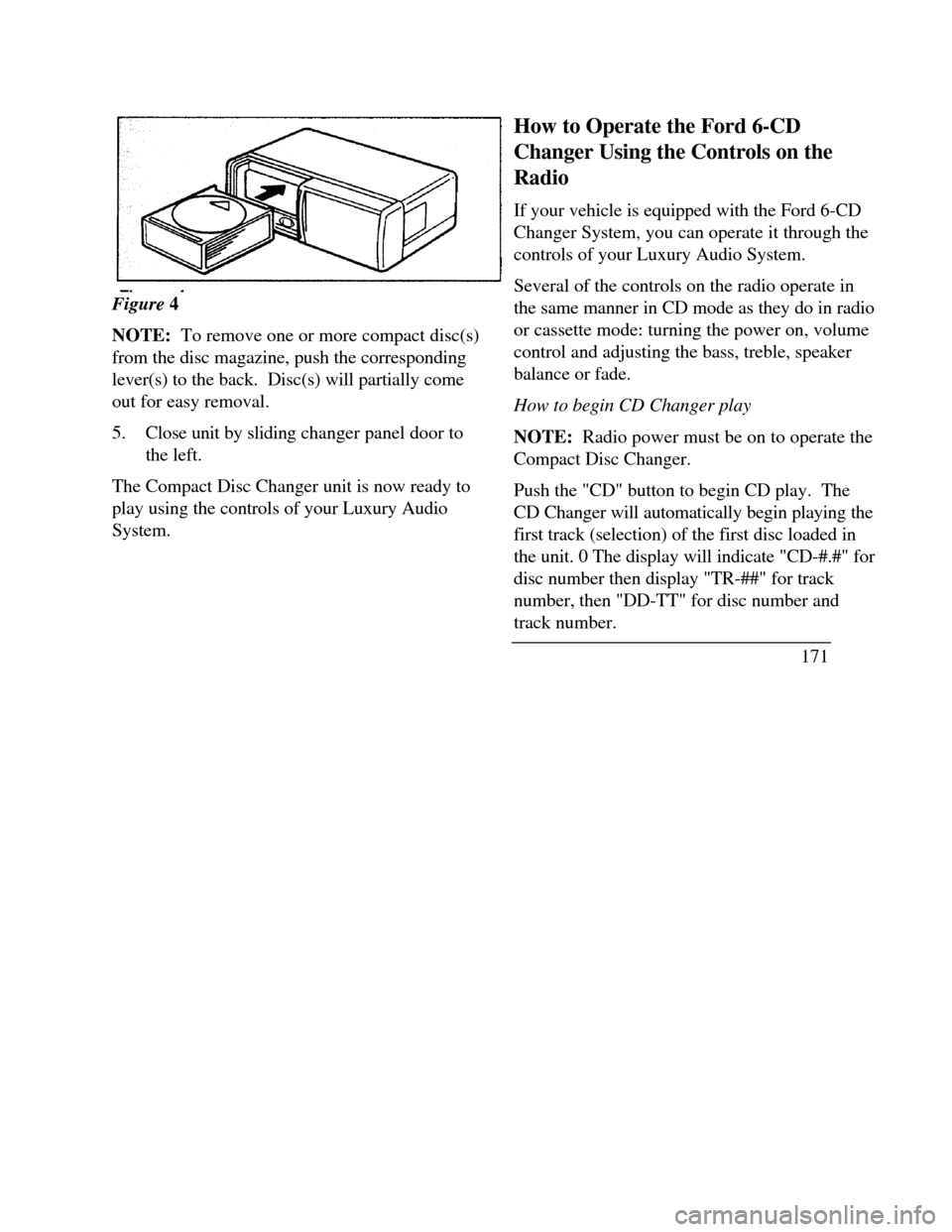
Figure 4
NOTE: To remove one or more compact disc(s)
from the disc magazine, push the corresponding
lever(s) to the back. Disc(s) will partially come
out for easy removal.
5.Close unit by sliding changer panel door to
the left.
The Compact Disc Changer unit is now ready to
play using the controls of your Luxury Audio
System.How to Operate the Ford 6-CD
Changer Using the Controls on the
Radio
If your vehicle is equipped with the Ford 6-CD
Changer System, you can operate it through the
controls of your Luxury Audio System.
Several of the controls on the radio operate in
the same manner in CD mode as they do in radio
or cassette mode: turning the power on, volume
control and adjusting the bass, treble, speaker
balance or fade.
How to begin CD Changer play
NOTE: Radio power must be on to operate the
Compact Disc Changer.
Push the "CD" button to begin CD play. The
CD Changer will automatically begin playing the
first track (selection) of the first disc loaded in
the unit. 0 The display will indicate "CD-#.#" for
disc number then display "TR-##" for track
number, then "DD-TT" for disc number and
track number.
171
Page 187 of 320

/!\ WARNINGAlways set the parking brake fully and makesure that the gearshift is securely latched in P(Park). Never leave your vehicle unattendedwhile it is running.You can tell a column-mounted gearshift is securely
latched in P (Park) if the lever is adjacent to the P
(Park) and you cannot move it without pulling it
toward you and rotating it downward.
You can tell a console-mounted gearshift is securely
latched in P (Park) if the lever is adjacent to the P
(Park) and you cannot move it without pushing in the
thumb button.
The gearshift will lock when you turn the key to the
LOCK position. When the gearshift is in any
position except P (Park), the ignition key cannot be
turned to the LOCK position or removed from the
steering column. To remove the key, the gearshift
lever must be in P (Park).
184Traction ControlÔ Ô (If equipped)
Your vehicle may be equipped with the
optional Traction ControlÔ, system. This
system helps prevent wheel spin in order to
improve tire traction and is an especially useful
feature when you drive in hilly areas or on
slippery, icy or snowy roads.
When the Traction Control system is
controlling wheelspin, an electric motor sound
may be heard from the engine compartment and
engine acceleration may seem slower. This is
normal.
Traction ControlÔ works automatically by
rapidly applying and releasing the brakes and
reducing engine torque to prevent one or both
of the front drive wheels from spinning during
acceleration.
During the Traction ControlÔ function, which
most often occurs during low speed
acceleration on slippery surfaces, a noise may
be heard coming from the engine compartment.
This is normal and may last for a few seconds
during the acceleration of the vehicle.
Page 195 of 320

/!\ WARNINGDo not spin the wheels at over 35 mph (55km/h). The tires may fail and injure apassenger or bystander.By moving the vehicle backward and forward, you
may gain enough momentum to move out of the
spot. Do not rock the vehicle for more than a few
minutes. This may overheat the engine, damage the
transaxle, or damage the tires. If you are still stuck
after a minute or two of rocking, call for a tow truck.
High water
Do not drive through flooded areas unless you are
sure that the water is below the bottom of the wheel
rims.
If you must drive through high water, drive slowly.
You may have limited traction or wet brakes, so
allow extra stopping distance because your vehicle
will not stop as quickly as usual.
192After you drive through the standing water,
apply your brakes gently several times as your
vehicle moves slowly. This helps to dry the
brakes.
Driving With a Heavy Load
There are limits to the amount of weight your
vehicle can carry or tow. The total weight of
your vehicle, plus the weight of the passengers
and cargo, should never be more than the
Gross Vehicle Weight Rating (GVWR). Also,
the weight that your vehicle carries over the
front axle and rear axle should never be more
than the Gross Axle Weight Rating (GAWR)
for the respective axle.
You can find your vehicle's GVWR and
GAWR on the Safety Compliance Certification
Label on the left front door lock facing or on
the door latch post pillar.
Page 197 of 320
3. Subtract the first reading from the second to
figure the total weight of the load.
After determining this load, you must also make sure
that the total weight of your vehicle, plus the load it
carries, is less than its GVWR. Also, make sure that
the weight your vehicle carries over each axle is less
than the GAWR for the respective axle.
If your vehicle exceeds the GVWR, remove cargo
from your vehicle accordingly. If your vehicle
exceeds the GAWR for either axle, shift the load or
remove cargo accordingly./!\ WARNINGImproper distribution of your vehicle's loador carrying weight in excess of the amountshown on the tire decal can cause rapid tirewear or loss of vehicle control.194Trailer Towing
Your vehicle is capable of towing a trailer of up
to a maximum of 2,000 lbs. (907 kg) gross
trailer weight with a maximum tongue load of
200 lbs. (91 kg).
Because towing a trailer puts extra strain on
your vehicle, you must follow certain
precautions for your safety and the good of
your vehicle: Stay within the load limits for towing your
vehicle. (See Trailer towing specifications
in this chapter.) Carefully and thoroughly prepare your
vehicle for towing, making sure to use the
right equipment and to attach it properly.
(See Preparing to Tow in this chapter.) Use extra caution when driving your vehicle
while you tow. (See Driving while you tow
in this chapter.)
Page 201 of 320

Driving While You Tow
Be especially careful when driving while you tow a
trailer. Never drive faster than 45 mph (70 km/h)
when you tow in hilly country on hot days. Also,
anticipate stops so that you can brake gradually.
Towing a trailer increases the load on the engine and
transaxle, particularly in hilly country and with
heavier trailers. Under these conditions you may
experience an excessive amount of shifting between
Overdrive and Third gears. Moving the shift selector
to D (Overdrive Lockout) will keep this from
happening and will provide better engine braking.
When driving in less hilly country or with a lighter
trailer load. you may move the gearshift selector
lever to (Overdrive) without experiencing
excessive shifting.
198When driving down steep hills, you should put
the gearshift selector lever in the I (First)
position to shift the transaxle into second gear.
This will provide additional engine braking.
The automatic transaxle will automatically
downshift to the proper gear for driving up a
grade.
If you use the speed control while you are
towing on very long, steep grades, the speed
control may shut off.
Servicing your vehicle if you tow
If you tow a trailer for a long distance, your
vehicle will need to be serviced more frequently
than usual. See the Maintenance Schedule and
Record booklet.