display LINCOLN CONTINENTAL 1996 Customer Assistance Guide
[x] Cancel search | Manufacturer: LINCOLN, Model Year: 1996, Model line: CONTINENTAL, Model: LINCOLN CONTINENTAL 1996Pages: 320, PDF Size: 1.8 MB
Page 142 of 320
Removing the floor mat
Lift floor mat just forward of retention post and
rotate rearward to disengage from retention post.
The Electronic Compass
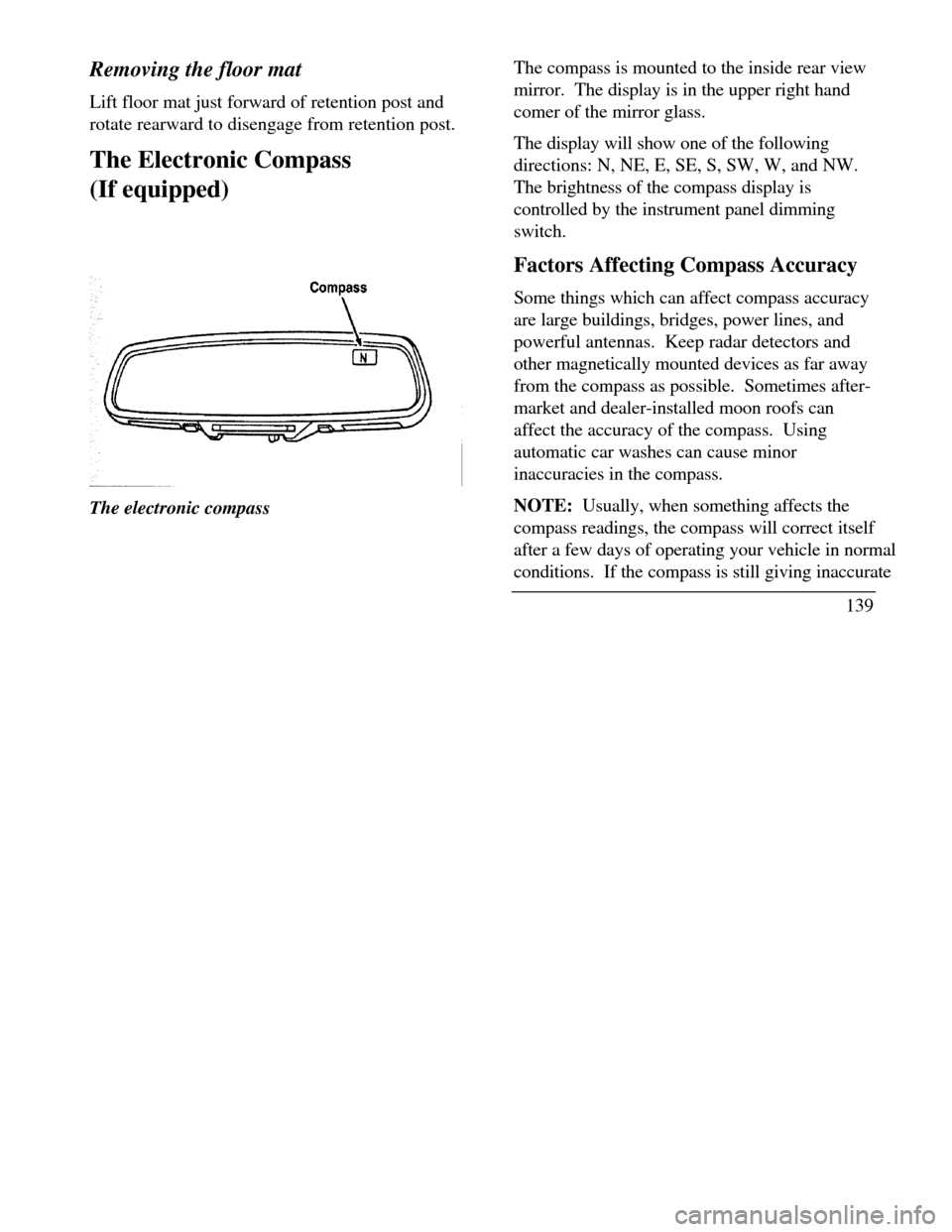
(If equipped)The electronic compassThe compass is mounted to the inside rear view
mirror. The display is in the upper right hand
comer of the mirror glass.
The display will show one of the following
directions: N, NE, E, SE, S, SW, W, and NW.
The brightness of the compass display is
controlled by the instrument panel dimming
switch.
Factors Affecting Compass Accuracy
Some things which can affect compass accuracy
are large buildings, bridges, power lines, and
powerful antennas. Keep radar detectors and
other magnetically mounted devices as far away
from the compass as possible. Sometimes after-
market and dealer-installed moon roofs can
affect the accuracy of the compass. Using
automatic car washes can cause minor
inaccuracies in the compass.
NOTE: Usually, when something affects the
compass readings, the compass will correct itself
after a few days of operating your vehicle in normal
conditions. If the compass is still giving inaccurate
139
Page 143 of 320

readings after a few days, perform a compass
adjustment.
Compass-Calibration
I .For optimum calibration, switch off all non-
essential electrical accessories (rear window
defrost, heater/air conditioning, map lamps,
wipers, etc.) and ensure all doors are shut.
2.Drive to an open, level area away from large
metallic objects or structures.
3.Insert an appropriate diameter rod (paper clip)
into the left switch access hole underneath the
compass module and press gently for 1-2
seconds until "CAL" and a direction appear on
the display.
1404. Release the button and drive in a circle
until "CAL" disappears from the display
(approx. 2-3 circles).
Compass-Zone Adjustment
1.The zone setting is factory pre-set to Zone
8. Refer to the Zone Map in this manual to
verify the correct compass zone setting for
your geographical location.
Page 144 of 320
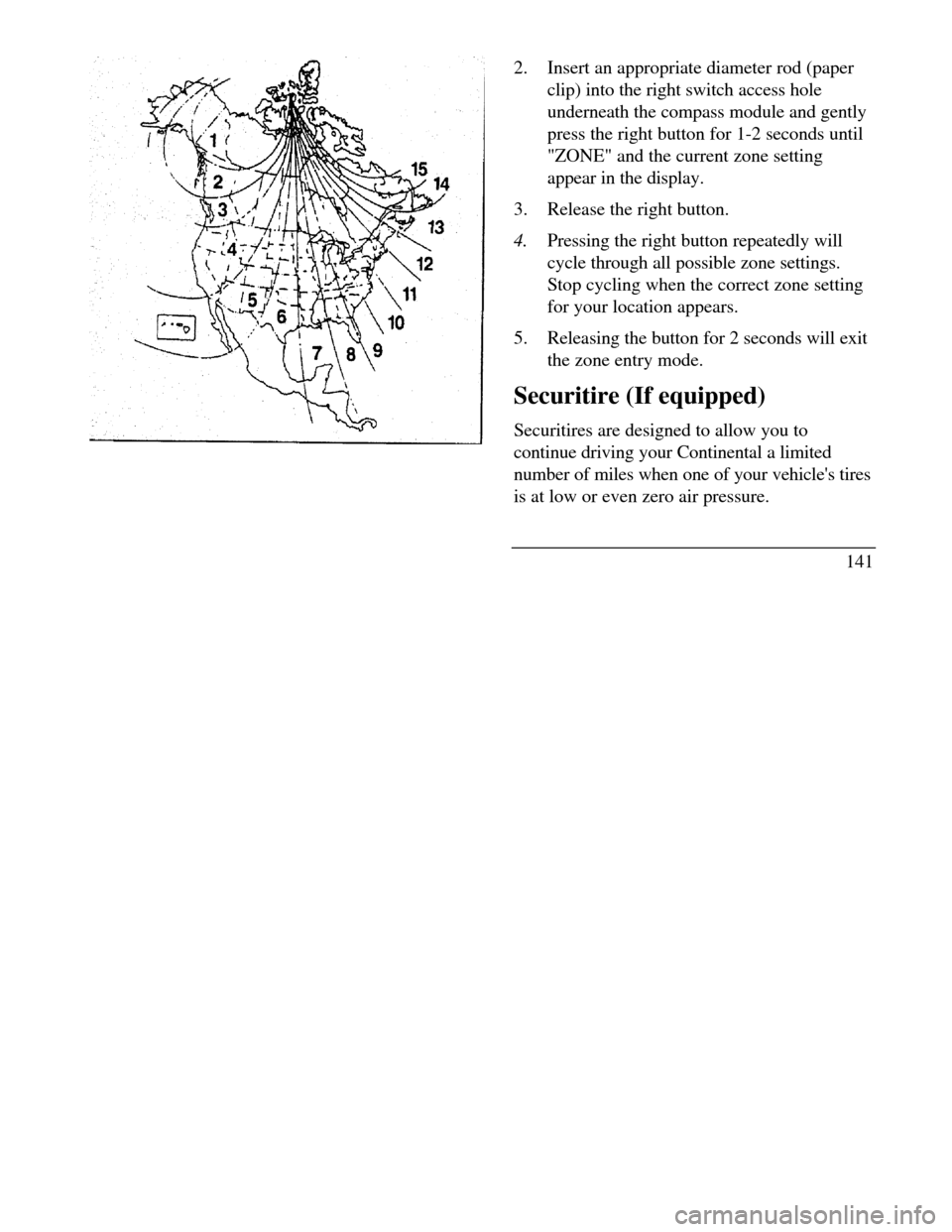
2.Insert an appropriate diameter rod (paper
clip) into the right switch access hole
underneath the compass module and gently
press the right button for 1-2 seconds until
"ZONE" and the current zone setting
appear in the display.
3.Release the right button.
4.Pressing the right button repeatedly will
cycle through all possible zone settings.
Stop cycling when the correct zone setting
for your location appears.
5.Releasing the button for 2 seconds will exit
the zone entry mode.
Securitire (If equipped)
Securitires are designed to allow you to
continue driving your Continental a limited
number of miles when one of your vehicle's tires
is at low or even zero air pressure.
141
Page 146 of 320

THIS DEVICE COMPLIES WITH FCC RULES,
PART 15. OPERATION IS SUBJECT TO THE
FOLLOWING TWO CONDITIONS: (1) THIS
DEVICE MAY NOT CAUSE HARMFUL
INTEREFERENCE AND (2) THIS DEVICE
MUST ACCEPT ANY INTEREFERENCE THAT
MAY BE RECEIVED, INCLUDING
INTEREFERENCE THAT MAY CAUSE
UNDESIRABLE OPERATION.
Maintenance Warning
The "Low Tire Pressure" warning will illuminate
and stay on when one of your vehicle's tires drops
below 18 psi (124 kps). The warning light will also
come on and stay lit if the Pressure Alert System has
malfunctioned.
If this warning appears, check the pressure in your
tires at the earliest possible convenience and adjust
any tire that is low to the recommended air pressure
level. This information can be found on the Service
Station Information page at the back of this manual
or on the driver's door placard.If the warning remains on after you have
adjusted the tires to recommended air pressure
levels, take your vehicle to an authorized
Lincoln/Mercury dealer for service.
Flat Tire Warning
If the sensors detect a tire pressure lower than I
0 psi (68 kps), the "Low Tire Pressure" warning
will flash repeatedly in the overhead console and
the message "Warning Low Tire Pressure" will
be displayed in the Message Center, indicating
an impending flat tire. If this condition occurs,
your Securitire requires service as soon as
possible. Refer to Servicing Your Secutitires.
NOTE: The Pressure Alert System will
activate only when the vehicle is moving faster
than 10 mph (15 km/h).
143
Page 148 of 320

Quick Summary To utilize your vehicle's assistance request
feature, YOUR CELLULAR PHONE MUST BE
ACTIVATED. Roadside or emergency assistance can be
requested whenever your key is in the
RUN/START position and for two minutes after
the vehicle is turned off. An assistance request is initiated by pressing
either the tow truck or ambulance button located
in the overhead console. When a button is pressed, a warning lamp located
in the overhead console begins to flash and status
messages are displayed on the vehicle's message
center. (Messages are only displayed when your
key is in the RUN/START position.) The vehicle's cellular phone automatically
places a call to a 24 hour emergency
response center. When contact is made, the vehicle sends an
electronic data message to the response center's
computer. This data message includes latitude
and longitude coordinates obtained from the
vehicle's positioning system. Once the data transmission is complete, the
call is forwarded to a response center
operator who confirms your location using a
computerized map. The vehicle's cellular handset is locked-out,
the phone is automatically placed in "hands
free" mode and voice communication is
established with the operator through the
"hands free" microphone. Typically, voice communication with an
operator is established within one minute
after an assistance button is pressed.
145
Page 152 of 320

when appropriate, stay in direct phone contact
with you until emergency help arrives notify pre-designated family contacts or friends
of the emergency situation, if requested, or if no
response is received from the vehicle.
NOTE: If You are certain of your location, a direct
phone call to 911 or other emergency services may
provide a faster response.
Activation and Deactivation
When either of the two Lincoln RESCU buttons is
pressed, a warning light, located in the overhead
console, will begin to flash and status messages will
be displayed on the vehicle's message center,
confirming an assistance request has been made.
The warning light will continue to flash throughout
the activation.The RESCU Warning light
The system can be activated whenever your
ignition key is in the RUN/START Position and
for two Minutes after your vehicle is turned off.
In most situations, the assistance request can
ONLY be terminated and the system reset when
a special tone is sent to the vehicle by the
Lincoln Security Response Center. (See
Automatic Redial later in this chapter for
exceptions.) Operation will continue even if the
vehicle is turned off during an activation
(although visual feedback via the Message
Center will not be available in this situation).
149
Page 153 of 320

Cellular Phone Interface
During an activation, Lincoln RESCU takes control
of the vehicle's cellular phone. If the phone is in
use, THE CALL WILL BE TERMINATED and the
Lincoln Security Response Center will automatically
be dialed. The cellular handset becomes inoperative
and all voice communication with the operator is
accomplished via the cellular phone's "hands-free"
microphone.
NOTE: When an activation is terminated, your
phone is left unlocked, in the "ON" state and may
not return to its previous system selection setting. It
can be reprogrammed to your previous setting as
desired.
Message Center Interface
During an activation, Lincoln RESCU
communicates with the vehicle's Message Center.
Status messages describing the sequence of steps
being executed are displayed, allowing you to
visually follow the activation process. The
following messages are
150typical of those displayed during an assistance
request. They are shown in the order in which
they would appear: ROADSIDE REQUEST or EMERGNCY
REQUEST CALL IN PROGRESS RINGING RESPONSE CENTER SENDING LOCATION DATA DATA RECEIVED WAITING FOR OPERATOR
Once an assistance request is made, it will
typically take less than one minute until contact
is made with an operator. During voice
communication the following messages will
alternately toggle on the display: CID XXXXXXXXXX LAT XXXXXXXXXX
Page 154 of 320

LON HDG XX
These messages respectively are the customer
identification number, vehicle latitude, vehicle
longitude and heading. Under special
circumstances, the operator may ask you to read the
information being displayed on the Message Center.
If vehicle messages are being displayed on the
Message Center (low washer fluid, low oil, door
ajar, etc.), they must be cleared in order to view the
LINCOLN RESCU messages. To clear the vehicle
messages, press the Message Center RESET button,
which is located to the right of the display.
Continue pressing the button until all vehicle
messages are cleared.
Automatic Redial
As described previously, when an assistance request
is made, the vehicle's cellular phone automatically
dials the Lincoln Security Response Center's central
computer and attempts to send an electronic datamessage. Occasionally, it can be difficult for the
computer to recognize the message if the
cellular connection is weak or noisy. If the
transmission of the message is unsuccessful, the
data call will be terminated and the message
"REDIAL IN PROGRESS" will be displayed on
the Message Center. A second call will
automatically be placed which bypasses the
response center's computer and is forwarded
directly to an operator.
Similarly, if the cellular call is disconnected by the
network prior to receipt of the termination tone,
another call to the response center will also
automatically be dialed. The message "REDIAL
IN PROGRESS" will be displayed on the Message
Center and voice communication with an operator
will be restored.
NOTE: During redial calls, full control of the
cellular phone is returned to you. Pressing
either the "PWR" or "END" button on the
cellular handset will terminate the assistance
request and reset the system.
151
Page 155 of 320

Location Data Retransmit Capability
During an activation, the Lincoln Security Response
Center operator has the capability to initiate a
retransmission of the electronic data message. This
may be necessary to ensure a more precise
determination of vehicle location or to track a
vehicle that is moving. To accomplish the
retransmit, a special tone is sent to the vehicle by the
response center. In this situation you will
temporarily lose voice contact with the operator and
the messages "SENDING LOCATION DATA" and
"DATA RECEIVED" will respectively be displayed
on the Message Center. After the data
retransmission is complete, voice communication
will be restored and the CID, LAT, LON and HDG
message will again alternately toggle on the
Message Center display.
152Global Positioning System
Vehicle location is continuously updated via
Global Positioning System (GPS) technology.
GPS was developed by the U.S. Department of
Defense for worldwide navigational and
positioning purposes. It utilizes a constellation
of 24 orbiting satellites located more than 20
thousand kilometers above the earth. At any
given time, several of the 24 satellites should be
visible to the vehicle's GPS receiver. Based on
the time for signals emitted by these satellites to
reach the receiver, an on-board computer will
determine the vehicle's location, typically within
100 feet. In addition to latitude and longitude,
the system also determines heading and speed.
Vehicle positioning information is relayed to the
Lincoln Security Response Center ONLY
during roadside or emergency requests. The
response center will not be able to track your
location while in an inactive state.
Page 157 of 320

Positioning capability temporarily degraded after
battery reconnect
When your vehicle is started, the Lincoln RESCU
GPS receiver begins the process of determining
vehicle location. The receiver will search the sky
and attempt to acquire signals from all visible
satellites. A real-time clock and an almanac
containing detailed information about the satellite
constellation are stored in the on-board computer's
memory and are used to expedite the search. If the
vehicle's battery is disconnected, the clock memory
is erased and time and date are lost. Once the
battery is reconnected, it could take approximately
15 minutes to reacquire the clock and for
positioning capability to be restored. During this
time, the system will operate but the response center
will not be able to identify your location. In this
situation, the operator will depend on you to
provide verbal information regarding vehicle
location.
154Inoperative if cellular signal marginal or
unavailable
Since the Lincoln RESCU System utilizes the
vehicle's cellular phone, it can only be operated
in geographical areas with cellular coverage.
Although approximately 90 percent of the U.S.
population lives and works in cellular coverage
areas, there are various rural or mountainous
areas where coverage is marginal or does not
exist. If an activation occurs in this situation,
the messages "NO CELLULAR SIGNAL" and
"WAITING TO ACQUIRE" will alternately be
displayed on the Message Center. If after
several attempts cellular service cannot be
acquired, the message "UNABLE TO PLACE
CALL" will be displayed, the assistance request
wfll be terminated and the phone will return to
its normal operating mode.