display LINCOLN CONTINENTAL 1996 Customer Assistance Guide
[x] Cancel search | Manufacturer: LINCOLN, Model Year: 1996, Model line: CONTINENTAL, Model: LINCOLN CONTINENTAL 1996Pages: 320, PDF Size: 1.8 MB
Page 78 of 320
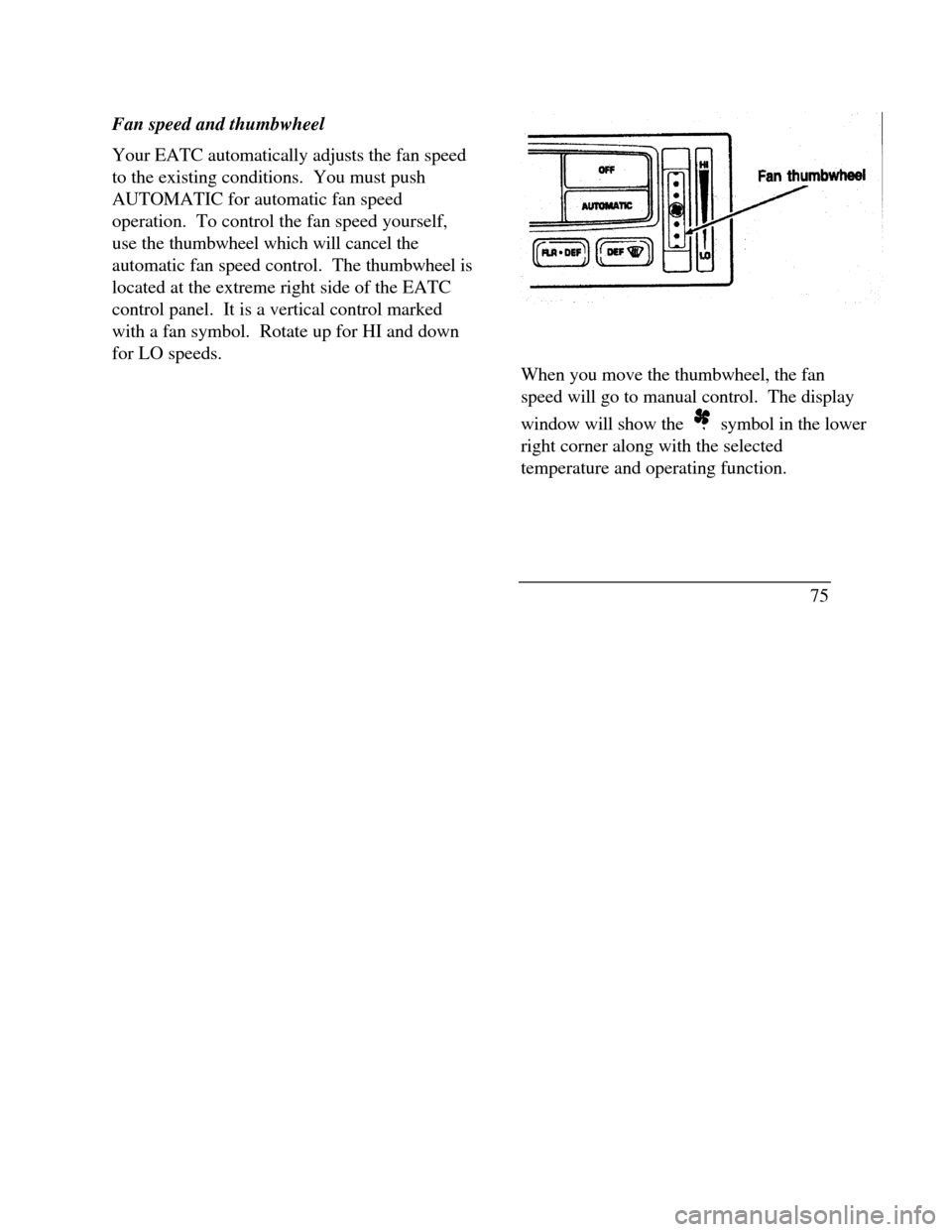
Fan speed and thumbwheel
Your EATC automatically adjusts the fan speed
to the existing conditions. You must push
AUTOMATIC for automatic fan speed
operation. To control the fan speed yourself,
use the thumbwheel which will cancel the
automatic fan speed control. The thumbwheel is
located at the extreme right side of the EATC
control panel. It is a vertical control marked
with a fan symbol. Rotate up for HI and down
for LO speeds.Fan thumbwheel
When you move the thumbwheel, the fan
speed will go to manual control. The display
window will show the symbol in the lower
right corner along with the selected
temperature and operating function.
75
Page 80 of 320

MAX A/C button
The MAX A/C feature allows for faster cooling
because air is drawn from inside the vehicle.
Using inside air causes the fan to sound louder
which is normal for this selection. The Display
window will change to indicate 60°F (16°C) and
MAX A/C. The fan will run at high speed and
the airflow will be from the instrument panel
registers. To exit and return to the previous
temperature, push AUTOMATIC or any of the
other five override buttons.
VENT button
Push this button to select outside air through the
instrument panel registers. The display window
will show the set temperature and VENT to the
lower right of the temperature. Your EATC will
heat the air if the temperature you have selected
is warmer than the outside air coming into the
vehicle. However, the air will NOT be cooled
regardless of the temperature setting.PNL & FLR button
Push this button to get air from the floor and
instrument panel registers at the same time.
The display will show the set temperature and
the words PNL and FLR. Depending on the
selected temperature, the air will be
automatically heated or cooled.
FLOOR button
Airflow will be to the floor when the FLOOR
button is pressed. The display window will
show the set temperature and FLR to the left of
the temperature. The air cannot be cooled in
the FLOOR position, only heated. Fan speed
will be automatic unless manually controlled. If
you override the fan speed and wish to return to
automatic fan control, push AUTOMATIC.
Then, again select FLOOR for airflow to the
floor.
77
Page 81 of 320

FLR & DEF button
Push this button to get air to the floor and
windshield defrosters at the same time. The
display will show the set temperature, FLR and
the Defrost symbol. If the outside temperature
is about 50°F (10°C) and above, the air will be
dehumidified to remove moisture. This will help
to prevent fogging in humid weather.
DEFROST button
Press the Defrost Button to obtain maximum
airflow to the windshield. Adjust the
temperature setting as required for defrosting.
The Display window will show the temperature
setting with the Defrost symbol to the left of the
temperature. When the outside temperature is
about 50°F (10°C) and above, the air will be
dehumidified to remove moisture. This will help
prevent fogging in humid weather.
78OUTSIDE TEMP button
By pressing this button the temperature
of the air outside of the vehicle will show
in the display. The outside temperature
will continue to be displayed until the
OUTSIDE TEMP button is pressed
again to cancel. If the selected
temperature setting is changed while the
outside temperature is displayed, the new
selected temperature will be displayed for
4 seconds after it is changed. Then, the
outside temperature will return to the
window. If a manual override is pressed
or the thumbwheel is rotated while the
outside temperature is displayed, the
window will show the change for 4
seconds. Then, the outside temperature
will return along with the changed
override selection.
Page 82 of 320
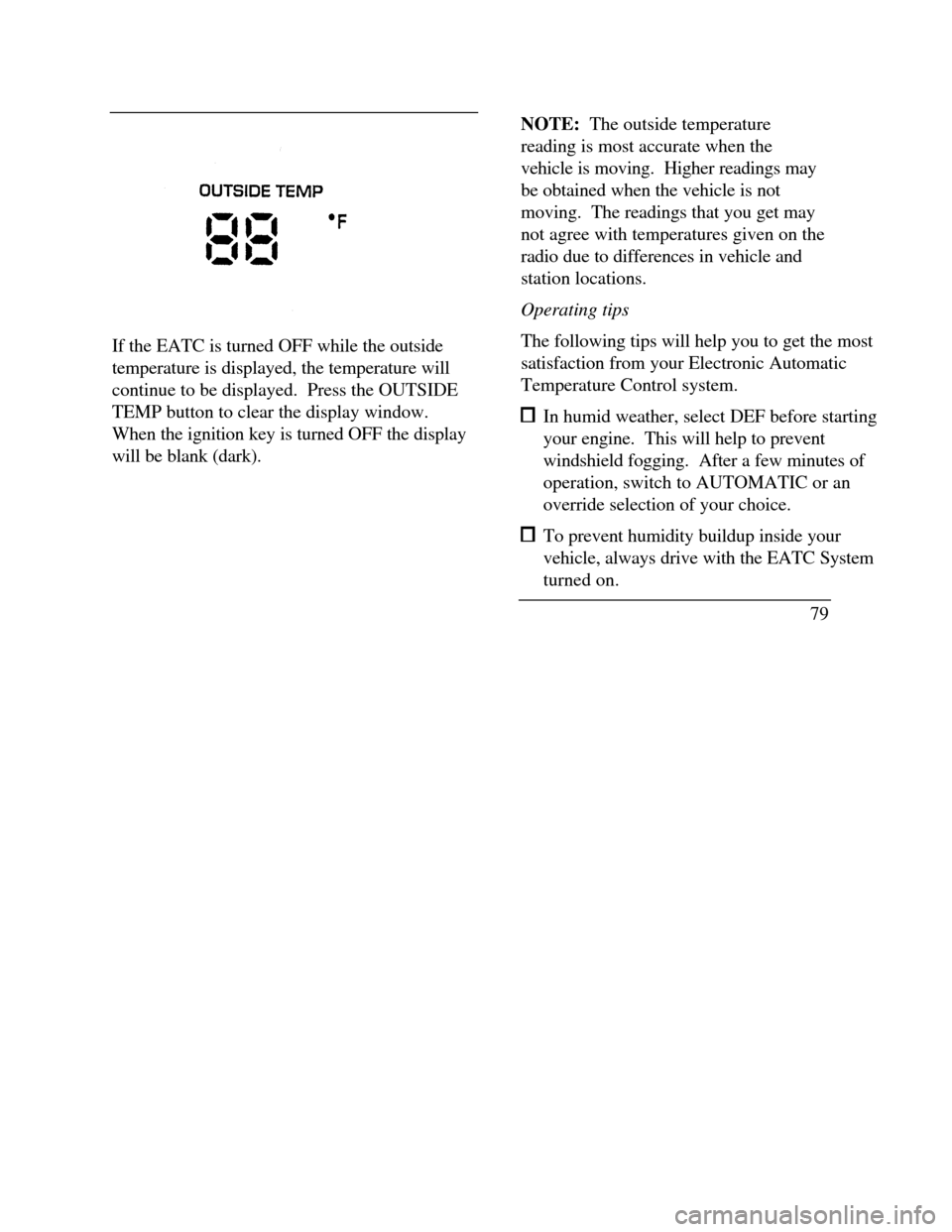
If the EATC is turned OFF while the outside
temperature is displayed, the temperature will
continue to be displayed. Press the OUTSIDE
TEMP button to clear the display window.
When the ignition key is turned OFF the display
will be blank (dark).NOTE: The outside temperature
reading is most accurate when the
vehicle is moving. Higher readings may
be obtained when the vehicle is not
moving. The readings that you get may
not agree with temperatures given on the
radio due to differences in vehicle and
station locations.
Operating tips
The following tips will help you to get the most
satisfaction from your Electronic Automatic
Temperature Control system. In humid weather, select DEF before starting
your engine. This will help to prevent
windshield fogging. After a few minutes of
operation, switch to AUTOMATIC or an
override selection of your choice. To prevent humidity buildup inside your
vehicle, always drive with the EATC System
turned on.
79
Page 87 of 320

If the autolamp is active, the headlamp system
will come on immediately after starting your
vehicle. If your vehicle is running before you
activate the autolamp, there may be a 15 second
delay before the headlights illuminate.
2.Turn the ignition key to ON or start your
vehicle.
3.Find the autolamp switch to the left of the
steering wheel on the instrument panel.
4. Push the autolamp switch up toward the
MAX position. As you press this switch, the
autolamp system's status will be displayed in
the message center. The system can be
turned OFF or can be set to provide light for
up to three (3) minutes after you turn your
vehicle off.
84Do not put any articles on top of the photocell
that is located in the top left corner of the
instrument panel. This photocell controls the
autolamp. If you cover it, the photocell reacts
as if it is nighttime, and the lamps turn on.
To turn the autolamp off, push the switch down
until the message center display reaches OFF.
Turning On Interior
Lights/Instrument Panel Illumination
You can brighten or dim the lights in the
instrument panel and the compass display
in the inside rearview mirror (if
equipped) with the PANEL DIM switch
located on the instrument panel.
Page 122 of 320
Memory Profile System
The Personality Memory Feature customizes your
Continental for up to two (2) drivers. The
following features are automatically recalled when
unlocking the doors using the remote entry
transmitter, keyless entry keypad, or by pressing
the Memory 1 or Memory 2 switches on the
driver's door: All driver's seat positions except power lumbar
and head restraint. Both left and right outside mirror settings. Radio station presets including the last selected
station and band and 0 preset preferences on
FMI, FM2, and AM. Instrument panel dimming setting. Autolamp delay time-out setting. Ride/Steering menu setting. Feature Menu settingsThe Ride/Steering menu is located in the
Message Center. The RIDE display allows you
to adjust the suspension feel to FIRM,
NORMAL, or PLUSH.
Pressing the Ride/Steering menu switch again
brings the STEERING display. This allows you
to adjust steering effort to LOW, NORMAL, or
HIGH.
For more information on ride/steering options,
see Road Calibrated Suspension later in this
chapter.
Personality Memory also allows you to
customize settings from the Feature menu
located in the Message Center. The Feature
menu contains five (5) features that you can
enable or disable. The features are listed in the
order they appear in the Feature menu. EXPRESS WINDOW - for one tap down
operation of the driver's window.
119
Page 124 of 320

keyless entry code or the Memory I or Memory 2
switches.
Keyless Entry
Up to three unique keyless entry codes can be
programmed by the customer. Two of the codes
can be assigned to recall Personality Memory I or
Memory 2. Each time the 5-digit code is entered on
the keypad, the driver's door will unlock and
Personality Memory 1 or Memory 2 will be
recalled.
NOTE: Please note that even though the driver's
Personality Memory may be recalled using remote
or keyless entry, the seats and mirrors will not
move to the driver's set positions until the driver's
door is opened.
Memory Switches
Pressing either the Memory I or Memory 2 switch
on the driver's door will also recall the Personality
Memory settings as selected, providing your
vehicle is in P (Park) or N (Neutral).Auto Save
Any change made by the driver to one of the
above Personality Memory settings will be
updated and saved automatically. The display,
SAVED TO DRIVER I or SAVED TO
DRIVER 2, will appear on the Message Center
for five (5) seconds as a confirmation of the
update to Personality Memory. If a radio preset
is changed the radio display will also show
SAVED.
If the driver does not use the remote entry
transmitter, or keyless entry keypad to unlock the
doors upon entering or does not press the
Memory I or Memory 2 switch, then any change
to one of the Personality Memory settings
(except radio presets) will not be automatically
saved. Instead the driver will be prompted by the
Message Center whether to save the settings to
Driver 1 or Driver 2.
121
Page 125 of 320
Pressing the SELECT switch will toggle between
1, 2 or no choice. If DRIVER I or DRIVER 2 is
selected, the display, SAVED TO DRIVER I or
SAVED TO DRIVER 2, will appear on the
Message Center to confirm the change has been
automatically saved with the Personality Memory.
If no choice is made by the driver, then the change
will not be automatically saved and there is no
effect on the Personality Memory.
Once this screen has been displayed, the driver will
not be asked again for the remainder of the drive.
Turning Personality OFF
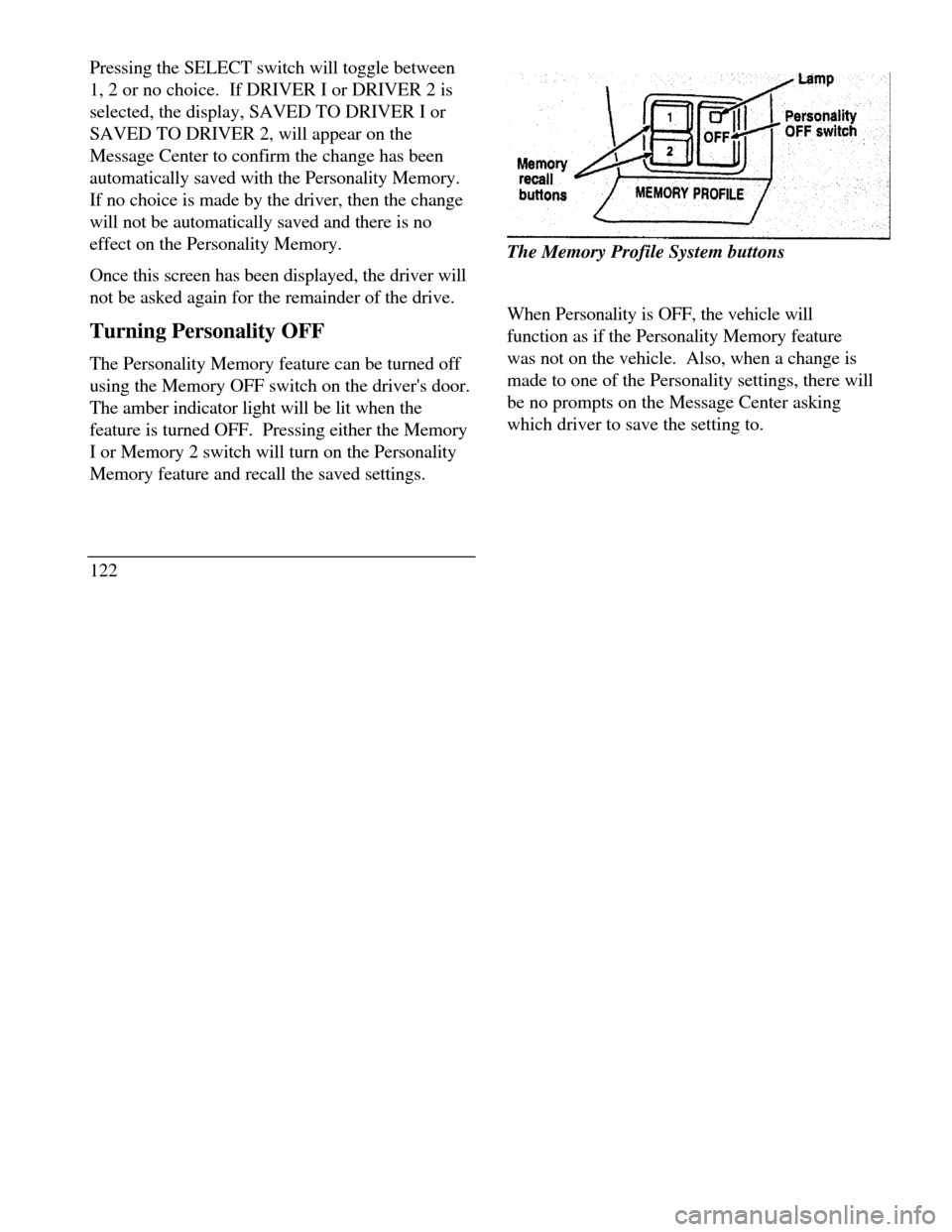
The Personality Memory feature can be turned off
using the Memory OFF switch on the driver's door.
The amber indicator light will be lit when the
feature is turned OFF. Pressing either the Memory
I or Memory 2 switch will turn on the Personality
Memory feature and recall the saved settings.
122Memory recall buttonsThe Memory Profile System buttons
When Personality is OFF, the vehicle will
function as if the Personality Memory feature
was not on the vehicle. Also, when a change is
made to one of the Personality settings, there will
be no prompts on the Message Center asking
which driver to save the setting to.
Page 126 of 320

Road Calibrated Suspension
Your Continental is equipped with a ride control
system that is designed to read disturbances in the
road surface every six inches at 60 mph (100 km/h)
to provide you with optimal driving response.
Ride control allows you to chose both a ride feel
and steering effort that best flts your personal
driving style. These options may be selected by
using the RIDE/STEER Message Center button.Pressing this button once will allow you to adjust
your RIDE CONTROL settings, between
NORMAL, PLUSH and FIRM. The settings are
changed by pressing the SELECT button while
RIDE CONTROL is displayed.
Pressing the RIDE/STEER button a second time
will allow you to adjust the STEERING
EFFORT settings between NORMAL, LOW,
and HIGH. The settings are changed by pressing
the SELECT button while STEERING EFFORT
is displayed.
123
Page 129 of 320
side mirrors are controlled by the setting on the
inside mirror.
There are two light sensors (photocells) in this
mirror. The sensor that detects rear glare is located
next to the switch. The second light sensor which
determines outside light level is located on the
backside of the mirror case.
One important safety feature is that the mirror
automatically returns to the normal position
whenever the vehicle is placed in R (Reverse) (when
the mirror is in the ON position). This feature
ensures a bright clear view in the mirror when
backing up.
Do not clean the housing or glass of any mirror with
harsh abrasives, fuel or other petroleum-based
cleaning products.
126Side View Mirrors
Your vehicle comes with electric side mirrors.
The side view mirror on the right is a convex
mirror. This mirror gives you a wider view of
the lanes on your right and behind you.
NOTE: When putting your vehicle in reverse,
both outside mirrors will tilt downward and
return to the adjusted position when taken out
of reverse. This feature can be disabled by
using the Menu Select button on the cluster. To
disable, press the menu button repeatedly until
"Reverse Mirrors" appears in the display, then
select OFF. To enable the reverse mirrors,
select ON./!\ WARNINGThe side view mirror on the right makesobjects appear smaller and farther awaythan they actually are.