buttons LINCOLN CONTINENTAL 1996 Customer Assistance Guide
[x] Cancel search | Manufacturer: LINCOLN, Model Year: 1996, Model line: CONTINENTAL, Model: LINCOLN CONTINENTAL 1996Pages: 320, PDF Size: 1.8 MB
Page 53 of 320

Have the exhaust and body ventilation systems
checked whenever: your vehicle is raised for service the sound of the exhaust system changes your vehicle has been damaged in a collision
Improve your ventilation by keeping all air inlet
vents clear of snow, leaves, and other debris.
50If the engine is idling while you are stopped in an
open area for long periods of time, open the
windows at least one inch (2 . 5 cm). Also,
adjust the heating or air conditioning to bring in
outside air.
If you use the Electronic Automatic Climate
Control, set the fan speed selector dial to a
medium or high blower speed with the VENT or
PNL-FLR function buttons pressed.
Page 63 of 320

The Instrument Cluster
In addition to warning lights, the instrument
cluster has a message center/odometer, a
speedometer, tachometer, fuel and coolant
temperature gauges.
The Electronic Message Center (M/C)
The Electronic Message Center only works
when the ignition is in the ON position.
Each time the WC is powered the display goes
through a self test by displaying the PLEASE
FASTEN SEATBELT message. This self test
is used to stabilize the systems before reporting
the status to you.
60The message center tells you about the
condition of your vehicle by two methods: operator selectable features continuous warning reporting of
monitored systems
You can select different features for the M/C to
display by using the message center control
buttons located to the right of the instrument
cluster. You will hear a tone when you press one
of these buttons. However, if the M/C detects a
warning from any of the monitored systems, then
the M/C will display the appropriate warning
message.
Page 64 of 320
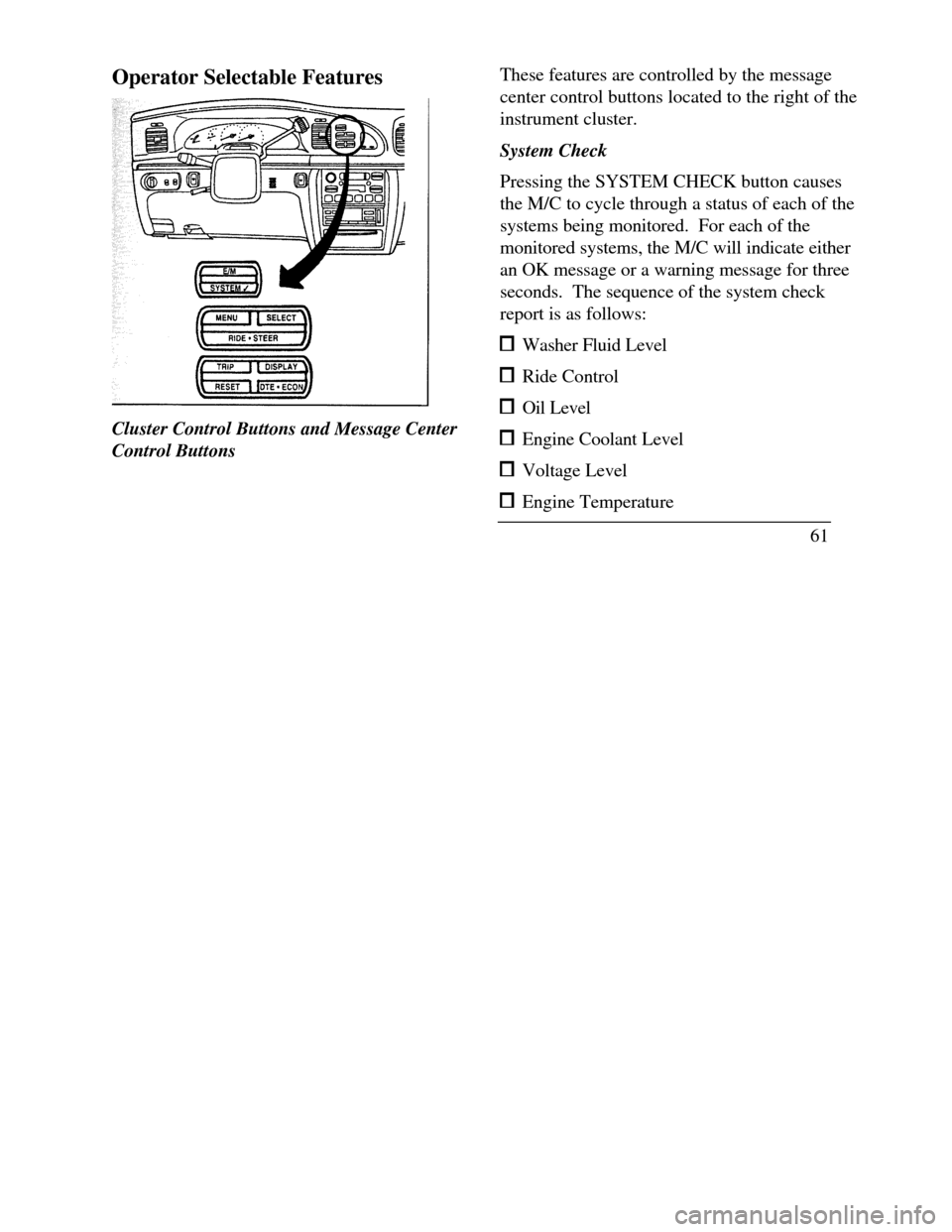
Operator Selectable FeaturesCluster Control Buttons and Message Center
Control ButtonsThese features are controlled by the message
center control buttons located to the right of the
instrument cluster.
System Check
Pressing the SYSTEM CHECK button causes
the M/C to cycle through a status of each of the
systems being monitored. For each of the
monitored systems, the M/C will indicate either
an OK message or a warning message for three
seconds. The sequence of the system check
report is as follows: Washer Fluid Level Ride Control Oil Level Engine Coolant Level Voltage Level Engine Temperature
61
Page 74 of 320
The Climate Control System
Electronic Automatic Temperature
Control System
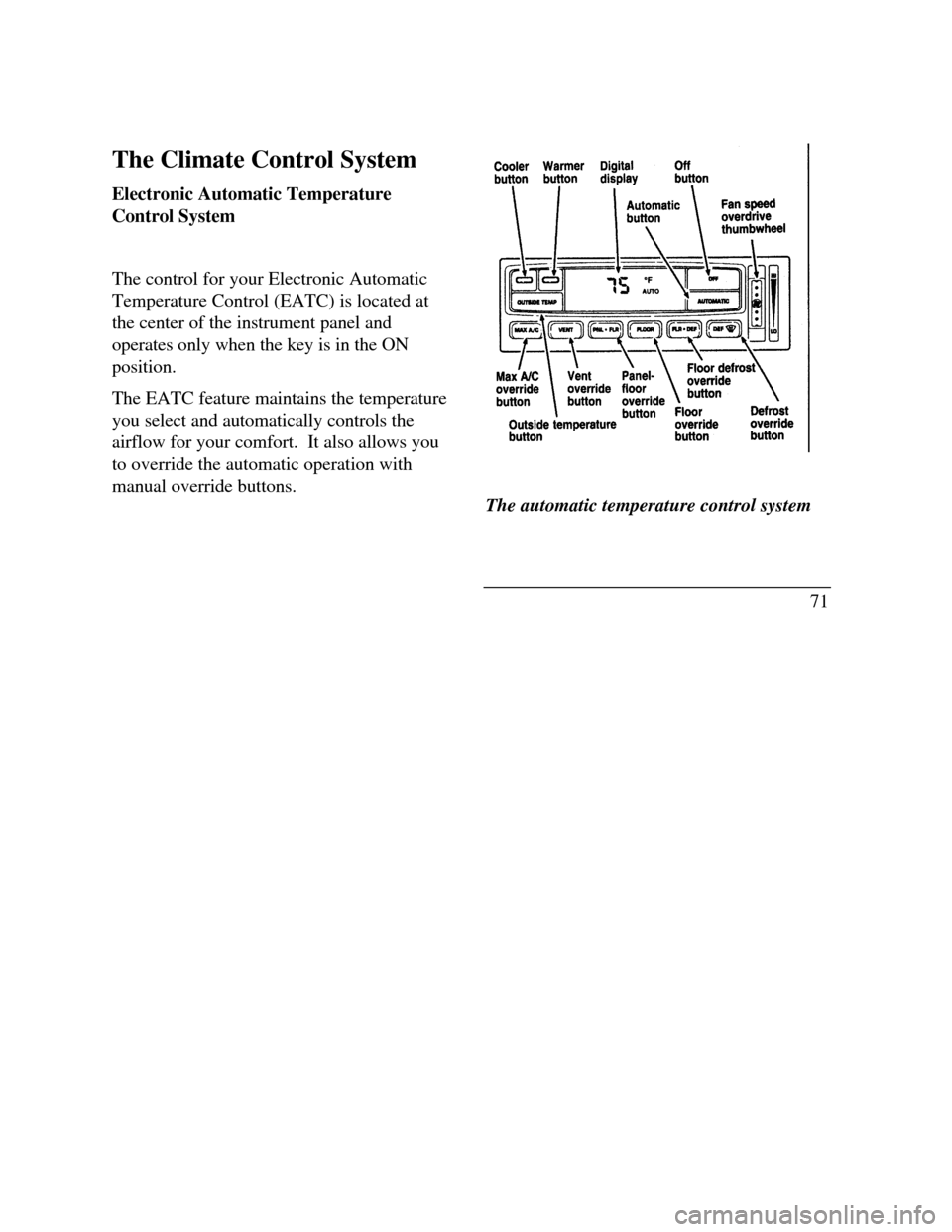
The control for your Electronic Automatic
Temperature Control (EATC) is located at
the center of the instrument panel and
operates only when the key is in the ON
position.
The EATC feature maintains the temperature
you select and automatically controls the
airflow for your comfort. It also allows you
to override the automatic operation with
manual override buttons.The automatic temperature control system
71
Page 75 of 320

To turn your EATC on, push the AUTOMATIC
button or any of the six override buttons along
the bottom of the control.
To turn your EATC off, press the OFF button.
When the system is off, the display window will
be blank (dark) except when OUTSIDE TEMP
has been selected. Then, OUTSIDE TEMP and
the temperature will appear in the window.
If you select AUTOMATIC, the system will
automatically determine fan speed and airflow
location. If an override button is selected, your
selection determines airflow location only. Fan
speed remains automatic unless you override it
by rotating the vertical thumbwheel located at
the extreme right of the control panel.
To change the temperature in the display
window, select any temperature between 65°F (I
8°C) and 85°F (29°C) using the BLUE (cooler)
or RED (warmer) buttons. The Electronic
Automatic Temperature Control will do the rest.
72If you want continuous maximum cooling, push the
BLUE button until 60°F (16°C) is shown in the
display window. Your EATC will cool at
maximum and disregard the 60°F (16°C) setting
until you select a warmer temperature with the
RED button. If you want continuous maximum
heating, push the RED button until 90°F (32°C) is
shown in the display window. Your EATC wifl
provide maximum heat regardless of the 90°F
(32°C) setting until you select a cooler temperature
with the BLUE button.
The display window tells you how the system is
operating. It will indicate the selected temperature
and the operating function you have chosen; AUTO
or one of the six manual overrides. It will also
indicate manual (thumbwheel) control of the fan
speed with the symbol. The display window
with all possible displays and their positions are
shown here. Normally not aU are shown at the
same time but are included here to familiarize you
with the names and symbols.
Page 77 of 320
If unusual conditions exist (i.e., window fogging,
etc.), the six manual override buttons allow
YOU to select special air discharge locations. A
thumbwheel allows you to adjust the fan speed
to suit your needs.
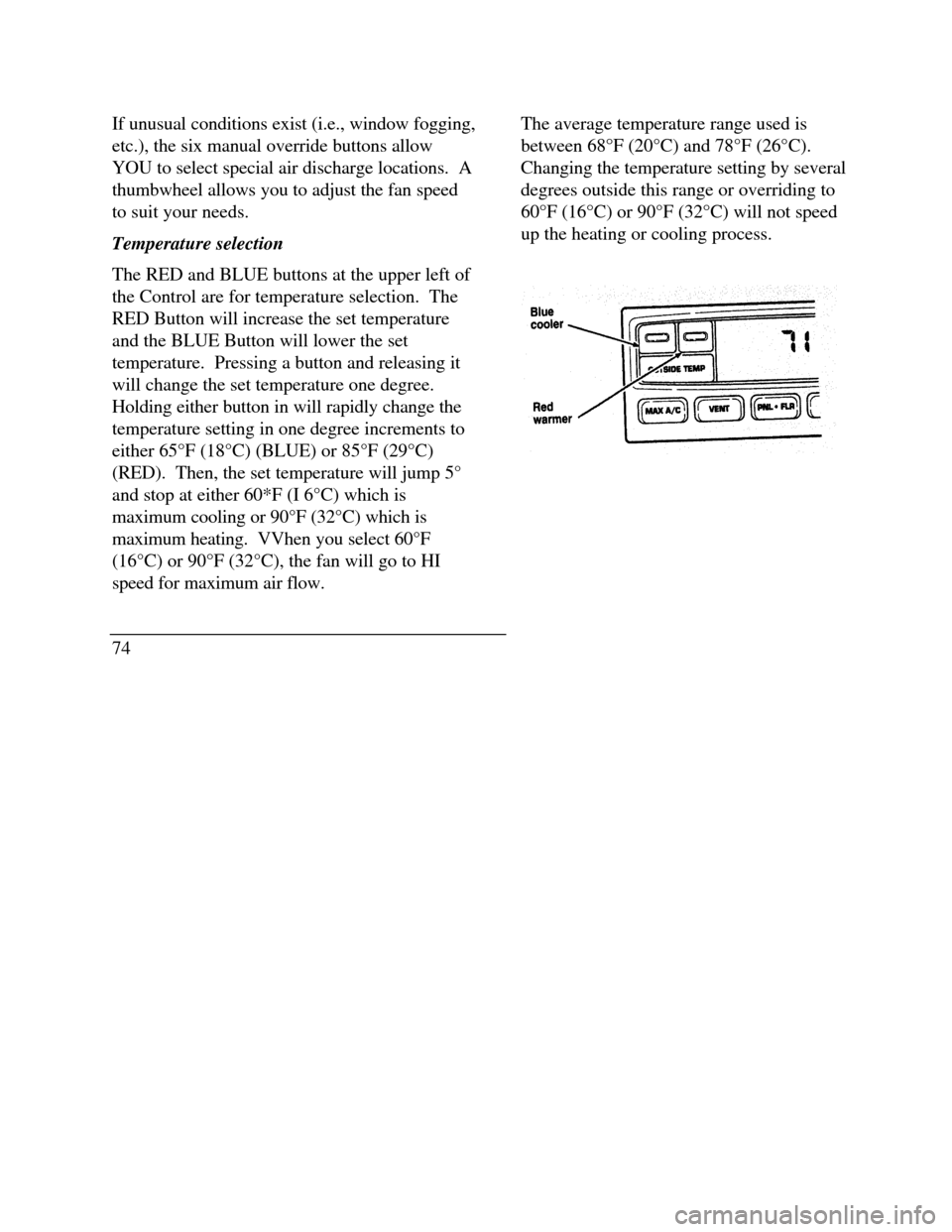
Temperature selection
The RED and BLUE buttons at the upper left of
the Control are for temperature selection. The
RED Button will increase the set temperature
and the BLUE Button will lower the set
temperature. Pressing a button and releasing it
will change the set temperature one degree.
Holding either button in will rapidly change the
temperature setting in one degree increments to
either 65°F (18°C) (BLUE) or 85°F (29°C)
(RED). Then, the set temperature will jump 5°
and stop at either 60*F (I 6°C) which is
maximum cooling or 90°F (32°C) which is
maximum heating. VVhen you select 60°F
(16°C) or 90°F (32°C), the fan will go to HI
speed for maximum air flow.
74The average temperature range used is
between 68°F (20°C) and 78°F (26°C).
Changing the temperature setting by several
degrees outside this range or overriding to
60°F (16°C) or 90°F (32°C) will not speed
up the heating or cooling process.
Page 79 of 320

You can override the fan speed at any time. If
you use the thumbwheel to override the fan
speed, the EATC will continue to control the
temperature but you control the fan speed. To
return to auto fan control, press the
AUTOMATIC button. If you are operating in
one of the override functions (FLOOR, MAX
A/C, etc.), automatic fan control will continue
unless you rotate the fan thumbwheel. To
76return to automatic fan control, press the
AUTOMATIC button. The EATC will return
to Automatic operation. If you want to
return to any override function, press the
button for that function. The fan speed will
continue to be automatically controlled.
Manual override buttons
Your EATC has six buttons which allow you
to make special selections. The buttons are
located along the bottom edge of the EATC
control and allow you to determine where the
air will be discharged. Pressing any override
button changes the air discharge location
only. It does not affect the ability of the
system to control temperature or the fan
speed. Return to fully Automatic operation
by pushing the AUTOMATIC button.
Page 80 of 320

MAX A/C button
The MAX A/C feature allows for faster cooling
because air is drawn from inside the vehicle.
Using inside air causes the fan to sound louder
which is normal for this selection. The Display
window will change to indicate 60°F (16°C) and
MAX A/C. The fan will run at high speed and
the airflow will be from the instrument panel
registers. To exit and return to the previous
temperature, push AUTOMATIC or any of the
other five override buttons.
VENT button
Push this button to select outside air through the
instrument panel registers. The display window
will show the set temperature and VENT to the
lower right of the temperature. Your EATC will
heat the air if the temperature you have selected
is warmer than the outside air coming into the
vehicle. However, the air will NOT be cooled
regardless of the temperature setting.PNL & FLR button
Push this button to get air from the floor and
instrument panel registers at the same time.
The display will show the set temperature and
the words PNL and FLR. Depending on the
selected temperature, the air will be
automatically heated or cooled.
FLOOR button
Airflow will be to the floor when the FLOOR
button is pressed. The display window will
show the set temperature and FLR to the left of
the temperature. The air cannot be cooled in
the FLOOR position, only heated. Fan speed
will be automatic unless manually controlled. If
you override the fan speed and wish to return to
automatic fan control, push AUTOMATIC.
Then, again select FLOOR for airflow to the
floor.
77
Page 104 of 320
Illuminated Entry System with Theater
Lighting
The interior lights will illuminate for approximately
25 seconds when either front door handle is lifted,
any button on the keyless entry pad is pressed, or
the remote entry system UNLOCK button is
pushed. If the amount of light outside your vehicle
is below a predetermined level, the exterior lights
will also illuminate.
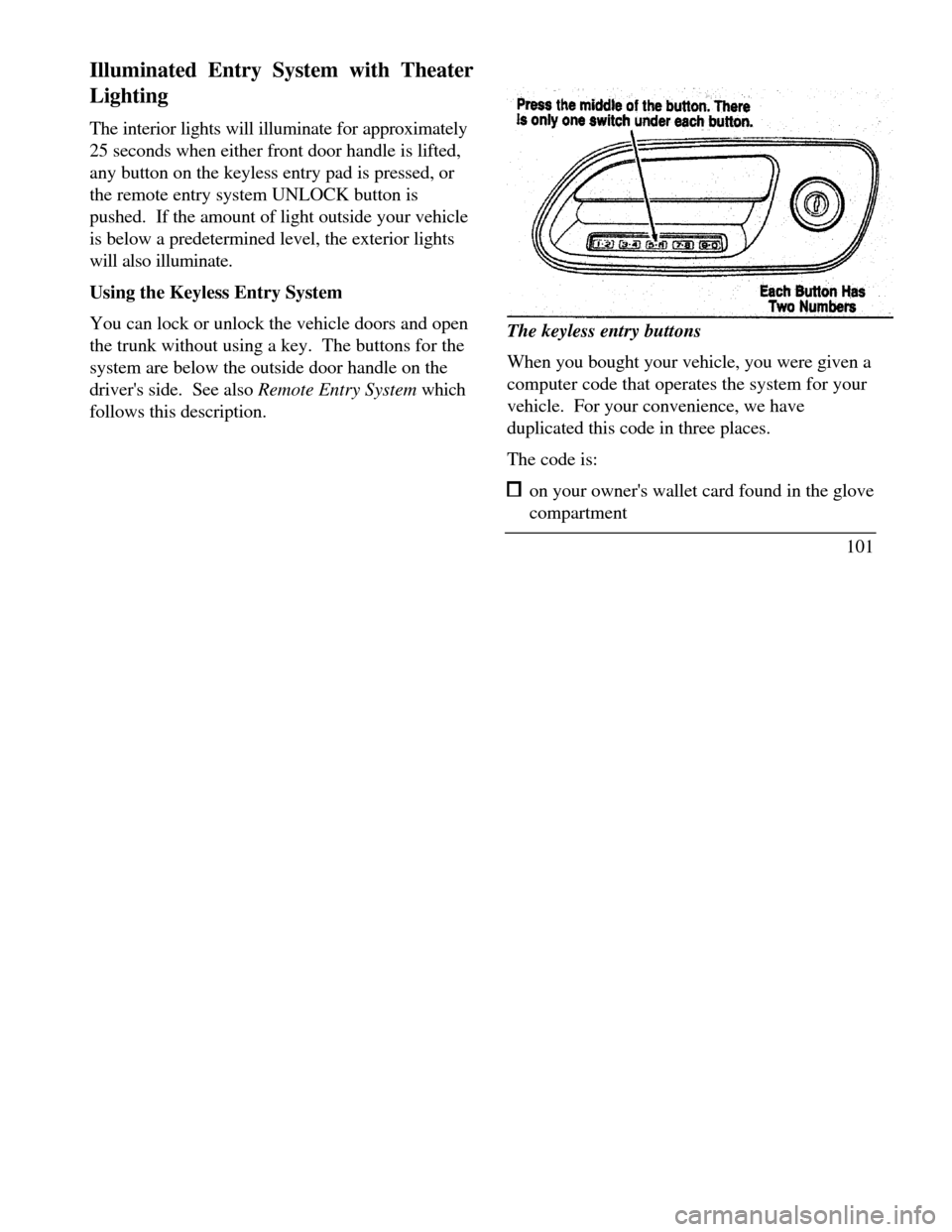
Using the Keyless Entry System
You can lock or unlock the vehicle doors and open
the trunk without using a key. The buttons for the
system are below the outside door handle on the
driver's side. See also Remote Entry System which
follows this description.The keyless entry buttons
When you bought your vehicle, you were given a
computer code that operates the system for your
vehicle. For your convenience, we have
duplicated this code in three places.
The code is: on your owner's wallet card found in the glove
compartment
101
Page 105 of 320

taped to the trunk lid's right hinge support bar taped to the computer module in your driver's
front door
When you use keyless entry, the illuminated entry
system turns on the interior lights for 25 seconds
and the buttons on the keypad light up. Do not
push the buttons with a key, ballpoint pen, pencil,
or any other hard object. These objects could
damage the buttons.
Unlocking the doors with the keyless entr .y
system
You must unlock the driver's door before you
unlock any of the other doors or trunk. If you let
more than five (5) seconds pass before pressing
numbers, the system shuts down, and you have to
enter the code again. The system has shut down if
the keypad light is out. If the keyless entry system
does not work properly, use the key or transmitters
to lock and unlock the doors or unlock the trunk.
1021 To unlock the driver's door, enter the factory
code or your personal code. All codes have
five (5) numbers. After you press the fifth
number, the driver's door unlocks.
2 To unlock all passenger doors, press the ¾
button within five (5) seconds of unlocking
the driver's door or trunk, or re-enter the
code to open the driver's door, then press
3/4.
3 To unlock the trunk, press the 5/6 button
within five seconds of unlocking the driver's
or passenger's doors, or re-enter the code to
open the driver's door, then press 5/6.
As long as the driver's door has been unlocked
first, you can open the passenger door or the
trunk in any order.
Locking the doors with the keyless entry system
Along with unlocking your doors, you can use
the keyless entry system to lock the doors.