ECU LINCOLN CONTINENTAL 1997 User Guide
[x] Cancel search | Manufacturer: LINCOLN, Model Year: 1997, Model line: CONTINENTAL, Model: LINCOLN CONTINENTAL 1997Pages: 321, PDF Size: 2.37 MB
Page 91 of 321

87
Registration RequirementYou are required to register with the Lincoln
Security Response Center shortly after receiving
your vehicle. The registration process is simple and
can be accomplished by calling the Lincoln Security
Response Center at 1-800-334-1327. Alternatively,
the registration process can be completed on-line
during an acquaintance period activation. (See
ªAcquaintance Activationsº later in the section for
details.) The information requested will aid in
servicing you more efficiently during an assistance
request.Optional Password Selection/False
ActivationsAt the time of your registration, you will be given
the option of establishing a user password. All
aspects of your service will be identical regardless of
your password decision except the way false
emergency activations are handled.If established, the password will be requested by the
operator to confirm an emergency activation was
initiated in error. If no password or an incorrect
password is given, the response center's operator
will seemingly terminate the call but actually stays
on the line and sends police to the last calculated
vehicle location (this could be useful in duress
situations). It is very important that you remember
your password to prevent false dispatches. Similarly,
it is also important to provide the password to any
other individuals who will be driving the vehicle or
who may have need to activate the system.
If you decide not to establish a password, simply
indicate to the operator that the emergency
assistance request was initiated in error and the call
will be terminated.
In either case, if an activation (roadside or
emergency) occurs and the operator cannot establish
voice communication, police assistance will be
dispatched to the vehicle.
File:05fncfc.ex
Update:Fri Sep 6 14:53:57 1996
Page 92 of 321

88NOTE:Information regarding changing or retrieving
lost passwords can be obtained by contacting the
Lincoln Security Response Center at
1-800-334-1327.Acquaintance ActivationsIt is required that you initiate an acquaintance
activation shortly after receiving your vehicle and
having your phone activated. An acquaintance
activation is initiated by pressing either the roadside
or emergency assistance button. When voice
communication is established with the Lincoln
Security Response Center, indicate that you are a
new user and the operator will follow special
acquaintance period support procedures which are
intended to familiarize you with your Lincoln
RESCU system. As described previously, the
acquaintance call can also be used to complete the
registration for new customers
Service ChargesFor four years, beginning with your vehicle's
warranty period, you will be entitled to unlimited
activations without facing service charges. (These
activations should be made only when emergency
or roadside assistance is required.) You will be
responsible, however, for any charges imposed by
your cellular phone carrier for the 1-800 phone call
to the Lincoln Security Response Center. After your
initial service period expires, you may be required
to pay a monitoring service fee. Your dealer can
provide you with specific information regarding post
initial service period service fees.Relinquishing Your VehicleAt the time you relinquish your vehicle, it is
important that you contact the Lincoln Security
Response Center at 1-800-334-1327 and cancel your
security service. Personal information provided to
the response center at the time of your registration
will be removed from the vehicle's file.
File:05fncfc.ex
Update:Fri Sep 6 14:53:57 1996
Page 103 of 321

99
q
Return to the HomeLink Transmitter in the
vehicle, and depress the programmed HomeLink
button for the duration of the rapid flash of the
HomeLink's red light, (1-2 seconds). Release the
button, and re-press the button to confirm that
the HomeLink Transmitter has been trained to
the receiver.
q
Your garage door opener should now recognize
your HomeLink Transmitter. You may use either
your HomeLink Transmitter or your original
hand-held transmitter to open your garage door.
If after following these suggestions you still have
difficulties in programming your HomeLink
Transmitter, call toll-free for customer assistance:
1-800-355-3515.
Erasing ChannelsTo erase all three programmed channels, hold down
the two outside buttons until the red light begins to
flash. Then release both buttons. Individual channels
cannot be erased, but can be reprogrammed usingthe procedures for programming the HomeLink
Transmitter, (steps 2 through 5).
NOTE:Be sure to retain your original transmitter
for future programming procedures (i.e., new
vehicle purchase).
NOTE:When selling your vehicle, be sure to erase
all channels on the HomeLink Transmitter that you
programmed.
AccessoriesAccessories for your HomeLink Universal
Transmitter are available from the manufacturer of
the device. If you would like additional information
or would like to purchase other accessories such as
home lighting or security products that can be
operated by the HomeLink Universal Transmitter,
please call toll-free:1-800-355-3515.
File:05fncfc.ex
Update:Fri Sep 6 14:53:57 1996
Page 118 of 321

114
CupholderWit hFul lConsole
WARNING
Us eonl ysof tcup sin thecupholder.
Page 122 of 321
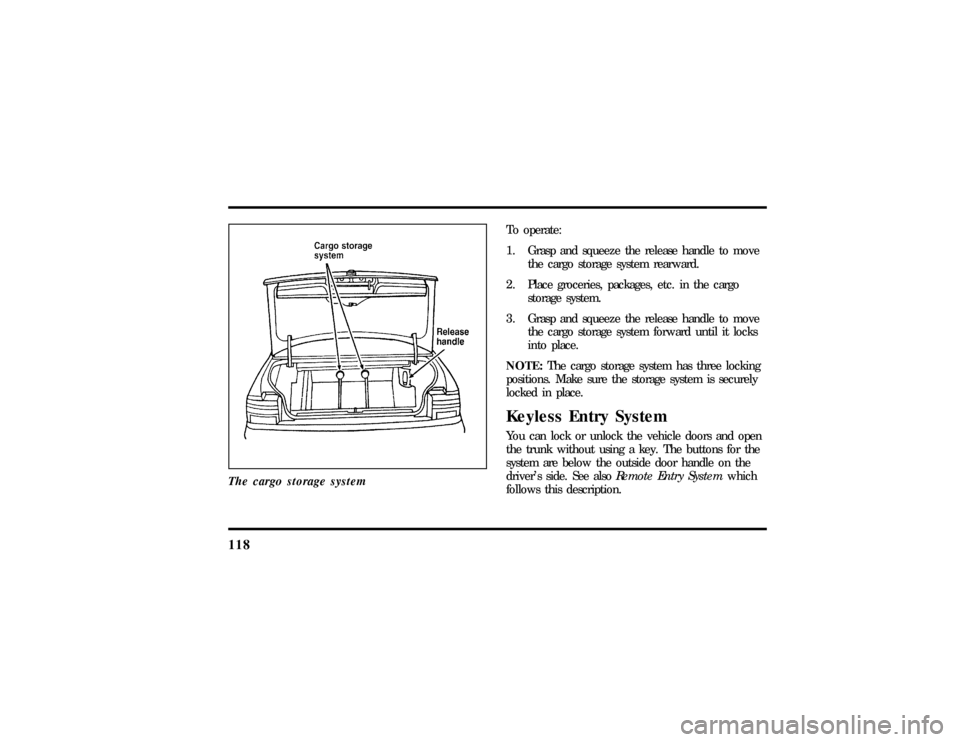
118The cargo storage system
To operate:
1. Grasp and squeeze the release handle to move
the cargo storage system rearward.
2. Place groceries, packages, etc. in the cargo
storage system.
3. Grasp and squeeze the release handle to move
the cargo storage system forward until it locks
into place.
NOTE:The cargo storage system has three locking
positions. Make sure the storage system is securely
locked in place.Keyless Entry SystemYou can lock or unlock the vehicle doors and open
the trunk without using a key. The buttons for the
system are below the outside door handle on the
driver's side. See alsoRemote Entry Systemwhich
follows this description.
File:05fncfc.ex
Update:Fri Sep 6 14:53:57 1996
Page 145 of 321
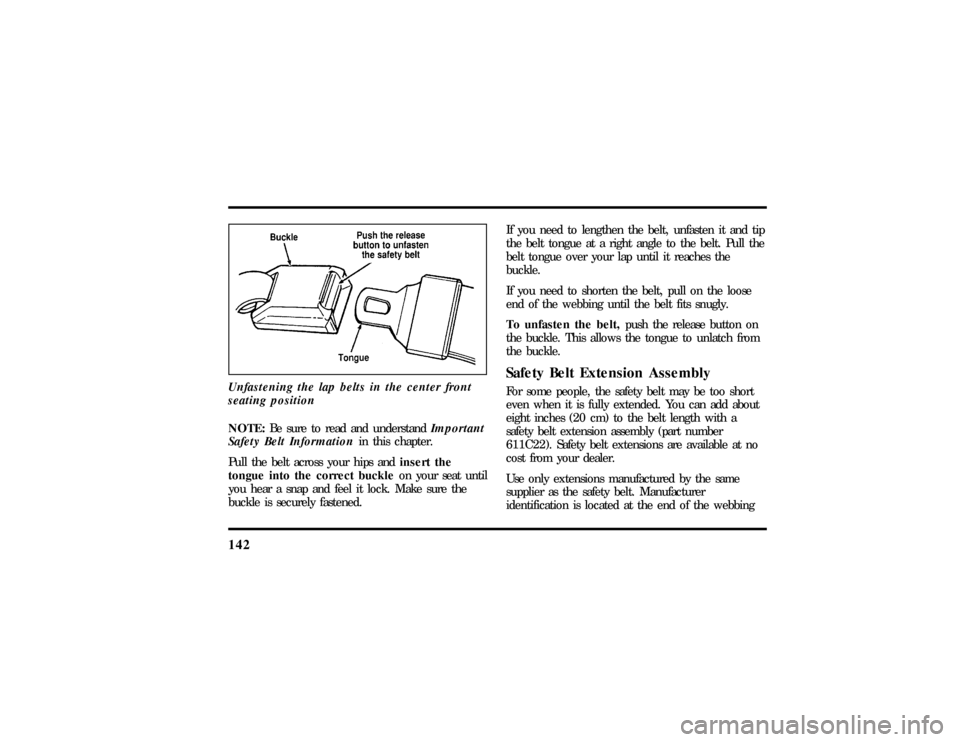
142Unfastening the lap belts in the center front
seating positionNOTE:Be sure to read and understandImportant
Safety Belt Informationin this chapter.
Pull the belt across your hips andinsert the
tongue into the correct buckleon your seat until
you hear a snap and feel it lock. Make sure the
buckle is securely fastened.If you need to lengthen the belt, unfasten it and tip
the belt tongue at a right angle to the belt. Pull the
belt tongue over your lap until it reaches the
buckle.
If you need to shorten the belt, pull on the loose
end of the webbing until the belt fits snugly.
To unfasten the belt,push the release button on
the buckle. This allows the tongue to unlatch from
the buckle.
Safety Belt Extension AssemblyFor some people, the safety belt may be too short
even when it is fully extended. You can add about
eight inches (20 cm) to the belt length with a
safety belt extension assembly (part number
611C22). Safety belt extensions are available at no
cost from your dealer.
Use only extensions manufactured by the same
supplier as the safety belt. Manufacturer
identification is located at the end of the webbing
File:06fnssc.ex
Update:Mon Jun 17 14:19:23 1996
Page 151 of 321

148
SafetyRestraint sfo rChildren
WARNING
Neve rle ta passenge rhol dachil don
WARNING
Carg oshoul dalway sbe secure dto
WARNING
Carefull yfollo wallof the
Page 153 of 321

150
WARNING
Whenusin gforward-facin gchil dseats
WARNING
If yo udo no tproperl ysecur eth esafety
WARNING
Carefull yfollo wallof the
WARNING
Alway skee pthebuckl ereleas ebutton
Page 157 of 321
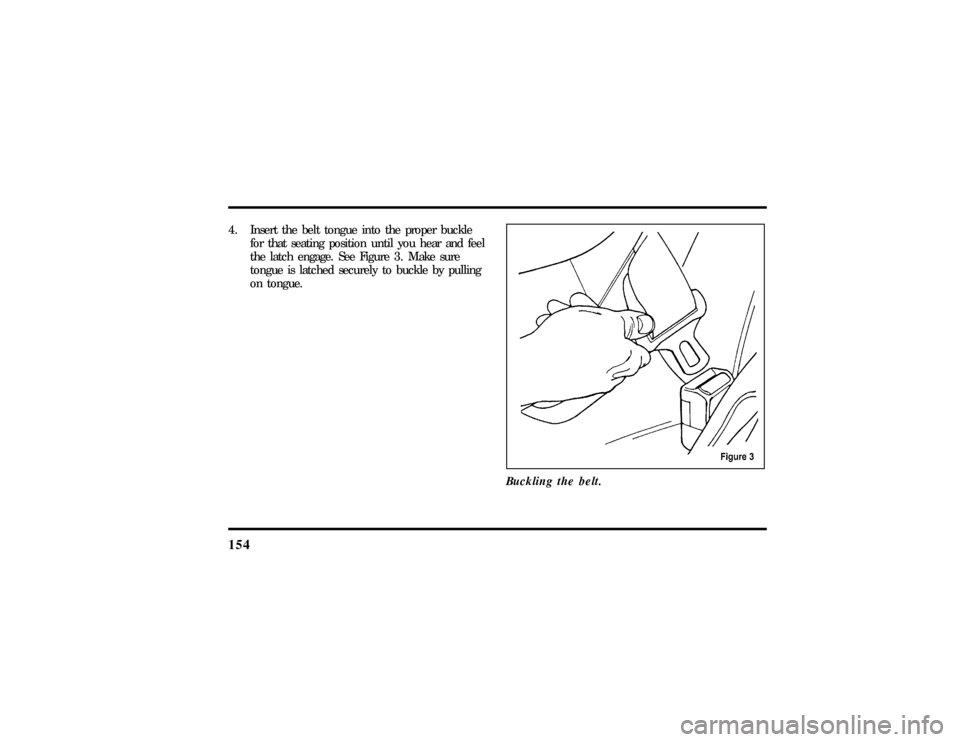
1544. Insert the belt tongue into the proper buckle
for that seating position until you hear and feel
the latch engage. See Figure 3. Make sure
tongue is latched securely to buckle by pulling
on tongue.
Buckling the belt.
File:06fnssc.ex
Update:Mon Jun 17 14:19:23 1996
Page 160 of 321
157
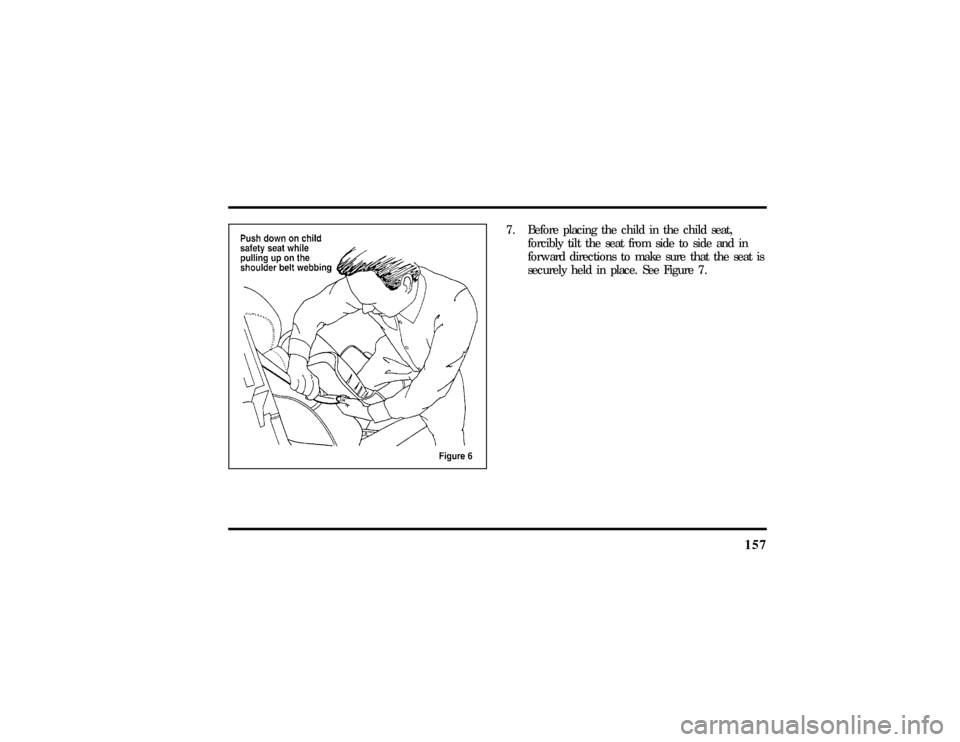
7. Before placing the child in the child seat,
forcibly tilt the seat from side to side and in
forward directions to make sure that the seat is
securely held in place. See Figure 7.
File:06fnssc.ex
Update:Mon Jun 17 14:19:23 1996