light LINCOLN CONTINENTAL 1997 Owner's Manual
[x] Cancel search | Manufacturer: LINCOLN, Model Year: 1997, Model line: CONTINENTAL, Model: LINCOLN CONTINENTAL 1997Pages: 321, PDF Size: 2.37 MB
Page 78 of 321

74Overhead Console WarningsIf your Continental is equipped with the Pressure
Alert System, a warning will appear in the overhead
console when the pressure in one of your vehicle's
tires drops below acceptable levels or if the system
has malfunctioned.
SeeSecuriTiresin theMaintenance and Care
chapter for more information.Lincoln RESCU System
(If equipped)Lincoln RESCU runs a self-test when you start your
vehicle. During this test, the Lincoln RESCU
warning light, located in the overhead console, will
briefly illuminate. If a problem is detected during
the self-check, the light will remain lit and the
message ªRESCU FAILUREº will be displayed on
the vehicle's message center for several seconds.
If the warning light fails to briefly illuminate when
you start your vehicle or if it remains lit, have your
Lincoln RESCU System checked by an authorized
Lincoln/Mercury dealer as soon as possible. Your
system may be inoperative.
File:05fncfc.ex
Update:Fri Sep 6 14:53:57 1996
Page 80 of 321

76q
The vehicle's cellular handset is locked-out, the
phone is automatically placed in ªhand freeº
mode and voice communication is established
with the operator through the ªhands freeº
microphone.
q
Typically, voice communication with an operator
is established within one minute after an
assistance button is pressed.
q
The operator verbally obtains details of your
situation and, if necessary, ties your vehicle into
a three-way phone call with the United States
Auto Club or local 911 or other emergency
services to dispatch the appropriate assistance to
your location.
q
Once the situation has been appropriately
handled, the operator will terminate the call,
the system warning light will stop flashing and
the system will be reset. In most situations,
ONLY the response center can terminate an
assistance request.
General DescriptionLincoln's Remote Emergency Satellite Cellular Unit
(RESCU) is designed to expedite roadside or
emergency assistance to distressed motorists who
are uncertain of their location and/or are uncertain
of who to contact for assistance.
The Lincoln RESCU System utilizes Global
Positioning System (GPS) technology and the
nation's cellular phone network to track vehicle
location and, at the touch of a button, put you in
voice contact with the Lincoln Security Response
Center.
Two buttons in the overhead console will activate
the system. A tow truck icon for roadside assistance
and an ambulance icon for emergency assistance
identify the buttons.
File:05fncfc.ex
Update:Fri Sep 6 14:53:57 1996
Page 83 of 321

79
When this button is pressed, the Lincoln Security
Response Center relays details of your situation and
your location to local 911 or other emergency
services via a three-way phone call. The response
center/emergency services will:q
dispatch the appropriate emergency help to your
location
q
when appropriate, stay in direct phone contact
with you until emergency help arrives
q
notify pre-designated family contacts or friends
of the emergency situation, if requested, or if no
response is received from the vehicle.
NOTE:If you are certain of your location, a direct
phone call to 911 or other emergency services may
provide a faster response.
Activation and DeactivationWhen either of the two Lincoln RESCU buttons is
pressed, a warning light, located in the overhead
console, will begin to flash and status messages willbe displayed on the vehicle's message center,
confirming an assistance request has been made.
The warning light will continue to flash throughout
the activation.
The RESCU Warning light
The system can be activated whenever your ignition
key is in the RUN/START position and for two
minutes after your vehicle is turned off. Once a
RESCU button has been pressed, DO NOT
ATTEMPT TO CRANK THE ENGINE as this may
cancel the activation. In most situations, the
assistance request canONLYbe terminated and the
system reset when a special tone is sent to the
File:05fncfc.ex
Update:Fri Sep 6 14:53:57 1996
Page 94 of 321
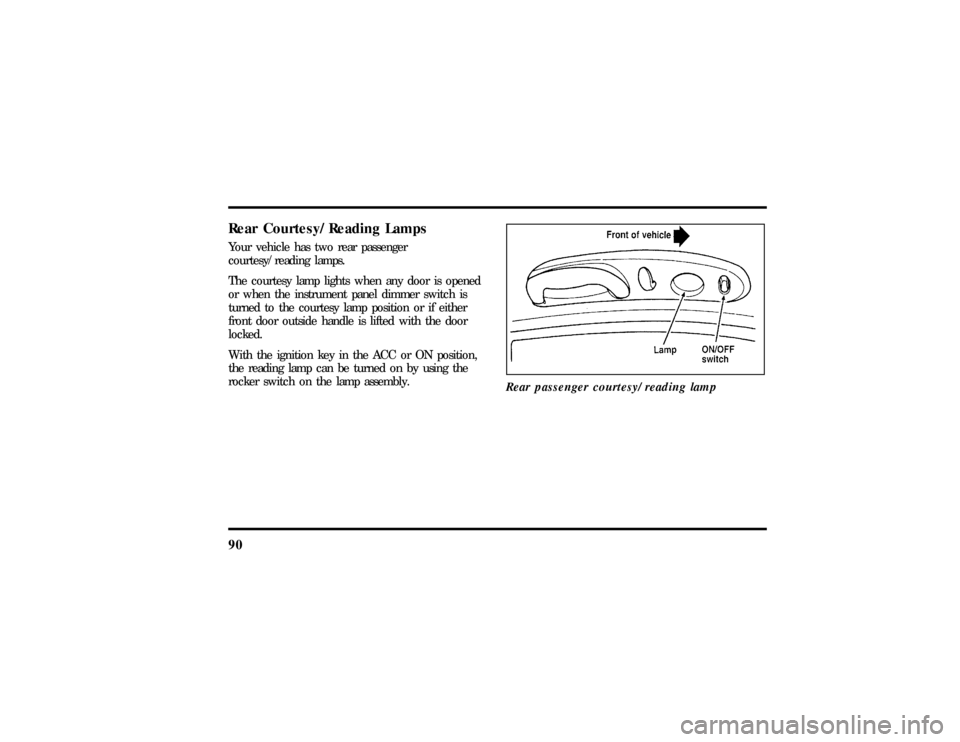
90Rear Courtesy/Reading LampsYour vehicle has two rear passenger
courtesy/reading lamps.
The courtesy lamp lights when any door is opened
or when the instrument panel dimmer switch is
turned to the courtesy lamp position or if either
front door outside handle is lifted with the door
locked.
With the ignition key in the ACC or ON position,
the reading lamp can be turned on by using the
rocker switch on the lamp assembly.
Rear passenger courtesy/reading lamp
File:05fncfc.ex
Update:Fri Sep 6 14:53:57 1996
Page 97 of 321
93
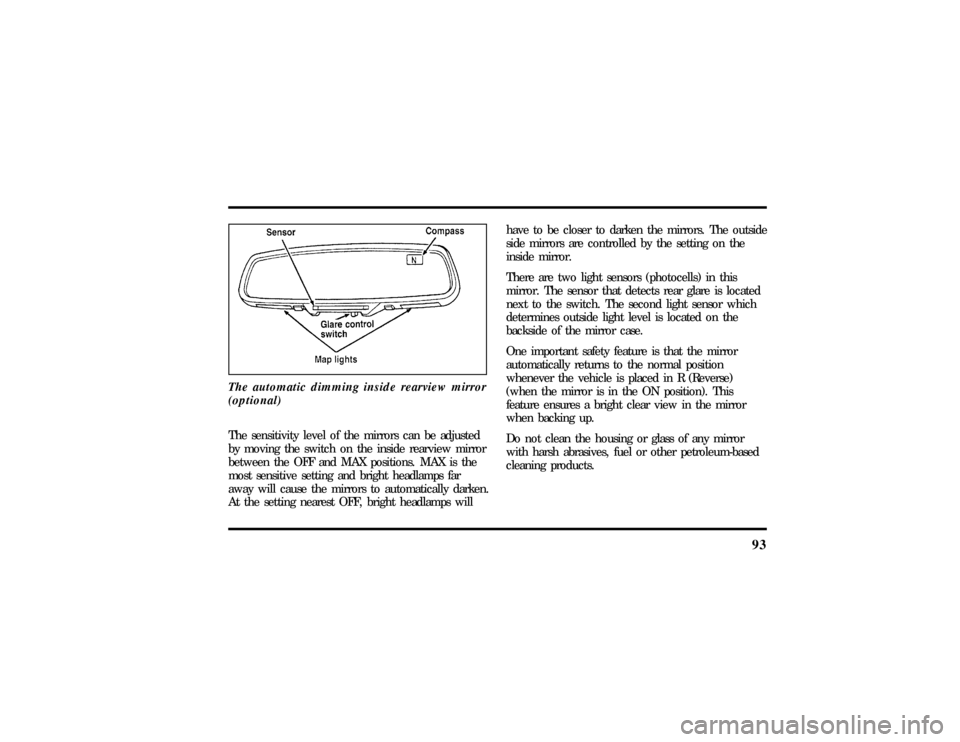
The automatic dimming inside rearview mirror
(optional)The sensitivity level of the mirrors can be adjusted
by moving the switch on the inside rearview mirror
between the OFF and MAX positions. MAX is the
most sensitive setting and bright headlamps far
away will cause the mirrors to automatically darken.
At the setting nearest OFF, bright headlamps willhave to be closer to darken the mirrors. The outside
side mirrors are controlled by the setting on the
inside mirror.
There are two light sensors (photocells) in this
mirror. The sensor that detects rear glare is located
next to the switch. The second light sensor which
determines outside light level is located on the
backside of the mirror case.
One important safety feature is that the mirror
automatically returns to the normal position
whenever the vehicle is placed in R (Reverse)
(when the mirror is in the ON position). This
feature ensures a bright clear view in the mirror
when backing up.
Do not clean the housing or glass of any mirror
with harsh abrasives, fuel or other petroleum-based
cleaning products.
File:05fncfc.ex
Update:Fri Sep 6 14:53:57 1996
Page 98 of 321
94Sun VisorsUsing the Sun VisorsYour vehicle has special sun visors. Besides the
regular sun visor, you have a second visor. By using
both the regular sun visor and the second visor, you
shield the sun from both the front and the side of
the vehicle at the same time.
To block the sun, move the main visor sideways
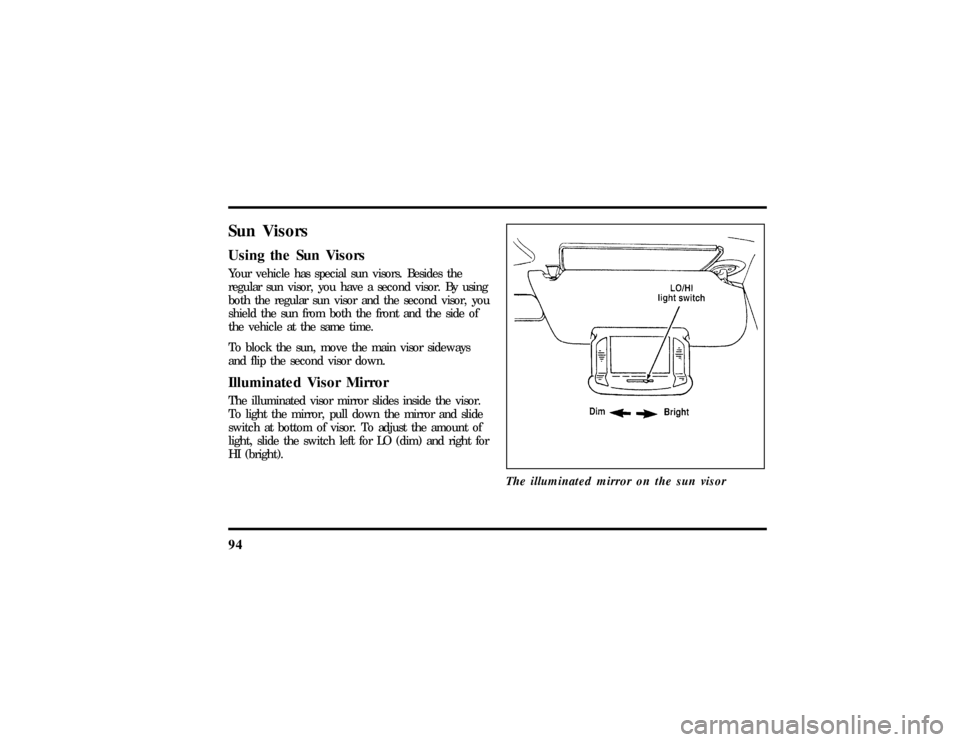
and flip the second visor down.Illuminated Visor MirrorThe illuminated visor mirror slides inside the visor.
To light the mirror, pull down the mirror and slide
switch at bottom of visor. To adjust the amount of
light, slide the switch left for LO (dim) and right for
HI (bright).
The illuminated mirror on the sun visor
File:05fncfc.ex
Update:Fri Sep 6 14:53:57 1996
Page 100 of 321
96ProgrammingIf after repeated attempts you do not successfully
program the HomeLink Universal Transmitter to
learn the signal of the hand-help transmitter, call
toll-free for customer assistance: 1-800-355-3515.
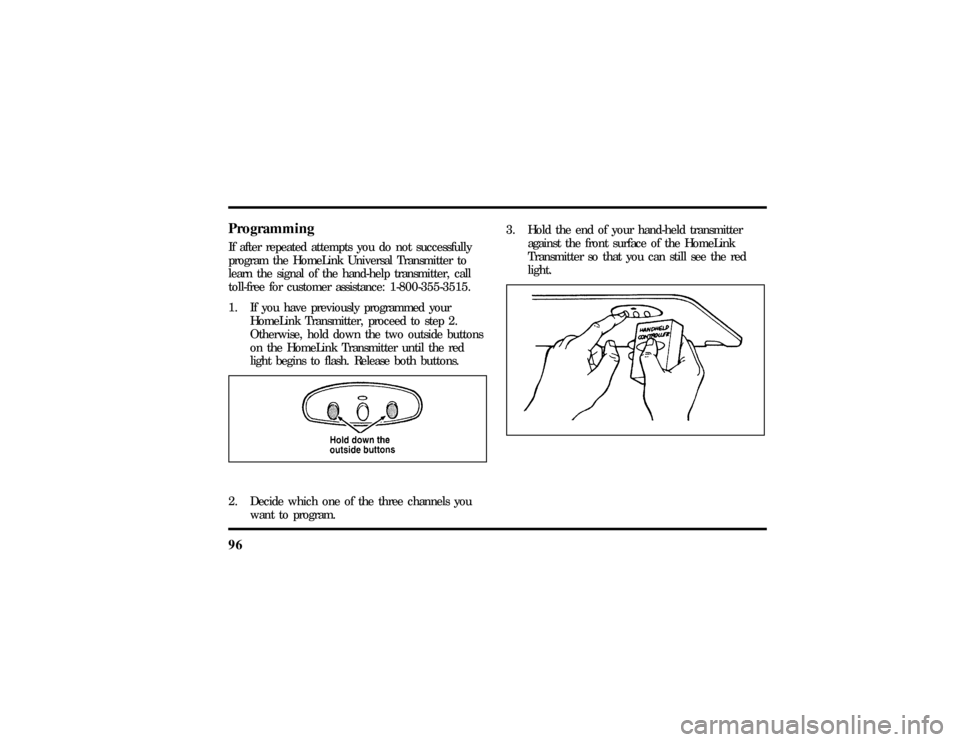
1. If you have previously programmed your
HomeLink Transmitter, proceed to step 2.
Otherwise, hold down the two outside buttons
on the HomeLink Transmitter until the red
light begins to flash. Release both buttons.2. Decide which one of the three channels you
want to program.3. Hold the end of your hand-held transmitter
against the front surface of the HomeLink
Transmitter so that you can still see the red
light.
File:05fncfc.ex
Update:Fri Sep 6 14:53:57 1996
Page 101 of 321

97
4. Using both hands, push the hand-held
transmitter button and the desired button on
the HomeLink Transmitter.Continue to press
both buttons through step 5.
5. Hold down both buttons until you see the red
light on the HomeLink Transmitter flash, first
slowly and then rapidly. It indicates that you
have successfully programmed the HomeLink
Transmitter to learn the new frequency signal.
Release both buttons once the rapid flashing
begins.Note to Canadian ResidentsDuring programming, your hand-held transmitter
may automatically stop transmitting after two
seconds, which may not be long enough to program
the HomeLink Universal Transmitter.
If you are programming from one of these
hand-held transmitters, continue to hold the button
on the HomeLink Transmitter while you re-press
your hand-held transmitter every two seconds.You may have to repeat this function several times
while programming.
Operating the HomeLinkHUniversal
TransmitterOnce it is programmed, the HomeLink Universal
Transmitter can be used in place of your hand-held
transmitter(s). To operate, simply press the
appropriate button on the HomeLink Transmitter.
The red light comes on while the signal is being
transmitted.
NOTE:If your hand-held transmitter appears to
program the HomeLink Transmitter, but does not
open your garage door, and if your garage door
opener was manufactured after 1995, your garage
door opener may have a ªcode protectedº or
ªrolling codeº feature.
A ªrolling codeº type of system will change the
ªcodeº of your garage door opener every time you
open or close your garage door.
File:05fncfc.ex
Update:Fri Sep 6 14:53:57 1996
Page 102 of 321

98To determine if you have one of these systems,
depress the button on the HomeLink Transmitter
that you programmed. If the red light on the
HomeLink Transmitter flashes rapidly for 1-2
seconds, then remains on, your garage door opener
has a rolling code system.Training a Garage Door Opener
Equipped with ªRolling CodesºTo train your ªrolling codeº garage door opener to
operate from your HomeLink Transmitter, follow
these steps:
1. Program your hand-held transmitter to the
HomeLink Transmitter by following the
procedures outlined in the ªProgrammingº
section of these instructions. (If you already
completed this programming, proceed to the
next instruction.)2. Train your garage door opener receiver to
recognize your HomeLink Transmitter. (Your
garage door opener receiver will learn to
recognize the HomeLink Transmitter by
following the same procedures used to train the
hand-held transmitter.)
q
Remove the cover panel from your garage door
opener receiver. (The receiver should be located
by the garage door opener motor.)
q
Locate the training button on the garage door
opener receiver. The exact location and color of
the button may vary by garage door opener
brand. If you have difficulty locating the training
button, reference your garage door opener
manual, or call1-800-355-3515.
q
Press the training button on the garage door
opener receiver for 1-2 seconds.
File:05fncfc.ex
Update:Fri Sep 6 14:53:57 1996
Page 103 of 321

99
q
Return to the HomeLink Transmitter in the
vehicle, and depress the programmed HomeLink
button for the duration of the rapid flash of the
HomeLink's red light, (1-2 seconds). Release the
button, and re-press the button to confirm that
the HomeLink Transmitter has been trained to
the receiver.
q
Your garage door opener should now recognize
your HomeLink Transmitter. You may use either
your HomeLink Transmitter or your original
hand-held transmitter to open your garage door.
If after following these suggestions you still have
difficulties in programming your HomeLink
Transmitter, call toll-free for customer assistance:
1-800-355-3515.
Erasing ChannelsTo erase all three programmed channels, hold down
the two outside buttons until the red light begins to
flash. Then release both buttons. Individual channels
cannot be erased, but can be reprogrammed usingthe procedures for programming the HomeLink
Transmitter, (steps 2 through 5).
NOTE:Be sure to retain your original transmitter
for future programming procedures (i.e., new
vehicle purchase).
NOTE:When selling your vehicle, be sure to erase
all channels on the HomeLink Transmitter that you
programmed.
AccessoriesAccessories for your HomeLink Universal
Transmitter are available from the manufacturer of
the device. If you would like additional information
or would like to purchase other accessories such as
home lighting or security products that can be
operated by the HomeLink Universal Transmitter,
please call toll-free:1-800-355-3515.
File:05fncfc.ex
Update:Fri Sep 6 14:53:57 1996