door lock LINCOLN CONTINENTAL 1998 Owners Manual
[x] Cancel search | Manufacturer: LINCOLN, Model Year: 1998, Model line: CONTINENTAL, Model: LINCOLN CONTINENTAL 1998Pages: 176, PDF Size: 1.32 MB
Page 9 of 176

Engine oil pressure
Illuminates when the oil pressure
falls below the normal range. Stop
the vehicle as soon as safely
possible and switch off the engine
immediately. Check the oil level and
add oil if needed. Refer toEngine oilin theMaintenance and Care
chapter.
This lamp also illuminates when the ignition is turned to ON and the
engine is off.
Traction ControlYoff light
Illuminates when the Traction
Controlysystem has been disabled
(by the driver or as a result of a
system failure). For more
information, refer to theDriving
chapter.
Safety belt warning chime
Chimes to remind you to fasten your safety belts.
For information on the safety belt warning chime, refer to theSeating
and safety restraintschapter.
Supplemental restraint system (SRS) warning chime
For information on the SRS warning chime, refer to theSeating and
safety restraintschapter.
Key-in-ignition warning chime
Sounds when the key is left in the ignition in the OFF/LOCK or ACC
position and either front door is opened.
Headlamps on warning chime
Sounds when the headlamps or parking lamps are on, the ignition is off
(and the key is not in the ignition) and either front door is opened.
Turn signal chime
Sounds when the turn signal lever has been activated to signal a turn.
T/ C
OFF
Instrumentation
9
Page 17 of 176

Traction control
Refer toTraction Controlyfor more information.
Express window
²Standard vehicle setting is saved as vehicle setting only (not the
Driver 1 or 2 individualized profiles).
²Standard vehicle with Memory Profile System: setting may be saved to
either Driver 1 or 2 personalized profiles or as a vehicle setting.
²Settings: ON or OFF.
²Original setting: ON.
²Setting adjustment is made using the message center MENU/SELECT
controls.
Auto door locks
²Standard vehicle: setting is saved as vehicle setting only (not the
Driver 1 or 2 individualized profiles.
²Standard vehicle with Memory Profile System: setting may be saved to
either the Driver 1 or 2 personalized profiles or as a vehicle setting.
²Settings: ON or OFF.
²Original setting: ON.
²Setting adjustment is made using the message center MENU/SELECT
controls.
Horn chirp
²Standard vehicle: setting is saved as vehicle setting only (not the
Driver 1 or 2 individualized profiles).
²Standard vehicle with Memory Profile System: setting may be saved to
either the Driver 1 or 2 personalized profiles or as a vehicle setting.
²Settings: ON or OFF.
²Original setting: ON.
²Setting adjustment is made using the message center MENU/SELECT
controls.
Easy entry/exit seat access
²Standard vehicle: setting is saved as vehicle setting only
(not the Driver 1 or 2 individualized profiles).
Instrumentation
17
Page 20 of 176

settings (not individualized settings). To change a feature setting see
Driver profile featuresin this section.
Associated systems
Keyless Entry System
Programming personalized codes:
With a key and/or Key FOB outside of the vehicle:
²Enter the factory code
²Press the 1/2 control
²Enter the five digit personalized code
Press:
²The 1/2 control to save the code as Driver 1.
²The 3/4 control to save the code as Driver 2.
²The 5/6 control to save as a third code that will not identify the driver
to the System and turn the system OFF.
²When the desired codes have been entered, press the 7/8 and 9/0
controls simultaneously to end programming, and to lock all of the
doors.
²Test the programmed codes by entering them and verifying the
driver's door unlocks. Press 7/8 and 9/0 simultaneously to lock all of
the doors. Repeat for other codes as required.
The Message Center System
The Message Center is used to display Driver Profile messages and
warning and program many of the Driver Profile System features. Press
the following controls for desired programming:
²The MENU control will display options for the Express Window, Auto
Door Locks, Horn Chirp, Easy Entry/Exit Seat Access and Reverse
Mirror features which can be set by using the SELECT control.
²The VEHICLE HANDLING control will display options for Adjustable
Steering and Adjustable Ride (DSS only) features which can be set
using the SELECT control.
²The DRIVER ID control will display the option of selecting Driver 1,
Driver 2 or OFF.
Instrumentation
20
Page 21 of 176

Driver profile features
Express window
²Standard vehicle-setting is saved as vehicle setting only
(not the DRIVER MEMORY 1 or 2 individualized profiles).
²Standard vehicle with Memory Profile System-setting may be saved to
either the DRIVER MEMORY 1 or 2 personalized profiles or as a
vehicle setting.
²Settings-ON or OFF
²Original setting-ON
²Setting adjustment made using: Message Center-MENU/SELECT
controls
Auto door locks
²Standard vehicle-setting is saved as vehicle setting only
(not the DRIVER MEMORY 1 or 2 individualized profiles).
²Standard vehicle with Memory Profile System-setting may be saved to
either the DRIVER MEMORY 1 or 2 personalized profiles or as a
vehicle setting.
²Settings-ON or OFF
²Original setting-ON
²Setting adjustment made using: Message Center-MENU/SELECT
controls
Horn chirp
²Standard vehicle-setting is saved as vehicle setting only
(not the DRIVER MEMORY 1 or 2 individualized profiles).
²Standard vehicle with Memory Profile System-setting may be saved to
either the DRIVER MEMORY 1 or 2 personalized profiles or as a
vehicle setting.
²Settings-ON or OFF
²Original setting-ON
²Setting adjustment made using: Message Center-MENU/SELECT
controls
Instrumentation
21
Page 24 of 176

²Standard vehicle with Memory Profile System-setting may be saved to
either the DRIVER MEMORY 1 or 2 personalized profiles or as a
vehicle setting.
²Settings-horizontal and vertical
²Original setting-N/A
²Setting adjustment made using: outside mirror control
Basic operation
In order for the system to be able to store or recall an individuals seat or
mirror position preferences, the Driver Profile System must first
recognize who will be driving the vehicle. Drivers may identify
themselves to the system one of two ways:
²Pressing the unlock control on the appropriate Key FOB (DRIVER
MEMORY 1 or DRIVER MEMORY 2 Key FOB is identified by the
number on the back of the Key FOB) before opening the driver's door.
²Entering either the DRIVER MEMORY 1 or DRIVER MEMORY 2
personalized code into the keyless entry keypad before opening the
driver's door. For information on programming personalized codes see
Keyless entry systemin this section.
Pressing OFF will turn the system off.
Once the system has identified the driver (DRIVER MEMORY 1 or
DRIVER MEMORY 2), the seat and mirror will automatically begin to
move to that driver profile. Changes made to the seat or mirror positions
will automatically be saved to that profile.
If the driver should enter the vehicle without first identifying themselves,
all features will remain at their last setting or position and any settings
will be saved as vehicle settings not individualized settings.
If Driver 1 or Driver 2 wishes to make temporarily changes to their seat
or outside mirror positions without affecting their preferred positions
they may do so by:
²Using the switch on the back of the Key FOB to turn the Driver
Profile System OFF prior to pressing the unlock control on the Key
FOB.
²Entering the vehicle without identifying themselves using the two
methods listed above.
This option may be useful to temporarily reposition the driver's seat and
mirrors during an extended drive.
Instrumentation
24
Page 25 of 176

Memory Profile System (if equipped)
The Memory Profile System allows the two primary drivers to select and
save individualized preferences for the following eleven vehicle features:
²Express window
²Auto door locks
²Horn chirp
²Easy entry/exit seat access
²Reverse mirrors
²Adjustable ride
²Adjustable steering
²Autolamp on/delay time
²Instrument panel dim control
²Driver's seat position
²Outside mirror position
Basic Operation of the Driver Profile System with Memory Profile System
is the same, with the added option of being able to identify who is
driving the vehicle by using the Message Center controls. Refer to
ªMessage Centerº in theInstrumentationchapter for more information
on the Message Center controls. The Message Center has a Driver ID
control, which when pressed, allows the driver to select either Driver 1,
Driver 2 or OFF. Selecting OFF will turn the system OFF.
Instrumentation
25
Page 58 of 176
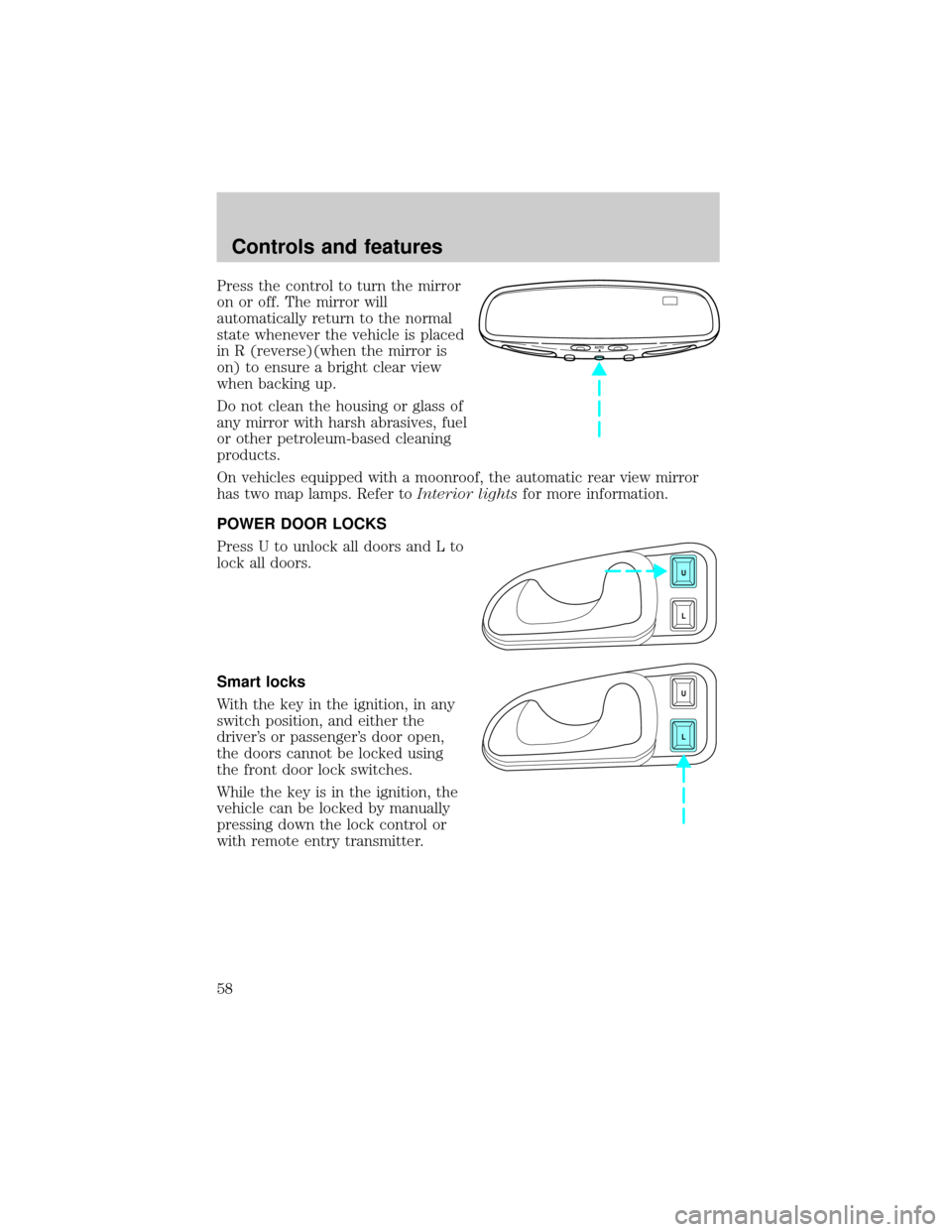
Press the control to turn the mirror
on or off. The mirror will
automatically return to the normal
state whenever the vehicle is placed
in R (reverse)(when the mirror is
on) to ensure a bright clear view
when backing up.
Do not clean the housing or glass of
any mirror with harsh abrasives, fuel
or other petroleum-based cleaning
products.
On vehicles equipped with a moonroof, the automatic rear view mirror
has two map lamps. Refer toInterior lightsfor more information.
POWER DOOR LOCKS
Press U to unlock all doors and L to
lock all doors.
Smart locks
With the key in the ignition, in any
switch position, and either the
driver's or passenger's door open,
the doors cannot be locked using
the front door lock switches.
While the key is in the ignition, the
vehicle can be locked by manually
pressing down the lock control or
with remote entry transmitter.
AUTO
U
L
U
L
Controls and features
58
Page 60 of 176
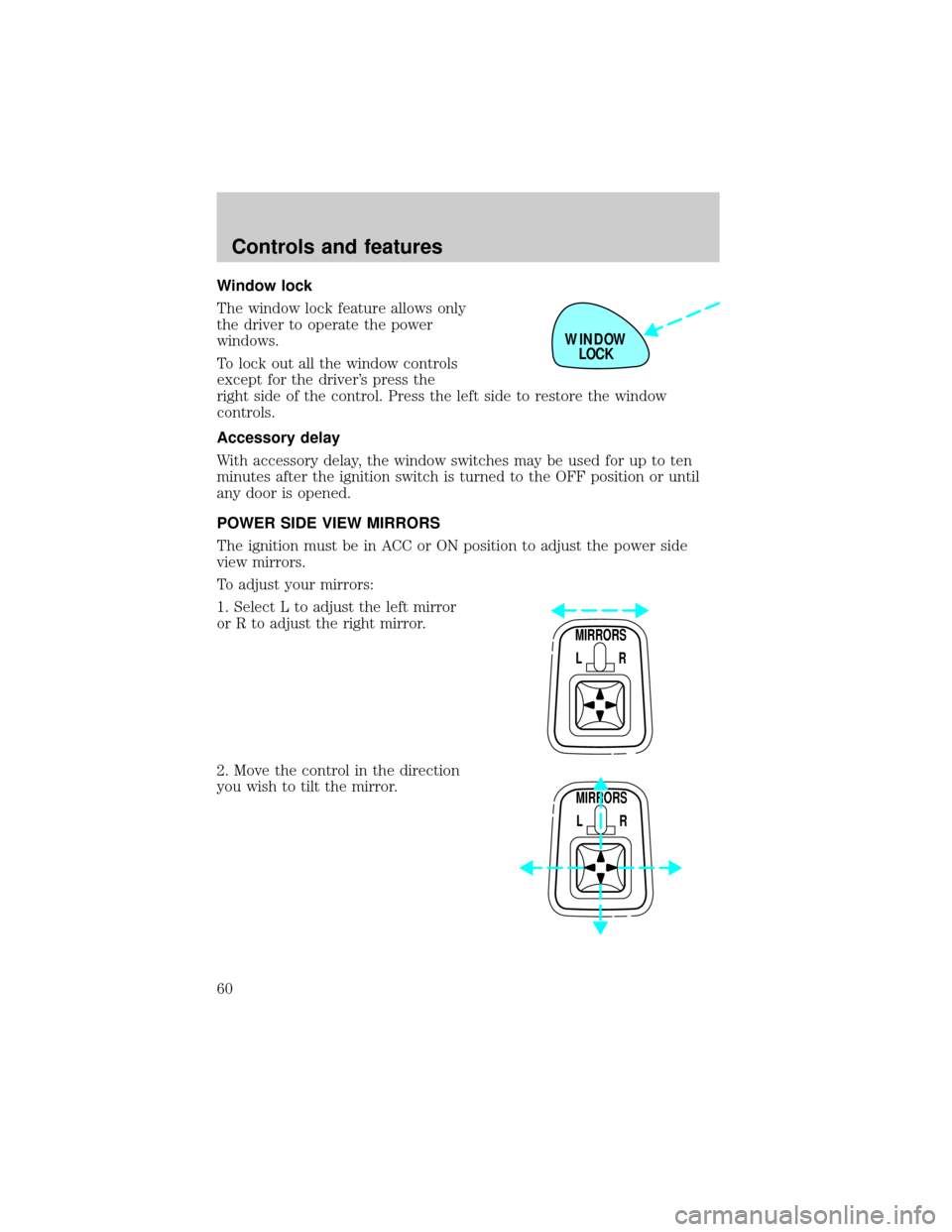
Window lock
The window lock feature allows only
the driver to operate the power
windows.
To lock out all the window controls
except for the driver's press the
right side of the control. Press the left side to restore the window
controls.
Accessory delay
With accessory delay, the window switches may be used for up to ten
minutes after the ignition switch is turned to the OFF position or until
any door is opened.
POWER SIDE VIEW MIRRORS
The ignition must be in ACC or ON position to adjust the power side
view mirrors.
To adjust your mirrors:
1. Select L to adjust the left mirror
or R to adjust the right mirror.
2. Move the control in the direction
you wish to tilt the mirror.
WINDOW
LOCK
MIRRORS
L R
MIRRORS
L R
Controls and features
60
Page 61 of 176
3. Return to the center position to lock mirrors in place.
Heated outside mirrors
Both mirrors are heated
automatically to remove ice, mist
and fog when the rear window
defrost is activated.
Do not remove ice from the mirrors
with a scraper or attempt to
readjust the mirror glass if it is
frozen in place. These actions could
cause damage to the glass and
mirrors.
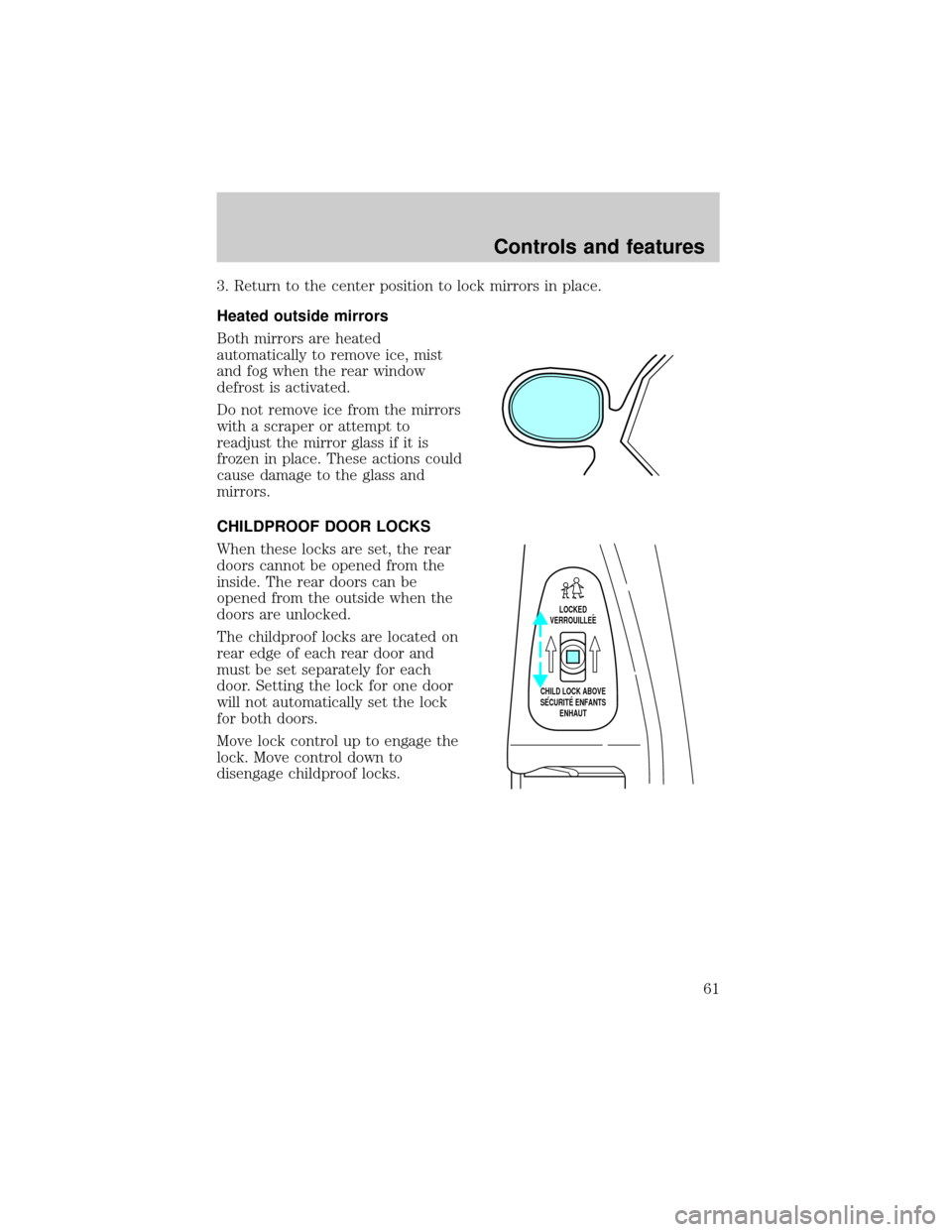
CHILDPROOF DOOR LOCKS
When these locks are set, the rear
doors cannot be opened from the
inside. The rear doors can be
opened from the outside when the
doors are unlocked.
The childproof locks are located on
rear edge of each rear door and
must be set separately for each
door. Setting the lock for one door
will not automatically set the lock
for both doors.
Move lock control up to engage the
lock. Move control down to
disengage childproof locks.
LOCKED
VERROUILLEE
CHILD LOCK ABOVE
SECURITE ENFANTS
ENHAUT
Controls and features
61
Page 63 of 176
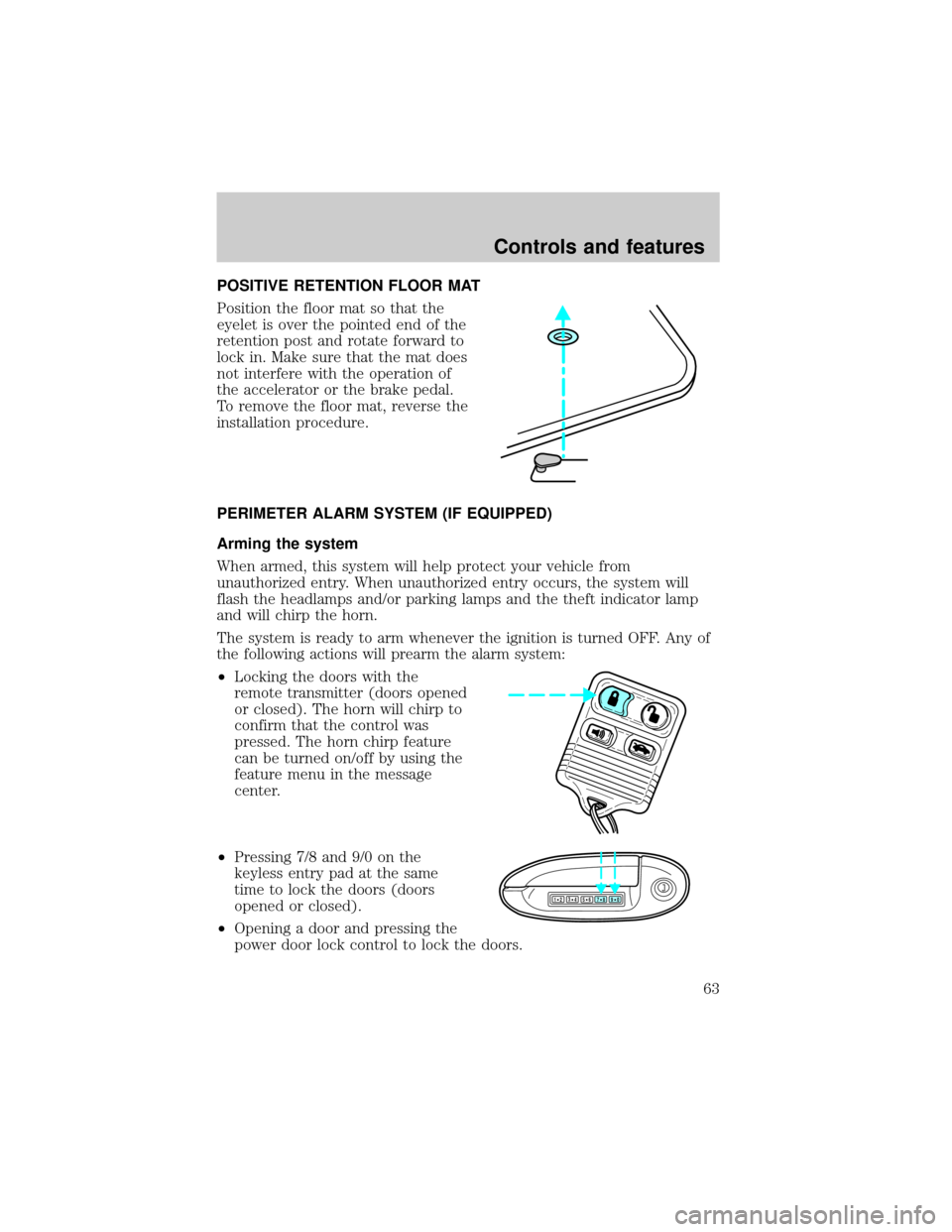
POSITIVE RETENTION FLOOR MAT
Position the floor mat so that the
eyelet is over the pointed end of the
retention post and rotate forward to
lock in. Make sure that the mat does
not interfere with the operation of
the accelerator or the brake pedal.
To remove the floor mat, reverse the
installation procedure.
PERIMETER ALARM SYSTEM (IF EQUIPPED)
Arming the system
When armed, this system will help protect your vehicle from
unauthorized entry. When unauthorized entry occurs, the system will
flash the headlamps and/or parking lamps and the theft indicator lamp
and will chirp the horn.
The system is ready to arm whenever the ignition is turned OFF. Any of
the following actions will prearm the alarm system:
²Locking the doors with the
remote transmitter (doors opened
or closed). The horn will chirp to
confirm that the control was
pressed. The horn chirp feature
can be turned on/off by using the
feature menu in the message
center.
²Pressing 7/8 and 9/0 on the
keyless entry pad at the same
time to lock the doors (doors
opened or closed).
²Opening a door and pressing the
power door lock control to lock the doors.
123
45678
90
Controls and features
63