key LINCOLN CONTINENTAL 2017 Owner's Guide
[x] Cancel search | Manufacturer: LINCOLN, Model Year: 2017, Model line: CONTINENTAL, Model: LINCOLN CONTINENTAL 2017Pages: 584, PDF Size: 6.13 MB
Page 117 of 584
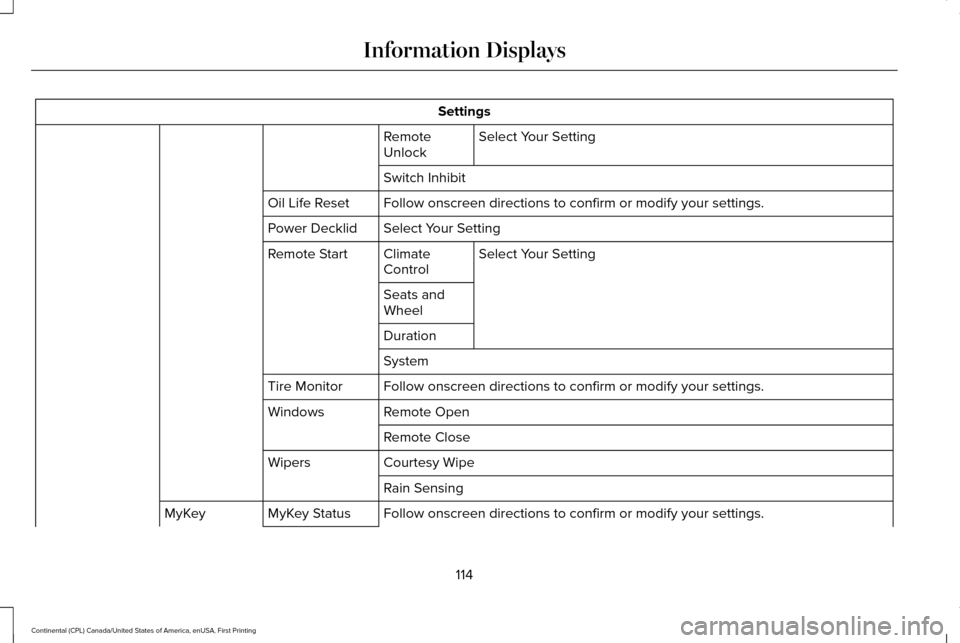
Settings
Select Your Setting
Remote
Unlock
Switch Inhibit
Follow onscreen directions to confirm or modify your settings.
Oil Life Reset
Select Your Setting
Power Decklid
Select Your Setting
Climate
Control
Remote Start
Seats and
Wheel
Duration
System
Follow onscreen directions to confirm or modify your settings.
Tire Monitor
Remote Open
Windows
Remote Close
Courtesy Wipe
Wipers
Rain Sensing
Follow onscreen directions to confirm or modify your settings.
MyKey Status
MyKey
114
Continental (CPL) Canada/United States of America, enUSA, First Printing Information Displays
Page 118 of 584
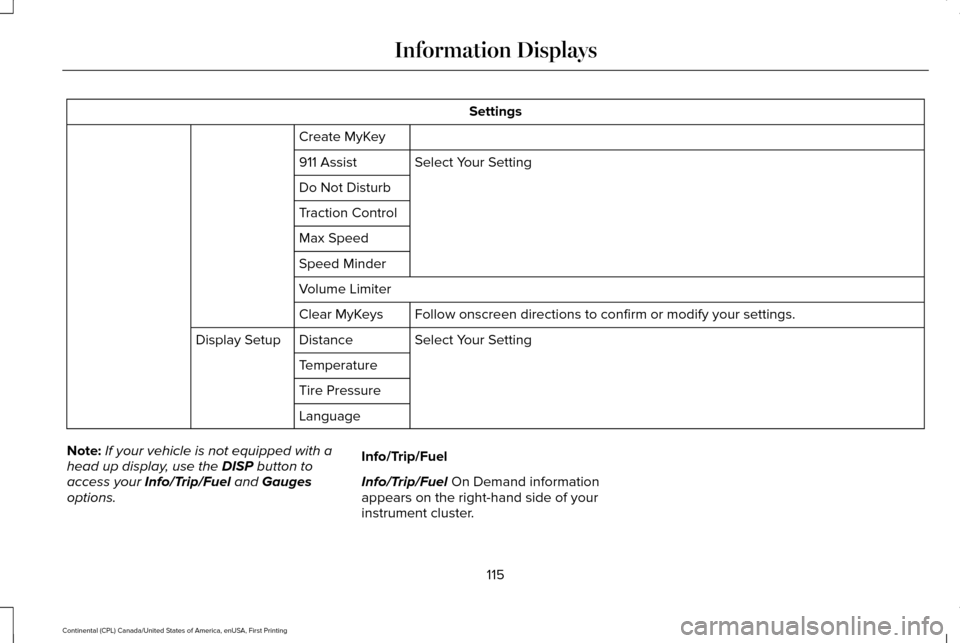
Settings
Create MyKey Select Your Setting
911 Assist
Do Not Disturb
Traction Control
Max Speed
Speed Minder
Volume Limiter
Follow onscreen directions to confirm or modify your settings.
Clear MyKeys
Select Your Setting
Distance
Display Setup
Temperature
Tire Pressure
Language
Note: If your vehicle is not equipped with a
head up display, use the DISP button to
access your Info/Trip/Fuel and Gauges
options. Info/Trip/Fuel
Info/Trip/Fuel On Demand information
appears on the right-hand side of your
instrument cluster.
115
Continental (CPL) Canada/United States of America, enUSA, First Printing Information Displays
Page 128 of 584

Action
Message
There is a system malfunction with the child locks. Contact an authorize\
d dealer as soon as possible.
Child Lock Malfunction Service Required
Indicates that the rear seat interior door release switches and power wi\
ndows are switched off,preventing rear seat occupants from opening the doors or windows.
Child Lock ON
Indicates that the rear seat interior door release switches and power wi\
ndows are switched on.
Child Lock OFF
Displays when the door lock turns off.
Door Unlocked
Displays when the door lock is turned on and you attempt to open the doo\
r.
Doors Locked Unlock Before Opening
Indicates a driver door fault that requires manually opening the door by\
the override lever.Contact an authorized dealer.
Driver Door Fault Use Inside Override
Lever In Map Pocket
Indicates a fault with the electronic door system. Contact an authorized\
dealer.
Door Fault Service Required
Displays the factory keypad code after the keypad has been reset. See Keyless Entry (page
75).
Factory Keypad Code {X X X X X}
Driver Alert Action
Message
Stop and rest as soon as it is safe to do so.
Driver Alert Warning Rest Now
Take a rest soon.
Driver Alert Warning Rest Suggested
125
Continental (CPL) Canada/United States of America, enUSA, First Printing Information Displays
Page 129 of 584
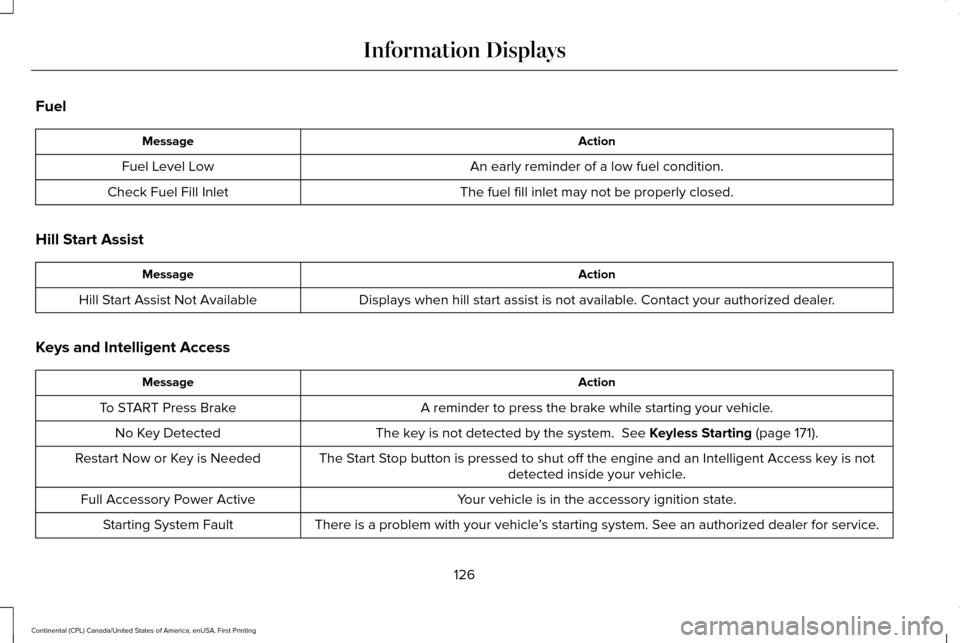
Fuel
Action
Message
An early reminder of a low fuel condition.
Fuel Level Low
The fuel fill inlet may not be properly closed.
Check Fuel Fill Inlet
Hill Start Assist Action
Message
Displays when hill start assist is not available. Contact your authorized dealer.
Hill Start Assist Not Available
Keys and Intelligent Access Action
Message
A reminder to press the brake while starting your vehicle.
To START Press Brake
The key is not detected by the system. See Keyless Starting (page 171).
No Key Detected
The Start Stop button is pressed to shut off the engine and an Intelligent Access k\
ey is notdetected inside your vehicle.
Restart Now or Key is Needed
Your vehicle is in the accessory ignition state.
Full Accessory Power Active
There is a problem with your vehicle’s starting system. See an authorized dealer for service.
Starting System Fault
126
Continental (CPL) Canada/United States of America, enUSA, First Printing Information Displays
Page 130 of 584
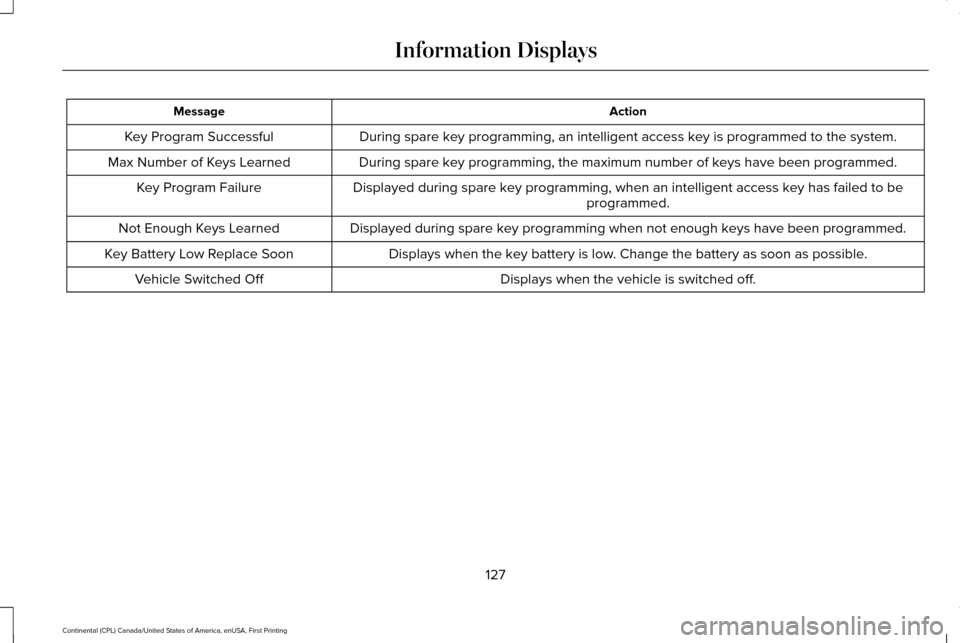
Action
Message
During spare key programming, an intelligent access key is programmed to the system.
Key Program Successful
During spare key programming, the maximum number of keys have been programmed.
Max Number of Keys Learned
Displayed during spare key programming, when an intelligent access key has failed to beprogrammed.
Key Program Failure
Displayed during spare key programming when not enough keys have been programmed.
Not Enough Keys Learned
Displays when the key battery is low. Change the battery as soon as possible.
Key Battery Low Replace Soon
Displays when the vehicle is switched off.
Vehicle Switched Off
127
Continental (CPL) Canada/United States of America, enUSA, First Printing Information Displays
Page 133 of 584
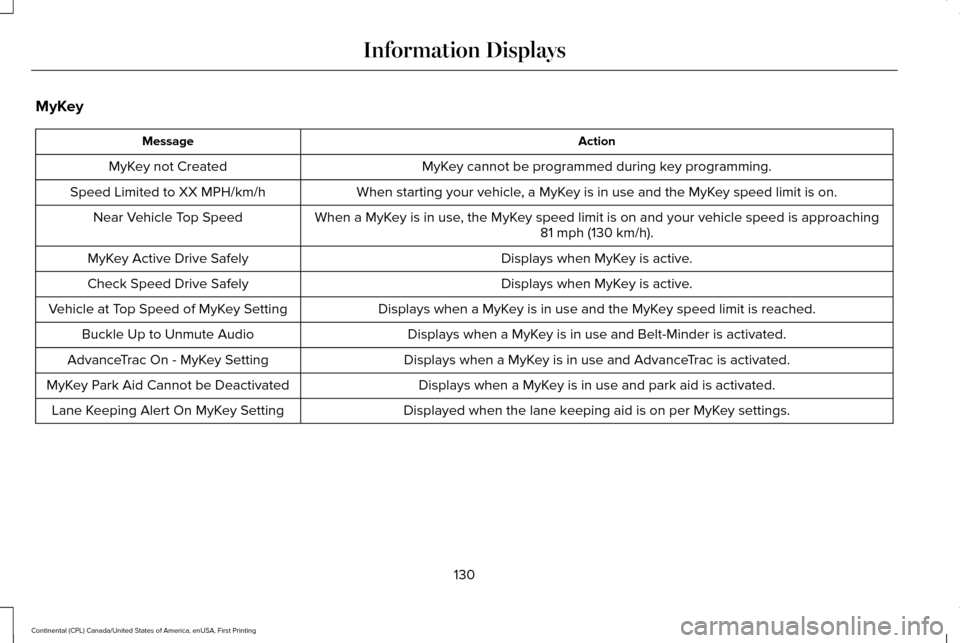
MyKey
Action
Message
MyKey cannot be programmed during key programming.
MyKey not Created
When starting your vehicle, a MyKey is in use and the MyKey speed limit is on.
Speed Limited to XX MPH/km/h
When a MyKey is in use, the MyKey speed limit is on and your vehicle speed is approaching81 mph (130 km/h).
Near Vehicle Top Speed
Displays when MyKey is active.
MyKey Active Drive Safely
Displays when MyKey is active.
Check Speed Drive Safely
Displays when a MyKey is in use and the MyKey speed limit is reached.
Vehicle at Top Speed of MyKey Setting
Displays when a MyKey is in use and Belt-Minder is activated.
Buckle Up to Unmute Audio
Displays when a MyKey is in use and AdvanceTrac is activated.
AdvanceTrac On - MyKey Setting
Displays when a MyKey is in use and park aid is activated.
MyKey Park Aid Cannot be Deactivated
Displayed when the lane keeping aid is on per MyKey settings.
Lane Keeping Alert On MyKey Setting
130
Continental (CPL) Canada/United States of America, enUSA, First Printing Information Displays
Page 160 of 584
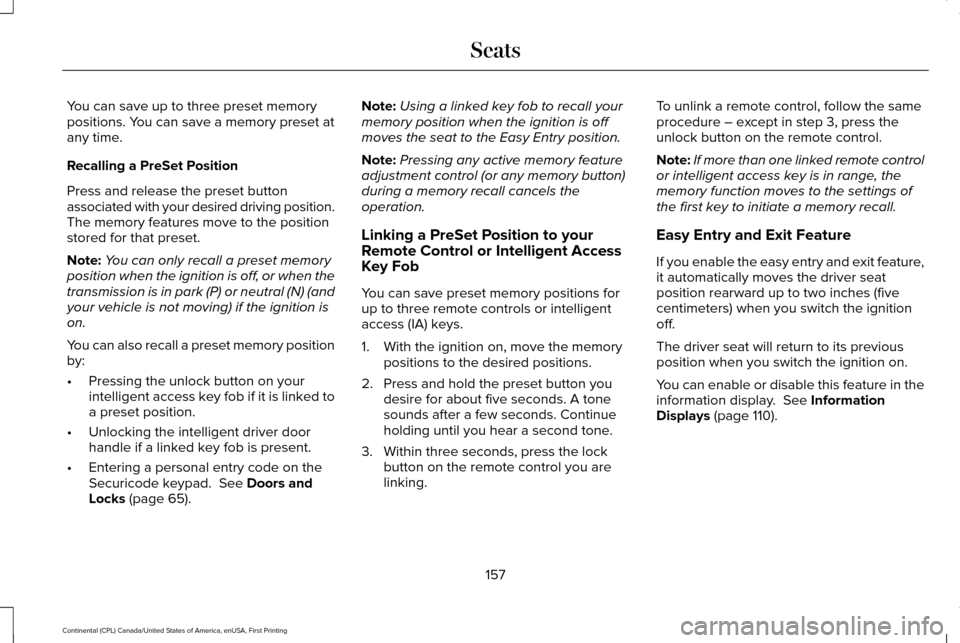
You can save up to three preset memory
positions. You can save a memory preset at
any time.
Recalling a PreSet Position
Press and release the preset button
associated with your desired driving position.
The memory features move to the position
stored for that preset.
Note:
You can only recall a preset memory
position when the ignition is off, or when the
transmission is in park (P) or neutral (N) (and
your vehicle is not moving) if the ignition is
on.
You can also recall a preset memory position
by:
• Pressing the unlock button on your
intelligent access key fob if it is linked to
a preset position.
• Unlocking the intelligent driver door
handle if a linked key fob is present.
• Entering a personal entry code on the
Securicode keypad. See Doors and
Locks (page 65). Note:
Using a linked key fob to recall your
memory position when the ignition is off
moves the seat to the Easy Entry position.
Note: Pressing any active memory feature
adjustment control (or any memory button)
during a memory recall cancels the
operation.
Linking a PreSet Position to your
Remote Control or Intelligent Access
Key Fob
You can save preset memory positions for
up to three remote controls or intelligent
access (IA) keys.
1. With the ignition on, move the memory positions to the desired positions.
2. Press and hold the preset button you desire for about five seconds. A tone
sounds after a few seconds. Continue
holding until you hear a second tone.
3. Within three seconds, press the lock button on the remote control you are
linking. To unlink a remote control, follow the same
procedure – except in step 3, press the
unlock button on the remote control.
Note:
If more than one linked remote control
or intelligent access key is in range, the
memory function moves to the settings of
the first key to initiate a memory recall.
Easy Entry and Exit Feature
If you enable the easy entry and exit feature,
it automatically moves the driver seat
position rearward up to two inches (five
centimeters) when you switch the ignition
off.
The driver seat will return to its previous
position when you switch the ignition on.
You can enable or disable this feature in the
information display.
See Information
Displays (page 110).
157
Continental (CPL) Canada/United States of America, enUSA, First Printing Seats
Page 174 of 584
GENERAL INFORMATION
WARNINGS
Extended idling at high engine speeds
can produce very high temperatures
in the engine and exhaust system, creating
the risk of fire or other damage. Do not park, idle or drive your vehicle
on dry grass or other dry ground cover.
The emission system heats up the engine
compartment and exhaust system, creating
the risk of fire. Do not start the engine in a closed
garage or in other enclosed areas.
Exhaust fumes can be toxic. Always open
the garage door before you start the engine. If you smell exhaust fumes inside your
vehicle, have your vehicle checked by
an authorized dealer immediately. Do not
drive your vehicle if you smell exhaust fumes. If you disconnect the battery, your vehicle
may exhibit some unusual driving
characteristics for approximately 5 miles (8
kilometers) after you reconnect it. This is
because the engine management system
must realign itself with the engine. You can
disregard any unusual driving characteristics
during this period.
The powertrain control system meets all
Canadian interference-causing equipment
standard requirements regulating the
impulse electrical field or radio noise.
When you start the engine, avoid pressing
the accelerator pedal before and during
operation. Only use the accelerator pedal
when you have difficulty starting the engine.
KEYLESS STARTING
Note:
The system may not function if the
passive key is close to metal objects or
electronic devices, for example keys or a
cell phone.
Note: A valid passive key must be located
inside your vehicle to switch the ignition on
and start your vehicle. Ignition Modes
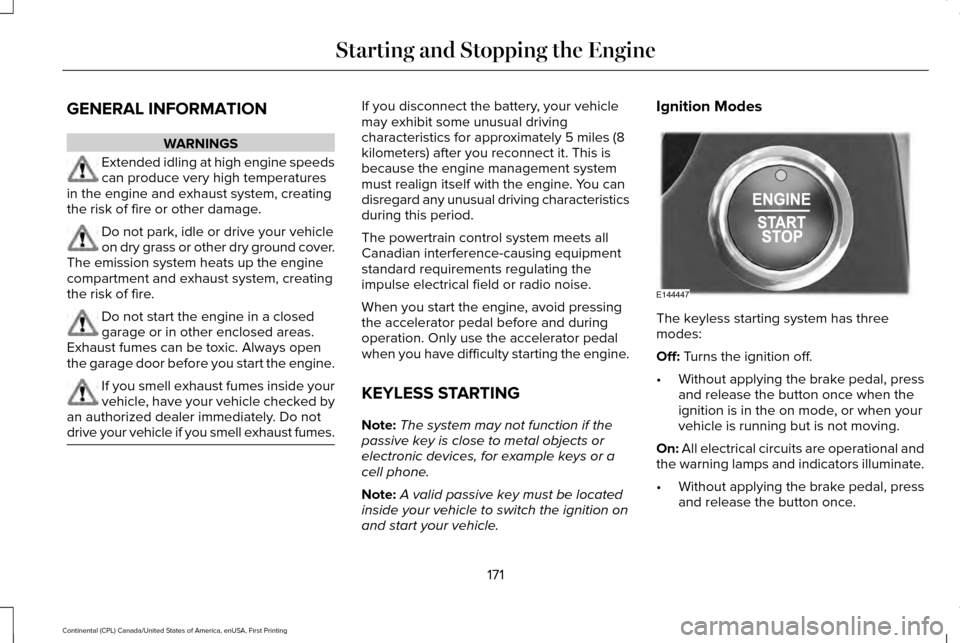
The keyless starting system has three
modes:
Off: Turns the ignition off.
• Without applying the brake pedal, press
and release the button once when the
ignition is in the on mode, or when your
vehicle is running but is not moving.
On:
All electrical circuits are operational and
the warning lamps and indicators illuminate.
• Without applying the brake pedal, press
and release the button once.
171
Continental (CPL) Canada/United States of America, enUSA, First Printing Starting and Stopping the EngineE144447
Page 175 of 584
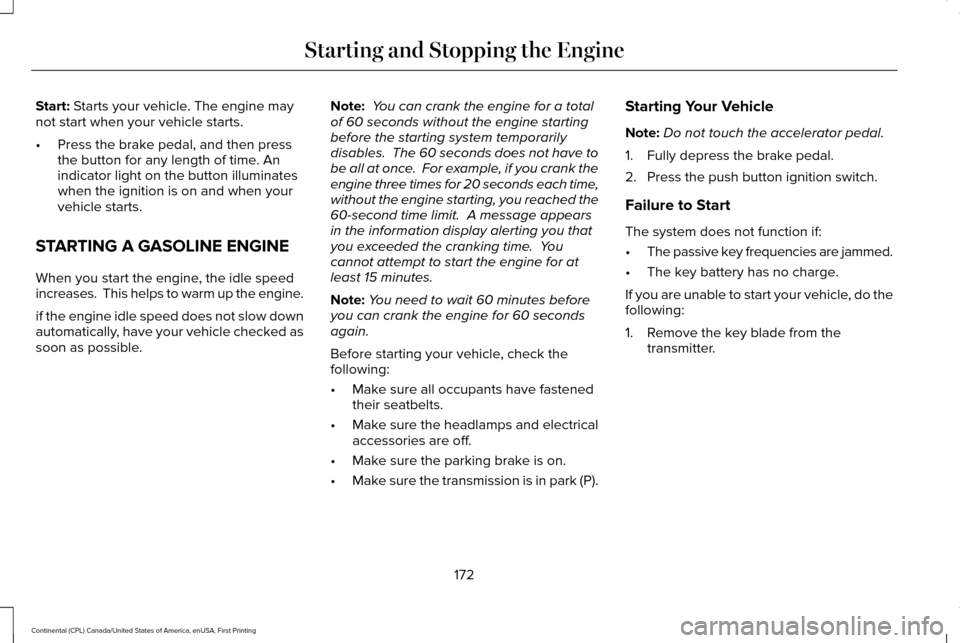
Start: Starts your vehicle. The engine may
not start when your vehicle starts.
• Press the brake pedal, and then press
the button for any length of time. An
indicator light on the button illuminates
when the ignition is on and when your
vehicle starts.
STARTING A GASOLINE ENGINE
When you start the engine, the idle speed
increases. This helps to warm up the engine.
if the engine idle speed does not slow down
automatically, have your vehicle checked as
soon as possible. Note:
You can crank the engine for a total
of 60 seconds without the engine starting
before the starting system temporarily
disables. The 60 seconds does not have to
be all at once. For example, if you crank the
engine three times for 20 seconds each time,
without the engine starting, you reached the
60-second time limit. A message appears
in the information display alerting you that
you exceeded the cranking time. You
cannot attempt to start the engine for at
least 15 minutes.
Note: You need to wait 60 minutes before
you can crank the engine for 60 seconds
again.
Before starting your vehicle, check the
following:
• Make sure all occupants have fastened
their seatbelts.
• Make sure the headlamps and electrical
accessories are off.
• Make sure the parking brake is on.
• Make sure the transmission is in park (P). Starting Your Vehicle
Note:
Do not touch the accelerator pedal.
1. Fully depress the brake pedal.
2. Press the push button ignition switch.
Failure to Start
The system does not function if:
• The passive key frequencies are jammed.
• The key battery has no charge.
If you are unable to start your vehicle, do the
following:
1. Remove the key blade from the transmitter.
172
Continental (CPL) Canada/United States of America, enUSA, First Printing Starting and Stopping the Engine
Page 176 of 584
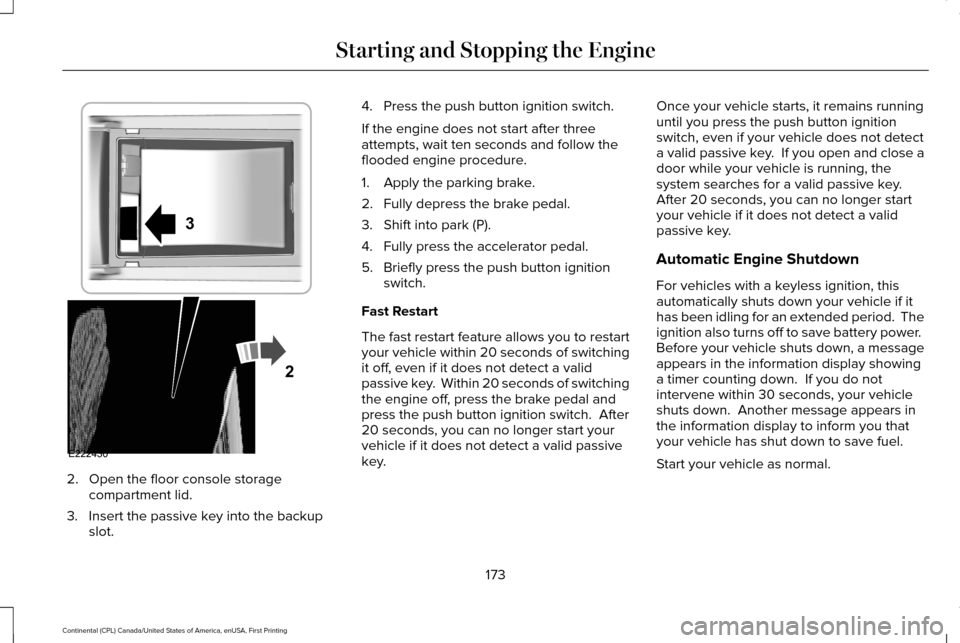
2. Open the floor console storage
compartment lid.
3. Insert the passive key into the backup slot. 4. Press the push button ignition switch.
If the engine does not start after three
attempts, wait ten seconds and follow the
flooded engine procedure.
1. Apply the parking brake.
2. Fully depress the brake pedal.
3. Shift into park (P).
4. Fully press the accelerator pedal.
5. Briefly press the push button ignition
switch.
Fast Restart
The fast restart feature allows you to restart
your vehicle within 20 seconds of switching
it off, even if it does not detect a valid
passive key. Within 20 seconds of switching
the engine off, press the brake pedal and
press the push button ignition switch. After
20 seconds, you can no longer start your
vehicle if it does not detect a valid passive
key. Once your vehicle starts, it remains running
until you press the push button ignition
switch, even if your vehicle does not detect
a valid passive key. If you open and close a
door while your vehicle is running, the
system searches for a valid passive key.
After 20 seconds, you can no longer start
your vehicle if it does not detect a valid
passive key.
Automatic Engine Shutdown
For vehicles with a keyless ignition, this
automatically shuts down your vehicle if it
has been idling for an extended period. The
ignition also turns off to save battery power.
Before your vehicle shuts down, a message
appears in the information display showing
a timer counting down. If you do not
intervene within 30 seconds, your vehicle
shuts down. Another message appears in
the information display to inform you that
your vehicle has shut down to save fuel.
Start your vehicle as normal.
173
Continental (CPL) Canada/United States of America, enUSA, First Printing Starting and Stopping the EngineE222430
2
3