key LINCOLN CONTINENTAL 2017 Workshop Manual
[x] Cancel search | Manufacturer: LINCOLN, Model Year: 2017, Model line: CONTINENTAL, Model: LINCOLN CONTINENTAL 2017Pages: 584, PDF Size: 6.13 MB
Page 417 of 584

Restricted features
Connecting to a new Wi-Fi network.
Sports Scores, Sports Schedule and Sports Headlines are not available wh\
en driving.
Sirius Travel Link
Viewing received text messages.
Text Messages
Using the keyboard to enter a destination.
Navigation
Demo navigation route.
Adding or editing Navigation Favorites entries or Avoid Areas.
Creating a SYNC Owner Account
Why do I need a SYNC owner account?
• Essential for keeping up with the latest
software and connected features.
• Access to customer support for any
questions you may have.
• Maintain account permissions.
Visit the website to sign up and register. Website
owner.lincoln.com Website
www.syncmyride.ca
www.syncmaroute.ca
Updating Your System
You can choose to download the update
onto a USB drive or use Wi-Fi to deliver
automatic updates.
USB Updates
To use the USB update you need to log into
your owner account and visit the SYNC
software update page. Website
owner.lincoln.com
www.syncmyride.ca
www.syncmaroute.ca
The website notifies you if an update is
available. You can then select to download
the update.
414
Continental (CPL) Canada/United States of America, enUSA, First Printing SYNC™ 3
Page 438 of 584
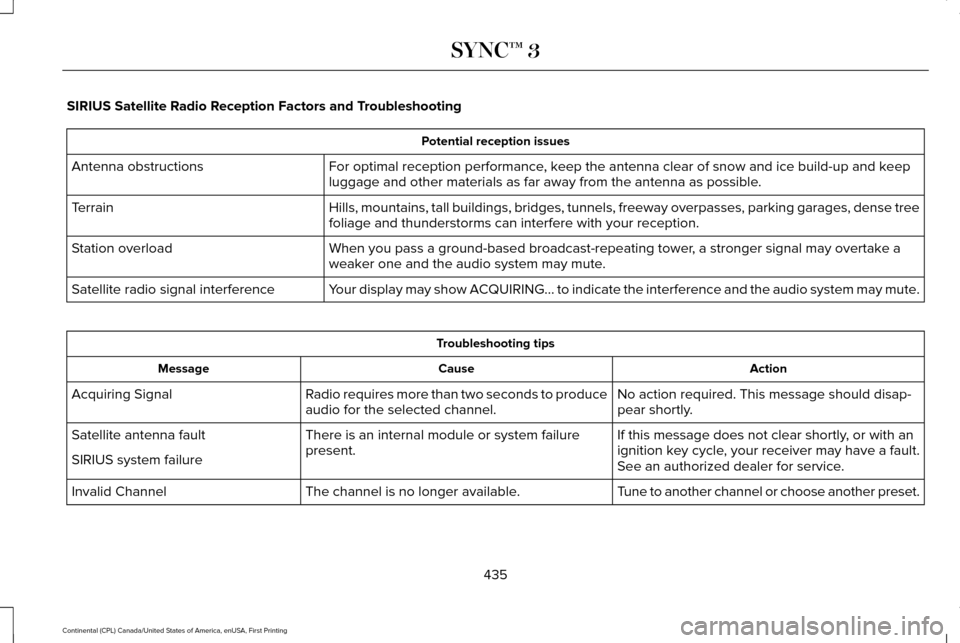
SIRIUS Satellite Radio Reception Factors and Troubleshooting
Potential reception issues
For optimal reception performance, keep the antenna clear of snow and ice build-up and keep
luggage and other materials as far away from the antenna as possible.
Antenna obstructions
Hills, mountains, tall buildings, bridges, tunnels, freeway overpasses, \
parking garages, dense tree
foliage and thunderstorms can interfere with your reception.
Terrain
When you pass a ground-based broadcast-repeating tower, a stronger signal may overtake a
weaker one and the audio system may mute.
Station overload
Your display may show ACQUIRING... to indicate the interference and the a\
udio system may mute.
Satellite radio signal interference Troubleshooting tips
Action
Cause
Message
No action required. This message should disap-
pear shortly.
Radio requires more than two seconds to produce
audio for the selected channel.
Acquiring Signal
If this message does not clear shortly, or with an
ignition key cycle, your receiver may have a fault.
See an authorized dealer for service.
There is an internal module or system failure
present.
Satellite antenna fault
SIRIUS system failure
Tune to another channel or choose another preset.
The channel is no longer available.
Invalid Channel
435
Continental (CPL) Canada/United States of America, enUSA, First Printing SYNC™ 3
Page 454 of 584

Action and Description
Menu Item
Item
You can place a call by selecting an entry from this list.
You can also sort the calls by selecting the drop down menu at the top of\
the screen. You can choose: Missed
Outgoing
Incoming
All
All of your contacts from your phone display in alphabetical order.
Contacts
B
Selecting this button allows you to choose a
specific letter to view.
A-Z Jump
Displays the name of your phone and takes you to the phone settings options.
Phone Settings
C
From this menu, you can pair subsequent devices, set ring tones and aler\
ts. See Settings (page 469).
Displays all recent text messages.
Text Messages
D
Use this keypad to dial in a phone number.
Phone Keypad
E
Use the backspace button to delete numbers.
Press this button to begin a call.
Call
Touch this button to send all calls directly to your voicemail. New text \
message notifications are not
displayed on the screen and all ringtones and alerts are set to silent.
Do Not Disturb
F
Users with phones having voice services may
see a button to access the feature. For
example, iPhone users see a Siri button. A
press and hold of the voice button on the
steering wheel also accesses this feature. 451
Continental (CPL) Canada/United States of America, enUSA, First Printing SYNC™ 3
Page 456 of 584
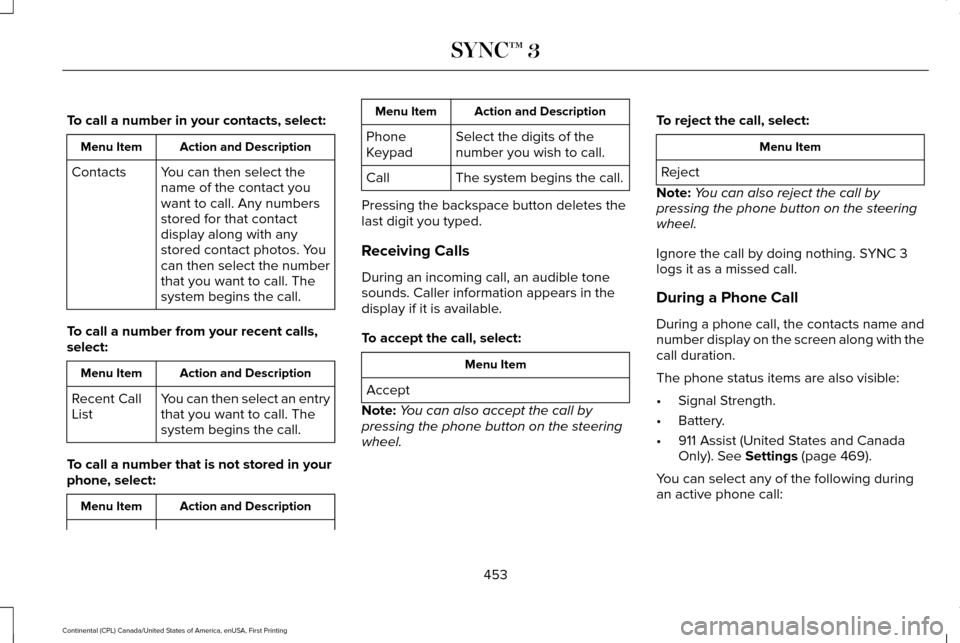
To call a number in your contacts, select:
Action and Description
Menu Item
You can then select the
name of the contact you
want to call. Any numbers
stored for that contact
display along with any
stored contact photos. You
can then select the number
that you want to call. The
system begins the call.
Contacts
To call a number from your recent calls,
select: Action and Description
Menu Item
You can then select an entry
that you want to call. The
system begins the call.
Recent Call
List
To call a number that is not stored in your
phone, select: Action and Description
Menu Item Action and Description
Menu Item
Select the digits of the
number you wish to call.
Phone
Keypad
The system begins the call.
Call
Pressing the backspace button deletes the
last digit you typed.
Receiving Calls
During an incoming call, an audible tone
sounds. Caller information appears in the
display if it is available.
To accept the call, select: Menu Item
Accept
Note: You can also accept the call by
pressing the phone button on the steering
wheel. To reject the call, select: Menu Item
Reject
Note: You can also reject the call by
pressing the phone button on the steering
wheel.
Ignore the call by doing nothing. SYNC 3
logs it as a missed call.
During a Phone Call
During a phone call, the contacts name and
number display on the screen along with the
call duration.
The phone status items are also visible:
• Signal Strength.
• Battery.
• 911 Assist (United States and Canada
Only). See Settings (page 469).
You can select any of the following during
an active phone call:
453
Continental (CPL) Canada/United States of America, enUSA, First Printing SYNC™ 3
Page 457 of 584
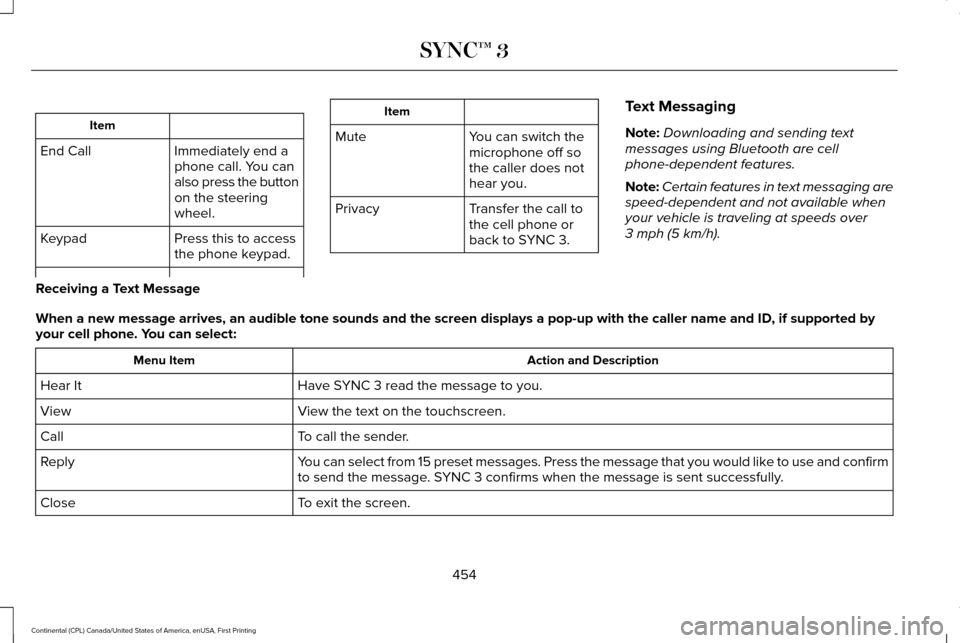
Item
Immediately end a
phone call. You can
also press the button
on the steering
wheel.
End Call
Press this to access
the phone keypad.
Keypad Item
Mute You can switch the
microphone off so
the caller does not
hear you.
Transfer the call to
the cell phone or
back to SYNC 3.
Privacy Text Messaging
Note:
Downloading and sending text
messages using Bluetooth are cell
phone-dependent features.
Note: Certain features in text messaging are
speed-dependent and not available when
your vehicle is traveling at speeds over
3 mph (5 km/h).
Receiving a Text Message
When a new message arrives, an audible tone sounds and the screen displa\
ys a pop-up with the caller name and ID, if supported by
your cell phone. You can select: Action and Description
Menu Item
Have SYNC 3 read the message to you.
Hear It
View the text on the touchscreen.
View
To call the sender.
Call
You can select from 15 preset messages. Press the message that you would \
like to use and confirm
to send the message. SYNC 3 confirms when the message is sent successfully.
Reply
To exit the screen.
Close
454
Continental (CPL) Canada/United States of America, enUSA, First Printing SYNC™ 3
Page 487 of 584
Ambient Lighting (If Equipped)
Tap a color once to active ambient lighting.
This sets the color to the highest intensity.
You can drag the colors up and down to
increase or decrease the intensity.
To switch ambient lighting off, press the
active color once or drag the active color all
the way down to zero intensity. Vehicle
Note:
You vehicle may not have all of these
features.
You can select the following features to
update their settings. Door Keypad Code
Select this button to add or erase a personal
door keypad code. To add or erase a
personal code, you first need to enter the
five-digit factory set code. You can find this
code on the owner's wallet card in the glove
box or from your authorized dealer.
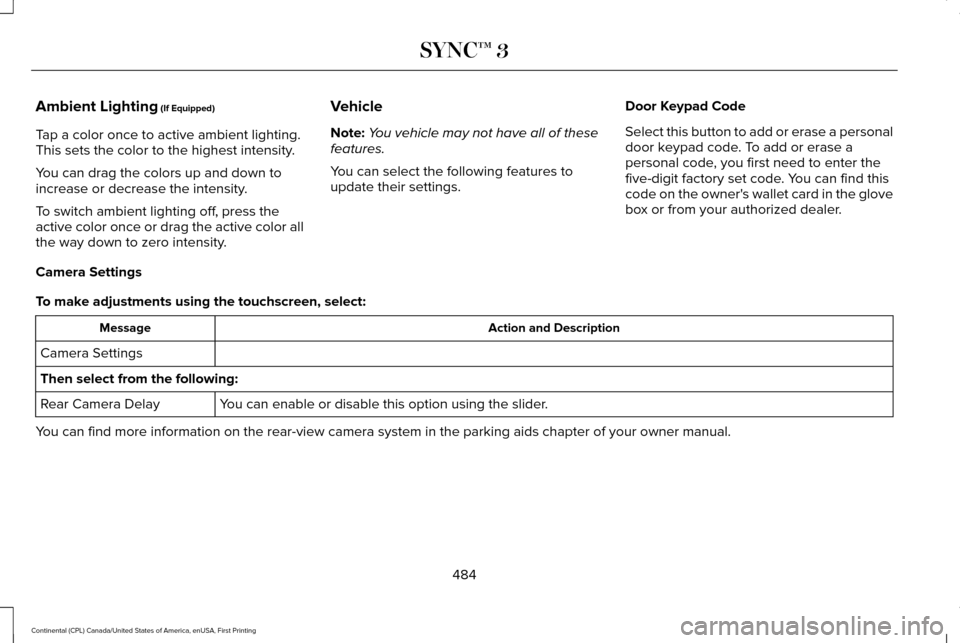
Camera Settings
To make adjustments using the touchscreen, select: Action and Description
Message
Camera Settings
Then select from the following: You can enable or disable this option using the slider.
Rear Camera Delay
You can find more information on the rear-view camera system in the parki\
ng aids chapter of your owner manual.
484
Continental (CPL) Canada/United States of America, enUSA, First Printing SYNC™ 3
Page 502 of 584
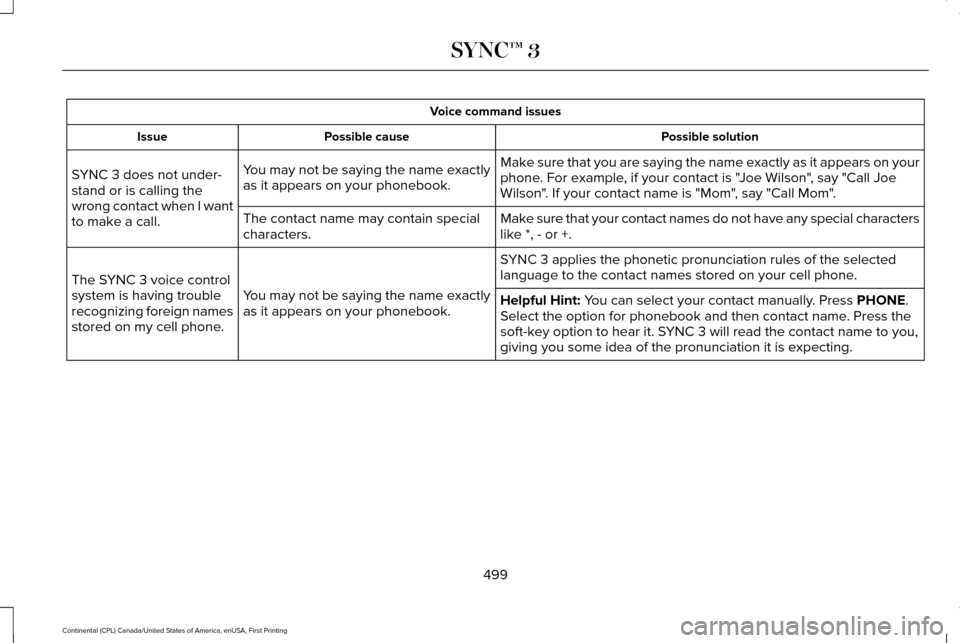
Voice command issues
Possible solution
Possible cause
Issue
Make sure that you are saying the name exactly as it appears on your
phone. For example, if your contact is "Joe Wilson", say "Call Joe
Wilson". If your contact name is "Mom", say "Call Mom".
You may not be saying the name exactly
as it appears on your phonebook.
SYNC 3 does not under-
stand or is calling the
wrong contact when I want
to make a call.
Make sure that your contact names do not have any special characters
like *, - or +.
The contact name may contain special
characters.
SYNC 3 applies the phonetic pronunciation rules of the selected
language to the contact names stored on your cell phone.
You may not be saying the name exactly
as it appears on your phonebook.
The SYNC 3 voice control
system is having trouble
recognizing foreign names
stored on my cell phone.
Helpful Hint: You can select your contact manually. Press PHONE.
Select the option for phonebook and then contact name. Press the
soft-key option to hear it. SYNC 3 will read the contact name to you,
giving you some idea of the pronunciation it is expecting.
499
Continental (CPL) Canada/United States of America, enUSA, First Printing SYNC™ 3
Page 574 of 584
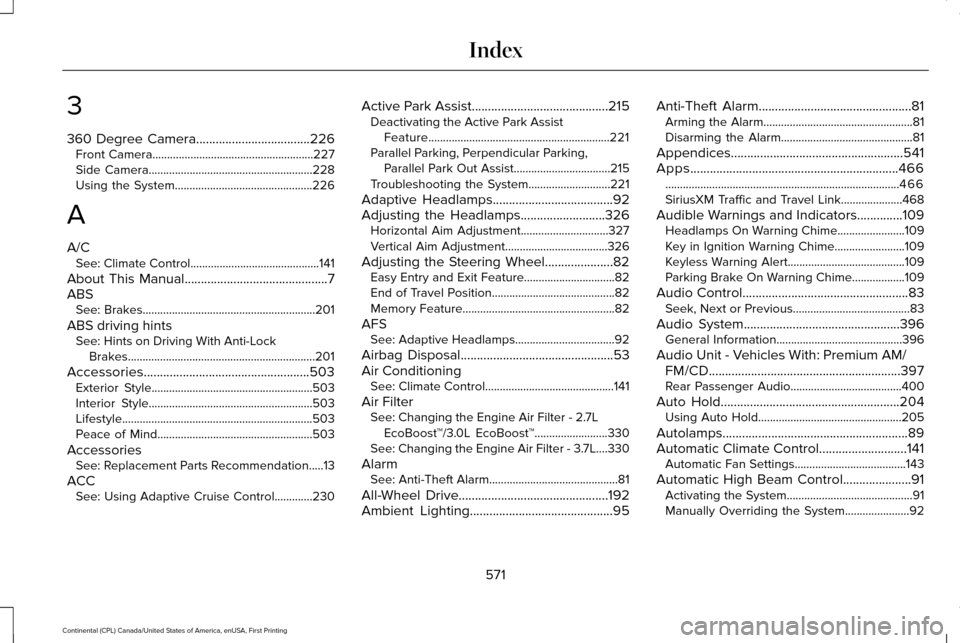
3
360 Degree Camera...................................226
Front Camera.......................................................227
Side Camera........................................................228
Using the System...............................................226
A
A/C See: Climate Control............................................141
About This Manual............................................7
ABS See: Brakes...........................................................201
ABS driving hints See: Hints on Driving With Anti-Lock
Brakes................................................................201
Accessories...................................................503 Exterior Style.......................................................503
Interior Style........................................................503
Lifestyle.................................................................503
Peace of Mind.....................................................503
Accessories See: Replacement Parts Recommendation.....13
ACC See: Using Adaptive Cruise Control.............230 Active Park Assist
..........................................215
Deactivating the Active Park Assist
Feature..............................................................221
Parallel Parking, Perpendicular Parking, Parallel Park Out Assist.................................215
Troubleshooting the System............................221
Adaptive Headlamps
.....................................92
Adjusting the Headlamps..........................326
Horizontal Aim Adjustment..............................327
Vertical Aim Adjustment...................................326
Adjusting the Steering Wheel.....................82 Easy Entry and Exit Feature...............................
82
End of Travel Position..........................................82
Memory Feature....................................................82
AFS See: Adaptive Headlamps..................................92
Airbag Disposal
...............................................53
Air Conditioning See: Climate Control............................................141
Air Filter See: Changing the Engine Air Filter - 2.7L
EcoBoost™/3.0L EcoBoost™.........................330
See: Changing the Engine Air Filter - 3.7L....330
Alarm See: Anti-Theft Alarm............................................81
All-Wheel Drive
..............................................192
Ambient Lighting............................................95 Anti-Theft Alarm
...............................................81
Arming the Alarm...................................................81
Disarming the Alarm.............................................81
Appendices.....................................................541
Apps
................................................................466
........................................................................\
........466
SiriusXM Traffic and Travel Link.....................468
Audible Warnings and Indicators
..............109
Headlamps On Warning Chime.......................109
Key in Ignition Warning Chime........................109
Keyless Warning Alert........................................109
Parking Brake On Warning Chime..................
109
Audio Control
...................................................83
Seek, Next or Previous........................................83
Audio System................................................396 General Information...........................................396
Audio Unit - Vehicles With: Premium AM/ FM/CD
...........................................................397
Rear Passenger Audio......................................400
Auto Hold
.......................................................204
Using Auto Hold.................................................205
Autolamps.........................................................89
Automatic Climate Control...........................141 Automatic Fan Settings......................................
143
Automatic High Beam Control.....................91 Activating the System...........................................91
Manually Overriding the System......................92
571
Continental (CPL) Canada/United States of America, enUSA, First Printing Index
Page 575 of 584
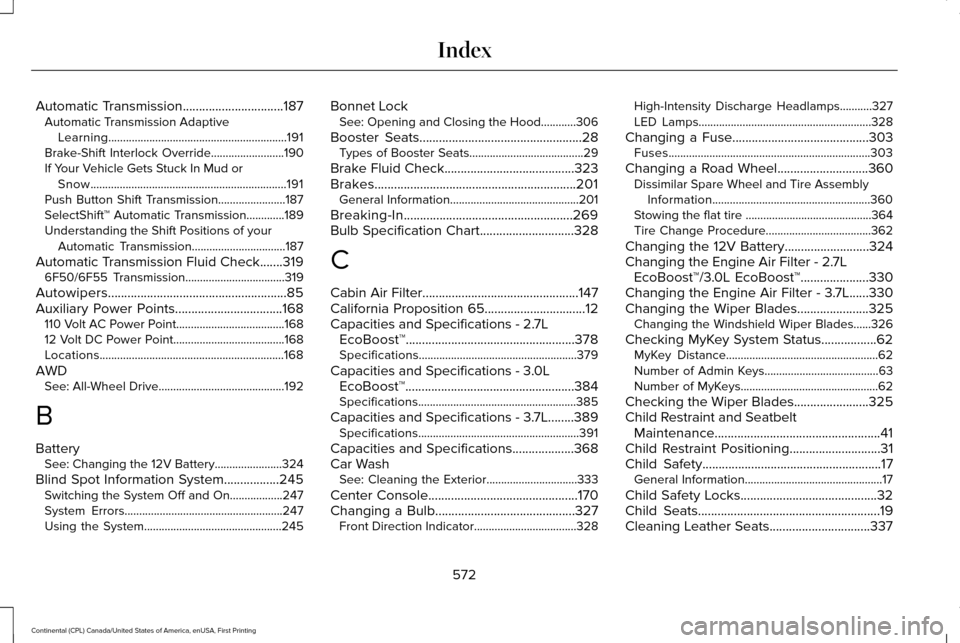
Automatic Transmission...............................187
Automatic Transmission Adaptive
Learning.............................................................191
Brake-Shift Interlock Override.........................
190
If Your Vehicle Gets Stuck In Mud or Snow...................................................................191
Push Button Shift Transmission.......................187
SelectShift™ Automatic Transmission.............189
Understanding the Shift Positions of your Automatic Transmission................................
187
Automatic Transmission Fluid Check
.......319
6F50/6F55 Transmission..................................319
Autowipers.......................................................85
Auxiliary Power Points.................................168 110 Volt AC Power Point.....................................168
12 Volt DC Power Point......................................168
Locations...............................................................168
AWD See: All-Wheel Drive...........................................192
B
Battery See: Changing the 12V Battery.......................
324
Blind Spot Information System.................245 Switching the System Off and On..................247
System Errors......................................................247
Using the System...............................................245 Bonnet Lock
See: Opening and Closing the Hood............306
Booster Seats
..................................................28
Types of Booster Seats.......................................29
Brake Fluid Check........................................323
Brakes..............................................................201 General Information............................................201
Breaking-In....................................................269
Bulb Specification Chart
.............................328
C
Cabin Air Filter................................................147
California Proposition 65
...............................12
Capacities and Specifications - 2.7L EcoBoost™....................................................378
Specifications......................................................379
Capacities and Specifications - 3.0L EcoBoost™....................................................384
Specifications......................................................385
Capacities and Specifications - 3.7L........389 Specifications.......................................................391
Capacities and Specifications
...................368
Car Wash See: Cleaning the Exterior...............................333
Center Console
..............................................170
Changing a Bulb...........................................327
Front Direction Indicator...................................328 High-Intensity Discharge Headlamps...........327
LED Lamps...........................................................328
Changing a Fuse..........................................303 Fuses.....................................................................303
Changing a Road Wheel............................360 Dissimilar Spare Wheel and Tire Assembly
Information......................................................360
Stowing the flat tire ...........................................364
Tire Change Procedure....................................362
Changing the 12V Battery
..........................324
Changing the Engine Air Filter - 2.7L EcoBoost™/3.0L EcoBoost™
.....................330
Changing the Engine Air Filter - 3.7L......330
Changing the Wiper Blades
......................325
Changing the Windshield Wiper Blades......326
Checking MyKey System Status.................62 MyKey Distance....................................................62
Number of Admin Keys.......................................63
Number of MyKeys...............................................62
Checking the Wiper Blades.......................325
Child Restraint and Seatbelt Maintenance...................................................41
Child Restraint Positioning
............................31
Child Safety.......................................................17
General Information...............................................17
Child Safety Locks..........................................32
Child Seats........................................................19
Cleaning Leather Seats...............................337
572
Continental (CPL) Canada/United States of America, enUSA, First Printing Index
Page 576 of 584
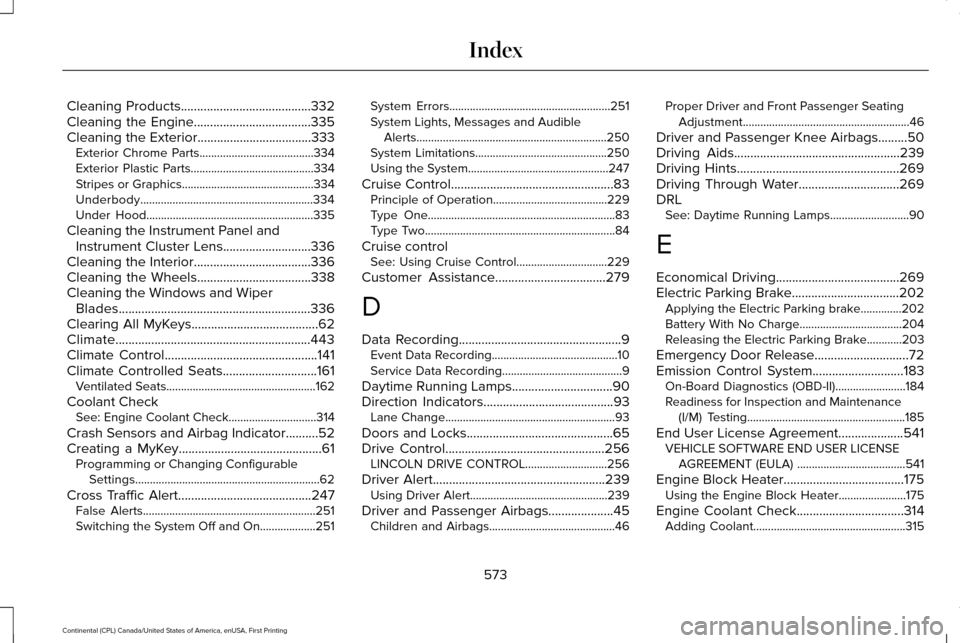
Cleaning Products........................................332
Cleaning the Engine....................................335
Cleaning the Exterior...................................333
Exterior Chrome Parts.......................................334
Exterior Plastic Parts..........................................334
Stripes or Graphics.............................................334
Underbody...........................................................334
Under Hood.........................................................335
Cleaning the Instrument Panel and Instrument Cluster Lens...........................336
Cleaning the Interior....................................336
Cleaning the Wheels...................................338
Cleaning the Windows and Wiper Blades...........................................................336
Clearing All MyKeys
.......................................62
Climate............................................................443
Climate Control
...............................................141
Climate Controlled Seats.............................161
Ventilated Seats...................................................162
Coolant Check See: Engine Coolant Check..............................314
Crash Sensors and Airbag Indicator
..........52
Creating a MyKey............................................61 Programming or Changing Configurable
Settings...............................................................62
Cross Traffic Alert
.........................................247
False Alerts...........................................................251
Switching the System Off and On...................251 System Errors.......................................................251
System Lights, Messages and Audible
Alerts.................................................................250
System Limitations.............................................250
Using the System................................................247
Cruise Control..................................................83 Principle of Operation.......................................229
Type One................................................................83
Type Two.................................................................84
Cruise control See: Using Cruise Control...............................
229
Customer Assistance..................................279
D
Data Recording
..................................................9
Event Data Recording...........................................10
Service Data Recording.........................................9
Daytime Running Lamps...............................90
Direction Indicators
........................................93
Lane Change..........................................................93
Doors and Locks.............................................65
Drive Control
.................................................256
LINCOLN DRIVE CONTROL............................256
Driver Alert.....................................................239 Using Driver Alert...............................................239
Driver and Passenger Airbags....................45 Children and Airbags...........................................46 Proper Driver and Front Passenger Seating
Adjustment.........................................................46
Driver and Passenger Knee Airbags.........50
Driving Aids
...................................................239
Driving Hints..................................................269
Driving Through Water...............................269
DRL See: Daytime Running Lamps...........................90
E
Economical Driving
......................................269
Electric Parking Brake.................................202 Applying the Electric Parking brake..............202
Battery With No Charge...................................204
Releasing the Electric Parking Brake............203
Emergency Door Release.............................72
Emission Control System
............................183
On-Board Diagnostics (OBD-II)........................184
Readiness for Inspection and Maintenance
(I/M) Testing......................................................185
End User License Agreement
....................541
VEHICLE SOFTWARE END USER LICENSE
AGREEMENT (EULA) .....................................541
Engine Block Heater
.....................................175
Using the Engine Block Heater.......................175
Engine Coolant Check.................................314 Adding Coolant....................................................315
573
Continental (CPL) Canada/United States of America, enUSA, First Printing Index