lock LINCOLN CONTINENTAL 2017 Service Manual
[x] Cancel search | Manufacturer: LINCOLN, Model Year: 2017, Model line: CONTINENTAL, Model: LINCOLN CONTINENTAL 2017Pages: 584, PDF Size: 6.13 MB
Page 108 of 584
WARNING LAMPS AND
INDICATORS
The following warning lamps and indicators
alert you to a vehicle condition that may
become serious. Some lamps illuminate
when you start your vehicle to make sure
they work. If any lamps remain on after
starting your vehicle, refer to the respective
system warning lamp for further information.
Note:
Some warning indicators appear in
the information display and function the
same as a warning lamp, but do not display
when you start your vehicle.
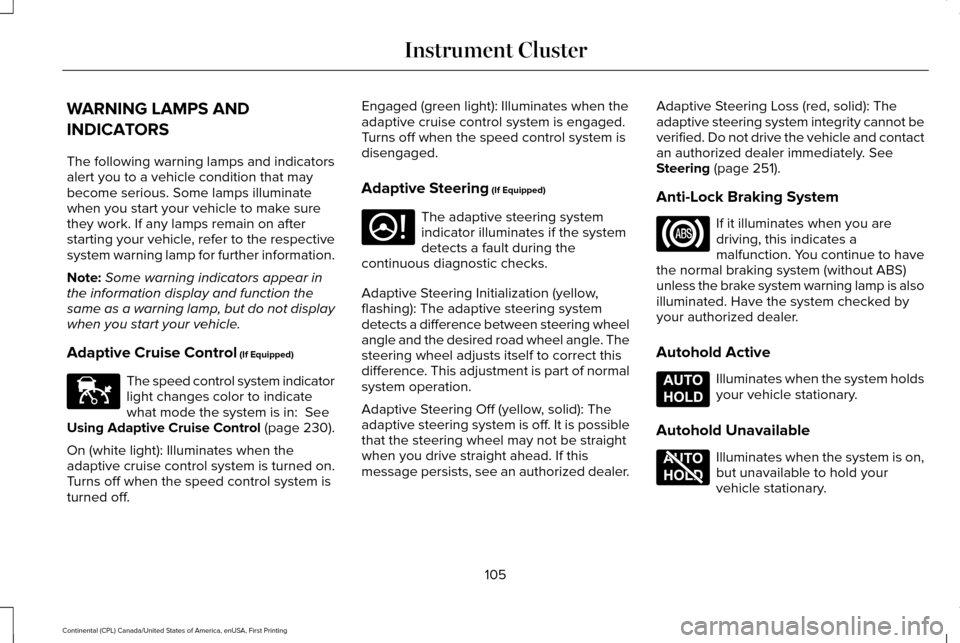
Adaptive Cruise Control (If Equipped) The speed control system indicator
light changes color to indicate
what mode the system is in:
See
Using Adaptive Cruise Control (page 230).
On (white light): Illuminates when the
adaptive cruise control system is turned on.
Turns off when the speed control system is
turned off. Engaged (green light): Illuminates when the
adaptive cruise control system is engaged.
Turns off when the speed control system is
disengaged.
Adaptive Steering
(If Equipped)
The adaptive steering system
indicator illuminates if the system
detects a fault during the
continuous diagnostic checks.
Adaptive Steering Initialization (yellow,
flashing): The adaptive steering system
detects a difference between steering wheel
angle and the desired road wheel angle. The
steering wheel adjusts itself to correct this
difference. This adjustment is part of normal
system operation.
Adaptive Steering Off (yellow, solid): The
adaptive steering system is off. It is possible
that the steering wheel may not be straight
when you drive straight ahead. If this
message persists, see an authorized dealer. Adaptive Steering Loss (red, solid): The
adaptive steering system integrity cannot be
verified. Do not drive the vehicle and contact
an authorized dealer immediately.
See
Steering (page 251).
Anti-Lock Braking System If it illuminates when you are
driving, this indicates a
malfunction. You continue to have
the normal braking system (without ABS)
unless the brake system warning lamp is also
illuminated. Have the system checked by
your authorized dealer.
Autohold Active Illuminates when the system holds
your vehicle stationary.
Autohold Unavailable Illuminates when the system is on,
but unavailable to hold your
vehicle stationary.
105
Continental (CPL) Canada/United States of America, enUSA, First Printing Instrument ClusterE144524 E223375 E197933 E197934
Page 116 of 584
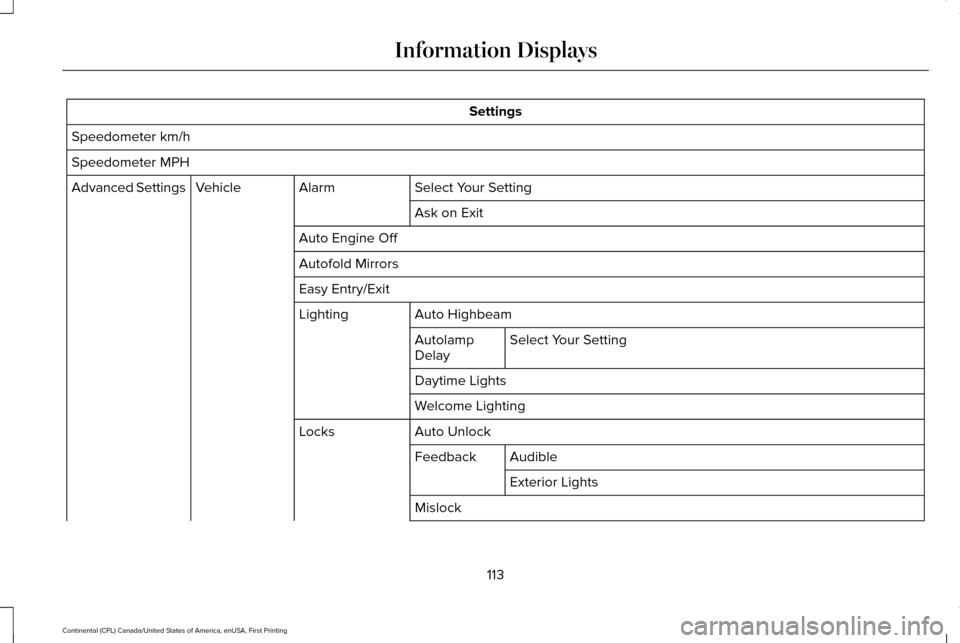
Settings
Speedometer km/h
Speedometer MPH Select Your Setting
Alarm
Vehicle
Advanced Settings
Ask on Exit
Auto Engine Off
Autofold Mirrors
Easy Entry/Exit Auto Highbeam
Lighting
Select Your Setting
Autolamp
Delay
Daytime Lights
Welcome Lighting
Auto Unlock
Locks
Audible
Feedback
Exterior Lights
Mislock
113
Continental (CPL) Canada/United States of America, enUSA, First Printing Information Displays
Page 117 of 584
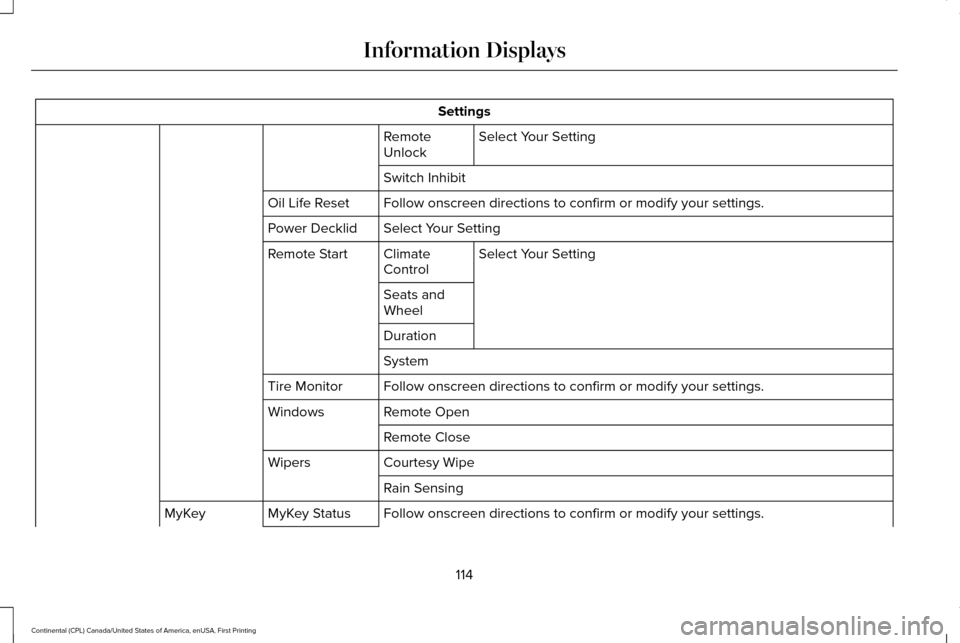
Settings
Select Your Setting
Remote
Unlock
Switch Inhibit
Follow onscreen directions to confirm or modify your settings.
Oil Life Reset
Select Your Setting
Power Decklid
Select Your Setting
Climate
Control
Remote Start
Seats and
Wheel
Duration
System
Follow onscreen directions to confirm or modify your settings.
Tire Monitor
Remote Open
Windows
Remote Close
Courtesy Wipe
Wipers
Rain Sensing
Follow onscreen directions to confirm or modify your settings.
MyKey Status
MyKey
114
Continental (CPL) Canada/United States of America, enUSA, First Printing Information Displays
Page 122 of 584
.
Adaptive Cruise Malfunction
Front Sensor No")
Adaptive Cruise Control
Action
Message
A radar malfunction is preventing the adaptive cruise from engaging. Se\
e Using Adaptive Cruise Control (page 230).
Adaptive Cruise Malfunction
Front Sensor Not Aligned Conditions exist such that the adaptive cruise cannot function properly.
See Using Adaptive
Cruise Control (page 230).
Adaptive Cruise Not Available
The radar is blocked because of poor radar visibility due to bad weather or ice/mud/water \
infront of radar. Driver can typically clean the sensor to resolve.
See Using Adaptive Cruise
Control (page 230).
Adaptive Cruise Not Available Sensor
Blocked See Manual
Displayed when the automatic braking has been disabled.
Normal Cruise Active Automatic Braking
Turned Off
Displayed when the adaptive cruise has reinstated controls to the driver\
.
Adaptive Cruise - Driver Resume Control
Displays when the vehicle speed is too slow to activate the adaptive cru\
ise.
Adaptive Cruise Speed Too Low to
Activate
Adaptive Headlamps Action
Message
Displays when a fault with the system has occurred. Contact an authorize\
d dealer as soon as possible.
Check Headlamp System See Manual
119
Continental (CPL) Canada/United States of America, enUSA, First Printing Information Displays
Page 123 of 584

Adaptive Steering
Action
Message
The adaptive steering system detects a difference between steering wheel\
angle and the desired
road wheel angle. The steering wheel adjusts itself to correct this difference. This adjustment is part of normal system operation.
Adaptive Steering Initialization
The adaptive steering system is off. It is possible that the steering wheel may not be straight
when you drive the vehicle straight ahead. If this message persists, see\
an authorized dealer.
Adaptive Steering Fault Service Required
The adaptive steering system integrity cannot be verified. Do not drive \
the vehicle and contactan authorized dealer immediately.
Adaptive Steering Loss Do Not Drive
Airbag Action
Message
Objects are by the passenger seat. After the objects are moved away from\
the seat, if the warningstays on or continues to come on contact an authorized dealer as soon as\
possible.
Occupant Sensor BLOCKED Remove
Objects Near Passenger Seat
Alarm Action
Message
The alarm has been triggered due to unauthorized entry. See Anti-Theft Alarm (page 81).
Vehicle Alarm To Stop Alarm, Start Vehicle.
120
Continental (CPL) Canada/United States of America, enUSA, First Printing Information Displays
Page 127 of 584

Blind Spot Information and Cross Traffic Alert System
Action
Message
A fault with the system has occurred. Contact an authorized dealer as so\
on as possible.
Blindspot System Fault
The system sensors are blocked. Contact an authorized dealer as soon as possible. See Blind
Spot Information System (page 245).
Blindspot Not Available Sensor Blocked
See Manual
The system detects a vehicle.
See Blind Spot Information System (page 245).
Vehicle Coming From X
The blind spot information system and cross traffic alert system sensors\
are blocked. See BlindSpot Information System
(page 245).
Cross Traffic Not Available Sensor Blocked
See Manual
A fault with the system has occurred. Contact an authorized dealer as so\
on as possible.
Cross Traffic System Fault
Doors and Locks Action
Message
The door listed is not completely closed.
X Door Ajar
The luggage compartment is not completely closed.
Trunk Ajar
The driver’s door is opened, your vehicle is in park and the engine is on.
Engine ON
Displays when the hood is not completely closed.
Hood Ajar
Displays when the door switches have been disabled.
Switches Inhibited Security Mode
124
Continental (CPL) Canada/United States of America, enUSA, First Printing Information Displays
Page 128 of 584

Action
Message
There is a system malfunction with the child locks. Contact an authorize\
d dealer as soon as possible.
Child Lock Malfunction Service Required
Indicates that the rear seat interior door release switches and power wi\
ndows are switched off,preventing rear seat occupants from opening the doors or windows.
Child Lock ON
Indicates that the rear seat interior door release switches and power wi\
ndows are switched on.
Child Lock OFF
Displays when the door lock turns off.
Door Unlocked
Displays when the door lock is turned on and you attempt to open the doo\
r.
Doors Locked Unlock Before Opening
Indicates a driver door fault that requires manually opening the door by\
the override lever.Contact an authorized dealer.
Driver Door Fault Use Inside Override
Lever In Map Pocket
Indicates a fault with the electronic door system. Contact an authorized\
dealer.
Door Fault Service Required
Displays the factory keypad code after the keypad has been reset. See Keyless Entry (page
75).
Factory Keypad Code {X X X X X}
Driver Alert Action
Message
Stop and rest as soon as it is safe to do so.
Driver Alert Warning Rest Now
Take a rest soon.
Driver Alert Warning Rest Suggested
125
Continental (CPL) Canada/United States of America, enUSA, First Printing Information Displays
Page 136 of 584
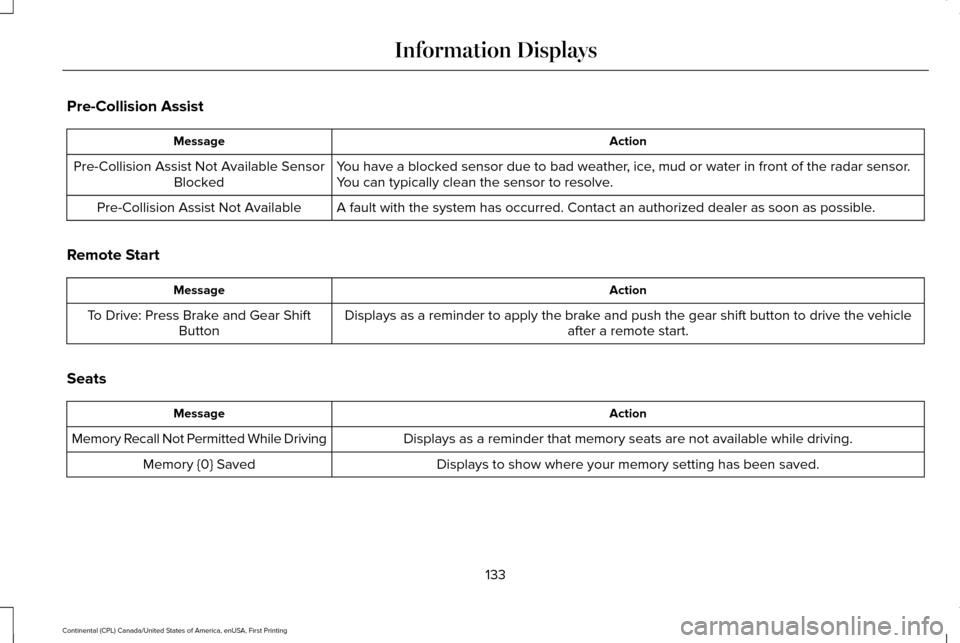
Pre-Collision Assist
Action
Message
You have a blocked sensor due to bad weather, ice, mud or water in front of the radar sensor.
You can typically clean the sensor to resolve.
Pre-Collision Assist Not Available Sensor
Blocked
A fault with the system has occurred. Contact an authorized dealer as so\
on as possible.
Pre-Collision Assist Not Available
Remote Start Action
Message
Displays as a reminder to apply the brake and push the gear shift button to drive the vehicle after a remote start.
To Drive: Press Brake and Gear Shift
Button
Seats Action
Message
Displays as a reminder that memory seats are not available while driving\
.
Memory Recall Not Permitted While Driving
Displays to show where your memory setting has been saved.
Memory {0} Saved
133
Continental (CPL) Canada/United States of America, enUSA, First Printing Information Displays
Page 143 of 584
Maintaining Your Head Up Display
•
Do not place objects onto the transparent
cover, as they may block you from seeing
portions of the image. These objects
could also damage the cover and affect
the quality of the projected image.
• The system uses a special windshield
designed to provide the optimum image
quality. You must replace the windshield
in a vehicle with this system with a
certified original equipment
manufactured (OEM) head up display
windshield. Replacing this system's
windshield with a non-head up display
windshield causes a double image or
distorted image. Have an authorized
dealer or authorized repair facility replace
the windshield.
• Direct light from oncoming headlamps or
a sunrise or sunset can affect the driver's
ability to see the HUD image.
• Clean the windshield often for optimal
HUD performance. See Cleaning the
Instrument Panel and Instrument
Cluster Lens
(page 336).
140
Continental (CPL) Canada/United States of America, enUSA, First Printing Information Displays
Page 149 of 584

Temperature control: Controls the temperature of the air circulated in the rear of your vehi\
cle. Turn to increase or decrease the
temperature.
E
Ventilated seats:
Press to switch the ventilated seats on and off. See Seats (page 148).
F
Power:
Press to switch the rear system on and off.
G
Note:
The rear climate system turns off automatically whenever max defrost is\
switched on, and turns back on when max defrost
is switched off. You can manually switch on the rear system with max defrost on.
Rear control lock:
When illuminated, you can only operate the rear passenger settings thro\
ugh the front controls.
H
Note:
The indicator briefly illuminates if you try to use the rear climate sy\
stem when the controls are locked.
HEATED WINDOWS AND MIRRORS
Note: Make sure the engine is running
before operating the heated windows.
Note: Depending on your remote start
settings, the heated windows, mirrors and
wipers may remain on after remote starting
the vehicle. Heated Rear Window Press the button to clear the
heated rear window of thin ice and
fog. The heated rear window will
automatically turn off after a short period of
time. Press the button again to switch it off.
Note: An indicator on the button illuminates
when active.
Note: Do not use razor blades or other
sharp objects to clean or remove decals from
the inside of the heated rear window. The
vehicle warranty does not cover damage
caused to the heated rear window grid lines. Heated Exterior Mirrors
(If Equipped)
When you switch the heated rear window
on, the heated exterior mirrors will
automatically turn on.
Note: Do not remove ice from the mirrors
with a scraper or adjust the mirror glass
when it is frozen in place.
Note: Do not clean the mirror housing or
glass with harsh abrasives, fuel or other
petroleum-based cleaning products.
146
Continental (CPL) Canada/United States of America, enUSA, First Printing Climate ControlE184884