fuel LINCOLN CONTINENTAL 2018 User Guide
[x] Cancel search | Manufacturer: LINCOLN, Model Year: 2018, Model line: CONTINENTAL, Model: LINCOLN CONTINENTAL 2018Pages: 615, PDF Size: 5.31 MB
Page 113 of 615
Left/Right Information Group
Information that appears in the left and rightinformation group varies depending oncurrent gauge, on-demand and HUD (ifequipped) settings. See GeneralInformation (page 115).
Fuel Gauge
The fuel gauge indicates about how muchfuel is in the fuel tank.
The arrow adjacent to the fuel pump symbolindicates on which side of your vehicle thefuel filler door is located.
Note:The fuel gauge may vary slightly whenyour vehicle is moving or on a slope.
Low Fuel Reminder
A low fuel level reminder displays andsounds when the distance to empty reaches75 mi (120 km) for MyKey, and at 50 mi(80 km), 25 mi (40 km), 10 mi (20 km) and0 mi (0 km) for all vehicle keys.
Note:The low fuel reminder can appear atdifferent fuel gauge positions depending onfuel economy conditions. This variation isnormal.
WARNING LAMPS AND
INDICATORS
The following warning lamps and indicatorsalert you to a vehicle condition that maybecome serious. Some lamps illuminatewhen you start your vehicle to make surethey work. If any lamps remain on afterstarting your vehicle, refer to the respectivesystem warning lamp for further information.
Note:Some warning indicators appear inthe information display and function thesame as a warning lamp, but do not displaywhen you start your vehicle.
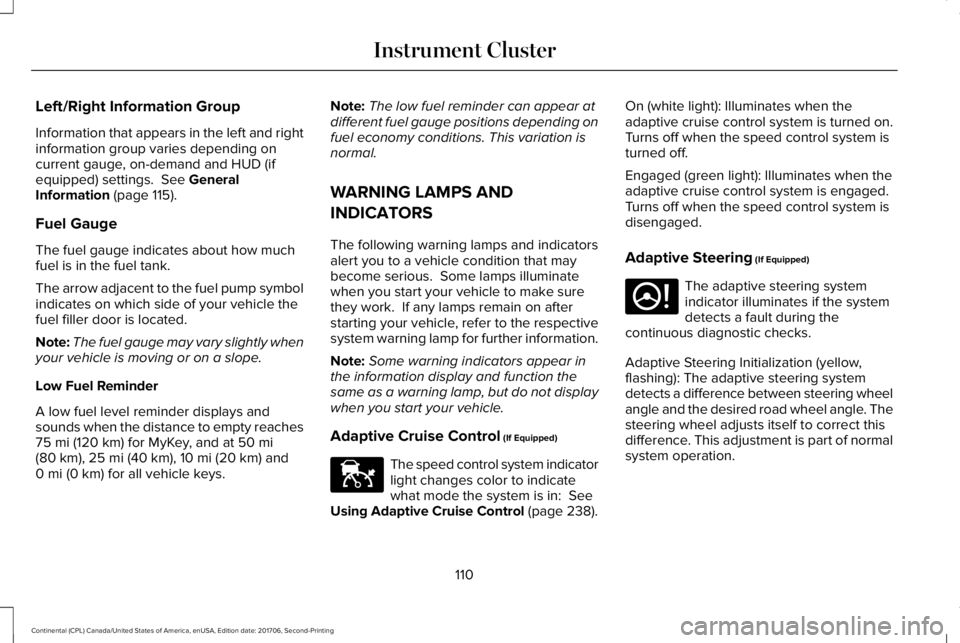
Adaptive Cruise Control (If Equipped)
The speed control system indicatorlight changes color to indicatewhat mode the system is in: SeeUsing Adaptive Cruise Control (page 238).
On (white light): Illuminates when theadaptive cruise control system is turned on.Turns off when the speed control system isturned off.
Engaged (green light): Illuminates when theadaptive cruise control system is engaged.Turns off when the speed control system isdisengaged.
Adaptive Steering (If Equipped)
The adaptive steering systemindicator illuminates if the systemdetects a fault during thecontinuous diagnostic checks.
Adaptive Steering Initialization (yellow,flashing): The adaptive steering systemdetects a difference between steering wheelangle and the desired road wheel angle. Thesteering wheel adjusts itself to correct thisdifference. This adjustment is part of normalsystem operation.
110
Continental (CPL) Canada/United States of America, enUSA, Edition date: 201706, Second-Printing
Instrument ClusterE144524 E223375
Page 116 of 615
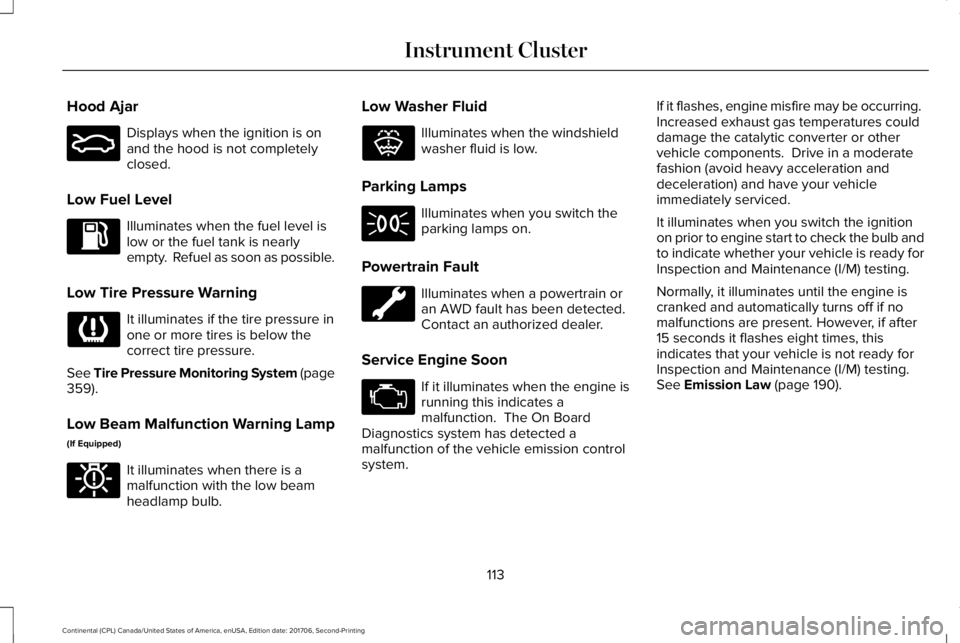
Hood Ajar
Displays when the ignition is onand the hood is not completelyclosed.
Low Fuel Level
Illuminates when the fuel level islow or the fuel tank is nearlyempty. Refuel as soon as possible.
Low Tire Pressure Warning
It illuminates if the tire pressure inone or more tires is below thecorrect tire pressure.
See Tire Pressure Monitoring System (page359).
Low Beam Malfunction Warning Lamp
(If Equipped)
It illuminates when there is amalfunction with the low beamheadlamp bulb.
Low Washer Fluid
Illuminates when the windshieldwasher fluid is low.
Parking Lamps
Illuminates when you switch theparking lamps on.
Powertrain Fault
Illuminates when a powertrain oran AWD fault has been detected. Contact an authorized dealer.
Service Engine Soon
If it illuminates when the engine isrunning this indicates amalfunction. The On BoardDiagnostics system has detected amalfunction of the vehicle emission controlsystem.
If it flashes, engine misfire may be occurring. Increased exhaust gas temperatures coulddamage the catalytic converter or othervehicle components. Drive in a moderatefashion (avoid heavy acceleration anddeceleration) and have your vehicleimmediately serviced.
It illuminates when you switch the ignitionon prior to engine start to check the bulb andto indicate whether your vehicle is ready forInspection and Maintenance (I/M) testing.
Normally, it illuminates until the engine iscranked and automatically turns off if nomalfunctions are present. However, if after15 seconds it flashes eight times, thisindicates that your vehicle is not ready forInspection and Maintenance (I/M) testing.See Emission Law (page 190).
113
Continental (CPL) Canada/United States of America, enUSA, Edition date: 201706, Second-Printing
Instrument ClusterE159324 E181350 E132353
Page 120 of 615
Settings
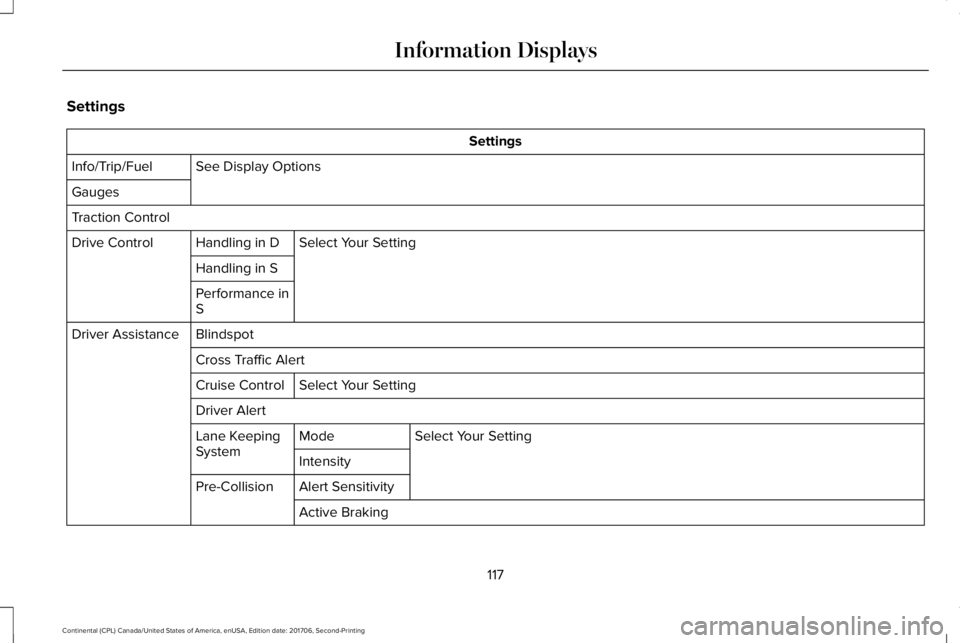
Settings
See Display OptionsInfo/Trip/Fuel
Gauges
Traction Control
Select Your SettingHandling in DDrive Control
Handling in S
Performance inS
BlindspotDriver Assistance
Cross Traffic Alert
Select Your SettingCruise Control
Driver Alert
Select Your SettingModeLane KeepingSystemIntensity
Alert SensitivityPre-Collision
Active Braking
117
Continental (CPL) Canada/United States of America, enUSA, Edition date: 201706, Second-Printing
Information Displays
Page 123 of 615
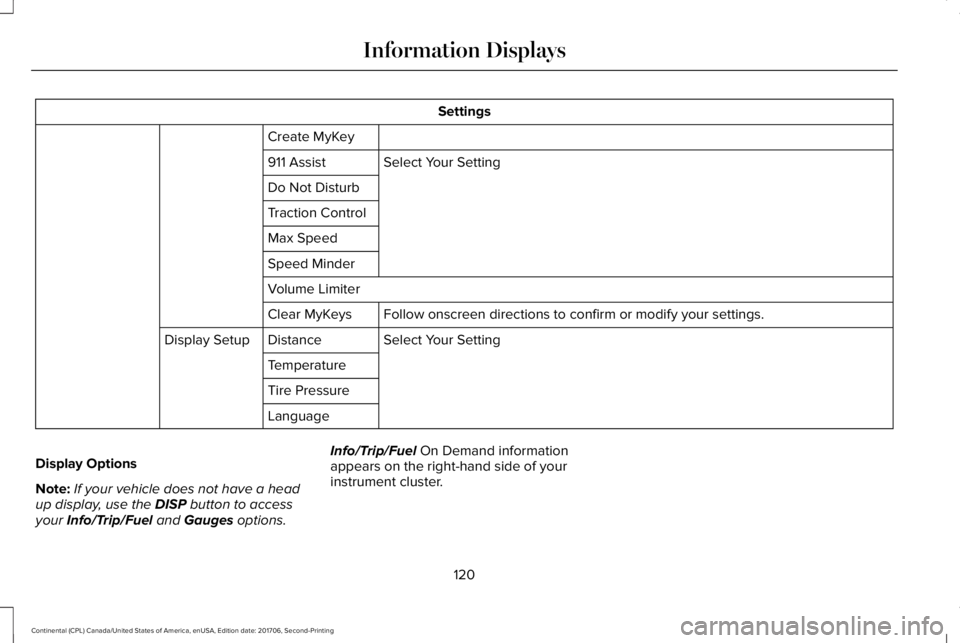
Settings
Create MyKey
Select Your Setting911 Assist
Do Not Disturb
Traction Control
Max Speed
Speed Minder
Volume Limiter
Follow onscreen directions to confirm or modify your settings.Clear MyKeys
Select Your SettingDistanceDisplay Setup
Temperature
Tire Pressure
Language
Display Options
Note:If your vehicle does not have a headup display, use the DISP button to accessyour Info/Trip/Fuel and Gauges options.
Info/Trip/Fuel On Demand informationappears on the right-hand side of yourinstrument cluster.
120
Continental (CPL) Canada/United States of America, enUSA, Edition date: 201706, Second-Printing
Information Displays
Page 124 of 615
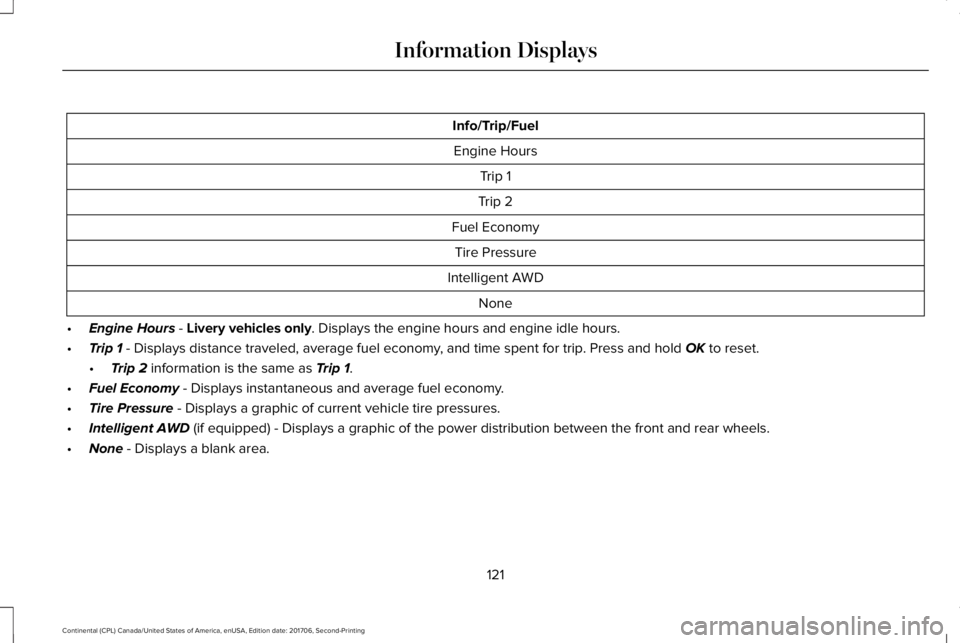
Info/Trip/Fuel
Engine Hours
Trip 1
Trip 2
Fuel Economy
Tire Pressure
Intelligent AWD
None
•Engine Hours - Livery vehicles only. Displays the engine hours and engine idle hours.
•Trip 1 - Displays distance traveled, average fuel economy, and time spent for trip. Press and hold OK to reset.
•Trip 2 information is the same as Trip 1.
•Fuel Economy - Displays instantaneous and average fuel economy.
•Tire Pressure - Displays a graphic of current vehicle tire pressures.
•Intelligent AWD (if equipped) - Displays a graphic of the power distribution between the front and rear wheels.
•None - Displays a blank area.
121
Continental (CPL) Canada/United States of America, enUSA, Edition date: 201706, Second-Printing
Information Displays
Page 125 of 615
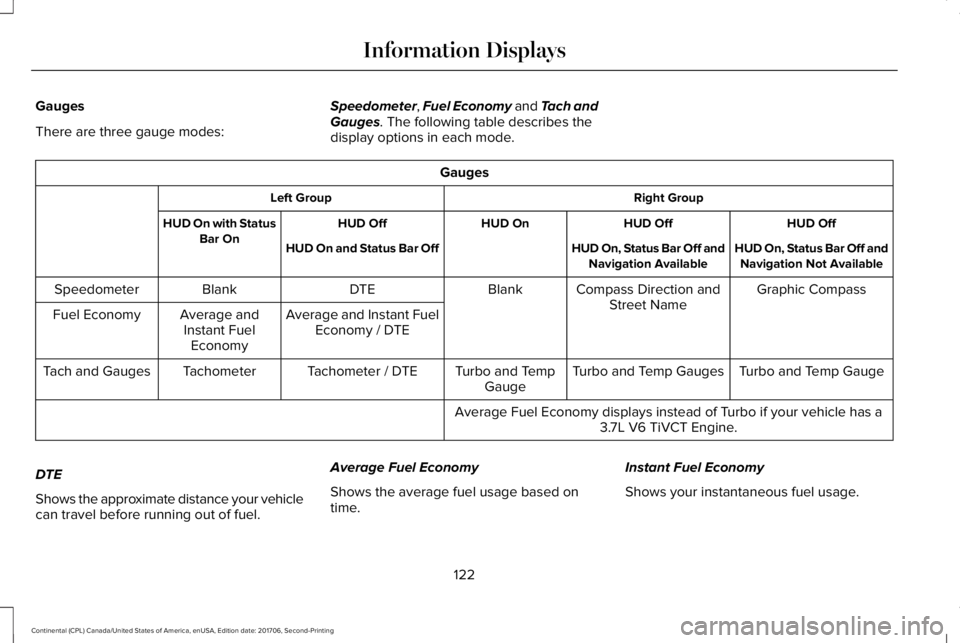
Gauges
There are three gauge modes:
Speedometer, Fuel Economy and Tach andGauges. The following table describes thedisplay options in each mode.
Gauges
Right GroupLeft Group
HUD OffHUD OffHUD OnHUD OffHUD On with StatusBar OnHUD On, Status Bar Off andNavigation Not AvailableHUD On, Status Bar Off andNavigation AvailableHUD On and Status Bar Off
Graphic CompassCompass Direction andStreet NameBlankDTEBlankSpeedometer
Average and Instant FuelEconomy / DTEAverage andInstant FuelEconomy
Fuel Economy
Turbo and Temp GaugeTurbo and Temp GaugesTurbo and TempGaugeTachometer / DTETachometerTach and Gauges
Average Fuel Economy displays instead of Turbo if your vehicle has a3.7L V6 TiVCT Engine.
DTE
Shows the approximate distance your vehiclecan travel before running out of fuel.
Average Fuel Economy
Shows the average fuel usage based ontime.
Instant Fuel Economy
Shows your instantaneous fuel usage.
122
Continental (CPL) Canada/United States of America, enUSA, Edition date: 201706, Second-Printing
Information Displays
Page 129 of 615
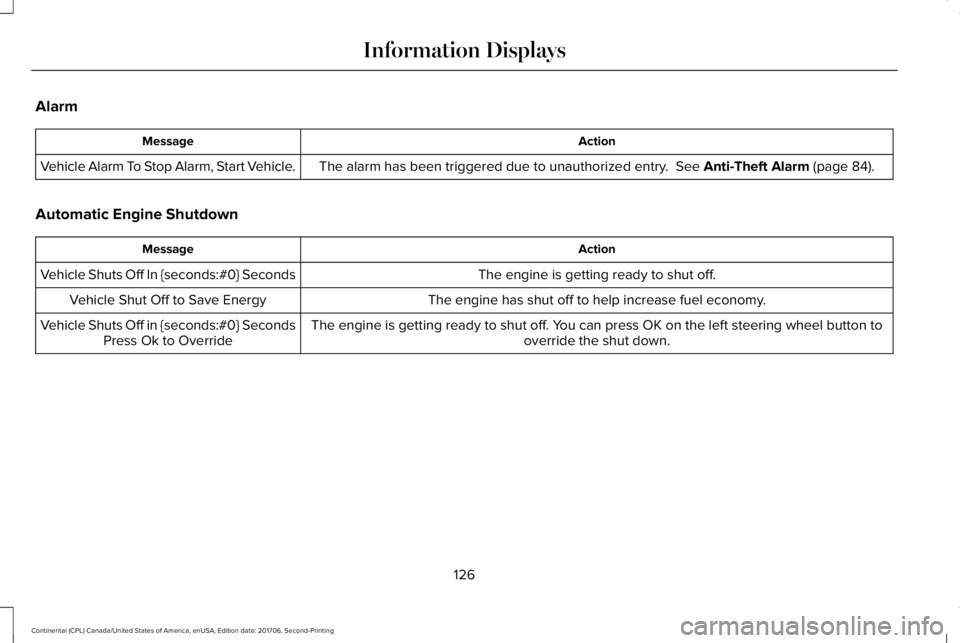
Alarm
ActionMessage
The alarm has been triggered due to unauthorized entry. See Anti-Theft Alarm (page 84).Vehicle Alarm To Stop Alarm, Start Vehicle.
Automatic Engine Shutdown
ActionMessage
The engine is getting ready to shut off.Vehicle Shuts Off In {seconds:#0} Seconds
The engine has shut off to help increase fuel economy.Vehicle Shut Off to Save Energy
The engine is getting ready to shut off. You can press OK on the left steering wheel button tooverride the shut down.Vehicle Shuts Off in {seconds:#0} SecondsPress Ok to Override
126
Continental (CPL) Canada/United States of America, enUSA, Edition date: 201706, Second-Printing
Information Displays
Page 134 of 615
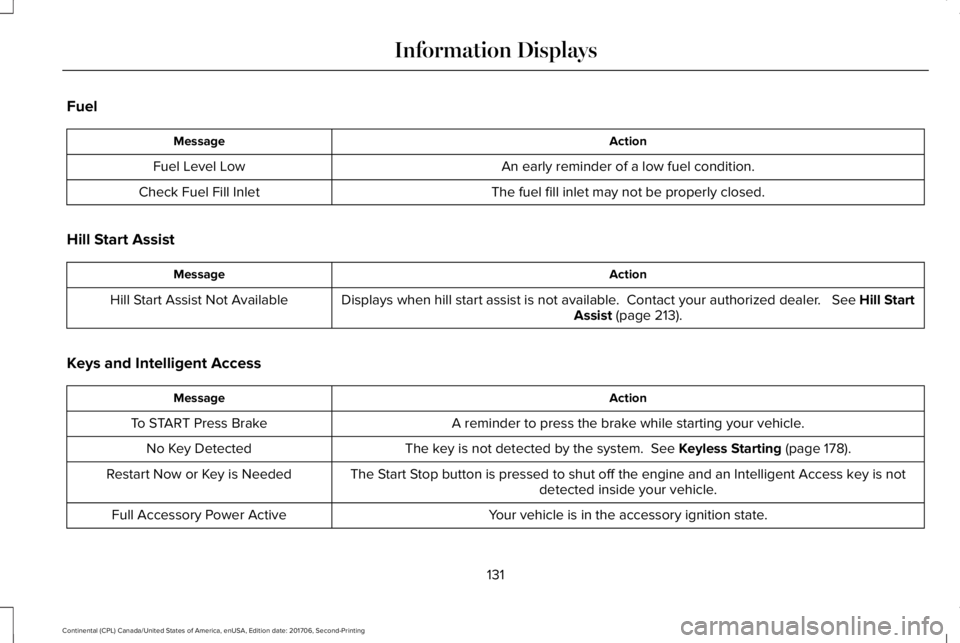
Fuel
ActionMessage
An early reminder of a low fuel condition.Fuel Level Low
The fuel fill inlet may not be properly closed.Check Fuel Fill Inlet
Hill Start Assist
ActionMessage
Displays when hill start assist is not available. Contact your authorized dealer. See Hill StartAssist (page 213).Hill Start Assist Not Available
Keys and Intelligent Access
ActionMessage
A reminder to press the brake while starting your vehicle.To START Press Brake
The key is not detected by the system. See Keyless Starting (page 178).No Key Detected
The Start Stop button is pressed to shut off the engine and an Intelligent Access key is notdetected inside your vehicle.Restart Now or Key is Needed
Your vehicle is in the accessory ignition state.Full Accessory Power Active
131
Continental (CPL) Canada/United States of America, enUSA, Edition date: 201706, Second-Printing
Information Displays
Page 146 of 615
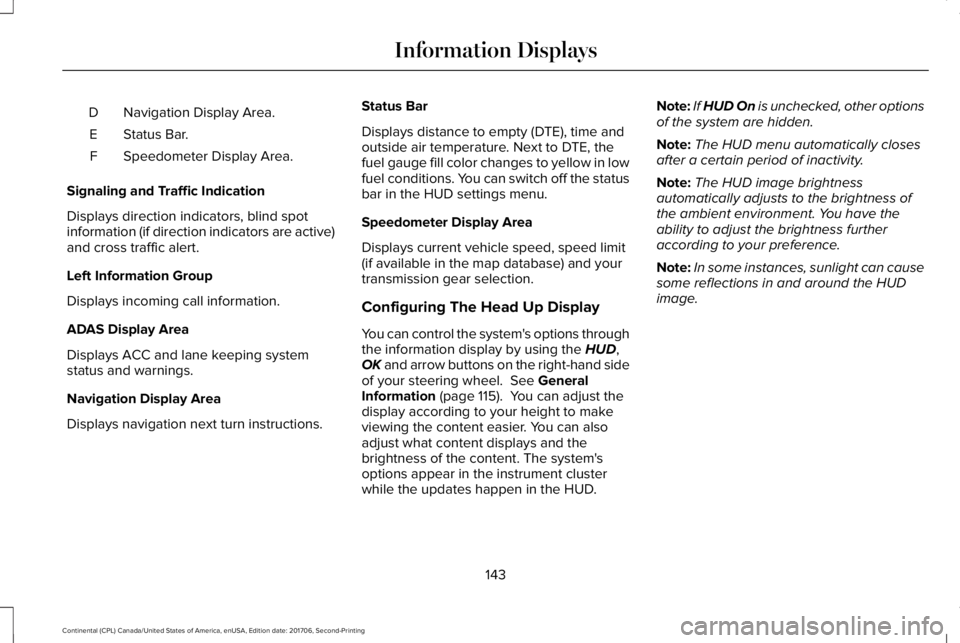
Navigation Display Area.D
Status Bar.E
Speedometer Display Area.F
Signaling and Traffic Indication
Displays direction indicators, blind spotinformation (if direction indicators are active)and cross traffic alert.
Left Information Group
Displays incoming call information.
ADAS Display Area
Displays ACC and lane keeping systemstatus and warnings.
Navigation Display Area
Displays navigation next turn instructions.
Status Bar
Displays distance to empty (DTE), time andoutside air temperature. Next to DTE, thefuel gauge fill color changes to yellow in lowfuel conditions. You can switch off the statusbar in the HUD settings menu.
Speedometer Display Area
Displays current vehicle speed, speed limit(if available in the map database) and yourtransmission gear selection.
Configuring The Head Up Display
You can control the system's options throughthe information display by using the HUD,OK and arrow buttons on the right-hand sideof your steering wheel. See GeneralInformation (page 115). You can adjust thedisplay according to your height to makeviewing the content easier. You can alsoadjust what content displays and thebrightness of the content. The system'soptions appear in the instrument clusterwhile the updates happen in the HUD.
Note:If HUD On is unchecked, other optionsof the system are hidden.
Note:The HUD menu automatically closesafter a certain period of inactivity.
Note:The HUD image brightnessautomatically adjusts to the brightness ofthe ambient environment. You have theability to adjust the brightness furtheraccording to your preference.
Note:In some instances, sunlight can causesome reflections in and around the HUDimage.
143
Continental (CPL) Canada/United States of America, enUSA, Edition date: 201706, Second-Printing
Information Displays
Page 154 of 615
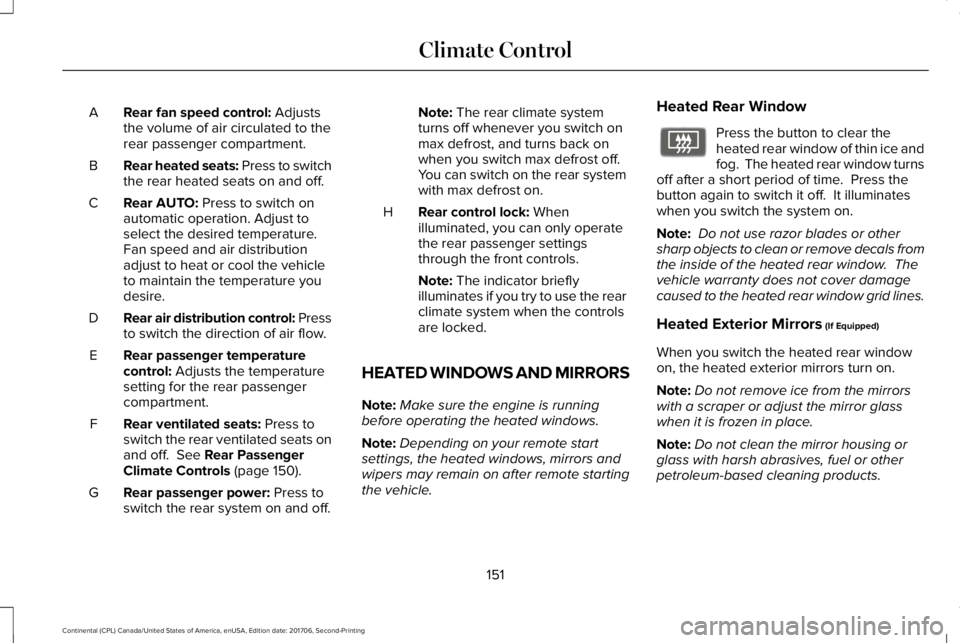
Rear fan speed control: Adjuststhe volume of air circulated to therear passenger compartment.
A
Rear heated seats: Press to switchthe rear heated seats on and off.B
Rear AUTO: Press to switch onautomatic operation. Adjust toselect the desired temperature.Fan speed and air distributionadjust to heat or cool the vehicleto maintain the temperature youdesire.
C
Rear air distribution control: Pressto switch the direction of air flow.D
Rear passenger temperaturecontrol: Adjusts the temperaturesetting for the rear passengercompartment.
E
Rear ventilated seats: Press toswitch the rear ventilated seats onand off. See Rear PassengerClimate Controls (page 150).
F
Rear passenger power: Press toswitch the rear system on and off.G
Note: The rear climate systemturns off whenever you switch onmax defrost, and turns back onwhen you switch max defrost off.You can switch on the rear systemwith max defrost on.
Rear control lock: Whenilluminated, you can only operatethe rear passenger settingsthrough the front controls.
H
Note: The indicator brieflyilluminates if you try to use the rearclimate system when the controlsare locked.
HEATED WINDOWS AND MIRRORS
Note:Make sure the engine is runningbefore operating the heated windows.
Note:Depending on your remote startsettings, the heated windows, mirrors andwipers may remain on after remote startingthe vehicle.
Heated Rear Window
Press the button to clear theheated rear window of thin ice andfog. The heated rear window turnsoff after a short period of time. Press thebutton again to switch it off. It illuminateswhen you switch the system on.
Note: Do not use razor blades or othersharp objects to clean or remove decals fromthe inside of the heated rear window. Thevehicle warranty does not cover damagecaused to the heated rear window grid lines.
Heated Exterior Mirrors (If Equipped)
When you switch the heated rear windowon, the heated exterior mirrors turn on.
Note:Do not remove ice from the mirrorswith a scraper or adjust the mirror glasswhen it is frozen in place.
Note:Do not clean the mirror housing orglass with harsh abrasives, fuel or otherpetroleum-based cleaning products.
151
Continental (CPL) Canada/United States of America, enUSA, Edition date: 201706, Second-Printing
Climate ControlE72507