suspension LINCOLN CONTINENTAL 2018 Owners Manual
[x] Cancel search | Manufacturer: LINCOLN, Model Year: 2018, Model line: CONTINENTAL, Model: LINCOLN CONTINENTAL 2018Pages: 615, PDF Size: 5.31 MB
Page 210 of 615
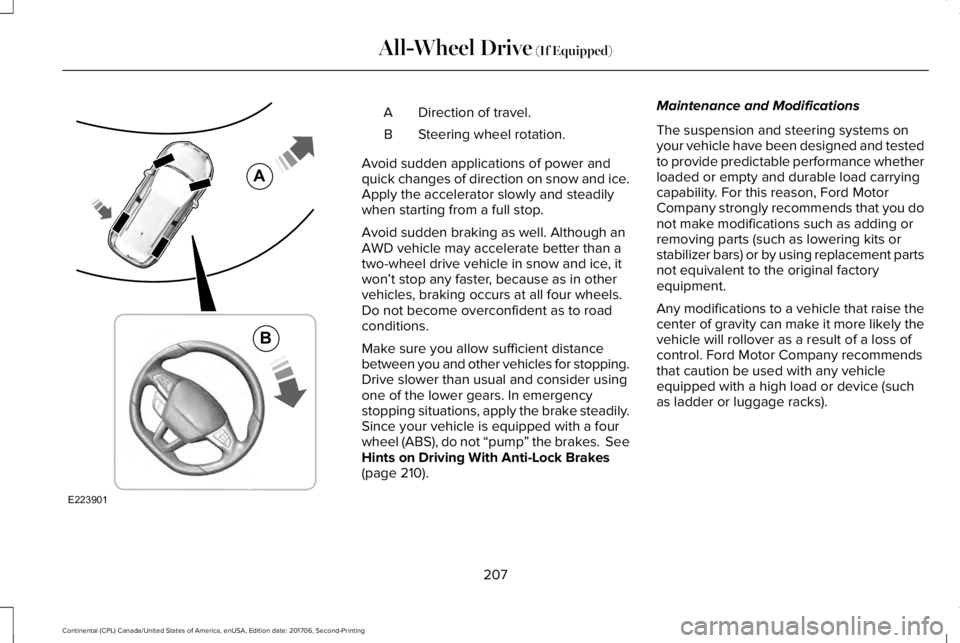
Direction of travel.A
Steering wheel rotation.B
Avoid sudden applications of power andquick changes of direction on snow and ice.Apply the accelerator slowly and steadilywhen starting from a full stop.
Avoid sudden braking as well. Although anAWD vehicle may accelerate better than atwo-wheel drive vehicle in snow and ice, itwon’t stop any faster, because as in othervehicles, braking occurs at all four wheels.Do not become overconfident as to roadconditions.
Make sure you allow sufficient distancebetween you and other vehicles for stopping.Drive slower than usual and consider usingone of the lower gears. In emergencystopping situations, apply the brake steadily.Since your vehicle is equipped with a fourwheel (ABS), do not “pump” the brakes. SeeHints on Driving With Anti-Lock Brakes(page 210).
Maintenance and Modifications
The suspension and steering systems onyour vehicle have been designed and testedto provide predictable performance whetherloaded or empty and durable load carryingcapability. For this reason, Ford MotorCompany strongly recommends that you donot make modifications such as adding orremoving parts (such as lowering kits orstabilizer bars) or by using replacement partsnot equivalent to the original factoryequipment.
Any modifications to a vehicle that raise thecenter of gravity can make it more likely thevehicle will rollover as a result of a loss ofcontrol. Ford Motor Company recommendsthat caution be used with any vehicleequipped with a high load or device (suchas ladder or luggage racks).
207
Continental (CPL) Canada/United States of America, enUSA, Edition date: 201706, Second-Printing
All-Wheel Drive (If Equipped)E223901
A
B
Page 220 of 615
PRINCIPLE OF OPERATION
WARNING: Vehicle modificationsinvolving braking system, aftermarket roofracks, suspension, steering system, tireconstruction and wheel and tire size maychange the handling characteristics of yourvehicle and may adversely affect theperformance of the electronic stability controlsystem. In addition, installing any stereoloudspeakers may interfere with andadversely affect the electronic stabilitycontrol system. Install any aftermarket stereoloudspeaker as far as possible from the frontcenter console, the tunnel, and the frontseats in order to minimize the risk ofinterfering with the electronic stability controlsensors. Reducing the effectiveness of theelectronic stability control system could leadto an increased risk of loss of vehicle control,vehicle rollover, personal injury and death.
WARNING: Remember that evenadvanced technology cannot defy the lawsof physics. It’s always possible to lose controlof a vehicle due to inappropriate driver inputfor the conditions. Aggressive driving on anyroad condition can cause you to lose controlof your vehicle increasing the risk of personalinjury or property damage. Activation of theelectronic stability control system is anindication that at least some of the tires haveexceeded their ability to grip the road; thiscould reduce the operator’s ability to controlthe vehicle potentially resulting in a loss ofvehicle control, vehicle rollover, personalinjury and death. If your electronic stabilitycontrol system activates, SLOW DOWN.
The system automatically turns on each timeyou switch the ignition on.
If a fault occurs in either the stability controlor the traction control system, you mayexperience the following conditions:
•The stability and traction control lightilluminates steadily.
•The stability control and traction controlsystems do not enhance your vehicle'sability to maintain traction of the wheels.
•The adaptive steering system (ifequipped) automatically changes thesteering function to a fixed steering ratio.See Steering (page 259).
If a driving condition activates either thestability control or the traction control systemyou may experience the following conditions:
•The stability and traction control lightflashes.
•Your vehicle slows down.
•Reduced engine power.
•A vibration in the brake pedal.
•The brake pedal is stiffer than usual.
•If the driving condition is severe and yourfoot is not on the brake, the brake pedalmay move as the system applies higherbrake force.
217
Continental (CPL) Canada/United States of America, enUSA, Edition date: 201706, Second-Printing
Stability Control
Page 249 of 615
DRIVER ALERT (If Equipped)
WARNING: The system is designed toaid the driver. It is not intended to replaceyour attention and judgment. You are stillresponsible to drive with due care andattention.
WARNING: At all times, you areresponsible for controlling your vehicle,supervising the system and intervening, ifrequired. Failure to take care may result inthe loss of control of your vehicle, seriouspersonal injury or death.
WARNING: The system may notfunction if the sensor is blocked.
WARNING: Take regular rest breaks ifyou feel tired. Do not wait for the system towarn you.
WARNING: Certain driving styles mayresult in the system warning you even if youare not feeling tired.
WARNING: In cold and severe weatherconditions the system may not function. Rain,snow and spray can all limit sensorperformance.
WARNING: The system will not operateif the sensor cannot track the road lanemarkings.
WARNING: If damage occurs in theimmediate area surrounding the sensor, haveyour vehicle checked as soon as possible.
WARNING: The system may notcorrectly operate if your vehicle is fitted witha suspension kit not approved by us.
Note:Keep the windshield free fromobstructions. For example, bird droppings,insects and snow or ice.
Note:If the camera is blocked or if thewindshield is damaged, the system may notfunction.
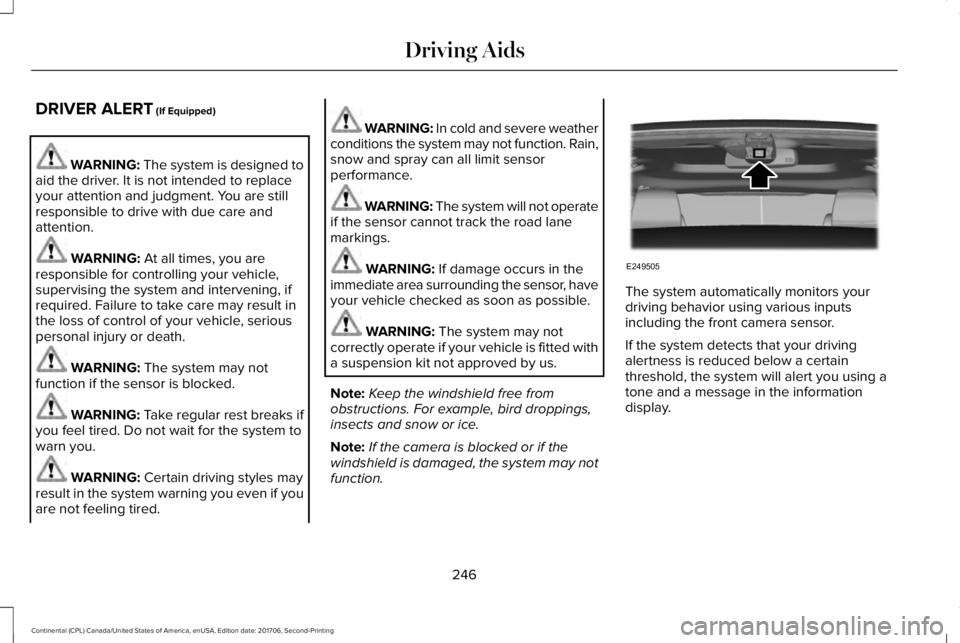
The system automatically monitors yourdriving behavior using various inputsincluding the front camera sensor.
If the system detects that your drivingalertness is reduced below a certainthreshold, the system will alert you using atone and a message in the informationdisplay.
246
Continental (CPL) Canada/United States of America, enUSA, Edition date: 201706, Second-Printing
Driving AidsE249505
Page 251 of 615
WARNING: The system may notcorrectly operate if your vehicle is fitted witha suspension kit not approved by us.
Note:The system works as long as thecamera can detect one lane marking.
Note:When aid or alert and aid modes areselected and the system detects no steeringactivity for a short period, the system alertsyou to put your hands on the steering wheel.The system may detect a light grip or touchon the steering wheel as hands off driving.
Note:The system may not function with ablocked camera, or a damaged or dirtywindshield. The system does not function ifthe operational speed of the vehicle is lessthan 40 mph (64 km/h).
When you switch the system on and itdetects an unintentional drift out of your laneis likely to occur, the system notifies orassists you to stay in your lane through thesteering system and information display. InAlert mode, the system provides a warningby vibrating the steering wheel. In Aid mode,the system provides steering assistance bygently counter steering your vehicle backinto the lane.
When the system is functioning in thecombined Alert and Aid mode, the systemfirst provides steering assistance by gentlycounter steering your vehicle back into thelane, followed by a warning by vibrating thesteering wheel if the vehicle is still out of thelane marking.
Switching the System On and Off
Note:The system on or off setting is storeduntil it is manually changed unless a MyKeyis detected. If the system detects a MyKeyit defaults to on and the mode is set to Alert.
Press the button on the direction indicatorstalk to switch the system on or off.
248
Continental (CPL) Canada/United States of America, enUSA, Edition date: 201706, Second-Printing
Driving AidsE249505 E132099
Page 255 of 615
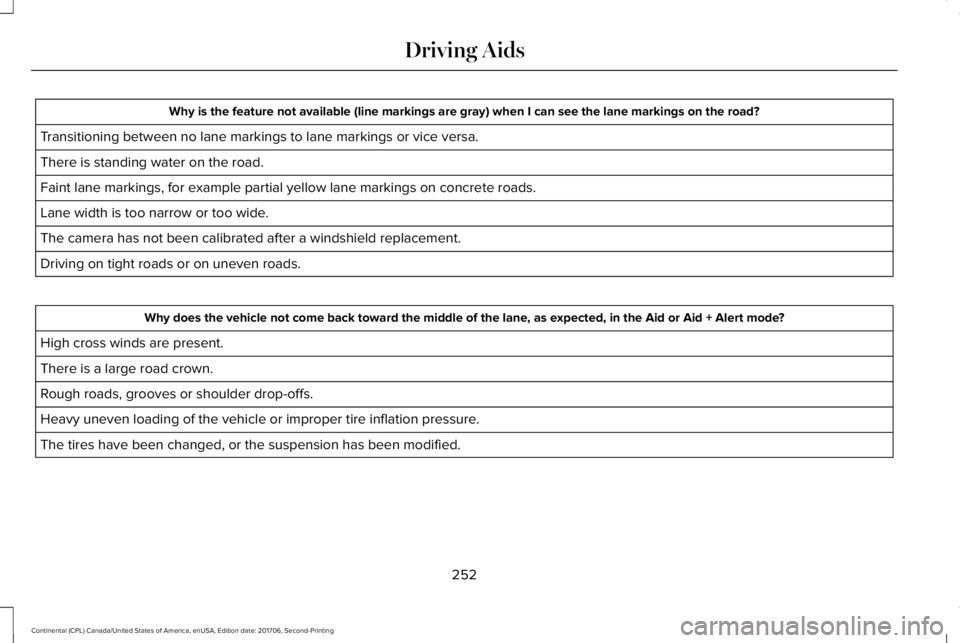
Why is the feature not available (line markings are gray) when I can see the lane markings on the road?
Transitioning between no lane markings to lane markings or vice versa.
There is standing water on the road.
Faint lane markings, for example partial yellow lane markings on concrete roads.
Lane width is too narrow or too wide.
The camera has not been calibrated after a windshield replacement.
Driving on tight roads or on uneven roads.
Why does the vehicle not come back toward the middle of the lane, as expected, in the Aid or Aid + Alert mode?
High cross winds are present.
There is a large road crown.
Rough roads, grooves or shoulder drop-offs.
Heavy uneven loading of the vehicle or improper tire inflation pressure.
The tires have been changed, or the suspension has been modified.
252
Continental (CPL) Canada/United States of America, enUSA, Edition date: 201706, Second-Printing
Driving Aids
Page 267 of 615
Note:If something hits the front end of yourvehicle or damage occurs, the radar sensingzone may change. This could cause missedor false vehicle detections. Contact anauthorized dealer to have the radar checkedfor proper coverage and operation.
Note:If your vehicle detects excessive heatat the camera or a potential misalignmentcondition, a message may display in theinformation display indicating temporarysensor unavailability. This messagedeactivates automatically when operationalconditions are correct. For example, whenthe ambient temperature around the sensordecreases or the sensor automaticallyrecalibrates.
DRIVE CONTROL
LINCOLN DRIVE CONTROL
The system delivers a driving experiencethrough a suite of sophisticated electronicvehicle systems. These systems continuouslymonitor your driving inputs and the roadconditions to optimize ride comfort, steering,handling, powertrain response and sound.
You can preset your preferences for thesesystems within the information display. Thesystem responds to your preferences basedon what gear position you select. Thisprovides a single location to control multiplesystems performance settings.
Lincoln Drive Control consists of thefollowing systems:
•Continuously controlled dampingdynamically adjusts the shock absorbersstiffness in real time to match the roadsurface and driver inputs. This systemcontinuously monitors your vehicle’smotion (roll, pitch, bounce), suspensionposition, load, speed, road conditions,and steering to adjust the suspensiondamping for optimal vehicle control.
•Electronically power-assisted steeringadjusts steering effort and feel based onyour vehicle speed and your inputs.
•Adaptive steering optimizes yourvehicle's steering response based onyour steering wheel input, changes invehicle speed and other conditions.
•Active noise control utilizes your vehicleelectronics to enhance the acousticexperience.
•Electronic stability control and tractioncontrol maintain your vehicle control inadverse conditions or high performancedriving.
•Electronic throttle control enhances thepowertrain response to your inputs.
Using Lincoln Drive Control
You can configure which of the Drive Controlmodes are active when your vehicle is indrive (D) or in sport (S). The configurationremains active until modified from the mainmenu on the information display.
264
Continental (CPL) Canada/United States of America, enUSA, Edition date: 201706, Second-Printing
Driving Aids
Page 268 of 615
These systems have a range of modes whichyou can choose from in order to customizeyour ideal driving experience:
•Comfort – Provides a more relaxeddriving experience, maximizing comfort.Your steering effort decreases and thesuspension movement is more fluid.Comfort mode is ideal when you desireenhanced traveling comfort.
•Normal – Delivers a balancedcombination of comfortable, controlledride and confident handling. This modeprovides an engaging drive experienceand a direct connection to the roadwithout sacrificing any of the composuredemanded from a luxury vehicle.
•Sport – Provides a sportier drivingexperience. The suspension stiffens, withan emphasis on handling and control.The engine responds more directly toyour inputs and takes on a more powerfultone. This mode is ideal for use duringmore spirited driving.
You can change the drive control settings inthe information display. See GeneralInformation (page 115).
Note:Not all settings may be available.
Note:Lincoln Drive Control has diagnosticchecks that continuously monitor the systemto ensure proper operation. Certain types ofsystem errors gray out the mode selectionswithin the information display, preventingyou from changing states when the gearposition is changed. Other types of errorsproduce a temporary message in theinformation display. If either conditionpersists for multiple key cycles, see anauthorized dealer.
265
Continental (CPL) Canada/United States of America, enUSA, Edition date: 201706, Second-Printing
Driving Aids
Page 274 of 615
TOWING A TRAILER
WARNING: Do not exceed theGVWR or the GAWR specified on thecertification label.
WARNING: Towing trailers beyondthe maximum recommended grosstrailer weight exceeds the limit of yourvehicle and could result in enginedamage, transmission damage,structural damage, loss of vehiclecontrol, vehicle rollover and personalinjury.
Note:There may be electrical itemssuch as fuses or relays that can affecttrailer towing operation. See Fuses(page 294).
The load capacity of your vehicle isdesignated by weight not volume. Youmay not necessarily be able to use allavailable space when loading yourvehicle or trailer.
Towing a trailer places extra load on theengine, transmission, axle, brakes, tires,and suspension. Inspect thesecomponents before, during and aftertowing.
Load Placement
To help minimize how trailer movementaffects the vehicle when driving:
•Load the heaviest items closest tothe trailer floor.
•Load the heaviest items in the centerof the left and right side trailer tires.
•Load the heaviest items above thetrailer axles or just slightly forwardtoward the trailer tongue. Do notallow the final trailer tongue weightto go above or below 10-15% of theloaded trailer weight.
•Select a ball mount with the correctrise or drop. When both the loadedvehicle and trailer are connected, thetrailer frame should be level, orslightly angled down toward thevehicle, when viewed from the side.
When driving with a trailer or payload, aslight takeoff vibration or shudder maybe present due to the increased payloadweight. Additional information regardingproper trailer loading and setting yourvehicle up for towing is located in theLoad Carrying chapter. See Load Limit(page 266).
You can also find information in the RV& Trailer Towing Guide available at yourauthorized dealer, or online.
271
Continental (CPL) Canada/United States of America, enUSA, Edition date: 201706, Second-Printing
Towing
Page 360 of 615
Highway Hazards
No matter how carefully you drive thereis always the possibility that you mayeventually have a flat tire on thehighway. Drive slowly to the closest safearea out of traffic. This may furtherdamage the flat tire, but your safety ismore important.
If you feel a sudden vibration or ridedisturbance while driving, or you suspectyour tire or vehicle has been damaged,immediately reduce your speed. Drivewith caution until you can safely pull offthe road. Stop and inspect the tires fordamage. If a tire is under-inflated ordamaged, deflate it, remove the wheeland replace it with your spare tire andwheel (if provided). If you cannot detect
a cause, have the vehicle towed to thenearest repair facility or tire dealer tohave the vehicle inspected.
Tire and Wheel Alignment
A bad jolt from hitting a curb or potholecan cause the front end of your vehicleto become misaligned or cause damageto your tires. If your vehicle seems topull to one side when you’re driving, thewheels may be out of alignment. Havean authorized dealer check the wheelalignment periodically.
Wheel misalignment in the front or therear can cause uneven and rapidtreadwear of your tires and should becorrected by an authorized dealer.Front-wheel drive vehicles and thosewith an independent rear suspension (ifequipped) may require alignment of allfour wheels.
The tires should also be balanced
periodically. An unbalanced tire andwheel assembly may result in irregulartire wear.
Tire Rotation
Note:If your tires show uneven wearask an authorized dealer to check forand correct any wheel misalignment,tire imbalance or mechanical probleminvolved before tire rotation.
Note:Your vehicle may be equippedwith a dissimilar spare wheel and tireassembly. A dissimilar spare wheel andtire assembly is defined as a sparewheel and tire assembly that is differentin brand, size or appearance from theroad tires and wheels. If you have adissimilar spare wheel and tire assemblyit is intended for temporary use only andshould not be used in a tire rotation.
Note:After having your tires rotated,inflation pressure must be checked and
adjusted to the vehicle requirements.
Rotating your tires at the recommendedinterval (as indicated in the ScheduledMaintenance chapter) will help your tireswear more evenly, providing better tireperformance and longer tire life.
357
Continental (CPL) Canada/United States of America, enUSA, Edition date: 201706, Second-Printing
Wheels and Tires
Page 361 of 615
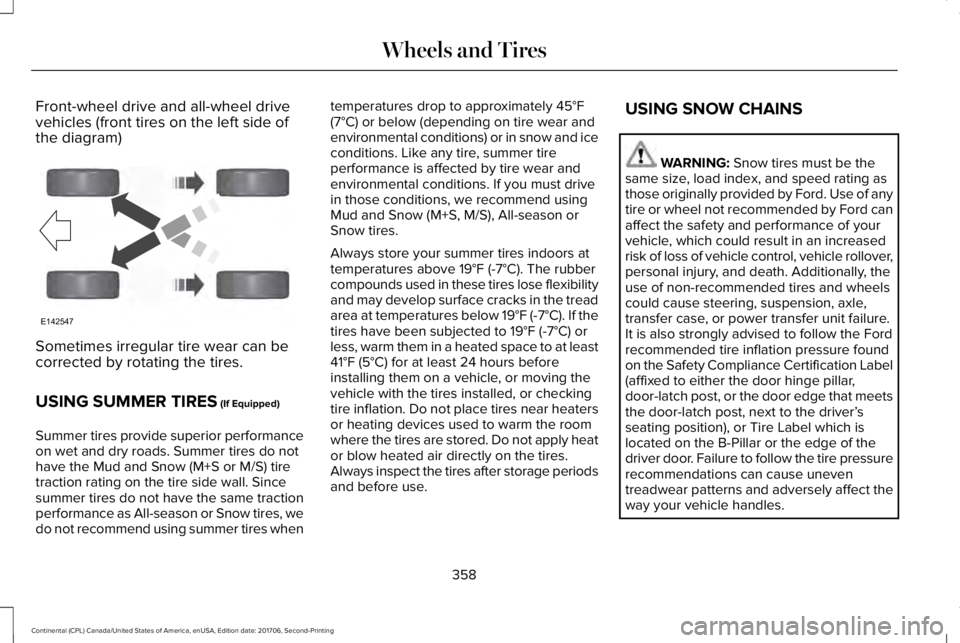
Front-wheel drive and all-wheel drivevehicles (front tires on the left side ofthe diagram)
Sometimes irregular tire wear can becorrected by rotating the tires.
USING SUMMER TIRES (If Equipped)
Summer tires provide superior performanceon wet and dry roads. Summer tires do nothave the Mud and Snow (M+S or M/S) tiretraction rating on the tire side wall. Sincesummer tires do not have the same tractionperformance as All-season or Snow tires, wedo not recommend using summer tires when
temperatures drop to approximately 45°F(7°C) or below (depending on tire wear andenvironmental conditions) or in snow and iceconditions. Like any tire, summer tireperformance is affected by tire wear andenvironmental conditions. If you must drivein those conditions, we recommend usingMud and Snow (M+S, M/S), All-season orSnow tires.
Always store your summer tires indoors attemperatures above 19°F (-7°C). The rubbercompounds used in these tires lose flexibilityand may develop surface cracks in the treadarea at temperatures below 19°F (-7°C). If thetires have been subjected to 19°F (-7°C) orless, warm them in a heated space to at least41°F (5°C) for at least 24 hours beforeinstalling them on a vehicle, or moving thevehicle with the tires installed, or checkingtire inflation. Do not place tires near heatersor heating devices used to warm the roomwhere the tires are stored. Do not apply heator blow heated air directly on the tires.Always inspect the tires after storage periodsand before use.
USING SNOW CHAINS
WARNING: Snow tires must be thesame size, load index, and speed rating asthose originally provided by Ford. Use of anytire or wheel not recommended by Ford canaffect the safety and performance of yourvehicle, which could result in an increasedrisk of loss of vehicle control, vehicle rollover,personal injury, and death. Additionally, theuse of non-recommended tires and wheelscould cause steering, suspension, axle,transfer case, or power transfer unit failure.It is also strongly advised to follow the Fordrecommended tire inflation pressure foundon the Safety Compliance Certification Label(affixed to either the door hinge pillar,door-latch post, or the door edge that meetsthe door-latch post, next to the driver’sseating position), or Tire Label which islocated on the B-Pillar or the edge of thedriver door. Failure to follow the tire pressurerecommendations can cause uneventreadwear patterns and adversely affect theway your vehicle handles.
358
Continental (CPL) Canada/United States of America, enUSA, Edition date: 201706, Second-Printing
Wheels and TiresE142547