height LINCOLN CONTINENTAL 2018 User Guide
[x] Cancel search | Manufacturer: LINCOLN, Model Year: 2018, Model line: CONTINENTAL, Model: LINCOLN CONTINENTAL 2018Pages: 615, PDF Size: 5.31 MB
Page 98 of 615
Type One - Conventional (Non-Configurable)
The daytime running lamps turn on when:
1. Switching the ignition on.
2. The transmission is not in park (P) forvehicles with automatic transmissions, orreleasing the parking brake for vehicleswith manual transmissions.
3. The lighting control is in the off, parkinglamp or autolamps positions.
4. The headlamps are off.
Type Two - Configurable
Switch the daytime running lamps on or offusing the information display. SeeInformation Displays (page 115).
The daytime running lamps turn on when:
1. The lamps are on in the informationdisplay.
2. Switching the ignition on.
3. The transmission is not in park (P) forvehicles with automatic transmissions, orreleasing the parking brake for vehicleswith manual transmissions.
4. The lighting control is in the autolampsposition.
5. The headlamps are off.
The other lighting control switch positionsdo not turn on the daytime running lamps.
If the daytime running lamps are off in theinformation display, the lamps stay off in allswitch positions.
AUTOMATIC HIGH BEAM
CONTROL (If Equipped)
WARNING: The system does notrelieve you of your responsibility to drive withdue care and attention. You may need tooverride the system if it does not turn thehigh beams on or off.
The system turns on high beams if it is darkenough and no other traffic is present. If itdetects an approaching vehicle’s headlampsor tail lamps, or street lighting ahead, thesystem turns off high beams before they candistract other road users. Low beams remainon.
Note:The system may not operate properlyif the sensor is blocked. Keep the windshieldfree from obstruction or damage.
Note:The system may not operate properlyin cold or inclement conditions. You canswitch on the high beams by overriding thesystem.
Note:If the system detects a blockage, forexample bird droppings, bug splatter, snowor ice, the system goes into low beam modeuntil you clear the blockage. A message mayappear in the information display if thecamera is blocked.
Note:Using much larger tires or equippingvehicle accessories such as snowplows canmodify your vehicle's ride height anddegrade automatic high beam controlperformance.
95
Continental (CPL) Canada/United States of America, enUSA, Edition date: 201706, Second-Printing
Lighting
Page 146 of 615
Navigation Display Area.D
Status Bar.E
Speedometer Display Area.F
Signaling and Traffic Indication
Displays direction indicators, blind spotinformation (if direction indicators are active)and cross traffic alert.
Left Information Group
Displays incoming call information.
ADAS Display Area
Displays ACC and lane keeping systemstatus and warnings.
Navigation Display Area
Displays navigation next turn instructions.
Status Bar
Displays distance to empty (DTE), time andoutside air temperature. Next to DTE, thefuel gauge fill color changes to yellow in lowfuel conditions. You can switch off the statusbar in the HUD settings menu.
Speedometer Display Area
Displays current vehicle speed, speed limit(if available in the map database) and yourtransmission gear selection.
Configuring The Head Up Display
You can control the system's options throughthe information display by using the HUD,OK and arrow buttons on the right-hand sideof your steering wheel. See GeneralInformation (page 115). You can adjust thedisplay according to your height to makeviewing the content easier. You can alsoadjust what content displays and thebrightness of the content. The system'soptions appear in the instrument clusterwhile the updates happen in the HUD.
Note:If HUD On is unchecked, other optionsof the system are hidden.
Note:The HUD menu automatically closesafter a certain period of inactivity.
Note:The HUD image brightnessautomatically adjusts to the brightness ofthe ambient environment. You have theability to adjust the brightness furtheraccording to your preference.
Note:In some instances, sunlight can causesome reflections in and around the HUDimage.
143
Continental (CPL) Canada/United States of America, enUSA, Edition date: 201706, Second-Printing
Information Displays
Page 159 of 615
The rear center head restraint consists of:
An energy absorbing headrestraint.A
Two steel stems.B
Guide sleeve adjust and unlockbutton.C
Guide sleeve unlock and removebutton.D
Raising the Head Restraint
Pull the head restraint up.
Lowering the Head Restraint
1. Press and hold button C.
2. Push the head restraint down.
Removing the Head Restraint
1.Pull the head restraint up until it reachesits highest position.
2. Press and hold buttons C and D.
3. Pull the head restraint up.
Installing the Head Restraint
Align the steel stems into the guide sleevesand push the head restraint down until itlocks.
Power Front Head Restraints (If equipped)
To raise the head restraint, lift the switch upuntil you reach a comfortable height.
To lower the head restraint, press the switchdown.
To move the head restraint forward, pushthe switch forward until you reach thedesired position.
To move the head restraint rearward, pushthe switch rearward.
Power Rear Head Restraints (If Equipped)
Press the button on the overhead consoleto fold the rear outboard head restraints.
Note:If your vehicle has power rear headrestraints, you cannot remove them.
156
Continental (CPL) Canada/United States of America, enUSA, Edition date: 201706, Second-Printing
SeatsE222280 E229803
Page 331 of 615
Changing the Windshield Wiper Blades
Note:Do not hold the wiper blade whenlifting the wiper arm.
Note:Make sure that the wiper arm doesnot spring back against the glass when thewiper blade is not attached.
1. Lift the wiper arm and then press thewiper blade locking buttons together.
2. Slightly rotate the wiper blade.
3. Remove the wiper blade.
4. Install in the reverse order.
Note:Make sure that the wiper blade locksinto place.
ADJUSTING THE HEADLAMPS
Vertical Aim Adjustment
The headlamps on your vehicle are properlyaimed at the assembly plant. If your vehiclehas been in an accident, have the alignmentof your headlamps checked by yourauthorized dealer.
Headlamp Aiming Target
8 feet (2.4 meters)A
Center height of lamp to groundB
25 feet (7.6 meters)C
Horizontal reference lineD
Vertical Aim Adjustment
1.Park the vehicle directly in front of a wallor screen on a level surface,approximately 25 ft (7.6 m) away.
2. Measure the height from the center ofyour headlamp indicated by a 3.0millimeter circle on the lens to the groundand mark an 8 ft (2.4 m) horizontalreference line on the vertical wall orscreen at this height (a piece of maskingtape works well).
Note:To see a clearer light pattern foradjusting, you may want to block the lightfrom one headlamp while adjusting theother.
3. Turn on the low beam headlamps toilluminate the wall or screen and openthe hood. Cover one of the headlampsso no light hits the wall.
328
Continental (CPL) Canada/United States of America, enUSA, Edition date: 201706, Second-Printing
MaintenanceE129990
1
1 2 E142592
Page 350 of 615
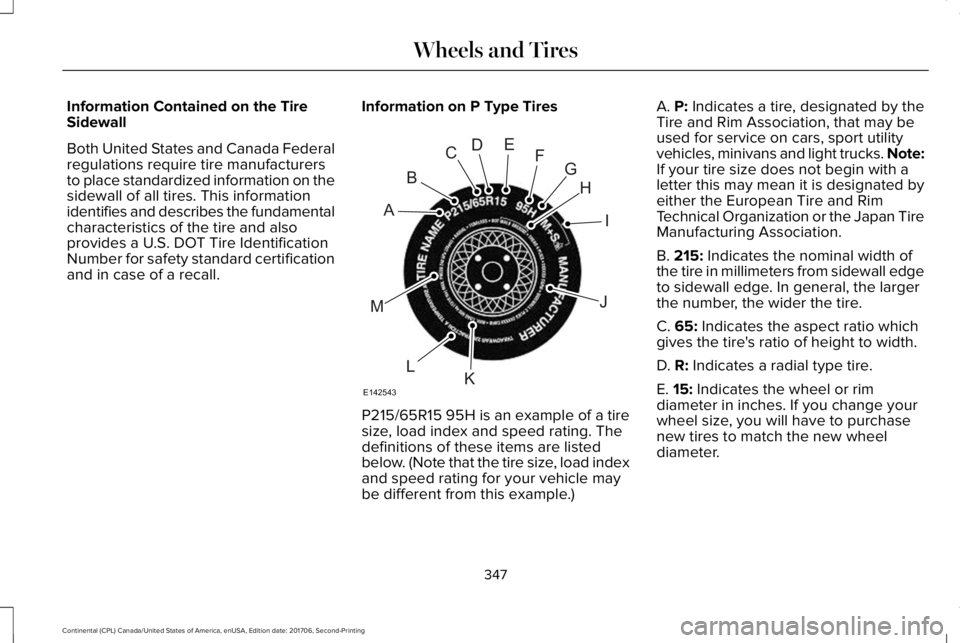
Information Contained on the TireSidewall
Both United States and Canada Federalregulations require tire manufacturersto place standardized information on thesidewall of all tires. This informationidentifies and describes the fundamentalcharacteristics of the tire and alsoprovides a U.S. DOT Tire IdentificationNumber for safety standard certificationand in case of a recall.
Information on P Type Tires
P215/65R15 95H is an example of a tiresize, load index and speed rating. Thedefinitions of these items are listedbelow. (Note that the tire size, load indexand speed rating for your vehicle maybe different from this example.)
A. P: Indicates a tire, designated by theTire and Rim Association, that may beused for service on cars, sport utilityvehicles, minivans and light trucks. Note:If your tire size does not begin with aletter this may mean it is designated byeither the European Tire and RimTechnical Organization or the Japan TireManufacturing Association.
B. 215: Indicates the nominal width ofthe tire in millimeters from sidewall edgeto sidewall edge. In general, the largerthe number, the wider the tire.
C. 65: Indicates the aspect ratio whichgives the tire's ratio of height to width.
D. R: Indicates a radial type tire.
E. 15: Indicates the wheel or rim
diameter in inches. If you change yourwheel size, you will have to purchasenew tires to match the new wheeldiameter.
347
Continental (CPL) Canada/United States of America, enUSA, Edition date: 201706, Second-Printing
Wheels and TiresH
I
J
KL
M
A
B
CDEFG
E142543
Page 354 of 615
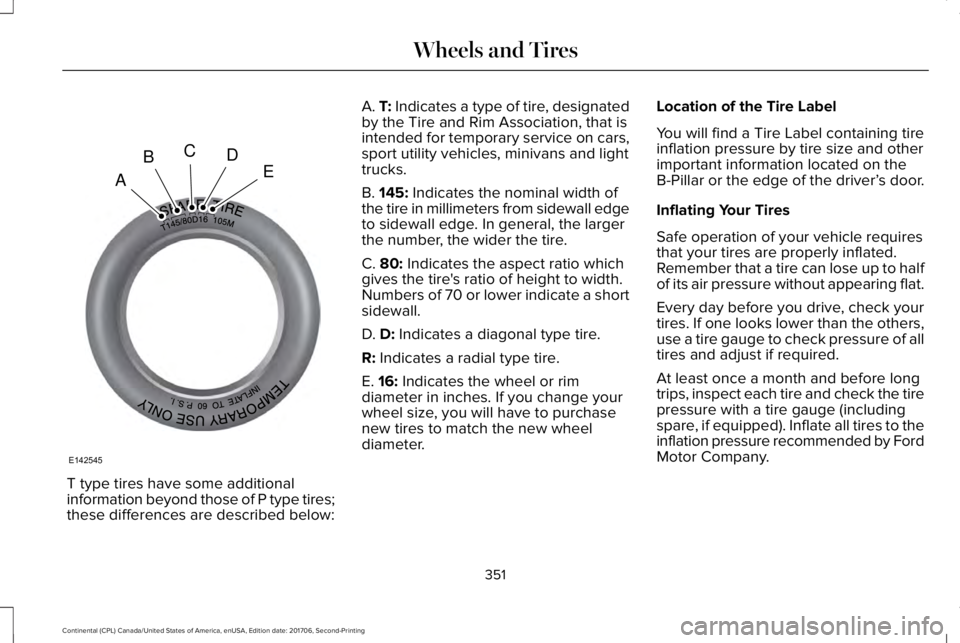
T type tires have some additionalinformation beyond those of P type tires;these differences are described below:
A. T: Indicates a type of tire, designatedby the Tire and Rim Association, that isintended for temporary service on cars,sport utility vehicles, minivans and lighttrucks.
B. 145: Indicates the nominal width ofthe tire in millimeters from sidewall edgeto sidewall edge. In general, the largerthe number, the wider the tire.
C. 80: Indicates the aspect ratio whichgives the tire's ratio of height to width.Numbers of 70 or lower indicate a shortsidewall.
D. D: Indicates a diagonal type tire.
R: Indicates a radial type tire.
E. 16: Indicates the wheel or rimdiameter in inches. If you change your
wheel size, you will have to purchasenew tires to match the new wheeldiameter.
Location of the Tire Label
You will find a Tire Label containing tireinflation pressure by tire size and otherimportant information located on theB-Pillar or the edge of the driver’s door.
Inflating Your Tires
Safe operation of your vehicle requiresthat your tires are properly inflated.Remember that a tire can lose up to halfof its air pressure without appearing flat.
Every day before you drive, check yourtires. If one looks lower than the others,use a tire gauge to check pressure of alltires and adjust if required.
At least once a month and before longtrips, inspect each tire and check the tire
pressure with a tire gauge (includingspare, if equipped). Inflate all tires to theinflation pressure recommended by FordMotor Company.
351
Continental (CPL) Canada/United States of America, enUSA, Edition date: 201706, Second-Printing
Wheels and TiresA
BCDE
E142545
Page 357 of 615
Improper or inadequate vehiclemaintenance can cause tires to wearabnormally. Inspect all your tires,including the spare, frequently, andreplace them if one or more of thefollowing conditions exist:
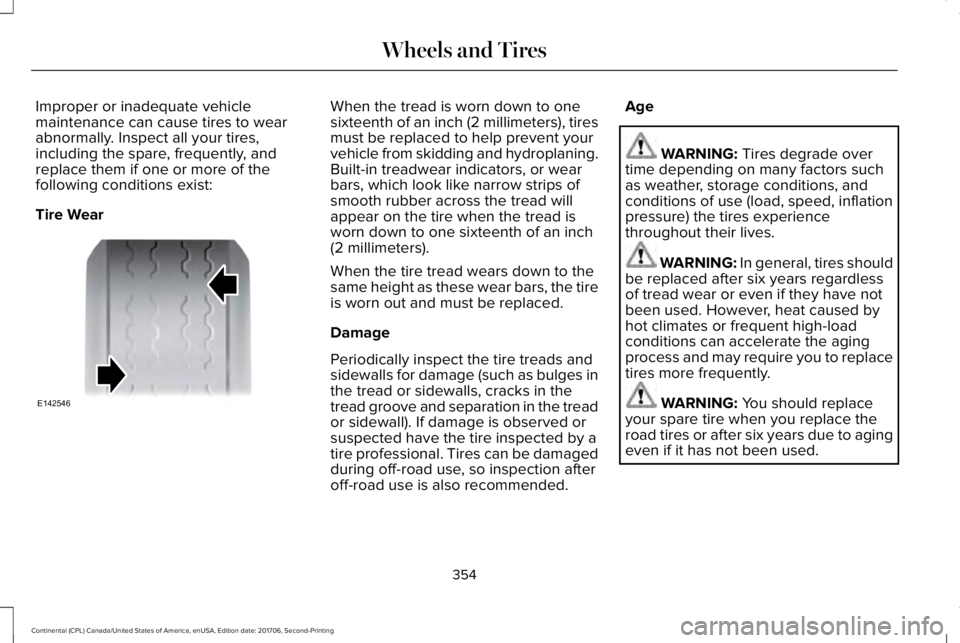
Tire Wear
When the tread is worn down to onesixteenth of an inch (2 millimeters), tiresmust be replaced to help prevent yourvehicle from skidding and hydroplaning.Built-in treadwear indicators, or wearbars, which look like narrow strips ofsmooth rubber across the tread willappear on the tire when the tread isworn down to one sixteenth of an inch(2 millimeters).
When the tire tread wears down to thesame height as these wear bars, the tireis worn out and must be replaced.
Damage
Periodically inspect the tire treads andsidewalls for damage (such as bulges inthe tread or sidewalls, cracks in the
tread groove and separation in the treador sidewall). If damage is observed orsuspected have the tire inspected by atire professional. Tires can be damagedduring off-road use, so inspection afteroff-road use is also recommended.
Age
WARNING: Tires degrade overtime depending on many factors suchas weather, storage conditions, andconditions of use (load, speed, inflationpressure) the tires experiencethroughout their lives.
WARNING: In general, tires shouldbe replaced after six years regardlessof tread wear or even if they have notbeen used. However, heat caused byhot climates or frequent high-loadconditions can accelerate the agingprocess and may require you to replacetires more frequently.
WARNING: You should replaceyour spare tire when you replace theroad tires or after six years due to agingeven if it has not been used.
354
Continental (CPL) Canada/United States of America, enUSA, Edition date: 201706, Second-Printing
Wheels and TiresE142546
Page 612 of 615
R
Rear Parking Aid............................................219Obstacle Distance Indicator............................220
Rear Passenger Climate Controls.............150Rear Seat Armrest.........................................169Rear Seats.......................................................165Adjusting the Rear Seats...................................165
Rear View Camera........................................231Using the Rear View Camera System...........232
Rear View CameraSee: Rear View Camera.....................................231
Recommended Towing Weights...............272Refueling.........................................................186Refueling System Overview.............................186Refueling System Warning................................188Refueling Your Vehicle.......................................187
Remote Control...............................................58Car Finder...............................................................60Intelligent Access Key.........................................58Remote Start..........................................................60Replacing the Battery..........................................58Sounding the Panic Alarm..................................60
Remote Start...................................................152Automatic Settings..............................................152
Repairing Minor Paint Damage..................341Replacement Parts Recommendation........13Collision Repairs.....................................................13
Scheduled Maintenance and MechanicalRepairs.................................................................13Warranty on Replacement Parts.........................13
Replacing a Lost Key or RemoteControl.............................................................61Reporting Safety Defects (CanadaOnly)..............................................................293Reporting Safety Defects (U.S. Only)......292Roadside Assistance...................................279Vehicles Sold in Canada: Getting RoadsideAssistance.......................................................280Vehicles Sold in Canada: Roadside AssistanceProgram Coverage........................................280Vehicles Sold in Canada: Using RoadsideAssistance.......................................................280Vehicles Sold in the United States: GettingRoadside Assistance.....................................279Vehicles Sold in the United States: UsingRoadside Assistance.....................................279
Roadside Emergencies...............................279Running-InSee: Breaking-In.................................................276
Running Out of Fuel.....................................184Adding Fuel From a Portable FuelContainer..........................................................185Filling a Portable Fuel Container.....................185
S
Safety Canopy™...............................................54Safety Precautions........................................183Satellite Radio...............................................409Satellite Radio Electronic Serial Number(ESN)....................................................................411Satellite Radio Reception Factors...................410SiriusXM Satellite Radio Service.....................410Troubleshooting....................................................411
Scheduled Maintenance Record..............535Scheduled Maintenance............................523Seatbelt Extension.........................................45Seatbelt Height Adjustment..........................41Seatbelt Reminder..........................................42Belt-Minder™...........................................................42
Seatbelts...........................................................36Principle of Operation..........................................36
Seatbelt Warning Lamp and IndicatorChime...............................................................41Conditions of operation......................................42
Seats.................................................................153Security.............................................................82Settings...........................................................480911 Assist...............................................................488Ambient Lighting................................................497Bluetooth..............................................................483Clock......................................................................482
609
Continental (CPL) Canada/United States of America, enUSA, Edition date: 201706, Second-Printing
Index