ignition LINCOLN CONTINENTAL 2018 User Guide
[x] Cancel search | Manufacturer: LINCOLN, Model Year: 2018, Model line: CONTINENTAL, Model: LINCOLN CONTINENTAL 2018Pages: 615, PDF Size: 5.31 MB
Page 67 of 615

MyKey is successfully created. Make sureyou label it so you can distinguish it from theadmin keys.
You can also program configurable settingsfor the key(s). See Programming/ChangingConfigurable Settings.
Programming/Changing ConfigurableSettings
Use the information display to access yourconfigurable MyKey settings.
1. Switch the ignition on using the key orthe transmitter you want to program.
2.Access the main menu in the informationdisplay and then scroll through themenus to change the settings of yourMyKey. See Information Displays (page115).
3. Follow the instructions in the display.
Note:You can clear or change your MyKeysettings at any time during the same keycycle as you created the MyKey. Once youhave switched the vehicle off, however, youwill need an admin key to change or clearyour MyKey settings.
CLEARING ALL MYKEYS
When you clear your MyKeys, you removeall restrictions and return all MyKeys to theiroriginal admin key status at once. To clearall MyKeys of all MyKey settings, use theinformation display.
1. Switch the ignition on using an adminkey.
2.Access the main menu in the informationdisplay and then scroll through themenus to begin clearing your MyKeyprogramming. See Information Displays(page 115).
3. Follow the instructions in the display.
4. A confirmation message appears in thedisplay after you finish clearing yourMyKeys.
Note:When you clear your MyKeys, youremove all restrictions and return all MyKeysto their original admin key status. You cannotremove the MyKey restrictions individually.
CHECKING MYKEY SYSTEM
STATUS
You can find information about yourprogrammed MyKeys by using theinformation display. See InformationDisplays (page 115).
MyKey Distance
Tracks the distance when drivers use aMyKey. The only way to delete theaccumulated distance is by using an adminkey to clear all MyKeys. If the distance doesnot accumulate as expected, then theintended user is not using the MyKey, or anadmin key user recently cleared and thenrecreated a MyKey.
Number of MyKeys
Indicates the number of MyKeysprogrammed to your vehicle. Use this featureto detect how many MyKeys you have foryour vehicle and determine when all MyKeyshave been deleted.
64
Continental (CPL) Canada/United States of America, enUSA, Edition date: 201706, Second-Printing
MyKey™
Page 70 of 615
LOCKING AND UNLOCKING
Your vehicle has an intelligent electronicallycontrolled door system that is in constantcommunication with overall vehicle systems.
When you lock your vehicle using the lockswitch on each door interior trim panel, orby using the keyless entry keypad or the locksensor on each door exterior trim panel, theexterior door handle switches do not releasethe doors. This helps to secure your vehicleand prevent unauthorized entry. Also, whenyour vehicle reaches a speed greater than12 mph (20 km/h) the exterior door handleswitches do not release the doors.
If the airbags deploy or the fuel pump shutoffswitch activates, all interior and exteriorunlock switches do not unlock your door forsix seconds. This helps to secure the doorsin the event of a crash. After six seconds, allswitches reset and you can open the doorsusing the interior and exterior unlatchswitches.
Door Lock Indicator
An LED on each front door window trimilluminates when you lock the doors. Itremains on for 2 to 5 seconds after youswitch the ignition off.
Door Lock Switch Inhibitor
When you electronically lock your vehicle,the door lock switches and the interiorluggage compartment release switch do notoperate after 20 seconds. You must unlockyour vehicle with the remote control orkeyless entry keypad, or switch the ignitionon, to restore function to these switches. You can switch this feature on or off in theinformation display. See GeneralInformation (page 115).
Activating Intelligent Access
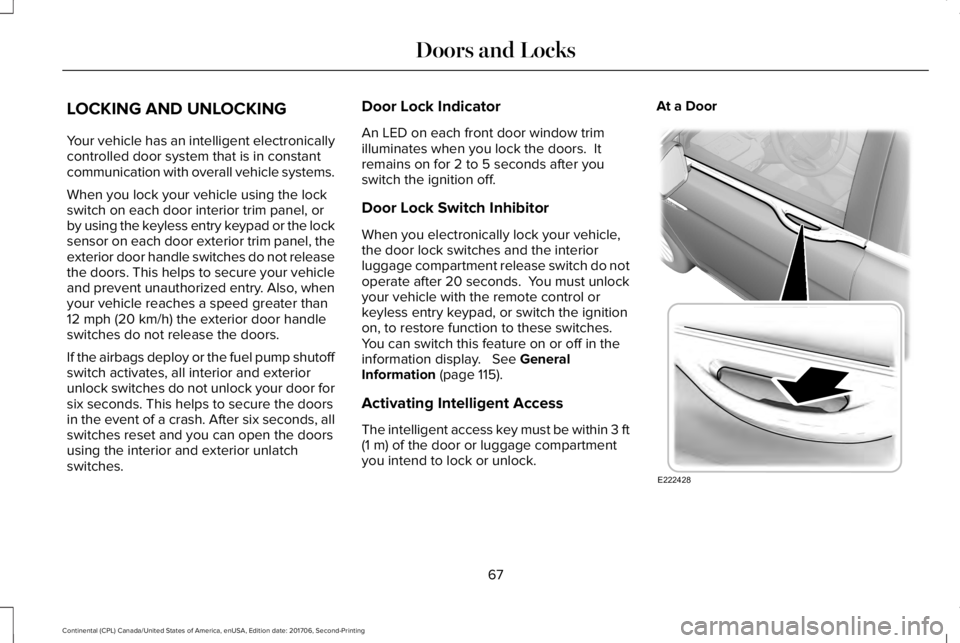
The intelligent access key must be within 3 ft(1 m) of the door or luggage compartmentyou intend to lock or unlock.
At a Door
67
Continental (CPL) Canada/United States of America, enUSA, Edition date: 201706, Second-Printing
Doors and LocksE222428
Page 74 of 615
Note:You cannot open the door again untilthe vehicle battery is fully charged andoperational.
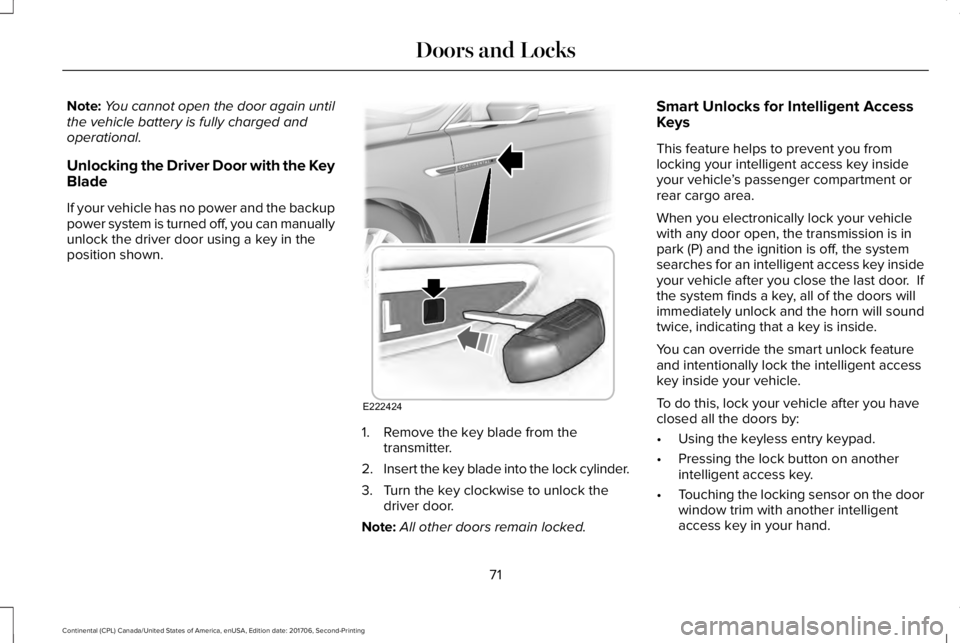
Unlocking the Driver Door with the KeyBlade
If your vehicle has no power and the backuppower system is turned off, you can manuallyunlock the driver door using a key in theposition shown.
1. Remove the key blade from thetransmitter.
2.Insert the key blade into the lock cylinder.
3. Turn the key clockwise to unlock thedriver door.
Note:All other doors remain locked.
Smart Unlocks for Intelligent AccessKeys
This feature helps to prevent you fromlocking your intelligent access key insideyour vehicle’s passenger compartment orrear cargo area.
When you electronically lock your vehiclewith any door open, the transmission is inpark (P) and the ignition is off, the systemsearches for an intelligent access key insideyour vehicle after you close the last door. Ifthe system finds a key, all of the doors willimmediately unlock and the horn will soundtwice, indicating that a key is inside.
You can override the smart unlock featureand intentionally lock the intelligent accesskey inside your vehicle.
To do this, lock your vehicle after you haveclosed all the doors by:
•Using the keyless entry keypad.
•Pressing the lock button on anotherintelligent access key.
•Touching the locking sensor on the doorwindow trim with another intelligentaccess key in your hand.
71
Continental (CPL) Canada/United States of America, enUSA, Edition date: 201706, Second-Printing
Doors and LocksE222424
Page 75 of 615
When you open one of the front doors andlock your vehicle using the power door lockcontrol, all doors will lock then unlock if:
•The ignition is on.
•The ignition is off and the transmissionis not in park (P).
Autolock (If Equipped)
Autolock locks all the doors when:
•All doors are closed.
•The ignition is on.
•You shift into any gear putting yourvehicle in motion.
•Your vehicle reaches a speed greaterthan 12 mph (20 km/h).
Autolock repeats when:
•You open then close any door while theignition is on and your vehicle speed is9 mph (15 km/h) or lower.
•Your vehicle reaches a speed greaterthan 12 mph (20 km/h).
Autounlock
Autounlock unlocks all the doors when:
•The ignition is on, all the doors areclosed, and your vehicle has beenmoving at a speed greater than 12 mph(20 km/h).
•Your vehicle comes to a stop and youswitch the ignition off or to the accessoryposition.
•You open the driver door within 10minutes of switching the ignition off or toaccessory.
Note:The doors do not autounlock if youelectronically lock your vehicle after youswitch the ignition off and before you openthe driver door.
Enabling or Disabling Autounlock
You can enable or disable the autounlockfeature in the information display or anauthorized dealer can do it for you. SeeGeneral Information (page 115).
Illuminated Entry
The interior lamps and some exterior lampsilluminate when you unlock the doors withthe remote control.
The illuminated entry system turns off thelights if:
•The ignition is on.
•You press the remote control lock button.
•After 25 seconds of illumination.
The lights do not turn off if:
•You turn them on with the lamp control.
•Any door is open.
Illuminated Exit
The interior lamps and some exterior lampsilluminate when all doors are closed and youswitch the ignition off.
The lamps turn off if all the doors remainclosed and:
•25 seconds have elapsed.
•You press the push button ignitionswitch.
72
Continental (CPL) Canada/United States of America, enUSA, Edition date: 201706, Second-Printing
Doors and Locks
Page 76 of 615
Battery Saver
If you leave the courtesy lamps, interiorlamps or headlamps on, the battery savershuts them off 10 minutes after you switchthe ignition off.
Battery Saver for Intelligent Access Keys
If you leave the ignition switched on, it shutsoff when it detects a certain amount ofbattery drain, or after 45 minutes.
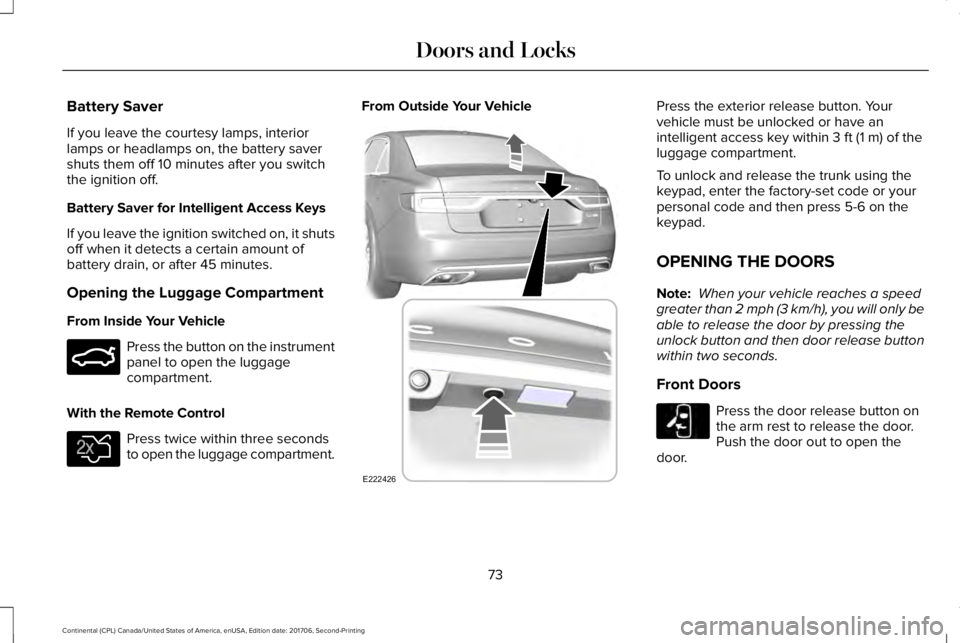
Opening the Luggage Compartment
From Inside Your Vehicle
Press the button on the instrumentpanel to open the luggagecompartment.
With the Remote Control
Press twice within three secondsto open the luggage compartment.
From Outside Your VehiclePress the exterior release button. Yourvehicle must be unlocked or have anintelligent access key within 3 ft (1 m) of theluggage compartment.
To unlock and release the trunk using thekeypad, enter the factory-set code or yourpersonal code and then press 5-6 on thekeypad.
OPENING THE DOORS
Note: When your vehicle reaches a speedgreater than 2 mph (3 km/h), you will only beable to release the door by pressing theunlock button and then door release buttonwithin two seconds.
Front Doors
Press the door release button onthe arm rest to release the door.Push the door out to open thedoor.
73
Continental (CPL) Canada/United States of America, enUSA, Edition date: 201706, Second-Printing
Doors and LocksE159323 E138630 E222426 E232417
Page 81 of 615
1.Move your foot under and away from therear bumper detection area in asingle-kick motion. Do not move yourfoot sideways or the sensors may notdetect the motion.
2. The decklid opens or closes.
Note:Allow the power system to open thedecklid. Manually pushing or pulling thedecklid may activate the system’s obstacledetection feature and stop the poweroperation or reverse its direction.
Note: Splashing water may cause thehands-free decklid to open. Keep theintelligent access key away from the rearbumper detection area when washing yourvehicle.
SOFT CLOSING DOOR
Gently close the door until it fully latches.The system automatically closes the door,making sure it is fully secure.
Note:The system does not work if thevehicle battery charge is low.
Note:The system is limited to 25 cyclesbetween each ignition cycle. This is toprevent the vehicle battery from losingcharge.
Note:You can override soft close by fullyclosing the door manually.
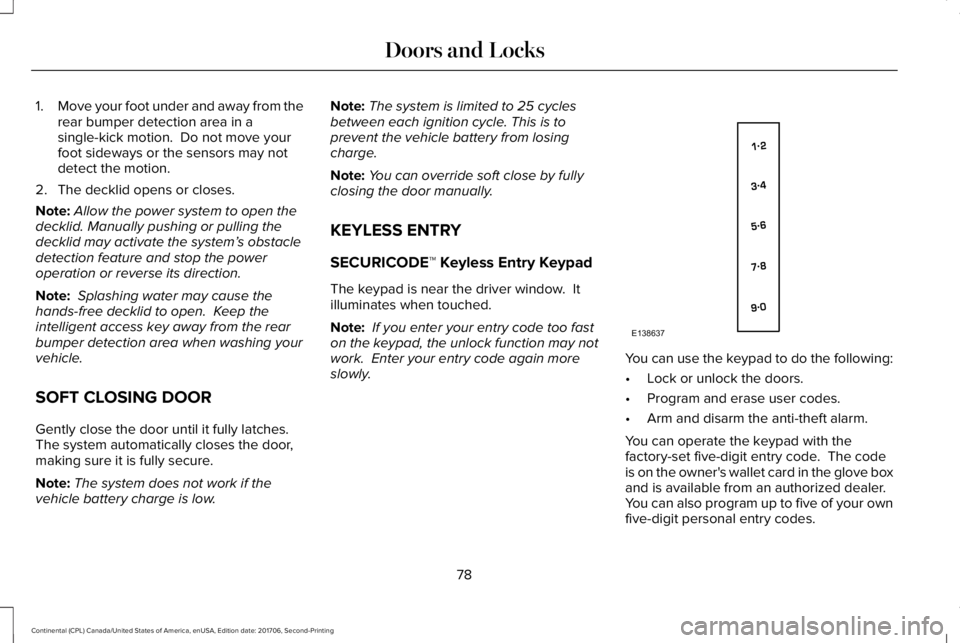
KEYLESS ENTRY
SECURICODE™ Keyless Entry Keypad
The keypad is near the driver window. Itilluminates when touched.
Note: If you enter your entry code too faston the keypad, the unlock function may notwork. Enter your entry code again moreslowly.You can use the keypad to do the following:
•Lock or unlock the doors.
•Program and erase user codes.
•Arm and disarm the anti-theft alarm.
You can operate the keypad with thefactory-set five-digit entry code. The codeis on the owner's wallet card in the glove boxand is available from an authorized dealer. You can also program up to five of your ownfive-digit personal entry codes.
78
Continental (CPL) Canada/United States of America, enUSA, Edition date: 201706, Second-Printing
Doors and LocksE138637
Page 85 of 615
PASSIVE ANTI-THEFT SYSTEM
Note: The system is not compatible withnon-Lincoln aftermarket remote startsystems. Use of these systems may result inengine starting problems and a loss ofsecurity protection.
Note: Metallic objects, electronic devicesor a second coded key on the same keychain may result in vehicle starting problems,especially if they are too close to the keywhen starting your vehicle. Prevent theseobjects from touching the coded key whenstarting your vehicle. Switch the ignition off,move all objects on the key chain away fromthe coded key and restart your vehicle if aproblem occurs.
Note: Do not leave a duplicate coded keyin your vehicle. Always take your keys andlock all doors when leaving your vehicle.
SecuriLock®
The system helps prevent the engine fromstarting unless you use a coded keyprogrammed to your vehicle. Using thewrong key may prevent your vehicle fromstarting. A message may appear in theinformation display.
If you are unable to start your vehicle with acoded key, it is not operating correctly. Amessage may appear in the informationdisplay.
Automatic Arming
The system arms when you switch theignition off.
Automatic Disarming
The system disarms when you switch theignition on with a coded key.
Replacement Keys
Note: Your vehicle comes with two keys.
The intelligent access key functions as aprogrammed key that operates the driverdoor lock and turns on the intelligent accesswith push button start system, as well as aremote control.
If your programmed transmitters are lost orstolen and you do not have an extra codedkey, you will need to have your vehicletowed to an authorized dealer. You need toerase the key codes from your vehicle andprogram new coded keys.
Store a spare intelligent access key awayfrom your vehicle in a safe place. You canpurchase replacement keys or remotecontrols from an authorized dealer.
Programming a Spare Intelligent AccessKey
Note:You can program a maximum of fourkeys to your vehicle.
You must have two previously programmedintelligent access keys inside your vehicleand the new unprogrammed intelligentaccess key readily accessible. You canpurchase replacement keys or remotecontrols from an authorized dealer.
82
Continental (CPL) Canada/United States of America, enUSA, Edition date: 201706, Second-Printing
Security
Page 86 of 615
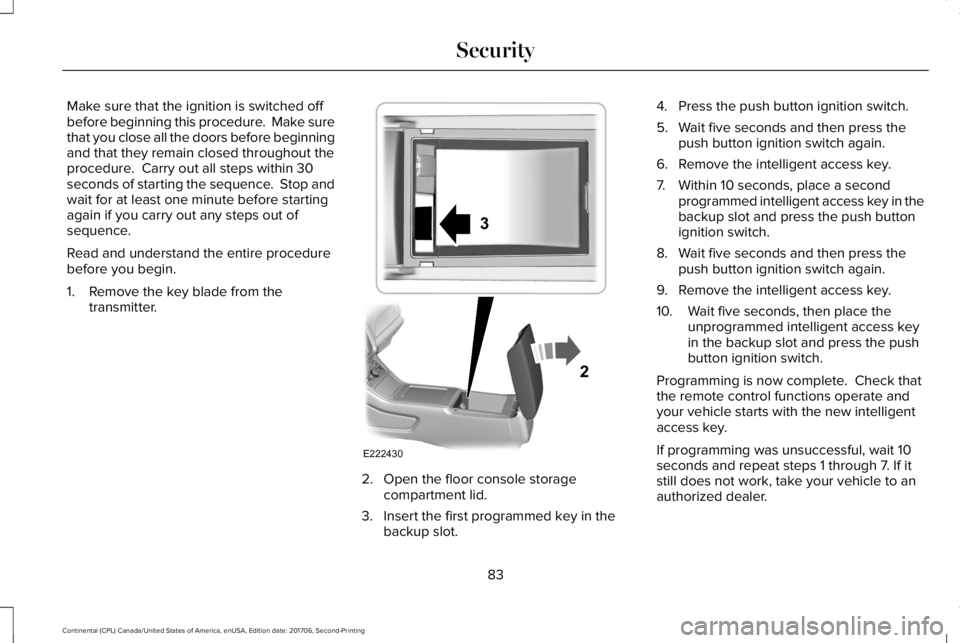
Make sure that the ignition is switched offbefore beginning this procedure. Make surethat you close all the doors before beginningand that they remain closed throughout theprocedure. Carry out all steps within 30seconds of starting the sequence. Stop andwait for at least one minute before startingagain if you carry out any steps out ofsequence.
Read and understand the entire procedurebefore you begin.
1. Remove the key blade from thetransmitter.
2. Open the floor console storagecompartment lid.
3. Insert the first programmed key in thebackup slot.
4. Press the push button ignition switch.
5. Wait five seconds and then press thepush button ignition switch again.
6. Remove the intelligent access key.
7. Within 10 seconds, place a secondprogrammed intelligent access key in thebackup slot and press the push buttonignition switch.
8. Wait five seconds and then press thepush button ignition switch again.
9. Remove the intelligent access key.
10. Wait five seconds, then place theunprogrammed intelligent access keyin the backup slot and press the pushbutton ignition switch.
Programming is now complete. Check thatthe remote control functions operate andyour vehicle starts with the new intelligentaccess key.
If programming was unsuccessful, wait 10seconds and repeat steps 1 through 7. If itstill does not work, take your vehicle to anauthorized dealer.
83
Continental (CPL) Canada/United States of America, enUSA, Edition date: 201706, Second-Printing
SecurityE222430
2
3
Page 88 of 615
ADJUSTING THE STEERING WHEEL
WARNING: Do not adjust the steeringwheel when your vehicle is moving.
Note: Make sure that you are sitting in thecorrect position. See Sitting in the CorrectPosition (page 153).
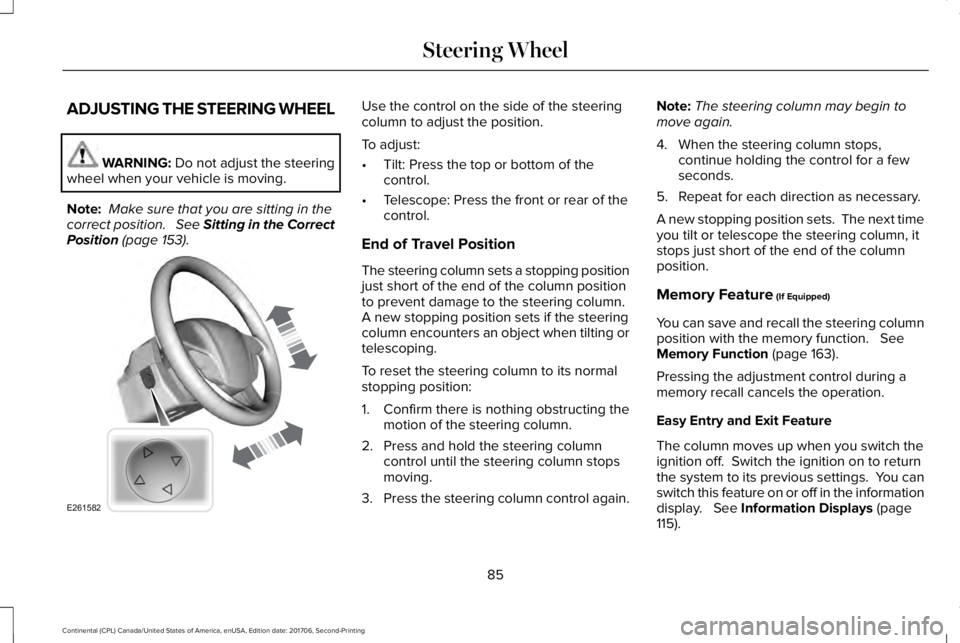
Use the control on the side of the steeringcolumn to adjust the position.
To adjust:
•Tilt: Press the top or bottom of thecontrol.
•Telescope: Press the front or rear of thecontrol.
End of Travel Position
The steering column sets a stopping positionjust short of the end of the column positionto prevent damage to the steering column. A new stopping position sets if the steeringcolumn encounters an object when tilting ortelescoping.
To reset the steering column to its normalstopping position:
1. Confirm there is nothing obstructing themotion of the steering column.
2. Press and hold the steering columncontrol until the steering column stopsmoving.
3.Press the steering column control again.
Note:The steering column may begin tomove again.
4. When the steering column stops,continue holding the control for a fewseconds.
5. Repeat for each direction as necessary.
A new stopping position sets. The next timeyou tilt or telescope the steering column, itstops just short of the end of the columnposition.
Memory Feature (If Equipped)
You can save and recall the steering columnposition with the memory function. SeeMemory Function (page 163).
Pressing the adjustment control during amemory recall cancels the operation.
Easy Entry and Exit Feature
The column moves up when you switch theignition off. Switch the ignition on to returnthe system to its previous settings. You canswitch this feature on or off in the informationdisplay. See Information Displays (page115).
85
Continental (CPL) Canada/United States of America, enUSA, Edition date: 201706, Second-Printing
Steering WheelE261582
Page 96 of 615
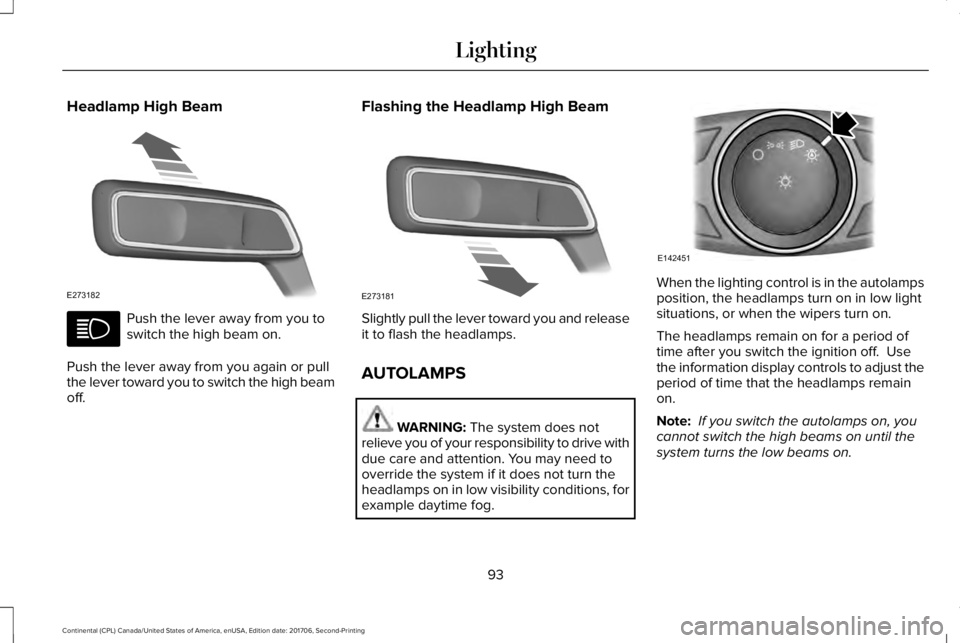
Headlamp High Beam
Push the lever away from you toswitch the high beam on.
Push the lever away from you again or pullthe lever toward you to switch the high beamoff.
Flashing the Headlamp High Beam
Slightly pull the lever toward you and releaseit to flash the headlamps.
AUTOLAMPS
WARNING: The system does notrelieve you of your responsibility to drive withdue care and attention. You may need tooverride the system if it does not turn theheadlamps on in low visibility conditions, forexample daytime fog.
When the lighting control is in the autolampsposition, the headlamps turn on in low lightsituations, or when the wipers turn on.
The headlamps remain on for a period oftime after you switch the ignition off. Usethe information display controls to adjust theperiod of time that the headlamps remainon.
Note: If you switch the autolamps on, youcannot switch the high beams on until thesystem turns the low beams on.
93
Continental (CPL) Canada/United States of America, enUSA, Edition date: 201706, Second-Printing
LightingE273182 E273181 E142451