fuse LINCOLN CONTINENTAL 2018 Owner's Manual
[x] Cancel search | Manufacturer: LINCOLN, Model Year: 2018, Model line: CONTINENTAL, Model: LINCOLN CONTINENTAL 2018Pages: 615, PDF Size: 5.31 MB
Page 310 of 615
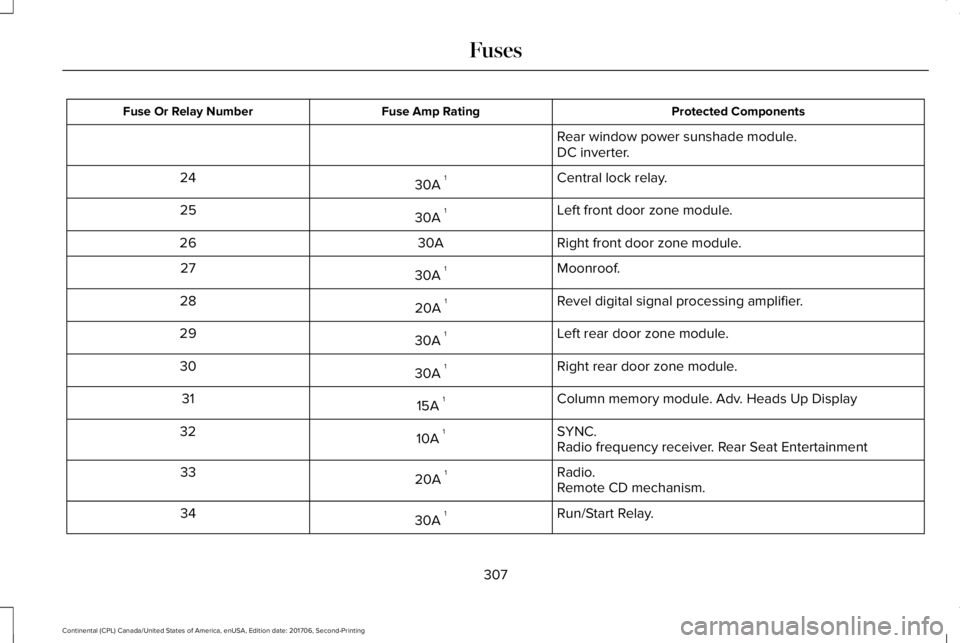
Protected ComponentsFuse Amp RatingFuse Or Relay Number
Rear window power sunshade module.DC inverter.
Central lock relay.30A 124
Left front door zone module.30A 125
Right front door zone module.30A26
Moonroof.30A 127
Revel digital signal processing amplifier.20A 128
Left rear door zone module.30A 129
Right rear door zone module.30A 130
Column memory module. Adv. Heads Up Display15A 131
SYNC.10A 132Radio frequency receiver. Rear Seat Entertainment
Radio.20A 133Remote CD mechanism.
Run/Start Relay.30A 134
307
Continental (CPL) Canada/United States of America, enUSA, Edition date: 201706, Second-Printing
Fuses
Page 311 of 615
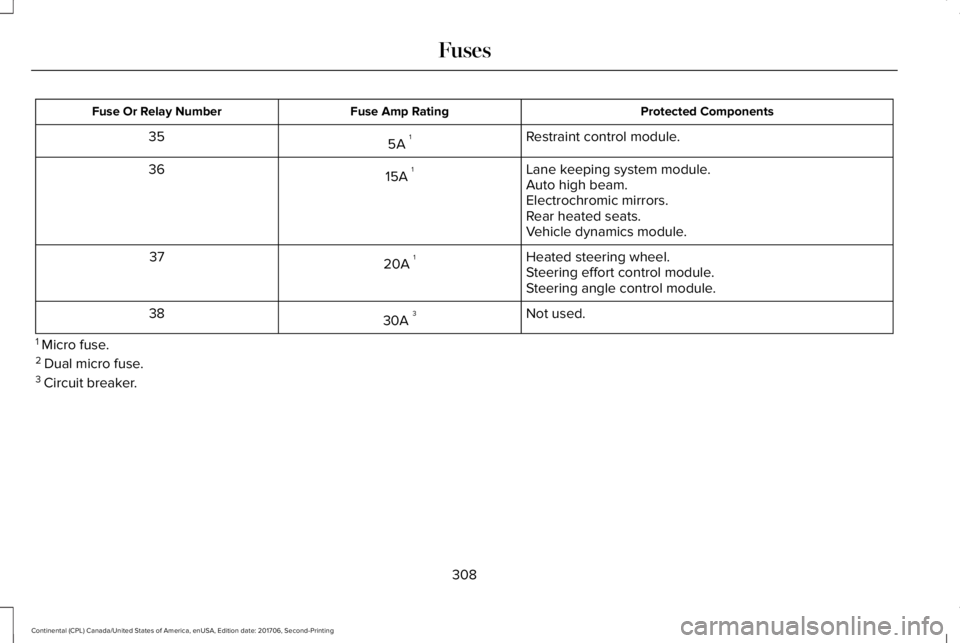
Protected ComponentsFuse Amp RatingFuse Or Relay Number
Restraint control module.5A 135
Lane keeping system module.15A 136Auto high beam.Electrochromic mirrors.Rear heated seats.Vehicle dynamics module.
Heated steering wheel.20A 137Steering effort control module.Steering angle control module.
Not used.30A 338
1 Micro fuse.2 Dual micro fuse.3 Circuit breaker.
308
Continental (CPL) Canada/United States of America, enUSA, Edition date: 201706, Second-Printing
Fuses
Page 312 of 615
CHANGING A FUSE
Fuses
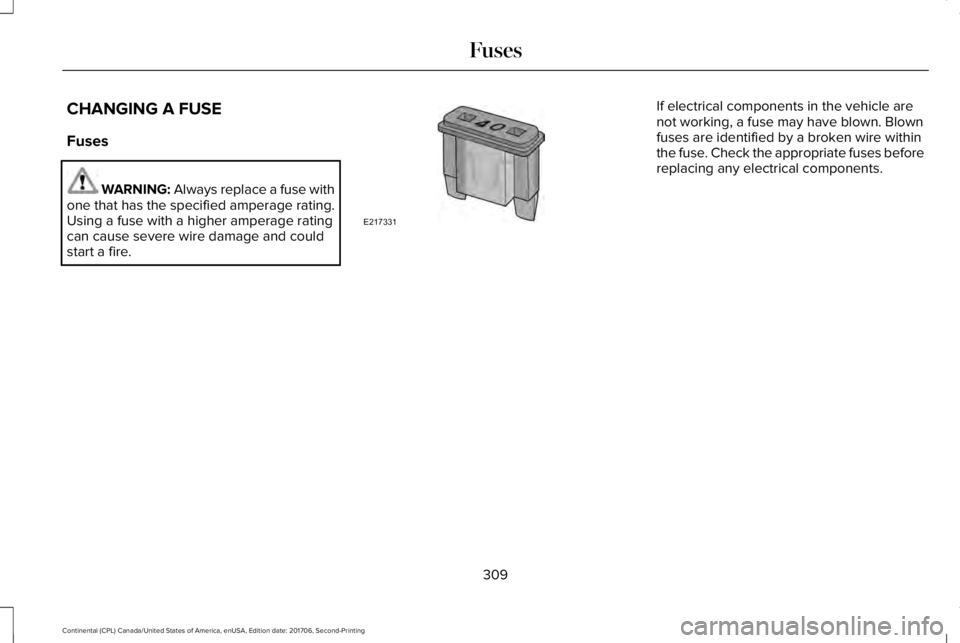
WARNING: Always replace a fuse withone that has the specified amperage rating.Using a fuse with a higher amperage ratingcan cause severe wire damage and couldstart a fire.
If electrical components in the vehicle arenot working, a fuse may have blown. Blownfuses are identified by a broken wire withinthe fuse. Check the appropriate fuses beforereplacing any electrical components.
309
Continental (CPL) Canada/United States of America, enUSA, Edition date: 201706, Second-Printing
FusesE217331
Page 313 of 615
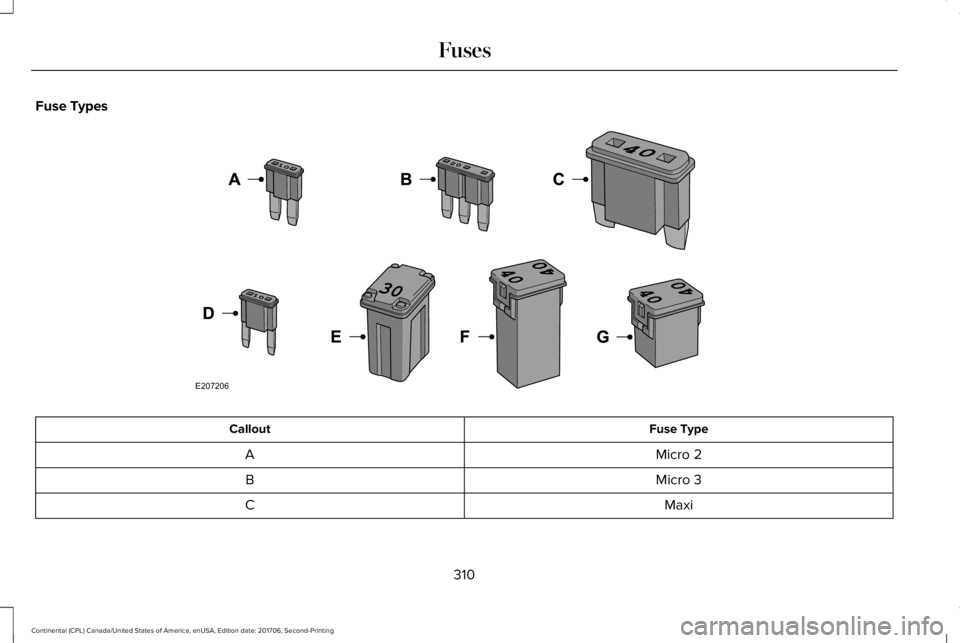
Fuse Types
Fuse TypeCallout
Micro 2A
Micro 3B
MaxiC
310
Continental (CPL) Canada/United States of America, enUSA, Edition date: 201706, Second-Printing
FusesE207206
Page 314 of 615
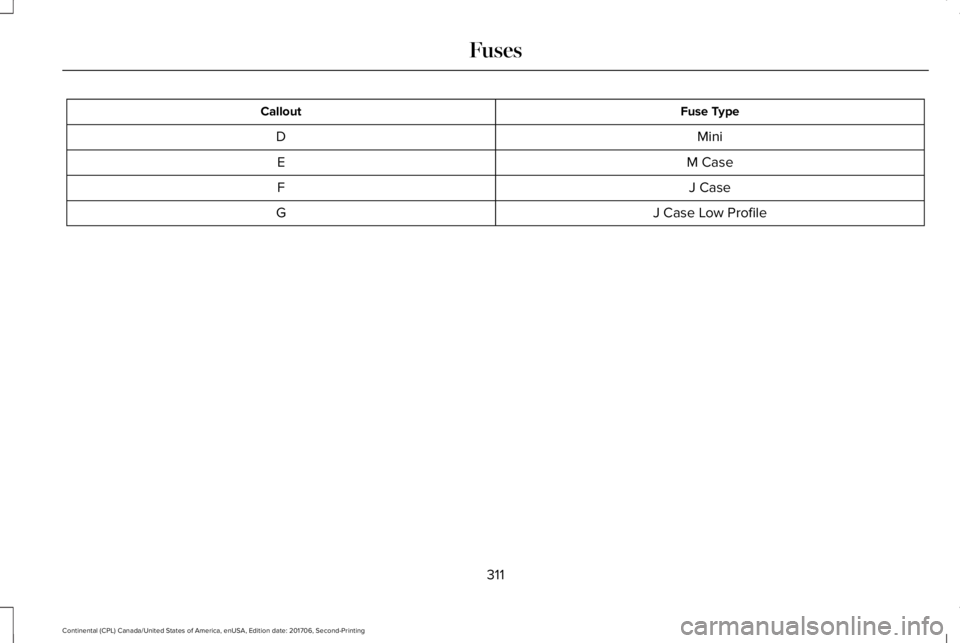
Fuse TypeCallout
MiniD
M CaseE
J CaseF
J Case Low ProfileG
311
Continental (CPL) Canada/United States of America, enUSA, Edition date: 201706, Second-Printing
Fuses
Page 317 of 615
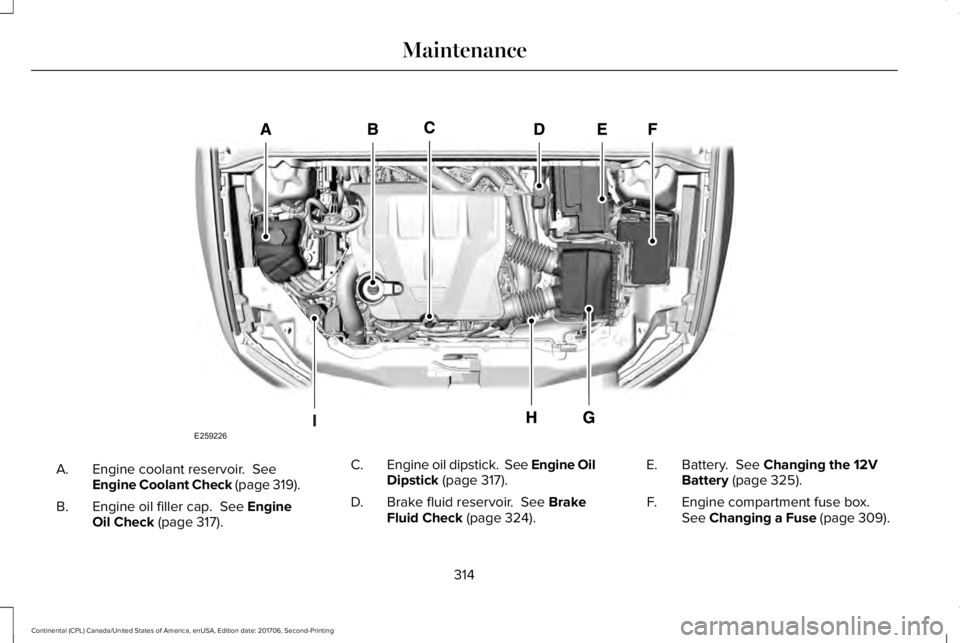
Engine coolant reservoir. SeeEngine Coolant Check (page 319).A.
Engine oil filler cap. See EngineOil Check (page 317).B.
Engine oil dipstick. See Engine OilDipstick (page 317).C.
Brake fluid reservoir. See BrakeFluid Check (page 324).D.
Battery. See Changing the 12VBattery (page 325).E.
Engine compartment fuse box.See Changing a Fuse (page 309).F.
314
Continental (CPL) Canada/United States of America, enUSA, Edition date: 201706, Second-Printing
MaintenanceE259226
Page 319 of 615
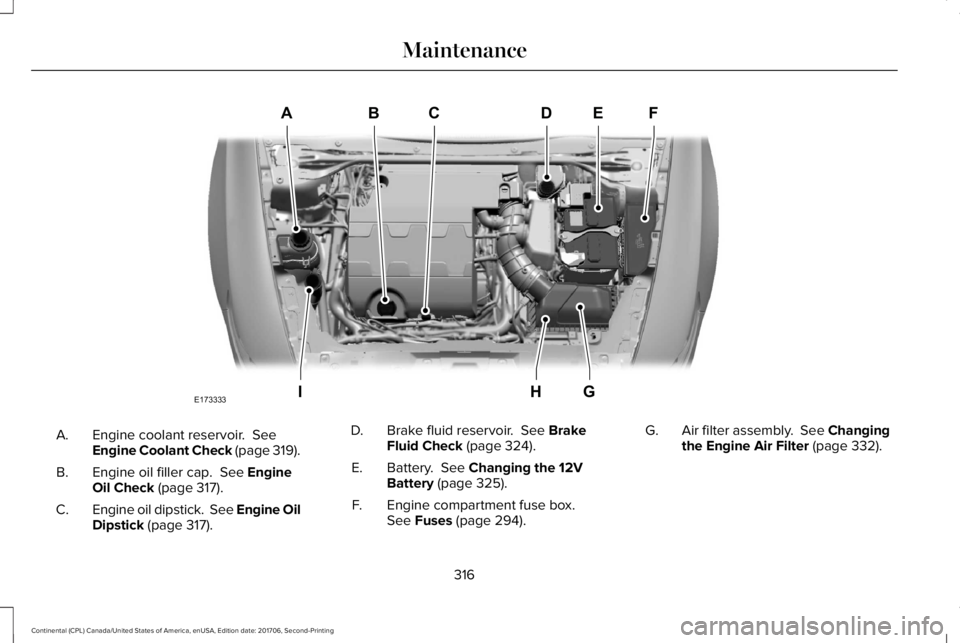
Engine coolant reservoir. SeeEngine Coolant Check (page 319).A.
Engine oil filler cap. See EngineOil Check (page 317).B.
Engine oil dipstick. See Engine OilDipstick (page 317).C.
Brake fluid reservoir. See BrakeFluid Check (page 324).D.
Battery. See Changing the 12VBattery (page 325).E.
Engine compartment fuse box.See Fuses (page 294).F.
Air filter assembly. See Changingthe Engine Air Filter (page 332).G.
316
Continental (CPL) Canada/United States of America, enUSA, Edition date: 201706, Second-Printing
MaintenanceABCD
GHI
EF
E173333
Page 464 of 615
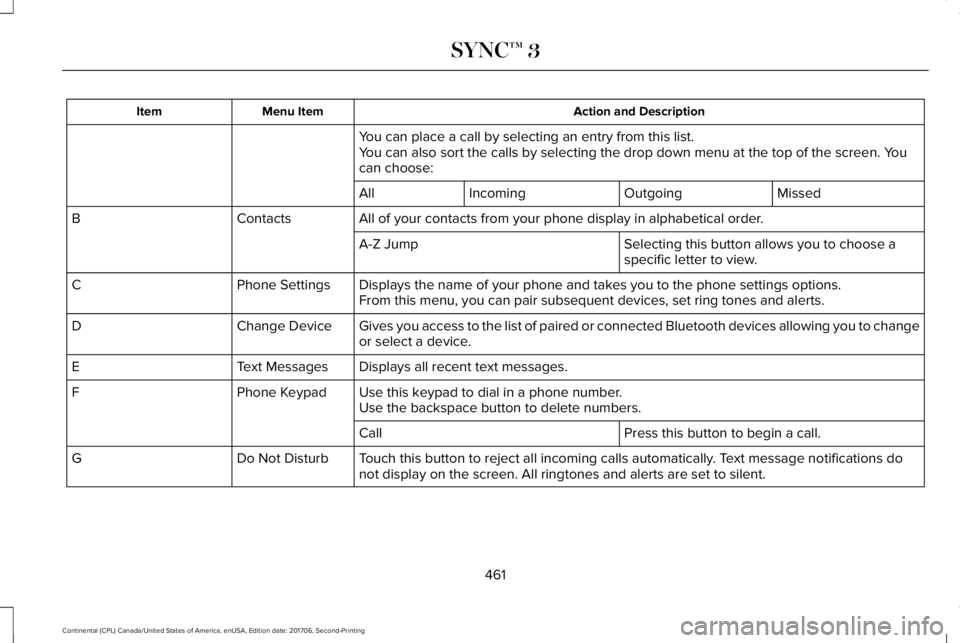
Action and DescriptionMenu ItemItem
You can place a call by selecting an entry from this list.You can also sort the calls by selecting the drop down menu at the top of the screen. Youcan choose:
MissedOutgoingIncomingAll
All of your contacts from your phone display in alphabetical order.ContactsB
Selecting this button allows you to choose aspecific letter to view.A-Z Jump
Displays the name of your phone and takes you to the phone settings options.Phone SettingsCFrom this menu, you can pair subsequent devices, set ring tones and alerts.
Gives you access to the list of paired or connected Bluetooth devices allowing you to changeor select a device.Change DeviceD
Displays all recent text messages.Text MessagesE
Use this keypad to dial in a phone number.Phone KeypadFUse the backspace button to delete numbers.
Press this button to begin a call.Call
Touch this button to reject all incoming calls automatically. Text message notifications donot display on the screen. All ringtones and alerts are set to silent.Do Not DisturbG
461
Continental (CPL) Canada/United States of America, enUSA, Edition date: 201706, Second-Printing
SYNC™ 3
Page 580 of 615
Entire Agreement. These terms andconditions constitute the entire agreementbetween Telenav (and its licensors, includingtheir licensors and suppliers) and youpertaining to the subject matter hereof, andsupersedes in their entirety any and allwritten or oral agreements previouslyexisting between us with respect to suchsubject matter.
Governing Law. The above terms andconditions shall be governed by the laws ofthe State of Illinois [insert “Netherlands”where European HERE Data is used], withoutgiving effect to (i) its conflict of lawsprovisions, or (ii) the United NationsConvention for Contracts for the InternationalSale of Goods, which is explicitly excluded.You agree to submit to the jurisdiction of theState of Illinois [insert “The Netherlands”where European HERE Data is used] for anyand all disputes, claims and actions arisingfrom or in connection with the Data providedto you hereunder.
Government End Users. If the Data is beingacquired by or on behalf of the United Statesgovernment or any other entity seeking orapplying rights similar to those customarilyclaimed by the United States government,this Data is a “commercial item” as that termis defined at 48 C.F.R. (“FAR”) 2.101, islicensed in accordance with these End-UserTerms, and each copy of Data delivered orotherwise furnished shall be marked andembedded as appropriate with the following“Notice of Use,” and shall be treated inaccordance with such Notice:
NOTICE OF USE
CONTRACTOR (MANUFACTURER/SUPPLIER) NAME: HERE
CONTRACTOR (MANUFACTURER/SUPPLIER) ADDRESS: c/o Nokia, 425 WestRandolph Street, Chicago, Illinois 60606
This Data is a commercial item as definedin FAR 2.101 and is subject to these End-User Terms under which this Data wasprovided.
© 1987 – 2014 HERE – All rights reserved.
If the Contracting Officer, federal governmentagency, or any federal official refuses to usethe legend provided herein, the ContractingOfficer, federal government agency, or anyfederal official must notify HERE prior toseeking additional or alternative rights in theData.
I. US/Canada Territory
A. United States Data. The End-UserTerms for any Application containing Datafor the United States shall contain thefollowing notices:
“HERE holds a non-exclusive licensefrom the United States Postal Service®to publish and sell ZIP+4® information.”
“©United States Postal Service® 20XX.Prices are not established, controlled orapproved by the United States PostalService®. The following trademarks andregistrations are owned by the USPS:United States Postal Service, USPS, andZIP+4.”
577
Continental (CPL) Canada/United States of America, enUSA, Edition date: 201706, Second-Printing
Appendices
Page 606 of 615
Changing a Fuse..........................................309Fuses.....................................................................309
Changing a Road Wheel.............................364Dissimilar Spare Wheel and Tire AssemblyInformation......................................................365Stowing the flat tire ...........................................369Tire Change Procedure....................................366
Changing the 12V Battery..........................325Changing the Engine Air Filter - 2.7LEcoBoost™/3.0L EcoBoost™.....................332Changing the Engine Air Filter - 3.7L......332Changing the Wiper Blades.......................327Changing the Windshield Wiper Blades......328
Checking MyKey System Status.................64MyKey Distance.....................................................64Number of Admin Keys.......................................65Number of MyKeys...............................................64
Checking the Wiper Blades.......................327Child Restraint and SeatbeltMaintenance..................................................44Child Restraint Positioning...........................33Child Safety.......................................................19General Information..............................................19
Child Safety Locks..........................................34Child Seats........................................................21Cleaning Leather Seats...............................341Cleaning Products........................................334Materials................................................................334
Cleaning the Engine....................................337Cleaning the Exterior...................................335Cleaning the Headlamps..................................335Exterior Chrome Parts.......................................336Exterior Plastic Parts..........................................336Stripes or Graphics............................................336Underbody...........................................................336Under Hood.........................................................336
Cleaning the Instrument Panel andInstrument Cluster Lens...........................340Cleaning the Interior....................................338Cleaning Black Label or PresidentialInterior...............................................................338
Cleaning the Wheels....................................341Cleaning the Windows and WiperBlades...........................................................337Clearing All MyKeys.......................................64Climate............................................................454Climate Control..............................................146Climate Controlled Seats............................168Ventilated Seats...................................................168
Coolant CheckSee: Engine Coolant Check..............................319
Crash Sensors and Airbag Indicator..........55Creating a MyKey...........................................63Programming/Changing ConfigurableSettings...............................................................64
Cross Traffic Alert.........................................255Blocked Sensors................................................258Switching the System Off and On..................258System Errors......................................................258System Lights, Messages and AudibleAlerts.................................................................258System Limitations.............................................258Using the Cross Traffic Alert System............255
Cruise Control.................................................86Principle of Operation.......................................237Type One................................................................86Type Two.................................................................87
Cruise controlSee: Using Cruise Control................................237
Customer Assistance..................................286
D
Data Recording................................................10Event Data Recording...........................................10Service Data Recording.......................................10
Daytime Running Lamps...............................94Type One - Conventional(Non-Configurable)..........................................95Type Two - Configurable....................................95
Direction Indicators........................................97Indicating a Lane Change...................................97
Doors and Locks.............................................67
603
Continental (CPL) Canada/United States of America, enUSA, Edition date: 201706, Second-Printing
Index