belt LINCOLN CONTINENTAL 2018 Owner's Guide
[x] Cancel search | Manufacturer: LINCOLN, Model Year: 2018, Model line: CONTINENTAL, Model: LINCOLN CONTINENTAL 2018Pages: 615, PDF Size: 5.31 MB
Page 52 of 615
The driver and passenger front airbag systemconsists of:
•Driver and passenger airbag modules.
•Front passenger sensing system.
· Crash sensors and monitoringsystem with readiness indicator.See Crash Sensors and AirbagIndicator (page 55).
Proper Driver and Front PassengerSeating Adjustment
WARNING: National Highway TrafficSafety Administration (NHTSA) recommendsa minimum distance of at least 10 in (25 cm)between an occupant's chest and the driverairbag module.
To properly position yourself away from theairbag:
•Move your seat to the rear as far as youcan while still reaching the pedalscomfortably.
•Recline the seat slightly (one or twodegrees) from the upright position.
After all occupants have adjusted their seatsand put on seatbelts, it is very important thatthey continue to sit properly. A properlyseated occupant sits upright, leaning againstthe seatback, and centered on the seatcushion, with their feet comfortably extendedon the floor. Sitting improperly can increasethe chance of injury in a crash event. Forexample, if an occupant slouches, lies down,turns sideways, sits forward, leans forwardor sideways, or puts one or both feet up, thechance of injury during a crash is greatlyincreased.
Children and Airbags
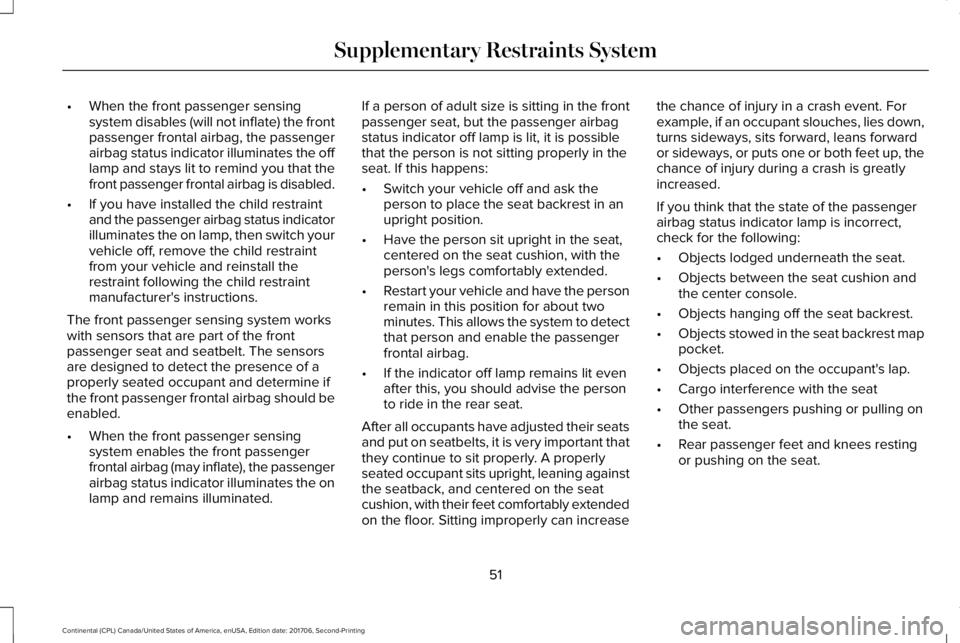
WARNING: Airbags can kill or injure achild in a child restraint. Never place arear-facing child restraint in front of an activeairbag. If you must use a forward-facing childrestraint in the front seat, move the seat uponwhich the child restraint is installed all theway back.
Children must always be properly restrained.Accident statistics suggest that children aresafer when properly restrained in the rearseating positions than in the front seatingposition. Failure to follow these instructionsmay increase the risk of injury in a crash.
49
Continental (CPL) Canada/United States of America, enUSA, Edition date: 201706, Second-Printing
Supplementary Restraints SystemE67017 E142846
Page 54 of 615
•When the front passenger sensingsystem disables (will not inflate) the frontpassenger frontal airbag, the passengerairbag status indicator illuminates the offlamp and stays lit to remind you that thefront passenger frontal airbag is disabled.
•If you have installed the child restraintand the passenger airbag status indicatorilluminates the on lamp, then switch yourvehicle off, remove the child restraintfrom your vehicle and reinstall therestraint following the child restraintmanufacturer's instructions.
The front passenger sensing system workswith sensors that are part of the frontpassenger seat and seatbelt. The sensorsare designed to detect the presence of aproperly seated occupant and determine ifthe front passenger frontal airbag should beenabled.
•When the front passenger sensingsystem enables the front passengerfrontal airbag (may inflate), the passengerairbag status indicator illuminates the onlamp and remains illuminated.
If a person of adult size is sitting in the frontpassenger seat, but the passenger airbagstatus indicator off lamp is lit, it is possiblethat the person is not sitting properly in theseat. If this happens:
•Switch your vehicle off and ask theperson to place the seat backrest in anupright position.
•Have the person sit upright in the seat,centered on the seat cushion, with theperson's legs comfortably extended.
•Restart your vehicle and have the personremain in this position for about twominutes. This allows the system to detectthat person and enable the passengerfrontal airbag.
•If the indicator off lamp remains lit evenafter this, you should advise the personto ride in the rear seat.
After all occupants have adjusted their seatsand put on seatbelts, it is very important thatthey continue to sit properly. A properlyseated occupant sits upright, leaning againstthe seatback, and centered on the seatcushion, with their feet comfortably extendedon the floor. Sitting improperly can increase
the chance of injury in a crash event. Forexample, if an occupant slouches, lies down,turns sideways, sits forward, leans forwardor sideways, or puts one or both feet up, thechance of injury during a crash is greatlyincreased.
If you think that the state of the passengerairbag status indicator lamp is incorrect,check for the following:
•Objects lodged underneath the seat.
•Objects between the seat cushion andthe center console.
•Objects hanging off the seat backrest.
•Objects stowed in the seat backrest mappocket.
•Objects placed on the occupant's lap.
•Cargo interference with the seat
•Other passengers pushing or pulling onthe seat.
•Rear passenger feet and knees restingor pushing on the seat.
51
Continental (CPL) Canada/United States of America, enUSA, Edition date: 201706, Second-Printing
Supplementary Restraints System
Page 57 of 615
Make sure the knee airbags areoperating properly. See CrashSensors and Airbag Indicator(page 55).
SAFETY CANOPY™
WARNING: Do not place objects ormount equipment on or near the headlinerat the siderail that may come into contactwith a deploying curtain airbag. Failure tofollow these instructions may increase therisk of personal injury in the event of a crash.
WARNING: Do not lean your head onthe door. The curtain airbag could injure youas it deploys from the headliner.
WARNING: Do not attempt to service,repair, or modify the supplementary restraintsystem or associated components. Failureto follow this instruction could result inpersonal injury or death.
WARNING: All occupants of yourvehicle, including the driver, should alwaysproperly wear their seatbelts, even when anairbag supplemental restraint system isprovided. Failure to properly wear yourseatbelt could seriously increase the risk ofinjury or death.
WARNING: To reduce risk of injury, donot obstruct or place objects in thedeployment path of the airbag.
WARNING: If a supplementary restraintsystem component has deployed, it will notfunction again. Have the system andassociated components inspected as soonas possible. Failure to follow this instructioncould result in personal injury or death.
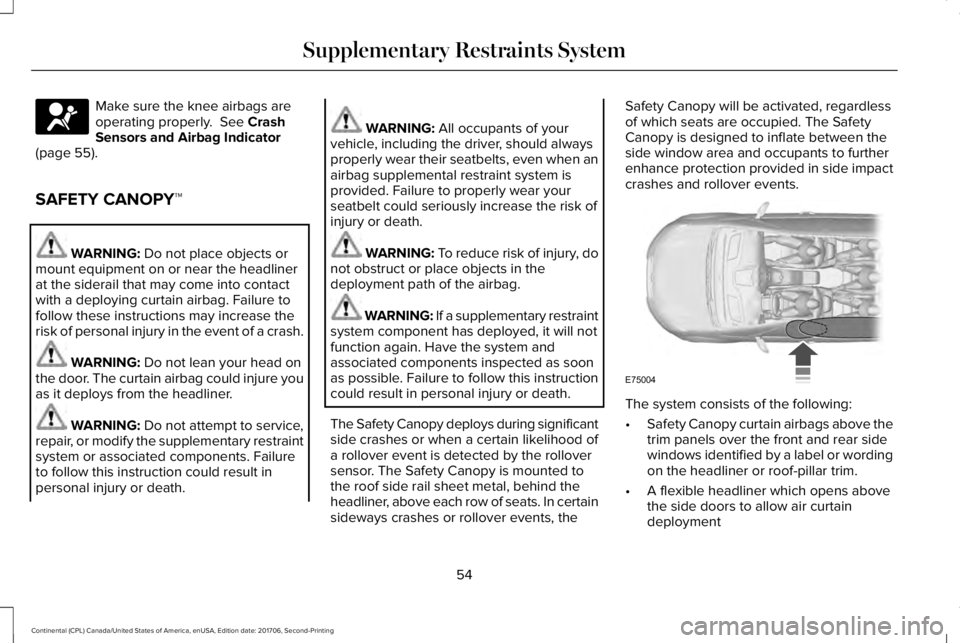
The Safety Canopy deploys during significantside crashes or when a certain likelihood ofa rollover event is detected by the rolloversensor. The Safety Canopy is mounted tothe roof side rail sheet metal, behind theheadliner, above each row of seats. In certainsideways crashes or rollover events, the
Safety Canopy will be activated, regardlessof which seats are occupied. The SafetyCanopy is designed to inflate between theside window area and occupants to furtherenhance protection provided in side impactcrashes and rollover events.
The system consists of the following:
•Safety Canopy curtain airbags above thetrim panels over the front and rear sidewindows identified by a label or wordingon the headliner or roof-pillar trim.
•A flexible headliner which opens abovethe side doors to allow air curtaindeployment
54
Continental (CPL) Canada/United States of America, enUSA, Edition date: 201706, Second-Printing
Supplementary Restraints SystemE67017 E75004
Page 58 of 615
· Crash sensors and monitoringsystem with a readiness indicator.See Crash Sensors and AirbagIndicator (page 55).
Properly restrain children 12 years old andunder in the rear seats. The Safety Canopywill not interfere with children restrainedusing a properly installed child or boosterseat because it is designed to inflatedownward from the headliner above thedoors along the side window opening.
The design and development of the SafetyCanopy included recommended testingprocedures that were developed by a groupof automotive safety experts known as theSide Airbag Technical Working Group. Theserecommended testing procedures helpreduce the risk of injuries related to thedeployment of side airbags (including theSafety Canopy).
CRASH SENSORS AND AIRBAG
INDICATOR
WARNING: Modifying or addingequipment to the front end of the vehicle(including frame, bumper, front end bodystructure and tow hooks) may affect theperformance of the airbag system, increasingthe risk of injury. Do not modify the front endof the vehicle.
Your vehicle has a collection of crash andoccupant sensors which provide informationto the restraints control module. Therestraints control module deploys (activates)the front seatbelt system, the adaptivecollapsible steering column, driver airbag,passenger airbag, knee airbag(s), seatmounted side airbags, Safety Canopy andoptional rear inflatable seatbelts. Based onthe type of crash, the restraints controlmodule will deploy the appropriate safetydevices.
The restraints control module also monitorsthe readiness of the above safety devicesplus the crash and occupant sensors. Thereadiness of the safety system is indicatedby a warning indicator light in the instrumentcluster or a backup tone (if equipped).Routine maintenance of the airbag is notrequired.
A difficulty with the system is indicated byone or more of the following:
The readiness light will notilluminate immediately after theignition is turned on.
•The readiness light will either flash orstay lit.
•A series of five beeps will be heard (Ifequipped). The tone pattern will repeatperiodically until the problem, the lightor both are repaired.
If any of these things happen, evenintermittently, have the supplementalrestraint system serviced at an authorizeddealer immediately. Unless serviced, thesystem may not function properly in theevent of a crash.
55
Continental (CPL) Canada/United States of America, enUSA, Edition date: 201706, Second-Printing
Supplementary Restraints SystemE67017 E67017
Page 59 of 615
The seatbelt pretensioners and the frontairbag supplemental restraint system aredesigned to activate when the vehiclesustains frontal deceleration sufficient tocause the restraints control module to deploya safety device.
The fact that the seatbelt pretensioners orfront airbags did not activate for both frontseat occupants in a crash does not meanthat something is wrong with the system.Rather, it means the restraints control moduledetermined the accident conditions (crashseverity, belt usage) were not appropriate toactivate these safety devices.
•The design of the front airbags is toactivate only in frontal and near-frontalcrashes (not rollovers, side impacts orrear impacts) unless the crash causessufficient frontal deceleration.
•The seatbelt pretensioners and rearinflatable seatbelts are designed toactivate in frontal, near-frontal and sidecrashes and rollovers.
•The knee airbag(s) may deploy based oncrash severity and occupant conditions.
•The design of the side airbags is to inflatein certain side impact crashes. Sideairbags may activate in other types ofcrashes if the vehicle experiencessufficient sideways motion ordeformation.
•The design of the Safety Canopy is toinflate in certain side impact crashes orrollover events. The Safety Canopy mayactivate in other types of crashes if thevehicle experiences sufficient sidewaysmotion or deformation, or a certainlikelihood of rollover.
AIRBAG DISPOSAL
Contact your authorized dealer as soon aspossible. Airbags must be disposed of byqualified personnel.
56
Continental (CPL) Canada/United States of America, enUSA, Edition date: 201706, Second-Printing
Supplementary Restraints System
Page 65 of 615
PRINCIPLE OF OPERATION
MyKey allows you to program keys withrestricted driving modes to promote gooddriving habits. You can program therestrictions to all keys except one. Any keysthat you did not program are administratorkeys or admin keys.
You can use admin keys to:
•Create a MyKey with certain vehiclerestrictions.
•Program certain MyKey settings.
•Clear all MyKey restrictions.
After you program a MyKey, you can viewthe following information through theinformation display:
•The total number of admin keys andMyKeys for your vehicle.
•The total distance a MyKey drivertraveled with your vehicle.
Note:Every MyKey receives the samerestrictions and settings. You cannotprogram them individually.
Note:For vehicles equipped with apush-button start switch: When both a MyKeyand an admin key are present when youstart your vehicle, the system recognizes theadmin key only.
Standard Settings
Not every vehicle includes the features listedbelow. If your vehicle has this equipment,then you cannot change the followingsettings when using a MyKey:
•Seatbelt reminder or Belt-Minder™. MyKeymutes the audio system until drivers, andin some instances, passengers, fastentheir seatbelts. Note: If your vehicleincludes an AM/FM radio or a very basicaudio system, then the radio may notmute.
•Earlier low-fuel warning. The low-fuelwarning activates earlier for MyKeydrivers, giving them more time to refuel.
•Certain driver alerts, stability systems orparking aids turn on automatically whenyou use the MyKey system. For example,Blind Spot Information System (BLIS),cross traffic alert, lane departure warningor forward collision warning. Note: MyKeydrivers may be able to turn the lanedeparture warning feature off, but thisfeature turns back on automatically withevery new key cycle.
•Restricted touchscreen operation in somemarkets. For example, MyKey mayprevent manual navigation destinationinput while the vehicle is in any gearother than park (P) or when the vehiclereaches a certain rate of speed.
•Satellite radio adult content restrictions,if this feature is available in your market.
Optional Settings
You can configure certain vehicle featuresettings when you first create a MyKey. Youcan also change the settings afterward withan admin key.
62
Continental (CPL) Canada/United States of America, enUSA, Edition date: 201706, Second-Printing
MyKey™
Page 66 of 615
Note:Not every feature applies to everyvehicle in every market. When they areavailable for your vehicle, then they appearin your information display, providing choicesto switch them on or off, or to select a morespecific setting.
•Various vehicle speed limits so theMyKey driver cannot exceed certainspeeds. The information display showswarnings followed by an audible tonewhen the MyKey driver reaches the setspeed. You cannot override the setspeed by fully depressing the acceleratorpedal.
WARNING: Do not set MyKeymaximum speed limit to a limit that willprevent the driver from maintaining a safespeed considering posted speed limits andprevailing road conditions. The driver isalways responsible to drive in accordancewith local laws and prevailing conditions.Failure to do so could result in accident orinjury.
•Various vehicle speed reminders soMyKey drivers know when their vehiclespeed approaches the limits. Warningsappear in your information display and atone sounds when the MyKey driversexceed the set vehicle speed.
•The audio system's maximum volumelimits to 45% so MyKey drivers canconcentrate on the road. A messageappears in the information display whenMyKey drivers attempt to exceed thelimited volume. MyKey also disables theautomatic volume control. Note: If yourvehicle includes an AM/FM radio or avery basic audio system, then the radiomay not limit.
•Always on setting. This setting forcescertain features to remain on and activefor MyKey drivers. For example, E911 oremergency assistance and the do notdisturb features stay on even if a MyKeydriver uses the feature's control to switchit off. When you select, you will not beable to turn off Advance Trac or tractioncontrol (if your vehicle has this feature).
CREATING A MYKEY
Use the information display to create aMyKey:
1. Insert the key you want to program intothe ignition. See Starting a GasolineEngine (page 179). If your vehicle isequipped with a push-button start, placethe remote control into the backup slot.See Passive Anti-Theft System (page82).
2. Switch the ignition on.
3.Access the main menu in the informationdisplay and then scroll through themenus to change the settings of yourMyKey. From the MyKey menu select theoption Create MyKey. See InformationDisplays (page 115).
4.When prompted, hold the OK button untilyou see a message informing you to labelthis key as a MyKey. The programmedrestrictions apply when you key off, openand close the driver door and restart yourvehicle with the programmed key ortransmitter.
63
Continental (CPL) Canada/United States of America, enUSA, Edition date: 201706, Second-Printing
MyKey™
Page 77 of 615
Rear Doors
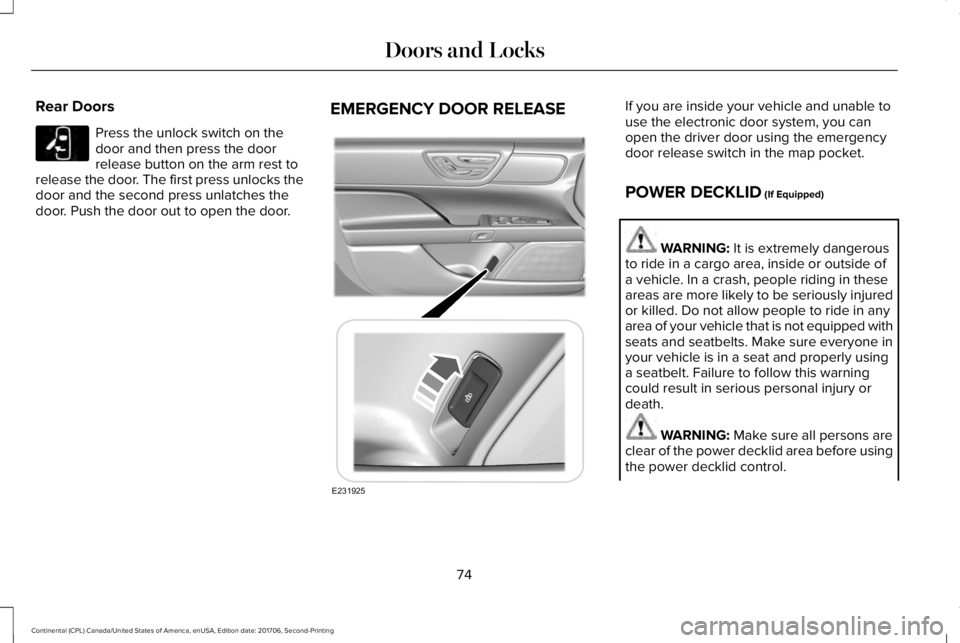
Press the unlock switch on thedoor and then press the doorrelease button on the arm rest torelease the door. The first press unlocks thedoor and the second press unlatches thedoor. Push the door out to open the door.
EMERGENCY DOOR RELEASEIf you are inside your vehicle and unable touse the electronic door system, you canopen the driver door using the emergencydoor release switch in the map pocket.
POWER DECKLID (If Equipped)
WARNING: It is extremely dangerousto ride in a cargo area, inside or outside ofa vehicle. In a crash, people riding in theseareas are more likely to be seriously injuredor killed. Do not allow people to ride in anyarea of your vehicle that is not equipped withseats and seatbelts. Make sure everyone inyour vehicle is in a seat and properly usinga seatbelt. Failure to follow this warningcould result in serious personal injury ordeath.
WARNING: Make sure all persons areclear of the power decklid area before usingthe power decklid control.
74
Continental (CPL) Canada/United States of America, enUSA, Edition date: 201706, Second-Printing
Doors and LocksE232417 E231925
Page 115 of 615
Direction Indicator
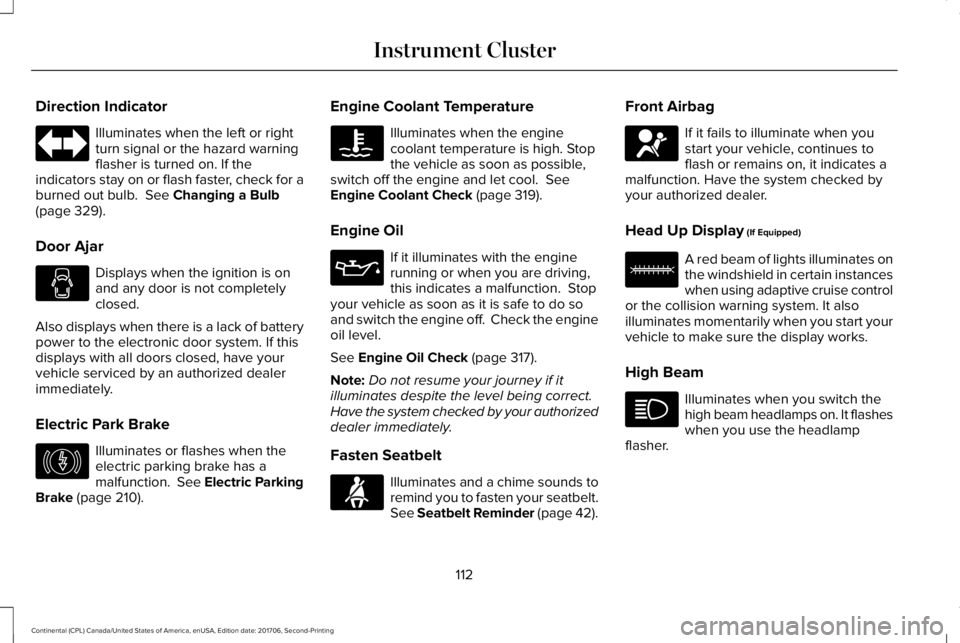
Illuminates when the left or rightturn signal or the hazard warningflasher is turned on. If theindicators stay on or flash faster, check for aburned out bulb. See Changing a Bulb(page 329).
Door Ajar
Displays when the ignition is onand any door is not completelyclosed.
Also displays when there is a lack of batterypower to the electronic door system. If thisdisplays with all doors closed, have yourvehicle serviced by an authorized dealerimmediately.
Electric Park Brake
Illuminates or flashes when theelectric parking brake has amalfunction. See Electric ParkingBrake (page 210).
Engine Coolant Temperature
Illuminates when the enginecoolant temperature is high. Stopthe vehicle as soon as possible,switch off the engine and let cool. SeeEngine Coolant Check (page 319).
Engine Oil
If it illuminates with the enginerunning or when you are driving,this indicates a malfunction. Stopyour vehicle as soon as it is safe to do soand switch the engine off. Check the engineoil level.
See Engine Oil Check (page 317).
Note:Do not resume your journey if itilluminates despite the level being correct.Have the system checked by your authorizeddealer immediately.
Fasten Seatbelt
Illuminates and a chime sounds toremind you to fasten your seatbelt.See Seatbelt Reminder (page 42).
Front Airbag
If it fails to illuminate when youstart your vehicle, continues toflash or remains on, it indicates amalfunction. Have the system checked byyour authorized dealer.
Head Up Display (If Equipped)
A red beam of lights illuminates onthe windshield in certain instanceswhen using adaptive cruise controlor the collision warning system. It alsoilluminates momentarily when you start yourvehicle to make sure the display works.
High Beam
Illuminates when you switch thehigh beam headlamps on. It flasheswhen you use the headlampflasher.
112
Continental (CPL) Canada/United States of America, enUSA, Edition date: 201706, Second-Printing
Instrument Cluster E146190 E71880 E67017 E156133
Page 138 of 615
MyKey
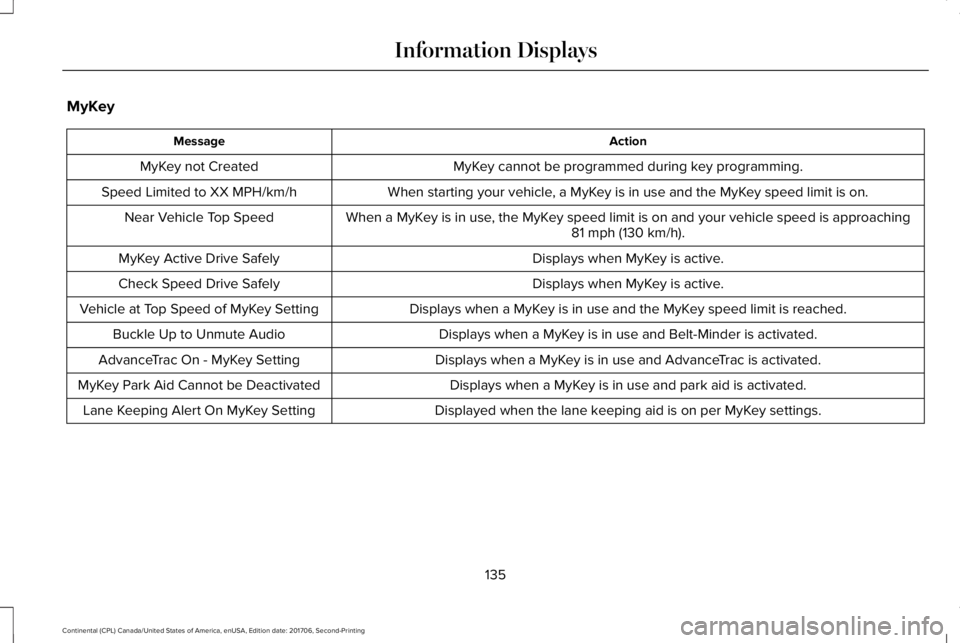
ActionMessage
MyKey cannot be programmed during key programming.MyKey not Created
When starting your vehicle, a MyKey is in use and the MyKey speed limit is on.Speed Limited to XX MPH/km/h
When a MyKey is in use, the MyKey speed limit is on and your vehicle speed is approaching81 mph (130 km/h).Near Vehicle Top Speed
Displays when MyKey is active.MyKey Active Drive Safely
Displays when MyKey is active.Check Speed Drive Safely
Displays when a MyKey is in use and the MyKey speed limit is reached.Vehicle at Top Speed of MyKey Setting
Displays when a MyKey is in use and Belt-Minder is activated.Buckle Up to Unmute Audio
Displays when a MyKey is in use and AdvanceTrac is activated.AdvanceTrac On - MyKey Setting
Displays when a MyKey is in use and park aid is activated.MyKey Park Aid Cannot be Deactivated
Displayed when the lane keeping aid is on per MyKey settings.Lane Keeping Alert On MyKey Setting
135
Continental (CPL) Canada/United States of America, enUSA, Edition date: 201706, Second-Printing
Information Displays