light LINCOLN CONTINENTAL 2018 Owner's Guide
[x] Cancel search | Manufacturer: LINCOLN, Model Year: 2018, Model line: CONTINENTAL, Model: LINCOLN CONTINENTAL 2018Pages: 615, PDF Size: 5.31 MB
Page 115 of 615
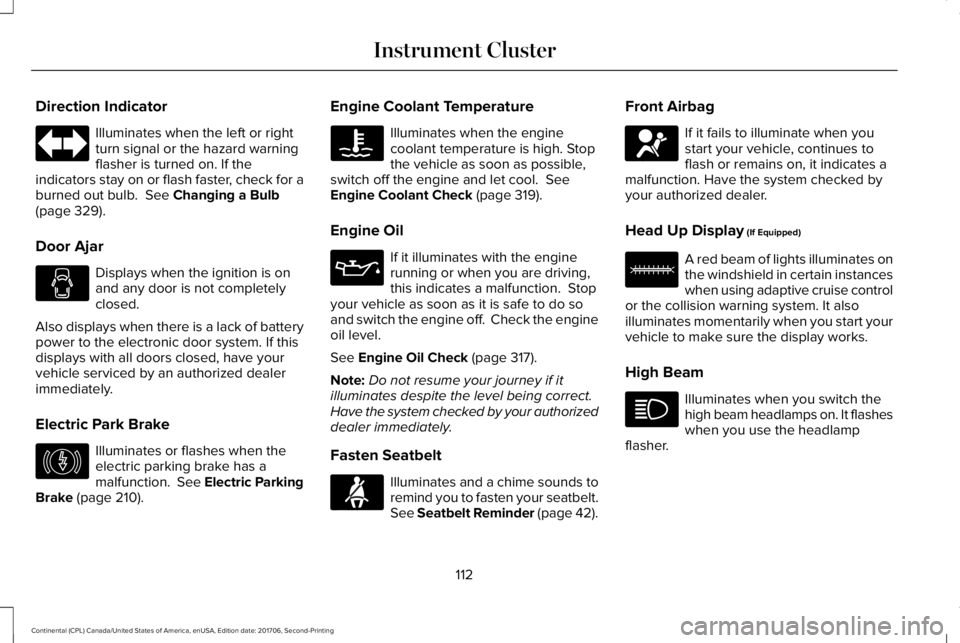
Direction Indicator
Illuminates when the left or rightturn signal or the hazard warningflasher is turned on. If theindicators stay on or flash faster, check for aburned out bulb. See Changing a Bulb(page 329).
Door Ajar
Displays when the ignition is onand any door is not completelyclosed.
Also displays when there is a lack of batterypower to the electronic door system. If thisdisplays with all doors closed, have yourvehicle serviced by an authorized dealerimmediately.
Electric Park Brake
Illuminates or flashes when theelectric parking brake has amalfunction. See Electric ParkingBrake (page 210).
Engine Coolant Temperature
Illuminates when the enginecoolant temperature is high. Stopthe vehicle as soon as possible,switch off the engine and let cool. SeeEngine Coolant Check (page 319).
Engine Oil
If it illuminates with the enginerunning or when you are driving,this indicates a malfunction. Stopyour vehicle as soon as it is safe to do soand switch the engine off. Check the engineoil level.
See Engine Oil Check (page 317).
Note:Do not resume your journey if itilluminates despite the level being correct.Have the system checked by your authorizeddealer immediately.
Fasten Seatbelt
Illuminates and a chime sounds toremind you to fasten your seatbelt.See Seatbelt Reminder (page 42).
Front Airbag
If it fails to illuminate when youstart your vehicle, continues toflash or remains on, it indicates amalfunction. Have the system checked byyour authorized dealer.
Head Up Display (If Equipped)
A red beam of lights illuminates onthe windshield in certain instanceswhen using adaptive cruise controlor the collision warning system. It alsoilluminates momentarily when you start yourvehicle to make sure the display works.
High Beam
Illuminates when you switch thehigh beam headlamps on. It flasheswhen you use the headlampflasher.
112
Continental (CPL) Canada/United States of America, enUSA, Edition date: 201706, Second-Printing
Instrument Cluster E146190 E71880 E67017 E156133
Page 118 of 615
GENERAL INFORMATION
WARNING: Driving while distractedcan result in loss of vehicle control, crashand injury. We strongly recommend that youuse extreme caution when using any devicethat may take your focus off the road. Yourprimary responsibility is the safe operationof your vehicle. We recommend against theuse of any hand-held device while drivingand encourage the use of voice-operatedsystems when possible. Make sure you areaware of all applicable local laws that mayaffect the use of electronic devices whiledriving.
You can control various systems on yourvehicle using the quick action menu (QAM)buttons on the right-hand side of the steeringwheel. The information display provides thecorresponding information.
Note:Some options may appear slightlydifferent or not at all if the items are optional.
Note:Some MyKey menu options onlyappear if MyKey is enabled and at least oneMyKey is programmed.
Note:Speedometer, driving aid information,and distance to empty information (ifenabled) moves to the left information groupwhen a menu is opened.
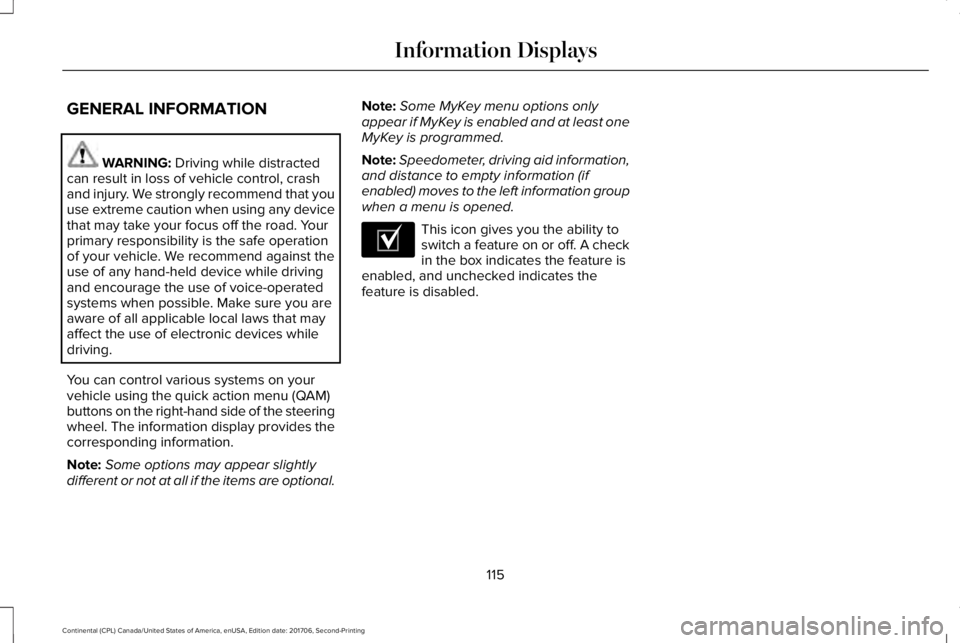
This icon gives you the ability toswitch a feature on or off. A checkin the box indicates the feature isenabled, and unchecked indicates thefeature is disabled.
115
Continental (CPL) Canada/United States of America, enUSA, Edition date: 201706, Second-Printing
Information DisplaysE204495
Page 119 of 615
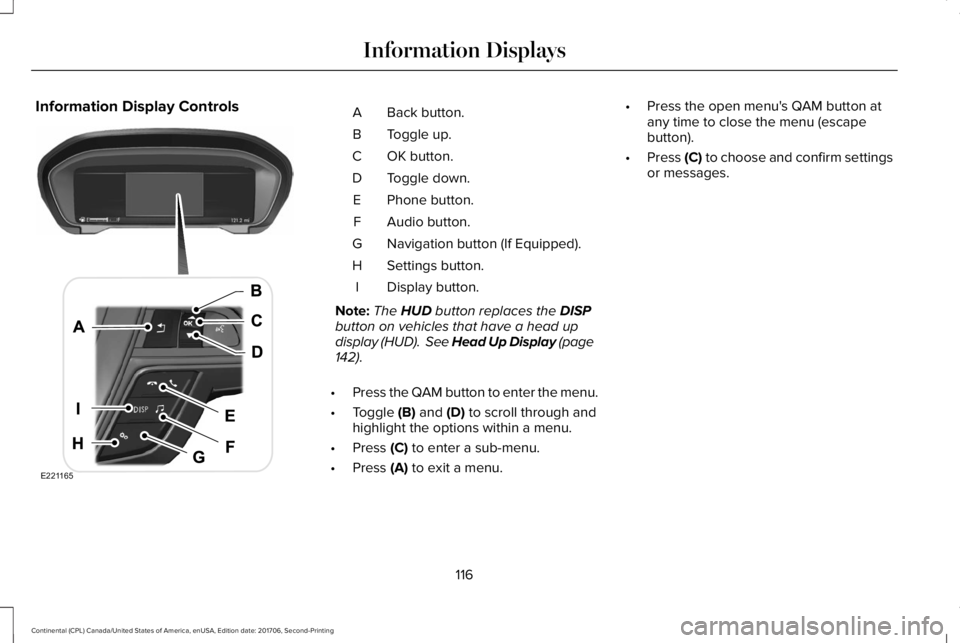
Information Display ControlsBack button.A
Toggle up.B
OK button.C
Toggle down.D
Phone button.E
Audio button.F
Navigation button (If Equipped).G
Settings button.H
Display button.I
Note:The HUD button replaces the DISPbutton on vehicles that have a head updisplay (HUD). See Head Up Display (page142).
•Press the QAM button to enter the menu.
•Toggle (B) and (D) to scroll through andhighlight the options within a menu.
•Press (C) to enter a sub-menu.
•Press (A) to exit a menu.
•Press the open menu's QAM button atany time to close the menu (escapebutton).
•Press (C) to choose and confirm settingsor messages.
116
Continental (CPL) Canada/United States of America, enUSA, Edition date: 201706, Second-Printing
Information DisplaysE221165
Page 121 of 615
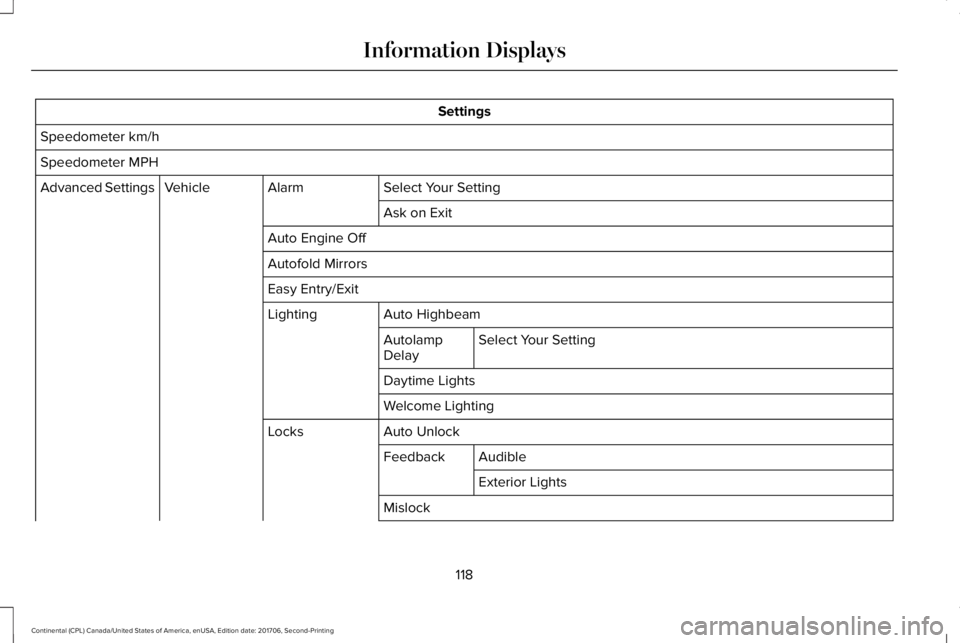
Settings
Speedometer km/h
Speedometer MPH
Select Your SettingAlarmVehicleAdvanced Settings
Ask on Exit
Auto Engine Off
Autofold Mirrors
Easy Entry/Exit
Auto HighbeamLighting
Select Your SettingAutolampDelay
Daytime Lights
Welcome Lighting
Auto UnlockLocks
AudibleFeedback
Exterior Lights
Mislock
118
Continental (CPL) Canada/United States of America, enUSA, Edition date: 201706, Second-Printing
Information Displays
Page 130 of 615
AWD
ActionMessage
Displays when the system automatically disables to protect itself. This may be caused by operatingthe vehicle with the compact tire installed, if the system is overheating or if there is an issue withanother vehicle system preventing AWD operation. The system resumes normal operation andclears this message after cycling the ignition on and off and driving a short distance with theroad tire re-installed, after the system is allowed to cool or after the other vehicle system issuesare resolved.
AWD OFF
Displays in conjunction with the powertrain malfunction or reduced power light when the systemis not operating properly. If the message stays on or continues to come on, contact yourauthorized dealer as soon as possible.
AWD Malfunction Service Required
Battery and Charging System
ActionMessage
The charging system needs servicing. If the warning stays on or continues to come on, contactan authorized dealer as soon as possible.Check Charging System
The charging system needs servicing. If the warning stays on or continues to come on, contactan authorized dealer as soon as possible.Charging System Service Soon
The charging system needs servicing. Contact an authorized dealer as soon as possible.Charging System Service Now
127
Continental (CPL) Canada/United States of America, enUSA, Edition date: 201706, Second-Printing
Information Displays
Page 146 of 615
Navigation Display Area.D
Status Bar.E
Speedometer Display Area.F
Signaling and Traffic Indication
Displays direction indicators, blind spotinformation (if direction indicators are active)and cross traffic alert.
Left Information Group
Displays incoming call information.
ADAS Display Area
Displays ACC and lane keeping systemstatus and warnings.
Navigation Display Area
Displays navigation next turn instructions.
Status Bar
Displays distance to empty (DTE), time andoutside air temperature. Next to DTE, thefuel gauge fill color changes to yellow in lowfuel conditions. You can switch off the statusbar in the HUD settings menu.
Speedometer Display Area
Displays current vehicle speed, speed limit(if available in the map database) and yourtransmission gear selection.
Configuring The Head Up Display
You can control the system's options throughthe information display by using the HUD,OK and arrow buttons on the right-hand sideof your steering wheel. See GeneralInformation (page 115). You can adjust thedisplay according to your height to makeviewing the content easier. You can alsoadjust what content displays and thebrightness of the content. The system'soptions appear in the instrument clusterwhile the updates happen in the HUD.
Note:If HUD On is unchecked, other optionsof the system are hidden.
Note:The HUD menu automatically closesafter a certain period of inactivity.
Note:The HUD image brightnessautomatically adjusts to the brightness ofthe ambient environment. You have theability to adjust the brightness furtheraccording to your preference.
Note:In some instances, sunlight can causesome reflections in and around the HUDimage.
143
Continental (CPL) Canada/United States of America, enUSA, Edition date: 201706, Second-Printing
Information Displays
Page 148 of 615
Maintaining Your Head Up Display
•Do not place objects onto the transparentcover, as they may block you from seeingportions of the image. These objectscould also damage the cover and affectthe quality of the projected image.
•The system uses a special windshielddesigned to provide the optimum imagequality. You must replace the windshieldin a vehicle with this system with acertified original equipmentmanufactured (OEM) head up displaywindshield. Replacing this system'swindshield with a non-head up displaywindshield causes a double image ordistorted image. Have an authorizeddealer or authorized repair facility replacethe windshield.
•Light conditions such as oncomingheadlamps, sunrise, sunset or reflectionsoff of wet road surfaces can affect thedriver's ability to see the HUD image.
•Clean the windshield often for optimalHUD performance. See Cleaning theWindows and Wiper Blades (page 337).
145
Continental (CPL) Canada/United States of America, enUSA, Edition date: 201706, Second-Printing
Information Displays
Page 156 of 615
SITTING IN THE CORRECT
POSITION
WARNING: Sitting improperly, out ofposition or with the seatback reclined too farcan take weight off the seat cushion andaffect the decision of the passenger sensingsystem, resulting in serious injury or deathin the event of a crash. Always sit uprightagainst your seat back, with your feet on thefloor.
WARNING: Do not recline the seatbackas this can cause the occupant to slide underthe safety belt, resulting in serious injury inthe event of a crash.
WARNING: Do not place objects higherthan the seatback to reduce the risk ofserious injury in the event of a crash orduring heavy braking.
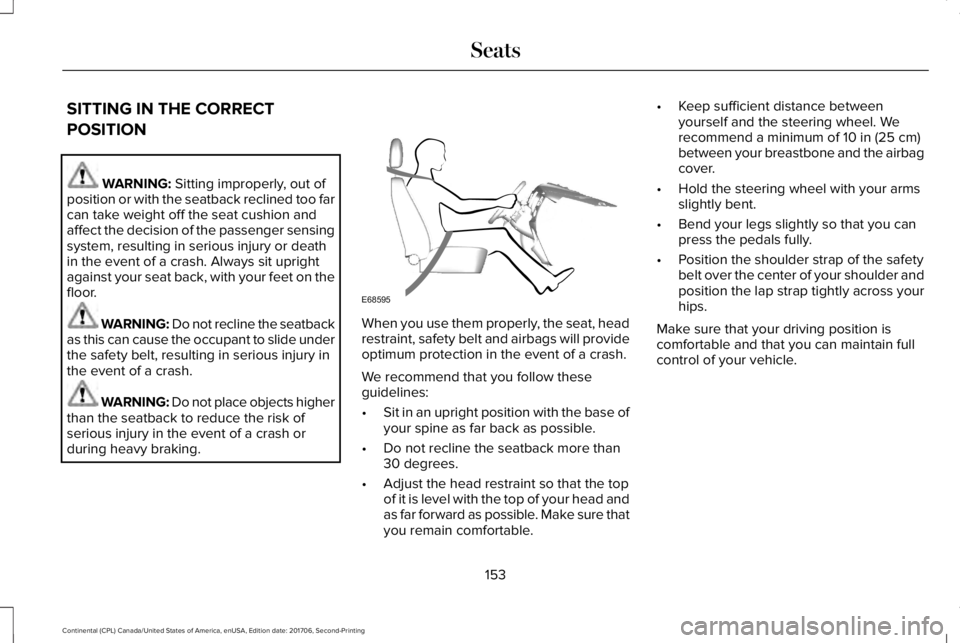
When you use them properly, the seat, headrestraint, safety belt and airbags will provideoptimum protection in the event of a crash.
We recommend that you follow theseguidelines:
•Sit in an upright position with the base ofyour spine as far back as possible.
•Do not recline the seatback more than30 degrees.
•Adjust the head restraint so that the topof it is level with the top of your head andas far forward as possible. Make sure thatyou remain comfortable.
•Keep sufficient distance betweenyourself and the steering wheel. Werecommend a minimum of 10 in (25 cm)between your breastbone and the airbagcover.
•Hold the steering wheel with your armsslightly bent.
•Bend your legs slightly so that you canpress the pedals fully.
•Position the shoulder strap of the safetybelt over the center of your shoulder andposition the lap strap tightly across yourhips.
Make sure that your driving position iscomfortable and that you can maintain fullcontrol of your vehicle.
153
Continental (CPL) Canada/United States of America, enUSA, Edition date: 201706, Second-Printing
SeatsE68595
Page 170 of 615
temperatures, especially if used for longperiods of time. Do not place anything onthe seat that insulates against heat, such asa blanket or cushion. This may cause theheated seat to overheat. Do not puncturethe seat with pins, needles or other pointedobjects. This may damage the heatingelement which may cause the heated seatto overheat. An overheated seat may causeserious personal injury.
Do not do the following:
•Place heavy objects on the seat.
•Operate the heated seat if water or anyother liquid spills on the seat. Allow theseat to dry thoroughly.
•Operate the heated seats unless theengine is running. Doing so can causethe battery to lose charge.
Press the heated seat symbol to cyclethrough the various heat settings and off.More indicator lights indicate warmersettings.
Rear Seats
WARNING: Persons who are unableto feel pain to the skin because of advancedage, chronic illness, diabetes, spinal cordinjury, medication, alcohol use, exhaustion,or other physical conditions, must exercisecare when using the seat heater. The seatheater may cause burns even at lowtemperatures, especially if used for longperiods of time. Do not place anything onthe seat that insulates against heat, such asa blanket or cushion, because this may cause
the seat heater to overheat. Do not puncturethe seat with pins, needles, or other pointedobjects because this may damage theheating element which may cause the seatheater to overheat. An overheated seat maycause serious personal injury.
Do not do the following:
•Place heavy objects on the seat.
•Operate the seat heater if water or anyother liquid is spilled on the seat. Allowthe seat to dry thoroughly.
•Operate the heated seats unless theengine is running. Doing so can causethe battery to lose charge.
The rear seat heat controls are located onthe rear of the center console.
167
Continental (CPL) Canada/United States of America, enUSA, Edition date: 201706, Second-Printing
SeatsE146322 E146322
Page 171 of 615
Press the heated seat symbol to cyclethrough the various heat settings and off.More indicator lights indicate warmersettings.
The heated seat module resets at everyignition run cycle. While the ignition is on,press the high or low heated seat switch toenable heating mode. When activated, theywill turn off automatically when you turn theengine off.
CLIMATE CONTROLLED SEATS (If
Equipped)
Heated Seats
WARNING: People who are unable tofeel pain to their skin because of advancedage, chronic illness, diabetes, spinal cordinjury, medication, alcohol use, exhaustionor other physical conditions, must usecaution when using the heated seat. Theheated seat may cause burns even at lowtemperatures, especially if used for longperiods of time. Do not place anything on
the seat that may block the heat, such as ablanket or cushion. This can cause theheated seat to overheat. Do not puncturethe seat with pins, needles or other pointedobjects. This damages the heating elementand can cause the heated seat to overheat.An overheated seat may cause seriouspersonal injury.
Note:The heated seats switch on during aremote start if they are enabled through theinformation displays. See GeneralInformation (page 115).
Note:The heated seats may also switch onwhen you start your vehicle if they were onwhen you previously switched your vehicleoff.
Note:Do not do the following:
•Place heavy objects on the seat.
•Operate the seat heater if water or anyother liquid spills on the seat. Allow theseat to dry thoroughly.
Press this symbol to cycle through thevarious heat settings and off. More indicatorlights indicate warmer settings.
Ventilated Seats
Note:The ventilated seats switch on duringa remote start if they are enabled throughthe information displays. See GeneralInformation (page 115).
Note:The ventilated seats may also switchon when you start your vehicle if they wereon when you previously switched yourvehicle off.
Note:Do not do the following:
168
Continental (CPL) Canada/United States of America, enUSA, Edition date: 201706, Second-Printing
SeatsE146322