brake LINCOLN CONTINENTAL 2018 Repair Manual
[x] Cancel search | Manufacturer: LINCOLN, Model Year: 2018, Model line: CONTINENTAL, Model: LINCOLN CONTINENTAL 2018Pages: 615, PDF Size: 5.31 MB
Page 247 of 615
System Not Available
The system may not turn on if there is:
•A blocked sensor.
•High brake temperature.
•A failure in the system or a relatedsystem.
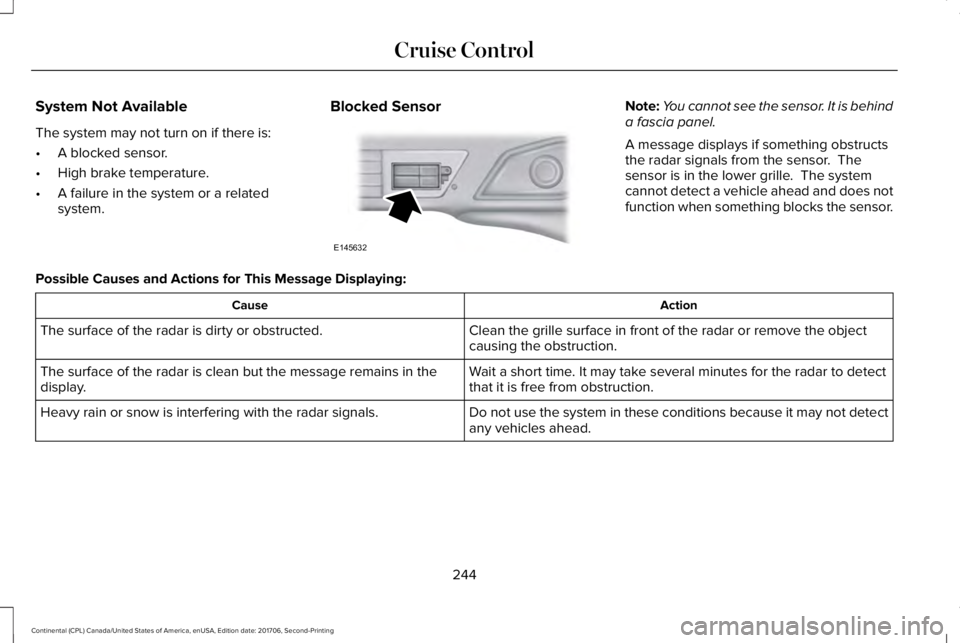
Blocked SensorNote:You cannot see the sensor. It is behinda fascia panel.
A message displays if something obstructsthe radar signals from the sensor. Thesensor is in the lower grille. The systemcannot detect a vehicle ahead and does notfunction when something blocks the sensor.
Possible Causes and Actions for This Message Displaying:
ActionCause
Clean the grille surface in front of the radar or remove the objectcausing the obstruction.The surface of the radar is dirty or obstructed.
Wait a short time. It may take several minutes for the radar to detectthat it is free from obstruction.The surface of the radar is clean but the message remains in thedisplay.
Do not use the system in these conditions because it may not detectany vehicles ahead.Heavy rain or snow is interfering with the radar signals.
244
Continental (CPL) Canada/United States of America, enUSA, Edition date: 201706, Second-Printing
Cruise ControlE145632
Page 248 of 615
ActionCause
Do not use the system in these conditions because it may not detectany vehicles ahead.Water, snow or ice on the surface of the road may interfere with theradar signals.
Wait a short time or switch to normal cruise control.You are in a desert or remote area with no other vehicles and noroadside objects.
Due to the nature of radar technology, it is possible to get a blockage warning with no actual block. This happens, for example, when drivingin sparse rural or desert environments. A false blocked condition either self clears, or clears after you restart your vehicle.
Switching to Normal Cruise Control
WARNING: Normal cruise control willnot brake when your vehicle is approachingslower vehicles. Always be aware of whichmode you have selected and apply thebrakes when necessary.
You can change from adaptive cruise controlto normal cruise control through theinformation display.
The cruise control indicator lightreplaces the adaptive cruisecontrol indicator light if you selectnormal cruise control. The gap setting doesnot display, and the system does not respondto lead vehicles. Automatic braking remainsactive to maintain set speed.
245
Continental (CPL) Canada/United States of America, enUSA, Edition date: 201706, Second-Printing
Cruise ControlE71340
Page 263 of 615
Adaptive Learning
The electronic power steering systemadaptive learning helps correct roadirregularities and improves overall handlingand steering feel. It communicates with thebrake system to help operate advancedstability control and accident avoidancesystems. Additionally, whenever the batteryis disconnected or a new battery installed,you must drive your vehicle a short distancebefore the system relearns the strategy andreactivates all systems.
Adaptive Steering (If Equipped)
Note:The adaptive steering system hasdiagnostic checks that continuously monitorthe system. If a fault is detected a messagedisplays in the information display. If a redwarning message displays, stop your vehicleas soon as it is safe to do so. The messagemay clear if the fault is no longer present. Ifan adaptive steering system warningmessage appears each time you start yourvehicle, have the system checked as soonas possible.
The adaptive steering system continuallychanges the steering ratio with changes tovehicle speed, optimizing the steeringresponse in all conditions.
The adaptive steering system is designedwith a locking device. While the lock isengaged, your vehicle returns to a fixedsteering ratio. You may also notice a soundwhen you start or turn off your vehicle as thelock is disengaged or engaged. If yourvehicle loses electrical power or detects afault while you are driving, the lock engagesand you are able to continue steering. Duringthis time it is possible that the steering wheelmay not be straight when the vehicle isdriving straight ahead. During this time youmay notice that the steering wheel anglerequired to steer the vehicle may bedifferent. Extreme operating conditions mayalso cause the lock to engage. This strategyprevents overheating and permanentdamage to the adaptive steering system.Typical steering and driving maneuvers allowthe system to cool and return to normaloperation.
PRE-COLLISION ASSIST (If Equipped)
WARNING: You are responsible forcontrolling your vehicle at all times. Thesystem is designed to be an aid and doesnot relieve you of your responsibility to drivewith due care and attention. Failure to followthis instruction could result in the loss ofcontrol of your vehicle, personal injury ordeath.
WARNING: The system does not detectvehicles that are driving in a differentdirection, pedestrians at night, cyclists oranimals. Failure to take care may result inthe loss of control of your vehicle, seriouspersonal injury or death.
WARNING: The system does notoperate during hard acceleration or steering.Failure to take care may lead to a crash orpersonal injury.
260
Continental (CPL) Canada/United States of America, enUSA, Edition date: 201706, Second-Printing
Driving Aids
Page 264 of 615
WARNING: The system may fail oroperate with reduced function during coldand severe weather conditions. Snow, ice,rain, spray and fog can adversely affect thesystem. Keep the front camera and radar freeof snow and ice. Failure to take care mayresult in the loss of control of your vehicle,serious personal injury or death.
WARNING: In situations where thevehicle camera has limited detectioncapability, this may reduce systemperformance. These situations include butare not limited to direct or low sunlight,vehicles at night without tail lights,unconventional vehicle types, pedestrianswith complex backgrounds, runningpedestrians, partly obscured pedestrians, orpedestrians that the system cannotdistinguish from a group. Failure to take caremay result in the loss of control of yourvehicle, serious personal injury or death.
WARNING: The system cannot helpprevent all crashes. Do not rely on thissystem to replace driver judgment and theneed to maintain a safe distance and speed.
Using the Pre-Collision Assist System
The system is active at speeds aboveapproximately 3 mph (5 km/h) and pedestriandetection is active at speeds up to 50 mph(80 km/h).
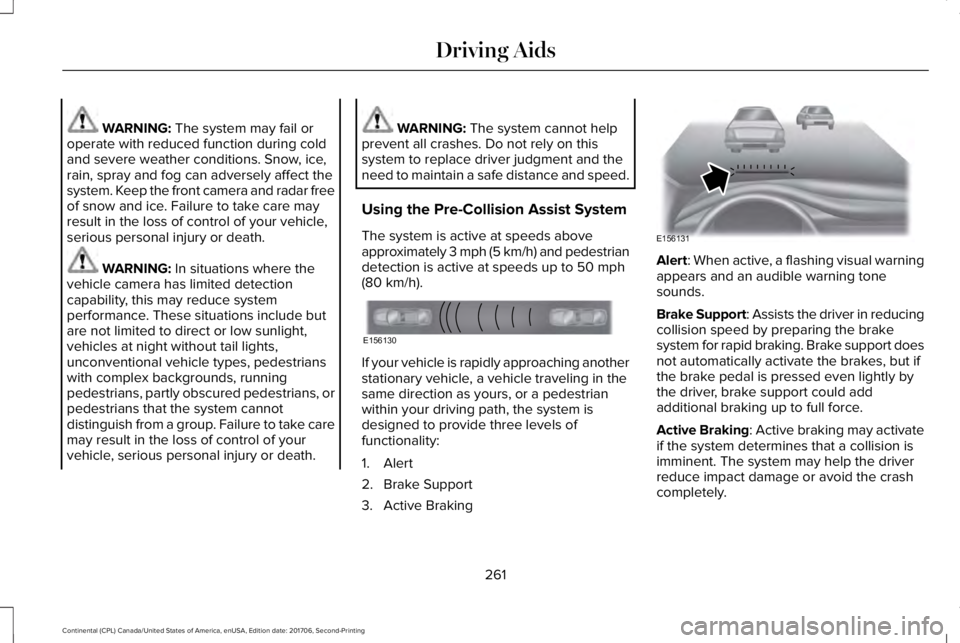
If your vehicle is rapidly approaching anotherstationary vehicle, a vehicle traveling in thesame direction as yours, or a pedestrianwithin your driving path, the system isdesigned to provide three levels offunctionality:
1. Alert
2. Brake Support
3. Active Braking
Alert: When active, a flashing visual warningappears and an audible warning tonesounds.
Brake Support: Assists the driver in reducingcollision speed by preparing the brakesystem for rapid braking. Brake support doesnot automatically activate the brakes, but ifthe brake pedal is pressed even lightly bythe driver, brake support could addadditional braking up to full force.
Active Braking: Active braking may activateif the system determines that a collision isimminent. The system may help the driverreduce impact damage or avoid the crashcompletely.
261
Continental (CPL) Canada/United States of America, enUSA, Edition date: 201706, Second-Printing
Driving AidsE156130 E156131
Page 271 of 615
GAWR (Gross Axle Weight Rating)
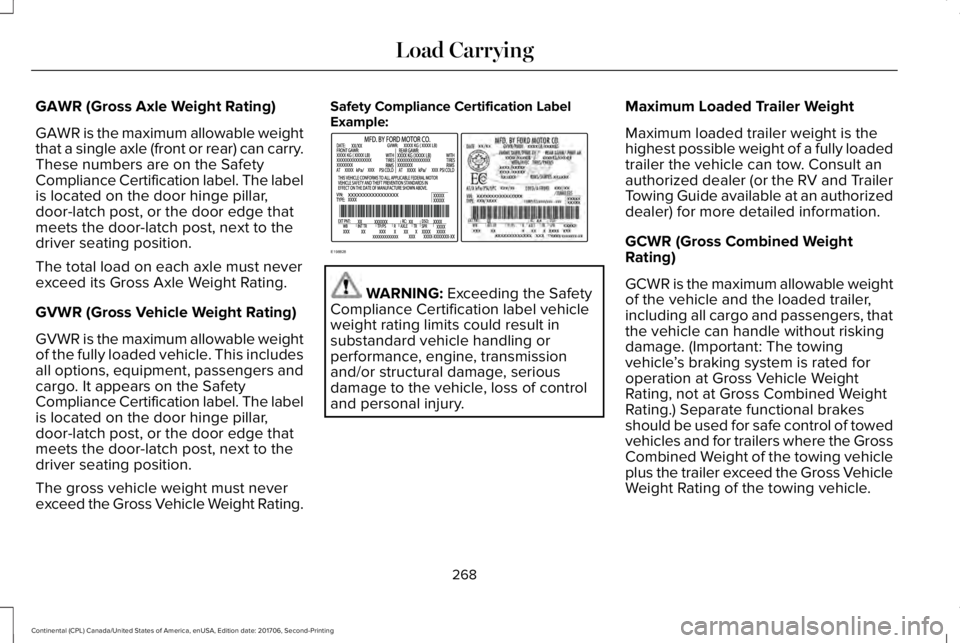
GAWR is the maximum allowable weightthat a single axle (front or rear) can carry.These numbers are on the SafetyCompliance Certification label. The labelis located on the door hinge pillar,door-latch post, or the door edge thatmeets the door-latch post, next to thedriver seating position.
The total load on each axle must neverexceed its Gross Axle Weight Rating.
GVWR (Gross Vehicle Weight Rating)
GVWR is the maximum allowable weightof the fully loaded vehicle. This includesall options, equipment, passengers andcargo. It appears on the Safety
Compliance Certification label. The labelis located on the door hinge pillar,door-latch post, or the door edge thatmeets the door-latch post, next to thedriver seating position.
The gross vehicle weight must neverexceed the Gross Vehicle Weight Rating.
Safety Compliance Certification LabelExample:
WARNING: Exceeding the SafetyCompliance Certification label vehicleweight rating limits could result insubstandard vehicle handling orperformance, engine, transmissionand/or structural damage, seriousdamage to the vehicle, loss of controland personal injury.
Maximum Loaded Trailer Weight
Maximum loaded trailer weight is thehighest possible weight of a fully loadedtrailer the vehicle can tow. Consult anauthorized dealer (or the RV and TrailerTowing Guide available at an authorizeddealer) for more detailed information.
GCWR (Gross Combined WeightRating)
GCWR is the maximum allowable weightof the vehicle and the loaded trailer,including all cargo and passengers, thatthe vehicle can handle without riskingdamage. (Important: The towingvehicle’s braking system is rated foroperation at Gross Vehicle WeightRating, not at Gross Combined Weight
Rating.) Separate functional brakesshould be used for safe control of towedvehicles and for trailers where the GrossCombined Weight of the towing vehicleplus the trailer exceed the Gross VehicleWeight Rating of the towing vehicle.
268
Continental (CPL) Canada/United States of America, enUSA, Edition date: 201706, Second-Printing
Load CarryingE198828
Page 274 of 615
TOWING A TRAILER
WARNING: Do not exceed theGVWR or the GAWR specified on thecertification label.
WARNING: Towing trailers beyondthe maximum recommended grosstrailer weight exceeds the limit of yourvehicle and could result in enginedamage, transmission damage,structural damage, loss of vehiclecontrol, vehicle rollover and personalinjury.
Note:There may be electrical itemssuch as fuses or relays that can affecttrailer towing operation. See Fuses(page 294).
The load capacity of your vehicle isdesignated by weight not volume. Youmay not necessarily be able to use allavailable space when loading yourvehicle or trailer.
Towing a trailer places extra load on theengine, transmission, axle, brakes, tires,and suspension. Inspect thesecomponents before, during and aftertowing.
Load Placement
To help minimize how trailer movementaffects the vehicle when driving:
•Load the heaviest items closest tothe trailer floor.
•Load the heaviest items in the centerof the left and right side trailer tires.
•Load the heaviest items above thetrailer axles or just slightly forwardtoward the trailer tongue. Do notallow the final trailer tongue weightto go above or below 10-15% of theloaded trailer weight.
•Select a ball mount with the correctrise or drop. When both the loadedvehicle and trailer are connected, thetrailer frame should be level, orslightly angled down toward thevehicle, when viewed from the side.
When driving with a trailer or payload, aslight takeoff vibration or shudder maybe present due to the increased payloadweight. Additional information regardingproper trailer loading and setting yourvehicle up for towing is located in theLoad Carrying chapter. See Load Limit(page 266).
You can also find information in the RV& Trailer Towing Guide available at yourauthorized dealer, or online.
271
Continental (CPL) Canada/United States of America, enUSA, Edition date: 201706, Second-Printing
Towing
Page 275 of 615
RV & Trailer Towing Guide Online
http://www.fleet.ford.com/towing-guides/Website
RECOMMENDED TOWING
WEIGHTS
Note:Do not exceed the trailer weightfor your vehicle configuration listed inthe chart below.
Note:Be sure to take into considerationtrailer frontal area. Do not exceed 12feet2 (1.11 meters2) trailer frontal area.
Note:For high altitude operation,reduce the gross combined weight by2% per 1000 feet (300 meters) startingat the 1000 foot (300 meter) elevationpoint.
Note:Certain states require electrictrailer brakes for trailers over a specifiedweight. Be sure to check stateregulations for this specified weight. Themaximum trailer weights listed may belimited to this specified weight, as thevehicle’s electrical system may notinclude the wiring connector needed to
use electric trailer brakes.
Your vehicle may tow a Class I trailerprovided the maximum trailer weight isless than or equal to the maximum trailerweight listed for your vehicleconfiguration on the following chart.
Maximum trailer weightPowertrain
1000 lb (454 kg)2.7L GTDI
1000 lb (454 kg)3.0L GTDI
1000 lb (454 kg)3.7L TiVCT
272
Continental (CPL) Canada/United States of America, enUSA, Edition date: 201706, Second-Printing
Towing
Page 276 of 615
ESSENTIAL TOWING CHECKS
Follow these guidelines for safe towing:
•Do not tow a trailer until you drive yourvehicle at least 1,000 mi (1,600 km).
•Consult your local motor vehicle laws fortowing a trailer.
•See the instructions included with towingaccessories for the proper installationand adjustment specifications.
•Service your vehicle more frequently ifyou tow a trailer. See your scheduledmaintenance information.
•If you use a rental trailer, follow theinstructions the rental agency gives you.
You can find information on loadspecification terms found on the tire labeland Safety Compliance label as well asinstructions on calculating your vehicle's loadin the Load Carrying chapter. See Load Limit(page 266).
Remember to account for the trailer tongueweight as part of your vehicle load whencalculating the total vehicle weight.
Hitches
Do not use a hitch that either clamps ontothe bumper or attaches to the axle.
Distribute the trailer load so 10-15% of thetotal trailer weight is on the tongue.
Safety Chains
Note:Never attach safety chains to thebumper.
Always connect the safety chains to the hookretainers of your vehicle hitch.
To connect the safety chains, cross themunder the trailer tongue and allow enoughslack for turning tight corners. Do not allowthe chains to drag on the ground.
Trailer Brakes
WARNING: Do not connect a trailer'shydraulic brake system directly to yourvehicle's brake system. Your vehicle may nothave enough braking power and yourchances of having a collision greatlyincrease.
Electric brakes and manual, automatic orsurge-type trailer brakes are safe if you installthem properly and adjust them to themanufacturer's specifications. The trailerbrakes must meet local and federalregulations.
The rating for the tow vehicle's brakingsystem operation is at the gross vehicleweight rating, not the gross combinedweight rating.
Separate functioning brake systems arerequired for safe control of towed vehiclesand trailers weighing more than 1500 lb(680 kg) when load.
Trailer Lamps
WARNING: Never connect any trailerlamp wiring to the vehicle's tail lamp wiring;this may damage the electrical systemresulting in fire. Contact your authorizeddealer as soon as possible for assistance inproper trailer tow wiring installation.Additional electrical equipment may berequired.
273
Continental (CPL) Canada/United States of America, enUSA, Edition date: 201706, Second-Printing
Towing
Page 277 of 615
Trailer lamps are required on most towedvehicles. Make sure all running lights, brakelights, turn signals and hazard lights areworking.
Before Towing a Trailer
Practice turning, stopping and backing up toget the feel of your vehicle-trailercombination before starting on a trip. Whenturning, make wider turns so the trailerwheels clear curbs and other obstacles.
When Towing a Trailer
•Do not drive faster than 70 mph(113 km/h) during the first 500 mi(800 km).
•Do not make full-throttle starts.
•Check your hitch, electrical connectionsand trailer wheel lug nuts thoroughly afteryou have traveled 50 mi (80 km).
•When stopped in congested or heavytraffic during hot weather, place thetransmission in park (P) to aid engine andtransmission cooling and to help A/Cperformance.
•Turn off the speed control with heavyloads or in hilly terrain. The speed controlmay turn off automatically when you aretowing on long, steep grades.
•Shift to a lower gear when driving downa long or steep hill. Do not apply thebrakes continuously, as they mayoverheat and become less effective.
•If your transmission is equipped with aGrade Assist or Tow/Haul feature, usethis feature when towing. This providesengine braking and helps eliminateexcessive transmission shifting foroptimum fuel economy and transmissioncooling.
•Allow more distance for stopping with atrailer attached. Anticipate stops andbrake gradually.
•Avoid parking on a grade. However, ifyou must park on a grade:
1. Turn the steering wheel to point yourvehicle tires away from traffic flow.
2. Set your vehicle parking brake.
3. Place the transmission in park (P).
4. Place wheel chocks in front and back ofthe trailer wheels. Chocks are notincluded with your vehicle.
Launching or Retrieving a Boat orPersonal Watercraft (PWC)
Note:Disconnect the wiring to the trailerbefore backing the trailer into the water.
Note:Reconnect the wiring to the trailerafter removing the trailer from the water.
When backing down a ramp during boatlaunching or retrieval:
•Do not allow the static water level to riseabove the bottom edge of the rearbumper.
•Do not allow waves to break higher than6 in (15 cm) above the bottom edge ofthe rear bumper.
Exceeding these limits may allow water toenter vehicle components:
•Causing internal damage to thecomponents.
•Affecting driveability, emissions, andreliability.
274
Continental (CPL) Canada/United States of America, enUSA, Edition date: 201706, Second-Printing
Towing
Page 279 of 615
BREAKING-IN
You need to break in new tires forapproximately 300 mi (480 km). During thistime, your vehicle may exhibit some unusualdriving characteristics.
Avoid driving too fast during the first 1,000 mi(1,600 km). Vary your speed frequently andchange up through the gears early. Do notlabor the engine.
Do not tow during the first 1,000 mi(1,600 km).
ECONOMICAL DRIVING
Fuel economy is affected by several thingssuch as how you drive, the conditions youdrive under and how you maintain yourvehicle.
There are some things to keep in mind thatmay improve your fuel economy:
•Accelerate and slow down in a smooth,moderate fashion.
•Drive at steady speeds.
•Anticipate stops; slowing down mayeliminate the need to stop.
•Combine errands and minimizestop-and-go driving (When runningerrands, go to the furthest destinationfirst and then work your way back home).
•Close the windows for high-speeddriving.
•Drive at reasonable speeds.
•Keep the tires properly inflated and useonly the recommended size.
•Use the recommended engine oil.
•Perform all regularly scheduledmaintenance.
There are also some things you may want toavoid doing because they reduce your fueleconomy:
•Avoid sudden or hard accelerations.
•Avoid revving the engine before turningoff the car.
•Avoid long idle periods.
•Do not warm up your vehicle on coldmornings.
•Reduce the use of air conditioning andheat.
•Avoid using speed control in hilly terrain.
•Do not rest your foot on the brake pedalwhile driving.
•Avoid carrying unnecessary weight.
•Avoid adding particular accessories toyour vehicle (e.g. bug deflectors,rollbars/light bars, running boards, skiracks).
•Avoid driving with the wheels out ofalignment.
DRIVING THROUGH WATER
WARNING: Do not drive throughflowing or deep water as you may losecontrol of your vehicle.
Note:Driving through standing water cancause vehicle damage.
Note:Engine damage can occur if waterenters the air filter.
276
Continental (CPL) Canada/United States of America, enUSA, Edition date: 201706, Second-Printing
Driving Hints