wheel LINCOLN CONTINENTAL 2019 Owners Manual
[x] Cancel search | Manufacturer: LINCOLN, Model Year: 2019, Model line: CONTINENTAL, Model: LINCOLN CONTINENTAL 2019Pages: 627, PDF Size: 6.39 MB
Page 392 of 627

CAPACITIES AND SPECIFICATIONS - 3.0L
Capacities
WARNING: The air conditioning refrigerant system contains refrigerant under high \
pressure. Only qualified personnel should service
the air conditioning refrigerant system. Opening the air conditioning re\
frigerant system can cause personal injury. Capacity
Item
6.0 qt (5.7 L)
Engine oil (with oil filter).
11.6 qt (11 L)
Engine coolant.
Between MIN/MAX on brake fluid reservoir
Brake fluid.
32.0 fl oz (946 ml)
Rear differential fluid (All Wheel Drive).
1.9 fl oz (55 ml)
Rear differential fluid additive (All Wheel Drive).
23.7 fl oz (700 ml)1
Power transfer unit fluid (All Wheel Drive).
11.6 qt (11 L)2
Automatic transmission fluid.
Fill as required
Windshield washer fluid.
18.0 gal (68.1 L)
Fuel tank.
389
Continental (CPL) Canada/United States of America, enUSA, Edition date: 201807, Second-Printing Capacities and Specifications
Page 394 of 627
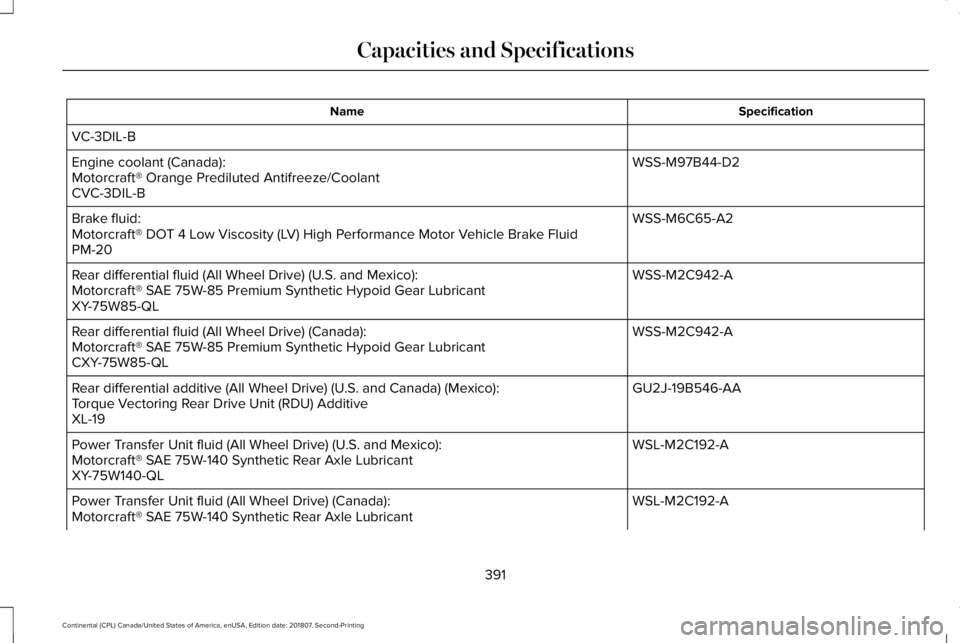
Specification
Name
VC-3DIL-B WSS-M97B44-D2
Engine coolant (Canada):
Motorcraft® Orange Prediluted Antifreeze/Coolant
CVC-3DIL-B
WSS-M6C65-A2
Brake fluid:
Motorcraft® DOT 4 Low Viscosity (LV) High Performance Motor Vehicle Brake Fluid
PM-20
WSS-M2C942-A
Rear differential fluid (All Wheel Drive) (U.S. and Mexico):
Motorcraft® SAE 75W-85 Premium Synthetic Hypoid Gear Lubricant
XY-75W85-QL
WSS-M2C942-A
Rear differential fluid (All Wheel Drive) (Canada):
Motorcraft® SAE 75W-85 Premium Synthetic Hypoid Gear Lubricant
CXY-75W85-QL
GU2J-19B546-AA
Rear differential additive (All Wheel Drive) (U.S. and Canada) (Mexico):
Torque Vectoring Rear Drive Unit (RDU) Additive
XL-19
WSL-M2C192-A
Power Transfer Unit fluid (All Wheel Drive) (U.S. and Mexico):
Motorcraft® SAE 75W-140 Synthetic Rear Axle Lubricant
XY-75W140-QL
WSL-M2C192-A
Power Transfer Unit fluid (All Wheel Drive) (Canada):
Motorcraft® SAE 75W-140 Synthetic Rear Axle Lubricant
391
Continental (CPL) Canada/United States of America, enUSA, Edition date: 201807, Second-Printing Capacities and Specifications
Page 399 of 627

CAPACITIES AND SPECIFICATIONS - 3.7L
Capacities
WARNING: The air conditioning refrigerant system contains refrigerant under high \
pressure. Only qualified personnel should service
the air conditioning refrigerant system. Opening the air conditioning re\
frigerant system can cause personal injury. Capacity
Item
6.0 qt (5.7 L)
Engine oil (with oil filter).
10.2 qt (9.7 L)
Engine coolant.
Between MIN/MAX on brake fluid reservoir
Brake fluid.
32.0 fl oz (946 ml)
Rear axle fluid (All Wheel Drive).
15.2 fl oz (450 ml)1
Power Transfer Unit fluid (All Wheel Drive).
11.6 qt (11 L)2
Automatic transmission fluid.
Fill as required
Windshield washer fluid.
18.0 gal (68.1 L)
Fuel tank.
396
Continental (CPL) Canada/United States of America, enUSA, Edition date: 201807, Second-Printing Capacities and Specifications
Page 401 of 627
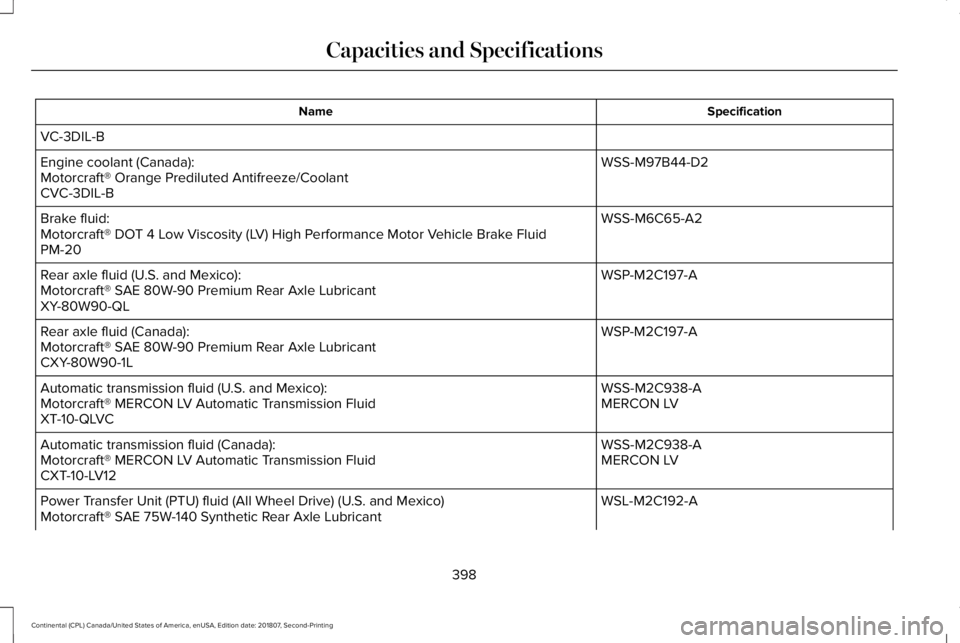
Specification
Name
VC-3DIL-B WSS-M97B44-D2
Engine coolant (Canada):
Motorcraft® Orange Prediluted Antifreeze/Coolant
CVC-3DIL-B
WSS-M6C65-A2
Brake fluid:
Motorcraft® DOT 4 Low Viscosity (LV) High Performance Motor Vehicle Brake Fluid
PM-20
WSP-M2C197-A
Rear axle fluid (U.S. and Mexico):
Motorcraft® SAE 80W-90 Premium Rear Axle Lubricant
XY-80W90-QL
WSP-M2C197-A
Rear axle fluid (Canada):
Motorcraft® SAE 80W-90 Premium Rear Axle Lubricant
CXY-80W90-1L
WSS-M2C938-A
Automatic transmission fluid (U.S. and Mexico):
MERCON LV
Motorcraft® MERCON LV Automatic Transmission Fluid
XT-10-QLVC
WSS-M2C938-A
Automatic transmission fluid (Canada):
MERCON LV
Motorcraft® MERCON LV Automatic Transmission Fluid
CXT-10-LV12
WSL-M2C192-A
Power Transfer Unit (PTU) fluid (All Wheel Drive) (U.S. and Mexico)
Motorcraft® SAE 75W-140 Synthetic Rear Axle Lubricant
398
Continental (CPL) Canada/United States of America, enUSA, Edition date: 201807, Second-Printing Capacities and Specifications
Page 402 of 627
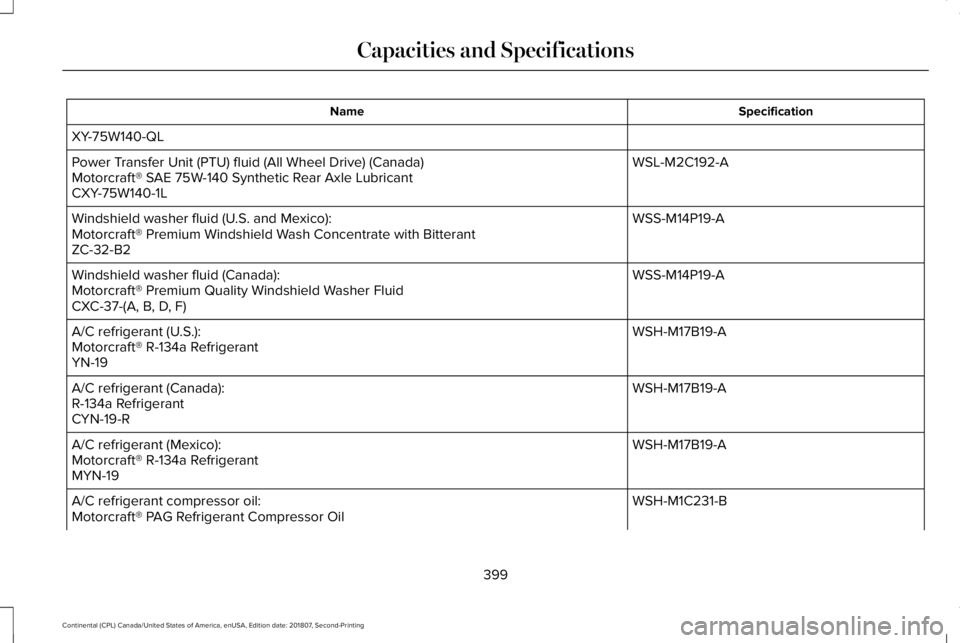
Specification
Name
XY-75W140-QL WSL-M2C192-A
Power Transfer Unit (PTU) fluid (All Wheel Drive) (Canada)
Motorcraft® SAE 75W-140 Synthetic Rear Axle Lubricant
CXY-75W140-1L
WSS-M14P19-A
Windshield washer fluid (U.S. and Mexico):
Motorcraft® Premium Windshield Wash Concentrate with Bitterant
ZC-32-B2
WSS-M14P19-A
Windshield washer fluid (Canada):
Motorcraft® Premium Quality Windshield Washer Fluid
CXC-37-(A, B, D, F)
WSH-M17B19-A
A/C refrigerant (U.S.):
Motorcraft® R-134a Refrigerant
YN-19
WSH-M17B19-A
A/C refrigerant (Canada):
R-134a Refrigerant
CYN-19-R
WSH-M17B19-A
A/C refrigerant (Mexico):
Motorcraft® R-134a Refrigerant
MYN-19
WSH-M1C231-B
A/C refrigerant compressor oil:
Motorcraft® PAG Refrigerant Compressor Oil
399
Continental (CPL) Canada/United States of America, enUSA, Edition date: 201807, Second-Printing Capacities and Specifications
Page 425 of 627

Description
Item
Callout
This shows the temperature the driver selects through the climate contro\
l system.
Driver Temperature
A
When you activate the heated steering wheel option on the touch screen, \
this icon
displays. It only displays when there is not a physical button for the h\
eated steering
wheel.
Heated steering wheel
B
(If equipped)
When the passenger's temperature has been adjusted and is no longer linked to the
driver's temperature, it displays here. If Dual is turned off and the temperatures are
linked, the passenger's temperature does not display.
Passenger Temperature
C
This icon displays when your phone's microphone is muted. A caller cannot hear you.
Microphone Mute
D
This icon displays when the audio system is muted.
Mute
E
This icon appears when SYNC 3 receives a software update. Pressing the icon shows
more details about the new software.
Download
F
This icon appears if a Wi-Fi network is connected.
Wi-Fi
G
An available Wi-Fi network is within range.
Wi-Fi in Range
H
This icon displays the phone signal strength and the roaming signal stre\
ngth.
Signal Strength
I
This icon displays when you receive a text message on your phone.
Text Message
J
This icon displays when 911 Assist is set to off and your phone is conne\
cted to SYNC.
911 Assist Off
K
This icon displays when a phone call is active.
In-Call
L
422
Continental (CPL) Canada/United States of America, enUSA, Edition date: 201807, Second-Printing SYNC™ 3
Page 427 of 627
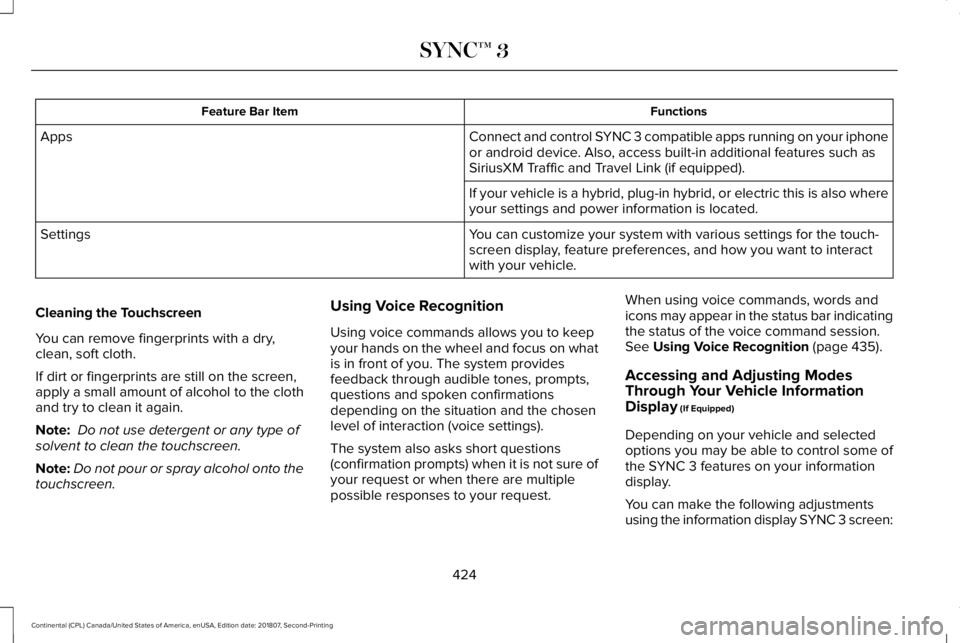
Functions
Feature Bar Item
Connect and control SYNC 3 compatible apps running on your iphone
or android device. Also, access built-in additional features such as
SiriusXM Traffic and Travel Link (if equipped).
Apps
If your vehicle is a hybrid, plug-in hybrid, or electric this is also wh\
ere
your settings and power information is located.
You can customize your system with various settings for the touch-
screen display, feature preferences, and how you want to interact
with your vehicle.
Settings
Cleaning the Touchscreen
You can remove fingerprints with a dry,
clean, soft cloth.
If dirt or fingerprints are still on the screen,
apply a small amount of alcohol to the cloth
and try to clean it again.
Note: Do not use detergent or any type of
solvent to clean the touchscreen.
Note: Do not pour or spray alcohol onto the
touchscreen. Using Voice Recognition
Using voice commands allows you to keep
your hands on the wheel and focus on what
is in front of you. The system provides
feedback through audible tones, prompts,
questions and spoken confirmations
depending on the situation and the chosen
level of interaction (voice settings).
The system also asks short questions
(confirmation prompts) when it is not sure of
your request or when there are multiple
possible responses to your request.When using voice commands, words and
icons may appear in the status bar indicating
the status of the voice command session.
See Using Voice Recognition (page 435).
Accessing and Adjusting Modes
Through Your Vehicle Information
Display
(If Equipped)
Depending on your vehicle and selected
options you may be able to control some of
the SYNC 3 features on your information
display.
You can make the following adjustments
using the information display SYNC 3 screen:
424
Continental (CPL) Canada/United States of America, enUSA, Edition date: 201807, Second-Printing SYNC™ 3
Page 428 of 627
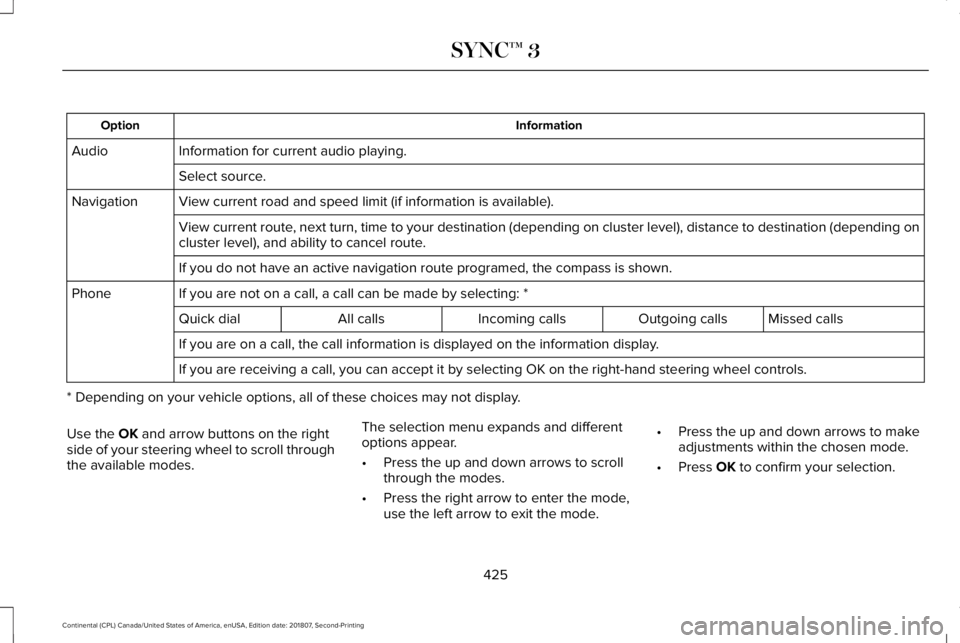
Information
Option
Information for current audio playing.
Audio
Select source.
View current road and speed limit (if information is available).
Navigation
View current route, next turn, time to your destination (depending on cluster level), di\
stance to destination (depending on
cluster level), and ability to cancel route.
If you do not have an active navigation route programed, the compass is \
shown.
If you are not on a call, a call can be made by selecting: *
Phone
Missed calls
Outgoing calls
Incoming calls
All calls
Quick dial
If you are on a call, the call information is displayed on the informati\
on display.
If you are receiving a call, you can accept it by selecting OK on the ri\
ght-hand steering wheel controls.
* Depending on your vehicle options, all of these choices may not displa\
y.
Use the OK and arrow buttons on the right
side of your steering wheel to scroll through
the available modes. The selection menu expands and different
options appear.
•
Press the up and down arrows to scroll
through the modes.
• Press the right arrow to enter the mode,
use the left arrow to exit the mode. •
Press the up and down arrows to make
adjustments within the chosen mode.
• Press
OK to confirm your selection.
425
Continental (CPL) Canada/United States of America, enUSA, Edition date: 201807, Second-Printing SYNC™ 3
Page 429 of 627
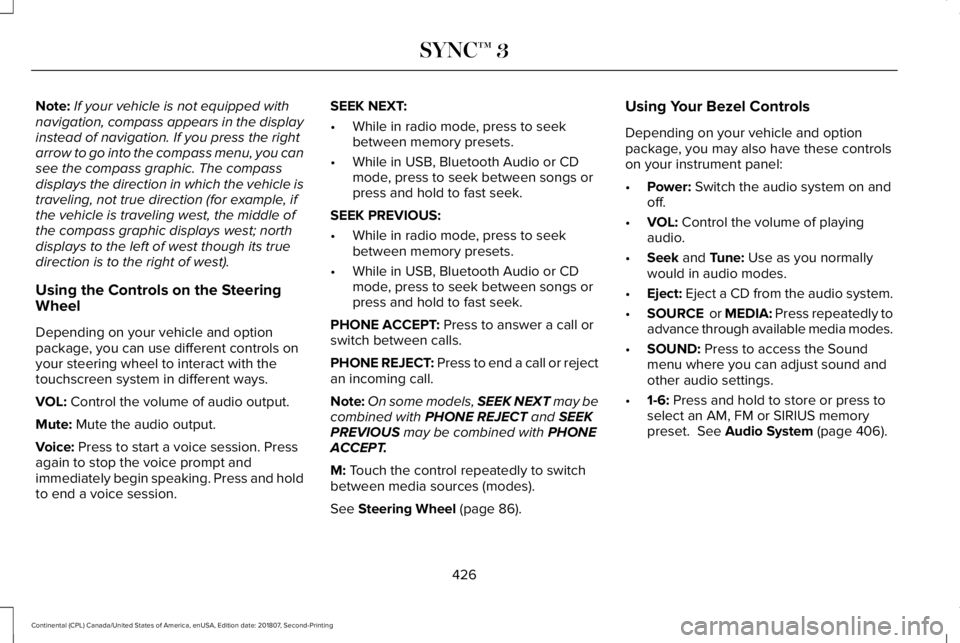
Note:
If your vehicle is not equipped with
navigation, compass appears in the display
instead of navigation. If you press the right
arrow to go into the compass menu, you can
see the compass graphic. The compass
displays the direction in which the vehicle is
traveling, not true direction (for example, if
the vehicle is traveling west, the middle of
the compass graphic displays west; north
displays to the left of west though its true
direction is to the right of west).
Using the Controls on the Steering
Wheel
Depending on your vehicle and option
package, you can use different controls on
your steering wheel to interact with the
touchscreen system in different ways.
VOL: Control the volume of audio output.
Mute:
Mute the audio output.
Voice:
Press to start a voice session. Press
again to stop the voice prompt and
immediately begin speaking. Press and hold
to end a voice session. SEEK NEXT:
•
While in radio mode, press to seek
between memory presets.
• While in USB, Bluetooth Audio or CD
mode, press to seek between songs or
press and hold to fast seek.
SEEK PREVIOUS:
• While in radio mode, press to seek
between memory presets.
• While in USB, Bluetooth Audio or CD
mode, press to seek between songs or
press and hold to fast seek.
PHONE ACCEPT:
Press to answer a call or
switch between calls.
PHONE REJECT: Press to end a call or reject
an incoming call.
Note: On some models, SEEK NEXT may be
combined with
PHONE REJECT and SEEK
PREVIOUS may be combined with PHONE
ACCEPT.
M:
Touch the control repeatedly to switch
between media sources (modes).
See
Steering Wheel (page 86). Using Your Bezel Controls
Depending on your vehicle and option
package, you may also have these controls
on your instrument panel:
•
Power:
Switch the audio system on and
off.
• VOL:
Control the volume of playing
audio.
• Seek
and Tune: Use as you normally
would in audio modes.
• Eject:
Eject a CD from the audio system.
• SOURCE
or MEDIA: Press repeatedly to
advance through available media modes.
• SOUND:
Press to access the Sound
menu where you can adjust sound and
other audio settings.
• 1-6:
Press and hold to store or press to
select an AM, FM or SIRIUS memory
preset.
See Audio System (page 406).
426
Continental (CPL) Canada/United States of America, enUSA, Edition date: 201807, Second-Printing SYNC™ 3
Page 431 of 627
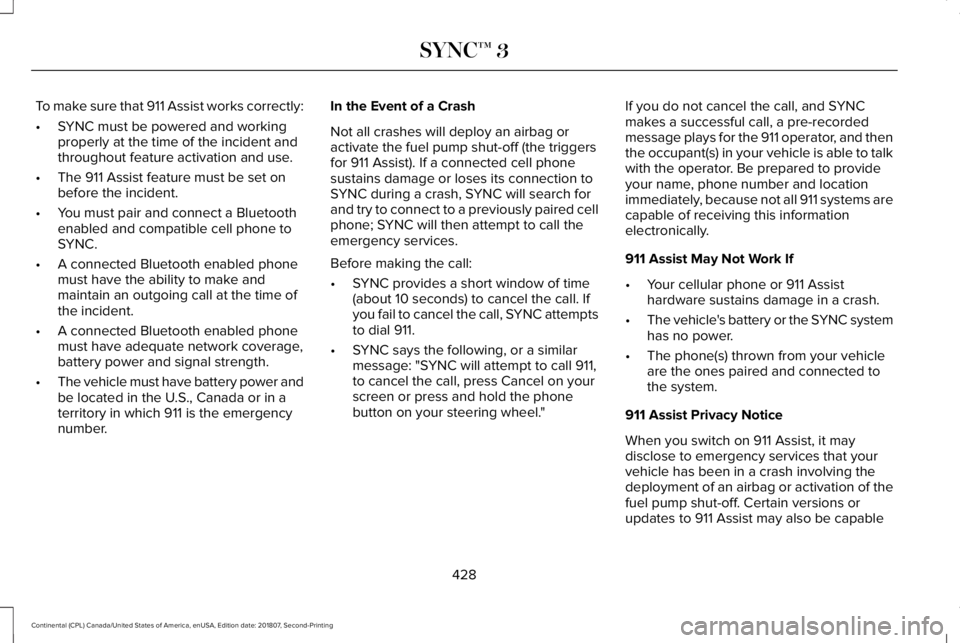
To make sure that 911 Assist works correctly:
•
SYNC must be powered and working
properly at the time of the incident and
throughout feature activation and use.
• The 911 Assist feature must be set on
before the incident.
• You must pair and connect a Bluetooth
enabled and compatible cell phone to
SYNC.
• A connected Bluetooth enabled phone
must have the ability to make and
maintain an outgoing call at the time of
the incident.
• A connected Bluetooth enabled phone
must have adequate network coverage,
battery power and signal strength.
• The vehicle must have battery power and
be located in the U.S., Canada or in a
territory in which 911 is the emergency
number. In the Event of a Crash
Not all crashes will deploy an airbag or
activate the fuel pump shut-off (the triggers
for 911 Assist). If a connected cell phone
sustains damage or loses its connection to
SYNC during a crash, SYNC will search for
and try to connect to a previously paired cell
phone; SYNC will then attempt to call the
emergency services.
Before making the call:
•
SYNC provides a short window of time
(about 10 seconds) to cancel the call. If
you fail to cancel the call, SYNC attempts
to dial 911.
• SYNC says the following, or a similar
message: "SYNC will attempt to call 911,
to cancel the call, press Cancel on your
screen or press and hold the phone
button on your steering wheel." If you do not cancel the call, and SYNC
makes a successful call, a pre-recorded
message plays for the 911 operator, and then
the occupant(s) in your vehicle is able to talk
with the operator. Be prepared to provide
your name, phone number and location
immediately, because not all 911 systems are
capable of receiving this information
electronically.
911 Assist May Not Work If
•
Your cellular phone or 911 Assist
hardware sustains damage in a crash.
• The vehicle's battery or the SYNC system
has no power.
• The phone(s) thrown from your vehicle
are the ones paired and connected to
the system.
911 Assist Privacy Notice
When you switch on 911 Assist, it may
disclose to emergency services that your
vehicle has been in a crash involving the
deployment of an airbag or activation of the
fuel pump shut-off. Certain versions or
updates to 911 Assist may also be capable
428
Continental (CPL) Canada/United States of America, enUSA, Edition date: 201807, Second-Printing SYNC™ 3