airbag off LINCOLN CONTINENTAL 2019 User Guide
[x] Cancel search | Manufacturer: LINCOLN, Model Year: 2019, Model line: CONTINENTAL, Model: LINCOLN CONTINENTAL 2019Pages: 627, PDF Size: 6.39 MB
Page 153 of 627
SITTING IN THE CORRECT
POSITION
WARNING: Sitting improperly, out of
position or with the seatback reclined too
far can take weight off the seat cushion
and affect the decision of the passenger
sensing system, resulting in serious injury
or death in the event of a crash. Always sit
upright against your seat back, with your
feet on the floor. WARNING:
Do not recline the
seatback too far as this can cause the
occupant to slide under the seatbelt,
resulting in serious injury in the event of a
collision. WARNING:
Do not place objects
higher than the top of the seat backrest.
Failure to follow this instruction could result
in personal injury or death in the event of
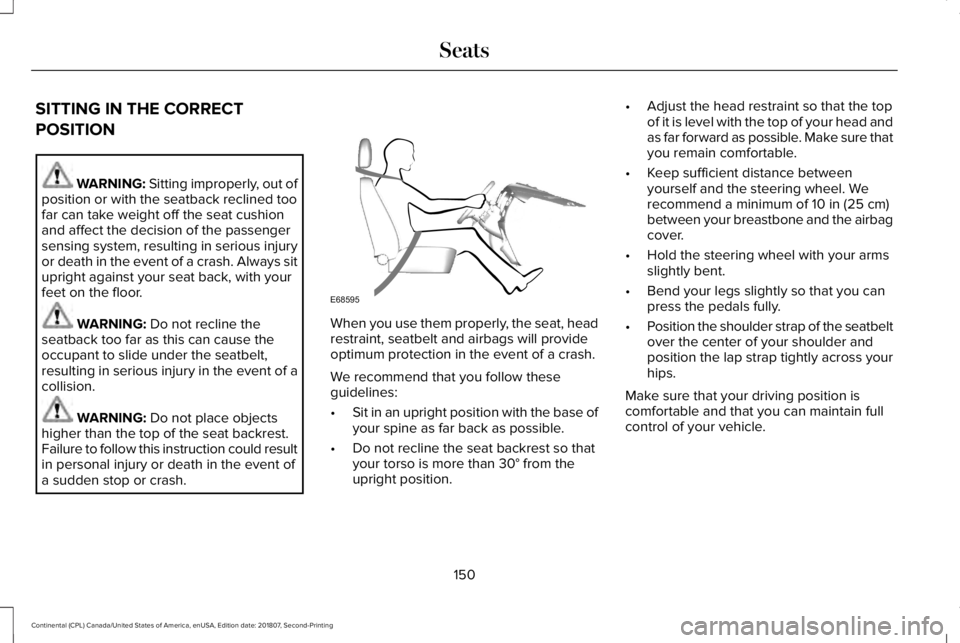
a sudden stop or crash. When you use them properly, the seat, head
restraint, seatbelt and airbags will provide
optimum protection in the event of a crash.
We recommend that you follow these
guidelines:
•
Sit in an upright position with the base of
your spine as far back as possible.
• Do not recline the seat backrest so that
your torso is more than
30° from the
upright position. •
Adjust the head restraint so that the top
of it is level with the top of your head and
as far forward as possible. Make sure that
you remain comfortable.
• Keep sufficient distance between
yourself and the steering wheel. We
recommend a minimum of
10 in (25 cm)
between your breastbone and the airbag
cover.
• Hold the steering wheel with your arms
slightly bent.
• Bend your legs slightly so that you can
press the pedals fully.
• Position the shoulder strap of the seatbelt
over the center of your shoulder and
position the lap strap tightly across your
hips.
Make sure that your driving position is
comfortable and that you can maintain full
control of your vehicle.
150
Continental (CPL) Canada/United States of America, enUSA, Edition date: 201807, Second-Printing SeatsE68595
Page 181 of 627
Note:
If the engine is idling for 30 minutes,
the ignition and engine automatically shuts
down.
1. Apply the parking brake.
2. Shift into park (P).
3. Briefly press the push button ignition switch.
Stopping the Engine When Your
Vehicle is Moving WARNING: Switching off the engine
when your vehicle is still moving results in
a significant decrease in braking
assistance. Higher effort is required to
apply the brakes and to stop your vehicle.
A significant decrease in steering
assistance could also occur. The steering
does not lock, but higher effort could be
required to steer your vehicle. When you
switch the ignition off, some electrical
circuits, for example airbags, also turn off.
If you unintentionally switch the ignition
off, shift into neutral (N) and restart the
engine. 1. Shift into neutral and use the brakes to
bring your vehicle to a safe stop.
2. When your vehicle has stopped, shift into
park (P).
3. Apply the parking brake.
4. Press and hold the push button ignition switch until the engine stops, or press it
three times within two seconds.
Guarding Against Exhaust Fumes WARNING: Exhaust leaks may result
in entry of harmful and potentially lethal
fumes into the passenger compartment. If
you smell exhaust fumes inside your
vehicle, have your vehicle inspected
immediately. Do not drive if you smell
exhaust fumes. Important Ventilating Information
If you stop your vehicle and then leave the
engine idling for long periods, we
recommend that you do one of the following:
•
Open the windows at least
1 in (3 cm).
• Set your climate control to outside air.
ENGINE BLOCK HEATER
(IF EQUIPPED) WARNING:
Failure to follow engine
block heater instructions could result in
property damage or serious personal
injury. WARNING:
Do not use your heater
with ungrounded electrical systems or
two-pronged adapters. There is a risk of
electrical shock.
178
Continental (CPL) Canada/United States of America, enUSA, Edition date: 201807, Second-Printing Starting and Stopping the Engine
Page 284 of 627
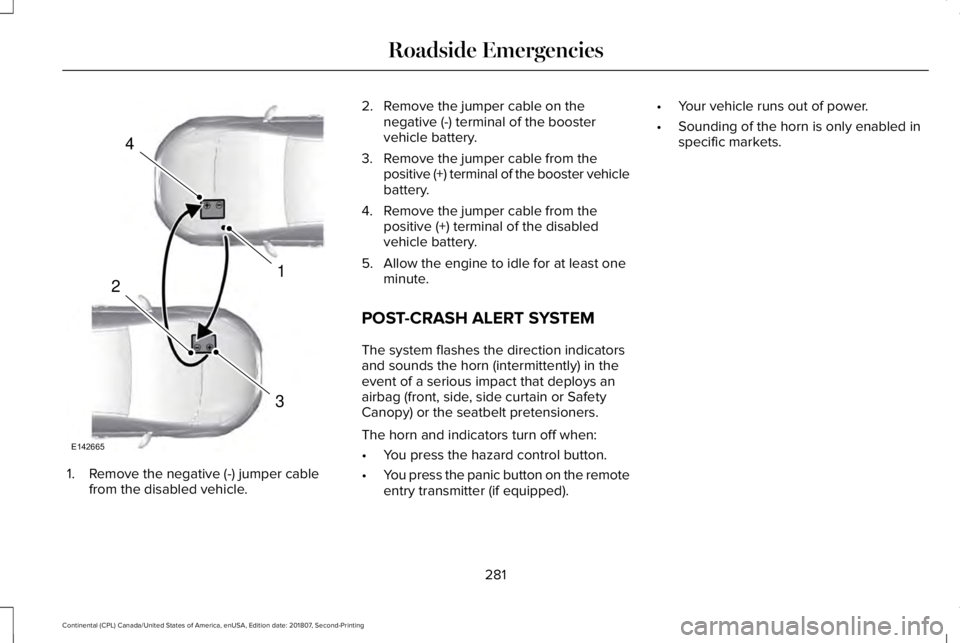
1. Remove the negative (-) jumper cable
from the disabled vehicle. 2. Remove the jumper cable on the
negative (-) terminal of the booster
vehicle battery.
3. Remove the jumper cable from the positive (+) terminal of the booster vehicle
battery.
4. Remove the jumper cable from the positive (+) terminal of the disabled
vehicle battery.
5. Allow the engine to idle for at least one minute.
POST-CRASH ALERT SYSTEM
The system flashes the direction indicators
and sounds the horn (intermittently) in the
event of a serious impact that deploys an
airbag (front, side, side curtain or Safety
Canopy) or the seatbelt pretensioners.
The horn and indicators turn off when:
• You press the hazard control button.
• You press the panic button on the remote
entry transmitter (if equipped). •
Your vehicle runs out of power.
• Sounding of the horn is only enabled in
specific markets.
281
Continental (CPL) Canada/United States of America, enUSA, Edition date: 201807, Second-Printing Roadside Emergencies4
1
3
2
E142665
Page 341 of 627
CLEANING THE INSTRUMENT
PANEL AND INSTRUMENT
CLUSTER LENS
WARNING: Do not use chemical
solvents or strong detergents when
cleaning the steering wheel or instrument
panel to avoid contamination of the airbag
system.
Note: Follow the same procedure as
cleaning leather seats for cleaning leather
instrument panels and leather interior trim
surfaces. See Cleaning Leather Seats
(page
338).
Clean the instrument panel and cluster lens
with a clean, damp and soft cloth, then use
a clean, dry and soft cloth to dry these areas. •
Avoid cleaners or polishes that increase
the gloss of the upper portion of the
instrument panel. The dull finish in this
area helps protect you from undesirable
windshield reflection.
• Do not use any household cleaning
products or glass cleaners as these may
damage the finish of the instrument
panel, interior trim and cluster lens.
• Wash or wipe your hands clean if you
have been in contact with certain
products such as insect repellent and
suntan lotion to avoid possible damage
to the interior painted surfaces.
• Do not allow air fresheners and hand
sanitizers to spill onto interior surfaces.
If a spill occurs, wipe off immediately.
Your warranty may not cover these
damages.
If a staining liquid like coffee or juice has
been spilled on the instrument panel or on
interior trim surfaces:
1. Wipe up spilled liquid using a clean, soft
cloth as quickly as possible. 2. Use Motorcraft Premium Leather and
Vinyl Cleaner or a commercially available
leather cleaning product for automotive
interiors. Test any cleaner or stain
remover on an inconspicuous area.
3. Alternatively, wipe the surface with a clean, soft cloth and a mild soap and
water solution. Dry the area with a clean,
soft cloth.
4. If necessary, apply more soap and water
solution or cleaning product to a clean,
soft cloth and press it onto the soiled
area. Allow this to set at room
temperature for 30 minutes.
5. Remove the soaked cloth, then with a clean, damp cloth, use a rubbing motion
for 60 seconds on the soiled area.
6. Dry the area with a clean, soft cloth.
CLEANING LEATHER SEATS
Note: Follow the same procedure as
cleaning leather seats for cleaning leather
instrument panels and leather interior trim
surfaces.
338
Continental (CPL) Canada/United States of America, enUSA, Edition date: 201807, Second-Printing Vehicle Care
Page 430 of 627
•
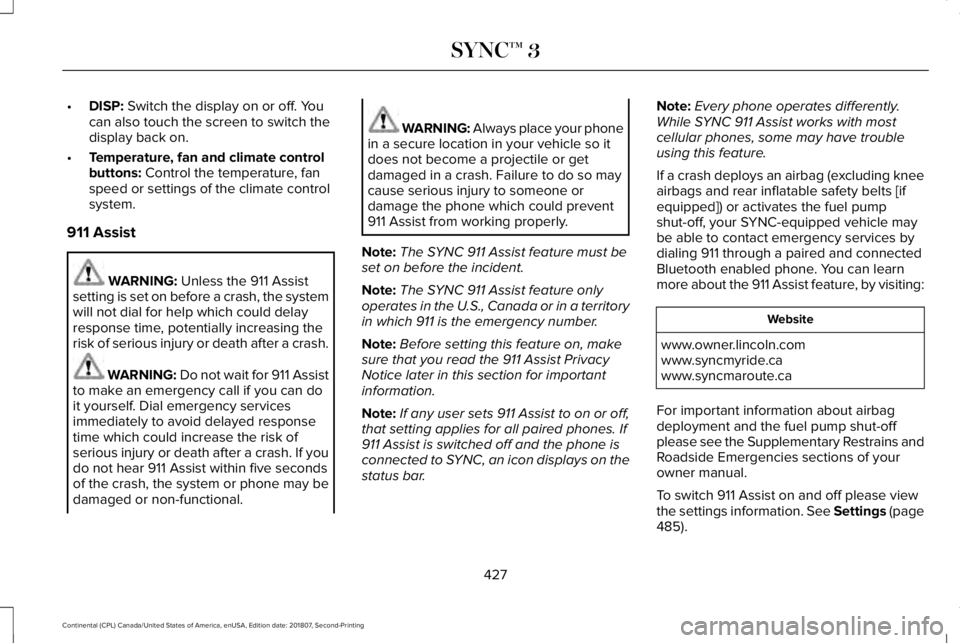
DISP: Switch the display on or off. You
can also touch the screen to switch the
display back on.
• Temperature, fan and climate control
buttons:
Control the temperature, fan
speed or settings of the climate control
system.
911 Assist WARNING:
Unless the 911 Assist
setting is set on before a crash, the system
will not dial for help which could delay
response time, potentially increasing the
risk of serious injury or death after a crash. WARNING:
Do not wait for 911 Assist
to make an emergency call if you can do
it yourself. Dial emergency services
immediately to avoid delayed response
time which could increase the risk of
serious injury or death after a crash. If you
do not hear 911 Assist within five seconds
of the crash, the system or phone may be
damaged or non-functional. WARNING: Always place your phone
in a secure location in your vehicle so it
does not become a projectile or get
damaged in a crash. Failure to do so may
cause serious injury to someone or
damage the phone which could prevent
911 Assist from working properly.
Note: The SYNC 911 Assist feature must be
set on before the incident.
Note: The SYNC 911 Assist feature only
operates in the U.S., Canada or in a territory
in which 911 is the emergency number.
Note: Before setting this feature on, make
sure that you read the 911 Assist Privacy
Notice later in this section for important
information.
Note: If any user sets 911 Assist to on or off,
that setting applies for all paired phones. If
911 Assist is switched off and the phone is
connected to SYNC, an icon displays on the
status bar. Note:
Every phone operates differently.
While SYNC 911 Assist works with most
cellular phones, some may have trouble
using this feature.
If a crash deploys an airbag (excluding knee
airbags and rear inflatable safety belts [if
equipped]) or activates the fuel pump
shut-off, your SYNC-equipped vehicle may
be able to contact emergency services by
dialing 911 through a paired and connected
Bluetooth enabled phone. You can learn
more about the 911 Assist feature, by visiting: Website
www.owner.lincoln.com
www.syncmyride.ca
www.syncmaroute.ca
For important information about airbag
deployment and the fuel pump shut-off
please see the Supplementary Restrains and
Roadside Emergencies sections of your
owner manual.
To switch 911 Assist on and off please view
the settings information. See Settings (page
485
).
427
Continental (CPL) Canada/United States of America, enUSA, Edition date: 201807, Second-Printing SYNC™ 3
Page 431 of 627
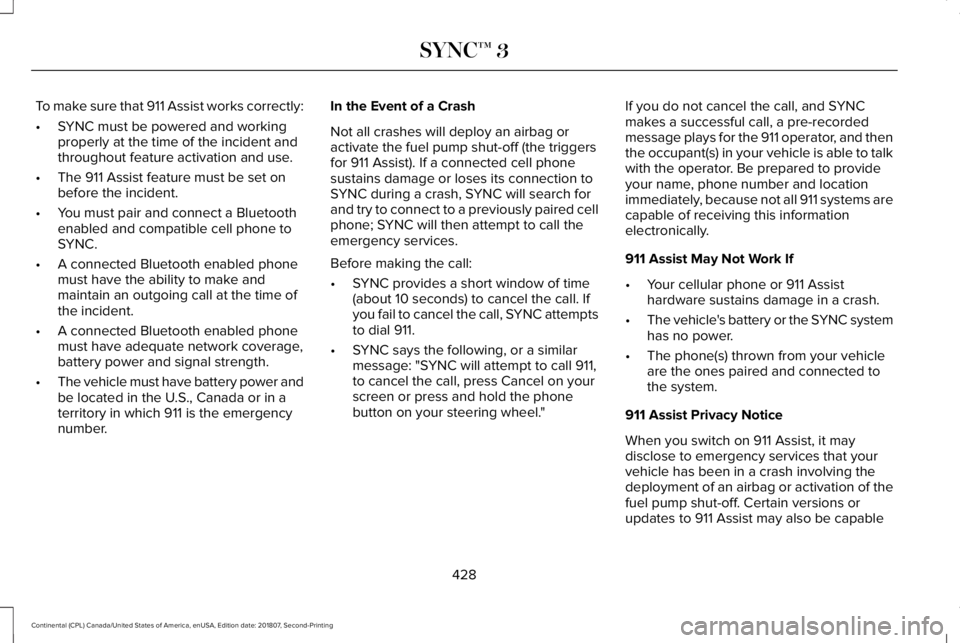
To make sure that 911 Assist works correctly:
•
SYNC must be powered and working
properly at the time of the incident and
throughout feature activation and use.
• The 911 Assist feature must be set on
before the incident.
• You must pair and connect a Bluetooth
enabled and compatible cell phone to
SYNC.
• A connected Bluetooth enabled phone
must have the ability to make and
maintain an outgoing call at the time of
the incident.
• A connected Bluetooth enabled phone
must have adequate network coverage,
battery power and signal strength.
• The vehicle must have battery power and
be located in the U.S., Canada or in a
territory in which 911 is the emergency
number. In the Event of a Crash
Not all crashes will deploy an airbag or
activate the fuel pump shut-off (the triggers
for 911 Assist). If a connected cell phone
sustains damage or loses its connection to
SYNC during a crash, SYNC will search for
and try to connect to a previously paired cell
phone; SYNC will then attempt to call the
emergency services.
Before making the call:
•
SYNC provides a short window of time
(about 10 seconds) to cancel the call. If
you fail to cancel the call, SYNC attempts
to dial 911.
• SYNC says the following, or a similar
message: "SYNC will attempt to call 911,
to cancel the call, press Cancel on your
screen or press and hold the phone
button on your steering wheel." If you do not cancel the call, and SYNC
makes a successful call, a pre-recorded
message plays for the 911 operator, and then
the occupant(s) in your vehicle is able to talk
with the operator. Be prepared to provide
your name, phone number and location
immediately, because not all 911 systems are
capable of receiving this information
electronically.
911 Assist May Not Work If
•
Your cellular phone or 911 Assist
hardware sustains damage in a crash.
• The vehicle's battery or the SYNC system
has no power.
• The phone(s) thrown from your vehicle
are the ones paired and connected to
the system.
911 Assist Privacy Notice
When you switch on 911 Assist, it may
disclose to emergency services that your
vehicle has been in a crash involving the
deployment of an airbag or activation of the
fuel pump shut-off. Certain versions or
updates to 911 Assist may also be capable
428
Continental (CPL) Canada/United States of America, enUSA, Edition date: 201807, Second-Printing SYNC™ 3
Page 614 of 627
3
360 Degree Camera....................................231
Front Camera......................................................232
Side Camera........................................................233
Using the System................................................231
A
A/C See: Climate Control...........................................143
About This Manual............................................7
ABS See: Brakes..........................................................206
ABS driving hints See: Hints on Driving With Anti-Lock
Brakes...............................................................207
Accessories...................................................523 Exterior Style.......................................................523
Interior Style.........................................................523
Lifestyle.................................................................523
Peace of Mind.....................................................523
Accessories See: Replacement Parts Recommendation.....14
ACC See: Using Adaptive Cruise Control..............
234
Active Park Assist..........................................219 Using Active Park Assist....................................221 Adaptive Headlamps
.....................................95
System Check........................................................96
Adjusting the Headlamps...........................327 Horizontal Aim Adjustment..............................328
Vertical Aim Adjustment...................................327
Adjusting the Steering Wheel.....................86 End of Travel Position..........................................86
Memory Feature....................................................86
AFS See: Adaptive Headlamps..................................95
Airbag Disposal...............................................57
Air Conditioning See: Climate Control...........................................143
Air Filter See: Changing the Engine Air Filter - 2.7L/
3.0L....................................................................330
See: Changing the Engine Air Filter - 3.7L....329
Alarm See: Anti-Theft Alarm...........................................85
All-Wheel Drive
..............................................197
Ambient Lighting............................................98
Adjusting the Brightness....................................98
Changing the Color..............................................
98
Switching Ambient Lighting Off........................98
Switching Ambient Lighting On
........................98
Anti-Theft Alarm..............................................
85
Arming the Alarm..................................................85
Disarming the Alarm............................................85 Appendices.....................................................561
Apps.................................................................482
........................................................................\
.........482
SiriusXM Traffic and Travel Link......................483
At a Glance
........................................................18
Audible Warnings and Indicators................111 Headlamps On Warning Chime.........................111
Keyless Warning Alert..........................................111
Parking Brake On Warning Chime....................111
Audio Control
...................................................87
Seek, Next or Previous........................................87
Audio System................................................406 General Information...........................................406
Audio Unit
......................................................408
Adjusting the Volume........................................408
Changing Radio S
tations..................................408
Ejecting the CD...................................................
408
Inserting a CD.....................................................409
Rear Passenger Audio Controls.....................409
Selecting the Audio Modes.............................
409
Switching the Audio Unit On and Off...........409
Using Seek, Fast Forward and Reverse.......409
Auto Hold........................................................210 Using Auto Hold...................................................211
Autolamps........................................................92 Windshield Wiper Activated Headlamps........93
Automatic Climate Control..........................143 Directing Air to the Footwell Air Vents..........143
611
Continental (CPL) Canada/United States of America, enUSA, Edition date: 201807, Second-Printing Index
Page 616 of 627
Readiness for Inspection and Maintenance
(I/M) Testing......................................................190
Center Console..............................................173
Changing a Bulb...........................................329
Front Direction Indicator..................................329
High-Intensity Discharge Headlamps...........329
LED Lamps...........................................................329
Changing a Fuse
..........................................307
Fuses.....................................................................307
Changing a Road Wheel.............................363 Dissimilar Spare Wheel and Tire Assembly
Information.......................................................364
Stowing the flat tire ...........................................369
Tire Change Procedure....................................365
Changing the 12V Battery..........................325
Changing the Engine Air Filter - 2.7L/ 3.0L................................................................330
Changing the Engine Air Filter - 3.7L......329
Changing the Wiper Blades.......................327 Changing the Windshield Wiper Blades.......327
Checking MyKey S
ystem Status.................60
MyKey Distance....................................................60
Number of Admin Keys........................................61
Number of MyKeys...............................................60
Checking the Wiper Blades.......................326
Child Restraint and Seatbelt Maintenance..................................................45
Child Restraint Positioning...........................34 Child Safety......................................................20
General Information.............................................20
Child Safety Locks..........................................36
Child Seats.......................................................22
Cleaning Leather Seats..............................338
Cleaning Products........................................332 Materials...............................................................332
Cleaning the Engine....................................335
Cleaning the Exterior...................................333 Cleaning the Headlamps..................................333
Exterior Chrome Parts.......................................334
Exterior Plastic Parts..........................................334
Stripes or Graphics.............................................334
Underbody...........................................................334
Under Hood.........................................................334
Cleaning the Instrument Panel and Instrument Cluster Lens...........................338
Cleaning the Interior
....................................336
Cleaning Black Label or Presidential
Interior...............................................................336
Cleaning the Wheels
...................................339
Cleaning the Windows and Wiper Blades...........................................................335
Clearing All MyKeys.......................................60
Climate............................................................459
Climate Control..............................................143
Climate Controlled Seats............................165 Ventilated Seats...................................................165 Coolant Check
See: Engine Coolant Check..............................318
Crash Sensors and Airbag Indicator..........56
Creating a MyKey...........................................59 Programming and Changing Configurable
Settings...............................................................60
Cross Traffic Alert
.........................................252
Blocked Sensors................................................255
Switching the System Off and On..................255
System Errors
......................................................255
System Lights, Messages and Audible Alerts.................................................................255
System Limitations.............................................255
Using the Cross Traffic Alert System............252
Cruise Control
..................................................87
Principle of Operation.......................................234
Customer Assistance
..................................283
D
Data Recording
................................................10
Comfort, Convenience and Entertainment
Data.......................................................................12
Event Data................................................................11
Service Data............................................................10
Services That Third Parties Provide..................12
Services That We Provide...................................12
Vehicles With a Modem.......................................12
613
Continental (CPL) Canada/United States of America, enUSA, Edition date: 201807, Second-Printing Index
Page 619 of 627
Opening the Windows.......................................100
H
Hazard Flashers............................................277
Headlamp Adjusting See: Adjusting the Headlamps.......................327
Headlamp Exit Delay.....................................93
Headrest See: Head Restraints...........................................151
Head Restraints
..............................................151
Front Seat Manual Head Restraints.................151
Rear Seat Center Head R
estraint....................153
Rear Seat Outermost Head Restraints...........152
Head Up Display...........................................139 Configuring The Head Up Display
..................140
Head Up Display (HUD).....................................139
Head Up Display Information...........................139
Maintaining Your Head Up Display.................142
Heated Exterior Mirrors...............................148
Heated Rear Window...................................147
Heated Seats..................................................163 Front Seats............................................................163
Rear Seats.............................................................164
Heated Steering Wheel................................88
Heated Windshield........................................147 Windshield Wiper De-Icer..................................147 Heating
See: Climate Control...........................................143
Hill Start Assist
..............................................209
Switching the System On and Off.................209
Using Hill Start Assist........................................209
Hints on Controlling the Interior Climate..........................................................145
Defogging the Side Windows in Cold Weather.............................................................146
General Hints........................................................145
Quickly Cooling the Interior..............................146
Quickly Heating the Interior.............................145
Recommended Settings for Cooling..............146
Recommended Settings for Heating
..............146
Hints on Driving With Anti-Lock Brak
es
...........................................................207
Home Screen.................................................434
Hood Lock See: Opening and Closing the Hood.............310
I
In California (U.S. Only)...............................284
Information Display Control
.........................88
Information Displays......................................112
General Information.............................................112
Information Messages
.................................120
Active Park.............................................................121 Adaptive Cruise Control.....................................121
Adaptive Headlamps..........................................122
Adaptive Steering...............................................122
Airbag.....................................................................122
Alarm......................................................................123
Automatic Engine Shutdown............................123
AWD........................................................................\
124
Battery and Charging System..........................124
Blind Spot Information and Cross Traffic Alert
System...............................................................126
Doors and Locks..................................................126
Driver Alert............................................................127
Fuel........................................................................\
.128
Hill Start Assist.....................................................128
Keys and Intelligent Access.............................128
Lane Keeping System........................................130
Maintenance.........................................................130
MyKey.....................................................................132
Park Aid..................................................................133
Park Brake.............................................................133
Power Steering.....................................................134
Pre-Collision Assist.............................................135
Remote Start.........................................................135
Seats.......................................................................135
Stability Control....................................................136
Starting System ...................................................136
Tire Pressure Monitoring System....................137
Transmission.........................................................137
616
Continental (CPL) Canada/United States of America, enUSA, Edition date: 201807, Second-Printing Index
Page 626 of 627

Electric Park Brake..............................................109
Engine Coolant Temperature...........................109
Engine Oil...............................................................110
Fasten Seatbelt.....................................................110
Front Airbag...........................................................110
High Beam.............................................................110
Hood Ajar...............................................................110
Low Beam Warning Lamp..................................110
Low Fuel Level......................................................110
Low Tire Pressure Warning...............................110
Low Washer Fluid.................................................110
Parking Lamps.......................................................110
Powertrain Fault....................................................110
Service Engine Soon............................................111
Stability Control......................................................111
Stability Control Off...............................................111
Trunk Ajar................................................................111
Washer Fluid Check.....................................324
Washers See: Cleaning the Exterior...............................333
Waxing.............................................................334
Welcome Lighting...........................................96
Wheel Nuts See: Changing a Road Wheel.........................363
Wheels and Tires..........................................342 General Information...........................................342
Technical Specifications.....................................371
Windows and Mirrors.....................................99 Windshield Washers
......................................90
Front Camera Washer.........................................90
Wiper Blades See: Checking the Wiper Blades...................326
Wipers and Washers......................................89
623
Continental (CPL) Canada/United States of America, enUSA, Edition date: 201807, Second-Printing Index