automatic transmission LINCOLN CONTINENTAL 2019 User Guide
[x] Cancel search | Manufacturer: LINCOLN, Model Year: 2019, Model line: CONTINENTAL, Model: LINCOLN CONTINENTAL 2019Pages: 627, PDF Size: 6.39 MB
Page 196 of 627
A message will appear in your information
display screen when your vehicle has
entered Stay in Neutral mode.
Note:
During this mode the N button will
flash continuously and your instrument
cluster will display
N as the selected gear.
Exiting Stay in Neutral mode
To disable Stay in Neutral mode select
another gear. See the
Putting the Vehicle
in Gear for instructions on how to do this.
Entering a Carwash
Note: Always put your vehicle in Stay in
Neutral mode when entering an automatic
car wash. Failure to do this could result in
vehicle damage not covered by warranty.
Drive (D)
The normal driving position for the best fuel
economy.
Sport (S)
Putting the vehicle in sport (S): •
Provides additional engine braking and
extends lower gear operation to enhance
performance for uphill climbs, hilly terrain
or mountainous areas. This will increase
engine RPM during engine braking.
• Provides additional lower gear operation
through the automatic transmission shift
strategy.
• Provides gear selection more quickly and
at higher engine speeds.
SelectShift™ Automatic Transmission
Your vehicle is equipped with a SelectShift
Automatic transmission gearshift lever. The
SelectShift Automatic transmission gives you
the ability to change gears up or down as
desired. In order to prevent the engine from running
at too low an RPM, which may cause it to
stall, SelectShift still automatically makes
some downshifts if it has determined that
you have not downshifted in time. Although
SelectShift makes some downshifts for you,
it still allows you to downshift at any time as
long as the SelectShift determines that
damage will not be caused to the engine
from over-revving.
Note:
Engine damage may occur if you
maintain excessive engine revving without
shifting.
SelectShift does not automatically upshift,
even if the engine is approaching the RPM
limit. It must be shifted manually by pressing
the + button. Notice should be taken of the
shift indicator lamp, which alerts the driver
when to shift to ensure the highest level of
efficiency and fuel economy.
Pull the + paddle on the steering wheel to
activate SelectShift.
• Pull the right paddle (+) to upshift.
• Pull the left paddle (–) to downshift.
193
Continental (CPL) Canada/United States of America, enUSA, Edition date: 201807, Second-Printing Transmission
Page 199 of 627
3. Using a tool, press and hold the brake
shift interlock switch. The shift buttons
on the instrument panel will flash when
your vehicle is in override mode.
4. With the override switch still held, press the neutral (N) button to shift from park.
5. Release the override button.
6. Your vehicle will remain in neutral for wrecker towing purposes or can be
shifted to the desired gear and driven (if
possible).
7. Release the parking brake.
Automatic Transmission Adaptive
Learning
This feature increases durability and provides
consistent shift feel over the life of your
vehicle. A new vehicle or transmission may
have firm or soft shifts. This operation will
not affect function or durability of your
transmission and is normal. Over time, the
adaptive learning process will fully update
transmission operation. Additionally, the
strategy must be relearned whenever the
battery is disconnected or a new battery is
installed. If Your Vehicle Gets Stuck In Mud or
Snow
Note:
Do not rock your vehicle if your engine
is not at normal operating temperature or
damage to your transmission may occur.
Note: Do not rock your vehicle for more than
a minute or damage to your transmission
and tires may occur, or your engine may
overheat.
If your vehicle gets stuck in mud or snow,
you can help rock your vehicle out by shifting
between forward and reverse gears,
stopping between shifts in a steady pattern.
Press lightly on the accelerator in each gear.
196
Continental (CPL) Canada/United States of America, enUSA, Edition date: 201807, Second-Printing Transmission
Page 202 of 627
Operating AWD Vehicles With Spare
or Mismatched Tires
WARNING: Only use replacement
tires and wheels that are the same size,
load index, speed rating and type (such as
P-metric versus LT-metric or all-season
versus all-terrain) as those originally
provided by Ford. The recommended tire
and wheel size may be found on either the
Safety Compliance Certification Label
(affixed to either the door hinge pillar,
door-latch post, or the door edge that
meets the door-latch post, next to the
driver’ s seating position), or the Tire Label
which is located on the B-Pillar or edge of
the driver’ s door. If this information is not
found on these labels, then you should
contact your authorized dealer as soon as
possible. Use of any tire or wheel not
recommended by Ford can affect the
safety and performance of your vehicle,
which could result in an increased risk of
loss of vehicle control, vehicle rollover,
personal injury and death. A spare tire of a different size other than the
tire provided should never be used. The
AWD system may disable automatically and
enter front-wheel drive only mode to protect
driveline components if a non-full sized tire
is installed. This condition may display an
AWD OFF
message in the information
display. If there is an AWD OFF message in
the information display from using a non-full
sized spare tire, this indicator should turn off
after reinstalling the repaired or replaced
normal road tire and cycling the ignition off
and on. It is recommended to reinstall the
repaired or replaced road tire as soon as
possible.
Major dissimilar tire sizes between the front
and rear axles (for example, 17 inch low
profile tires on the front axle and 22 inch high
profile tires on the rear axle) could cause the
AWD system to stop functioning and default
to front-wheel drive or damage the AWD
system. However, the AWD system is
capable of tolerating any combination of new
and worn tires of the same original tire size.
For example, using 3 worn tread tires and 1
new tread tire all of the same original tire
size, can be tolerated by the AWD system. Driving In Special Conditions With All-
Wheel Drive (AWD)
AWD vehicles are equipped for driving on
sand, snow, mud and rough roads and have
operating characteristics that are somewhat
different from conventional vehicles, both on
and off the highway.
When driving at slow speeds in deep sand
under high outside temperatures, use a low
gear when possible. Lower gear operation
will maximize the engine and transmission
cooling capability.
Under severe operating conditions, the A/C
may cycle on and off to protect overheating
of the engine.
Basic operating principles in special
conditions
•
Drive slower in strong crosswinds which
can affect the normal steering
characteristics of your vehicle.
• Be extremely careful when driving on
pavement made slippery by loose sand,
water, gravel, snow or ice.
199
Continental (CPL) Canada/United States of America, enUSA, Edition date: 201807, Second-Printing All-Wheel Drive
(If Equipped)
Page 210 of 627
HINTS ON DRIVING WITH ANTI-
LOCK BRAKES
The anti-lock braking system does not
eliminate the risks when:
•
You drive too closely to the vehicle in
front of you.
• Your vehicle is hydroplaning.
• You take corners too fast.
• The road surface is poor.
Note: If the system activates, the brake
pedal may pulse and may travel further.
Maintain pressure on the brake pedal. You
may also hear a noise from the system. This
is normal.
ELECTRIC PARKING BRAKE WARNING: Always fully apply the
parking brake and make sure you shift into
park (P). Failure to follow this instruction
could result in personal injury or death. WARNING:
If you drive extended
distances with the parking brake applied,
you could cause damage to the brake
system. WARNING:
The electric parking
brake does not operate if the vehicle
battery is running out of charge.
Your vehicle has an electric parking brake.
You operate it with a switch instead of a
lever. The switch is on the center console or
to the left-hand side of the steering wheel,
on the lower part of the instrument panel.
Note: The electric parking brake makes
noises during operation. This is normal.
Applying the Electric Parking Brake Pull the switch upward.
The red warning lamp flashes
during operation and illuminates
when the parking brake is applied. Note:
It remains illuminated for a short
period of time after you switch the ignition
off.
If it continues to flash or does not illuminate,
the system has malfunctioned. Have your
vehicle checked as soon as possible.
Note: You can apply the electric parking
brake when the ignition is off.
Note: The electric parking brake could
automatically apply when you shift into park
(P).
See Transmission (page 191).
Applying the Electric Parking Brake in an
Emergency
Note: Do not apply the electric parking brake
when your vehicle is moving, except in an
emergency. If you repeatedly use the electric
parking brake to slow or stop your vehicle,
you could cause damage to the brake
system.
You can use the electric parking brake to
slow or stop your vehicle in an emergency.
207
Continental (CPL) Canada/United States of America, enUSA, Edition date: 201807, Second-Printing BrakesE267156 E270480
Page 212 of 627
HILL START ASSIST
WARNING: The system does not
replace the parking brake. When you leave
your vehicle, always apply the parking
brake and shift the transmission into park
(P) for automatic transmission or first gear
for manual transmission. WARNING: You must remain in your
vehicle when the system turns on. At all
times, you are responsible for controlling
your vehicle, supervising the system and
intervening, if required. Failure to take care
may result in the loss of control of your
vehicle, serious personal injury or death. WARNING:
The system turns off if
there is a malfunction or if you excessively
rev the engine.
The system makes it easier to pull away
when your vehicle is on a slope without the
need to use the parking brake. When the system activates, your vehicle
remains stationary on a slope for a few
seconds after you release the brake pedal.
This allows you time to move your foot from
the brake to the accelerator pedal. The
brakes release when the engine has
developed sufficient torque to prevent your
vehicle from rolling down the slope. This is
an advantage when pulling away on a slope,
for example from a car park ramp, traffic
lights or when reversing uphill into a parking
space.
The system activates on any slope that
causes your vehicle to roll.
Note:
There is no warning lamp to indicate
the system is either on or off.
Using Hill Start Assist
1. Press the brake pedal to bring your vehicle to a complete standstill. Keep the
brake pedal pressed and shift into first
gear when facing uphill or reverse (R)
when facing downhill.
2. The system activates if the sensors detect that your vehicle is on a slope. 3. When you remove your foot from the
brake pedal, your vehicle remains on the
slope without rolling away for a few
seconds. This hold time increases if you
are in the process of driving off.
4. Pull away in the normal manner.
Switching the System On and Off
Vehicles with Manual Transmission
You can switch this feature on or off in the
information display. The system remembers
the last setting when you start your vehicle.
Vehicles with Automatic Transmission
The system turns on when you switch the
ignition on and you cannot switch the system
off.
209
Continental (CPL) Canada/United States of America, enUSA, Edition date: 201807, Second-Printing Brakes
Page 214 of 627
Press the Auto Hold button to switch the
system on and off. The Auto Hold indicator
light illuminates in the Auto Hold button
when the system is on.
Note:
You can only switch Auto Hold on if
you close the door and fasten your seatbelt.
Note: The system remembers the last setting
when you start your vehicle.
Note: When in reverse (R), Auto Hold does
not function.
When Auto Hold is off, your vehicle behaves
the same as a vehicle without Auto Hold.
There is an Auto Hold indicator lamp in the
instrument cluster that has two modes, active
and unavailable. The Auto Hold (ACTIVE) indicator
light illuminates in the information
display when the system holds
your vehicle stationary. When in active mode,
press the brake pedal and the Auto Hold
button to switch Auto Hold off. The Auto Hold (UNAVAILABLE)
indicator light illuminates in the
information display when the
system is on but unavailable to hold your
vehicle (for example, during Active Park
Assist, Stay in Neutral Mode, or when you
do not fasten your seatbelt or close the
door).
Note: Make sure you switch off Auto Hold
or use the Stay in Neutral mode before you
enter a car wash. See Automatic
Transmission (page 191).
Using Auto Hold
1. Bring your vehicle to a stop by pressing the brake pedal. After coming to a stop,
the green Auto Hold (ACTIVE) indicator
lamp illuminates in the information
display.
2. Release the brake pedal. The Auto Hold
(ACTIVE) indicator light remains
illuminated in the information display and
Auto Hold will hold your vehicle at a stop. 3. When you press the accelerator pedal,
Auto Hold releases the brakes and allows
you to drive off. Once you drive off, the
green Auto Hold (ACTIVE) indicator no
longer illuminates in the information
display.
211
Continental (CPL) Canada/United States of America, enUSA, Edition date: 201807, Second-Printing BrakesE197933 E197934
Page 218 of 627
PRINCIPLE OF OPERATION
WARNING: To help avoid personal
injury, always use caution when in reverse
(R) and when using the sensing system. WARNING:
The system may not
detect objects with surfaces that absorb
reflection. Always drive with due care and
attention. Failure to take care may result
in a crash. WARNING:
Traffic control systems,
inclement weather, air brakes, external
motors and fans may affect the correct
operation of the sensing system.This may
cause reduced performance or false alerts. WARNING:
The system may not
detect small or moving objects, particularly
those close to the ground.
Note: If your vehicle has MyKey™, the sensing
system cannot be switched off when a
MyKey™ is present.
See Principle of
Operation (page 58). Note:
Keep the sensors on the bumper or
fascia free from snow, ice and large
accumulations of dirt. If the sensors are
covered, the system’ s accuracy can be
affected. Do not clean the sensors with sharp
objects.
Note: If your vehicle sustains damage to the
bumper or fascia, leaving it misaligned or
bent, the sensing zone may be altered
causing inaccurate measurement of
obstacles or false alerts.
Note: Certain add-on devices installed
around the bumper or fascia may create
false alerts. For example, large trailer
hitches, bike or surfboard racks, license plate
brackets, bumper covers or any other device
that may block the normal detection zone
of the system. Remove the add-on device to
prevent false alerts.
Note: When you connect a trailer to your
vehicle, the rear parking aid may detect the
trailer and therefore provide an alert. Disable
the rear parking aid when you connect a
trailer to prevent the alert. The sensing system warns the driver of
obstacles within a certain range of your
vehicle. The system turns on automatically
whenever you switch the ignition on.
You can switch the system off through the
information display menu or from the pop-up
message that appears once you shift the
transmission into reverse (R).
See General
Information (page 112). If your vehicle has a
parking aid button, you can switch the
system off by pressing the button.
If a fault is present in the system, a warning
message appears in the information display.
See
Information Messages (page 120).
215
Continental (CPL) Canada/United States of America, enUSA, Edition date: 201807, Second-Printing Parking Aids
Page 253 of 627
BLIND SPOT INFORMATION
SYSTEM
WARNING: Do not use the blind spot
information system as a replacement for
using the interior and exterior mirrors or
looking over your shoulder before
changing lanes. The blind spot information
system is not a replacement for careful
driving. WARNING: The system may not
operate properly during severe weather
conditions, for example snow, ice, heavy
rain and spray. Always drive with due care
and attention. Failure to take care may
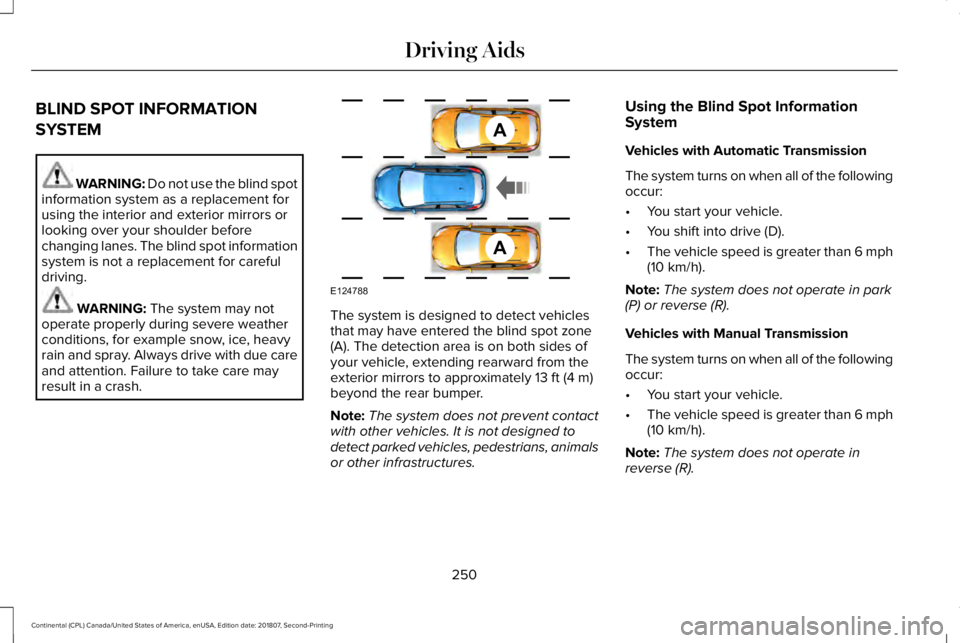
result in a crash. The system is designed to detect vehicles
that may have entered the blind spot zone
(A). The detection area is on both sides of
your vehicle, extending rearward from the
exterior mirrors to approximately
13 ft (4 m)
beyond the rear bumper.
Note: The system does not prevent contact
with other vehicles. It is not designed to
detect parked vehicles, pedestrians, animals
or other infrastructures. Using the Blind Spot Information
System
Vehicles with Automatic Transmission
The system turns on when all of the following
occur:
•
You start your vehicle.
• You shift into drive (D).
• The vehicle speed is greater than
6 mph
(10 km/h).
Note: The system does not operate in park
(P) or reverse (R).
Vehicles with Manual Transmission
The system turns on when all of the following
occur:
• You start your vehicle.
• The vehicle speed is greater than
6 mph
(10 km/h).
Note: The system does not operate in
reverse (R).
250
Continental (CPL) Canada/United States of America, enUSA, Edition date: 201807, Second-Printing Driving AidsA
A
E124788
Page 274 of 627
Trailer lamps are required on most towed
vehicles. Make sure all running lights, brake
lights, turn signals and hazard lights are
working.
Before Towing a Trailer
Practice turning, stopping and backing up to
get the feel of your vehicle-trailer
combination before starting on a trip. When
turning, make wider turns so the trailer
wheels clear curbs and other obstacles.
When Towing a Trailer
•
Do not drive faster than 70 mph
(113 km/h) during the first 500 mi
(800 km).
• Do not make full-throttle starts.
• Check your hitch, electrical connections
and trailer wheel lug nuts thoroughly after
you have traveled
50 mi (80 km).
• When stopped in congested or heavy
traffic during hot weather, place the
transmission in park (P) to aid engine and
transmission cooling and to help A/C
performance. •
Turn off the speed control with heavy
loads or in hilly terrain. The speed control
may turn off automatically when you are
towing on long, steep grades.
• Shift to a lower gear when driving down
a long or steep hill. Do not apply the
brakes continuously, as they may
overheat and become less effective.
• If your transmission is equipped with a
Grade Assist or Tow/Haul feature, use
this feature when towing. This provides
engine braking and helps eliminate
excessive transmission shifting for
optimum fuel economy and transmission
cooling.
• Allow more distance for stopping with a
trailer attached. Anticipate stops and
brake gradually.
• Avoid parking on a grade. However, if
you must park on a grade:
1. Turn the steering wheel to point your vehicle tires away from traffic flow.
2. Set your vehicle parking brake.
3. Place the transmission in park (P). 4. Place wheel chocks in front and back of
the trailer wheels. Chocks are not
included with your vehicle.
Launching or Retrieving a Boat or
Personal Watercraft (PWC)
Note: Disconnect the wiring to the trailer
before
backing the trailer into the water.
Note: Reconnect the wiring to the trailer
after
removing the trailer from the water.
When backing down a ramp during boat
launching or retrieval:
• Do not allow the static water level to rise
above the bottom edge of the rear
bumper.
• Do not allow waves to break higher than
6 in (15 cm)
above the bottom edge of
the rear bumper.
Exceeding these limits may allow water to
enter vehicle components:
• Causing internal damage to the
components.
• Affecting driveability, emissions, and
reliability.
271
Continental (CPL) Canada/United States of America, enUSA, Edition date: 201807, Second-Printing Towing
Page 281 of 627
Note:
When you try to restart your vehicle
after a fuel shutoff, the vehicle makes sure
that various systems are safe to restart.
Once the vehicle determines the systems
are safe, then the vehicle allows you to
restart.
Note: In the event that your vehicle does
not restart after your third attempt, contact
a qualified technician.
The fuel pump shutoff stops the flow of fuel
to the engine in the event of a moderate to
severe crash. Not every impact causes a
shutoff.
Should your vehicle shut off after a crash,
you may restart your vehicle.
1. Press START/STOP to switch off your
vehicle.
2. Press the brake pedal and
START/STOP
to switch on your vehicle. 3. Remove your foot from the brake pedal
and press
START/STOP to switch off
your vehicle.
4. You can attempt to start the vehicle by pressing the brake pedal and
START/STOP
, or press START/STOP
without pressing the brake pedal.
JUMP STARTING THE VEHICLE WARNING:
Batteries normally
produce explosive gases which can cause
personal injury. Therefore, do not allow
flames, sparks or lighted substances to
come near the battery. When working near
the battery, always shield your face and
protect your eyes. Always provide correct
ventilation. WARNING:
Keep batteries out of
reach of children. Batteries contain sulfuric
acid. Avoid contact with skin, eyes or
clothing. Shield your eyes when working
near the battery to protect against possible
splashing of acid solution. In case of acid
contact with skin or eyes, flush immediately
with water for a minimum of 15 minutes and
get prompt medical attention. If acid is
swallowed, call a physician immediately. WARNING:
Use only adequately
sized cables with insulated clamps.
Preparing Your Vehicle
Do not attempt to push-start your automatic
transmission vehicle.
Note: Attempting to push-start a vehicle with
an automatic transmission may cause
transmission damage.
Note: Use only a 12-volt supply to start your
vehicle.
278
Continental (CPL) Canada/United States of America, enUSA, Edition date: 201807, Second-Printing Roadside Emergencies