lights LINCOLN CONTINENTAL 2019 Owner's Manual
[x] Cancel search | Manufacturer: LINCOLN, Model Year: 2019, Model line: CONTINENTAL, Model: LINCOLN CONTINENTAL 2019Pages: 627, PDF Size: 6.39 MB
Page 407 of 627
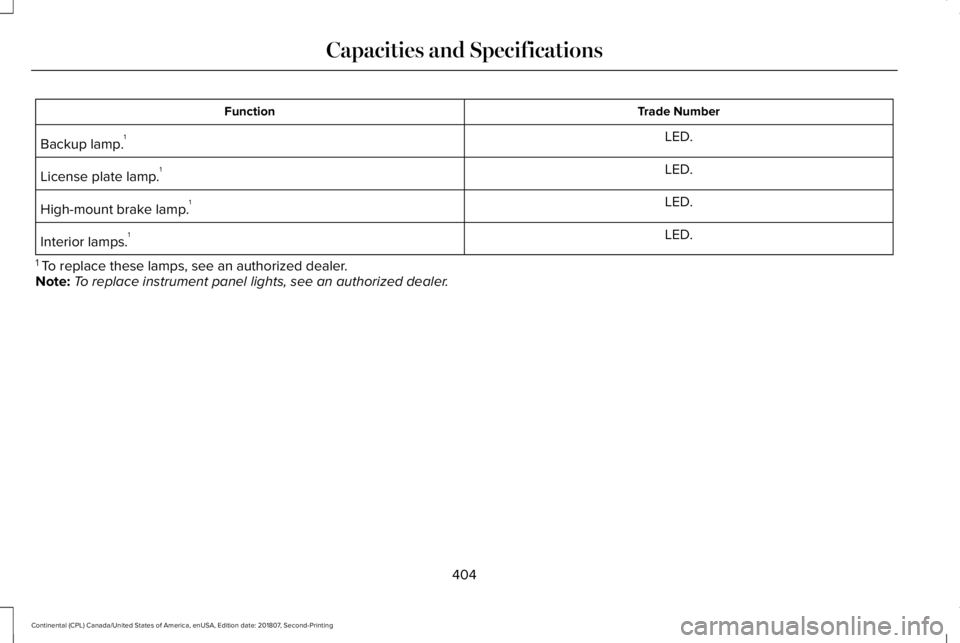
Trade Number
Function
LED.
Backup lamp. 1
LED.
License plate lamp. 1
LED.
High-mount brake lamp. 1
LED.
Interior lamps. 1
1 To replace these lamps, see an authorized dealer.
Note: To replace instrument panel lights, see an authorized dealer.
404
Continental (CPL) Canada/United States of America, enUSA, Edition date: 201807, Second-Printing Capacities and Specifications
Page 464 of 627

AUTO: Touch the button to switch on automatic operation of the fan speed, air d\
istribution, air conditioning and outside or recirculated
air, in order to maintain your set temperature. Multiple presses of the AUTO button will change the maximum fan speed allowed
during AUTO. The AUTO Fan Limit set point shall be indicated by the number of AUTO indicator lights and a pop-up, when not on
the climate screen.
A
AUTO Fan Limit High: When three indicators are on (High), the fan speed will not be limite\
d. It will be automatically controlled at
higher speeds in order to reach the selected temperature as quickly as p\
ossible.
AUTO Fan Limit Medium:
When two indicators are on (Medium), the fan will be automatically co\
ntrolled and limited to moderate
speeds in order to reach the selected temperature with a reduced amount \
of cabin noise.
AUTO Fan Limit Low: When one indicator is on (Low), the fan will be automatically controlled and limited to lower spee\
ds in order
to reach the selected temperature with the least amount of cabin noise. This means that the cabin will not be heated or cooled as
quickly as possible.
Note: The system will start at the previously selected Auto fan setting \
when Auto is turned on.
Once Auto is selected air distribution, A/C operation, and outside or re\
circulated air will also be automatically adjusted to heat or
cool the vehicle in order to maintain the selected temperature.
The AUTO button can also be used to turn off dual zone operation by pressing an\
d holding the button for greater than 2 seconds.
Power:
Touch the button to switch the system on and off. Switch off the climate control system to prevent outside air from enterin\
g
the vehicle.
B
DUAL:
This button lights up when the passenger controls are active. To switch them off and link the passenger temperature to the
driver temperature, touch the DUAL button.
C
Note:
the passenger side temperature and the DUAL indication automatically turn on when you or your passenger adjust th\
e
passenger temperature.
Passenger temperature:
Touch up or down to adjust the temperature.
D
Fan speed:
Touch up or down to increase or decrease the volume of air that circulate\
s in your vehicle.
E
461
Continental (CPL) Canada/United States of America, enUSA, Edition date: 201807, Second-Printing SYNC™ 3
Page 475 of 627
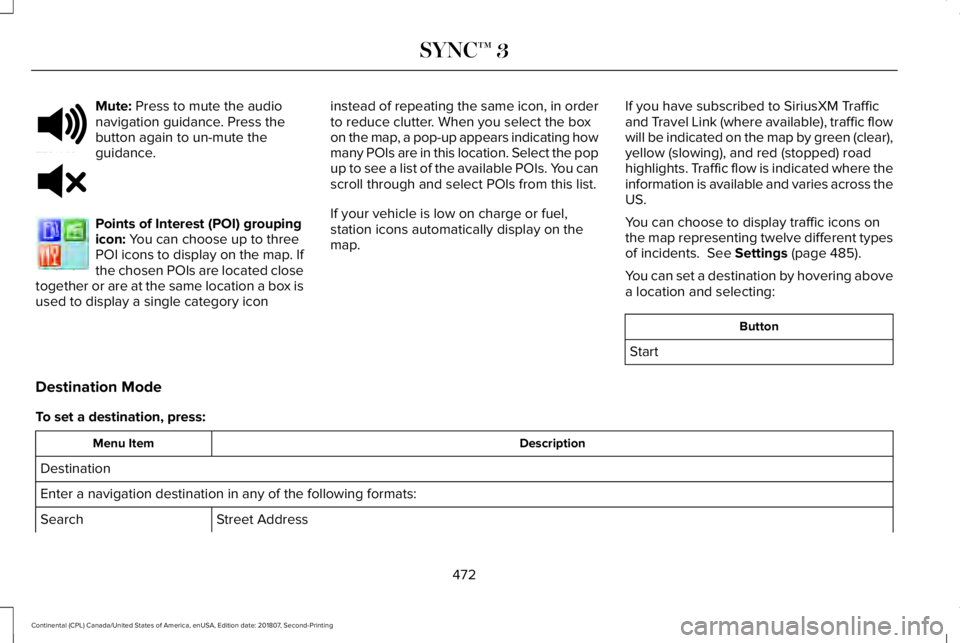
Mute: Press to mute the audio
navigation guidance. Press the
button again to un-mute the
guidance. Points of Interest (POI) grouping
icon:
You can choose up to three
POI icons to display on the map. If
the chosen POIs are located close
together or are at the same location a box is
used to display a single category icon instead of repeating the same icon, in order
to reduce clutter. When you select the box
on the map, a pop-up appears indicating how
many POIs are in this location. Select the pop
up to see a list of the available POIs. You can
scroll through and select POIs from this list.
If your vehicle is low on charge or fuel,
station icons automatically display on the
map.
If you have subscribed to SiriusXM Traffic
and Travel Link (where available), traffic flow
will be indicated on the map by green (clear),
yellow (slowing), and red (stopped) road
highlights. Traffic flow is indicated where the
information is available and varies across the
US.
You can choose to display traffic icons on
the map representing twelve different types
of incidents. See Settings (page 485).
You can set a destination by hovering above
a location and selecting: Button
Start
Destination Mode
To set a destination, press: Description
Menu Item
Destination
Enter a navigation destination in any of the following formats: Street Address
Search
472
Continental (CPL) Canada/United States of America, enUSA, Edition date: 201807, Second-Printing SYNC™ 3E251780 E251779 E207754
Page 533 of 627
Make sure to change your vehicle
’s oils and
fluids at the specified intervals or in
conjunction with a repair. Flushing is a viable
way to change fluid for many vehicle
sub-systems during scheduled maintenance. It is critical that systems are flushed only with
new fluid that is the same as that required
to fill and operate the system or using a
Ford-approved flushing chemical.
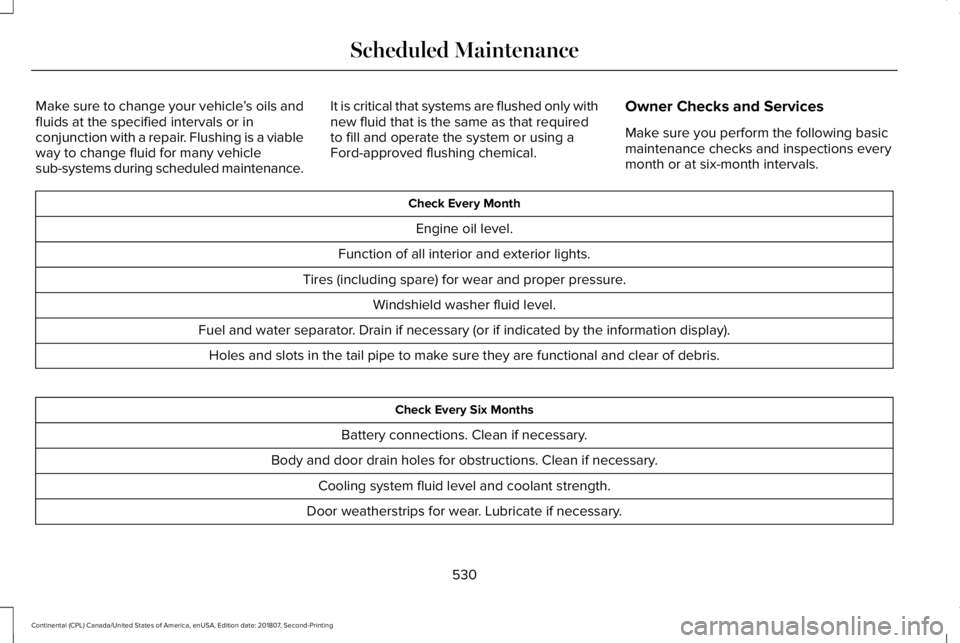
Owner Checks and Services
Make sure you perform the following basic
maintenance checks and inspections every
month or at six-month intervals. Check Every Month
Engine oil level.
Function of all interior and exterior lights.
Tires (including spare) for wear and proper pressure. Windshield washer fluid level.
Fuel and water separator. Drain if necessary (or if indicated by the information display). Holes and slots in the tail pipe to make sure they are functional and clear of debris. Check Every Six Months
Battery connections. Clean if necessary.
Body and door drain holes for obstructions. Clean if necessary. Cooling system fluid level and coolant strength.
Door weatherstrips for wear. Lubricate if necessary.
530
Continental (CPL) Canada/United States of America, enUSA, Edition date: 201807, Second-Printing Scheduled Maintenance
Page 616 of 627
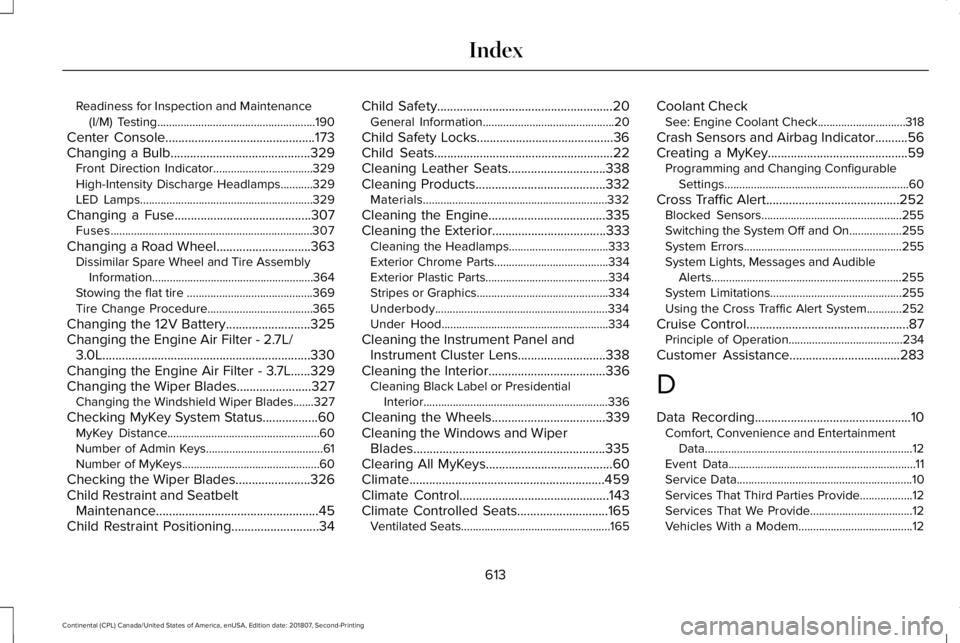
Readiness for Inspection and Maintenance
(I/M) Testing......................................................190
Center Console..............................................173
Changing a Bulb...........................................329
Front Direction Indicator..................................329
High-Intensity Discharge Headlamps...........329
LED Lamps...........................................................329
Changing a Fuse
..........................................307
Fuses.....................................................................307
Changing a Road Wheel.............................363 Dissimilar Spare Wheel and Tire Assembly
Information.......................................................364
Stowing the flat tire ...........................................369
Tire Change Procedure....................................365
Changing the 12V Battery..........................325
Changing the Engine Air Filter - 2.7L/ 3.0L................................................................330
Changing the Engine Air Filter - 3.7L......329
Changing the Wiper Blades.......................327 Changing the Windshield Wiper Blades.......327
Checking MyKey S
ystem Status.................60
MyKey Distance....................................................60
Number of Admin Keys........................................61
Number of MyKeys...............................................60
Checking the Wiper Blades.......................326
Child Restraint and Seatbelt Maintenance..................................................45
Child Restraint Positioning...........................34 Child Safety......................................................20
General Information.............................................20
Child Safety Locks..........................................36
Child Seats.......................................................22
Cleaning Leather Seats..............................338
Cleaning Products........................................332 Materials...............................................................332
Cleaning the Engine....................................335
Cleaning the Exterior...................................333 Cleaning the Headlamps..................................333
Exterior Chrome Parts.......................................334
Exterior Plastic Parts..........................................334
Stripes or Graphics.............................................334
Underbody...........................................................334
Under Hood.........................................................334
Cleaning the Instrument Panel and Instrument Cluster Lens...........................338
Cleaning the Interior
....................................336
Cleaning Black Label or Presidential
Interior...............................................................336
Cleaning the Wheels
...................................339
Cleaning the Windows and Wiper Blades...........................................................335
Clearing All MyKeys.......................................60
Climate............................................................459
Climate Control..............................................143
Climate Controlled Seats............................165 Ventilated Seats...................................................165 Coolant Check
See: Engine Coolant Check..............................318
Crash Sensors and Airbag Indicator..........56
Creating a MyKey...........................................59 Programming and Changing Configurable
Settings...............................................................60
Cross Traffic Alert
.........................................252
Blocked Sensors................................................255
Switching the System Off and On..................255
System Errors
......................................................255
System Lights, Messages and Audible Alerts.................................................................255
System Limitations.............................................255
Using the Cross Traffic Alert System............252
Cruise Control
..................................................87
Principle of Operation.......................................234
Customer Assistance
..................................283
D
Data Recording
................................................10
Comfort, Convenience and Entertainment
Data.......................................................................12
Event Data................................................................11
Service Data............................................................10
Services That Third Parties Provide..................12
Services That We Provide...................................12
Vehicles With a Modem.......................................12
613
Continental (CPL) Canada/United States of America, enUSA, Edition date: 201807, Second-Printing Index
Page 625 of 627

Changing the Set Speed..................................237
Detection Issues.................................................238
Following a Vehicle............................................235
Following a Vehicle to a Complete
Stop...................................................................236
Hilly Condition Usage.......................................238
Overriding the Set Speed................................237
Park Brake Application.....................................238
Resuming the Set Speed..................................237
Setting the Adaptive Cruise Speed...............235
Setting the Adaptive Cruise Speed When Your Vehicle is Stationary......................................235
Setting the Gap Distance.................................236
Switching Adaptive Cruise Control Off.........238
Switching Adaptive Cruise Control On.........235
Switching to Normal Cruise Control..............242
System Not Available........................................239
Using All-Wheel Drive..................................197 Driving In Special Conditions With All-Wheel
Drive (AWD)......................................................199
Operating AWD Vehicles With Spare or Mismatched Tires...........................................199
Using MyKey With Remote Start Systems...........................................................61
Using Snow Chains......................................356
Using Stability Control.................................214
Using Summer Tires....................................356 Using Traction Control
.................................212
Switching the System Off..................................212
System Indicator Lights and Messages.........212
Using a Switch.....................................................212
Using the Information Display Controls........212
Using Voice R
ecognition............................435
Audio Voice Commands...................................437
Climate Voice Commands................................438
Mobile App Voice Commands
........................443
Navigation Voice Commands...........................441
Phone Voice Commands..................................439
SiriusXM Traffic and Travel Link Voice Commands.......................................................444
Voice Settings Commands...............................444
Utilizing the Mediation/Arbitration Program (Canada Only).............................................286
V
Vehicle Care..................................................332 General Information
...........................................332
Vehicle Certification Label.........................380
Vehicle Identification Number..................380
Vehicle Identification...................................405
Vehicle Storage............................................340 Battery....................................................................341
Body.......................................................................340
Brakes.....................................................................341 Cooling system....................................................341
Engine...................................................................340
Fuel system..........................................................340
General.................................................................340
Miscellaneous
.......................................................341
Removing Vehicle From Storage
.....................341
Tires........................................................................\
341
Ventilation See: Climate Control...........................................143
VIN See: Vehicle Identification Number...............380
Voice Control
...................................................87
W
Warning Lamps and Indicators
..................107
Adaptive Cruise Control....................................107
Adaptive Steering...............................................108
Anti-Lock Braking System.................................108
Autohold Active...................................................108
Autohold Unavailable.........................................108
Automatic Headlamp High Beam...................108
Battery....................................................................
108
Blind Spot Monitor..............................................108
Brake System Warning Lamp...........................109
Cruise Control......................................................109
Direction Indicator..............................................109
Door Ajar...............................................................109
622
Continental (CPL) Canada/United States of America, enUSA, Edition date: 201807, Second-Printing Index