transmission LINCOLN CONTINENTAL 2019 Service Manual
[x] Cancel search | Manufacturer: LINCOLN, Model Year: 2019, Model line: CONTINENTAL, Model: LINCOLN CONTINENTAL 2019Pages: 627, PDF Size: 6.39 MB
Page 223 of 627
Active park assist is a multi-step process and
may require you to shift the transmission
multiple times. Follow the onscreen
instructions until the parking maneuver is
complete.
If you are uncomfortable with the proximity
to any vehicle or object, you may choose to
override the system by grabbing the steering
wheel, or by taking full control of your vehicle
after pressing the active park assist button.
Keep your hands, hair, clothing and any
loose items clear of the steering wheel when
using active park assist.
The sensors are on the front and rear
bumpers.
Note:
Keep the sensors free from snow, ice
and large accumulations of dirt.
Note: Do not cover up the sensors.
Note: Do not clean the sensors with sharp
objects. Note:
The sensors may not detect objects
with surfaces that absorb ultrasonic waves.
The sensors may falsely detect objects due
to ultrasonic interference caused by
motorcycle exhausts, truck air brakes or
horns, for example.
Note: If you change any tires, the system
must recalibrate and may not correctly
operate for a short time.
The system may not correctly operate in any
of the following conditions:
• You use a spare tire or a tire that is
significantly worn more than the other
tires.
• One or more tires are incorrectly inflated.
• You try to park on a tight curve.
• Something passes between the front
bumper and the parking space. For
example, a pedestrian or cyclist. •
The edge of the neighboring parked
vehicle is high off the ground. For
example, a bus, tow truck or flatbed
truck.
• The weather conditions are poor. For
example, during heavy rain, snow, fog,
high humidity and high temperatures.
Do not use the system if:
• You have attached an add-on accessory
close to the sensors on the front or rear
of your vehicle. For example, a bike rack
or trailer.
• You have attached an overhanging
object to the roof. For example, a
surfboard.
• The front bumper, rear bumper or the
side sensors are damaged.
• The correct tire size is not in use on your
vehicle. For example, a mini-spare tire.
220
Continental (CPL) Canada/United States of America, enUSA, Edition date: 201807, Second-Printing Parking Aids
Page 229 of 627
Troubleshooting
Possible Cause
Symptom
You may have switched the traction control off.
The system does not search for a parking space.
The transmission is in reverse (R). Your vehicle must be moving forward to be able to
detect a parking space.
The sensors may be blocked. For example, snow, ice or dirt buildup. Blocked sensors
can affect how the system functions.
The system does not offer a parking space.
There is not enough room in the parking space for your vehicle to safely\
park.
There is not enough space for the parking maneuver on the opposite side \
of the parking
space.
The parking space is more than 5 ft (1.5 m) or less than 2 ft (0.5 m) away.
The vehicle speed is greater than 22 mph (35 km/h) for parallel parkin\
g or greater than
19 mph (30 km/h)
for perpendicular parking.
You recently disconnected or replaced the battery. After you reconnect the battery you
must drive your vehicle on a straight road for a short period of time.
Your vehicle is rolling in the opposite direction of the current transmis\
sion position. For
example, rolling forward when in reverse (R).
The system does not correctly position your vehicle
in a parking space.
An irregular curb along the parking space prevents the system from corre\
ctly aligning
your vehicle.
226
Continental (CPL) Canada/United States of America, enUSA, Edition date: 201807, Second-Printing Parking Aids
Page 231 of 627
REAR VIEW CAMERA
WARNING: The rear view camera
system is a reverse aid supplement device
that still requires the driver to use it in
conjunction with the interior and exterior
mirrors for maximum coverage. WARNING:
Objects that are close to
either corner of the bumper or under the
bumper, might not be seen on the screen
due to the limited coverage of the camera
system. WARNING:
Reverse your vehicle
slowly. Failure to follow this instruction
could result in the loss of control of your
vehicle, personal injury or death. WARNING:
Use caution when the
rear cargo door is ajar. If the rear cargo
door is ajar, the camera will be out of
position and the video image may be
incorrect. All guidelines disappear when
the rear cargo door is ajar. Failure to follow
this instruction could result in personal
injury. WARNING: Use caution when turning
camera features on or off when the
transmission is not in park (P). Make sure
your vehicle is not moving.
The rear view camera system provides a
video image of the area behind your vehicle.
During operation, lines appear in the display
which represent your vehicle ’s path and
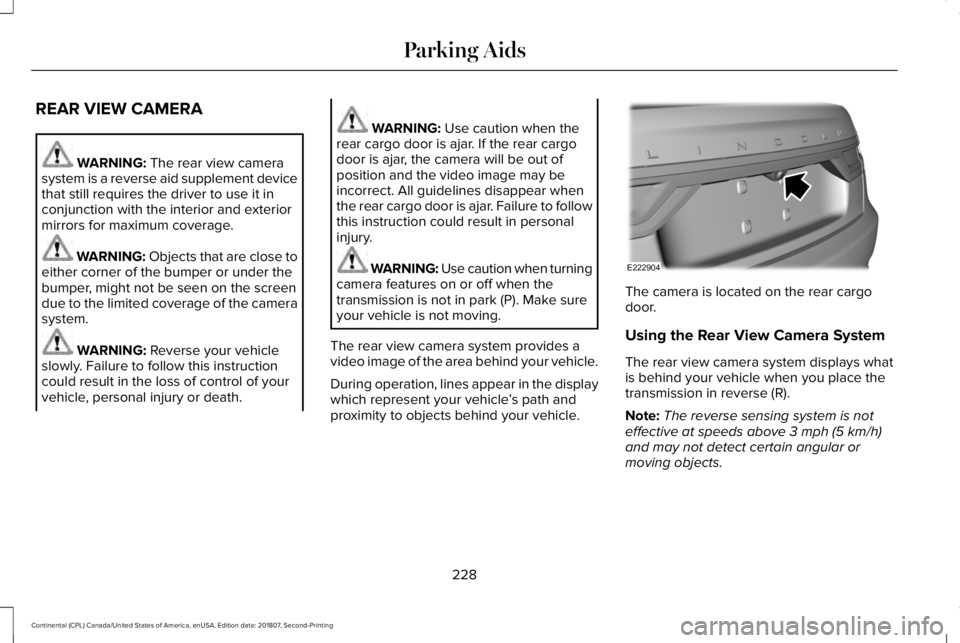
proximity to objects behind your vehicle. The camera is located on the rear cargo
door.
Using the Rear View Camera System
The rear view camera system displays what
is behind your vehicle when you place the
transmission in reverse (R).
Note:
The reverse sensing system is not
effective at speeds above
3 mph (5 km/h)
and may not detect certain angular or
moving objects.
228
Continental (CPL) Canada/United States of America, enUSA, Edition date: 201807, Second-Printing Parking AidsE222904
Page 232 of 627
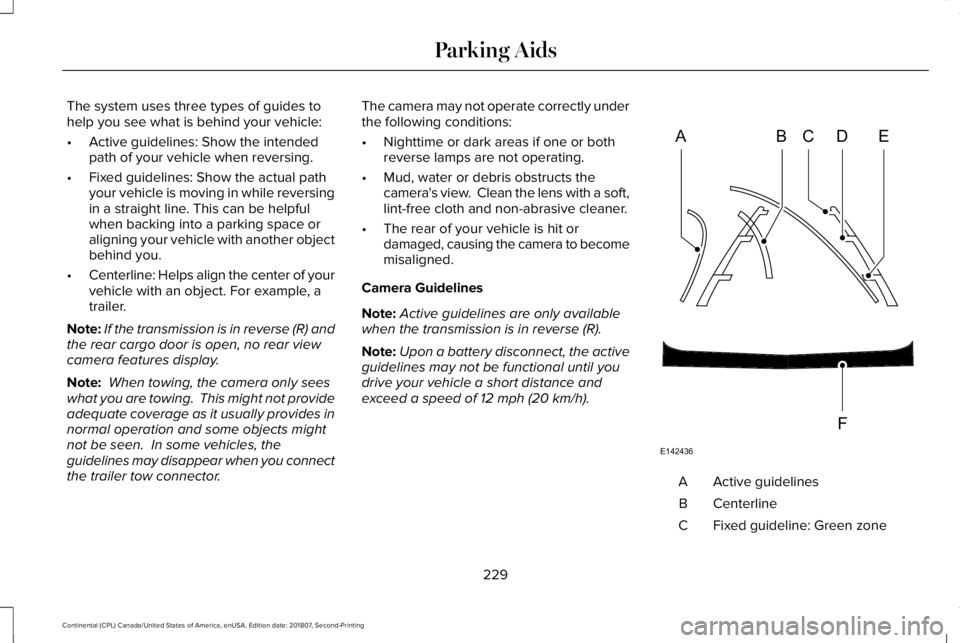
The system uses three types of guides to
help you see what is behind your vehicle:
•
Active guidelines: Show the intended
path of your vehicle when reversing.
• Fixed guidelines: Show the actual path
your vehicle is moving in while reversing
in a straight line. This can be helpful
when backing into a parking space or
aligning your vehicle with another object
behind you.
• Centerline: Helps align the center of your
vehicle with an object. For example, a
trailer.
Note: If the transmission is in reverse (R) and
the rear cargo door is open, no rear view
camera features display.
Note: When towing, the camera only sees
what you are towing. This might not provide
adequate coverage as it usually provides in
normal operation and some objects might
not be seen. In some vehicles, the
guidelines may disappear when you connect
the trailer tow connector. The camera may not operate correctly under
the following conditions:
•
Nighttime or dark areas if one or both
reverse lamps are not operating.
• Mud, water or debris obstructs the
camera's view. Clean the lens with a soft,
lint-free cloth and non-abrasive cleaner.
• The rear of your vehicle is hit or
damaged, causing the camera to become
misaligned.
Camera Guidelines
Note: Active guidelines are only available
when the transmission is in reverse (R).
Note: Upon a battery disconnect, the active
guidelines may not be functional until you
drive your vehicle a short distance and
exceed a speed of 12 mph (20 km/h). Active guidelines
A
Centerline
B
Fixed guideline: Green zone
C
229
Continental (CPL) Canada/United States of America, enUSA, Edition date: 201807, Second-Printing Parking AidsABCD
F
E
E142436
Page 233 of 627
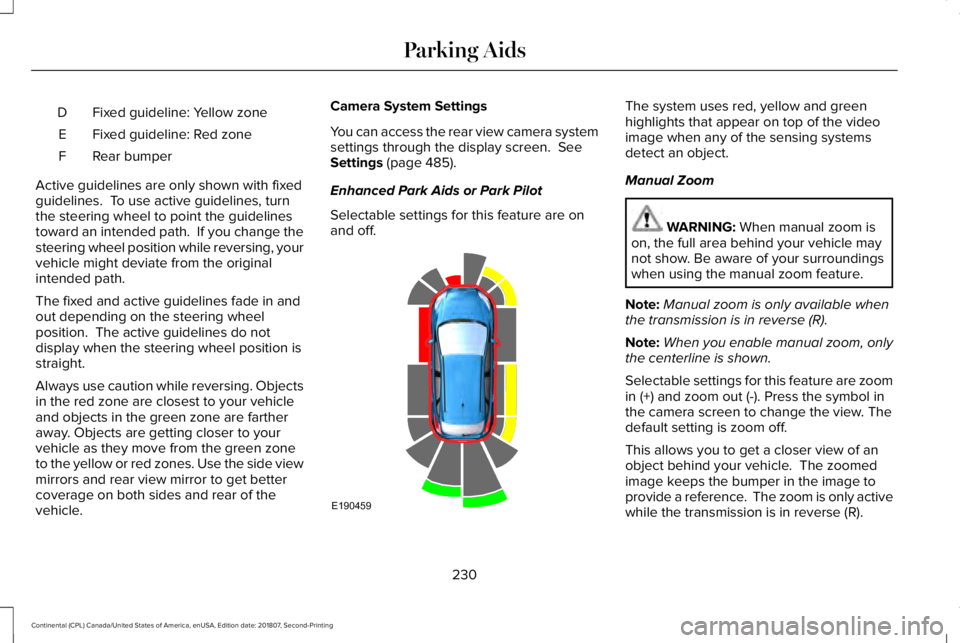
Fixed guideline: Yellow zone
D
Fixed guideline: Red zone
E
Rear bumper
F
Active guidelines are only shown with fixed
guidelines. To use active guidelines, turn
the steering wheel to point the guidelines
toward an intended path. If you change the
steering wheel position while reversing, your
vehicle might deviate from the original
intended path.
The fixed and active guidelines fade in and
out depending on the steering wheel
position. The active guidelines do not
display when the steering wheel position is
straight.
Always use caution while reversing. Objects
in the red zone are closest to your vehicle
and objects in the green zone are farther
away. Objects are getting closer to your
vehicle as they move from the green zone
to the yellow or red zones. Use the side view
mirrors and rear view mirror to get better
coverage on both sides and rear of the
vehicle. Camera System Settings
You can access the rear view camera system
settings through the display screen. See
Settings (page 485).
Enhanced Park Aids or Park Pilot
Selectable settings for this feature are on
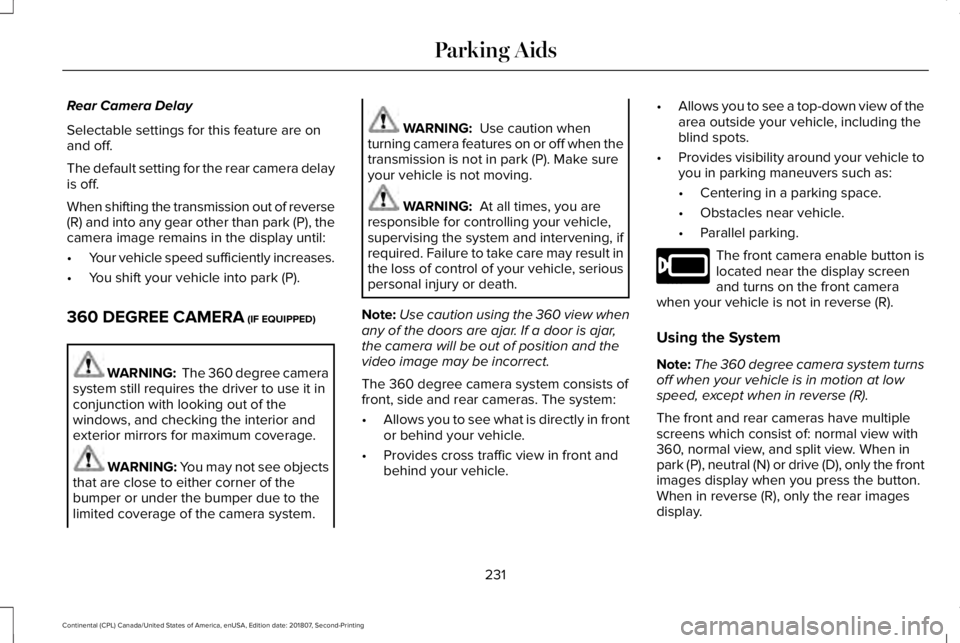
and off. The system uses red, yellow and green
highlights that appear on top of the video
image when any of the sensing systems
detect an object.
Manual Zoom
WARNING:
When manual zoom is
on, the full area behind your vehicle may
not show. Be aware of your surroundings
when using the manual zoom feature.
Note: Manual zoom is only available when
the transmission is in reverse (R).
Note: When you enable manual zoom, only
the centerline is shown.
Selectable settings for this feature are zoom
in (+) and zoom out (-). Press the symbol in
the camera screen to change the view. The
default setting is zoom off.
This allows you to get a closer view of an
object behind your vehicle. The zoomed
image keeps the bumper in the image to
provide a reference. The zoom is only active
while the transmission is in reverse (R).
230
Continental (CPL) Canada/United States of America, enUSA, Edition date: 201807, Second-Printing Parking AidsE190459
Page 234 of 627
Rear Camera Delay
Selectable settings for this feature are on
and off.
The default setting for the rear camera delay
is off.
When shifting the transmission out of reverse
(R) and into any gear other than park (P), the
camera image remains in the display until:
•
Your vehicle speed sufficiently increases.
• You shift your vehicle into park (P).
360 DEGREE CAMERA (IF EQUIPPED) WARNING:
The 360 degree camera
system still requires the driver to use it in
conjunction with looking out of the
windows, and checking the interior and
exterior mirrors for maximum coverage. WARNING: You may not see objects
that are close to either corner of the
bumper or under the bumper due to the
limited coverage of the camera system. WARNING:
Use caution when
turning camera features on or off when the
transmission is not in park (P). Make sure
your vehicle is not moving. WARNING:
At all times, you are
responsible for controlling your vehicle,
supervising the system and intervening, if
required. Failure to take care may result in
the loss of control of your vehicle, serious
personal injury or death.
Note: Use caution using the 360 view when
any of the doors are ajar. If a door is ajar,
the camera will be out of position and the
video image may be incorrect.
The 360 degree camera system consists of
front, side and rear cameras. The system:
• Allows you to see what is directly in front
or behind your vehicle.
• Provides cross traffic view in front and
behind your vehicle. •
Allows you to see a top-down view of the
area outside your vehicle, including the
blind spots.
• Provides visibility around your vehicle to
you in parking maneuvers such as:
•Centering in a parking space.
• Obstacles near vehicle.
• Parallel parking. The front camera enable button is
located near the display screen
and turns on the front camera
when your vehicle is not in reverse (R).
Using the System
Note: The 360 degree camera system turns
off when your vehicle is in motion at low
speed, except when in reverse (R).
The front and rear cameras have multiple
screens which consist of: normal view with
360, normal view, and split view. When in
park (P), neutral (N) or drive (D), only the front
images display when you press the button.
When in reverse (R), only the rear images
display.
231
Continental (CPL) Canada/United States of America, enUSA, Edition date: 201807, Second-Printing Parking AidsE205884
Page 235 of 627
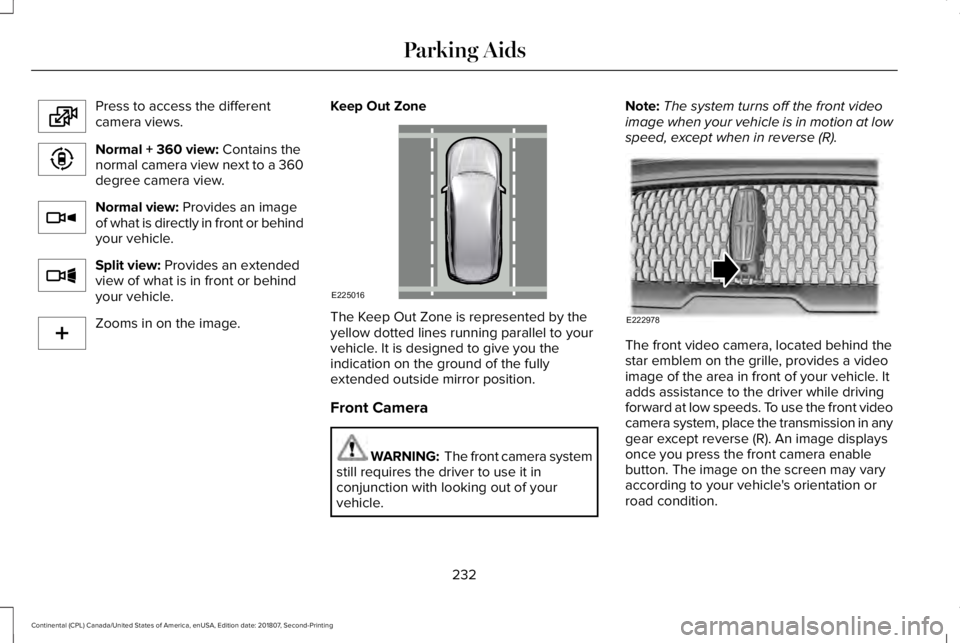
Press to access the different
camera views.
Normal + 360 view: Contains the
normal camera view next to a 360
degree camera view. Normal view:
Provides an image
of what is directly in front or behind
your vehicle. Split view:
Provides an extended
view of what is in front or behind
your vehicle. Zooms in on the image.
Keep Out Zone The Keep Out Zone is represented by the
yellow dotted lines running parallel to your
vehicle. It is designed to give you the
indication on the ground of the fully
extended outside mirror position.
Front Camera
WARNING: The front camera system
still requires the driver to use it in
conjunction with looking out of your
vehicle. Note:
The system turns off the front video
image when your vehicle is in motion at low
speed, except when in reverse (R). The front video camera, located behind the
star emblem on the grille, provides a video
image of the area in front of your vehicle. It
adds assistance to the driver while driving
forward at low speeds. To use the front video
camera system, place the transmission in any
gear except reverse (R). An image displays
once you press the front camera enable
button. The image on the screen may vary
according to your vehicle's orientation or
road condition.
232
Continental (CPL) Canada/United States of America, enUSA, Edition date: 201807, Second-Printing Parking AidsE224483 E224783 E224784 E224785 E224485 E225016 E222978
Page 253 of 627
BLIND SPOT INFORMATION
SYSTEM
WARNING: Do not use the blind spot
information system as a replacement for
using the interior and exterior mirrors or
looking over your shoulder before
changing lanes. The blind spot information
system is not a replacement for careful
driving. WARNING: The system may not
operate properly during severe weather
conditions, for example snow, ice, heavy
rain and spray. Always drive with due care
and attention. Failure to take care may
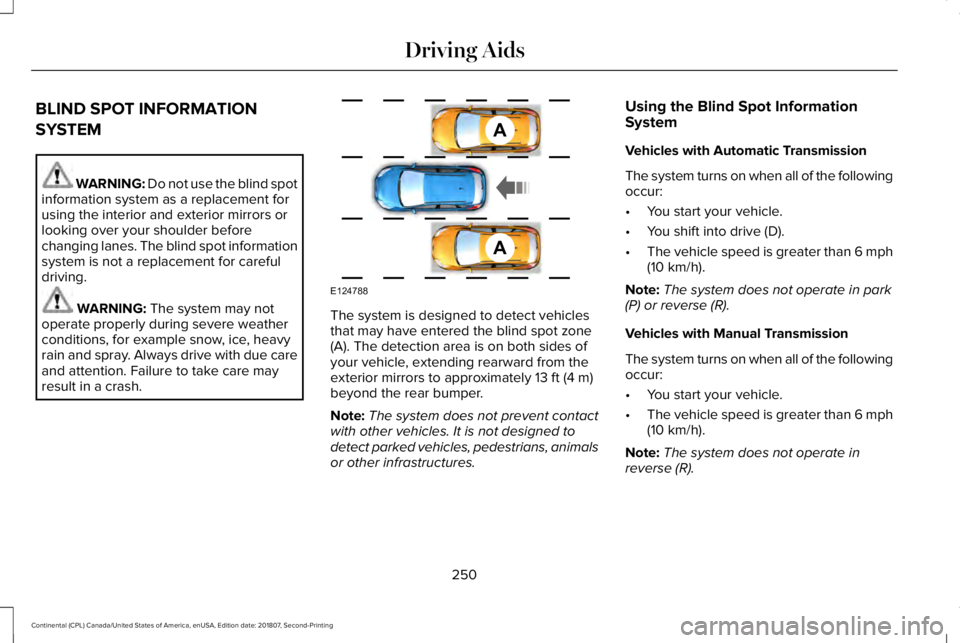
result in a crash. The system is designed to detect vehicles
that may have entered the blind spot zone
(A). The detection area is on both sides of
your vehicle, extending rearward from the
exterior mirrors to approximately
13 ft (4 m)
beyond the rear bumper.
Note: The system does not prevent contact
with other vehicles. It is not designed to
detect parked vehicles, pedestrians, animals
or other infrastructures. Using the Blind Spot Information
System
Vehicles with Automatic Transmission
The system turns on when all of the following
occur:
•
You start your vehicle.
• You shift into drive (D).
• The vehicle speed is greater than
6 mph
(10 km/h).
Note: The system does not operate in park
(P) or reverse (R).
Vehicles with Manual Transmission
The system turns on when all of the following
occur:
• You start your vehicle.
• The vehicle speed is greater than
6 mph
(10 km/h).
Note: The system does not operate in
reverse (R).
250
Continental (CPL) Canada/United States of America, enUSA, Edition date: 201807, Second-Printing Driving AidsA
A
E124788
Page 271 of 627
TOWING A TRAILER
WARNING: Do not exceed the
GVWR or the GAWR specified on the
certification label. WARNING:
Towing trailers
beyond the maximum recommended
gross trailer weight exceeds the limit
of your vehicle and could result in
engine damage, transmission damage,
structural damage, loss of vehicle
control, vehicle rollover and personal
injury.
Note: There may be electrical items
such as fuses or relays that can affect
trailer towing operation.
See Fuses
(page 292). The load capacity of your vehicle is
designated by weight not volume. You
may not necessarily be able to use all
available space when loading your
vehicle or trailer.
Towing a trailer places extra load on the
engine, transmission, axle, brakes, tires,
and suspension. Inspect these
components before, during and after
towing.
Load Placement
To help minimize how trailer movement
affects the vehicle when driving:
•
Load the heaviest items closest to
the trailer floor.
• Load the heaviest items in the center
of the left and right side trailer tires. •
Load the heaviest items above the
trailer axles or just slightly forward
toward the trailer tongue. Do not
allow the final trailer tongue weight
to go above or below 10-15% of the
loaded trailer weight.
• Select a ball mount with the correct
rise or drop. When both the loaded
vehicle and trailer are connected, the
trailer frame should be level, or
slightly angled down toward the
vehicle, when viewed from the side.
When driving with a trailer or payload, a
slight takeoff vibration or shudder may
be present due to the increased payload
weight. Additional information regarding
proper trailer loading and setting your
vehicle up for towing is located in the
Load Carrying chapter. See Load Limit
(page 263).
You can also find information in the
RV
& Trailer Towing Guide available at your
authorized dealer, or online.
268
Continental (CPL) Canada/United States of America, enUSA, Edition date: 201807, Second-Printing Towing
Page 274 of 627
Trailer lamps are required on most towed
vehicles. Make sure all running lights, brake
lights, turn signals and hazard lights are
working.
Before Towing a Trailer
Practice turning, stopping and backing up to
get the feel of your vehicle-trailer
combination before starting on a trip. When
turning, make wider turns so the trailer
wheels clear curbs and other obstacles.
When Towing a Trailer
•
Do not drive faster than 70 mph
(113 km/h) during the first 500 mi
(800 km).
• Do not make full-throttle starts.
• Check your hitch, electrical connections
and trailer wheel lug nuts thoroughly after
you have traveled
50 mi (80 km).
• When stopped in congested or heavy
traffic during hot weather, place the
transmission in park (P) to aid engine and
transmission cooling and to help A/C
performance. •
Turn off the speed control with heavy
loads or in hilly terrain. The speed control
may turn off automatically when you are
towing on long, steep grades.
• Shift to a lower gear when driving down
a long or steep hill. Do not apply the
brakes continuously, as they may
overheat and become less effective.
• If your transmission is equipped with a
Grade Assist or Tow/Haul feature, use
this feature when towing. This provides
engine braking and helps eliminate
excessive transmission shifting for
optimum fuel economy and transmission
cooling.
• Allow more distance for stopping with a
trailer attached. Anticipate stops and
brake gradually.
• Avoid parking on a grade. However, if
you must park on a grade:
1. Turn the steering wheel to point your vehicle tires away from traffic flow.
2. Set your vehicle parking brake.
3. Place the transmission in park (P). 4. Place wheel chocks in front and back of
the trailer wheels. Chocks are not
included with your vehicle.
Launching or Retrieving a Boat or
Personal Watercraft (PWC)
Note: Disconnect the wiring to the trailer
before
backing the trailer into the water.
Note: Reconnect the wiring to the trailer
after
removing the trailer from the water.
When backing down a ramp during boat
launching or retrieval:
• Do not allow the static water level to rise
above the bottom edge of the rear
bumper.
• Do not allow waves to break higher than
6 in (15 cm)
above the bottom edge of
the rear bumper.
Exceeding these limits may allow water to
enter vehicle components:
• Causing internal damage to the
components.
• Affecting driveability, emissions, and
reliability.
271
Continental (CPL) Canada/United States of America, enUSA, Edition date: 201807, Second-Printing Towing