brake light LINCOLN CONTINENTAL 2020 Owner's Guide
[x] Cancel search | Manufacturer: LINCOLN, Model Year: 2020, Model line: CONTINENTAL, Model: LINCOLN CONTINENTAL 2020Pages: 609, PDF Size: 6.24 MB
Page 352 of 609
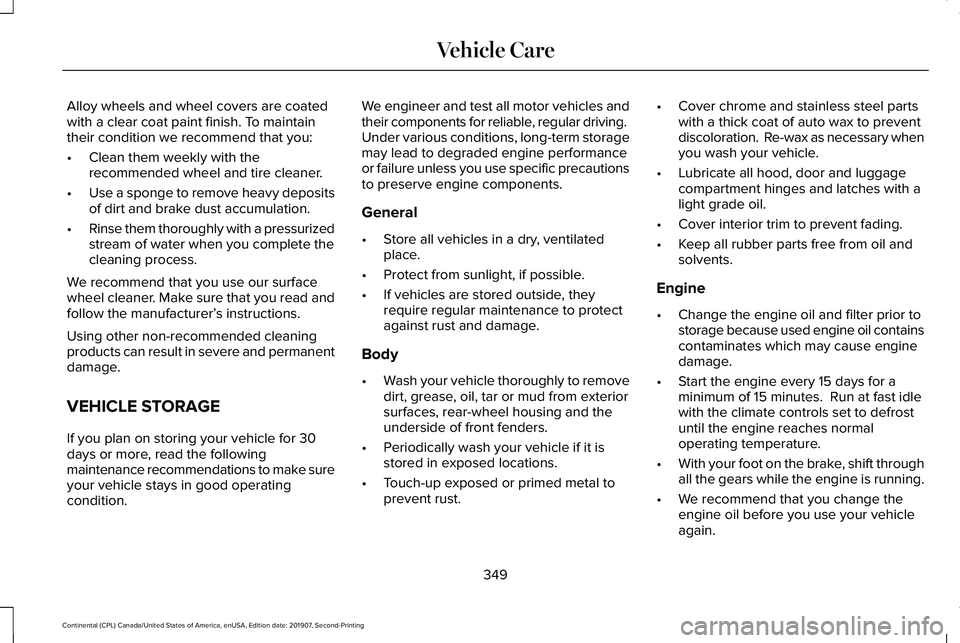
Alloy wheels and wheel covers are coated
with a clear coat paint finish. To maintain
their condition we recommend that you:
•
Clean them weekly with the
recommended wheel and tire cleaner.
• Use a sponge to remove heavy deposits
of dirt and brake dust accumulation.
• Rinse them thoroughly with a pressurized
stream of water when you complete the
cleaning process.
We recommend that you use our surface
wheel cleaner. Make sure that you read and
follow the manufacturer’ s instructions.
Using other non-recommended cleaning
products can result in severe and permanent
damage.
VEHICLE STORAGE
If you plan on storing your vehicle for 30
days or more, read the following
maintenance recommendations to make sure
your vehicle stays in good operating
condition. We engineer and test all motor vehicles and
their components for reliable, regular driving.
Under various conditions, long-term storage
may lead to degraded engine performance
or failure unless you use specific precautions
to preserve engine components.
General
•
Store all vehicles in a dry, ventilated
place.
• Protect from sunlight, if possible.
• If vehicles are stored outside, they
require regular maintenance to protect
against rust and damage.
Body
• Wash your vehicle thoroughly to remove
dirt, grease, oil, tar or mud from exterior
surfaces, rear-wheel housing and the
underside of front fenders.
• Periodically wash your vehicle if it is
stored in exposed locations.
• Touch-up exposed or primed metal to
prevent rust. •
Cover chrome and stainless steel parts
with a thick coat of auto wax to prevent
discoloration. Re-wax as necessary when
you wash your vehicle.
• Lubricate all hood, door and luggage
compartment hinges and latches with a
light grade oil.
• Cover interior trim to prevent fading.
• Keep all rubber parts free from oil and
solvents.
Engine
• Change the engine oil and filter prior to
storage because used engine oil contains
contaminates which may cause engine
damage.
• Start the engine every 15 days for a
minimum of 15 minutes. Run at fast idle
with the climate controls set to defrost
until the engine reaches normal
operating temperature.
• With your foot on the brake, shift through
all the gears while the engine is running.
• We recommend that you change the
engine oil before you use your vehicle
again.
349
Continental (CPL) Canada/United States of America, enUSA, Edition date: 201907, Second-Printing Vehicle Care
Page 375 of 609
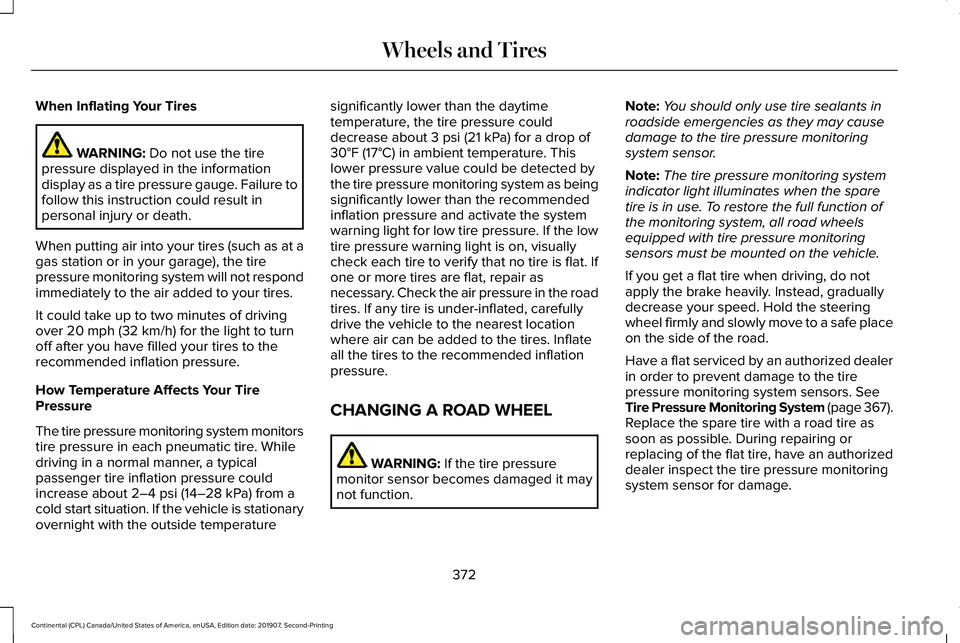
When Inflating Your Tires
WARNING: Do not use the tire
pressure displayed in the information
display as a tire pressure gauge. Failure to
follow this instruction could result in
personal injury or death.
When putting air into your tires (such as at a
gas station or in your garage), the tire
pressure monitoring system will not respond
immediately to the air added to your tires.
It could take up to two minutes of driving
over
20 mph (32 km/h) for the light to turn
off after you have filled your tires to the
recommended inflation pressure.
How Temperature Affects Your Tire
Pressure
The tire pressure monitoring system monitors
tire pressure in each pneumatic tire. While
driving in a normal manner, a typical
passenger tire inflation pressure could
increase about
2–4 psi (14–28 kPa) from a
cold start situation. If the vehicle is stationary
overnight with the outside temperature significantly lower than the daytime
temperature, the tire pressure could
decrease about
3 psi (21 kPa) for a drop of
30°F (17°C) in ambient temperature. This
lower pressure value could be detected by
the tire pressure monitoring system as being
significantly lower than the recommended
inflation pressure and activate the system
warning light for low tire pressure. If the low
tire pressure warning light is on, visually
check each tire to verify that no tire is flat. If
one or more tires are flat, repair as
necessary. Check the air pressure in the road
tires. If any tire is under-inflated, carefully
drive the vehicle to the nearest location
where air can be added to the tires. Inflate
all the tires to the recommended inflation
pressure.
CHANGING A ROAD WHEEL WARNING:
If the tire pressure
monitor sensor becomes damaged it may
not function. Note:
You should only use tire sealants in
roadside emergencies as they may cause
damage to the tire pressure monitoring
system sensor.
Note: The tire pressure monitoring system
indicator light illuminates when the spare
tire is in use. To restore the full function of
the monitoring system, all road wheels
equipped with tire pressure monitoring
sensors must be mounted on the vehicle.
If you get a flat tire when driving, do not
apply the brake heavily. Instead, gradually
decrease your speed. Hold the steering
wheel firmly and slowly move to a safe place
on the side of the road.
Have a flat serviced by an authorized dealer
in order to prevent damage to the tire
pressure monitoring system sensors.
See
Tire Pressure Monitoring System (page 367).
Replace the spare tire with a road tire as
soon as possible. During repairing or
replacing of the flat tire, have an authorized
dealer inspect the tire pressure monitoring
system sensor for damage.
372
Continental (CPL) Canada/United States of America, enUSA, Edition date: 201907, Second-Printing Wheels and Tires
Page 429 of 609
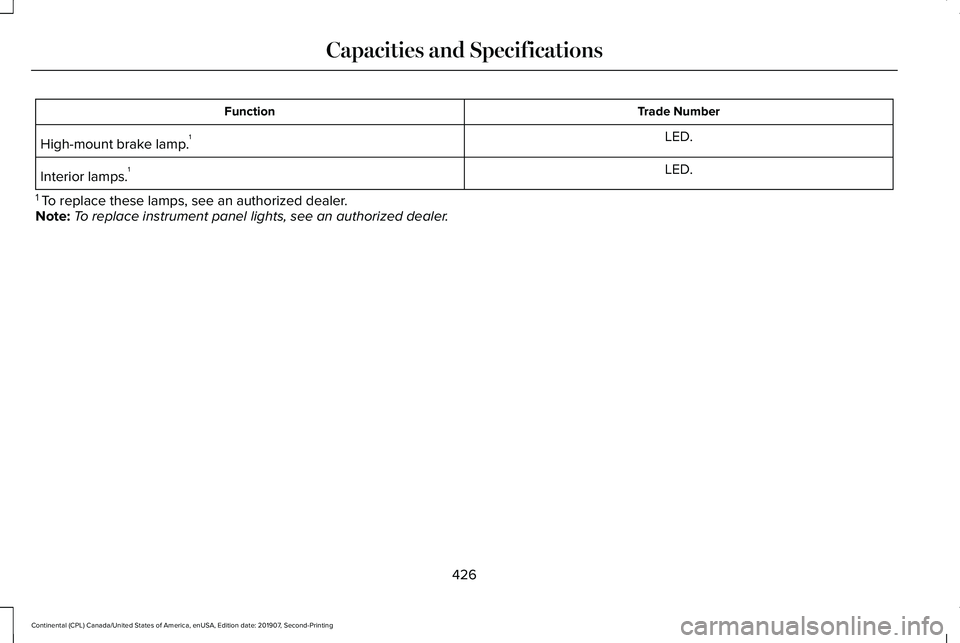
Trade Number
Function
LED.
High-mount brake lamp. 1
LED.
Interior lamps. 1
1 To replace these lamps, see an authorized dealer.
Note: To replace instrument panel lights, see an authorized dealer.
426
Continental (CPL) Canada/United States of America, enUSA, Edition date: 201907, Second-Printing Capacities and Specifications
Page 596 of 609
3
360 Degree Camera...................................238
Front Camera......................................................239
Side Camera........................................................240
Using the System...............................................239
9
911 Assist...........................................................59
A
A/C See: Climate Control..........................................148
About This Manual
............................................7
ABS See: Brakes...........................................................212
ABS driving hints See: Hints on Driving With Anti-Lock
Brakes................................................................213
Accessories...................................................505
Accessories See: Replacement Parts Recommendation.....15
ACC See: Using Adaptive Cruise Control...............241
Active Park Assist
.........................................227
Using Active Park Assist...................................228 Adaptive Headlamps...................................100
System Check......................................................100
Adjusting the Headlamps...........................337 Horizontal Aim Adjustment..............................
338
Vertical Aim Adjustment....................................337
Adjusting the Steering Wheel.....................90 End of Travel Position..........................................90
Memory Feature...................................................90
AFS See: Adaptive Headlamps................................100
Airbag Disposal
...............................................58
Air Conditioning See: Climate Control..........................................148
Air Filter See: Changing the Engine Air Filter - 2.7L/
3.0L....................................................................327
See: Changing the Engine Air Filter - 3.7L....326
Alarm See: Anti-Theft Alarm...........................................89
All-Wheel Drive
.............................................203
Ambient Lighting...........................................102
Adjusting the Brightness...................................102
Changing the Color............................................102
Switching Ambient Lighting Off.......................102
Switching Ambient Lighting On.......................102
Anti-Theft Alarm
..............................................89
Arming the Alarm..................................................89
Disarming the Alarm............................................89 Appendices....................................................542
Apps
.................................................................483
SiriusXM Traffic and Travel Link......................484
Using Apps on an Android Device................484
Using Apps on an iOS Device.........................483
Using Mobile Navigation on an Android
Device...............................................................484
At a Glance
........................................................19
Audible Warnings and Indicators...............116 Headlamps On Warning Chime
........................116
Keyless Warning Alert.........................................116
Parking Brake On Warning Chime
...................116
Audio Control....................................................91 You can operate the following functions with
the control:..........................................................91
Audio System
................................................434
General Information...........................................434
Audio Unit
......................................................435
Adjusting the Volume........................................435
Changing Radio Stations..................................435
Ejecting the CD...................................................435
Inserting a CD......................................................436
Rear Passenger Audio Controls.....................436
Selecting the Audio Modes.............................436
Setting a Memory Preset..................................436
Switching the Audio Unit On and Off............
436
Using Seek, Fast Forward and Reverse.......436
593
Continental (CPL) Canada/United States of America, enUSA, Edition date: 201907, Second-Printing Index
Page 603 of 609
Hill Start Assist.....................................................133
Keys and Intelligent Access..............................133
Lane Keeping System........................................135
Maintenance.........................................................135
MyKey.....................................................................137
Park Aid..................................................................138
Park Brake.............................................................138
Power Steering....................................................139
Pre-Collision Assist.............................................140
Remote Start.........................................................140
Seats.......................................................................140
Stability Control.....................................................141
Starting System ....................................................141
Tire Pressure Monitoring System....................142
Transmission.........................................................142
Installing Child Restraints.............................23 Inflatable Seatbelts...............................................27
Standard Seatbelts...............................................24
Using Lap and Shoulder Belts...........................23
Using Lower Anchors and Tethers for
CHildren (LATCH).............................................29
Using Tether Straps...............................................31
Installing the Vehicle Identification Card...............................................................427
Instrument Cluster...........................................111
Instrument Lighting Dimmer........................99
Instrument Panel..............................................19 Interior Lamps.................................................101
Front Interior Lamp..............................................101
Interior Lamp Function.......................................102
Rear Interior Lamps............................................102
Switching All of the Interior Lamps Off..........102
Switching All of the Interior Lamps On...........101
Switching the Individual Map Lamps On and
Off.......................................................................102
Interior Luggage Compartment Release...........................................................85
Interior Mirror
.................................................108
Auto-Dimming Mirror..........................................108
Introduction
.........................................................7
J
Jump Starting the Vehicle..........................286 Connecting the Jumper Cables......................287
Jump Starting......................................................288
Preparing Your Vehicle.....................................286
Removing the Jumper Cables........................288
K
Keyless Entry
....................................................83
SECURICODE™ Keyless Entry Keypad.............83
Keyless Starting
.............................................180
Ignition Modes.....................................................180 Keys and Remote Controls............................61
L
Lane Keeping System..................................251
Switching the System On and Off..................252
Lighting Control
...............................................97
Flashing the Headlamp High Beam.................98
Headlamp High Beam.........................................98
Lighting..............................................................97 General Information.............................................97
Lincoln Automotive Financial Services......14
Lincoln Protect..............................................507 Lincoln Protect (CANADA ONLY)...................508
Lincoln Protect Extended Service Plans (U.S.
Only)..................................................................507
Load Carrying.................................................271
Load Limit
........................................................271
Special Loading Instructions for Owners of
Pick-up Trucks and Utility-type
Vehicles............................................................275
Vehicle Loading - with and without a Trailer..................................................................271
Locking and Unlocking..................................72 Activating Intelligent Access..............................
72
Autolock...................................................................77
Battery Saver..........................................................78
Door Lock Indicator..............................................72
600
Continental (CPL) Canada/United States of America, enUSA, Edition date: 201907, Second-Printing Index
Page 608 of 609
Transporting the Vehicle............................289
Type Approvals.............................................578
China.....................................................................590
Radio Frequency Certification for Keys and
Remote Controls.............................................591
Radio Frequency Certifications for Blind Spot Information System.......................................588
Radio Frequency Certifications for Body Control Module..............................................590
Radio Frequency Certifications for Cruise Control Module..............................................590
Radio Frequency Certifications for Mid Range Radar.................................................................582
Radio Frequency Certifications for Passive Anti-Theft System..........................................583
Radio Frequency Certifications for Radio Transceiver Module.......................................
586
Radio Frequency Certifications for SYNC 3........................................................................\
.590
Radio Frequency Certifications for Tire Pressure Monitoring Sensor(s)...................578
Radio Frequency Certifications for Wireless Charging..........................................................589
Radio Frequency Statement for Audio Unit.....................................................................591 U
Under Hood Overview - 2.7L/3.0L...........320
Under Hood Overview - 3.7L.....................322
Universal Garage Door Opener.................172
HomeLink Wireless Control System...............
172
USB Port
.........................................................443
Using Adaptive Cruise Control..................241 Automatic Cancellation.....................................244
Blocked Sensor...................................................247
Canceling the Set Speed.................................244
Changing the Set Speed..................................244
Detection Issues.................................................245
Following a Vehicle............................................242
Following a Vehicle to a Complete
Stop...................................................................243
Hilly Condition Usage.......................................245
Overriding the Set Speed................................244
Park Brake Application.....................................245
Resuming the Set Speed..................................244
Setting the Adaptive Cruise Speed...............242
Setting the Adaptive Cruise Speed When Your Vehicle is Stationary......................................242
Setting the Gap Distance.................................243
Switching Adaptive Cruise Control Off.........245
Switching Adaptive Cruise Control On.........242
Switching to Normal Cruise Control..............249
System Not Available........................................246 Using All-Wheel Drive
.................................203
Driving In Special Conditions With All-Wheel
Drive (AWD).....................................................205
Operating AWD Vehicles With Spare or Mismatched Tires..........................................205
Using MyKey With Remote Start Systems..........................................................70
Using Snow Chains
......................................366
Using Stability Control................................220
Using Summer Tires....................................366
Using Traction Control
.................................218
Switching the System Off..................................218
System Indicator Lights and Messages.........218
Using a Switch.....................................................218
Using the Information Display Controls........218
Using Voice Recognition............................446 Apps.......................................................................455
Automatic Blower Motor Speed
Reduction.........................................................457
Climate..................................................................450
Entertainment......................................................448
General..................................................................447
Navigation............................................................453
Phone.....................................................................451
SiriusXM Traffic and Travel Link.....................456
Voice Settings.....................................................456
Utilizing the Mediation/Arbitration Program (Canada Only)
.............................................294
605
Continental (CPL) Canada/United States of America, enUSA, Edition date: 201907, Second-Printing Index
Page 609 of 609
V
Vehicle Care...................................................341
General Information............................................341
Vehicle Certification Label
.........................389
Vehicle Identification Number..................389
Vehicle Identification...................................427
Vehicle Storage............................................349
Body.......................................................................349
Brakes...................................................................350
Cooling system...................................................350
Disconnecting Your 12 Volt Battery...............350
Engine...................................................................349
Fuel system..........................................................350
General..................................................................349
Miscellaneous.....................................................350
Removing Vehicle From Storage...................
350
Tires.......................................................................350
Ventilation See: Climate Control..........................................148
VIN See: Vehicle Identification Number...............
389
Voice Control
....................................................91
W
Warning Lamps and Indicators...................112 Adaptive Cruise Control.....................................112 Adaptive Steering.................................................113
Anti-Lock Braking System..................................113
Autohold Active....................................................113
Autohold Unavailable..........................................113
Automatic Headlamp High Beam....................113
Battery.....................................................................113
Blind Spot Monitor...............................................113
Brake System Warning Lamp............................114
Cruise Control.......................................................114
Direction Indicator................................................114
Door Ajar.................................................................114
Electric Park Brake...............................................114
Engine Coolant Temperature............................114
Engine Oil...............................................................115
Fasten Seatbelt.....................................................115
Front Airbag...........................................................115
High Beam.............................................................115
Hood Ajar...............................................................115
Low Beam Warning Lamp..................................115
Low Fuel Level......................................................115
Low Tire Pressure Warning................................115
Low Washer Fluid.................................................115
Parking Lamps.......................................................115
Powertrain Fault....................................................115
Service Engine Soon...........................................116
Stability Control.....................................................116
Stability Control Off..............................................116
Trunk Ajar...............................................................116
Washer Fluid Check
.....................................338
Washers See: Cleaning the Exterior...............................342
See: Wipers and Washers...................................94
Waxing.............................................................343
Welcome Lighting
..........................................101
What Is 911 Assist............................................59
What Is Automatic High Beam Control...........................................................103
Wheel Nuts See: Changing a Road Wheel.........................372
Wheels and Tires.........................................352 General Information...........................................352
Technical Specifications...................................379
Wi-Fi Hotspot
.................................................432
Windows and Mirrors...................................105
Windshield Washers......................................96
Front Camera Washer.........................................96
Windshield Wipers..........................................94 Intermittent Wipe..................................................94
Speed Dependent Wipers..................................94
Wiper Blades See: Checking the Wiper Blades...................339
Wipers and Washers......................................94
606
Continental (CPL) Canada/United States of America, enUSA, Edition date: 201907, Second-Printing Index