engine LINCOLN CONTINENTAL 2020 Repair Manual
[x] Cancel search | Manufacturer: LINCOLN, Model Year: 2020, Model line: CONTINENTAL, Model: LINCOLN CONTINENTAL 2020Pages: 609, PDF Size: 6.24 MB
Page 217 of 609
Note:
The electric parking brake could
automatically apply when you shift into park
(P). See Transmission (page 197).
Applying the Electric Parking Brake in an
Emergency
Note: Do not apply the electric parking brake
when your vehicle is moving, except in an
emergency. If you repeatedly use the electric
parking brake to slow or stop your vehicle,
you could cause damage to the brake
system.
You can use the electric parking brake to
slow or stop your vehicle in an emergency. Pull the switch upward and hold it.
The red warning lamp illuminates,
a tone sounds and the stoplamps
turn on.
The electric parking brake continues to slow
your vehicle down unless you release the
switch. Manually Releasing the Electric Parking
Brake
Switch the ignition on.
Press and hold the brake pedal.
Push the switch downward.
The red warning lamp turns off.
If it remains illuminated or flashes, the system
has malfunctioned. Have your vehicle
checked as soon as possible.
Pulling Away on a Hill When Towing a
Trailer
Press and hold the brake pedal.
Pull the switch upward and hold it.
Shift into gear. Press the accelerator pedal until engine has
developed sufficient torque to prevent your
vehicle from rolling down the hill. Release the switch and pull away
in a normal manner.
Automatically Releasing the Electric
Parking Brake
Close the driver door.
Shift into gear.
Press the accelerator pedal and pull away in
a normal manner. The red warning lamp turns off.
If it remains illuminated or flashes, the electric
parking brake has not released. Manually
release the parking brake.
214
Continental (CPL) Canada/United States of America, enUSA, Edition date: 201907, Second-Printing BrakesE267156 E270480 E267156 E270480 E267156 E267156 E270480
Page 218 of 609
Releasing the Electric Parking Brake if
the Vehicle Battery is Running Out of
Charge
Connect a booster battery to the vehicle
battery to release the electric parking brake
if the vehicle battery is running out of charge.
See Jump Starting the Vehicle (page 286).
HILL START ASSIST WARNING:
The system does not
replace the parking brake. When you leave
your vehicle, always apply the parking
brake and shift the transmission into park
(P) for automatic transmission or first gear
for manual transmission. WARNING: You must remain in your
vehicle when the system turns on. At all
times, you are responsible for controlling
your vehicle, supervising the system and
intervening, if required. Failure to take care
may result in the loss of control of your
vehicle, serious personal injury or death. WARNING:
The system turns off if
there is a malfunction or if you excessively
rev the engine.
The system makes it easier to pull away
when your vehicle is on a slope without the
need to use the parking brake.
When the system activates, your vehicle
remains stationary on a slope for a few
seconds after you release the brake pedal.
This allows you time to move your foot from
the brake to the accelerator pedal. The
brakes release when the engine has
developed sufficient torque to prevent your
vehicle from rolling down the slope. This is
an advantage when pulling away on a slope,
for example from a car park ramp, traffic
lights or when reversing uphill into a parking
space.
The system activates on any slope that
causes your vehicle to roll.
Note: There is no warning lamp to indicate
the system is either on or off. Using Hill Start Assist
1. Press the brake pedal to bring your
vehicle to a complete standstill. Keep
the brake pedal pressed and shift into
first gear when facing uphill or reverse
(R) when facing downhill.
2. The system activates if the sensors detect that your vehicle is on a slope.
3. When you remove your foot from the brake pedal, your vehicle remains on the
slope without rolling away for a few
seconds. When you remove your foot
from the brake pedal, your vehicle
remains on the slope without rolling away
for a few seconds. This hold time
increases if you are in the process of
driving off.
4. Pull away in the normal manner.
Switching the System On and Off
Vehicles with Automatic Transmission
The system turns on when you switch the
ignition on and you cannot switch the system
off.
215
Continental (CPL) Canada/United States of America, enUSA, Edition date: 201907, Second-Printing Brakes
Page 219 of 609
AUTO HOLD
WARNING: The system does not
replace the parking brake. When you leave
your vehicle, always apply the parking
brake. WARNING: You must remain in your
vehicle when the system turns on. At all
times, you are responsible for controlling
your vehicle, supervising the system and
intervening, if required. Failure to take care
may result in the loss of control of your
vehicle, serious personal injury or death. WARNING:
The system will turn off
if a malfunction is apparent or if you rev
the engine excessively. Failure to take care
may result in the loss of control of your
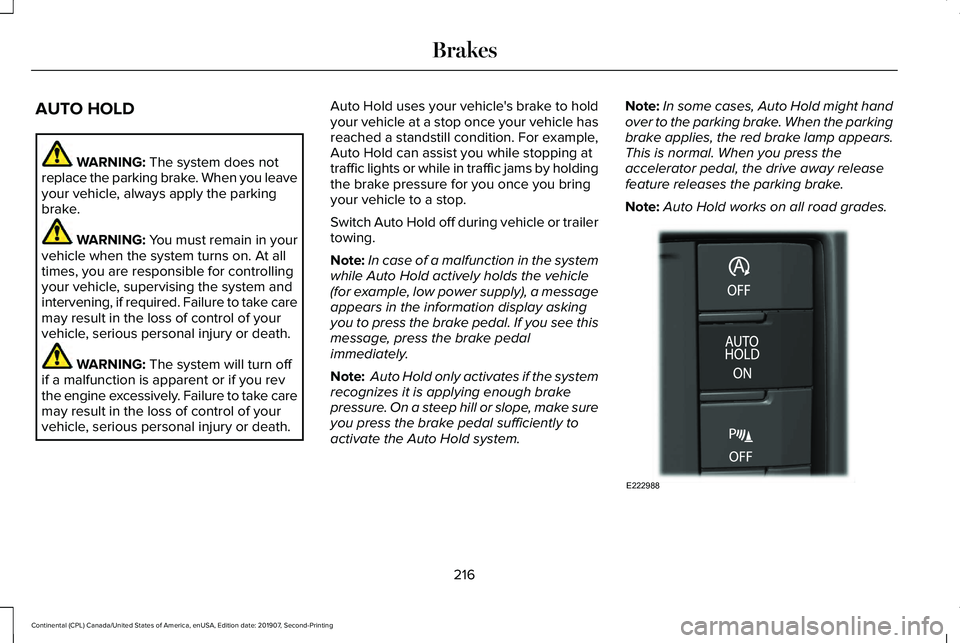
vehicle, serious personal injury or death. Auto Hold uses your vehicle's brake to hold
your vehicle at a stop once your vehicle has
reached a standstill condition. For example,
Auto Hold can assist you while stopping at
traffic lights or while in traffic jams by holding
the brake pressure for you once you bring
your vehicle to a stop.
Switch Auto Hold off during vehicle or trailer
towing.
Note:
In case of a malfunction in the system
while Auto Hold actively holds the vehicle
(for example, low power supply), a message
appears in the information display asking
you to press the brake pedal. If you see this
message, press the brake pedal
immediately.
Note: Auto Hold only activates if the system
recognizes it is applying enough brake
pressure. On a steep hill or slope, make sure
you press the brake pedal sufficiently to
activate the Auto Hold system. Note:
In some cases, Auto Hold might hand
over to the parking brake. When the parking
brake applies, the red brake lamp appears.
This is normal. When you press the
accelerator pedal, the drive away release
feature releases the parking brake.
Note: Auto Hold works on all road grades. 216
Continental (CPL) Canada/United States of America, enUSA, Edition date: 201907, Second-Printing BrakesE222988
Page 221 of 609
PRINCIPLE OF OPERATION
The traction control system helps avoid drive
wheel spin and loss of traction.
If your vehicle begins to slide, the system
applies the brakes to individual wheels and,
when needed, reduces engine power at the
same time. If the wheels spin when
accelerating on slippery or loose surfaces,
the system reduces engine power in order
to increase traction.
USING TRACTION CONTROL
WARNING: The stability and traction
control light illuminates steadily if the
system detects a failure. Make sure you
did not manually disable the traction
control system using the information
display controls or the switch. If the stability
control and traction control light is still illuminating steadily, have the system
serviced by an authorized dealer
immediately. Operating your vehicle with
the traction control disabled could lead to
an increased risk of loss of vehicle control,
vehicle rollover, personal injury and death.
The system automatically turns on each time
you switch the ignition on.
If your vehicle is stuck in mud or snow,
switching traction control off may be
beneficial as this allows the wheels to spin.
Note: When you switch traction control off,
stability control remains fully active.
Switching the System Off
When you switch the system off or on, a
message appears in the information display
showing system status.
You can switch the system off by either using
the information display controls or the switch. Using the Information Display Controls
You can switch this feature off or on in the
information display. See General Information
(page
117).
Using a Switch
(If Equipped)
Use the traction control switch on the
instrument panel to switch the system off or
on.
System Indicator Lights and Messages The stability and traction control
light:
• Temporarily illuminates on engine
start-up.
• Flashes when a driving condition
activates either of the systems.
• Illuminates if a problem occurs in either
of the systems. The stability and traction control
off light temporarily illuminates on
engine start-up and stays on when
you switch the traction control system off.
218
Continental (CPL) Canada/United States of America, enUSA, Edition date: 201907, Second-Printing Traction ControlE138639 E130458
Page 222 of 609
PRINCIPLE OF OPERATION
WARNING: Vehicle modifications
involving braking system, aftermarket roof
racks, suspension, steering system, tire
construction and wheel and tire size may
change the handling characteristics of your
vehicle and may adversely affect the
performance of the electronic stability
control system. In addition, installing any
stereo loudspeakers may interfere with
and adversely affect the electronic stability
control system. Install any aftermarket
stereo loudspeaker as far as possible from
the front center console, the tunnel, and
the front seats in order to minimize the risk
of interfering with the electronic stability
control sensors. Reducing the
effectiveness of the electronic stability
control system could lead to an increased
risk of loss of vehicle control, vehicle
rollover, personal injury and death. WARNING:
Remember that even
advanced technology cannot defy the laws
of physics. It’ s always possible to lose
control of a vehicle due to inappropriate
driver input for the conditions. Aggressive
driving on any road condition can cause
you to lose control of your vehicle
increasing the risk of personal injury or
property damage. Activation of the
electronic stability control system is an
indication that at least some of the tires
have exceeded their ability to grip the
road; this could reduce the operator’ s
ability to control the vehicle potentially
resulting in a loss of vehicle control, vehicle
rollover, personal injury and death. If your
electronic stability control system activates,
SLOW DOWN.
The system automatically turns on each time
you switch the ignition on.
If a fault occurs in either the stability control
or the traction control system, you may
experience the following conditions: •
The stability and traction control light
illuminates steadily.
• The stability control and traction control
systems do not enhance your vehicle's
ability to maintain traction of the wheels.
• The adaptive steering system (if
equipped) automatically changes the
steering function to a fixed steering ratio.
See
Steering (page 264).
If a driving condition activates either the
stability control or the traction control system
you may experience the following conditions:
• The stability and traction control light
flashes.
• Your vehicle slows down.
• Reduced engine power.
• A vibration in the brake pedal.
• The brake pedal is stiffer than usual.
• If the driving condition is severe and your
foot is not on the brake, the brake pedal
may move as the system applies higher
brake force.
219
Continental (CPL) Canada/United States of America, enUSA, Edition date: 201907, Second-Printing Stability Control
Page 223 of 609
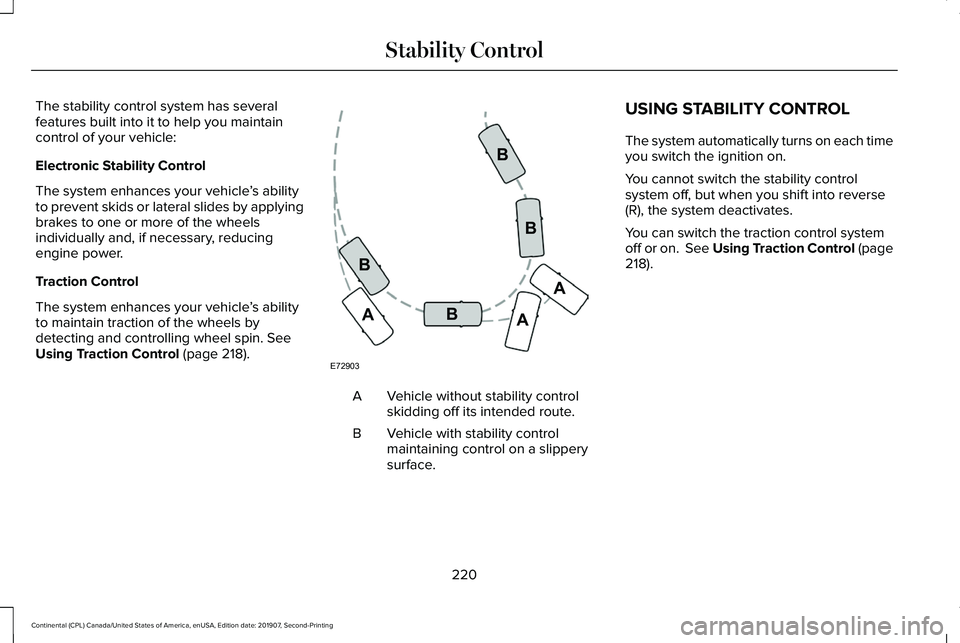
The stability control system has several
features built into it to help you maintain
control of your vehicle:
Electronic Stability Control
The system enhances your vehicle
’s ability
to prevent skids or lateral slides by applying
brakes to one or more of the wheels
individually and, if necessary, reducing
engine power.
Traction Control
The system enhances your vehicle ’s ability
to maintain traction of the wheels by
detecting and controlling wheel spin. See
Using Traction Control (page 218). Vehicle without stability control
skidding off its intended route.
A
Vehicle with stability control
maintaining control on a slippery
surface.
B USING STABILITY CONTROL
The system automatically turns on each time
you switch the ignition on.
You cannot switch the stability control
system off, but when you shift into reverse
(R), the system deactivates.
You can switch the traction control system
off or on.
See Using Traction Control (page
218).
220
Continental (CPL) Canada/United States of America, enUSA, Edition date: 201907, Second-Printing Stability ControlE72903A
AA
B
BB
B
Page 248 of 609
•
The tires lose traction.
• You apply the parking brake.
Park Brake Application
Automatic parking brake application and
cancellation occurs if:
• You unbuckle the seatbelt and open the
door after you stop the vehicle.
• You hold the vehicle at a stop
continuously for more than three minutes.
Hilly Condition Usage
You should select a lower gear when the
system is active in situations such as
prolonged downhill driving on steep grades,
for example in mountainous areas. The
system needs additional engine braking in
these situations to reduce the load on the
vehicle ’s regular brake system to prevent it
from overheating.
Note: An audible alarm sounds and the
system shuts down if it applies brakes for an
extended period of time. This allows the
brakes to cool. The system functions
normally again after the brakes cool. Switching Adaptive Cruise Control Off Press and release the button when
the system is in standby mode, or
switch the ignition off.
Note: You erase the set speed and gap
setting when you switch the system off.
Detection Issues WARNING: On rare occasions,
detection issues can occur due to the road
infrastructures, for example bridges,
tunnels and safety barriers. In these cases,
the system may brake late or
unexpectedly. At all times, you are
responsible for controlling your vehicle,
supervising the system and intervening, if
required. WARNING:
If the system
malfunctions, have your vehicle checked
as soon as possible. The radar sensor has a limited field of view.
It may not detect vehicles at all or detect a
vehicle later than expected in some
situations. The lead vehicle graphic does not
illuminate if the system does not detect a
vehicle in front of you.
245
Continental (CPL) Canada/United States of America, enUSA, Edition date: 201907, Second-Printing Cruise ControlE294678
Page 262 of 609
CROSS TRAFFIC ALERT
WARNING: Do not use the cross
traffic alert system as a replacement for
using the interior and exterior mirrors or
looking over your shoulder before
reversing out of a parking space. The cross
traffic alert system is not a replacement for
careful driving. WARNING:
The system may not
operate properly during severe weather
conditions, for example snow, ice, heavy
rain and spray. Always drive with due care
and attention. Failure to take care may
result in a crash.
The system alerts you of vehicles
approaching from the sides behind your
vehicle when you shift into reverse (R). Using Cross Traffic Alert
The system detects vehicles that approach
at a speed between
4 mph (6 km/h) and
37 mph (60 km/h). Coverage decreases when
the sensors are partially, mostly or fully
obstructed. Slowly reversing helps increase
the coverage area and effectiveness.
The system turns on when you start the
engine and you shift into reverse (R). The
system turns off when you shift out of reverse
(R).
259
Continental (CPL) Canada/United States of America, enUSA, Edition date: 201907, Second-Printing Driving Aids
Page 272 of 609
Lincoln Drive Control consists of the
following systems:
•
Adaptive suspension dynamically adjusts
the shock absorbers stiffness in real time
to match the road surface and driver
inputs. This system continuously monitors
your vehicle ’s motion (roll, pitch, bounce),
suspension position, load, speed, road
conditions, and steering to adjust the
suspension damping for optimal vehicle
control.
• Electronically power-assisted steering
adjusts steering effort and feel based on
your vehicle speed and your inputs.
• Adaptive steering optimizes your
vehicle's steering response based on
your steering wheel input, changes in
vehicle speed and other conditions.
• Active noise control utilizes your vehicle
electronics to enhance the acoustic
experience. •
Electronic stability control and traction
control maintain your vehicle control in
adverse conditions or high performance
driving.
• Electronic throttle control enhances the
powertrain response to your inputs.
Using Lincoln Drive Control
You can configure which of the Drive Control
modes are active when your vehicle is in
drive (D) or in sport (S). The configuration
remains active until modified from the main
menu on the information display. These systems have a range of modes which
you can choose from in order to customize
your ideal driving experience:
•
Comfort – Provides a more relaxed
driving experience, maximizing comfort.
Your steering effort decreases and the
suspension movement is more fluid.
Comfort mode is ideal when you desire
enhanced traveling comfort.
• Normal
– Delivers a balanced
combination of comfortable, controlled
ride and confident handling. This mode
provides an engaging drive experience
and a direct connection to the road
without sacrificing any of the composure
demanded from a luxury vehicle.
• Sport
– Provides a sportier driving
experience. The suspension stiffens, with
an emphasis on handling and control.
The engine responds more directly to
your inputs and takes on a more powerful
tone. This mode is ideal for use during
more spirited driving.
You can change the drive control settings in
the information display.
See General
Information (page 117).
269
Continental (CPL) Canada/United States of America, enUSA, Edition date: 201907, Second-Printing Driving Aids
Page 279 of 609
TOWING A TRAILER
WARNING: Do not exceed the
GVWR or the GAWR specified on the
certification label. WARNING:
Towing trailers
beyond the maximum recommended
gross trailer weight exceeds the limit
of your vehicle and could result in
engine damage, transmission damage,
structural damage, loss of vehicle
control, vehicle rollover and personal
injury.
Note: There may be electrical items
such as fuses or relays that can affect
trailer towing operation.
See Fuses
(page 300). The load capacity of your vehicle is
designated by weight not volume. You
may not necessarily be able to use all
available space when loading your
vehicle or trailer.
Towing a trailer places extra load on the
engine, transmission, axle, brakes, tires,
and suspension. Inspect these
components before, during and after
towing.
Load Placement
To help minimize how trailer movement
affects the vehicle when driving:
•
Load the heaviest items closest to
the trailer floor.
• Load the heaviest items in the center
of the left and right side trailer tires. •
Load the heaviest items above the
trailer axles or just slightly forward
toward the trailer tongue. Do not
allow the final trailer tongue weight
to go above or below 10-15% of the
loaded trailer weight.
• Select a ball mount with the correct
rise or drop. When both the loaded
vehicle and trailer are connected, the
trailer frame should be level, or
slightly angled down toward the
vehicle, when viewed from the side.
When driving with a trailer or payload, a
slight takeoff vibration or shudder may
be present due to the increased payload
weight. Additional information regarding
proper trailer loading and setting your
vehicle up for towing is located in the
Load Carrying chapter. See Load Limit
(page 271).
You can also find information in the
RV
& Trailer Towing Guide available at your
authorized dealer, or online.
276
Continental (CPL) Canada/United States of America, enUSA, Edition date: 201907, Second-Printing Towing