lock LINCOLN CORSAIR 2020 Owners Manual
[x] Cancel search | Manufacturer: LINCOLN, Model Year: 2020, Model line: CORSAIR, Model: LINCOLN CORSAIR 2020Pages: 591, PDF Size: 6 MB
Page 481 of 591

Action and Description
Menu Item
Touch this button to view nearby movie theaters and their show times, if \
available.
Movie Listings
Touch this button to view the nearby weather, current weather, or the five-day forecast for the
chosen area.
Weather
Select to see the weather map, which can show storms,
radar information, charts and winds.
Map
Select to choose from a listing of weather locations.
Area
Touch this button to view scores and schedules from a variety of sports. \
You can also save up to
10 favorite teams for easier access. The score automatically refreshes w\
hen a game is in progress.
Sports Info
Touch this button to view ski conditions for a specific area.
Ski Conditions
SETTINGS Press the button to enter the
settings menu.
Once you select a tile, press the
button next to a menu item to view
an explanation of the feature or
setting. Sound
Select this tile to adjust the sound settings.
Clock
Select this tile to adjust the clock settings.
Bluetooth
Select this tile to switch Bluetooth on and off
and adjust settings.Phone
Select this tile to connect, disconnect, and
manage the connected device settings.
Audio
Select this tile to adjust the audio settings.
478
Corsair (CTF) Canada/United States of America, enUSA, Edition date: 201906, Second-Printing SYNC™ 3E280315 E268570
Page 486 of 591

Possible Cause and Resolution
Symptom
–Incorrect device settings.
•Make sure that your device does not have an auto-install program or active \
security
settings.
• Check that your device is not set only to charge.
– Device lock screen enabled.
•Unlock your device before connecting it.
The system does not recognize my device. –Device limitation.
•Do not leave your device in your vehicle during very hot or very cold we\
ather condi-
tions.
– Cable connection issue.
•Correctly connect the cable to your device and the vehicle USB port.
– Incompatible cable.
•Use the cable recommended by the manufacturer of your device.
The system does not understand the name of
a track or artist. –
Device limitation. Bluetooth does not support voice commands.
•Connect your device to a USB port.
• If you have an iOS device, press and hold the voice control button on the steering
wheel to use Siri to play specific tracks.
483
Corsair (CTF) Canada/United States of America, enUSA, Edition date: 201906, Second-Printing SYNC™ 3
Page 487 of 591
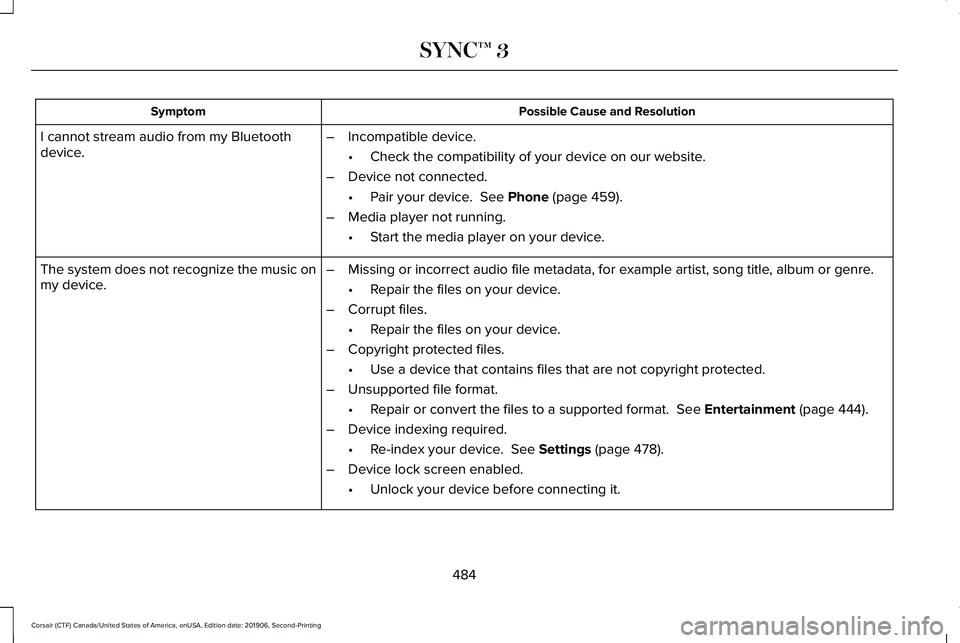
Possible Cause and Resolution
Symptom
I cannot stream audio from my Bluetooth
device. –
Incompatible device.
•Check the compatibility of your device on our website.
– Device not connected.
•Pair your device. See Phone (page 459).
– Media player not running.
•Start the media player on your device.
The system does not recognize the music on
my device. –
Missing or incorrect audio file metadata, for example artist, song title\
, album or genre.
•Repair the files on your device.
– Corrupt files.
•Repair the files on your device.
– Copyright protected files.
•Use a device that contains files that are not copyright protected.
– Unsupported file format.
•Repair or convert the files to a supported format.
See Entertainment (page 444).
– Device indexing required.
•Re-index your device.
See Settings (page 478).
– Device lock screen enabled.
•Unlock your device before connecting it.
484
Corsair (CTF) Canada/United States of America, enUSA, Edition date: 201906, Second-Printing SYNC™ 3
Page 489 of 591
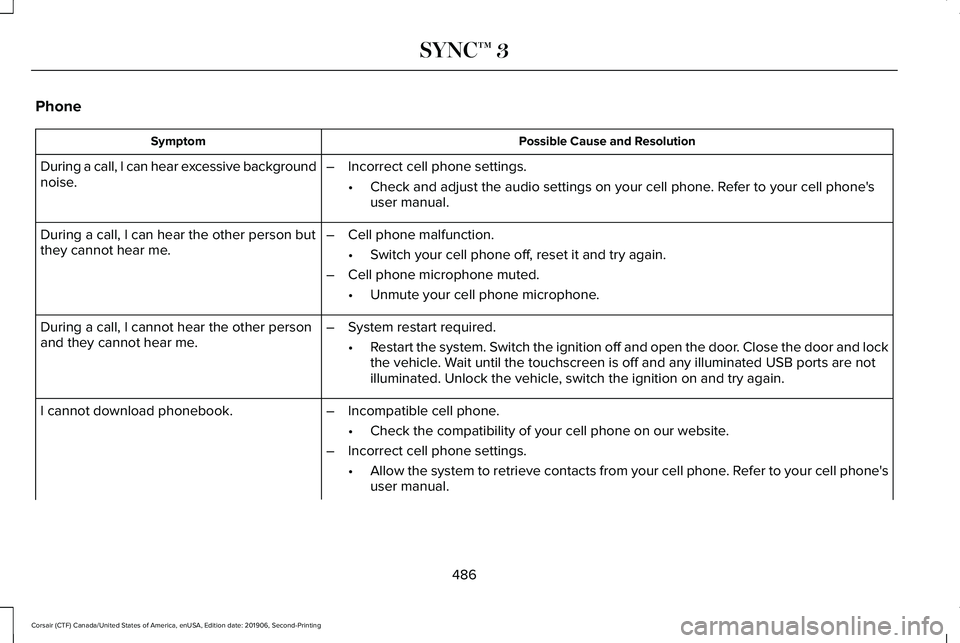
Phone
Possible Cause and Resolution
Symptom
During a call, I can hear excessive background
noise. –
Incorrect cell phone settings.
•Check and adjust the audio settings on your cell phone. Refer to your cell phone's
user manual.
– Cell phone malfunction.
•Switch your cell phone off, reset it and try again.
– Cell phone microphone muted.
•Unmute your cell phone microphone.
During a call, I can hear the other person but
they cannot hear me.
During a call, I cannot hear the other person
and they cannot hear me.
–
System restart required.
•Restart the system. Switch the ignition off and open the door. Close the door and lock
the vehicle. Wait until the touchscreen is off and any illuminated USB ports are not
illuminated. Unlock the vehicle, switch the ignition on and try again.
I cannot download phonebook. –Incompatible cell phone.
•Check the compatibility of your cell phone on our website.
– Incorrect cell phone settings.
•Allow the system to retrieve contacts from your cell phone. Refer to your cell phone's
user manual.
486
Corsair (CTF) Canada/United States of America, enUSA, Edition date: 201906, Second-Printing SYNC™ 3
Page 497 of 591
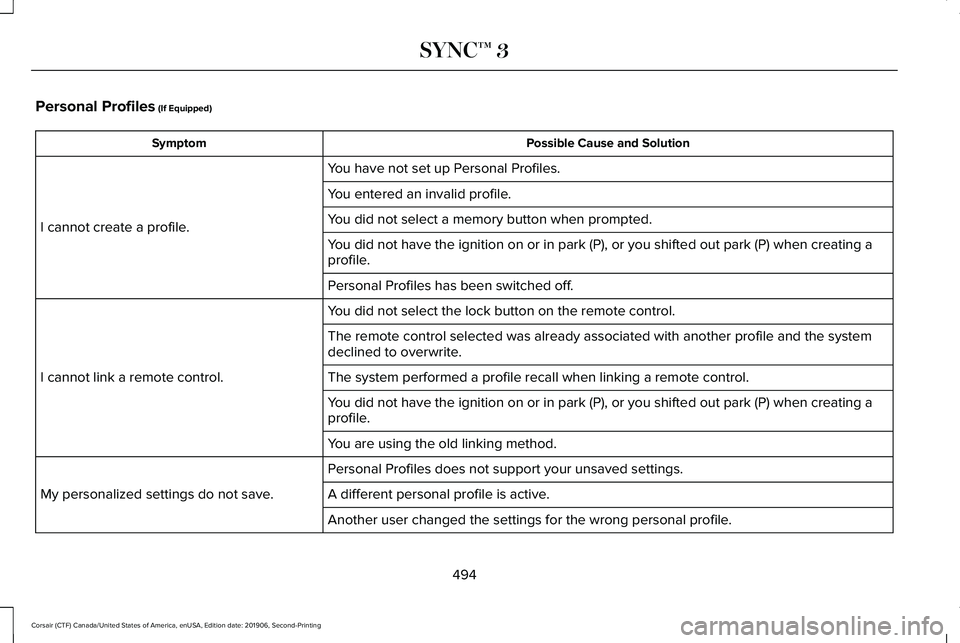
Personal Profiles (If Equipped)
Possible Cause and Solution
Symptom
You have not set up Personal Profiles.
I cannot create a profile. You entered an invalid profile.
You did not select a memory button when prompted.
You did not have the ignition on or in park (P), or you shifted out par\
k (P) when creating a
profile.
Personal Profiles has been switched off.
You did not select the lock button on the remote control.
I cannot link a remote control. The remote control selected was already associated with another profile \
and the system
declined to overwrite.
The system performed a profile recall when linking a remote control.
You did not have the ignition on or in park (P), or you shifted out par\
k (P) when creating a
profile.
You are using the old linking method.
Personal Profiles does not support your unsaved settings.
My personalized settings do not save. A different personal profile is active. Another user changed the settings for the wrong personal profile.
494
Corsair (CTF) Canada/United States of America, enUSA, Edition date: 201906, Second-Printing SYNC™ 3
Page 498 of 591
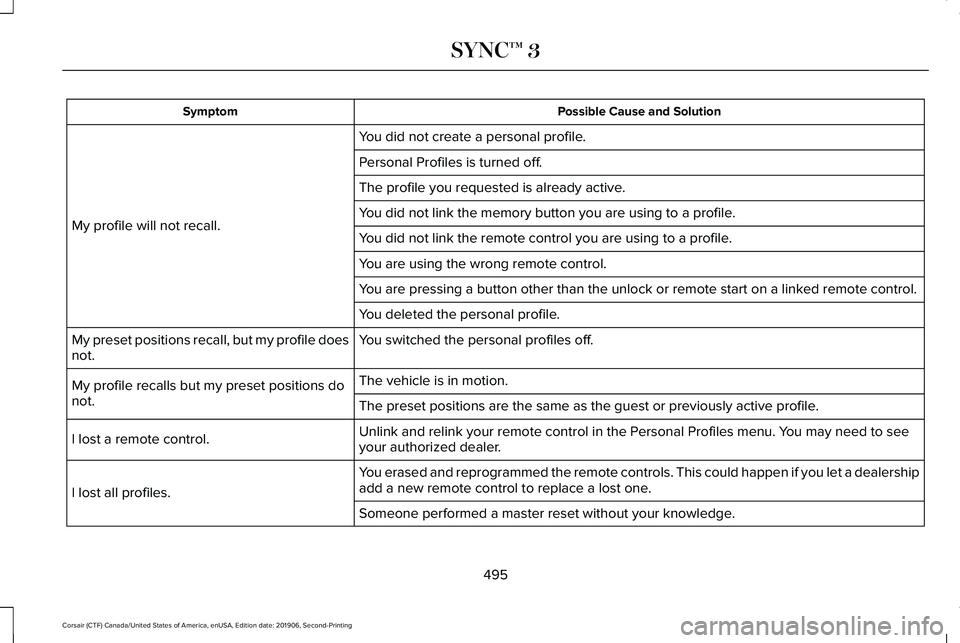
Possible Cause and Solution
Symptom
You did not create a personal profile.
My profile will not recall. Personal Profiles is turned off.
The profile you requested is already active.
You did not link the memory button you are using to a profile.
You did not link the remote control you are using to a profile.
You are using the wrong remote control.
You are pressing a button other than the unlock or remote start on a link\
ed remote control.
You deleted the personal profile.
You switched the personal profiles off.
My preset positions recall, but my profile does
not.
The vehicle is in motion.
My profile recalls but my preset positions do
not. The preset positions are the same as the guest or previously active prof\
ile.
Unlink and relink your remote control in the Personal Profiles menu. You may need to see
your authorized dealer.
I lost a remote control.
You erased and reprogrammed the remote controls. This could happen if you\
let a dealership
add a new remote control to replace a lost one.
I lost all profiles.
Someone performed a master reset without your knowledge.
495
Corsair (CTF) Canada/United States of America, enUSA, Edition date: 201906, Second-Printing SYNC™ 3
Page 502 of 591

PROTECT YOURSELF FROM THE RISING
COST OF VEHICLE REPAIRS WITH
LINCOLN PROTECT EXTENDED SERVICE
PLAN.
Lincoln Protect Extended Service Plans
(U.S. Only)
Lincoln Protect means peace of mind. It’
s the
extended service plan backed by the Lincoln
Motor Company, and provides more
protection beyond the New Vehicle Limited
Warranty coverage. When you visit your
Lincoln Dealer, insist on genuine Lincoln
Protect extended service plans!
Lincoln Protect Extended Service Plan Can
Quickly Pay for Itself
One trip to the Service Center could easily
exceed the price of your Lincoln Protect
extended service plan. With Lincoln Protect
you minimize your risk for unexpected repair
bills and rising repair costs. Up to 1000+ Covered Vehicle Components
There are four mechanical Lincoln Protect
extended service plans with different levels
of coverage. Ask your authorized dealer for
details.
1.
PremiumCARE - Our most comprehensive
coverage. With over 1,000 covered
components, this plan is so complete it’ s
probably easier to list what’ s not covered.
2. ExtraCARE - Covers 113 components, and
includes many high-tech items.
3. BaseCARE - Covers 84 components.
4. PowertrainCARE - Covers 29 critical components.
Lincoln Protect extended service plans are
honored by all authorized Lincoln dealers in
the U.S., Canada and Mexico.
That means you get:
• Reliable, quality service at any Lincoln or
Ford dealership.
• Repairs performed by factory trained
technicians, using genuine parts. Rental Car Reimbursement
1st day Rental Benefit
If you bring your car into your dealer for
service, we
’ll give you a loaner to use for the
day.
Extended Rental Benefits
If your vehicle is kept overnight for covered
repairs, you are eligible for rental car
coverage, including bumper to bumper
warranty repairs, and Field Service Actions.
Roadside Assistance
Exclusive 24/7 roadside assistance, including:
• Towing, flat-tire change and battery jump
starts.
• Out of fuel and lock-out assistance.
• Travel expense reimbursement for
lodging, meals and rental car.
• Assistance for taxi, shuttle, rental car
coverage and other transportation.
499
Corsair (CTF) Canada/United States of America, enUSA, Edition date: 201906, Second-Printing Lincoln Protect
Page 508 of 591

Check Every Six Months
Hinges, latches and outside locks for proper operation. Lubricate if necessary. Parking brake for proper operation.
Seatbelts and seat latches for wear and function.
Safety warning lamps (brake, ABS, airbag and seatbelt) for operation.
Washer spray and wiper operation. Clean or replace blades as necessary.
Multi-Point Inspection
In order to keep your vehicle running right,
it is important to have the systems on your
vehicle checked regularly. This can help
identify potential issues and prevent major
problems. We recommend having the
following multi-point inspection performed
at every scheduled maintenance interval to
help make sure your vehicle keeps running
great.
505
Corsair (CTF) Canada/United States of America, enUSA, Edition date: 201906, Second-Printing Scheduled Maintenance
Page 576 of 591
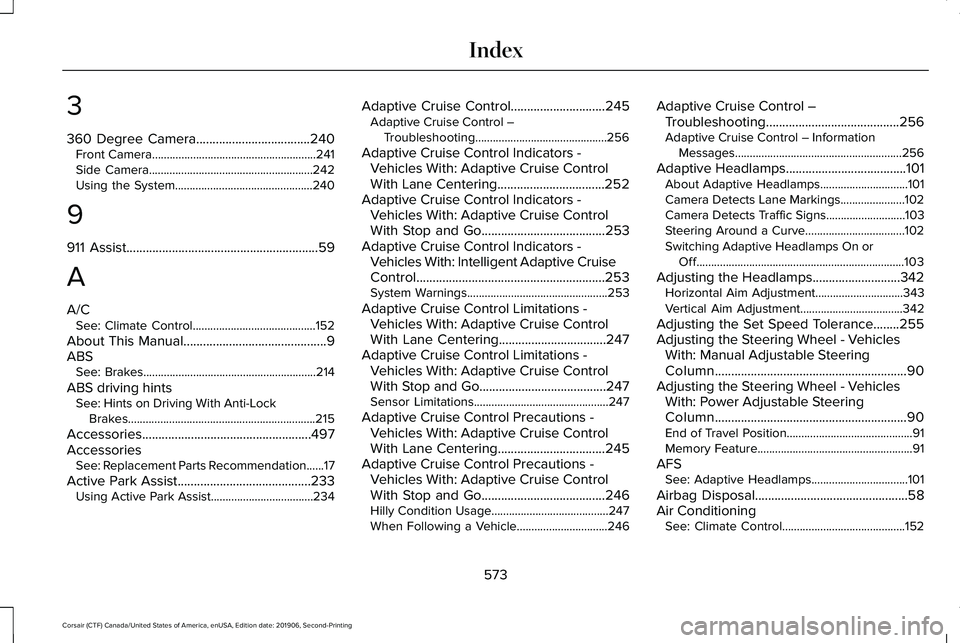
3
360 Degree Camera...................................240
Front Camera........................................................241
Side Camera........................................................242
Using the System...............................................240
9
911 Assist...........................................................59
A
A/C See: Climate Control..........................................152
About This Manual
............................................9
ABS See: Brakes...........................................................214
ABS driving hints See: Hints on Driving With Anti-Lock
Brakes................................................................215
Accessories....................................................497
Accessories See: Replacement Parts Recommendation......17
Active Park Assist.........................................233 Using Active Park Assist...................................234 Adaptive Cruise Control.............................245
Adaptive Cruise Control –
Troubleshooting.............................................256
Adaptive Cruise Control Indicators - Vehicles With: Adaptive Cruise Control
With Lane Centering.................................252
Adaptive Cruise Control Indicators - Vehicles With: Adaptive Cruise Control
With Stop and Go......................................253
Adaptive Cruise Control Indicators - Vehicles With: Intelligent Adaptive Cruise
Control..........................................................253
System Warnings................................................253
Adaptive Cruise Control Limitations - Vehicles With: Adaptive Cruise Control
With Lane Centering.................................247
Adaptive Cruise Control Limitations - Vehicles With: Adaptive Cruise Control
With Stop and Go.......................................247
Sensor Limitations..............................................247
Adaptive Cruise Control Precautions - Vehicles With: Adaptive Cruise Control
With Lane Centering.................................245
Adaptive Cruise Control Precautions - Vehicles With: Adaptive Cruise Control
With Stop and Go
......................................246
Hilly Condition Usage........................................247
When Following a Vehicle...............................246 Adaptive Cruise Control –
Troubleshooting .........................................
256
Adaptive Cruise Control – Information
Messages.........................................................256
Adaptive Headlamps
.....................................101
About Adaptive Headlamps..............................101
Camera Detects Lane Markings......................102
Camera Detects Traffic Signs...........................103
Steering Around a Curve..................................102
Switching Adaptive Headlamps On or
Off.......................................................................103
Adjusting the Headlamps
...........................342
Horizontal Aim Adjustment..............................343
Vertical Aim Adjustment...................................342
Adjusting the Set Speed Tolerance........255
Adjusting the Steering Wheel - Vehicles With: Manual Adjustable Steering
Column...........................................................90
Adjusting the Steering Wheel - Vehicles With: Power Adjustable Steering
Column...........................................................90
End of Travel Position...........................................91
Memory Feature.....................................................91
AFS See: Adaptive Headlamps.................................101
Airbag Disposal
...............................................58
Air Conditioning See: Climate Control..........................................152
573
Corsair (CTF) Canada/United States of America, enUSA, Edition date: 201906, Second-Printing Index
Page 578 of 591
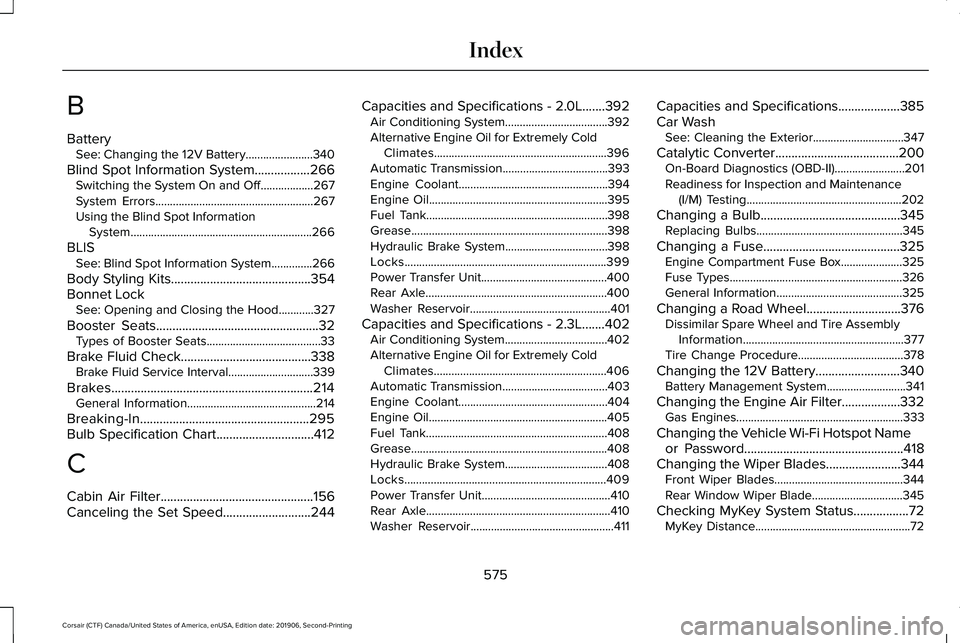
B
Battery
See: Changing the 12V Battery.......................340
Blind Spot Information System.................266 Switching the System On and Off..................267
System Errors......................................................267
Using the Blind Spot Information
System..............................................................266
BLIS See: Blind Spot Information System..............266
Body Styling Kits...........................................354
Bonnet Lock See: Opening and Closing the Hood............327
Booster Seats..................................................32
Types of Booster Seats.......................................33
Brake Fluid Check........................................338 Brake Fluid Service Interval.............................339
Brakes..............................................................214 General Information............................................214
Breaking-In....................................................295
Bulb Specification Chart..............................412
C
Cabin Air Filter...............................................156
Canceling the Set Speed...........................244 Capacities and Specifications - 2.0L
.......392
Air Conditioning System...................................392
Alternative Engine Oil for Extremely Cold
Climates...........................................................396
Automatic Transmission....................................393
Engine Coolant...................................................394
Engine Oil.............................................................395
Fuel Tank..............................................................398
Grease...................................................................398
Hydraulic Brake System...................................398
Locks.....................................................................399
Power Transfer Unit...........................................400
Rear Axle..............................................................400
Washer Reservoir................................................401
Capacities and Specifications - 2.3L.......402 Air Conditioning System...................................
402
Alternative Engine Oil for Extremely Cold Climates...........................................................406
Automatic Transmission....................................403
Engine Coolant...................................................404
Engine Oil.............................................................405
Fuel Tank..............................................................408
Grease...................................................................408
Hydraulic Brake System...................................408
Locks.....................................................................409
Power Transfer Unit............................................410
Rear Axle...............................................................410
Washer Reservoir.................................................411 Capacities and Specifications...................385
Car Wash
See: Cleaning the Exterior...............................347
Catalytic Converter......................................200 On-Board Diagnostics (OBD-II)........................201
Readiness for Inspection and Maintenance
(I/M) Testing.....................................................202
Changing a Bulb
...........................................345
Replacing Bulbs..................................................345
Changing a Fuse..........................................325 Engine Compartment Fuse Box.....................325
Fuse Types...........................................................326
General Information...........................................325
Changing a Road Wheel.............................376 Dissimilar Spare Wheel and Tire Assembly
Information.......................................................377
Tire Change Procedure....................................378
Changing the 12V Battery..........................340 Battery Management System...........................341
Changing the Engine Air Filter..................332 Gas Engines.........................................................333
Changing the Vehicle Wi-Fi Hotspot Name or Password
.................................................418
Changing the Wiper Blades.......................344
Front Wiper Blades............................................344
Rear Window Wiper Blade...............................345
Checking MyKey System Status.................72 MyKey Distance.....................................................72
575
Corsair (CTF) Canada/United States of America, enUSA, Edition date: 201906, Second-Printing Index