trailer LINCOLN CORSAIR 2020 User Guide
[x] Cancel search | Manufacturer: LINCOLN, Model Year: 2020, Model line: CORSAIR, Model: LINCOLN CORSAIR 2020Pages: 591, PDF Size: 6 MB
Page 230 of 591
PRINCIPLE OF OPERATION
WARNING: To help avoid personal
injury, always use caution when in reverse
(R) and when using the sensing system. WARNING:
The system may not
detect objects with surfaces that absorb
reflection. Always drive with due care and
attention. Failure to take care may result
in a crash. WARNING:
Traffic control systems,
inclement weather, air brakes, external
motors and fans may affect the correct
operation of the sensing system.This may
cause reduced performance or false alerts. WARNING:
The system may not
detect small or moving objects, particularly
those close to the ground.
Note: If your vehicle has MyKey™, the sensing
system cannot be switched off when a
MyKey™ is present.
See Principle of
Operation (page 70). Note:
Keep the sensors on the bumper or
fascia free from snow, ice and large
accumulations of dirt. If the sensors are
covered, the system’ s accuracy can be
affected. Do not clean the sensors with sharp
objects.
Note: If your vehicle sustains damage to the
bumper or fascia, leaving it misaligned or
bent, the sensing zone may be altered
causing inaccurate measurement of
obstacles or false alerts.
Note: Certain add-on devices installed
around the bumper or fascia may create
false alerts. For example, large trailer
hitches, bike or surfboard racks, license plate
brackets, bumper covers or any other device
that may block the normal detection zone
of the system. Remove the add-on device to
prevent false alerts.
Note: When you connect a trailer to your
vehicle, the rear parking aid may detect the
trailer and therefore provide an alert. Disable
the rear parking aid when you connect a
trailer to prevent the alert. The sensing system warns the driver of
obstacles within a certain range of your
vehicle. The system turns on automatically
whenever you switch the ignition on.
You can switch the system off through the
touchscreen or from the pop-up message
that appears once you shift the transmission
into reverse (R). See Settings (page 478). If
your vehicle has a parking aid button, you
can switch the system off by pressing the
button.
If a fault is present in the system, a warning
message appears in the information display.
See
Information Messages (page 128).
REAR PARKING AID WARNING:
The system may not
detect objects with surfaces that absorb
reflection. Always drive with due care and
attention. Failure to take care may result
in a crash.
227
Corsair (CTF) Canada/United States of America, enUSA, Edition date: 201906, Second-Printing Parking Aids
Page 231 of 591
WARNING: The system may not
detect small or moving objects, particularly
those close to the ground. WARNING:
To help avoid personal
injury, always use caution when in reverse
(R) and when using the sensing system. WARNING:
The parking aid system
can only assist you to detect objects when
your vehicle is moving at parking speeds.
To help avoid personal injury you must
take care when using the parking aid
system.
Note: Keep the sensors free from snow, ice
and large accumulations of dirt.
Note: Do not cover up the sensors.
Note: Do not clean the sensors with sharp
objects.
Note: If your vehicle sustains damage
leaving the sensors misaligned, this may
cause inaccurate measurements or false
alerts. Note:
Some accessories, for example large
trailer hitches or bike or surfboard racks can
cause reduced performance or false alerts.
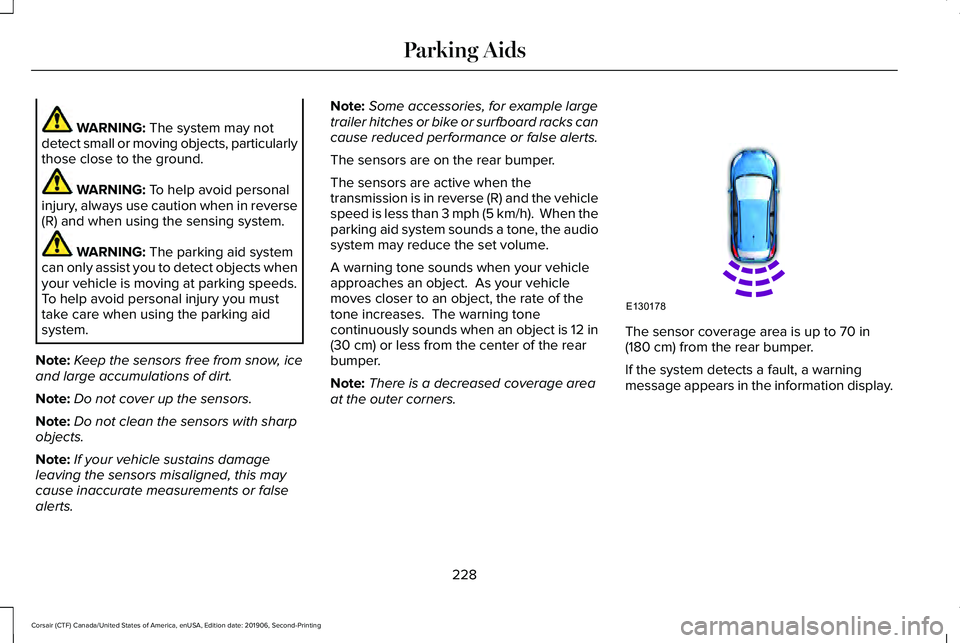
The sensors are on the rear bumper.
The sensors are active when the
transmission is in reverse (R) and the vehicle
speed is less than 3 mph (5 km/h). When the
parking aid system sounds a tone, the audio
system may reduce the set volume.
A warning tone sounds when your vehicle
approaches an object. As your vehicle
moves closer to an object, the rate of the
tone increases. The warning tone
continuously sounds when an object is 12 in
(30 cm)
or less from the center of the rear
bumper.
Note: There is a decreased coverage area
at the outer corners. The sensor coverage area is up to 70 in
(180 cm) from the rear bumper.
If the system detects a fault, a warning
message appears in the information display.
228
Corsair (CTF) Canada/United States of America, enUSA, Edition date: 201906, Second-Printing Parking AidsE130178
Page 233 of 591
WARNING: The parking aid system
can only assist you to detect objects when
your vehicle is moving at parking speeds.
To help avoid personal injury you must
take care when using the parking aid
system.
Note: Keep the sensors free from snow, ice
and large accumulations of dirt.
Note: Do not cover up the sensors.
Note: Do not clean the sensors with sharp
objects.
Note: If your vehicle sustains damage
leaving the sensors misaligned, this may
cause inaccurate measurements or false
alerts.
Note: Some accessories, for example large
trailer hitches or bike or surfboard racks can
cause reduced performance or false alerts.
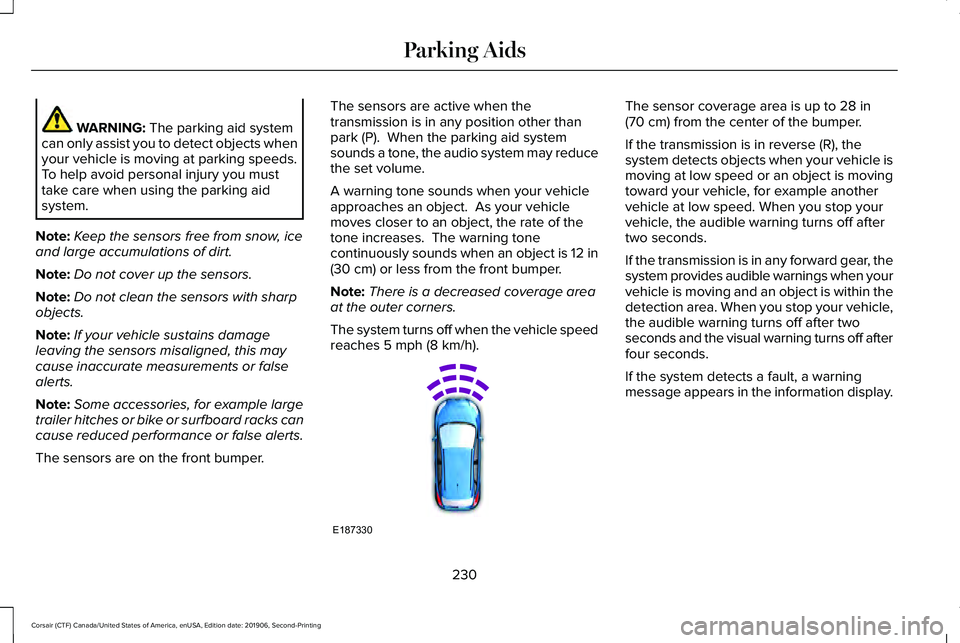
The sensors are on the front bumper. The sensors are active when the
transmission is in any position other than
park (P). When the parking aid system
sounds a tone, the audio system may reduce
the set volume.
A warning tone sounds when your vehicle
approaches an object. As your vehicle
moves closer to an object, the rate of the
tone increases. The warning tone
continuously sounds when an object is 12 in
(30 cm)
or less from the front bumper.
Note: There is a decreased coverage area
at the outer corners.
The system turns off when the vehicle speed
reaches
5 mph (8 km/h). The sensor coverage area is up to
28 in
(70 cm) from the center of the bumper.
If the transmission is in reverse (R), the
system detects objects when your vehicle is
moving at low speed or an object is moving
toward your vehicle, for example another
vehicle at low speed. When you stop your
vehicle, the audible warning turns off after
two seconds.
If the transmission is in any forward gear, the
system provides audible warnings when your
vehicle is moving and an object is within the
detection area. When you stop your vehicle,
the audible warning turns off after two
seconds and the visual warning turns off after
four seconds.
If the system detects a fault, a warning
message appears in the information display.
230
Corsair (CTF) Canada/United States of America, enUSA, Edition date: 201906, Second-Printing Parking AidsE187330
Page 235 of 591
Note:
Do not clean the sensors with sharp
objects.
Note: If your vehicle sustains damage
leaving the sensors misaligned, this may
cause inaccurate measurements or false
alerts.
Note: If you switch traction control off, the
side sensing system also turns off.
Note: Some accessories, for example large
trailer hitches or bike or surfboard racks can
cause reduced performance or false alerts.
Note: The system does not detect an object
that is moving toward the side of your
vehicle, for example another vehicle moving
at low speed, if it does not pass a front or
rear sensor.
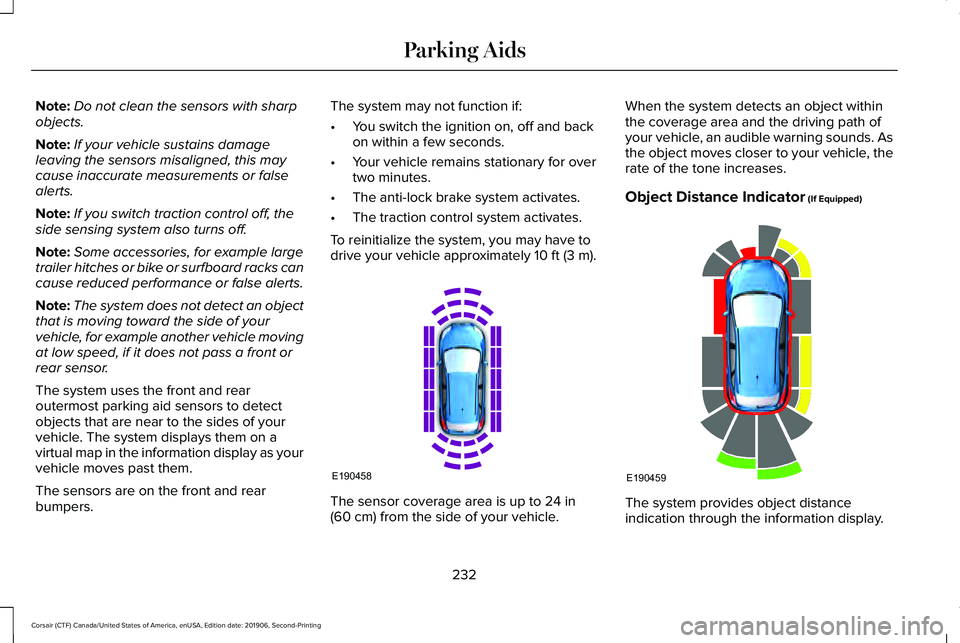
The system uses the front and rear
outermost parking aid sensors to detect
objects that are near to the sides of your
vehicle. The system displays them on a
virtual map in the information display as your
vehicle moves past them.
The sensors are on the front and rear
bumpers. The system may not function if:
•
You switch the ignition on, off and back
on within a few seconds.
• Your vehicle remains stationary for over
two minutes.
• The anti-lock brake system activates.
• The traction control system activates.
To reinitialize the system, you may have to
drive your vehicle approximately 10 ft (3 m). The sensor coverage area is up to
24 in
(60 cm) from the side of your vehicle. When the system detects an object within
the coverage area and the driving path of
your vehicle, an audible warning sounds. As
the object moves closer to your vehicle, the
rate of the tone increases.
Object Distance Indicator
(If Equipped)
The system provides object distance
indication through the information display.
232
Corsair (CTF) Canada/United States of America, enUSA, Edition date: 201906, Second-Printing Parking AidsE190458 E190459
Page 241 of 591
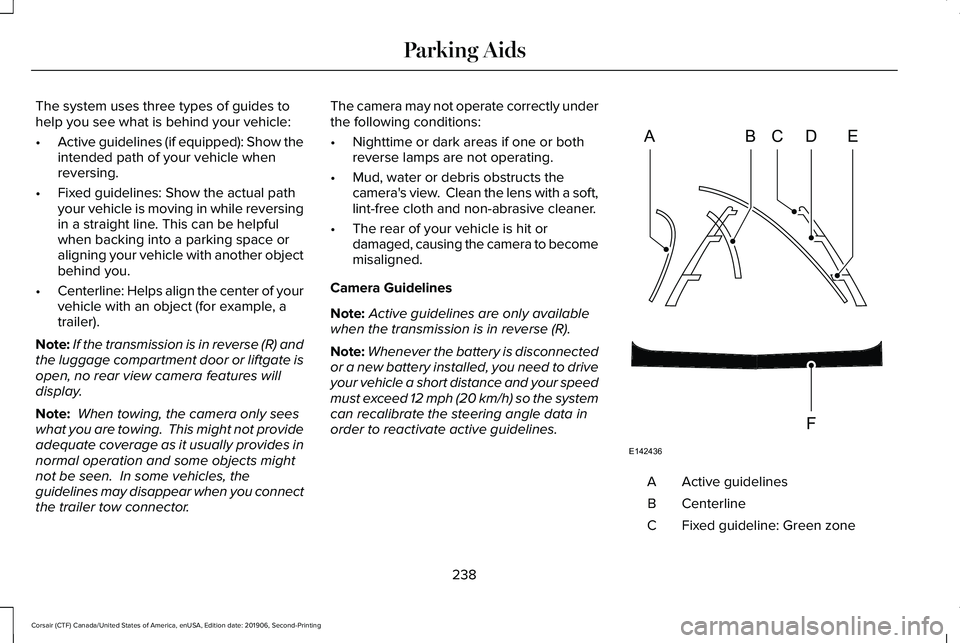
The system uses three types of guides to
help you see what is behind your vehicle:
•
Active guidelines (if equipped): Show the
intended path of your vehicle when
reversing.
• Fixed guidelines: Show the actual path
your vehicle is moving in while reversing
in a straight line. This can be helpful
when backing into a parking space or
aligning your vehicle with another object
behind you.
• Centerline: Helps align the center of your
vehicle with an object (for example, a
trailer).
Note: If the transmission is in reverse (R) and
the luggage compartment door or liftgate is
open, no rear view camera features will
display.
Note: When towing, the camera only sees
what you are towing. This might not provide
adequate coverage as it usually provides in
normal operation and some objects might
not be seen. In some vehicles, the
guidelines may disappear when you connect
the trailer tow connector. The camera may not operate correctly under
the following conditions:
•
Nighttime or dark areas if one or both
reverse lamps are not operating.
• Mud, water or debris obstructs the
camera's view. Clean the lens with a soft,
lint-free cloth and non-abrasive cleaner.
• The rear of your vehicle is hit or
damaged, causing the camera to become
misaligned.
Camera Guidelines
Note: Active guidelines are only available
when the transmission is in reverse (R).
Note: Whenever the battery is disconnected
or a new battery installed, you need to drive
your vehicle a short distance and your speed
must exceed 12 mph (20 km/h) so the system
can recalibrate the steering angle data in
order to reactivate active guidelines. Active guidelines
A
Centerline
B
Fixed guideline: Green zone
C
238
Corsair (CTF) Canada/United States of America, enUSA, Edition date: 201906, Second-Printing Parking AidsABCD
F
E
E142436
Page 248 of 591
HOW DOES ADAPTIVE CRUISE
CONTROL WITH STOP AND GO
WORK
Adaptive cruise control with stop and go
uses radar and camera sensors to adjust the
speed of your vehicle to maintain a set gap
from the vehicle in front of you in the same
lane while following it to a complete stop.
You can also engage the system to follow a
vehicle in front of you and adjust set speed
while stopped.
WHAT IS ADAPTIVE CRUISE
CONTROL WITH LANE CENTERING
Adaptive cruise control with lane centering
uses radar and camera sensors to help keep
your vehicle in the lane by applying
continuous assistance steering torque input
toward the lane center on highways.
Note:
The adaptive cruise control gap setting
operates normally. WHAT IS INTELLIGENT ADAPTIVE
CRUISE CONTROL
Intelligent adaptive cruise control combines
speed sign recognition with adaptive cruise
control to adjust the cruise set speed to the
speed limit detected by the speed sign
recognition system. For example, if the speed
sign recognition system detects a 50 mph
(80 km/h) speed limit, the cruise set speed
is updated to 50 mph (80 km/h).
Note: The adaptive cruise control gap setting
operates normally.
ADAPTIVE CRUISE CONTROL
PRECAUTIONS - VEHICLES WITH:
ADAPTIVE CRUISE CONTROL
WITH LANE CENTERING
Adaptive cruise control precautions apply to
lane centering unless stated otherwise or
contradicted by a lane centering precaution.
See
Adaptive Cruise Control Precautions
(page 246). WARNING:
Do not use the system
when towing a trailer. Failure to follow this
instruction could result in the loss of
control of your vehicle, personal injury or
death. WARNING: Do not use the system if
any changes or modifications to the
steering wheel have been made. Any
changes or modifications to the steering
wheel could affect the functionality or
performance of the system. Failure to
follow this instruction could result in the
loss of control of your vehicle, personal
injury or death.
245
Corsair (CTF) Canada/United States of America, enUSA, Edition date: 201906, Second-Printing Adaptive Cruise Control
(If Equipped)
Page 249 of 591
ADAPTIVE CRUISE CONTROL
PRECAUTIONS - VEHICLES WITH:
ADAPTIVE CRUISE CONTROL
WITH STOP AND GO
WARNING: You are responsible for
controlling your vehicle at all times. The
system is designed to be an aid and does
not relieve you of your responsibility to
drive with due care and attention. Failure
to follow this instruction could result in the
loss of control of your vehicle, personal
injury or death. WARNING:
Pay close attention to
changing road conditions such as entering
or leaving a highway, on roads with
intersections or roundabouts, roads
without visible lanes of travel, roads that
are winding, slippery, unpaved, or steep
slopes. WARNING:
The system does not
control speed in low traction conditions or
extremely steep slopes. The system is
designed to be an aid and does not relieve
you of your responsibility to drive with due
care and attention. Failure to follow this
instruction could result in personal injury. WARNING:
The system is not a crash
warning or avoidance system. WARNING:
Do not use the system
when towing a trailer that has aftermarket
electronic trailer brake controls. Failure to
follow this instruction could result in the
loss of control of your vehicle, personal
injury or death. WARNING:
Do not use tire sizes
other than those recommended because
this can affect the normal operation of the
system. Failure to do so may result in a loss
of vehicle control, which could result in
serious injury. WARNING:
Do not use the system
with a snow plow blade installed. WARNING:
Do not use the system in
poor visibility, for example fog, heavy rain,
spray or snow.
When Following a Vehicle WARNING: When following a vehicle
that is braking, your vehicle does not
always decelerate quickly enough to avoid
a crash without driver intervention. Apply
the brakes when necessary. Failure to
follow this instruction could result in
personal injury or death.
246
Corsair (CTF) Canada/United States of America, enUSA, Edition date: 201906, Second-Printing Adaptive Cruise Control
(If Equipped)
Page 270 of 591
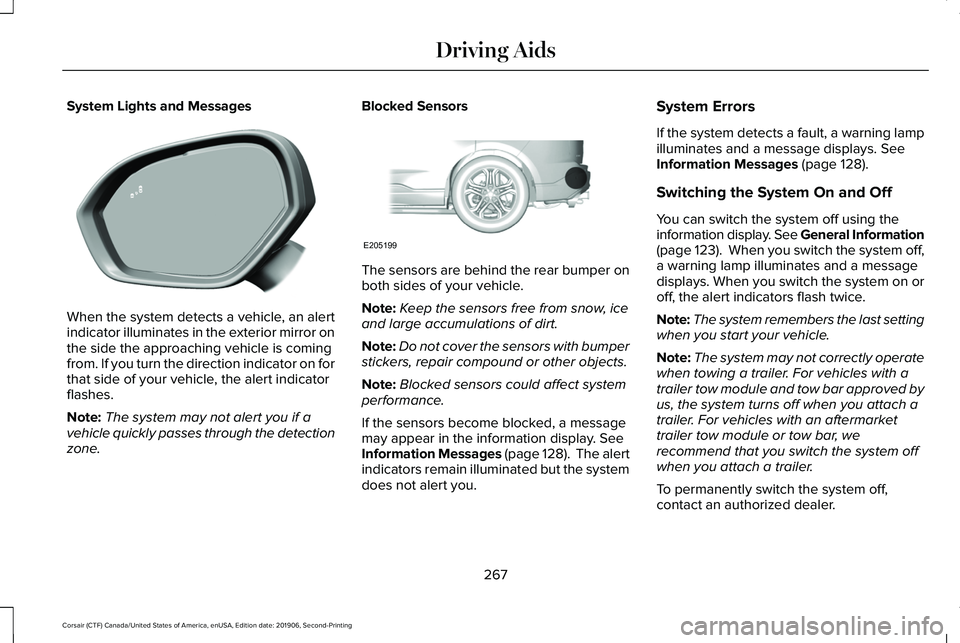
System Lights and Messages
When the system detects a vehicle, an alert
indicator illuminates in the exterior mirror on
the side the approaching vehicle is coming
from. If you turn the direction indicator on for
that side of your vehicle, the alert indicator
flashes.
Note:
The system may not alert you if a
vehicle quickly passes through the detection
zone. Blocked Sensors
The sensors are behind the rear bumper on
both sides of your vehicle.
Note:
Keep the sensors free from snow, ice
and large accumulations of dirt.
Note: Do not cover the sensors with bumper
stickers, repair compound or other objects.
Note: Blocked sensors could affect system
performance.
If the sensors become blocked, a message
may appear in the information display. See
Information Messages (page 128). The alert
indicators remain illuminated but the system
does not alert you. System Errors
If the system detects a fault, a warning lamp
illuminates and a message displays.
See
Information Messages (page 128).
Switching the System On and Off
You can switch the system off using the
information display. See General Information
(page
123). When you switch the system off,
a warning lamp illuminates and a message
displays. When you switch the system on or
off, the alert indicators flash twice.
Note: The system remembers the last setting
when you start your vehicle.
Note: The system may not correctly operate
when towing a trailer. For vehicles with a
trailer tow module and tow bar approved by
us, the system turns off when you attach a
trailer. For vehicles with an aftermarket
trailer tow module or tow bar, we
recommend that you switch the system off
when you attach a trailer.
To permanently switch the system off,
contact an authorized dealer.
267
Corsair (CTF) Canada/United States of America, enUSA, Edition date: 201906, Second-Printing Driving AidsE309221 E205199
Page 274 of 591
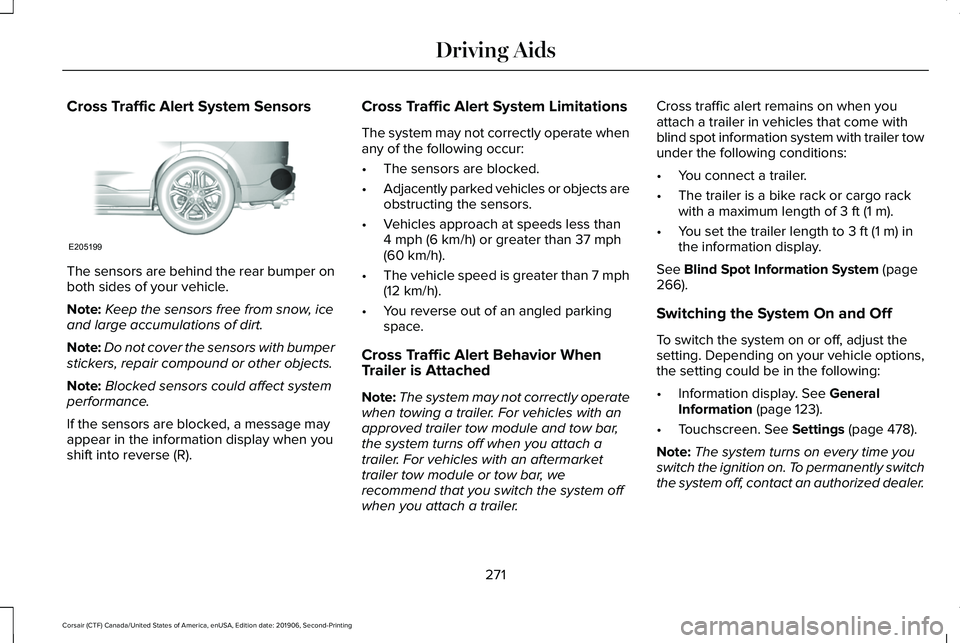
Cross Traffic Alert System Sensors
The sensors are behind the rear bumper on
both sides of your vehicle.
Note:
Keep the sensors free from snow, ice
and large accumulations of dirt.
Note: Do not cover the sensors with bumper
stickers, repair compound or other objects.
Note: Blocked sensors could affect system
performance.
If the sensors are blocked, a message may
appear in the information display when you
shift into reverse (R). Cross Traffic Alert System Limitations
The system may not correctly operate when
any of the following occur:
•
The sensors are blocked.
• Adjacently parked vehicles or objects are
obstructing the sensors.
• Vehicles approach at speeds less than
4 mph (6 km/h) or greater than 37 mph
(60 km/h).
• The vehicle speed is greater than 7 mph
(12 km/h)
.
• You reverse out of an angled parking
space.
Cross Traffic Alert Behavior When
Trailer is Attached
Note: The system may not correctly operate
when towing a trailer. For vehicles with an
approved trailer tow module and tow bar,
the system turns off when you attach a
trailer. For vehicles with an aftermarket
trailer tow module or tow bar, we
recommend that you switch the system off
when you attach a trailer. Cross traffic alert remains on when you
attach a trailer in vehicles that come with
blind spot information system with trailer tow
under the following conditions:
•
You connect a trailer.
• The trailer is a bike rack or cargo rack
with a maximum length of
3 ft (1 m).
• You set the trailer length to
3 ft (1 m) in
the information display.
See
Blind Spot Information System (page
266).
Switching the System On and Off
To switch the system on or off, adjust the
setting. Depending on your vehicle options,
the setting could be in the following:
• Information display.
See General
Information (page 123).
• Touchscreen.
See Settings (page 478).
Note: The system turns on every time you
switch the ignition on. To permanently switch
the system off, contact an authorized dealer.
271
Corsair (CTF) Canada/United States of America, enUSA, Edition date: 201906, Second-Printing Driving AidsE205199
Page 275 of 591
Cross Traffic Alert Indicator
When the system detects an
approaching vehicle, a tone
sounds, a warning lamp illuminates
in the relevant exterior mirror and arrows
appear in the information display to show
which side the approaching vehicle is coming
from. Note:
If arrows do not display, a message
appears in the information display.
If the system malfunctions, a warning lamp
illuminates in the instrument cluster and a
message appears in the information display.
Have your vehicle checked as soon as
possible. Note:
In exceptional conditions, the system
could alert you, even when there is nothing
in the detection zone, for example a vehicle
passing further away from your vehicle.
Cross Traffic Alert Information Messages Action
Message
Displays instead of indication arrows when the system detects a vehicle. Check for approaching
traffic.
Cross Traffic Alert
Indicates blocked cross traffic alert system sensors. Clean the sensors. If the message\
continues
to appear, have your vehicle checked as soon as possible.
Cross Traffic Not Available Sensor
Blocked See Manual
The system has malfunctioned. Have your vehicle checked as soon as possible.
Cross Traffic System Fault
Displays if you attach a trailer to your vehicle.
Cross Traffic Alert Deactivated Trailer
Attached
272
Corsair (CTF) Canada/United States of America, enUSA, Edition date: 201906, Second-Printing Driving AidsE268294