trailer LINCOLN CORSAIR 2020 Owners Manual
[x] Cancel search | Manufacturer: LINCOLN, Model Year: 2020, Model line: CORSAIR, Model: LINCOLN CORSAIR 2020Pages: 591, PDF Size: 6 MB
Page 8 of 591
Adaptive Cruise Control Limitations -
Vehicles With: Adaptive Cruise Control
With Lane Centering ..............................247
Adaptive Cruise Control Limitations - Vehicles With: Adaptive Cruise Control
With Stop and Go ....................................
247
Switching Adaptive Cruise Control On and Off ...............................................................
249
Setting the Adaptive Cruise Control Speed ......................................................................
250
Setting the Adaptive Cruise Control Gap .......................................................................
251
Canceling the Set Speed ..........................
252
Resuming the Set Speed ..........................
252
Overriding the Set Speed .........................
252
Adaptive Cruise Control Indicators - Vehicles With: Adaptive Cruise Control
With Lane Centering ..............................
252
Adaptive Cruise Control Indicators - Vehicles With: Adaptive Cruise Control
With Stop and Go ....................................
253
Adaptive Cruise Control Indicators - Vehicles With: Intelligent Adaptive
Cruise Control ..........................................
253
Switching From Adaptive Cruise Control to Cruise Control .....................................
253Switching Lane Centering On and Off
......................................................................
254
Switching Intelligent Mode On and Off ......................................................................
255
Adjusting the Set Speed Tolerance .......
255
Adaptive Cruise Control – Troubleshooting ......................................................................
256
Driving Aids
Driver Alert ....................................................
259
Lane Keeping System ................................
260
Blind Spot Information System ................
266
Cross Traffic Alert ........................................
268
Steering ..........................................................
273
Pre-Collision Assist .....................................
273
Drive Mode Control
What Is Drive Mode Control .....................
279
Selecting a Drive Mode .............................
279
Drive Modes .................................................
279
Load Carrying
Rear Under Floor Storage ..........................
281
Luggage Covers ...........................................
281Roof Racks and Load Carriers
..................
281
Load Limit ......................................................
283
Towing
Towing a Trailer ...........................................
288
Trailer Sway Control ...................................
289
Recommended Towing Weights .............
289
Essential Towing Checks ...........................
291
Towing the Vehicle on Four Wheels ......
293
Driving Hints
Economical Driving .....................................
295
Breaking-In ...................................................
295
Driving Through Water ..............................
295
Floor Mats .....................................................
296
Roadside Emergencies
Roadside Assistance ..................................
298
Hazard Flashers ..........................................
299
Fuel Shutoff ..................................................
299
Jump Starting the Vehicle ........................
300
Post-Crash Alert System ...........................
303
Transporting the Vehicle ...........................
303
5
Corsair (CTF) Canada/United States of America, enUSA, Edition date: 201906, Second-Printing Table of Contents
Page 88 of 591
Switching the Power Liftgate On or Off
You can switch the power liftgate on or off
through the vehicle settings on your
touchscreen.
When switched off, the liftgate only unlatches
and will not power open or close.
Hands-Free Feature (If Equipped)
Make sure you have the passive key within
3 ft (1 m)
of the liftgate.
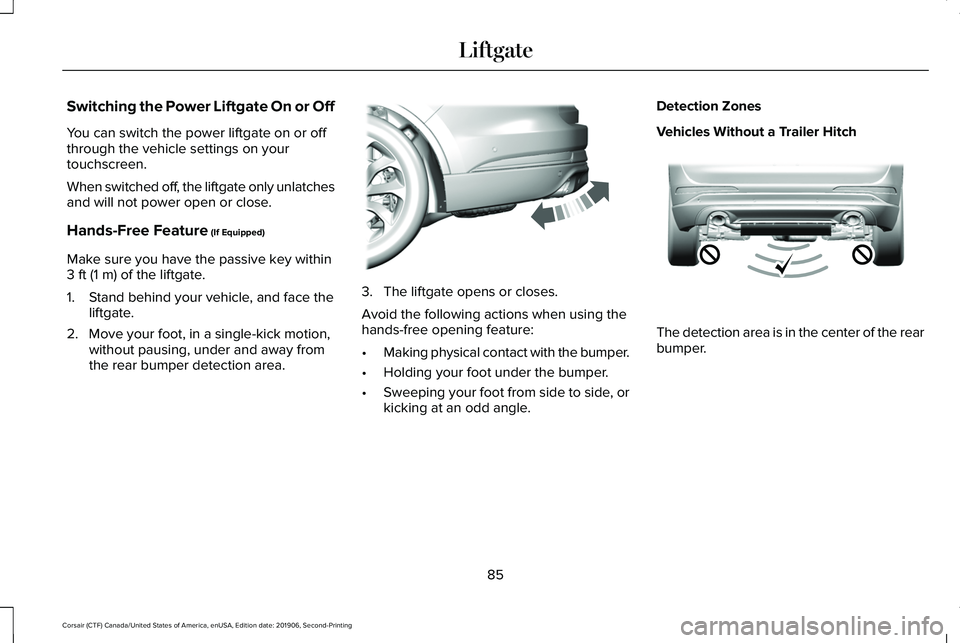
1. Stand behind your vehicle, and face the liftgate.
2. Move your foot, in a single-kick motion, without pausing, under and away from
the rear bumper detection area. 3. The liftgate opens or closes.
Avoid the following actions when using the
hands-free opening feature:
•
Making physical contact with the bumper.
• Holding your foot under the bumper.
• Sweeping your foot from side to side, or
kicking at an odd angle. Detection Zones
Vehicles Without a Trailer Hitch
The detection area is in the center of the rear
bumper.
85
Corsair (CTF) Canada/United States of America, enUSA, Edition date: 201906, Second-Printing LiftgateE300799 E310717
Page 89 of 591
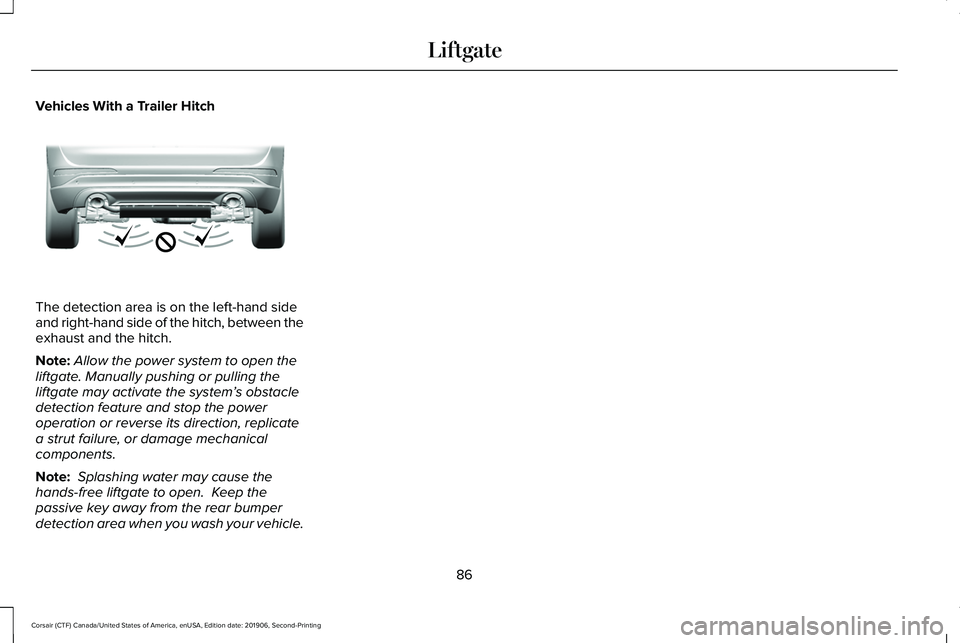
Vehicles With a Trailer Hitch
The detection area is on the left-hand side
and right-hand side of the hitch, between the
exhaust and the hitch.
Note:
Allow the power system to open the
liftgate. Manually pushing or pulling the
liftgate may activate the system’ s obstacle
detection feature and stop the power
operation or reverse its direction, replicate
a strut failure, or damage mechanical
components.
Note: Splashing water may cause the
hands-free liftgate to open. Keep the
passive key away from the rear bumper
detection area when you wash your vehicle.
86
Corsair (CTF) Canada/United States of America, enUSA, Edition date: 201906, Second-Printing LiftgateE310718
Page 136 of 591

Blind Spot Information and Cross Traffic Alert System
Action
Message
A system error has occurred. Contact an authorized dealer as soon as pos\
sible.
Blind Spot System Fault
The system sensors are blocked. See Blind Spot Information System (page 266).
Blind Spot Not Available Sensor Blocked
See Manual
The system detects a vehicle and automatically applied the brakes.
Cross Traffic Alert Applying Brakes
The blind spot information system and cross traffic alert system sensors\
are blocked. See CrossTraffic Alert
(page 268).
Cross Traffic Not Available Sensor Blocked
See Manual
A system error has occurred. Contact an authorized dealer as soon as pos\
sible.
Cross Traffic System Fault
The system automatically turns off and displays this message when you co\
nnect a trailer to thevehicle that does not have a trailer blind spot system or when you switc\
h the trailer blind spot system off through the information display.
See Cross Traffic Alert (page 268).
Cross Traffic Alert Deactivated Trailer
Attached
The system automatically turns off and displays this message when you co\
nnect a trailer to thevehicle that does not have a trailer blind spot system or when you switc\
h the trailer blind spot system off through the information display.
See Blind Spot Information System (page 266).
Blind Spot Alert Deactivated Trailer
Attached
133
Corsair (CTF) Canada/United States of America, enUSA, Edition date: 201906, Second-Printing Information Displays
Page 148 of 591
Tire Pressure Monitoring System
Action
Message
One or more tires on your vehicle have low tire pressure. See Tire Pressure Monitoring System (page 371).
Tire Pressure Low
The tire pressure monitoring system is malfunctioning. If the warning st\
ays on or continues tocome on, contact an authorized dealer.
See Tire Pressure Monitoring System (page 371).
Tire Pressure Monitor Fault
A tire pressure sensor is malfunctioning, or your spare tire is in use. For more information on
how the system operates under these conditions, See Tire Pressure Monitoring System (page 371
). If the warning stays on or continues to come on, contact an authorized \
dealer as soon as possible.
Tire Pressure Sensor Fault
Trailer Action
Message
A correct trailer connection is sensed during a given ignition cycle.
Trailer Connected
A trailer connection becomes disconnected, either intentionally or unint\
entionally,and has been sensed during a given ignition cycle.
Trailer Disconnected
The trailer sway control has detected trailer sway.
Trailer Sway Reduce Speed
There are certain faults in your vehicle wiring and trailer wiring or br\
ake system.See
Towing a Trailer (page 288).
Trailer Wiring Fault
145
Corsair (CTF) Canada/United States of America, enUSA, Edition date: 201906, Second-Printing Information Displays
Page 149 of 591
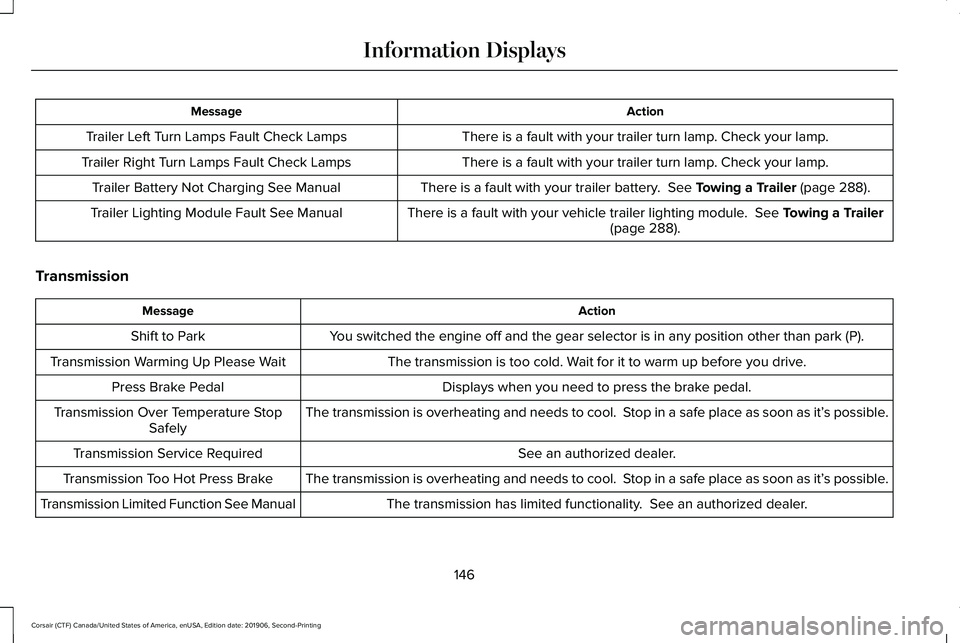
Action
Message
There is a fault with your trailer turn lamp. Check your lamp.
Trailer Left Turn Lamps Fault Check Lamps
There is a fault with your trailer turn lamp. Check your lamp.
Trailer Right Turn Lamps Fault Check Lamps
There is a fault with your trailer battery. See Towing a Trailer (page 288).
Trailer Battery Not Charging See Manual
There is a fault with your vehicle trailer lighting module.
See Towing a Trailer
(page 288).
Trailer Lighting Module Fault See Manual
Transmission Action
Message
You switched the engine off and the gear selector is in any position othe\
r than park (P).
Shift to Park
The transmission is too cold. Wait for it to warm up before you drive.
Transmission Warming Up Please Wait
Displays when you need to press the brake pedal.
Press Brake Pedal
The transmission is overheating and needs to cool. Stop in a safe place as soon as it’ s possible.
Transmission Over Temperature Stop
Safely
See an authorized dealer.
Transmission Service Required
The transmission is overheating and needs to cool. Stop in a safe place as soon as it’ s possible.
Transmission Too Hot Press Brake
The transmission has limited functionality. See an authorized dealer.
Transmission Limited Function See Manual
146
Corsair (CTF) Canada/United States of America, enUSA, Edition date: 201906, Second-Printing Information Displays
Page 195 of 591
FUEL QUALITY
Choosing the Right Fuel
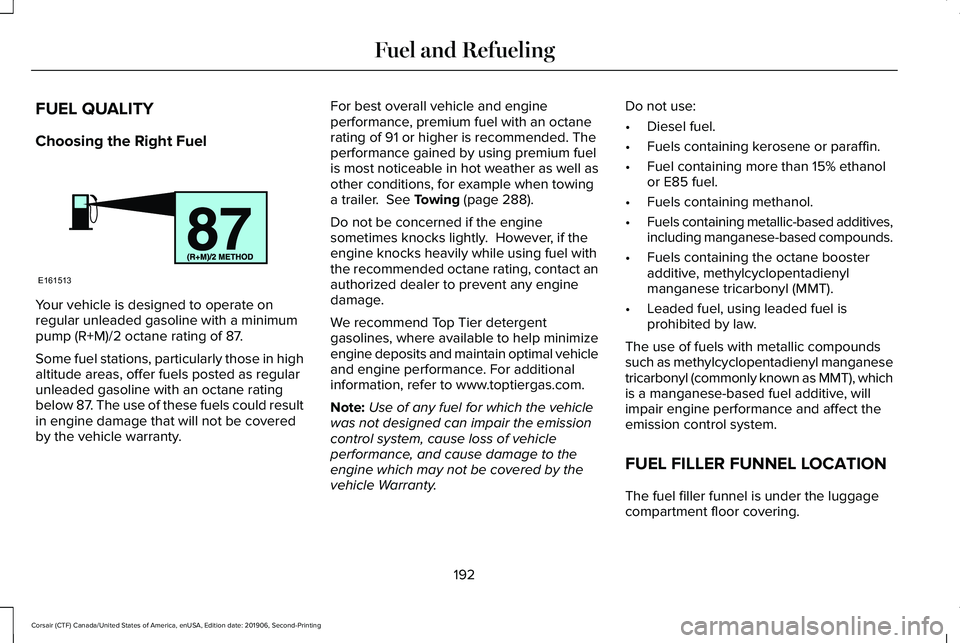
Your vehicle is designed to operate on
regular unleaded gasoline with a minimum
pump (R+M)/2 octane rating of 87.
Some fuel stations, particularly those in high
altitude areas, offer fuels posted as regular
unleaded gasoline with an octane rating
below 87. The use of these fuels could result
in engine damage that will not be covered
by the vehicle warranty. For best overall vehicle and engine
performance, premium fuel with an octane
rating of 91 or higher is recommended. The
performance gained by using premium fuel
is most noticeable in hot weather as well as
other conditions, for example when towing
a trailer. See Towing (page 288).
Do not be concerned if the engine
sometimes knocks lightly. However, if the
engine knocks heavily while using fuel with
the recommended octane rating, contact an
authorized dealer to prevent any engine
damage.
We recommend Top Tier detergent
gasolines, where available to help minimize
engine deposits and maintain optimal vehicle
and engine performance. For additional
information, refer to www.toptiergas.com.
Note: Use of any fuel for which the vehicle
was not designed can impair the emission
control system, cause loss of vehicle
performance, and cause damage to the
engine which may not be covered by the
vehicle Warranty. Do not use:
•
Diesel fuel.
• Fuels containing kerosene or paraffin.
• Fuel containing more than 15% ethanol
or E85 fuel.
• Fuels containing methanol.
• Fuels containing metallic-based additives,
including manganese-based compounds.
• Fuels containing the octane booster
additive, methylcyclopentadienyl
manganese tricarbonyl (MMT).
• Leaded fuel, using leaded fuel is
prohibited by law.
The use of fuels with metallic compounds
such as methylcyclopentadienyl manganese
tricarbonyl (commonly known as MMT), which
is a manganese-based fuel additive, will
impair engine performance and affect the
emission control system.
FUEL FILLER FUNNEL LOCATION
The fuel filler funnel is under the luggage
compartment floor covering.
192
Corsair (CTF) Canada/United States of America, enUSA, Edition date: 201906, Second-Printing Fuel and RefuelingE161513
Page 219 of 591
Note:
It remains illuminated for a short
period of time after you switch the ignition
off.
If it continues to flash or does not illuminate,
the system has malfunctioned. Have your
vehicle checked as soon as possible.
Note: You can apply the electric parking
brake when the ignition is off.
Note: The electric parking brake could
automatically apply when you shift into park
(P). See Transmission (page 203).
Applying the Electric Parking Brake in an
Emergency
Note: Do not apply the electric parking brake
when your vehicle is moving, except in an
emergency. If you repeatedly use the electric
parking brake to slow or stop your vehicle,
you could cause damage to the brake
system.
You can use the electric parking brake to
slow or stop your vehicle in an emergency. Pull the switch upward and hold it.
The red warning lamp illuminates,
a tone sounds and the stoplamps
turn on.
The electric parking brake continues to slow
your vehicle down unless you release the
switch.
Manually Releasing the Electric Parking
Brake
Switch the ignition on.
Press and hold the brake pedal.
Push the switch downward.
The red warning lamp turns off. If it remains illuminated or flashes, the system
has malfunctioned. Have your vehicle
checked as soon as possible.
Pulling Away on a Hill When Towing a
Trailer
Press and hold the brake pedal.
Pull the switch upward and hold it.
Shift into gear.
Press the accelerator pedal until engine has
developed sufficient torque to prevent your
vehicle from rolling down the hill. Release the switch and pull away
in a normal manner.
Automatically Releasing the Electric
Parking Brake
Close the driver door.
Shift into gear.
216
Corsair (CTF) Canada/United States of America, enUSA, Edition date: 201906, Second-Printing Brakes E267156 E270480 E267156 E270480 E267156 E267156
Page 224 of 591
Note:
Certain add-on devices around the
bumper or fascia may create false alerts. For
example, large trailer hitches, bike or
surfboard racks, license plate brackets,
bumper covers or any other device that may
block the normal detection zone of the
system. Remove the add-on device to
prevent false alerts.
Note: The system does not react to small or
moving objects, particularly those close to
the ground.
Note: The system does not operate during
hard acceleration or steering.
The system only applies the brakes for a
short period of time when an event occurs.
The driver should take action as soon as they
notice the brakes automatically apply in
order to remain in control of the vehicle.
Note: If your vehicle sustains damage to the
bumper or fascia leaving it misaligned or
bent, the sensing zone may be altered
causing inaccurate measurement of
obstacles or false alerts. Note:
Vehicle loading and suspension
changes can impact the angle of the sensors
and may change the normal detection zone
of the system resulting in inaccurate
measurement of obstacles or false alerts.
Note: When you connect a trailer, the system
may detect the trailer and provide an alert
or the system automatically turns off. If the
system does not automatically turn off,
switch the system off manually after you
connect the trailer.
Note: You may experience reduced system
performance on road surfaces that limit
deceleration. For example, roads with ice,
loose gravel, mud or sand.
SWITCHING REVERSE BRAKING
ASSIST ON AND OFF
You can switch the system on or off through
the touchscreen. See Settings (page 478). Note:
The system is unavailable when rear
parking aid or cross traffic alert is off.
OVERRIDING REVERSE BRAKING
ASSIST
There could be instances when unexpected
or unwanted braking occurs. Firmly pressing
the accelerator pedal or switching the feature
off, overrides the system.
REVERSE BRAKING ASSIST
INDICATORS
If the system determines that a collision with
an obstacle may occur, full braking may
automatically apply. Bring your vehicle to a
stop a safe distance away from the obstacle. A message and warning indicator
appear when the system
automatically applies the brakes.
221
Corsair (CTF) Canada/United States of America, enUSA, Edition date: 201906, Second-Printing Reverse Braking Assist
(If Equipped)E293490
Page 226 of 591
Reverse Braking Assist – Frequently
Asked Questions
Note:
If the frequently asked questions and
answers that are shown in the following
chart do not assist you in returning the
system to available, contact an authorized
dealer to have the system checked for
proper operation.
Why is the system off ?
Make sure you switch the system on.
See Switching Reverse Braking Assist
On and Off (page 221).
Why is the system unavailable? Make sure that the liftgate and all doors
are closed.
Why is the system unavailable? Make sure the cross traffic alert system
is on. See Cross Traffic Alert (page 268).
Why is the system unavailable? Make sure the rear parking aid system
is on.
See Parking Aids (page 227). Why is the system unavailable?
Make sure traction control is on.
See
Using Traction Control (page 224).
Why is the system unavailable? The vehicle has sustained a rear end
impact. Contact an authorized dealer to
have the sensors checked for proper
coverage and operation.
Why is the system unavailable? An ABS, traction control or stability
control event may have occurred. The
system resumes operation when the
event is complete.
Why is the system unavailable? Make sure the rear view camera and
360 degree camera are not dirty or
obstructed. If it dirty, clean the camera.
See
Parking Aids (page 227). See
Parking Aids (page 227). If the message
still appears after cleaning the camera,
wait a short time and the message
should clear. If the message does not
clear, contact an authorized dealer. Why is the system unavailable?
Make sure the sensors are not blocked
or faulted. See Cross Traffic Alert (page
268). See Rear Parking Aid (page 227).
Why is the system unavailable? You recently had your vehicle serviced,
or the battery disconnected. Drive your
vehicle a short distance to resume
system operation.
Why does the system turn off when I
connect a trailer? The system does not function when you
connect a trailer. Operation resumes
when you disconnect the trailer.
223
Corsair (CTF) Canada/United States of America, enUSA, Edition date: 201906, Second-Printing Reverse Braking Assist
(If Equipped)