battery LINCOLN CORSAIR 2020 Service Manual
[x] Cancel search | Manufacturer: LINCOLN, Model Year: 2020, Model line: CORSAIR, Model: LINCOLN CORSAIR 2020Pages: 591, PDF Size: 6 MB
Page 303 of 591
The fuel pump shutoff stops the flow of fuel
to the engine in the event of a moderate to
severe crash. Not every impact causes a
shutoff.
Should your vehicle shut off after a crash,
you may restart your vehicle.
If your vehicle has a key system:
1. Switch off the ignition.
2. Switch to start position.
3. Switch off the ignition.
4. Switch on the ignition to re-enable the
fuel pump.
5. If the vehicle does not start, repeat steps
1 through 4.
If your vehicle has a push button start
system:
1. Press START/STOP to switch off your
vehicle.
2. Press the brake pedal and
START/STOP
to switch on your vehicle.
3. Remove your foot from the brake pedal and press
START/STOP to switch off
your vehicle. 4. You can attempt to start the vehicle by
pressing the brake pedal and
START/STOP
, or press START/STOP
without pressing the brake pedal.
5. If the vehicle does not start, repeat steps
1 through 4.
JUMP STARTING THE VEHICLE WARNING:
Batteries normally
produce explosive gases which can cause
personal injury. Therefore, do not allow
flames, sparks or lighted substances to
come near the battery. When working near
the battery, always shield your face and
protect your eyes. Always provide correct
ventilation. WARNING:
Keep batteries out of
reach of children. Batteries contain sulfuric
acid. Avoid contact with skin, eyes or
clothing. Shield your eyes when working
near the battery to protect against possible
splashing of acid solution. In case of acid
contact with skin or eyes, flush immediately
with water for a minimum of 15 minutes and
get prompt medical attention. If acid is
swallowed, call a physician immediately. WARNING:
Use only adequately
sized cables with insulated clamps. WARNING: Make sure that the cables
are clear of any moving parts and fuel
delivery system parts.
Note: Do not attempt to push-start your
automatic transmission vehicle. Attempting
to push-start a vehicle with an automatic
transmission may cause transmission
damage.
Note: Do not disconnect the battery of the
disabled vehicle as this could damage the
vehicle electrical system.
300
Corsair (CTF) Canada/United States of America, enUSA, Edition date: 201906, Second-Printing Roadside Emergencies
Page 304 of 591
Preparing Your Vehicle
Note:
Use only a 12-volt supply to start your
vehicle.
Park the booster vehicle close to the hood
of the disabled vehicle, making sure the two
vehicles do not touch.
Connecting the Jumper Cables WARNING: Do not connect the
negative jumper cable to any other part of
your vehicle. Use the ground point.
Note: If you are using a jump pack or booster
box, follow that manufacturer's instructions.
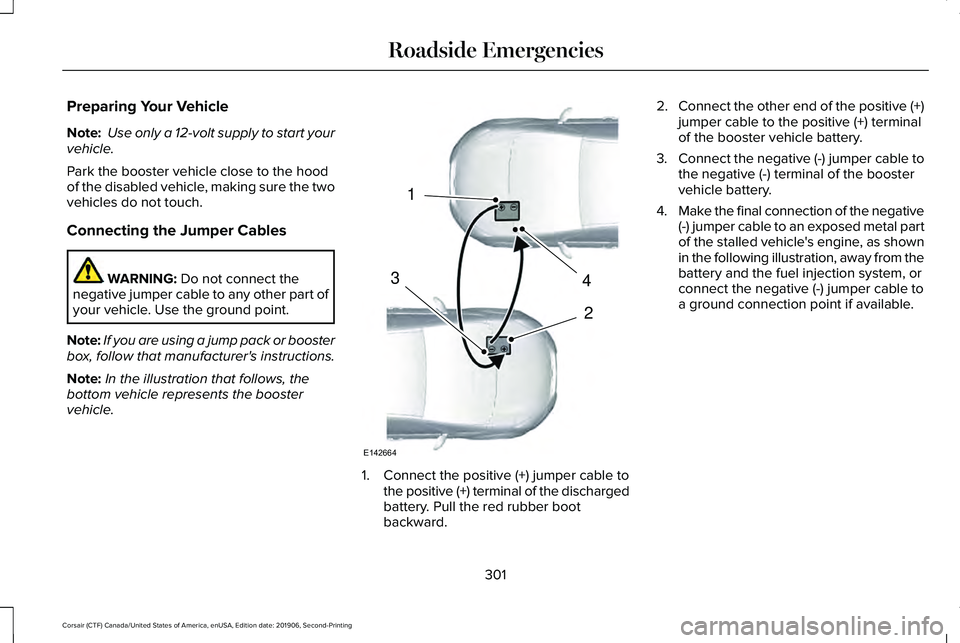
Note: In the illustration that follows, the
bottom vehicle represents the booster
vehicle. 1. Connect the positive (+) jumper cable to
the positive (+) terminal of the discharged
battery. Pull the red rubber boot
backward. 2.
Connect the other end of the positive (+)
jumper cable to the positive (+) terminal
of the booster vehicle battery.
3. Connect the negative (-) jumper cable to
the negative (-) terminal of the booster
vehicle battery.
4. Make the final connection of the negative
(-) jumper cable to an exposed metal part
of the stalled vehicle's engine, as shown
in the following illustration, away from the
battery and the fuel injection system, or
connect the negative (-) jumper cable to
a ground connection point if available.
301
Corsair (CTF) Canada/United States of America, enUSA, Edition date: 201906, Second-Printing Roadside Emergencies4
2
1
3
E142664
Page 306 of 591
2. Remove the jumper cable on the
negative (-) terminal of the booster
vehicle battery.
3. Remove the jumper cable from the positive (+) terminal of the booster vehicle
battery.
4. Remove the jumper cable from the positive (+) terminal of the disabled
vehicle battery.
5. Allow the engine to idle for at least one minute.
POST-CRASH ALERT SYSTEM
The system flashes the direction indicators
and sounds the horn (intermittently) in the
event of a serious impact that deploys an
airbag (front, side, side curtain or Safety
Canopy) or the seatbelt pretensioners.
The horn and indicators turn off when:
• You press the hazard control button.
• You press the panic button on the remote
entry transmitter (if equipped). •
Your vehicle runs out of power.
• Sounding of the horn is only enabled in
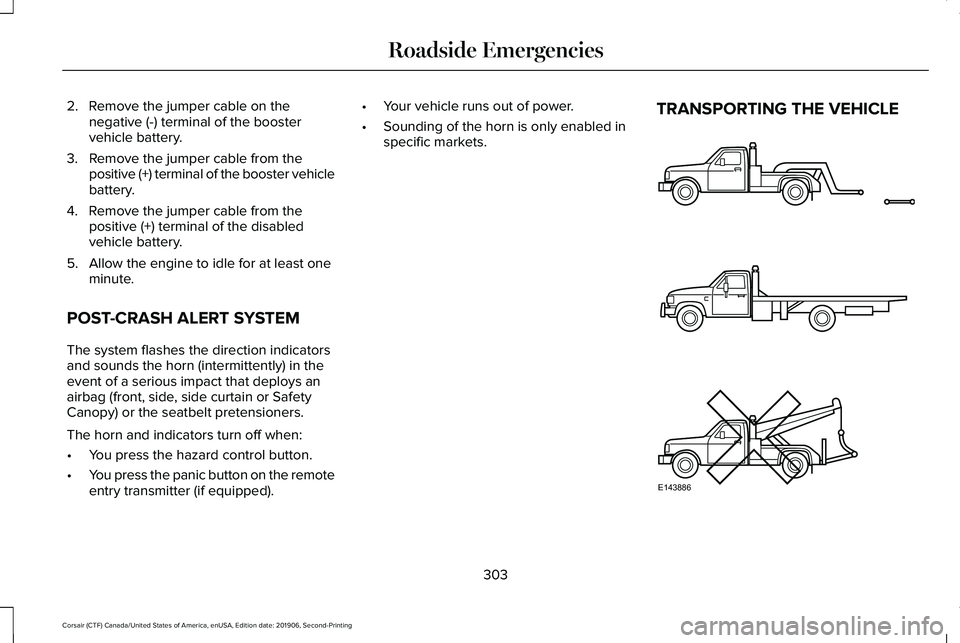
specific markets. TRANSPORTING THE VEHICLE
303
Corsair (CTF) Canada/United States of America, enUSA, Edition date: 201906, Second-Printing Roadside EmergenciesE143886
Page 317 of 591

FUSE SPECIFICATION CHART
Engine Compartment Fuse Box
WARNING: Always disconnect the
battery before servicing high current fuses. WARNING:
To reduce risk of
electrical shock, always replace the cover
to the power distribution box before
reconnecting the battery or refilling fluid
reservoirs.
The engine compartment fuse box is in the
engine compartment. It has high-current
fuses that protect your vehicle's main
electrical systems from overloads. When you disconnect and reconnect the
battery, you need to reset some features.
See Changing the 12V Battery (page 340).
Lift the release lever at the rear of the cover
to remove it.
Note: Replace fuses with the same type and
rating.
See Changing a Fuse (page 325).
314
Corsair (CTF) Canada/United States of America, enUSA, Edition date: 201906, Second-Printing Fuses
Page 320 of 591
Protected Component
Fuse Rating
Fuse Location
Not used.
—
16
Heated wiper park.
15 A
17
Air conditioning clutch.
10 A
18
Not used.
—
19
DC/DC converter (hybrid).
5 A
20
Battery charge control module (hybrid).
10 A
21
Adaptive cruise control.
5 A
22
Charge port light ring (hybrid).
5 A
23
Battery electronic control module (hybrid).
5 A
24
Left-hand enhanced exterior lighting module.
25 A
25
Right-hand enhanced exterior lighting module.
25 A
26
Powertrain control module (hybrid).
5 A
27
Anti-lock brake system module.
10 A
28
Powertrain control module.
10 A
29
Electronic stability control.
10 A
30
Transmission oil pump.
317
Corsair (CTF) Canada/United States of America, enUSA, Edition date: 201906, Second-Printing Fuses
Page 330 of 591
GENERAL INFORMATION
Have your vehicle serviced regularly to help
maintain its roadworthiness and resale value.
There is a large network of authorized
dealers that are there to help you with their
professional servicing expertise. We believe
that their specially trained technicians are
best qualified to service your vehicle properly
and expertly. They are supported by a wide
range of highly specialized tools developed
specifically for servicing your vehicle.
If your vehicle requires professional service,
an authorized dealer can provide the
necessary parts and service. Check your
warranty information to find out which parts
and services are covered.
Use only recommended fuels, lubricants,
fluids and service parts conforming to
specifications. Motorcraft® parts are
designed and built to provide the best
performance in your vehicle.
Precautions
•
Do not work on a hot engine.
• Make sure that nothing gets caught in
moving parts.
• Do not work on a vehicle with the engine
running in an enclosed space, unless you
are sure you have enough ventilation.
• Keep all open flames and other burning
material (such as cigarettes) away from
the battery and all fuel related parts.
Working with the Engine Off
1. Set the parking brake and shift the transmission to park (P).
2. Switch off the engine.
3. Block the wheels.
Working with the Engine On WARNING: To reduce the risk of
vehicle damage and personal burn injuries,
do not start your engine with the air
cleaner removed and do not remove it
while the engine is running. 1. Set the parking brake and shift the
transmission to park (P).
2. Block the wheels.
OPENING AND CLOSING THE
HOOD
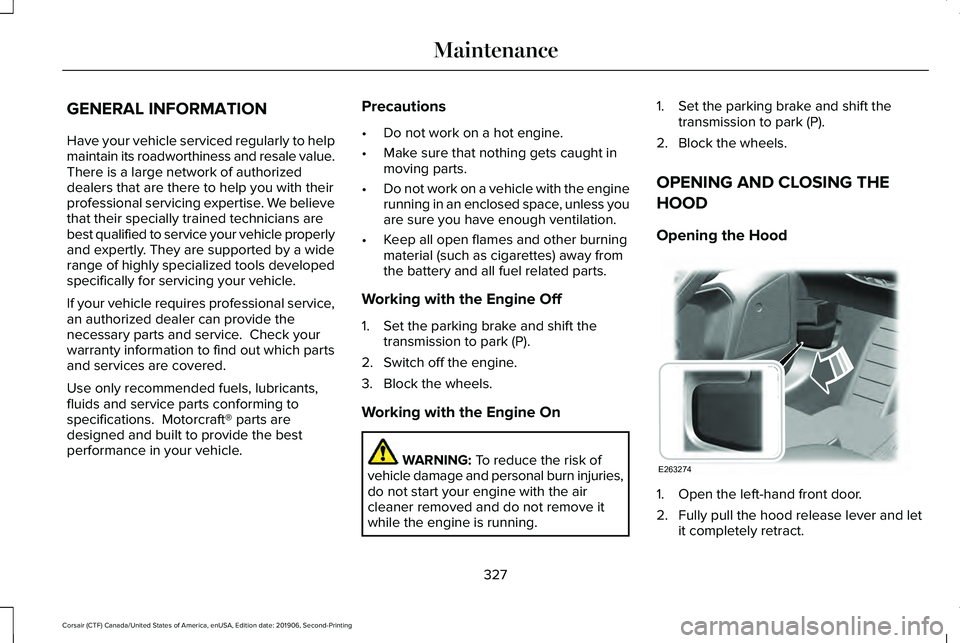
Opening the Hood 1. Open the left-hand front door.
2. Fully pull the hood release lever and let
it completely retract.
327
Corsair (CTF) Canada/United States of America, enUSA, Edition date: 201906, Second-Printing MaintenanceE263274
Page 333 of 591
Engine oil filler cap. See Engine Oil Check (page 330).
D
Brake fluid reservoir.
See Brake Fluid Check (page 338).
E
Battery.
See Changing the 12V Battery (page 340).
F
Power distribution box.
See Fuse Specification Chart (page 314).
G
Air filter assembly.
See Changing the Engine Air Filter (page 332).
H
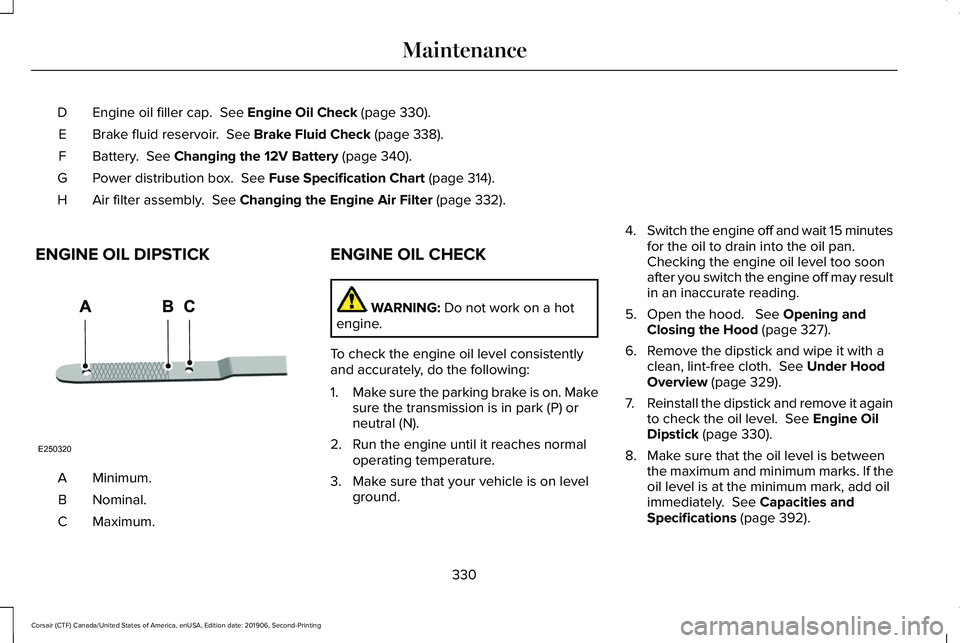
ENGINE OIL DIPSTICK Minimum.
A
Nominal.
B
Maximum.
C ENGINE OIL CHECK WARNING:
Do not work on a hot
engine.
To check the engine oil level consistently
and accurately, do the following:
1. Make sure the parking brake is on. Make
sure the transmission is in park (P) or
neutral (N).
2. Run the engine until it reaches normal operating temperature.
3. Make sure that your vehicle is on level ground. 4.
Switch the engine off and wait 15 minutes
for the oil to drain into the oil pan.
Checking the engine oil level too soon
after you switch the engine off may result
in an inaccurate reading.
5. Open the hood. See Opening and
Closing the Hood (page 327).
6. Remove the dipstick and wipe it with a clean, lint-free cloth.
See Under Hood
Overview (page 329).
7. Reinstall the dipstick and remove it again
to check the oil level.
See Engine Oil
Dipstick (page 330).
8. Make sure that the oil level is between the maximum and minimum marks. If the
oil level is at the minimum mark, add oil
immediately.
See Capacities and
Specifications (page 392).
330
Corsair (CTF) Canada/United States of America, enUSA, Edition date: 201906, Second-Printing MaintenanceE250320
Page 343 of 591
CHANGING THE 12V BATTERY
WARNING: Batteries normally
produce explosive gases which can cause
personal injury. Therefore, do not allow
flames, sparks or lighted substances to
come near the battery. When working near
the battery, always shield your face and
protect your eyes. Always provide correct
ventilation. WARNING:
When lifting a
plastic-cased battery, excessive pressure
on the end walls could cause acid to flow
through the vent caps, resulting in personal
injury and damage to the vehicle or battery.
Lift the battery with a battery carrier or with
your hands on opposite corners. WARNING:
Keep batteries out of
reach of children. Batteries contain sulfuric
acid. Avoid contact with skin, eyes or
clothing. Shield your eyes when working
near the battery to protect against possible
splashing of acid solution. In case of acid
contact with skin or eyes, flush immediately
with water for a minimum of 15 minutes and
get prompt medical attention. If acid is
swallowed, call a physician immediately. WARNING:
Battery posts, terminals
and related accessories contain lead and
lead compounds, chemicals known to the
State of California to cause cancer and
reproductive harm. Wash your hands after
handling
. WARNING:
This vehicle may have
more than one battery. Removing the
battery cables from only one battery does
not disconnect your vehicle electrical
system. Make sure you disconnect the
battery cables from all batteries when
disconnecting power. Failure to do so may
cause serious personal injury or property
damage. WARNING:
For vehicles with
Auto-Start-Stop the battery requirement is
different. You must replace the battery with
one of exactly the same specification.
Your vehicle has a Motorcraft
maintenance-free battery which normally
does not require additional water.
When your vehicle requires a battery
replacement, use a recommended
replacement battery that matches the
electrical requirements of the vehicle.
Note: After cleaning or replacing the battery,
make sure you reinstall the battery vent tube,
battery cover or shield.
340
Corsair (CTF) Canada/United States of America, enUSA, Edition date: 201906, Second-Printing Maintenance
Page 344 of 591
For longer, trouble-free operation, keep the
top of the battery clean and dry.
If you see any corrosion on the battery or
terminals, remove the cables from the
terminals and clean with a wire brush. You
can neutralize the acid with a solution of
baking soda and water.
Because a computer electronically controls
your vehicle's engine, power from the battery
maintains some control conditions. When
you disconnect or have a new battery
installed, the engine must relearn its idle and
fuel trim strategy for optimum driveability and
performance. Flexible fuel vehicles (FFV)
must also relearn the ethanol content of the
fuel for optimum driveability and
performance.
To restore the settings, do the following:
1. Apply the parking brake.
2. Shift into park (P) or neutral (N).
3. Switch off all the accessories.
4. Press the brake pedal and start your
vehicle. 5. Run the engine until it reaches normal
operating temperature. While the engine
is warming up, complete the following:
Reset the clock. Reset the power
windows bounce-back feature. See
Windows and Mirrors (page 108). Reset
the radio station presets. See Audio
System (page 420).
6. Allow the engine to idle for at least one minute.
7. Drive the vehicle at least 10 mi (16 km) to
completely relearn the idle trim and fuel
trim strategy.
Note: If you do not allow the engine to
relearn the idle and fuel trim strategy, you
could adversely affect the idle quality of your
vehicle until the engine computer eventually
relearns the idle trim and fuel trim strategy.
Note: For flexible fuel vehicles, if you are
operating on E85, you could experience poor
starts or an inability to start the engine and
driveability problems until the fuel trim and
ethanol content have been relearned. Make sure that you dispose of old batteries
in an environmentally friendly way. Seek
advice from your local authority about
recycling old batteries.
If storing your vehicle for more than 30 days
without recharging the battery, we
recommend that you disconnect the negative
battery cable to maintain battery charge for
quick starting.
Battery Management System
(If Equipped)
The battery management system monitors
battery conditions and takes actions to
extend battery life. If the system detects
excessive battery drain, it temporarily
disables some electrical systems to protect
the battery.
Systems included are:
• Heated rear window.
• Heated seats.
• Climate control.
• Heated steering wheel.
• Audio unit.
• Navigation system.
341
Corsair (CTF) Canada/United States of America, enUSA, Edition date: 201906, Second-Printing Maintenance
Page 345 of 591
A message could appear in the information
display to alert you that battery protection
actions are active. These messages are only
for notification that an action is taking place,
and not intended to indicate an electrical
problem or that the battery requires
replacement.
After battery replacement, or in some cases,
after charging the battery with an external
charger, the battery management system
requires eight hours of vehicle sleep time to
relearn the battery state of charge. During
this time, keep your vehicle fully locked with
the ignition switched off.
Note:
Prior to relearning the battery state of
charge, the battery management system
could temporarily disable some electrical
systems. Electrical Accessory Installation
To make sure the battery management
system works correctly, do not connect an
electrical device ground connection directly
to the battery negative post. This can cause
inaccurate measurements of the battery
condition and potential incorrect system
operation.
Note:
If you add electrical accessories or
components to the vehicle, it could adversely
affect battery performance and durability.
This could also affect the performance of
other electrical systems in the vehicle.
Battery Disposal Make sure that you dispose of old
batteries in an environmentally
friendly way. Seek advice from
your local authority about recycling old
batteries. ADJUSTING THE HEADLAMPS
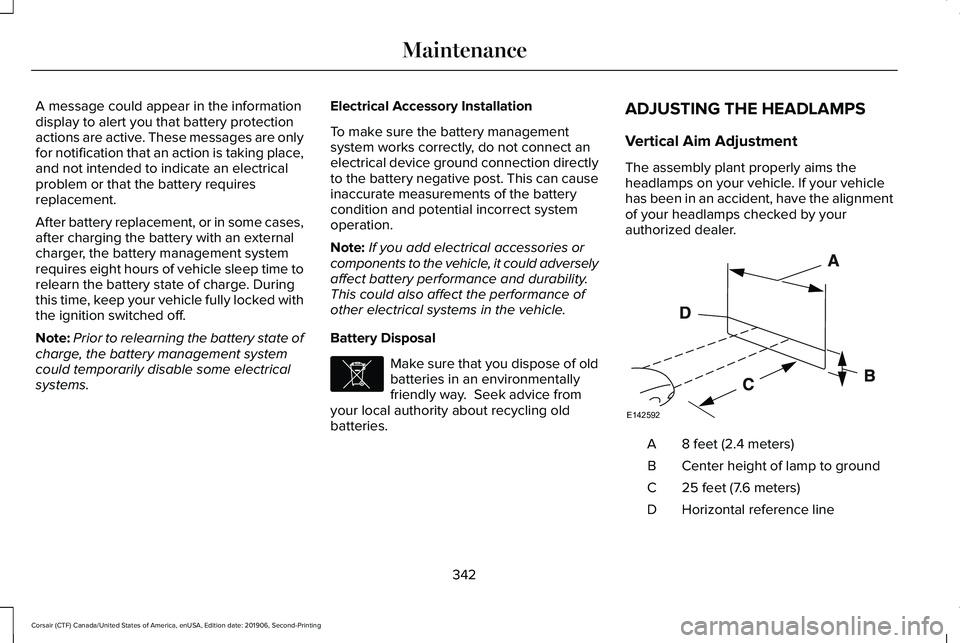
Vertical Aim Adjustment
The assembly plant properly aims the
headlamps on your vehicle. If your vehicle
has been in an accident, have the alignment
of your headlamps checked by your
authorized dealer.
8 feet (2.4 meters)
A
Center height of lamp to ground
B
25 feet (7.6 meters)
C
Horizontal reference line
D
342
Corsair (CTF) Canada/United States of America, enUSA, Edition date: 201906, Second-Printing MaintenanceE107998 E142592