battery LINCOLN CORSAIR 2020 Owner's Guide
[x] Cancel search | Manufacturer: LINCOLN, Model Year: 2020, Model line: CORSAIR, Model: LINCOLN CORSAIR 2020Pages: 591, PDF Size: 6 MB
Page 207 of 591
Your vehicle has a feature that automatically
shifts your vehicle into park (P) when any of
the following conditions occur:
•
You turn the vehicle off.
• You open the driver door with your
seatbelt unlatched with the vehicle
stopped.
• You unlatch your seatbelt when the driver
door is open with the vehicle stopped.
If you turn your vehicle off when moving,
your vehicle first shifts into neutral (N) until
it stops and then shift into park (P)
automatically.
Note: If you have waited an extended period
of time, 2-15 minutes before starting your
vehicle, unlatching your seatbelt can cause
this feature to activate, even with the driver
door closed.
Note: This feature may not work properly if
the door ajar switch is malfunctioning. If your
door ajar indicator does not illuminate when
you open the driver door, or the indicator
illuminates with the driver door closed, see
your authorized dealer. Reverse (R)
With the selector in reverse (R), your vehicle
moves backward. Always come to a
complete stop before shifting into and out
of reverse (R).
Neutral (N)
WARNING: In neutral (N) your vehicle
has the ability to roll freely. If you intend to
leave your vehicle, make sure you apply
the parking brake.
In neutral (N), power is not transmitted to the
driven wheels but the transmission is not
locked. You can start the engine with the
transmission in this position. Stay in Neutral Mode
Note:
Stay in neutral mode is a temporary
vehicle state with the ignition off. Once in
this mode, sufficient battery voltage must be
maintained or your vehicle returns to park.
Extended usage of Stay in Neutral mode
may result in a battery voltage reduction to
a level where the vehicle may no longer
start. Do not tow your vehicle in this mode.
Note: When entering an automatic car wash,
always shift in neutral (N). If you are exiting
the vehicle by the car wash, Stay in Neutral
Mode is available. Failure to do this could
result in vehicle damage not covered by
warranty.
Stay in Neutral mode allows your vehicle to
stay in neutral when you exit your vehicle.
Your vehicle must be stationary to enter this
mode.
To enter Stay in Neutral mode:
• Press the neutral (N) button on the
transmission selector.
• Press the neutral (N) button again to
enter Stay in Neutral mode.
204
Corsair (CTF) Canada/United States of America, enUSA, Edition date: 201906, Second-Printing Transmission
Page 209 of 591
SelectShift in drive (D):
Provides a temporary manual mode for
performing more demanding maneuvers
where extra control of gear selection is
required (for example, when towing, downhill
driving or overtaking). This mode holds a
selected gear for a temporary period of time
dependent on driver inputs (for example,
steering or accelerator pedal input).
In SelectShift mode, the instrument cluster
displays your currently selected gear. If you
request a gear, but it is not available due to
vehicle conditions, low speed, too high
engine speed for requested gear selection,
the current gear briefly flashes.
Note:
At full accelerator pedal travel, the
transmission downshifts for maximum
performance. Note:
In low traction conditions, you can pull
away in second gear using SelectShift. To
perform this operation, select drive (D) and
press the (+) paddle until 2 is displayed on
the cluster. Your vehicle is now ready to
move in 2nd gear.
Manual Park Release WARNING: When doing this
procedure, you need to take the
transmission out of park (P) which means
your vehicle can roll freely. To avoid
unwanted vehicle movement, always fully
apply the parking brake prior to doing this
procedure. Use wheels chocks if
appropriate. WARNING:
If the parking brake is
fully released, but the brake warning lamp
remains illuminated, the brakes may not
be working properly. Have your vehicle
checked as soon as possible. WARNING: Do not drive your vehicle
until you verify that the stoplamps are
working.
Use the manual park release to move your
transmission from the park (P) position in the
event of an electrical malfunction or
emergency.
Activating the Manual Park Release Cable
1. Apply the parking brake.
See Electric
Parking Brake (page 215).
Note: If the vehicle battery is dead, for
example, no electrical power is available,
you could require external power to apply
the parking brake.
2. Locate the Manual Park Release cable access cover on the lower instrument
panel dash to the bottom left hand side
of the steering column.
206
Corsair (CTF) Canada/United States of America, enUSA, Edition date: 201906, Second-Printing Transmission
Page 210 of 591
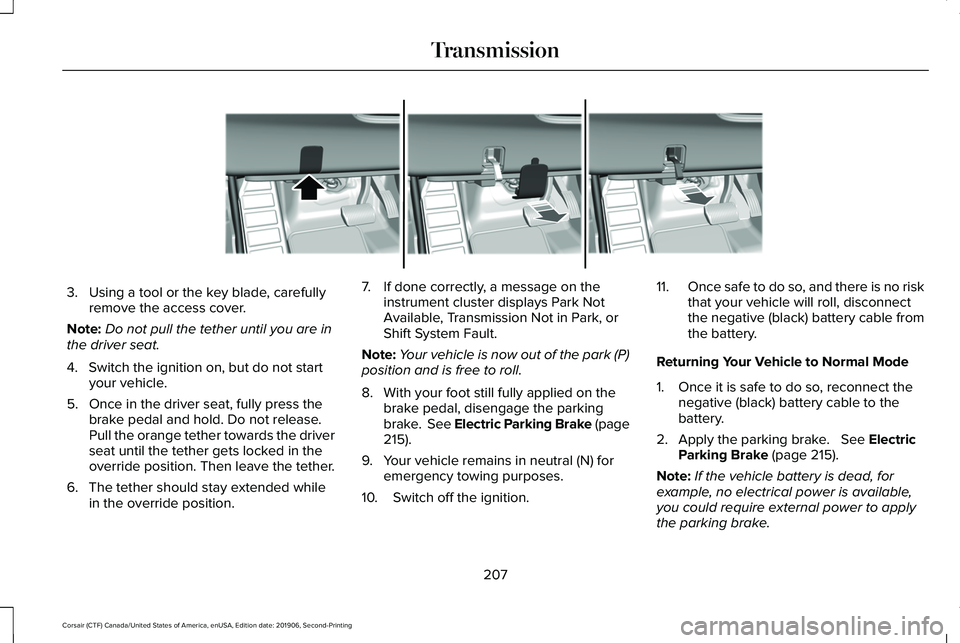
3. Using a tool or the key blade, carefully
remove the access cover.
Note: Do not pull the tether until you are in
the driver seat.
4. Switch the ignition on, but do not start your vehicle.
5. Once in the driver seat, fully press the brake pedal and hold. Do not release.
Pull the orange tether towards the driver
seat until the tether gets locked in the
override position. Then leave the tether.
6. The tether should stay extended while in the override position. 7. If done correctly, a message on the
instrument cluster displays Park Not
Available, Transmission Not in Park, or
Shift System Fault.
Note: Your vehicle is now out of the park (P)
position and is free to roll.
8. With your foot still fully applied on the brake pedal, disengage the parking
brake. See Electric Parking Brake (page
215).
9. Your vehicle remains in neutral (N) for emergency towing purposes.
10. Switch off the ignition. 11.
Once safe to do so, and there is no risk
that your vehicle will roll, disconnect
the negative (black) battery cable from
the battery.
Returning Your Vehicle to Normal Mode
1. Once it is safe to do so, reconnect the negative (black) battery cable to the
battery.
2. Apply the parking brake. See Electric
Parking Brake (page 215).
Note: If the vehicle battery is dead, for
example, no electrical power is available,
you could require external power to apply
the parking brake.
207
Corsair (CTF) Canada/United States of America, enUSA, Edition date: 201906, Second-Printing TransmissionE307867
Page 218 of 591
HINTS ON DRIVING WITH ANTI-
LOCK BRAKES
The anti-lock braking system does not
eliminate the risks when:
•
You drive too closely to the vehicle in
front of you.
• Your vehicle is hydroplaning.
• You take corners too fast.
• The road surface is poor.
Note: If the system activates, the brake
pedal may pulse and may travel further.
Maintain pressure on the brake pedal. You
may also hear a noise from the system. This
is normal. ELECTRIC PARKING BRAKE WARNING: If the brake system
warning light remains illuminated or flashes
for more than four seconds after you have
released the parking brake, there could be
a problem with your braking system. Have
your vehicle checked as soon as possible. WARNING:
Always fully apply the
parking brake and make sure you shift into
park (P). Failure to follow this instruction
could result in personal injury or death. WARNING:
With the exception of
emergency conditions (for example, the
brake pedal is broken or is blocked), do
not apply the electric parking brake while
the vehicle is moving. On bends, or poor
road surfaces or weather conditions,
emergency braking can cause the vehicle
to skid out of control or off the road. WARNING:
If you drive extended
distances with the parking brake applied,
you could cause damage to the brake
system. WARNING:
The electric parking
brake does not operate if the vehicle
battery is running out of charge.
Note: The electric parking brake makes
noises during operation. This is normal.
Your vehicle has an electric parking brake.
You operate it with a switch instead of a
lever. The switch is on the center console or
to the left-hand side of the steering wheel,
on the lower part of the instrument panel.
Applying the Electric Parking Brake Pull the switch upward.
The red warning lamp flashes
during operation and illuminates
when the parking brake is applied.
215
Corsair (CTF) Canada/United States of America, enUSA, Edition date: 201906, Second-Printing BrakesE267156 E270480
Page 220 of 591
Press the accelerator pedal and pull away in
a normal manner.
The red warning lamp turns off.
If it remains illuminated or flashes, the electric
parking brake has not released. Manually
release the parking brake.
Releasing the Electric Parking Brake if
the Vehicle Battery is Running Out of
Charge
Note:
The electric parking brake does not
apply or release if the battery is low or has
no charge.
Connect a booster battery to the vehicle
battery to release the electric parking brake
if the vehicle battery is running out of charge.
See Jump Starting the Vehicle (page 300). HILL START ASSIST WARNING:
The system does not
replace the parking brake. When you leave
your vehicle, always apply the parking
brake. WARNING: You must remain in your
vehicle when the system turns on. At all
times, you are responsible for controlling
your vehicle, supervising the system and
intervening, if required. Failure to take care
may result in the loss of control of your
vehicle, serious personal injury or death.
Note: If the engine is revved excessively, or
if a malfunction is detected, the system will
be deactivated.
The system makes it easier to pull away
when your vehicle is on a slope without the
need to use the parking brake. When the system is active, your vehicle will
remain stationary on the slope for two to
three seconds after you release the brake
pedal. This allows you time to move your
foot from the brake to the accelerator pedal.
The brakes release automatically when the
engine has sufficient torque to prevent your
vehicle from rolling down the grade. This is
an advantage when pulling away on a slope,
for example from a car park ramp, traffic
lights or when reversing uphill into a parking
space.
The system will activate automatically on any
slope that will cause significant vehicle
rollback. For vehicles with a manual
transmission, you can switch this feature off
using the information display.
See
Information Displays (page 123). The system
will remain on or off depending on how it
was last set.
Note: There is no warning lamp to indicate
the system is either on or off.
Note: If your vehicle is equipped with Auto
Hold, Hill Start Assist is not available while
Auto Hold is active.
217
Corsair (CTF) Canada/United States of America, enUSA, Edition date: 201906, Second-Printing BrakesE270480
Page 226 of 591
Reverse Braking Assist – Frequently
Asked Questions
Note:
If the frequently asked questions and
answers that are shown in the following
chart do not assist you in returning the
system to available, contact an authorized
dealer to have the system checked for
proper operation.
Why is the system off ?
Make sure you switch the system on.
See Switching Reverse Braking Assist
On and Off (page 221).
Why is the system unavailable? Make sure that the liftgate and all doors
are closed.
Why is the system unavailable? Make sure the cross traffic alert system
is on. See Cross Traffic Alert (page 268).
Why is the system unavailable? Make sure the rear parking aid system
is on.
See Parking Aids (page 227). Why is the system unavailable?
Make sure traction control is on.
See
Using Traction Control (page 224).
Why is the system unavailable? The vehicle has sustained a rear end
impact. Contact an authorized dealer to
have the sensors checked for proper
coverage and operation.
Why is the system unavailable? An ABS, traction control or stability
control event may have occurred. The
system resumes operation when the
event is complete.
Why is the system unavailable? Make sure the rear view camera and
360 degree camera are not dirty or
obstructed. If it dirty, clean the camera.
See
Parking Aids (page 227). See
Parking Aids (page 227). If the message
still appears after cleaning the camera,
wait a short time and the message
should clear. If the message does not
clear, contact an authorized dealer. Why is the system unavailable?
Make sure the sensors are not blocked
or faulted. See Cross Traffic Alert (page
268). See Rear Parking Aid (page 227).
Why is the system unavailable? You recently had your vehicle serviced,
or the battery disconnected. Drive your
vehicle a short distance to resume
system operation.
Why does the system turn off when I
connect a trailer? The system does not function when you
connect a trailer. Operation resumes
when you disconnect the trailer.
223
Corsair (CTF) Canada/United States of America, enUSA, Edition date: 201906, Second-Printing Reverse Braking Assist
(If Equipped)
Page 239 of 591
 for parallel parkin\
g or greater than
19 mph (30 km/h) for perpendicular parking.
You recently disconnected or replaced the b")
Possible Cause
Symptom
The vehicle speed is greater than 22 mph (35 km/h) for parallel parkin\
g or greater than
19 mph (30 km/h) for perpendicular parking.
You recently disconnected or replaced the battery. After you reconnect the battery you
must drive your vehicle on a straight road for a short period of time.
An irregular curb along the parking space prevents the system from corre\
ctly aligning
your vehicle.
The system does not correctly position your vehicle
in a parking space.
Vehicles or objects bordering the space may not be correctly parked.
Your vehicle stopped too far past the parking space.
The tires may not be correctly installed or maintained. For example, not inflated correctly,
improper size, or of different sizes.
A repair or alteration changes the detection capabilities.
A parked vehicle has a high attachment. For example, a salt sprayer, snowplow or moving
truck bed.
The parking space length or position of parked objects changes after your vehicle passes
the space.
You are using a spare tire or a tire that is significantly worn more than\
the other tires.
The temperature around your vehicle quickly changes. For example, driving from a
heated garage into cold outside temperature, or after leaving a car wash.
236
Corsair (CTF) Canada/United States of America, enUSA, Edition date: 201906, Second-Printing Parking Aids
Page 241 of 591
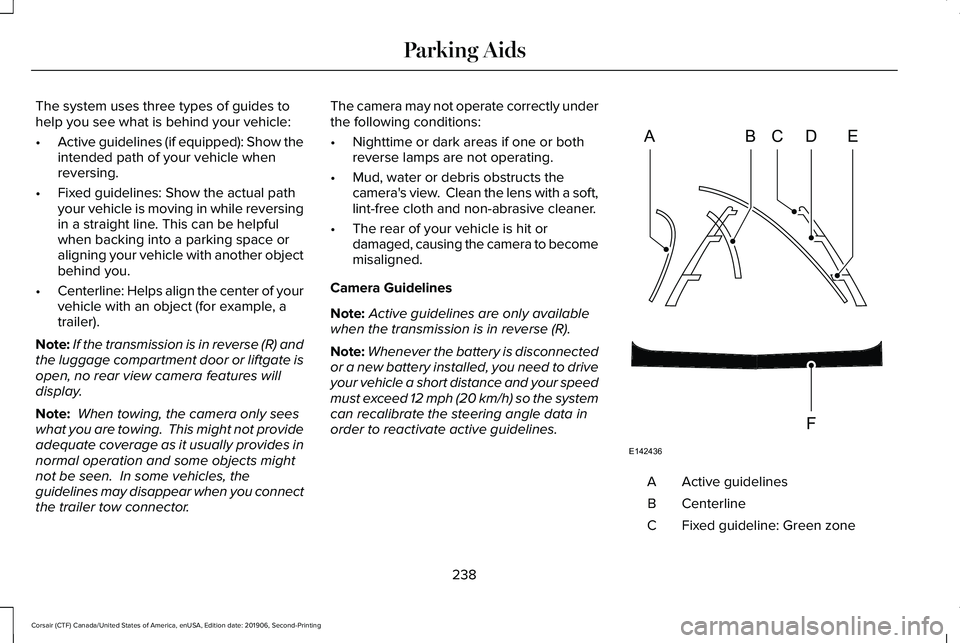
The system uses three types of guides to
help you see what is behind your vehicle:
•
Active guidelines (if equipped): Show the
intended path of your vehicle when
reversing.
• Fixed guidelines: Show the actual path
your vehicle is moving in while reversing
in a straight line. This can be helpful
when backing into a parking space or
aligning your vehicle with another object
behind you.
• Centerline: Helps align the center of your
vehicle with an object (for example, a
trailer).
Note: If the transmission is in reverse (R) and
the luggage compartment door or liftgate is
open, no rear view camera features will
display.
Note: When towing, the camera only sees
what you are towing. This might not provide
adequate coverage as it usually provides in
normal operation and some objects might
not be seen. In some vehicles, the
guidelines may disappear when you connect
the trailer tow connector. The camera may not operate correctly under
the following conditions:
•
Nighttime or dark areas if one or both
reverse lamps are not operating.
• Mud, water or debris obstructs the
camera's view. Clean the lens with a soft,
lint-free cloth and non-abrasive cleaner.
• The rear of your vehicle is hit or
damaged, causing the camera to become
misaligned.
Camera Guidelines
Note: Active guidelines are only available
when the transmission is in reverse (R).
Note: Whenever the battery is disconnected
or a new battery installed, you need to drive
your vehicle a short distance and your speed
must exceed 12 mph (20 km/h) so the system
can recalibrate the steering angle data in
order to reactivate active guidelines. Active guidelines
A
Centerline
B
Fixed guideline: Green zone
C
238
Corsair (CTF) Canada/United States of America, enUSA, Edition date: 201906, Second-Printing Parking AidsABCD
F
E
E142436
Page 301 of 591
ROADSIDE ASSISTANCE
Vehicles sold in the United States:
Getting Roadside Assistance
To fully assist you should you have a vehicle
concern, Lincoln Motor Company offers a
complimentary roadside assistance program.
This program is separate from the New
Vehicle Limited Warranty.
The service is available:
•
Throughout the life of the vehicle for
original owners.
• For six years or 70,000 mi (110,000 km)
(whichever comes first) for subsequent
owners.
Roadside Assistance covers:
• A flat tire change with a good spare
(except vehicles supplied with a tire
inflation kit).
• Battery jump start.
• Lock-out assistance (key replacement
cost is the client's responsibility). •
Fuel delivery — independent service
contractors, if not prohibited by state,
local or municipal law shall deliver up to
2 gal (8 L)
of gasoline fuel to a disabled
vehicle. Roadside Assistance limits fuel
delivery service to two no-charge
occurrences within a 12-month period.
• Winch out — available within 100 ft (30 m)
of a paved or county maintained road,
no recoveries. •
Towing — independent service
contractors, if not prohibited by state,
local or municipal law shall tow Lincoln
eligible vehicles to the client's selling or
preferred dealer within 100 mi (160 km)
of the disablement location or to the
nearest Lincoln dealer. If a client requests
a tow to a selling or preferred dealer that
is more than
100 mi (160 km) from the
disablement location, the client is
responsible for any mileage costs in
excess of
100 mi (160 km).
• Roadside Assistance includes up to $200
for a towed trailer if the disabled eligible
vehicle requires service at the nearest
authorized dealer. If the towing vehicle
is operational but the trailer is not, then
the trailer does not qualify for any
roadside services.
Vehicles Sold in the United States:
Using Roadside Assistance
United States clients who require roadside
assistance, call 1-800-521-4140 or contact
Roadside Assistance using the Lincoln Way
mobile app.
298
Corsair (CTF) Canada/United States of America, enUSA, Edition date: 201906, Second-Printing Roadside Emergencies
Page 302 of 591
If you need to arrange roadside assistance
for yourself, Lincoln Motor Company
reimburses a reasonable amount for towing
to the nearest Lincoln dealership within
100 mi (160 km). To obtain reimbursement
information, United States clients, call
1-800-521-4140. Clients need to submit their
original receipts.
Vehicles Sold in Canada: Getting
Roadside Assistance
To fully assist you should you have a vehicle
concern, Lincoln Motor Company offers a
complimentary roadside assistance program.
This program is eligible within Canada or the
continental United States.
The service is available 24 hours a day,
seven days a week.
This program is separate from the New
Vehicle Limited Warranty, beginning from
the original warranty start date and lasts the
life of the vehicle for the original owner.
Subsequent owners receive coverage that
is concurrent with the 6 years or
70,000 mi
(110,000 km) (whichever occurs first)
powertrain warranty coverage period. Note:
Canadian roadside coverage and
benefits may differ from the U.S. coverage.
For complete program coverage details,
review your warranty guide, contact your
dealer, call us in Canada at 1-800-387-9333,
or visit our website at
www.lincolncanada.com.
If you purchased your vehicle in Canada and
require roadside assistance, please call
1-800-387-9333 or contact Roadside
Assistance using the Lincoln Way mobile
app.
Note: For quick reference, complete the
roadside assistance identification card found
in the glove compartment of your vehicle
and place it in your wallet.
HAZARD FLASHERS
Note: The hazard flashers operate when the
ignition is in any position, or if the key is not
in the ignition. If used when the vehicle is not
running, the battery loses charge. As a result,
there may be insufficient power to restart
your vehicle. The flasher control is on the
instrument panel. Use your hazard
flashers when your vehicle is
creating a safety hazard for other motorists.
• Press the flasher control and all front and
rear direction indicators flash.
• Press the button again to switch them off.
FUEL SHUTOFF WARNING:
If your vehicle has been
involved in a crash, have the fuel system
checked. Failure to follow this instruction
could result in fire, personal injury or death.
Note: When you try to restart your vehicle
after a fuel shutoff, the vehicle makes sure
that various systems are safe to restart.
Once the vehicle determines the systems
are safe, then the vehicle allows you to
restart.
Note: In the event that your vehicle does not
restart after your third attempt, contact a
qualified technician.
299
Corsair (CTF) Canada/United States of America, enUSA, Edition date: 201906, Second-Printing Roadside Emergencies