lock LINCOLN CORSAIR 2021 Owners Manual
[x] Cancel search | Manufacturer: LINCOLN, Model Year: 2021, Model line: CORSAIR, Model: LINCOLN CORSAIR 2021Pages: 638, PDF Size: 5.7 MB
Page 537 of 638
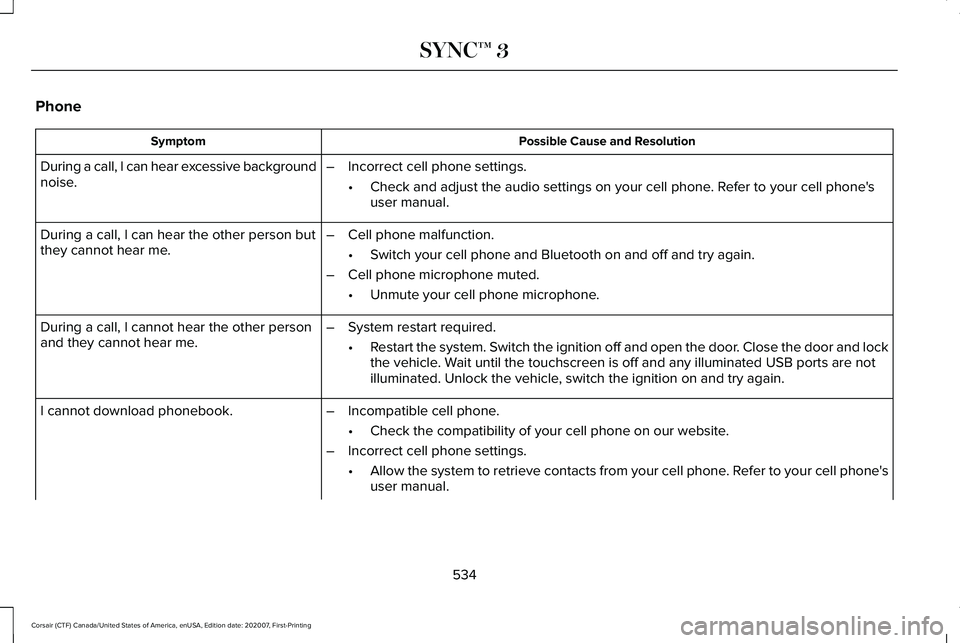
Phone
Possible Cause and Resolution
Symptom
During a call, I can hear excessive background
noise. –
Incorrect cell phone settings.
•Check and adjust the audio settings on your cell phone. Refer to your cell phone's
user manual.
– Cell phone malfunction.
•Switch your cell phone and Bluetooth on and off and try again.
– Cell phone microphone muted.
•Unmute your cell phone microphone.
During a call, I can hear the other person but
they cannot hear me.
During a call, I cannot hear the other person
and they cannot hear me.
–
System restart required.
•Restart the system. Switch the ignition off and open the door. Close the door and lock
the vehicle. Wait until the touchscreen is off and any illuminated USB ports are not
illuminated. Unlock the vehicle, switch the ignition on and try again.
I cannot download phonebook. –Incompatible cell phone.
•Check the compatibility of your cell phone on our website.
– Incorrect cell phone settings.
•Allow the system to retrieve contacts from your cell phone. Refer to your cell phone's
user manual.
534
Corsair (CTF) Canada/United States of America, enUSA, Edition date: 202007, First-Printing SYNC™ 3
Page 545 of 638
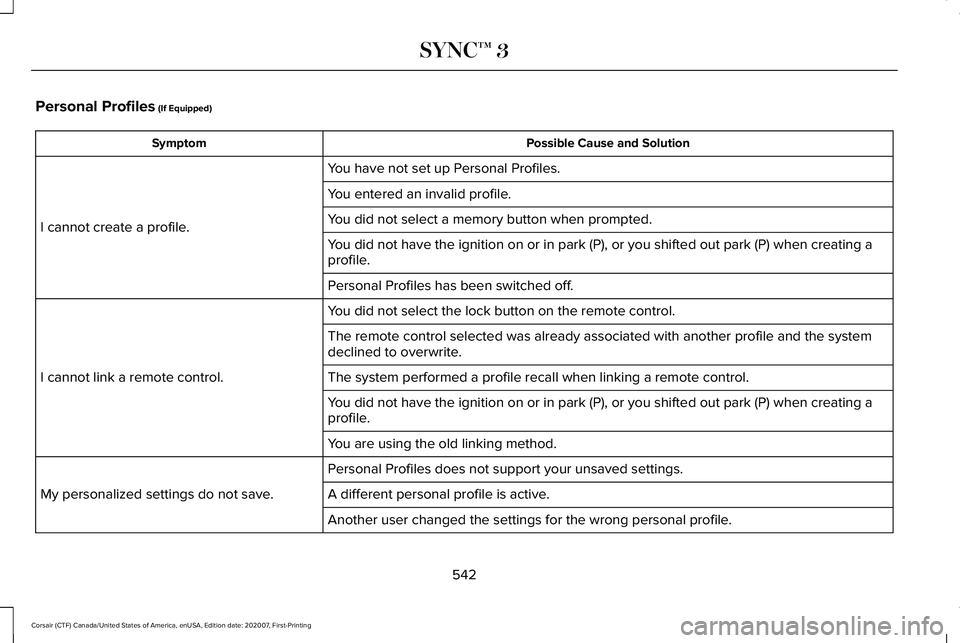
Personal Profiles (If Equipped)
Possible Cause and Solution
Symptom
You have not set up Personal Profiles.
I cannot create a profile. You entered an invalid profile.
You did not select a memory button when prompted.
You did not have the ignition on or in park (P), or you shifted out par\
k (P) when creating a
profile.
Personal Profiles has been switched off.
You did not select the lock button on the remote control.
I cannot link a remote control. The remote control selected was already associated with another profile \
and the system
declined to overwrite.
The system performed a profile recall when linking a remote control.
You did not have the ignition on or in park (P), or you shifted out par\
k (P) when creating a
profile.
You are using the old linking method.
Personal Profiles does not support your unsaved settings.
My personalized settings do not save. A different personal profile is active. Another user changed the settings for the wrong personal profile.
542
Corsair (CTF) Canada/United States of America, enUSA, Edition date: 202007, First-Printing SYNC™ 3
Page 546 of 638
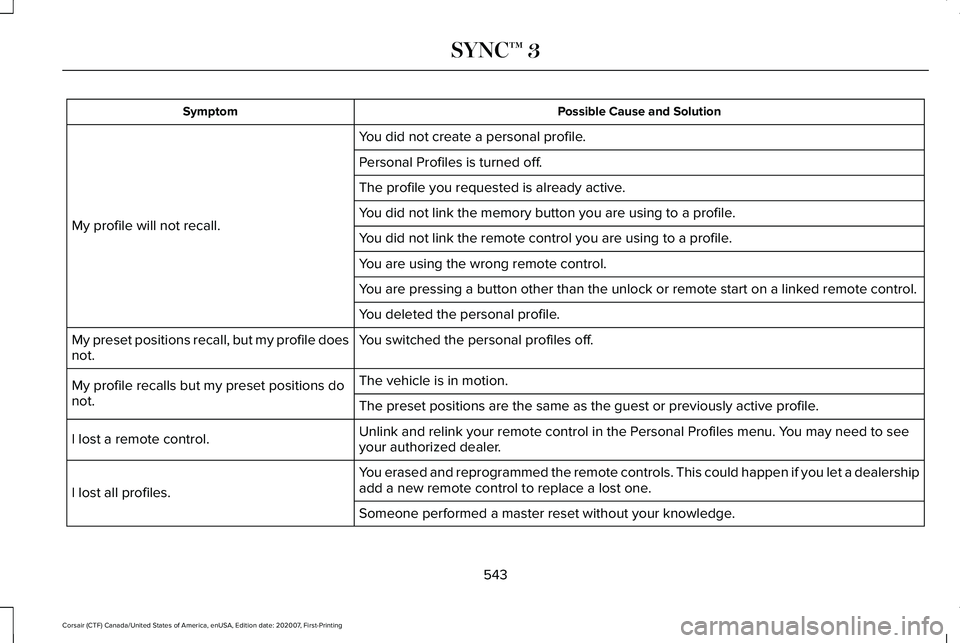
Possible Cause and Solution
Symptom
You did not create a personal profile.
My profile will not recall. Personal Profiles is turned off.
The profile you requested is already active.
You did not link the memory button you are using to a profile.
You did not link the remote control you are using to a profile.
You are using the wrong remote control.
You are pressing a button other than the unlock or remote start on a link\
ed remote control.
You deleted the personal profile.
You switched the personal profiles off.
My preset positions recall, but my profile does
not.
The vehicle is in motion.
My profile recalls but my preset positions do
not. The preset positions are the same as the guest or previously active prof\
ile.
Unlink and relink your remote control in the Personal Profiles menu. You may need to see
your authorized dealer.
I lost a remote control.
You erased and reprogrammed the remote controls. This could happen if you\
let a dealership
add a new remote control to replace a lost one.
I lost all profiles.
Someone performed a master reset without your knowledge.
543
Corsair (CTF) Canada/United States of America, enUSA, Edition date: 202007, First-Printing SYNC™ 3
Page 550 of 638
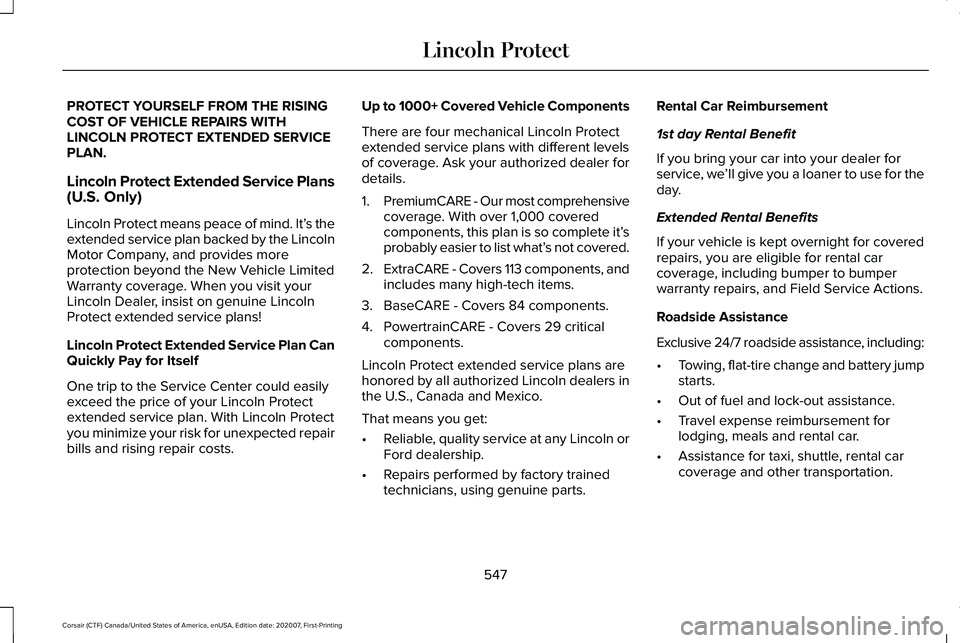
PROTECT YOURSELF FROM THE RISING
COST OF VEHICLE REPAIRS WITH
LINCOLN PROTECT EXTENDED SERVICE
PLAN.
Lincoln Protect Extended Service Plans
(U.S. Only)
Lincoln Protect means peace of mind. It’
s the
extended service plan backed by the Lincoln
Motor Company, and provides more
protection beyond the New Vehicle Limited
Warranty coverage. When you visit your
Lincoln Dealer, insist on genuine Lincoln
Protect extended service plans!
Lincoln Protect Extended Service Plan Can
Quickly Pay for Itself
One trip to the Service Center could easily
exceed the price of your Lincoln Protect
extended service plan. With Lincoln Protect
you minimize your risk for unexpected repair
bills and rising repair costs. Up to 1000+ Covered Vehicle Components
There are four mechanical Lincoln Protect
extended service plans with different levels
of coverage. Ask your authorized dealer for
details.
1.
PremiumCARE - Our most comprehensive
coverage. With over 1,000 covered
components, this plan is so complete it’ s
probably easier to list what’ s not covered.
2. ExtraCARE - Covers 113 components, and
includes many high-tech items.
3. BaseCARE - Covers 84 components.
4. PowertrainCARE - Covers 29 critical components.
Lincoln Protect extended service plans are
honored by all authorized Lincoln dealers in
the U.S., Canada and Mexico.
That means you get:
• Reliable, quality service at any Lincoln or
Ford dealership.
• Repairs performed by factory trained
technicians, using genuine parts. Rental Car Reimbursement
1st day Rental Benefit
If you bring your car into your dealer for
service, we
’ll give you a loaner to use for the
day.
Extended Rental Benefits
If your vehicle is kept overnight for covered
repairs, you are eligible for rental car
coverage, including bumper to bumper
warranty repairs, and Field Service Actions.
Roadside Assistance
Exclusive 24/7 roadside assistance, including:
• Towing, flat-tire change and battery jump
starts.
• Out of fuel and lock-out assistance.
• Travel expense reimbursement for
lodging, meals and rental car.
• Assistance for taxi, shuttle, rental car
coverage and other transportation.
547
Corsair (CTF) Canada/United States of America, enUSA, Edition date: 202007, First-Printing Lincoln Protect
Page 556 of 638
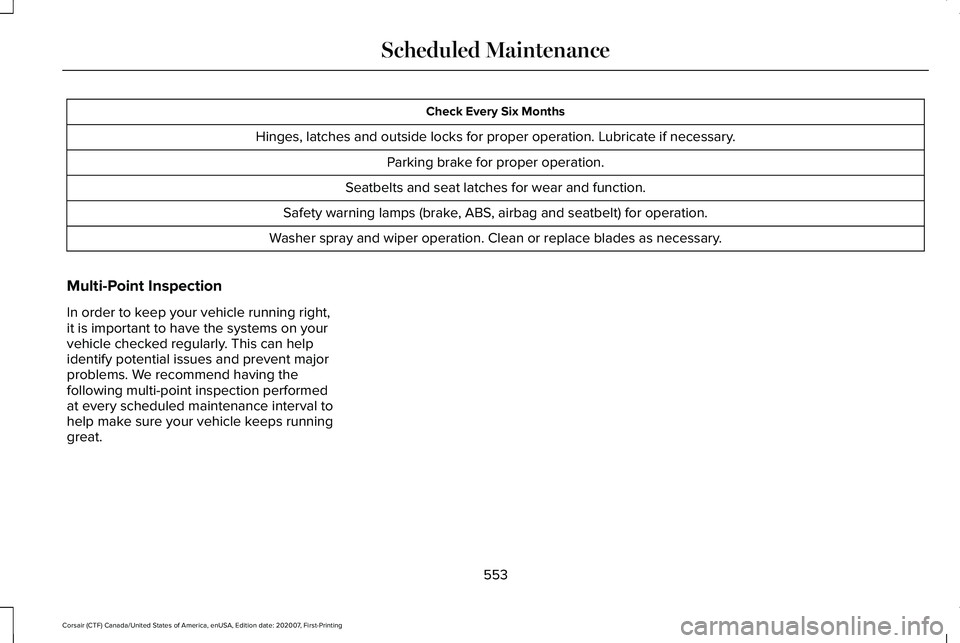
Check Every Six Months
Hinges, latches and outside locks for proper operation. Lubricate if necessary. Parking brake for proper operation.
Seatbelts and seat latches for wear and function.
Safety warning lamps (brake, ABS, airbag and seatbelt) for operation.
Washer spray and wiper operation. Clean or replace blades as necessary.
Multi-Point Inspection
In order to keep your vehicle running right,
it is important to have the systems on your
vehicle checked regularly. This can help
identify potential issues and prevent major
problems. We recommend having the
following multi-point inspection performed
at every scheduled maintenance interval to
help make sure your vehicle keeps running
great.
553
Corsair (CTF) Canada/United States of America, enUSA, Edition date: 202007, First-Printing Scheduled Maintenance
Page 620 of 638
3
360 Degree Camera...................................268
360 Degree Camera Cameras.......................269
360 Degree Camera Settings..........................271
360 Degree Camera Cameras
.................269
Locating the Front View Camera...................269
Locating the Rear View Camera....................269
Locating the Side View Camera.....................269
360 Degree Camera Guide Lines............270 Keep Out Zone....................................................270
360 Degree Camera Limitations..............268
360 Degree Camera Precautions............268
360 Degree Camera Settings....................271 Switching the 360 Degree Camera On and
Off.......................................................................271
Switching the 360 Degree Camera View....................................................................271
9
911 Assist
...........................................................62
A
A/C See: Climate Control..........................................164
About This Manual
...........................................11 ABS
See: Brakes..........................................................245
ABS driving hints See: Hints on Driving With Anti-Lock
Brakes...............................................................246
Accessories...................................................545
Accessories See: Replacement Parts Recommendation.....19
Active Park Assist
.........................................272
Active Park Assist – Troubleshooting...........274
Active Park Assist – Troubleshooting.........................................274
Active Park Assist – Frequently Asked Questions.........................................................274
Active Park Assist – Information Messages.........................................................274
Adaptive Cruise Control
.............................278
Adaptive Cruise Control –
Troubleshooting.............................................289
Adaptive Cruise Control Indicators - Vehicles With: Adaptive Cruise Control
With Lane Centering.................................285
Adaptive Cruise Control Indicators - Vehicles With: Adaptive Cruise Control
With Stop and Go
......................................286 Adaptive Cruise Control Indicators -
Vehicles With: Intelligent Adaptive Cruise
Control..........................................................286
System Warnings................................................286
Adaptive Cruise Control Limitations - Vehicles With: Adaptive Cruise Control
With Lane Centering.................................280
Adaptive Cruise Control Limitations - Vehicles With: Adaptive Cruise Control
With Stop and Go......................................280
Sensor Limitations.............................................280
Adaptive Cruise Control Precautions - Vehicles With: Adaptive Cruise Control
With Lane Centering
.................................278
Adaptive Cruise Control Precautions - Vehicles With: Adaptive Cruise Control
With Stop and Go
......................................279
Hilly Condition Usage.......................................280
When Following a Vehicle................................
279
Adaptive Cruise Control – Troubleshooting.........................................289
Adaptive Cruise Control – Information Messages.........................................................289
Adaptive Headlamps...................................105 About Adaptive Headlamps.............................105
Camera Detects Lane Markings......................
106
Camera Detects Traffic Signs...........................107
Steering Around a Curve..................................106
617
Corsair (CTF) Canada/United States of America, enUSA, Edition date: 202007, First-Printing Index
Page 622 of 638
Switching the Climate Control On and
Off.......................................................................165
Automatic High Beam Control....................110
Automatic High Beam Control Indicators........................................................111
Automatic Transmission - Excluding: Plug-In Hybrid Electric Vehicle
(PHEV)...........................................................232
Automatic Transmission Adaptive
Learning...........................................................236
If Your Vehicle Gets Stuck in Mud or Snow.................................................................236
Manual Park Release.........................................234
SelectShift™ Automatic Transmission............234
Understanding the Shift Positions of Your Automatic Transmission...............................232
Automatic Transmission Fluid Check............................................................379
Automatic Transmission - Plug-In Hybrid Electric Vehicle (PHEV).............................237
If Your Vehicle Gets Stuck In Mud or Snow.................................................................239
Understanding the Shift Positions of Your Automatic Transmission...............................
237
Auto-Start-Stop.............................................204 Disabling Auto-Start-Stop................................205
Enabling Auto-Start-Stop..................................204 Autowipers......................................................100
Autowipers Settings...........................................100
Low Temperature Wipe Inhibit.........................100
Auxiliary Power Points.................................192 12 Volt DC Power Point......................................192
USB Port and Power Point Locations.............
192
AWD See: All-Wheel Drive..........................................240
B
Battery See: Changing the 12V Battery......................380
Blind Spot Information System.................299 Switching the System On and Off..................300
System Errors......................................................300
Using the Blind Spot Information
System..............................................................299
BLIS See: Blind Spot Information System..............299
Body Styling Kits
...........................................394
Bonnet Lock See: Opening and Closing the Hood............365
Booster Seats..................................................34 Types of Booster Seats.......................................35
Brake Fluid Check........................................379 Brake Fluid Service Interval.............................380 Brakes.............................................................245
General Information...........................................245
Breaking-In.....................................................333
Bulb Specification Chart.............................460
C
Canceling the Set Speed............................277
Capacities and Specifications - 2.0L.......439 Air Conditioning System...................................
439
Alternative Engine Oil for Extremely Cold Climates............................................................442
Engine Coolant...................................................440
Engine Oil..............................................................441
Fuel Tank..............................................................444
Grease...................................................................444
Hydraulic Brake System....................................444
Locks......................................................................445
Washer Reservoir...............................................446
Capacities and Specifications - 2.3L.......446 Air Conditioning System...................................
447
Alternative Engine Oil for Extremely Cold Climates...........................................................450
Engine Coolant...................................................448
Engine Oil.............................................................449
Fuel Tank...............................................................451
Grease....................................................................451
Hydraulic Brake System...................................452
619
Corsair (CTF) Canada/United States of America, enUSA, Edition date: 202007, First-Printing Index
Page 623 of 638
Locks......................................................................453
Washer Reservoir...............................................453
Capacities and Specifications - 2.5L, Plug-In Hybrid Electric Vehicle
(PHEV)...........................................................454
Air Conditioning System...................................454
Engine Coolant...................................................455
Engine Oil.............................................................456
Fuel Tank..............................................................457
Grease...................................................................457
Hydraulic Brake System...................................458
Locks.....................................................................459
Washer Reservoir...............................................459
Capacities and Specifications...................433
Car Wash See: Cleaning the Exterior...............................387
Catalytic Converter
......................................222
On-Board Diagnostics (OBD-II).......................223
Readiness for Inspection and Maintenance (I/M) Testing.....................................................224
Changing a Bulb
...........................................385
Changing a Fuse..........................................363
Engine Compartment Fuse Box......................363
Fuse Types...........................................................364
General Information...........................................363
Changing a Road Wheel.............................423 Dissimilar Spare Wheel and Tire Assembly
Information.......................................................424 Tire Change Procedure....................................425
Changing the 12V Battery..........................380 Remove and Reinstall the Battery..................382
Changing the Engine Air Filter - 2.0L/ 2.3L................................................................372
Gas Engines.........................................................372
Changing the Engine Air Filter - 2.5L, Plug-In Hybrid Electric Vehicle
(PHEV)...........................................................373
Changing the Vehicle Wi-Fi Hotspot Name or Password
................................................466
Changing the Wiper Blades......................384 Front Wiper Blades............................................384
Rear Window Wiper Blade...............................385
Charging the High Voltage Battery.........225 IMPORTANT SAFETY INSTRUCTIONS.........
225
Checking MyKey System Status.................74
Checking the Wiper Blades.......................384
Child Restraint and Seatbelt Maintenance..................................................48
Child Restraint Positioning............................37
Child Safety......................................................26 General Information.............................................26
Child Safety Locks..........................................39 Left-Hand Side.......................................................40
Right-Hand Side....................................................40
Cleaning Leather Seats...............................391 Cleaning Products........................................386
Materials...............................................................386
Cleaning the Engine
....................................389
Cleaning the Exterior...................................387 Cleaning the Headlamps..................................387
Exterior Chrome Parts.......................................388
Exterior Plastic Parts..........................................388
Stripes or Graphics............................................388
Underbody...........................................................388
Under Hood.........................................................388
Cleaning the Instrument Panel and Instrument Cluster Lens...........................390
Cleaning the Interior...................................390
Cleaning the Wheels...................................392
Cleaning the Windows and Wiper Blades...........................................................389
Clearing All MyKeys........................................73
Clearing the Garage Door Opener
...........190
Climate............................................................504
Accessing Rear Climate Controls...................507
Accessing the Climate Control Menu...........
504
Directing the Airflow..........................................504
Rear Climate Control Lock Indicator.............
507
Setting the Blower Motor Speed...................505
Setting the Temperature..................................505
Switching Auto Mode On and Off..................505
Switching Dual Zone Mode On and Off.......505
620
Corsair (CTF) Canada/United States of America, enUSA, Edition date: 202007, First-Printing Index
Page 625 of 638
Daytime Running Lamps - Vehicles With:
Configurable Daytime Running
Lamps............................................................104
Daytime Running Lamps - Vehicles With: Daytime Running Lamps (DRL)...............104
Declaration of Conformity..........................598
Declaration of Conformity - Vehicles With: SYNC 3.........................................................599
Radio Frequency Statement............................599
Digital Radio
...................................................470
HD Radio Reception and Station
Troubleshooting..............................................471
Direction Indicators
.......................................107
Indicating a Lane Change.................................107
Doors and Locks.............................................76
Drive Mode Control......................................312 Drive Modes.........................................................312
Drive Modes
...................................................312
Conserve...............................................................312
Deep Conditions..................................................312
Excite......................................................................313
Normal
....................................................................313
Preserve EV..........................................................313
Pure EV..................................................................313
Slippery..................................................................314
Driver Alert
.....................................................292
Using Driver Alert...............................................293 Driver and Passenger Airbags....................52
Children and Airbags...........................................53
Proper Driver and Front Passenger Seating
Adjustment.........................................................53
Driver and Passenger Knee Airbags.........57
Driving Aids...................................................292
Driving Hints
..................................................333
Driving Through Water................................333
DRL See: Daytime Running Lamps - Vehicles With:
Configurable Daytime Running Lamps......104
See: Daytime Running Lamps - Vehicles With: Daytime Running Lamps (DRL)....................
104
E
Economical Driving
......................................333
Electric Parking Brake.................................246 Applying the Electric Parking Brake..............246
Automatically Releasing the Electric Parking
Brake.................................................................247
Manually Releasing the Electric Parking Brake.................................................................247
Releasing the Electric Parking Brake if the Vehicle Battery is Running Out of
Charge..............................................................247
Electric Vehicle Information........................517 Charge Preferences...........................................521 Charge Settings...................................................518
Charge Time Settings.......................................522
Departure Time Settings..................................
523
Engine On Due To...............................................517
Power Flow............................................................517
Vehicle Operational States...............................517
Electromagnetic Compatibility
..................563
Emergency Call Limitations..........................63
Emergency Call Requirements....................62
Emission Law
..................................................221
Noise Emissions Warranty, Prohibited
Tampering Acts and Maintenance............222
Tampering With a Noise Control System...............................................................221
Enabling Remote Start
..................................161
End User License Agreement...................568 VEHICLE SOFTWARE END USER LICENSE
AGREEMENT (EULA) ....................................568
Engine Block Heater
...................................202
Using the Engine Block Heater......................203
Engine Coolant Check................................374 Adding Coolant...................................................375
Coolant Change..................................................377
Engine Coolant Temperature
Management...................................................378
Fail-Safe Cooling.................................................377
Recycled Coolant...............................................376
Severe Climates..................................................376
622
Corsair (CTF) Canada/United States of America, enUSA, Edition date: 202007, First-Printing Index
Page 626 of 638
Engine Emission Control.............................221
Engine Oil Check..........................................370
Adding Engine Oil...............................................371
Engine Oil Dipstick.......................................370
Engine Specifications - 2.0L......................433
Drivebelt Routing................................................434
Engine Specifications - 2.3L
......................434
Drivebelt Routing................................................435
Engine Specifications - 2.5L, Plug-In Hybrid Electric Vehicle (PHEV)............................435
Entering a Parallel Parking Space
............272
Entering a Perpendicular Parking Space............................................................272
Entertainment................................................492 AM/FM Radio.......................................................493
Apps.......................................................................504
Bluetooth Stereo or USB..................................
502
CD (If equipped)..................................................501
HD Radio ™ Information (If Available)..............497
SiriusXM® Satellite Radio (If Activated).........
493
Sources.................................................................492
Supported Media Players, Formats and Metadata Information...................................504
USB Ports.............................................................504
Environment.....................................................22
EPB See: Electric Parking Brake.............................246 Essential Towing Checks
............................328
Before Towing a Trailer.....................................329
Hitches..................................................................328
Launching or Retrieving a Boat or Personal
Watercraft (PWC)............................................329
Safety Chains......................................................328
Trailer Brakes.......................................................328
Trailer Lamps.......................................................329
When Towing a Trailer.......................................329
Event Data Recording See: Data Recording.............................................14
Exiting a Parking Space
..............................273
Export Unique Options...................................21
Extending the Remote Start Duration
.......161
Exterior Mirrors...............................................113 Auto-Dimming Feature.......................................115
Auto-Folding Mirrors............................................114
Blind Spot Monitor...............................................115
Fold-Away Exterior Mirrors................................114
Heated Exterior Mirrors......................................114
Lincoln Welcome Mat..........................................115
Memory Mirrors.....................................................115
Power Exterior Mirrors........................................113
Signal Indicator Mirrors.......................................115 F
Fastening the Seatbelts
................................42
How to Extract Seatbelts in the Rear
Outermost Positions........................................45
Seatbelt Locking Modes.....................................43
Using a Sliding Clip..............................................43
Using Seatbelts During Pregnancy..................43
Flat Tire See: Changing a Road Wheel.........................
423
Flat Tire Inflation See: Tire Sealant and Inflator Kit....................397
Floor Mats
.......................................................334
Fog Lamps - Front See: Front Fog Lamps........................................104
Front Fog Lamps...........................................104 Front Fog Lamp Indicator..................................105
Switching the Front Fog Lamps On or
Off.......................................................................104
Front Parking Aid
.........................................260
Object Distance Indicator................................262
Front Passenger Sensing System..............54
Fuel and Refueling.......................................209
Fuel Consumption.........................................219 Advertised Capacity...........................................219
Calculating Fuel Economy................................219
Filling the Fuel Tank............................................219
Fuel Filler Funnel Location..........................211
623
Corsair (CTF) Canada/United States of America, enUSA, Edition date: 202007, First-Printing Index