display LINCOLN CORSAIR 2021 Owners Manual
[x] Cancel search | Manufacturer: LINCOLN, Model Year: 2021, Model line: CORSAIR, Model: LINCOLN CORSAIR 2021Pages: 638, PDF Size: 5.7 MB
Page 558 of 638
NORMAL SCHEDULED
MAINTENANCE
Intelligent Oil-Life Monitor™
Your vehicle has an Intelligent Oil-Life
Monitor that determines when you should
change the engine oil based on how you use
your vehicle. By using several important
factors in its calculations, the monitor helps
reduce the cost of owning your vehicle and
reduces environmental waste at the same
time.
This means you do not have to remember to
change the oil on a mileage-based schedule.
Your vehicle lets you know when an oil
change is due by displaying a message in
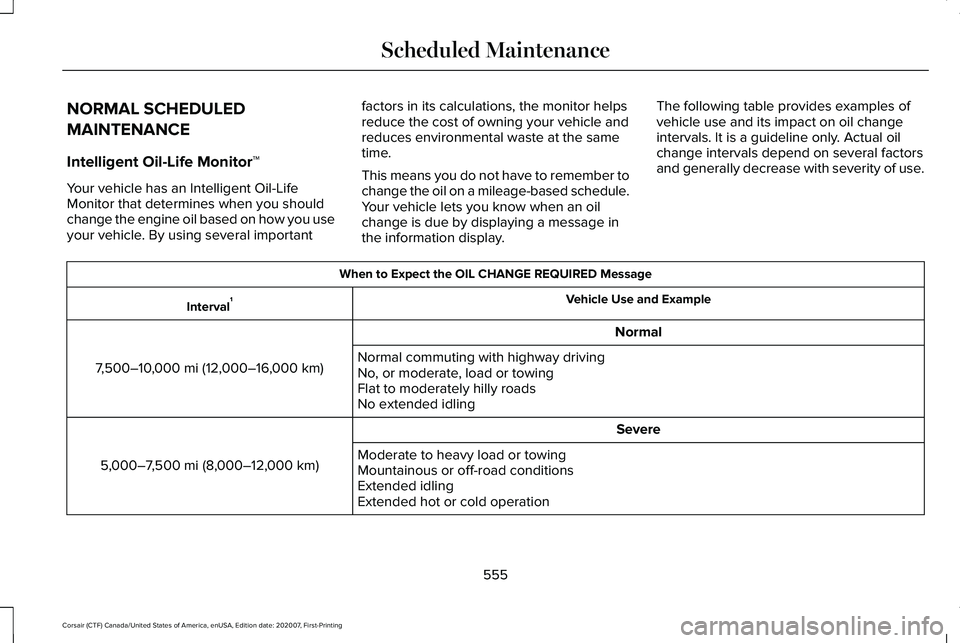
the information display.The following table provides examples of
vehicle use and its impact on oil change
intervals. It is a guideline only. Actual oil
change intervals depend on several factors
and generally decrease with severity of use. When to Expect the OIL CHANGE REQUIRED Message
Vehicle Use and Example
Interval 1
Normal
7,500–10,000 mi (12,000–16,000 km) Normal commuting with highway driving
No, or moderate, load or towing
Flat to moderately hilly roads
No extended idling
Severe
5,000–7,500 mi (8,000–12,000 km) Moderate to heavy load or towing
Mountainous or off-road conditions
Extended idling
Extended hot or cold operation
555
Corsair (CTF) Canada/United States of America, enUSA, Edition date: 202007, First-Printing Scheduled Maintenance
Page 559 of 638
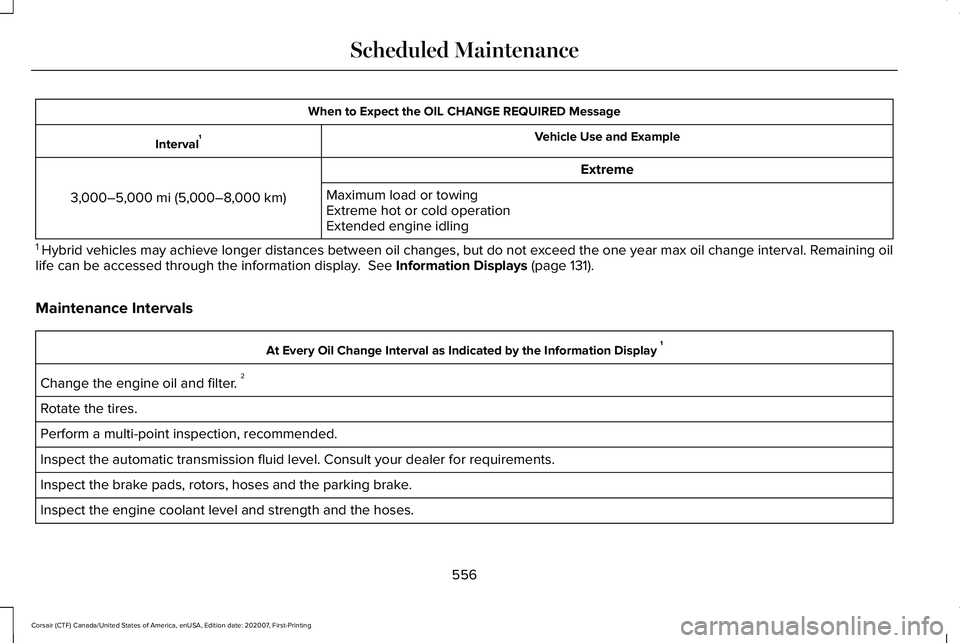
When to Expect the OIL CHANGE REQUIRED Message
Vehicle Use and Example
Interval 1
Extreme
3,000–5,000 mi (5,000–8,000 km) Maximum load or towing
Extreme hot or cold operation
Extended engine idling
1 Hybrid vehicles may achieve longer distances between oil changes, but do\
not exceed the one year max oil change interval. Remaining oil
life can be accessed through the information display. See Information Displays (page 131).
Maintenance Intervals At Every Oil Change Interval as Indicated by the Information Display
1
Change the engine oil and filter. 2
Rotate the tires.
Perform a multi-point inspection, recommended.
Inspect the automatic transmission fluid level. Consult your dealer for \
requirements.
Inspect the brake pads, rotors, hoses and the parking brake.
Inspect the engine coolant level and strength and the hoses.
556
Corsair (CTF) Canada/United States of America, enUSA, Edition date: 202007, First-Printing Scheduled Maintenance
Page 560 of 638
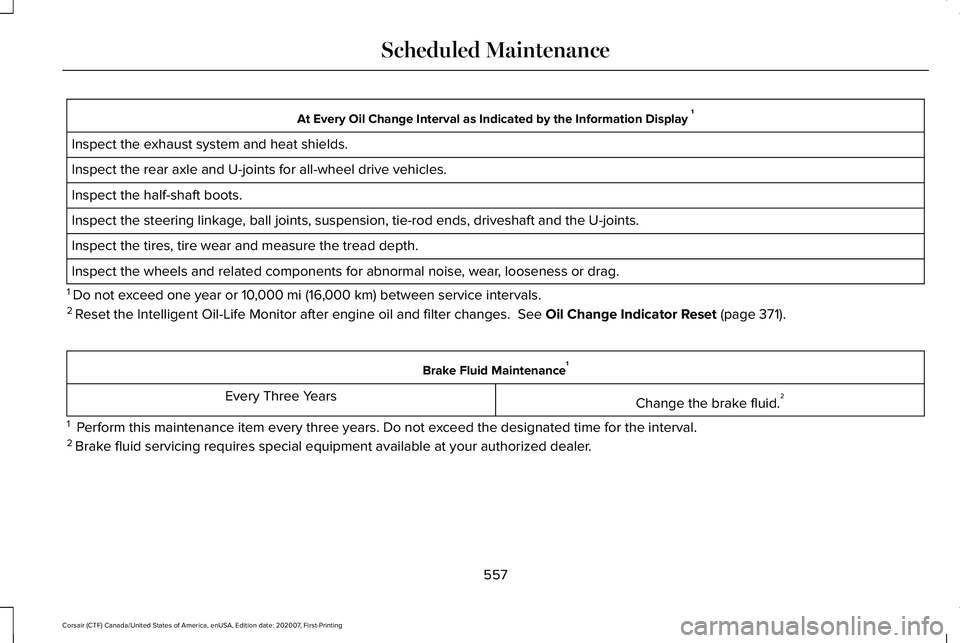
At Every Oil Change Interval as Indicated by the Information Display
1
Inspect the exhaust system and heat shields.
Inspect the rear axle and U-joints for all-wheel drive vehicles.
Inspect the half-shaft boots.
Inspect the steering linkage, ball joints, suspension, tie-rod ends, driveshaft and the U-joints.
Inspect the tires, tire wear and measure the tread depth.
Inspect the wheels and related components for abnormal noise, wear, looseness or drag.
1 Do not exceed one year or 10,000 mi (16,000 km) between service intervals.
2 Reset the Intelligent Oil-Life Monitor after engine oil and filter change\
s.
See Oil Change Indicator Reset (page 371). Brake Fluid Maintenance
1
Change the brake fluid. 2
Every Three Years
1 Perform this maintenance item every three years. Do not exceed the designated time for the interval.
2 Brake fluid servicing requires special equipment available at your authorize\
d dealer.
557
Corsair (CTF) Canada/United States of America, enUSA, Edition date: 202007, First-Printing Scheduled Maintenance
Page 562 of 638
SPECIAL OPERATING CONDITIONS
SCHEDULED MAINTENANCE
If you operate your vehicle primarily in any
of the following conditions, you need to
perform extra maintenance as indicated. If
you operate your vehicle occasionally under
any of these conditions, it is not necessary
to perform the extra maintenance. For
specific recommendations, see your
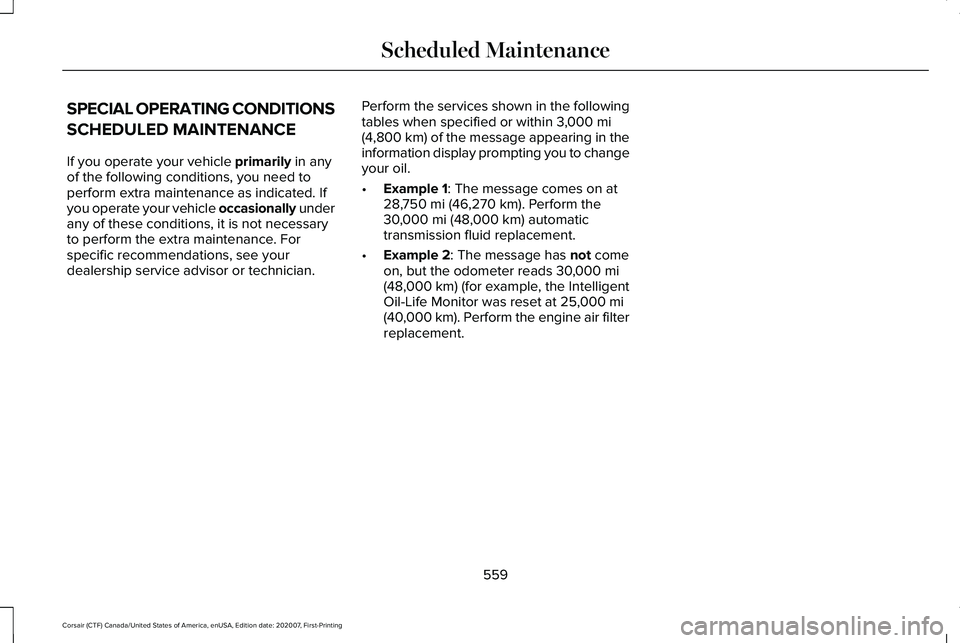
dealership service advisor or technician. Perform the services shown in the following
tables when specified or within
3,000 mi
(4,800 km) of the message appearing in the
information display prompting you to change
your oil.
• Example 1
: The message comes on at
28,750 mi (46,270 km). Perform the
30,000 mi (48,000 km) automatic
transmission fluid replacement.
• Example 2
: The message has not come
on, but the odometer reads 30,000 mi
(48,000 km) (for example, the Intelligent
Oil-Life Monitor was reset at 25,000 mi
(40,000 km). Perform the engine air filter
replacement.
559
Corsair (CTF) Canada/United States of America, enUSA, Edition date: 202007, First-Printing Scheduled Maintenance
Page 563 of 638

Towing a Trailer or Using a Car-top Carrier
Change engine oil and filter as indicated by the information display and\
perform services listed in the Normal
Scheduled Maintenance chart.
As required
Inspect rear axle and U-joints (AWD).
Inspect frequently, service
as required
Change automatic transmission fluid.
Every 30,000 mi
(48,000 km)
Replace spark plugs.
Every
60,000 mi
(96,000 km) Extensive Idling or Low-speed Driving for Long Distances, as in Heavy Commercial Use Such as Delivery, Taxi, Patrol Car or Livery
Change engine oil and filter as indicated by the information display and\
perform services listed in the Normal
Scheduled Maintenance chart.
As required
Replace cabin air filter.1
Inspect frequently, service
as required
Replace engine air filter.
560
Corsair (CTF) Canada/United States of America, enUSA, Edition date: 202007, First-Printing Scheduled Maintenance
Page 592 of 638
of the foregoing, “Enterprise Applications
”
shall mean Geomarketing applications,
GIS applications, mobile business asset
management applications, call center
applications, telematics applications,
public organization Internet applications
or for providing geocoding services.
V. Europe Territory A. Use of Certain Traffic Codes in Europe 1. General Restrictions Applicable to
Traffic Codes. Client acknowledges and
agrees that in certain countries of the
Europe Territory, Client will need to
obtain rights directly from third party
RDS-TMC code providers to receive and
use the Traffic Codes in the Data and to
deliver to End-Users Transactions in any
way derived from or based on such
Traffic Codes. For such countries, HERE
shall deliver the Data incorporating
Traffic Codes to Client only after
receiving certification from Client of its
having obtained such rights. 2. Display of Third Party Rights Legends
for Belgium. Client shall, for each Trans-
action that uses Traffic Codes for
Belgium, provide the following notice to
the End-User: “Traffic Codes for Belgium
are provided by the Ministerie van de
Vlaamse Gemeenschap and the
Ministèrie de l’Equipement et des
Transports.
”
B. Paper Maps. With respect to any license
granted to Client relating to making,
selling or distributing paper maps (i.e., a
map fixed on a paper or paper-like
medium): (a) such license with respect to
Data for the Territory of Great Britain is
conditioned on Client’ s entering into and
complying with a separate written agree-
ment with the Ordnance Survey (“ OS”) to
create and sell paper maps, Client’ s
paying to the OS any and all applicable
paper map royalties, and Client’ s
complying with the OS copyright notice
requirements; (b) such license for selling
or otherwise distributing for charge with
respect to Data for the Territory of Czech
Republic is conditioned on Client’ s
obtaining prior written consent from Kartografie a.s.; (c) such license for selling
or distributing with respect to Data for the
Territory of Switzerland is conditioned on
Client’
s obtaining a permit from
Bundesamt für Landestopografie of
Switzerland; (d) Client is restricted from
using Data for the Territory of France to
create paper maps with a scale between
1:5,000 and 1:250,000; and (e) Client is
restricted from using any Data to create,
sell or distribute paper maps that are the
same or substantially similar, in terms of
data content and specific use of color,
symbols and scale, to paper maps
published by the European national
mapping agencies, including without
limitation, Landervermessungämter of
Germany, Topografische Dienst of the
Netherlands, Nationaal Geografisch
Instituut of Belgium, Bundesamt für
Landestopografie of Switzerland,
Bundesamt für Eich-und Vermessung-
swesen of Austria, and the National Land
Survey of Sweden.
589
Corsair (CTF) Canada/United States of America, enUSA, Edition date: 202007, First-Printing Appendices
Page 621 of 638
Switching Adaptive Headlamps On or
Off.......................................................................107
Adjusting the Headlamps ...........................382
Horizontal Aim Adjustment..............................383
Vertical Aim Adjustment...................................382
Adjusting the Set Speed Tolerance - Vehicles With: Intelligent Adaptive Cruise
Control
..........................................................288
Adjusting the Steering Wheel - Vehicles With: Manual Adjustable Steering
Column
............................................................97
Adjusting the Steering Wheel - Vehicles With: Power Adjustable Steering
Column
............................................................97
AFS See: Adaptive Headlamps................................105
Airbag Disposal
...............................................60
Air Conditioning See: Climate Control..........................................164
Air Filter See: Changing the Engine Air Filter - 2.0L/
2.3L....................................................................372
See: Changing the Engine Air Filter - 2.5L, Plug-In Hybrid Electric Vehicle (PHEV)......373
All-Wheel Drive.............................................240
Ambient Lighting
...........................................108
Adjusting the Brightness...................................109
Changing the Color............................................109 Switching Ambient Lighting Off.......................109
Switching Ambient Lighting On.......................109
Anti-Theft Alarm System...............................93 Arming the Anti-Theft Alarm System...............94
Disarming the Anti-Theft Alarm System..........94
How Does the Anti-Theft Alarm System
Work.....................................................................93
What Are the Inclination Sensors.....................93
What Are the Interior Sensors...........................93
What Is the Anti-Theft Alarm System...............93
What Is the Battery Backup Alarm...................94
What Is the Perimeter Alarm..............................93
Anti-Theft Alarm System Settings..............94 Setting the Alarm Security Level......................94
Switching Ask on Exit On and Off....................94
What are the Alarm Security Levels.................94
What Is Ask on Exit...............................................94
Appendices....................................................563
Apps.................................................................523 SiriusXM Traffic and Travel Link.....................525
Using Apps on an Android Device................524
Using Apps on an iOS Device........................524
Using Mobile Navigation on an Android
Device...............................................................524
At a Glance.......................................................23
Audible Warnings and Indicators..............130 Headlamps On Warning Chime.......................130
Keyless Warning Alert........................................130 Parking Brake On Warning Chime..................
130
Audio System
................................................468
General Information...........................................468
Audio Unit
......................................................469
Adjusting the Volume........................................469
Changing Radio Stations..................................469
Selecting the Audio Modes.............................469
Switching the Audio Unit On and Off............
470
Switching the Display On and Off..................470
Using Seek, Fast Forward and Reverse.......470
Auto Hold
.......................................................249
Auto Hold Indicator............................................249
Switching Auto Hold On and Off....................249
Using Auto Hold.................................................249
Autolamps.......................................................103 Windshield Wiper Activated Headlamps......103
Automatic Climate Control..........................164 Accessing the Air Distribution Controls........164
Accessing the Climate Control Menu............164
Setting the Blower Motor Speed.....................164
Setting the Temperature....................................164
Switching Auto Mode On and Off...................164
Switching Maximum Air Conditioning On and
Off.......................................................................165
Switching Maximum Defrost On and Off......166
Switching Recirculated Air On and Off..........166
Switching the Air Conditioning On and Off.......................................................................165
618
Corsair (CTF) Canada/United States of America, enUSA, Edition date: 202007, First-Printing Index
Page 627 of 638
Fuel Filter........................................................384
Fuel Quality - Gasoline................................210
Choosing the Right Fuel....................................210
Fuel Quality - Plug-In Hybrid Electric Vehicle (PHEV).............................................211
Choosing the Right Fuel.....................................211
Fuel Shutoff....................................................337
Fuses
...............................................................352
Fuse Specification Chart............................352 Engine Compartment Fuse Box.....................352
Passenger Compartment Fuse Box..............
360
G
Garage Door Opener...................................187
Garage Door Opener Limitations..............188
Garage Door Opener Precautions............187
Garage Door Opener Radio Frequencies.................................................190
FCC and RSS-210 Industry Canada Compliance......................................................190
Gauges - Plug-In Hybrid Electric Vehicle (PHEV), Vehicles With: 12.3 Inch
Instrument Cluster Display Screen
.........118
Battery Gauge......................................................120
Engine Coolant Temperature Gauge..............
121
Fuel Gauge...........................................................120
Left and Right Information Group...................
120 Low Fuel Reminder.............................................120
Status Bar..............................................................120
Vehicle Driving Range.........................................121
Gauges - Vehicles With: 12.3 Inch Instrument Cluster Display Screen........124
Engine Coolant Temperature Gauge.............126
Fuel Gauge...........................................................125
Left and Right Information Group...................125
Status Bar..............................................................125
Gauges - Vehicles With: 6.5 Inch Instrument Cluster Display Screen........122
Engine Coolant Temperature Gauge.............
123
Fuel Gauge............................................................123
Information Bar....................................................123
Information Display.............................................123
Gearbox See: Transmission..............................................232
General Information on Radio Frequencies...................................................64
Intelligent Access..................................................64
General Maintenance Information
...........550
Multi-Point Inspection........................................553
Owner Checks and Services...........................552
Protecting Your Investment.............................550
Why Maintain Your Vehicle?............................550
Why Maintain Your Vehicle at Your
Dealership?.....................................................550 Getting Assistance Outside the U.S. and
Canada.........................................................347
Getting the Services You Need................343 Away From Home...............................................343
Global Opening and Closing.......................113 Closing the Windows...........................................113
Opening the Windows........................................113
H
Hazard Flashers
............................................337
Headlamp Adjusting See: Adjusting the Headlamps.......................382
Headlamp Exit Delay
....................................104
Headlamp Removal See: Removing a Headlamp............................
385
Headrest See: Head Restraints...........................................171
Head Restraints
...............................................171
Installing the Head Restraint.............................173
Lowering the Head Restraint............................172
Raising the Head Restraint................................172
Removing the Head Restraint..........................172
Tilting the Front Seat Head Restraint.............172
Head Up Display............................................157 Configuring The Head Up Display..................158
Head Up Display Overview..............................159
Maintaining Your Head Up Display.................160
624
Corsair (CTF) Canada/United States of America, enUSA, Edition date: 202007, First-Printing Index
Page 628 of 638
Heated Exterior Mirrors...............................168
Heated Rear Window...................................167
Heated Seats..................................................182
Front Seats............................................................182
Rear Seats.............................................................183
Heated Windshield
.......................................167
Windshield Wiper De-Icer.................................167
Heating See: Climate Control..........................................164
High Voltage Battery...................................225 General Information...........................................225
Hill Start Assist..............................................248 Switching the System On and Off..................248
Using Hill Start Assist........................................
248
Hints on Controlling the Interior Climate..........................................................166
Defogging the Side Windows in Cold Weather.............................................................167
General Hints.......................................................166
Quickly Cooling the Interior..............................
167
Quickly Heating the Interior..............................167
Recommended Settings for Cooling..............167
Recommended Settings for Heating..............167
Hints on Driving With Anti-Lock Brakes..........................................................246
Hood Lock See: Opening and Closing the Hood............365
Horn...................................................................98 How Does Adaptive Cruise Control With
Stop and Go Work.....................................278
How Does Speed Sign Recognition Work...............................................................315
How Does the Garage Door Opener Work
...............................................................187
How Does the Rear Occupant Alert System Work...............................................................185
Hybrid Vehicle Frequently Asked Questions....................................................207
I
In California (U.S. Only)...............................344
Information Displays
......................................131
General Information.............................................131
Information Messages
..................................137
Active Park............................................................138
Adaptive Cruise Control....................................138
Adaptive Headlamps..........................................139
AdvanceTrac ™ and Traction Control................139
Alarm......................................................................140
Automatic Engine Shutdown............................140
AWD........................................................................\
.141
Battery and Charging System (12 Volt)..........142
Battery and Charging System (High Voltage).............................................................143 Blind Spot Information and Cross Traffic Alert
System...............................................................144
Doors and Locks..................................................144
Driver Alert............................................................145
Fuel........................................................................\
.146
Hill Start Assist.....................................................146
Keys and Intelligent Access..............................147
Lane Keeping System........................................148
Maintenance.........................................................148
MyKey.....................................................................150
Park Aid...................................................................151
Park Brake.............................................................152
Power Steering....................................................153
Pre-Collision Assist.............................................154
Remote Start.........................................................154
Seats.......................................................................154
Starting System ...................................................155
Tire Pressure Monitoring System....................155
Transmission.........................................................156
Installing Child Restraints.............................28 Child Restraints.....................................................28
Using Lap and Shoulder Belts...........................28
Using Lower Anchors and Tethers for
CHildren (LATCH)..............................................31
Using Tether Straps..............................................33
Instrument Cluster
..........................................118
Instrument Lighting Dimmer.......................103
Instrument Panel
.............................................23
625
Corsair (CTF) Canada/United States of America, enUSA, Edition date: 202007, First-Printing Index
Page 630 of 638
Mechanical Key......................................................77
Opening a Rear Door from Inside.....................77
Power Door Locks................................................76
Remote Control.....................................................76
Smart Unlocks........................................................78
Welcome Lighting.................................................80
Locking and Unlocking the Doors Using Keyless Entry.................................................83
Locking the Doors................................................84
Unlocking the Doors............................................83
Luggage Covers
............................................318
Lug Nuts See: Changing a Road Wheel.........................
423
M
Maintenance..................................................365 General Information...........................................365
Master Access Code.......................................81 What Is the Master Access Code......................81
Memory Function
...........................................177
Easy Entry and Exit Feature..............................178
Linking a PreSet Position to Your Remote
Control ..............................................................178
Personal Profiles..................................................178
Saving a PreSet Position....................................177
Message Center See: Information Displays..................................131 Mirrors
See: Windows and Mirrors.................................112
Mobile Communications Equipment
.........20
Moonroof..........................................................116
Bounce-Back..........................................................117
Motorcraft Parts - 2.0L................................436
Motorcraft Parts - 2.3L.................................437
Motorcraft Parts - 2.5L, Plug-In Hybrid Electric Vehicle (PHEV).............................438
MyKey Settings
................................................72
Configurable MyKey Settings............................72
Non-Configurable MyKey Settings...................72
MyKey – Troubleshooting.............................74 MyKey – Frequently Asked Questions............75
MyKey – Information Messages........................74
MyKey™..............................................................72 MyKey Settings......................................................72
MyKey – Troubleshooting...................................74
N
Navigation......................................................509 Changing the Format of the Map....................513
cityseeker..............................................................515
Michelin Travel Guide.........................................516
Navigation Map Accuracy and Updates.......
516
Route Guidance...................................................513
Setting a Destination...........................................511 SiriusXM Traffic and Travel Link......................
516
Zoom.......................................................................513
Network Connectivity
.................................462
Connecting the Vehicle to a Mobile
Network............................................................462
Network Connectivity – Troubleshooting.........................................463
Normal Scheduled Maintenance.............555 Intelligent Oil-Life Monitor™.............................555
Maintenance Intervals.......................................556
O
Oil Change Indicator Reset.........................371
Oil Check See: Engine Oil Check......................................370
Opening and Closing the Hood
...............365
Closing the Hood...............................................366
Opening the Hood.............................................365
Opening the Liftgate......................................85 Opening the Hands-Free Liftgate....................
86
Opening the Liftgate From Inside Your Vehicle................................................................85
Opening the Liftgate From Outside Your Vehicle................................................................85
Opening the Liftgate Using the Remote Control................................................................86
627
Corsair (CTF) Canada/United States of America, enUSA, Edition date: 202007, First-Printing Index