brake sensor LINCOLN CORSAIR 2021 User Guide
[x] Cancel search | Manufacturer: LINCOLN, Model Year: 2021, Model line: CORSAIR, Model: LINCOLN CORSAIR 2021Pages: 638, PDF Size: 5.7 MB
Page 284 of 638
WARNING: The system only warns
of vehicles detected by the radar sensor.
In some cases there may be no warning
or a delayed warning. Apply the brakes
when necessary. Failure to follow this
instruction could result in personal injury
or death. WARNING:
The system may not
detect stationary or slow moving vehicles
below
6 mph (10 km/h). WARNING:
The system does not
detect pedestrians or objects in the road. WARNING:
The system does not
detect oncoming vehicles in the same lane. WARNING:
The system may not
operate properly if the sensor is blocked.
Keep the windshield free from obstruction. WARNING:
The sensor may
incorrectly track lane markings as other
structures or objects. This can result in a
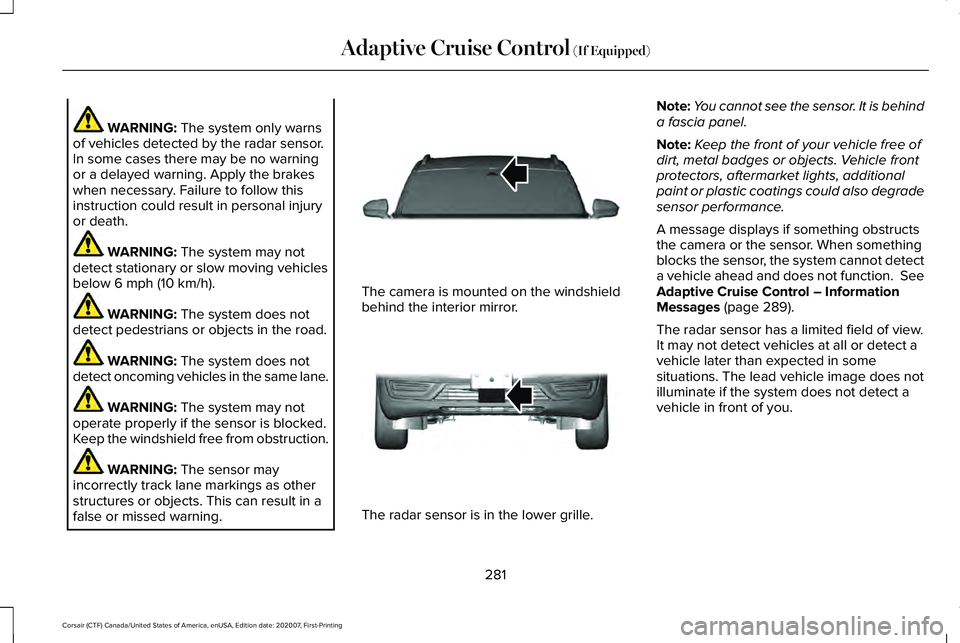
false or missed warning. The camera is mounted on the windshield
behind the interior mirror.
The radar sensor is in the lower grille.Note:
You cannot see the sensor. It is behind
a fascia panel.
Note: Keep the front of your vehicle free of
dirt, metal badges or objects. Vehicle front
protectors, aftermarket lights, additional
paint or plastic coatings could also degrade
sensor performance.
A message displays if something obstructs
the camera or the sensor. When something
blocks the sensor, the system cannot detect
a vehicle ahead and does not function. See
Adaptive Cruise Control – Information
Messages
(page 289).
The radar sensor has a limited field of view.
It may not detect vehicles at all or detect a
vehicle later than expected in some
situations. The lead vehicle image does not
illuminate if the system does not detect a
vehicle in front of you.
281
Corsair (CTF) Canada/United States of America, enUSA, Edition date: 202007, First-Printing Adaptive Cruise Control
(If Equipped)E307893 E307892
Page 286 of 638
The system may cancel and set the parking
brake if:
•
You unbuckle the seatbelt and open the
driver door after you stop your vehicle.
• Your vehicle is at a stop continuously for
more than three minutes.
The system may deactivate or prevent
activating when requested if:
• The vehicle has a blocked sensor.
• The brake temperature is too high.
• There is a failure in the system or a
related system.
SETTING THE ADAPTIVE CRUISE
CONTROL SPEED
Drive to the speed you prefer. Press either button to set the
current speed.
Take your foot off the accelerator pedal. The indicator, current gap setting and set
speed appear in the information display.
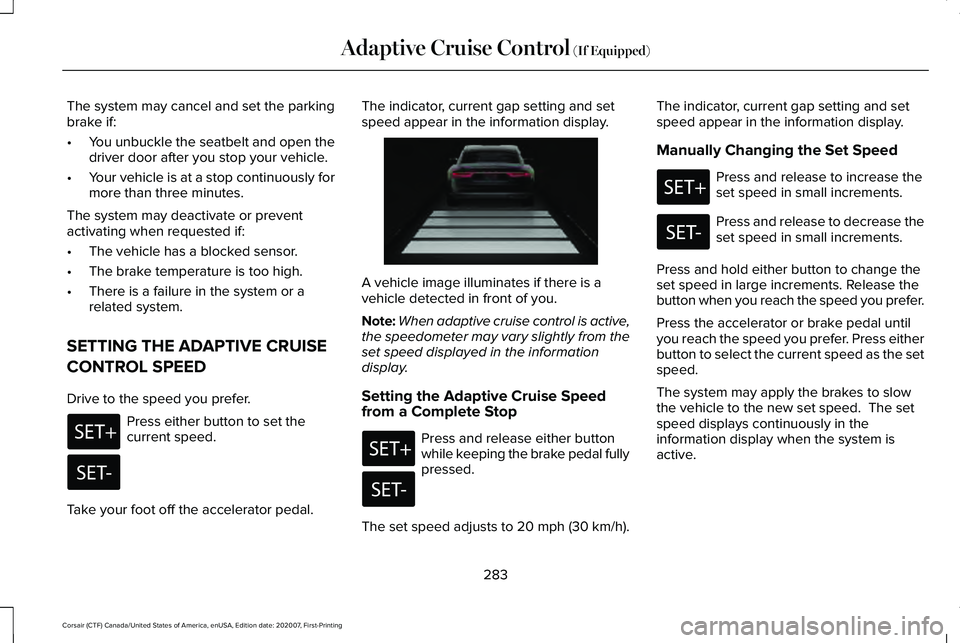
A vehicle image illuminates if there is a
vehicle detected in front of you.
Note:
When adaptive cruise control is active,
the speedometer may vary slightly from the
set speed displayed in the information
display.
Setting the Adaptive Cruise Speed
from a Complete Stop Press and release either button
while keeping the brake pedal fully
pressed.
The set speed adjusts to 20 mph (30 km/h). The indicator, current gap setting and set
speed appear in the information display.
Manually Changing the Set Speed Press and release to increase the
set speed in small increments.
Press and release to decrease the
set speed in small increments.
Press and hold either button to change the
set speed in large increments. Release the
button when you reach the speed you prefer.
Press the accelerator or brake pedal until
you reach the speed you prefer. Press either
button to select the current speed as the set
speed.
The system may apply the brakes to slow
the vehicle to the new set speed. The set
speed displays continuously in the
information display when the system is
active.
283
Corsair (CTF) Canada/United States of America, enUSA, Edition date: 202007, First-Printing Adaptive Cruise Control (If Equipped) E255686
Page 293 of 638
Adaptive Cruise Control – Information
Messages - Vehicles With: Adaptive
Cruise Control With Stop and Go
Note:
Depending on your vehicle options
and instrument cluster type, not all messages
display or are available. Note:
The system could abbreviate or
shorten certain messages depending upon
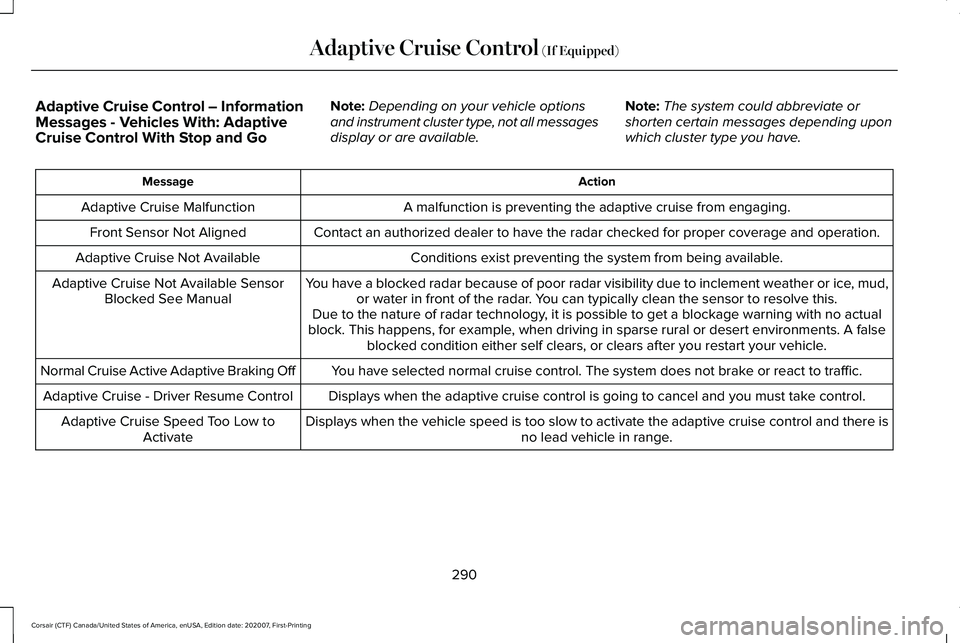
which cluster type you have. Action
Message
A malfunction is preventing the adaptive cruise from engaging.
Adaptive Cruise Malfunction
Front Sensor Not Aligned Contact an authorized dealer to have the radar checked for proper coverage and operation. Conditions exist preventing the system from being available.
Adaptive Cruise Not Available
You have a blocked radar because of poor radar visibility due to inclement weather or ic\
e, mud,or water in front of the radar. You can typically clean the sensor to resolve this.
Adaptive Cruise Not Available Sensor
Blocked See Manual Due to the nature of radar technology, it is possible to get a blockage warning with no actual
block. This happens, for example, when driving in sparse rural or desert environments. A false blocked condition either self clears, or clears after you restart your vehicl\
e.
You have selected normal cruise control. The system does not brake or react to traffic.
Normal Cruise Active Adaptive Braking Off
Displays when the adaptive cruise control is going to cancel and you mus\
t take control.
Adaptive Cruise - Driver Resume Control
Displays when the vehicle speed is too slow to activate the adaptive cru\
ise control and there isno lead vehicle in range.
Adaptive Cruise Speed Too Low to
Activate
290
Corsair (CTF) Canada/United States of America, enUSA, Edition date: 202007, First-Printing Adaptive Cruise Control (If Equipped)
Page 311 of 638
Active braking: It activates if the system
determines that a collision is about to occur.
The system may help the driver reduce
impact damage or completely avoid the
crash.
Note: If you perceive pre-collision assist
alerts as being too frequent or disturbing,
you can reduce the alert sensitivity, though
we recommend using the highest sensitivity
setting where possible. Setting lower
sensitivity would lead to fewer and later
system warnings.
Note: Brake support and active braking are
active at speeds up to 75 mph (120 km/h). If
your vehicle has a radar sensor, included
with adaptive cruise control, then brake
support and active braking are active up to
the maximum speed of your vehicle.
Note: The system turns off when you select
the deep conditions drive mode. Distance Indication and Alert (If Equipped)
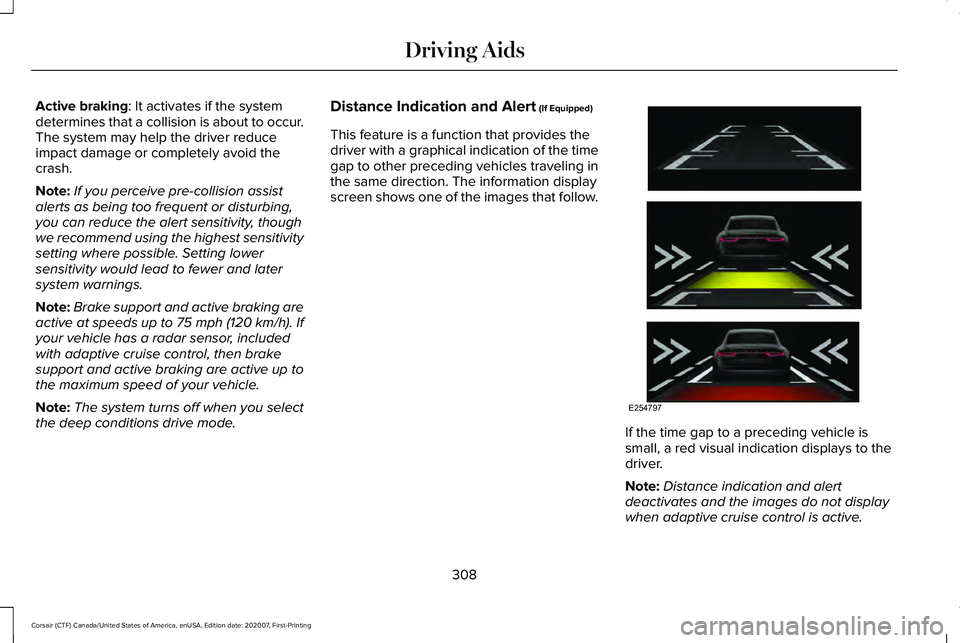
This feature is a function that provides the
driver with a graphical indication of the time
gap to other preceding vehicles traveling in
the same direction. The information display
screen shows one of the images that follow. If the time gap to a preceding vehicle is
small, a red visual indication displays to the
driver.
Note:
Distance indication and alert
deactivates and the images do not display
when adaptive cruise control is active.
308
Corsair (CTF) Canada/United States of America, enUSA, Edition date: 202007, First-Printing Driving AidsE254797
Page 385 of 638
Remove and Reinstall the Battery
To disconnect or remove the battery, do the
following:
1. Apply the parking brake and switch the
ignition off.
2. Switch all electrical equipment off, for example lights and radio.
3. Wait a minimum of two minutes before disconnecting the battery.
Note: The engine management system has
a power hold function and remains powered
for a period of time after you switch the
ignition off. This is to allow diagnostic and
adaptive tables to be stored. Disconnecting
the battery without waiting can cause
damage not covered by the vehicle
Warranty.
4. Disconnect the negative battery cable terminal.
5. Disconnect the positive battery cable terminal.
6. Remove the battery securing clamp.
7. Remove the battery.
8. To install, reverse the removal procedure. Note:
Before reconnecting the battery, make
sure the ignition remains switched off.
Note: Make sure the battery cable terminals
are fully tightened.
If you disconnect or replace the vehicle
battery, you must reset the following
features:
• Window bounce-back. See Windows
and Mirrors (page 112).
• Clock Settings.
• Pre-set radio stations.
• Steering Angle Sensor.
Note: To calibrate the steering angle sensor,
drive the vehicle above
30 mph (50 km/h)
for a minimum of 1.2 mi (2 km). Make sure to
drive straight ahead for a minimum of 30
seconds. Several vehicle functions are
disabled and a warning light could appear
until the sensor is calibrated. Note:
For flexible fuel vehicles, if you are
operating on E85, you could experience poor
starts or an inability to start the engine, and
driveability problems until the fuel trim and
ethanol content have been relearned. Drive
the vehicle at least
10 mi (16 km) to
completely relearn the idle trim and fuel trim
strategy.
Battery Disposal Make sure that you dispose of old
batteries in an environmentally
friendly way. Seek advice from
your local authority about recycling old
batteries.
ADJUSTING THE HEADLAMPS
Vertical Aim Adjustment
The assembly plant properly aims the
headlamps on your vehicle. If your vehicle
has been in an accident, have the alignment
of your headlamps checked by your
authorized dealer.
382
Corsair (CTF) Canada/United States of America, enUSA, Edition date: 202007, First-Printing MaintenanceE107998
Page 401 of 638
Note:
Do not drive the vehicle above 50 mph
(80 km/h).
Note: Do not drive further than
120 mi
(200 km). Drive only to the closest authorized
Ford dealer or tire repair shop to have your
tire inspected.
• Drive carefully and avoid abrupt steering
maneuvers.
• Periodically monitor tire inflation pressure
in the affected tire; if the tire is losing
pressure, have the vehicle towed.
• Read the information in the Tips for Use
of the Kit section to make sure safe
operation of the kit and your vehicle.
Tips for Use of the Kit
To ensure safe operation of the kit:
• Read all instructions and cautions fully.
• Before operating the kit, make sure your
vehicle is safely off the road and away
from moving traffic. Turn on the hazard
lights.
• Always set the parking brake to ensure
the vehicle doesn't move unexpectedly. •
Do not remove any foreign objects, such
as nails or screws, from the tire.
• When using the kit, leave the engine
running (only if the vehicle is outdoors or
in a well-ventilated area) so the
compressor does not drain the vehicle's
battery.
• Do not allow the compressor to operate
continuously for more than 15 minutes.
This will help prevent the compressor
from overheating.
• Never leave the kit unattended during
operation.
• Sealant compound contains latex. Those
with latex sensitivities should use
appropriate precautions to avoid an
allergic reaction.
• Keep the kit away from children.
• Only use the kit when the ambient
temperature is between -22°F (-30°C) and
158°F (70°C)
. •
Only use the sealing compound before
the use-by date. The use-by date is on a
label on the sealant canister and can be
seen through the rectangular viewing
window on the bottom of the compressor.
Check the use-by date regularly and
replace the canister when the sealant
expires.
• Do not store the kit unsecured inside the
passenger compartment of the vehicle
as it may cause injury during a sudden
stop or crash. Always store the kit in its
original location.
• After sealant use, the tire pressure
monitoring system sensor and valve stem
on the wheel must be replaced by an
authorized Ford dealer.
• Operating the kit could cause an
electrical disturbance in radio, CD, and
DVD player operation. * When inflation only is required for
a tire or other objects, the selector
must be in the Air position.
398
Corsair (CTF) Canada/United States of America, enUSA, Edition date: 202007, First-Printing Wheels and TiresE175978
Page 422 of 638
•
Not all S-class snow chains or cables
meet these restrictions. Chains of this
size restriction will include a tensioning
device.
• The snow chains or cables must be
mounted in pairs on the front axle.
• Do not use chains or cables on
225/55R19, and 245/45R20 tires.
• Install cables securely, verifying that the
cables do not touch any wiring, brake
lines or fuel lines.
• When driving with tire cables do not
exceed 29.8 mph (48 km/h) or the
maximum speed recommended by the
chain manufacturer, whichever is less.
• Drive cautiously. If you hear the cables
rub or bang against the vehicle, stop and
retighten them. If this does not work,
remove the cables to prevent vehicle
damage.
• Remove the cables when they are no
longer needed. Do not use cables on dry
roads.
If you have any questions regarding snow
chains or cables, please contact your
authorized dealer. TIRE PRESSURE MONITORING
SYSTEM WARNING:
The tire pressure
monitoring system is not a substitute for
manually checking tire pressures. You
should periodically check tire pressures
using a pressure gauge. Failure to correctly
maintain tire pressures could increase the
risk of tire failure, loss of control, vehicle
rollover and personal injury.
Note: You should only use tire sealants in
roadside emergencies as they may cause
damage to the tire pressure monitoring
system sensor.
Note: If the tire pressure monitoring system
sensor becomes damaged, it may not
function. Each tire, including the spare (if
provided), should be checked
monthly when cold and inflated to
the inflation pressure recommended by the
vehicle manufacturer on the vehicle placard
or tire inflation pressure label. (If your vehicle
has tires of a different size than the size
indicated on the vehicle placard or tire
inflation pressure label, you should
determine the proper tire inflation pressure
for those tires).
As an added safety feature, your vehicle has
been equipped with a Tire Pressure
Monitoring System (TPMS) that illuminates a
low tire pressure telltale when one or more
of your tires is significantly under-inflated.
Accordingly, when the low tire pressure
telltale illuminates, you should stop and
check your tires as soon as possible, and
inflate them to the proper pressure. Driving
on a significantly under-inflated tire causes
the tire to overheat and can lead to tire
failure. Under-inflation also reduces fuel
efficiency and tire tread life, and may affect
the vehicle ’s handling and stopping ability.
419
Corsair (CTF) Canada/United States of America, enUSA, Edition date: 202007, First-Printing Wheels and Tires
Page 427 of 638
If you get a flat tire when driving, do not
apply the brake heavily. Instead, gradually
decrease your speed. Hold the steering
wheel firmly and slowly move to a safe place
on the side of the road.
Have a flat serviced by an authorized dealer
in order to prevent damage to the tire
pressure monitoring system sensors. See
Tire Pressure Monitoring System (page 419).
Replace the spare tire with a road tire as
soon as possible. During repairing or
replacing of the flat tire, have the authorized
dealer inspect the tire pressure monitoring
system sensor for damage.
Dissimilar Spare Wheel and Tire
Assembly Information WARNING:
Failure to follow these
guidelines could result in an increased risk
of loss of vehicle control, injury or death. If you have a dissimilar spare wheel and tire,
then it is intended for temporary use only.
This means that if you need to use it, you
should replace it as soon as possible with a
road wheel and tire assembly that is the
same size and type as the road tires and
wheels that we provided with the vehicle. If
the dissimilar spare tire or wheel is damaged,
replace it instead of repairing it.
A dissimilar spare wheel and tire assembly
is defined as a spare wheel and tire assembly
that is different in brand, size or appearance
from the road tires and wheels and can be
one of three types:
1.
T-type mini-spare: This spare tire begins
with the letter T for tire size and may have
Temporary Use Only molded in the sidewall.
2.
Full-size dissimilar spare with label on
wheel: This spare tire has a label on the
wheel that states: THIS WHEEL AND TIRE
ASSEMBLY FOR TEMPORARY USE ONLY.
When driving with one of the dissimilar spare
tires listed above, do not: •
Exceed
50 mph (80 km/h).
• Load the vehicle beyond maximum
vehicle load rating listed on the Safety
Compliance Label.
• Tow a trailer.
• Use snow chains on the end of the
vehicle with the dissimilar spare tire.
• Use more than one dissimilar spare tire
at a time.
• Use commercial car washing equipment.
• Try to repair the dissimilar spare tire.
Use of one of the dissimilar spare tires listed
above at any one wheel location can lead to
impairment of the following:
• Handling, stability and braking
performance.
• Comfort and noise.
• Ground clearance and parking at curbs.
• Winter weather driving capability.
• Wet weather driving capability.
• All-wheel driving capability
3.
Full-size dissimilar spare without label
on wheel
424
Corsair (CTF) Canada/United States of America, enUSA, Edition date: 202007, First-Printing Wheels and Tires
Page 620 of 638
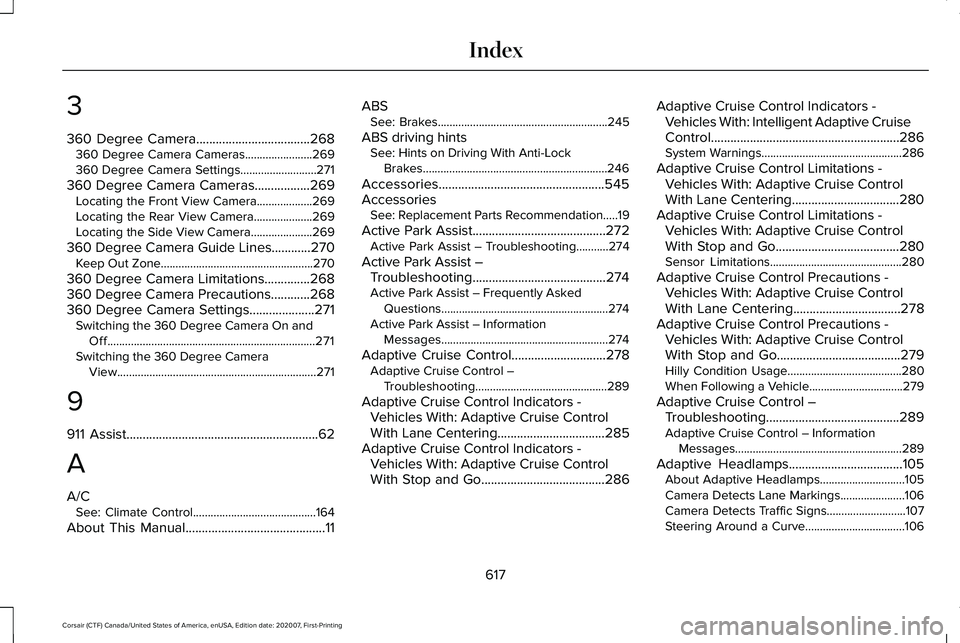
3
360 Degree Camera...................................268
360 Degree Camera Cameras.......................269
360 Degree Camera Settings..........................271
360 Degree Camera Cameras
.................269
Locating the Front View Camera...................269
Locating the Rear View Camera....................269
Locating the Side View Camera.....................269
360 Degree Camera Guide Lines............270 Keep Out Zone....................................................270
360 Degree Camera Limitations..............268
360 Degree Camera Precautions............268
360 Degree Camera Settings....................271 Switching the 360 Degree Camera On and
Off.......................................................................271
Switching the 360 Degree Camera View....................................................................271
9
911 Assist
...........................................................62
A
A/C See: Climate Control..........................................164
About This Manual
...........................................11 ABS
See: Brakes..........................................................245
ABS driving hints See: Hints on Driving With Anti-Lock
Brakes...............................................................246
Accessories...................................................545
Accessories See: Replacement Parts Recommendation.....19
Active Park Assist
.........................................272
Active Park Assist – Troubleshooting...........274
Active Park Assist – Troubleshooting.........................................274
Active Park Assist – Frequently Asked Questions.........................................................274
Active Park Assist – Information Messages.........................................................274
Adaptive Cruise Control
.............................278
Adaptive Cruise Control –
Troubleshooting.............................................289
Adaptive Cruise Control Indicators - Vehicles With: Adaptive Cruise Control
With Lane Centering.................................285
Adaptive Cruise Control Indicators - Vehicles With: Adaptive Cruise Control
With Stop and Go
......................................286 Adaptive Cruise Control Indicators -
Vehicles With: Intelligent Adaptive Cruise
Control..........................................................286
System Warnings................................................286
Adaptive Cruise Control Limitations - Vehicles With: Adaptive Cruise Control
With Lane Centering.................................280
Adaptive Cruise Control Limitations - Vehicles With: Adaptive Cruise Control
With Stop and Go......................................280
Sensor Limitations.............................................280
Adaptive Cruise Control Precautions - Vehicles With: Adaptive Cruise Control
With Lane Centering
.................................278
Adaptive Cruise Control Precautions - Vehicles With: Adaptive Cruise Control
With Stop and Go
......................................279
Hilly Condition Usage.......................................280
When Following a Vehicle................................
279
Adaptive Cruise Control – Troubleshooting.........................................289
Adaptive Cruise Control – Information Messages.........................................................289
Adaptive Headlamps...................................105 About Adaptive Headlamps.............................105
Camera Detects Lane Markings......................
106
Camera Detects Traffic Signs...........................107
Steering Around a Curve..................................106
617
Corsair (CTF) Canada/United States of America, enUSA, Edition date: 202007, First-Printing Index
Page 621 of 638
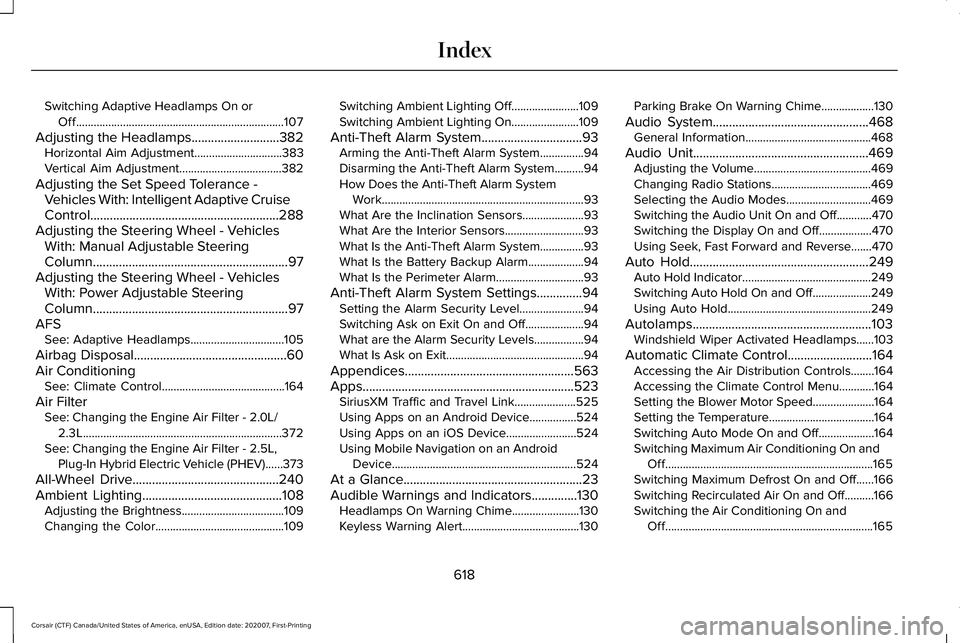
Switching Adaptive Headlamps On or
Off.......................................................................107
Adjusting the Headlamps ...........................382
Horizontal Aim Adjustment..............................383
Vertical Aim Adjustment...................................382
Adjusting the Set Speed Tolerance - Vehicles With: Intelligent Adaptive Cruise
Control
..........................................................288
Adjusting the Steering Wheel - Vehicles With: Manual Adjustable Steering
Column
............................................................97
Adjusting the Steering Wheel - Vehicles With: Power Adjustable Steering
Column
............................................................97
AFS See: Adaptive Headlamps................................105
Airbag Disposal
...............................................60
Air Conditioning See: Climate Control..........................................164
Air Filter See: Changing the Engine Air Filter - 2.0L/
2.3L....................................................................372
See: Changing the Engine Air Filter - 2.5L, Plug-In Hybrid Electric Vehicle (PHEV)......373
All-Wheel Drive.............................................240
Ambient Lighting
...........................................108
Adjusting the Brightness...................................109
Changing the Color............................................109 Switching Ambient Lighting Off.......................109
Switching Ambient Lighting On.......................109
Anti-Theft Alarm System...............................93 Arming the Anti-Theft Alarm System...............94
Disarming the Anti-Theft Alarm System..........94
How Does the Anti-Theft Alarm System
Work.....................................................................93
What Are the Inclination Sensors.....................93
What Are the Interior Sensors...........................93
What Is the Anti-Theft Alarm System...............93
What Is the Battery Backup Alarm...................94
What Is the Perimeter Alarm..............................93
Anti-Theft Alarm System Settings..............94 Setting the Alarm Security Level......................94
Switching Ask on Exit On and Off....................94
What are the Alarm Security Levels.................94
What Is Ask on Exit...............................................94
Appendices....................................................563
Apps.................................................................523 SiriusXM Traffic and Travel Link.....................525
Using Apps on an Android Device................524
Using Apps on an iOS Device........................524
Using Mobile Navigation on an Android
Device...............................................................524
At a Glance.......................................................23
Audible Warnings and Indicators..............130 Headlamps On Warning Chime.......................130
Keyless Warning Alert........................................130 Parking Brake On Warning Chime..................
130
Audio System
................................................468
General Information...........................................468
Audio Unit
......................................................469
Adjusting the Volume........................................469
Changing Radio Stations..................................469
Selecting the Audio Modes.............................469
Switching the Audio Unit On and Off............
470
Switching the Display On and Off..................470
Using Seek, Fast Forward and Reverse.......470
Auto Hold
.......................................................249
Auto Hold Indicator............................................249
Switching Auto Hold On and Off....................249
Using Auto Hold.................................................249
Autolamps.......................................................103 Windshield Wiper Activated Headlamps......103
Automatic Climate Control..........................164 Accessing the Air Distribution Controls........164
Accessing the Climate Control Menu............164
Setting the Blower Motor Speed.....................164
Setting the Temperature....................................164
Switching Auto Mode On and Off...................164
Switching Maximum Air Conditioning On and
Off.......................................................................165
Switching Maximum Defrost On and Off......166
Switching Recirculated Air On and Off..........166
Switching the Air Conditioning On and Off.......................................................................165
618
Corsair (CTF) Canada/United States of America, enUSA, Edition date: 202007, First-Printing Index