fuel pump LINCOLN CORSAIR 2021 User Guide
[x] Cancel search | Manufacturer: LINCOLN, Model Year: 2021, Model line: CORSAIR, Model: LINCOLN CORSAIR 2021Pages: 638, PDF Size: 5.7 MB
Page 217 of 638
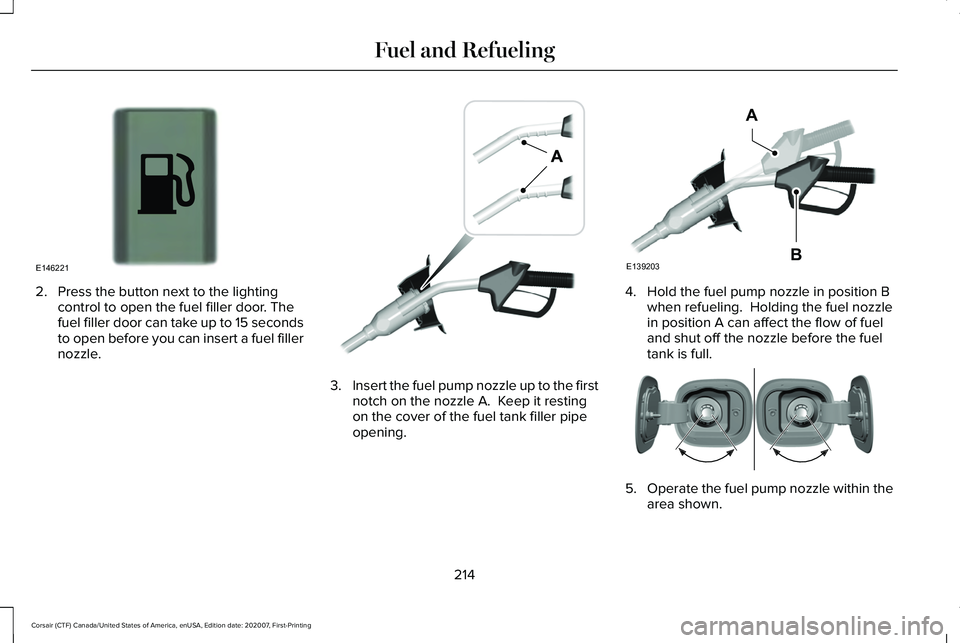
2. Press the button next to the lighting
control to open the fuel filler door. The
fuel filler door can take up to 15 seconds
to open before you can insert a fuel filler
nozzle. 3.
Insert the fuel pump nozzle up to the first
notch on the nozzle A. Keep it resting
on the cover of the fuel tank filler pipe
opening. 4. Hold the fuel pump nozzle in position B
when refueling. Holding the fuel nozzle
in position A can affect the flow of fuel
and shut off the nozzle before the fuel
tank is full. 5.
Operate the fuel pump nozzle within the
area shown.
214
Corsair (CTF) Canada/United States of America, enUSA, Edition date: 202007, First-Printing Fuel and RefuelingE146221 E139202 E139203
A
B E337454
Page 218 of 638
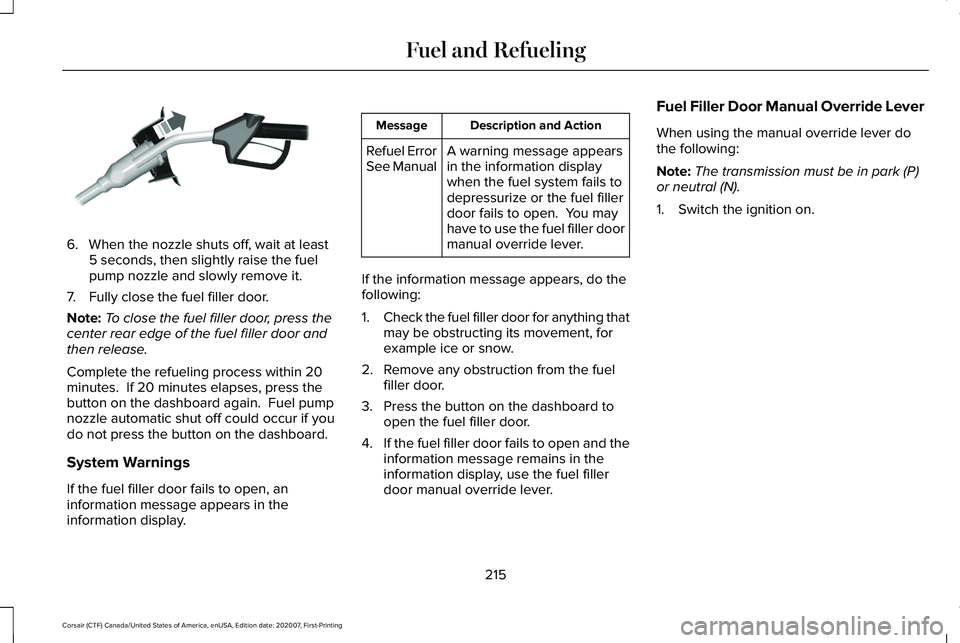
6. When the nozzle shuts off, wait at least
5 seconds, then slightly raise the fuel
pump nozzle and slowly remove it.
7. Fully close the fuel filler door.
Note: To close the fuel filler door, press the
center rear edge of the fuel filler door and
then release.
Complete the refueling process within 20
minutes. If 20 minutes elapses, press the
button on the dashboard again. Fuel pump
nozzle automatic shut off could occur if you
do not press the button on the dashboard.
System Warnings
If the fuel filler door fails to open, an
information message appears in the
information display. Description and Action
Message
A warning message appears
in the information display
when the fuel system fails to
depressurize or the fuel filler
door fails to open. You may
have to use the fuel filler door
manual override lever.
Refuel Error
See Manual
If the information message appears, do the
following:
1. Check the fuel filler door for anything that
may be obstructing its movement, for
example ice or snow.
2. Remove any obstruction from the fuel filler door.
3. Press the button on the dashboard to open the fuel filler door.
4. If the fuel filler door fails to open and the
information message remains in the
information display, use the fuel filler
door manual override lever. Fuel Filler Door Manual Override Lever
When using the manual override lever do
the following:
Note:
The transmission must be in park (P)
or neutral (N).
1. Switch the ignition on.
215
Corsair (CTF) Canada/United States of America, enUSA, Edition date: 202007, First-Printing Fuel and RefuelingE119081
Page 220 of 638
Refueling Your Vehicle
WARNING: When refueling always
shut the engine off and never allow sparks
or open flames near the fuel tank filler
valve. Never smoke or use a cell phone
while refueling. Fuel vapor is extremely
hazardous under certain conditions. Avoid
inhaling excess fumes. WARNING:
The fuel system may be
under pressure. If you hear a hissing sound
near the fuel filler inlet, do not refuel until
the sound stops. Otherwise, fuel may spray
out, which could cause serious personal
injury. WARNING:
Do not pry open the fuel
tank filler valve. This could damage the fuel
system. Failure to follow this instruction
could result in fire, personal injury or death. WARNING:
Do not remove the fuel
pump nozzle from its fully inserted position
when refueling. WARNING:
Stop refueling when the
fuel pump nozzle automatically shuts off
for the first time. Failure to follow this will
fill the expansion space in the fuel tank and
could lead to fuel overflowing. WARNING:
Do not overfill the fuel
tank. The pressure in an overfilled tank
may cause leakage and lead to fuel spray
and fire. WARNING: Wait at least five seconds
before removing the fuel pump nozzle to
allow any residual fuel to drain into the fuel
tank.
1. Fully open the fuel filler door.
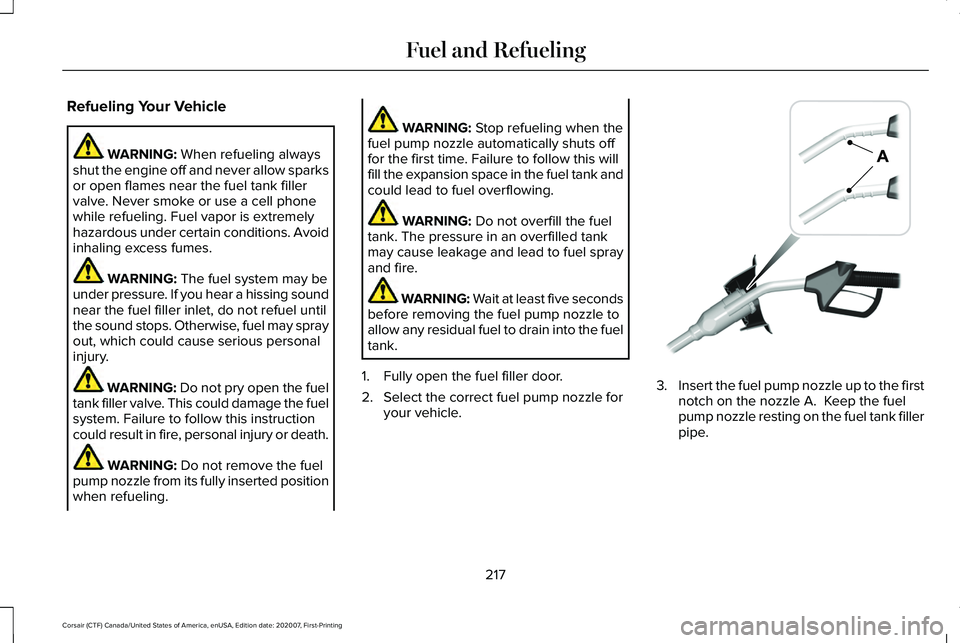
2. Select the correct fuel pump nozzle for your vehicle. 3.
Insert the fuel pump nozzle up to the first
notch on the nozzle A. Keep the fuel
pump nozzle resting on the fuel tank filler
pipe.
217
Corsair (CTF) Canada/United States of America, enUSA, Edition date: 202007, First-Printing Fuel and RefuelingE139202
Page 221 of 638
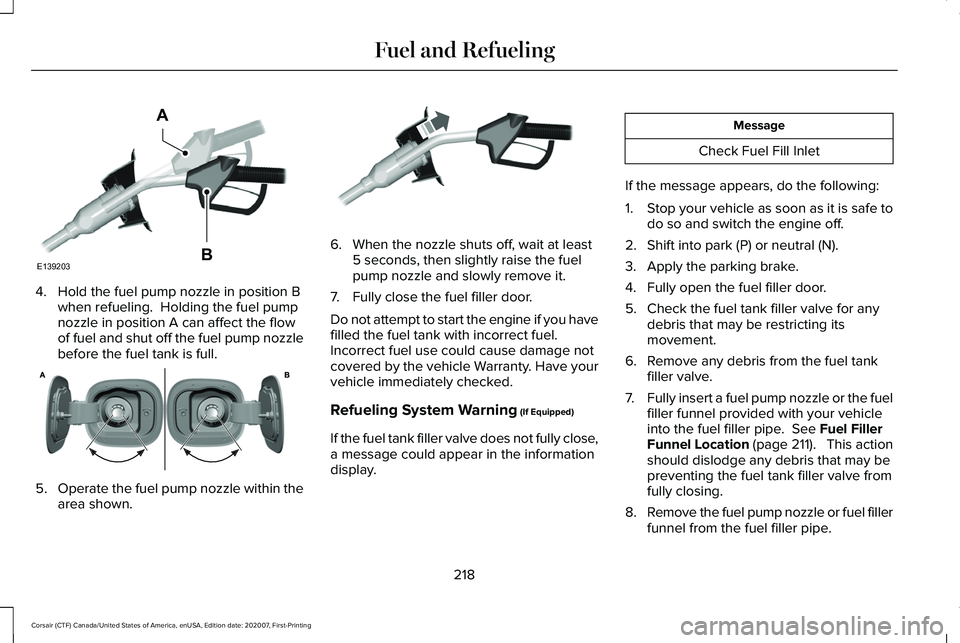
4. Hold the fuel pump nozzle in position B
when refueling. Holding the fuel pump
nozzle in position A can affect the flow
of fuel and shut off the fuel pump nozzle
before the fuel tank is full. 5.
Operate the fuel pump nozzle within the
area shown. 6. When the nozzle shuts off, wait at least
5 seconds, then slightly raise the fuel
pump nozzle and slowly remove it.
7. Fully close the fuel filler door.
Do not attempt to start the engine if you have
filled the fuel tank with incorrect fuel.
Incorrect fuel use could cause damage not
covered by the vehicle Warranty. Have your
vehicle immediately checked.
Refueling System Warning (If Equipped)
If the fuel tank filler valve does not fully close,
a message could appear in the information
display. Message
Check Fuel Fill Inlet
If the message appears, do the following:
1. Stop your vehicle as soon as it is safe to
do so and switch the engine off.
2. Shift into park (P) or neutral (N).
3. Apply the parking brake.
4. Fully open the fuel filler door.
5. Check the fuel tank filler valve for any debris that may be restricting its
movement.
6. Remove any debris from the fuel tank filler valve.
7. Fully insert a fuel pump nozzle or the fuel
filler funnel provided with your vehicle
into the fuel filler pipe.
See Fuel Filler
Funnel Location (page 211). This action
should dislodge any debris that may be
preventing the fuel tank filler valve from
fully closing.
8. Remove the fuel pump nozzle or fuel filler
funnel from the fuel filler pipe.
218
Corsair (CTF) Canada/United States of America, enUSA, Edition date: 202007, First-Printing Fuel and RefuelingE139203
A
B E321655 E119081
Page 341 of 638
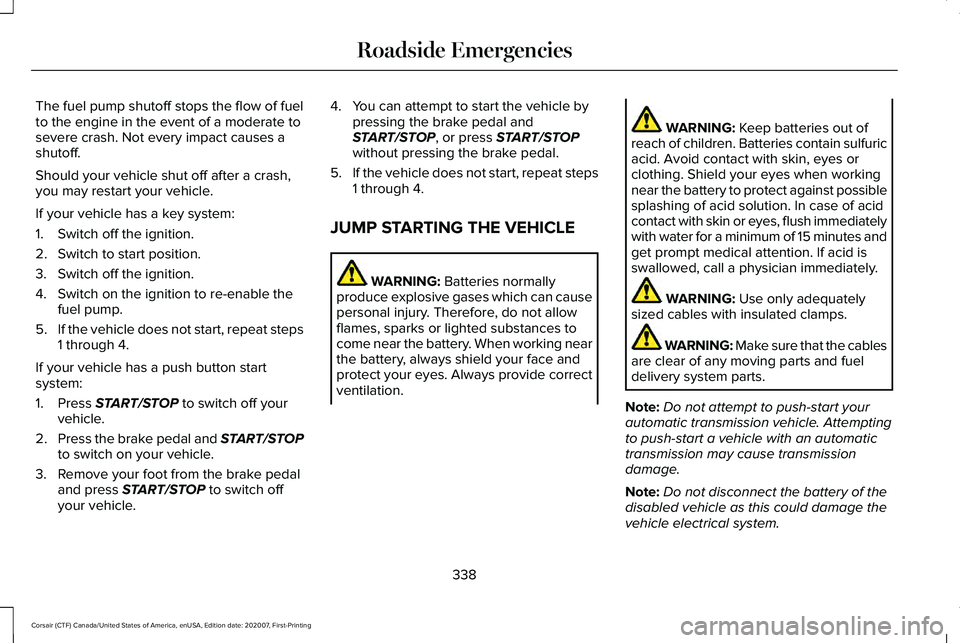
The fuel pump shutoff stops the flow of fuel
to the engine in the event of a moderate to
severe crash. Not every impact causes a
shutoff.
Should your vehicle shut off after a crash,
you may restart your vehicle.
If your vehicle has a key system:
1. Switch off the ignition.
2. Switch to start position.
3. Switch off the ignition.
4. Switch on the ignition to re-enable the
fuel pump.
5. If the vehicle does not start, repeat steps
1 through 4.
If your vehicle has a push button start
system:
1. Press START/STOP to switch off your
vehicle.
2. Press the brake pedal and
START/STOP
to switch on your vehicle.
3. Remove your foot from the brake pedal and press
START/STOP to switch off
your vehicle. 4. You can attempt to start the vehicle by
pressing the brake pedal and
START/STOP
, or press START/STOP
without pressing the brake pedal.
5. If the vehicle does not start, repeat steps
1 through 4.
JUMP STARTING THE VEHICLE WARNING:
Batteries normally
produce explosive gases which can cause
personal injury. Therefore, do not allow
flames, sparks or lighted substances to
come near the battery. When working near
the battery, always shield your face and
protect your eyes. Always provide correct
ventilation. WARNING:
Keep batteries out of
reach of children. Batteries contain sulfuric
acid. Avoid contact with skin, eyes or
clothing. Shield your eyes when working
near the battery to protect against possible
splashing of acid solution. In case of acid
contact with skin or eyes, flush immediately
with water for a minimum of 15 minutes and
get prompt medical attention. If acid is
swallowed, call a physician immediately. WARNING:
Use only adequately
sized cables with insulated clamps. WARNING: Make sure that the cables
are clear of any moving parts and fuel
delivery system parts.
Note: Do not attempt to push-start your
automatic transmission vehicle. Attempting
to push-start a vehicle with an automatic
transmission may cause transmission
damage.
Note: Do not disconnect the battery of the
disabled vehicle as this could damage the
vehicle electrical system.
338
Corsair (CTF) Canada/United States of America, enUSA, Edition date: 202007, First-Printing Roadside Emergencies
Page 362 of 638
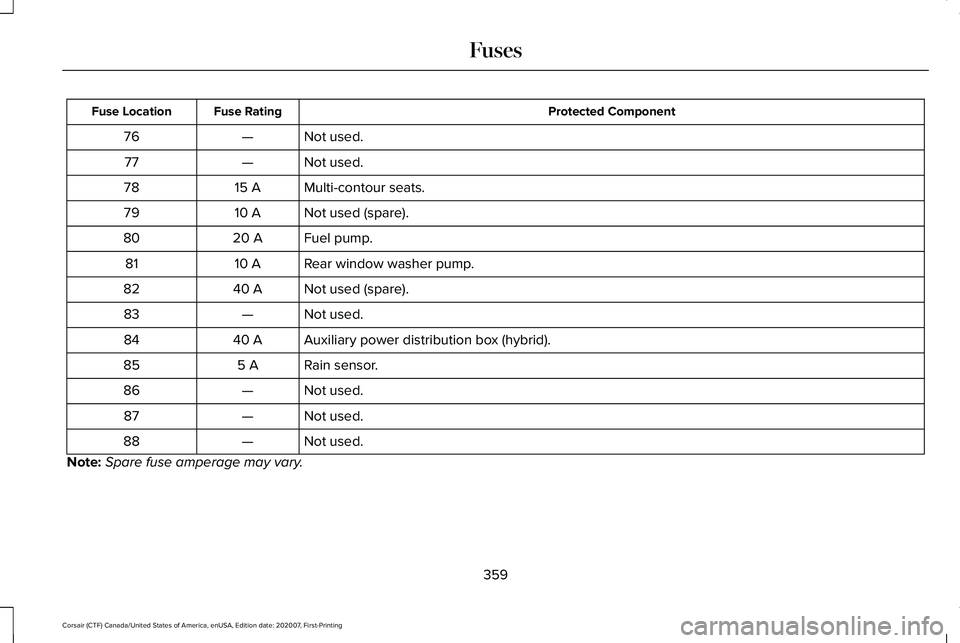
Protected Component
Fuse Rating
Fuse Location
Not used.
—
76
Not used.
—
77
Multi-contour seats.
15 A
78
Not used (spare).
10 A
79
Fuel pump.
20 A
80
Rear window washer pump.
10 A
81
Not used (spare).
40 A
82
Not used.
—
83
Auxiliary power distribution box (hybrid).
40 A
84
Rain sensor.
5 A
85
Not used.
—
86
Not used.
—
87
Not used.
—
88
Note: Spare fuse amperage may vary.
359
Corsair (CTF) Canada/United States of America, enUSA, Edition date: 202007, First-Printing Fuses
Page 396 of 638
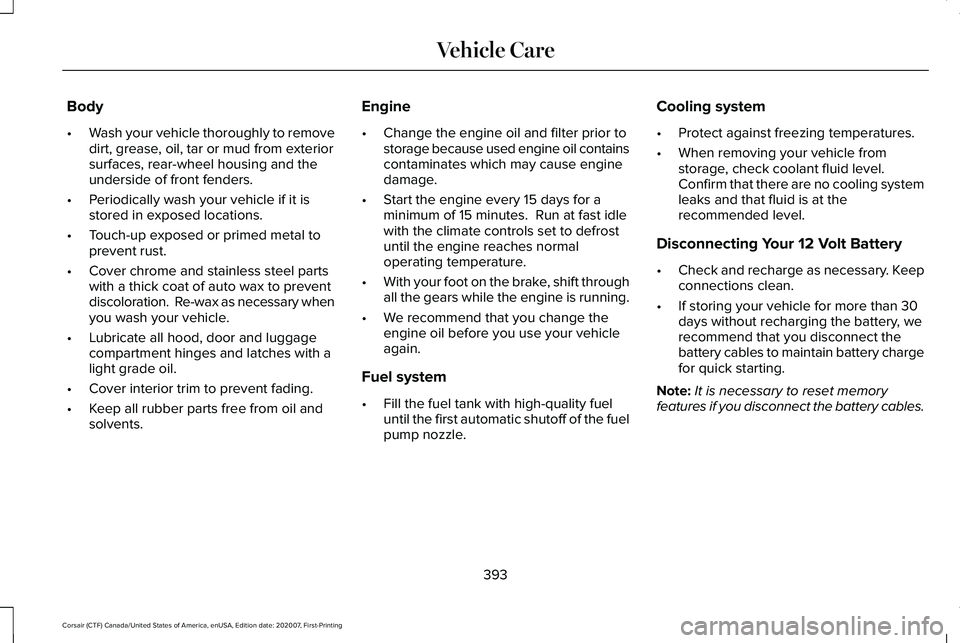
Body
•
Wash your vehicle thoroughly to remove
dirt, grease, oil, tar or mud from exterior
surfaces, rear-wheel housing and the
underside of front fenders.
• Periodically wash your vehicle if it is
stored in exposed locations.
• Touch-up exposed or primed metal to
prevent rust.
• Cover chrome and stainless steel parts
with a thick coat of auto wax to prevent
discoloration. Re-wax as necessary when
you wash your vehicle.
• Lubricate all hood, door and luggage
compartment hinges and latches with a
light grade oil.
• Cover interior trim to prevent fading.
• Keep all rubber parts free from oil and
solvents. Engine
•
Change the engine oil and filter prior to
storage because used engine oil contains
contaminates which may cause engine
damage.
• Start the engine every 15 days for a
minimum of 15 minutes. Run at fast idle
with the climate controls set to defrost
until the engine reaches normal
operating temperature.
• With your foot on the brake, shift through
all the gears while the engine is running.
• We recommend that you change the
engine oil before you use your vehicle
again.
Fuel system
• Fill the fuel tank with high-quality fuel
until the first automatic shutoff of the fuel
pump nozzle. Cooling system
•
Protect against freezing temperatures.
• When removing your vehicle from
storage, check coolant fluid level.
Confirm that there are no cooling system
leaks and that fluid is at the
recommended level.
Disconnecting Your 12 Volt Battery
• Check and recharge as necessary. Keep
connections clean.
• If storing your vehicle for more than 30
days without recharging the battery, we
recommend that you disconnect the
battery cables to maintain battery charge
for quick starting.
Note: It is necessary to reset memory
features if you disconnect the battery cables.
393
Corsair (CTF) Canada/United States of America, enUSA, Edition date: 202007, First-Printing Vehicle Care