hood open LINCOLN CORSAIR 2021 User Guide
[x] Cancel search | Manufacturer: LINCOLN, Model Year: 2021, Model line: CORSAIR, Model: LINCOLN CORSAIR 2021Pages: 638, PDF Size: 5.7 MB
Page 373 of 638
Brake fluid reservoir: See Brake Fluid Check (page 379).
F
Power distribution box:
See Fuses (page 352).
G
Air filter assembly:
See Changing the Engine Air Filter (page 373).
H
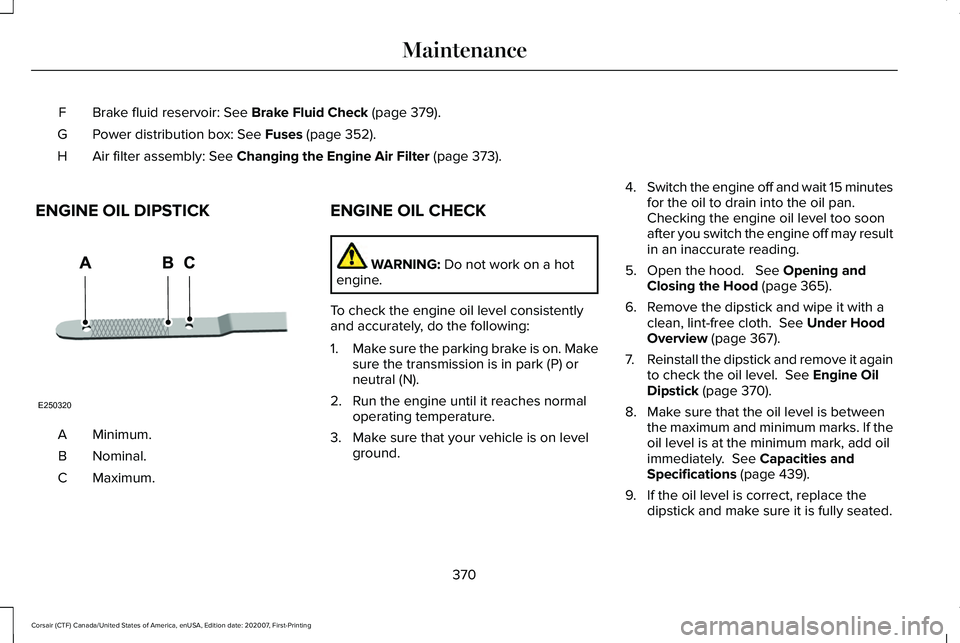
ENGINE OIL DIPSTICK Minimum.
A
Nominal.
B
Maximum.
C ENGINE OIL CHECK WARNING:
Do not work on a hot
engine.
To check the engine oil level consistently
and accurately, do the following:
1. Make sure the parking brake is on. Make
sure the transmission is in park (P) or
neutral (N).
2. Run the engine until it reaches normal operating temperature.
3. Make sure that your vehicle is on level ground. 4.
Switch the engine off and wait 15 minutes
for the oil to drain into the oil pan.
Checking the engine oil level too soon
after you switch the engine off may result
in an inaccurate reading.
5. Open the hood. See Opening and
Closing the Hood (page 365).
6. Remove the dipstick and wipe it with a clean, lint-free cloth.
See Under Hood
Overview (page 367).
7. Reinstall the dipstick and remove it again
to check the oil level.
See Engine Oil
Dipstick (page 370).
8. Make sure that the oil level is between the maximum and minimum marks. If the
oil level is at the minimum mark, add oil
immediately.
See Capacities and
Specifications (page 439).
9. If the oil level is correct, replace the dipstick and make sure it is fully seated.
370
Corsair (CTF) Canada/United States of America, enUSA, Edition date: 202007, First-Printing MaintenanceE250320
Page 374 of 638
Note:
Do not remove the dipstick when the
engine is running.
Note: If the oil level is between the
maximum and minimum marks, the oil level
is acceptable. Do not add oil.
Note: The oil consumption of new engines
reaches its normal level after approximately
3,000 mi (5,000 km).
Adding Engine Oil WARNING:
Do not remove the filler
cap when the engine is running. WARNING:
Do not add engine oil
when the engine is hot. Failure to follow
this instruction could result in personal
injury.
Do not use supplemental engine oil additives
because they are unnecessary and could
lead to engine damage that may not be
covered by the vehicle Warranty. Only use oils certified for gasoline engines
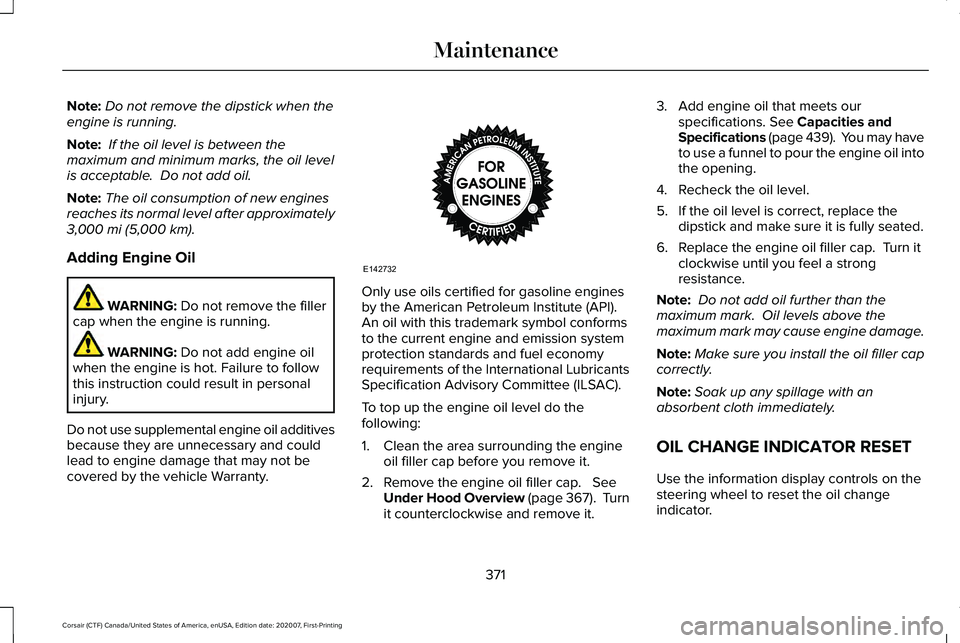
by the American Petroleum Institute (API).
An oil with this trademark symbol conforms
to the current engine and emission system
protection standards and fuel economy
requirements of the International Lubricants
Specification Advisory Committee (ILSAC).
To top up the engine oil level do the
following:
1. Clean the area surrounding the engine
oil filler cap before you remove it.
2. Remove the engine oil filler cap.
See
Under Hood Overview (page 367). Turn
it counterclockwise and remove it. 3. Add engine oil that meets our
specifications.
See Capacities and
Specifications (page 439). You may have
to use a funnel to pour the engine oil into
the opening.
4. Recheck the oil level.
5. If the oil level is correct, replace the dipstick and make sure it is fully seated.
6. Replace the engine oil filler cap. Turn it clockwise until you feel a strong
resistance.
Note: Do not add oil further than the
maximum mark. Oil levels above the
maximum mark may cause engine damage.
Note: Make sure you install the oil filler cap
correctly.
Note: Soak up any spillage with an
absorbent cloth immediately.
OIL CHANGE INDICATOR RESET
Use the information display controls on the
steering wheel to reset the oil change
indicator.
371
Corsair (CTF) Canada/United States of America, enUSA, Edition date: 202007, First-Printing MaintenanceE142732
Page 386 of 638
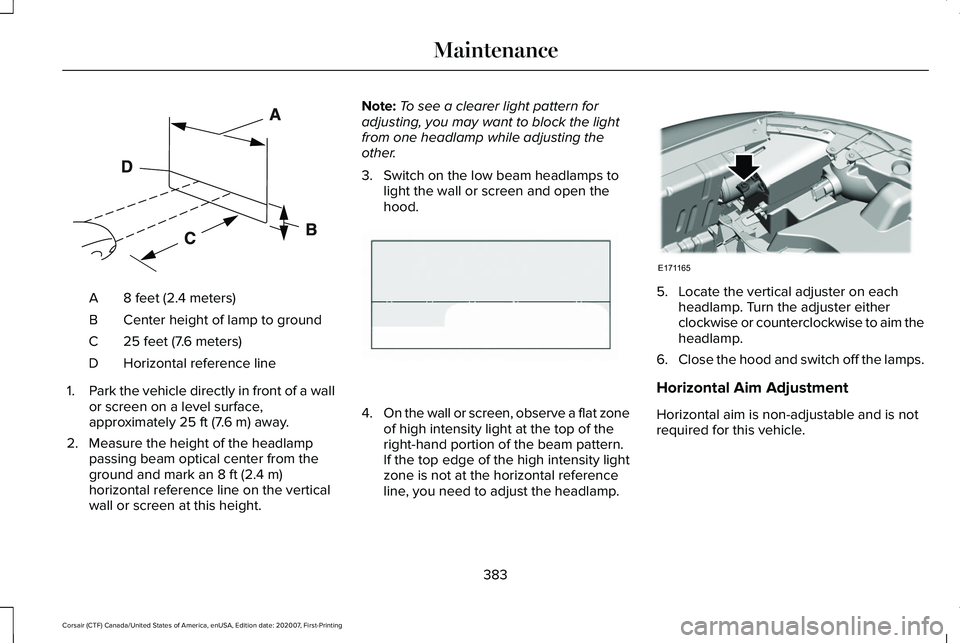
8 feet (2.4 meters)
A
Center height of lamp to ground
B
25 feet (7.6 meters)
C
Horizontal reference line
D
1. Park the vehicle directly in front of a wall
or screen on a level surface,
approximately 25 ft (7.6 m) away.
2. Measure the height of the headlamp passing beam optical center from the
ground and mark an
8 ft (2.4 m)
horizontal reference line on the vertical
wall or screen at this height. Note:
To see a clearer light pattern for
adjusting, you may want to block the light
from one headlamp while adjusting the
other.
3. Switch on the low beam headlamps to light the wall or screen and open the
hood. 4.
On the wall or screen, observe a flat zone
of high intensity light at the top of the
right-hand portion of the beam pattern.
If the top edge of the high intensity light
zone is not at the horizontal reference
line, you need to adjust the headlamp. 5. Locate the vertical adjuster on each
headlamp. Turn the adjuster either
clockwise or counterclockwise to aim the
headlamp.
6. Close the hood and switch off the lamps.
Horizontal Aim Adjustment
Horizontal aim is non-adjustable and is not
required for this vehicle.
383
Corsair (CTF) Canada/United States of America, enUSA, Edition date: 202007, First-Printing MaintenanceE142592 E142465 E171165
Page 397 of 638
Plugging in Your HYBRID
We recommend the following options for
your plug-in vehicle (PHEV) :
•
Leave your vehicle plugged in. The 12
volt battery maintains power if left
plugged in. However, this periodically
uses electricity from the household
outlet.
• Connect a battery charger to your 12 volt
battery and leave it on a continuous, slow
charge.
• Disconnect the 12 volt battery. If your 12
volt battery is located in the luggage
compartment, do not fully shut the
luggage compartment after
disconnecting the 12 volt battery. Only
leave the luggage compartment open if
your vehicle is stored in a locked
location.
Brakes
• Make sure the brakes and parking brake
release fully. Tires
•
Maintain recommended air pressure.
Miscellaneous
• Make sure all linkages, cables, levers and
pins under your vehicle are covered with
grease to prevent rust.
• Move vehicles at least 25 ft (7.5 m) every
15 days to lubricate working parts and
prevent corrosion.
Removing Vehicle From Storage
When your vehicle is ready to come out of
storage, do the following:
• Wash your vehicle to remove any dirt or
grease film build-up on window surfaces.
• Check windshield wipers for any
deterioration.
• Check under the hood for any foreign
material that may have collected during
storage such as mice or squirrel nests.
• Check the exhaust for any foreign
material that may have collected during
storage. •
Check tire pressures and set tire inflation
per the Tire Label.
• Check brake pedal operation. Drive your
vehicle 15 ft (4.5 m) back and forth to
remove rust build-up.
• Check fluid levels (including coolant, oil
and gas) to make sure there are no leaks,
and fluids are at recommended levels.
• If you remove the battery, clean the
battery cable ends and check for
damage.
Contact an authorized dealer if you have any
concerns or issues.
BODY STYLING KITS
The distance between the underside of your
vehicle and the ground is less than that of
other models. Drive with extreme care to
avoid damage to your vehicle.
394
Corsair (CTF) Canada/United States of America, enUSA, Edition date: 202007, First-Printing Vehicle Care
Page 622 of 638
Switching the Climate Control On and
Off.......................................................................165
Automatic High Beam Control....................110
Automatic High Beam Control Indicators........................................................111
Automatic Transmission - Excluding: Plug-In Hybrid Electric Vehicle
(PHEV)...........................................................232
Automatic Transmission Adaptive
Learning...........................................................236
If Your Vehicle Gets Stuck in Mud or Snow.................................................................236
Manual Park Release.........................................234
SelectShift™ Automatic Transmission............234
Understanding the Shift Positions of Your Automatic Transmission...............................232
Automatic Transmission Fluid Check............................................................379
Automatic Transmission - Plug-In Hybrid Electric Vehicle (PHEV).............................237
If Your Vehicle Gets Stuck In Mud or Snow.................................................................239
Understanding the Shift Positions of Your Automatic Transmission...............................
237
Auto-Start-Stop.............................................204 Disabling Auto-Start-Stop................................205
Enabling Auto-Start-Stop..................................204 Autowipers......................................................100
Autowipers Settings...........................................100
Low Temperature Wipe Inhibit.........................100
Auxiliary Power Points.................................192 12 Volt DC Power Point......................................192
USB Port and Power Point Locations.............
192
AWD See: All-Wheel Drive..........................................240
B
Battery See: Changing the 12V Battery......................380
Blind Spot Information System.................299 Switching the System On and Off..................300
System Errors......................................................300
Using the Blind Spot Information
System..............................................................299
BLIS See: Blind Spot Information System..............299
Body Styling Kits
...........................................394
Bonnet Lock See: Opening and Closing the Hood............365
Booster Seats..................................................34 Types of Booster Seats.......................................35
Brake Fluid Check........................................379 Brake Fluid Service Interval.............................380 Brakes.............................................................245
General Information...........................................245
Breaking-In.....................................................333
Bulb Specification Chart.............................460
C
Canceling the Set Speed............................277
Capacities and Specifications - 2.0L.......439 Air Conditioning System...................................
439
Alternative Engine Oil for Extremely Cold Climates............................................................442
Engine Coolant...................................................440
Engine Oil..............................................................441
Fuel Tank..............................................................444
Grease...................................................................444
Hydraulic Brake System....................................444
Locks......................................................................445
Washer Reservoir...............................................446
Capacities and Specifications - 2.3L.......446 Air Conditioning System...................................
447
Alternative Engine Oil for Extremely Cold Climates...........................................................450
Engine Coolant...................................................448
Engine Oil.............................................................449
Fuel Tank...............................................................451
Grease....................................................................451
Hydraulic Brake System...................................452
619
Corsair (CTF) Canada/United States of America, enUSA, Edition date: 202007, First-Printing Index
Page 623 of 638
Locks......................................................................453
Washer Reservoir...............................................453
Capacities and Specifications - 2.5L, Plug-In Hybrid Electric Vehicle
(PHEV)...........................................................454
Air Conditioning System...................................454
Engine Coolant...................................................455
Engine Oil.............................................................456
Fuel Tank..............................................................457
Grease...................................................................457
Hydraulic Brake System...................................458
Locks.....................................................................459
Washer Reservoir...............................................459
Capacities and Specifications...................433
Car Wash See: Cleaning the Exterior...............................387
Catalytic Converter
......................................222
On-Board Diagnostics (OBD-II).......................223
Readiness for Inspection and Maintenance (I/M) Testing.....................................................224
Changing a Bulb
...........................................385
Changing a Fuse..........................................363
Engine Compartment Fuse Box......................363
Fuse Types...........................................................364
General Information...........................................363
Changing a Road Wheel.............................423 Dissimilar Spare Wheel and Tire Assembly
Information.......................................................424 Tire Change Procedure....................................425
Changing the 12V Battery..........................380 Remove and Reinstall the Battery..................382
Changing the Engine Air Filter - 2.0L/ 2.3L................................................................372
Gas Engines.........................................................372
Changing the Engine Air Filter - 2.5L, Plug-In Hybrid Electric Vehicle
(PHEV)...........................................................373
Changing the Vehicle Wi-Fi Hotspot Name or Password
................................................466
Changing the Wiper Blades......................384 Front Wiper Blades............................................384
Rear Window Wiper Blade...............................385
Charging the High Voltage Battery.........225 IMPORTANT SAFETY INSTRUCTIONS.........
225
Checking MyKey System Status.................74
Checking the Wiper Blades.......................384
Child Restraint and Seatbelt Maintenance..................................................48
Child Restraint Positioning............................37
Child Safety......................................................26 General Information.............................................26
Child Safety Locks..........................................39 Left-Hand Side.......................................................40
Right-Hand Side....................................................40
Cleaning Leather Seats...............................391 Cleaning Products........................................386
Materials...............................................................386
Cleaning the Engine
....................................389
Cleaning the Exterior...................................387 Cleaning the Headlamps..................................387
Exterior Chrome Parts.......................................388
Exterior Plastic Parts..........................................388
Stripes or Graphics............................................388
Underbody...........................................................388
Under Hood.........................................................388
Cleaning the Instrument Panel and Instrument Cluster Lens...........................390
Cleaning the Interior...................................390
Cleaning the Wheels...................................392
Cleaning the Windows and Wiper Blades...........................................................389
Clearing All MyKeys........................................73
Clearing the Garage Door Opener
...........190
Climate............................................................504
Accessing Rear Climate Controls...................507
Accessing the Climate Control Menu...........
504
Directing the Airflow..........................................504
Rear Climate Control Lock Indicator.............
507
Setting the Blower Motor Speed...................505
Setting the Temperature..................................505
Switching Auto Mode On and Off..................505
Switching Dual Zone Mode On and Off.......505
620
Corsair (CTF) Canada/United States of America, enUSA, Edition date: 202007, First-Printing Index
Page 628 of 638
Heated Exterior Mirrors...............................168
Heated Rear Window...................................167
Heated Seats..................................................182
Front Seats............................................................182
Rear Seats.............................................................183
Heated Windshield
.......................................167
Windshield Wiper De-Icer.................................167
Heating See: Climate Control..........................................164
High Voltage Battery...................................225 General Information...........................................225
Hill Start Assist..............................................248 Switching the System On and Off..................248
Using Hill Start Assist........................................
248
Hints on Controlling the Interior Climate..........................................................166
Defogging the Side Windows in Cold Weather.............................................................167
General Hints.......................................................166
Quickly Cooling the Interior..............................
167
Quickly Heating the Interior..............................167
Recommended Settings for Cooling..............167
Recommended Settings for Heating..............167
Hints on Driving With Anti-Lock Brakes..........................................................246
Hood Lock See: Opening and Closing the Hood............365
Horn...................................................................98 How Does Adaptive Cruise Control With
Stop and Go Work.....................................278
How Does Speed Sign Recognition Work...............................................................315
How Does the Garage Door Opener Work
...............................................................187
How Does the Rear Occupant Alert System Work...............................................................185
Hybrid Vehicle Frequently Asked Questions....................................................207
I
In California (U.S. Only)...............................344
Information Displays
......................................131
General Information.............................................131
Information Messages
..................................137
Active Park............................................................138
Adaptive Cruise Control....................................138
Adaptive Headlamps..........................................139
AdvanceTrac ™ and Traction Control................139
Alarm......................................................................140
Automatic Engine Shutdown............................140
AWD........................................................................\
.141
Battery and Charging System (12 Volt)..........142
Battery and Charging System (High Voltage).............................................................143 Blind Spot Information and Cross Traffic Alert
System...............................................................144
Doors and Locks..................................................144
Driver Alert............................................................145
Fuel........................................................................\
.146
Hill Start Assist.....................................................146
Keys and Intelligent Access..............................147
Lane Keeping System........................................148
Maintenance.........................................................148
MyKey.....................................................................150
Park Aid...................................................................151
Park Brake.............................................................152
Power Steering....................................................153
Pre-Collision Assist.............................................154
Remote Start.........................................................154
Seats.......................................................................154
Starting System ...................................................155
Tire Pressure Monitoring System....................155
Transmission.........................................................156
Installing Child Restraints.............................28 Child Restraints.....................................................28
Using Lap and Shoulder Belts...........................28
Using Lower Anchors and Tethers for
CHildren (LATCH)..............................................31
Using Tether Straps..............................................33
Instrument Cluster
..........................................118
Instrument Lighting Dimmer.......................103
Instrument Panel
.............................................23
625
Corsair (CTF) Canada/United States of America, enUSA, Edition date: 202007, First-Printing Index
Page 630 of 638
Mechanical Key......................................................77
Opening a Rear Door from Inside.....................77
Power Door Locks................................................76
Remote Control.....................................................76
Smart Unlocks........................................................78
Welcome Lighting.................................................80
Locking and Unlocking the Doors Using Keyless Entry.................................................83
Locking the Doors................................................84
Unlocking the Doors............................................83
Luggage Covers
............................................318
Lug Nuts See: Changing a Road Wheel.........................
423
M
Maintenance..................................................365 General Information...........................................365
Master Access Code.......................................81 What Is the Master Access Code......................81
Memory Function
...........................................177
Easy Entry and Exit Feature..............................178
Linking a PreSet Position to Your Remote
Control ..............................................................178
Personal Profiles..................................................178
Saving a PreSet Position....................................177
Message Center See: Information Displays..................................131 Mirrors
See: Windows and Mirrors.................................112
Mobile Communications Equipment
.........20
Moonroof..........................................................116
Bounce-Back..........................................................117
Motorcraft Parts - 2.0L................................436
Motorcraft Parts - 2.3L.................................437
Motorcraft Parts - 2.5L, Plug-In Hybrid Electric Vehicle (PHEV).............................438
MyKey Settings
................................................72
Configurable MyKey Settings............................72
Non-Configurable MyKey Settings...................72
MyKey – Troubleshooting.............................74 MyKey – Frequently Asked Questions............75
MyKey – Information Messages........................74
MyKey™..............................................................72 MyKey Settings......................................................72
MyKey – Troubleshooting...................................74
N
Navigation......................................................509 Changing the Format of the Map....................513
cityseeker..............................................................515
Michelin Travel Guide.........................................516
Navigation Map Accuracy and Updates.......
516
Route Guidance...................................................513
Setting a Destination...........................................511 SiriusXM Traffic and Travel Link......................
516
Zoom.......................................................................513
Network Connectivity
.................................462
Connecting the Vehicle to a Mobile
Network............................................................462
Network Connectivity – Troubleshooting.........................................463
Normal Scheduled Maintenance.............555 Intelligent Oil-Life Monitor™.............................555
Maintenance Intervals.......................................556
O
Oil Change Indicator Reset.........................371
Oil Check See: Engine Oil Check......................................370
Opening and Closing the Hood
...............365
Closing the Hood...............................................366
Opening the Hood.............................................365
Opening the Liftgate......................................85 Opening the Hands-Free Liftgate....................
86
Opening the Liftgate From Inside Your Vehicle................................................................85
Opening the Liftgate From Outside Your Vehicle................................................................85
Opening the Liftgate Using the Remote Control................................................................86
627
Corsair (CTF) Canada/United States of America, enUSA, Edition date: 202007, First-Printing Index
Page 636 of 638

Second Stage: Checking Tire Pressure.......402
Tips for Use of the Kit........................................398
What to do after the Tire has been
Sealed...............................................................402
What to do when a Tire Is Punctured...........399
Tires See: Wheels and Tires......................................395
Towing a Trailer.............................................325 Load Placement..................................................325
Towing the Vehicle on Four Wheels - Gasoline, 8-Speed Automatic
Transmission – 8F35/8F40.....................330
Emergency Towing............................................330
Recreational Towing - All-Wheel and
Four-Wheel Drive Vehicles...........................331
Recreational Towing - Front-Wheel Drive Vehicles............................................................330
Recreational Towing - Rear-Wheel Drive Vehicles............................................................330
Towing the Vehicle on Four Wheels - Plug-In Hybrid Electric Vehicle (PHEV),
Automatic Transmission – HF45.............331
Emergency Towing..............................................331
Recreational Towing...........................................331
Towing.............................................................325
Traction Control
............................................255
Principle of Operation.......................................255
Trailer Sway Control....................................326 Transmission..................................................232
Transporting the Vehicle
.............................341
Type Approvals............................................600
Radio Frequency Certification Labels for Body
Control Module..............................................602
Radio Frequency Certifications for Adaptive Cruise Control................................................600
Radio Frequency Certifications for Blind Spot Information System.......................................600
Radio Frequency Certifications for Bluetooth Low Energy Module.......................................601
Radio Frequency Certifications for Garage Door Opener....................................................615
Radio Frequency Certifications for Passive Key.....................................................................603
Radio Frequency Certifications for Radio Transceiver Module.......................................604
Radio Frequency Certifications for SYNC3.2...........................................................604
Radio Frequency Certifications for Telematics Control Unit.....................................................608
Radio Frequency Certifications for Tire Pressure Monitoring System Sensor -
AG2SM3...........................................................609
Radio Frequency Certifications for Tire Pressure Monitoring System Sensor -
AG2SM4............................................................610 Radio Frequency Certifications for Wireless
Accessory Charging Module.......................615
U
Under Hood Overview - 2.0L/2.3L...........367
Under Hood Overview - 2.5L, Plug-In Hybrid Electric Vehicle (PHEV)...............369
Unique Driving Characteristics.................204
USB Port
..........................................................476
Locating the USB Ports.....................................477
Using All-Wheel Drive
.................................240
Driving in Special Conditions With All-Wheel
Drive..................................................................240
Using MyKey With Remote Start Systems...........................................................74
Using Snow Chains
.......................................418
Using Stability Control................................257
Using the Backup Start Passcode..............69
Using the Valet Mode....................................69
Using Traction Control................................255 Switching the System Off.................................255
System Indicator Lights and Messages........
255
Using a Switch....................................................255
Using the Information Display Controls.......255
Using Voice Recognition............................480 Apps.......................................................................489
633
Corsair (CTF) Canada/United States of America, enUSA, Edition date: 202007, First-Printing Index