USB LINCOLN CORSAIR 2021 Owner's Manual
[x] Cancel search | Manufacturer: LINCOLN, Model Year: 2021, Model line: CORSAIR, Model: LINCOLN CORSAIR 2021Pages: 638, PDF Size: 5.7 MB
Page 534 of 638

Possible Cause and Resolution
Symptom
–Incorrect device settings.
•Make sure that your device does not have an auto-install program or active \
security
settings.
• Check that your device is not set only to charge.
– Device lock screen enabled.
•Unlock your device before connecting it.
The system does not recognize my device. –Device limitation.
•Do not leave your device in your vehicle during very hot or very cold we\
ather condi-
tions.
– Cable connection issue.
•Correctly connect the cable to your device and the vehicle USB port.
– Incompatible cable.
•Use the cable recommended by the manufacturer of your device.
The system does not understand the name of
a track or artist. –
Device limitation. Bluetooth does not support voice commands.
•Connect your device to a USB port.
• If you have an iOS device, press and hold the voice control button on the steering
wheel to use Siri to play specific tracks.
531
Corsair (CTF) Canada/United States of America, enUSA, Edition date: 202007, First-Printing SYNC™ 3
Page 536 of 638
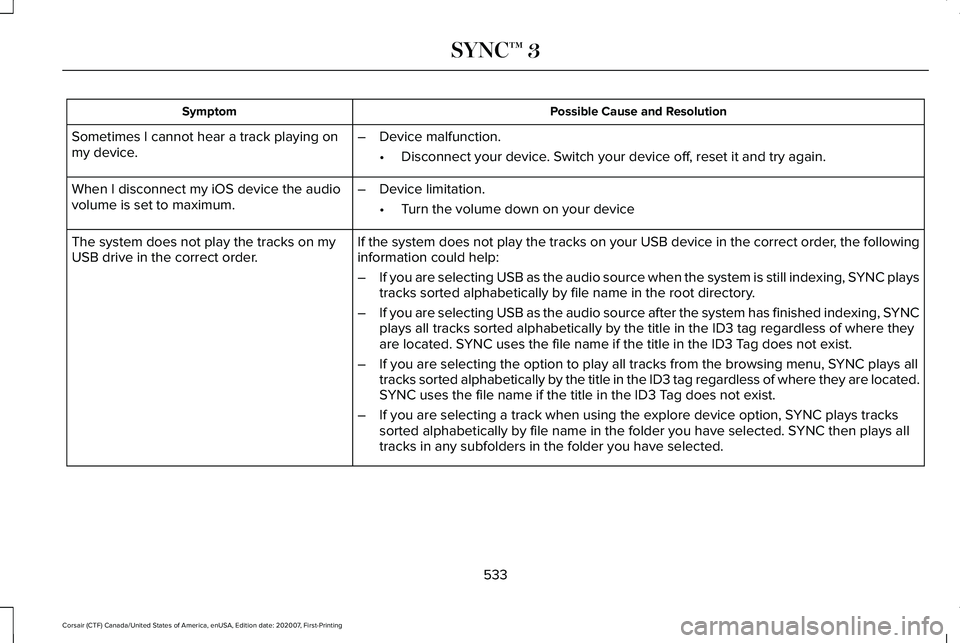
Possible Cause and Resolution
Symptom
Sometimes I cannot hear a track playing on
my device. –
Device malfunction.
•Disconnect your device. Switch your device off, reset it and try again.
When I disconnect my iOS device the audio
volume is set to maximum. –
Device limitation.
•Turn the volume down on your device
If the system does not play the tracks on your USB device in the correct\
order, the following
information could help:
The system does not play the tracks on my
USB drive in the correct order.
–If you are selecting USB as the audio source when the system is still in\
dexing, SYNC plays
tracks sorted alphabetically by file name in the root directory.
– If you are selecting USB as the audio source after the system has finish\
ed indexing, SYNC
plays all tracks sorted alphabetically by the title in the ID3 tag regar\
dless of where they
are located. SYNC uses the file name if the title in the ID3 Tag does not exist.
– If you are selecting the option to play all tracks from the browsing men\
u, SYNC plays all
tracks sorted alphabetically by the title in the ID3 tag regardless of w\
here they are located.
SYNC uses the file name if the title in the ID3 Tag does not exist.
– If you are selecting a track when using the explore device option, SYNC plays tracks
sorted alphabetically by file name in the folder you have selected. SYNC then plays all
tracks in any subfolders in the folder you have selected.
533
Corsair (CTF) Canada/United States of America, enUSA, Edition date: 202007, First-Printing SYNC™ 3
Page 537 of 638
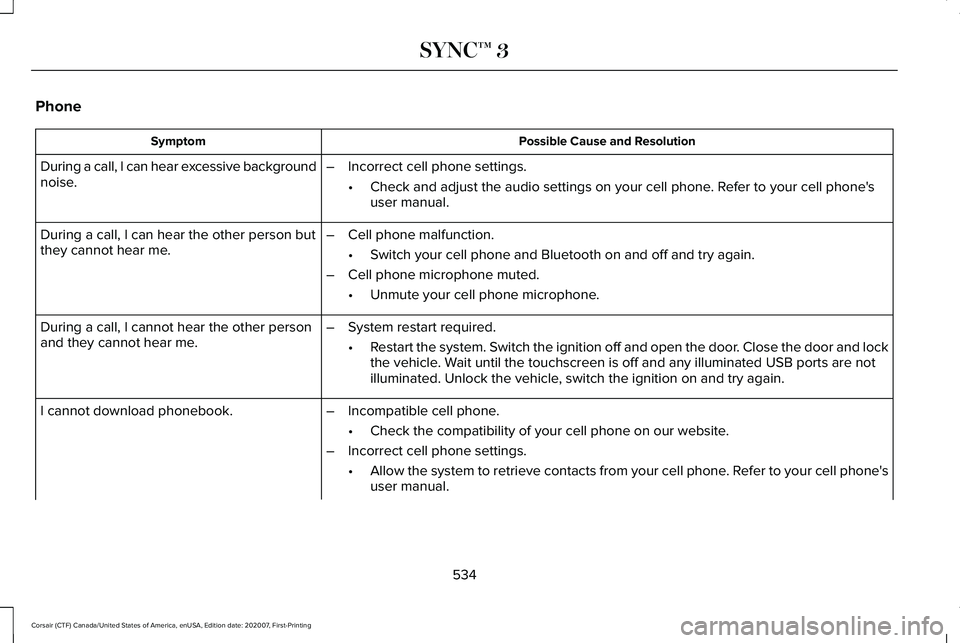
Phone
Possible Cause and Resolution
Symptom
During a call, I can hear excessive background
noise. –
Incorrect cell phone settings.
•Check and adjust the audio settings on your cell phone. Refer to your cell phone's
user manual.
– Cell phone malfunction.
•Switch your cell phone and Bluetooth on and off and try again.
– Cell phone microphone muted.
•Unmute your cell phone microphone.
During a call, I can hear the other person but
they cannot hear me.
During a call, I cannot hear the other person
and they cannot hear me.
–
System restart required.
•Restart the system. Switch the ignition off and open the door. Close the door and lock
the vehicle. Wait until the touchscreen is off and any illuminated USB ports are not
illuminated. Unlock the vehicle, switch the ignition on and try again.
I cannot download phonebook. –Incompatible cell phone.
•Check the compatibility of your cell phone on our website.
– Incorrect cell phone settings.
•Allow the system to retrieve contacts from your cell phone. Refer to your cell phone's
user manual.
534
Corsair (CTF) Canada/United States of America, enUSA, Edition date: 202007, First-Printing SYNC™ 3
Page 541 of 638

Apps
Possible Cause and Resolution
Symptom
The system cannot find any apps. –Incompatible device.
•You will need an Android device with OS 4.3 or higher or an iOS device wi\
th iOS 8.0
or higher. Pair and connect your Android device to find AppLink compatible apps.
Connect your iOS device to a USB port or pair and connect using Bluetoot\
h.
I have a compatible device and it is correctly
connected but the system still cannot find any
apps. –
AppLink compatible apps not installed on your device.
•Download and install the latest version of the app.
– AppLink compatible apps not running on your device.
•Start the apps to allow the system to find them and make sure you sign in to any apps
if required.
– Incorrect app settings.
•Check and adjust the app settings on your device and allow SYNC to access the app
if required.
I have a compatible device, it is correctly
connected and my apps are running but the
system still cannot find any apps. –
Apps failed to fully close.
•Restart the apps and try again.
• If you have an Android device with apps that have an exit or quit option\
, use this and
then restart the apps. Alternatively, use the force stop option in the settings menu on
your device.
• If you have an iOS device with iOS 7.0 or higher, tap the home button on your device
twice and then swipe the app upward to close it.
538
Corsair (CTF) Canada/United States of America, enUSA, Edition date: 202007, First-Printing SYNC™ 3
Page 622 of 638
Switching the Climate Control On and
Off.......................................................................165
Automatic High Beam Control....................110
Automatic High Beam Control Indicators........................................................111
Automatic Transmission - Excluding: Plug-In Hybrid Electric Vehicle
(PHEV)...........................................................232
Automatic Transmission Adaptive
Learning...........................................................236
If Your Vehicle Gets Stuck in Mud or Snow.................................................................236
Manual Park Release.........................................234
SelectShift™ Automatic Transmission............234
Understanding the Shift Positions of Your Automatic Transmission...............................232
Automatic Transmission Fluid Check............................................................379
Automatic Transmission - Plug-In Hybrid Electric Vehicle (PHEV).............................237
If Your Vehicle Gets Stuck In Mud or Snow.................................................................239
Understanding the Shift Positions of Your Automatic Transmission...............................
237
Auto-Start-Stop.............................................204 Disabling Auto-Start-Stop................................205
Enabling Auto-Start-Stop..................................204 Autowipers......................................................100
Autowipers Settings...........................................100
Low Temperature Wipe Inhibit.........................100
Auxiliary Power Points.................................192 12 Volt DC Power Point......................................192
USB Port and Power Point Locations.............
192
AWD See: All-Wheel Drive..........................................240
B
Battery See: Changing the 12V Battery......................380
Blind Spot Information System.................299 Switching the System On and Off..................300
System Errors......................................................300
Using the Blind Spot Information
System..............................................................299
BLIS See: Blind Spot Information System..............299
Body Styling Kits
...........................................394
Bonnet Lock See: Opening and Closing the Hood............365
Booster Seats..................................................34 Types of Booster Seats.......................................35
Brake Fluid Check........................................379 Brake Fluid Service Interval.............................380 Brakes.............................................................245
General Information...........................................245
Breaking-In.....................................................333
Bulb Specification Chart.............................460
C
Canceling the Set Speed............................277
Capacities and Specifications - 2.0L.......439 Air Conditioning System...................................
439
Alternative Engine Oil for Extremely Cold Climates............................................................442
Engine Coolant...................................................440
Engine Oil..............................................................441
Fuel Tank..............................................................444
Grease...................................................................444
Hydraulic Brake System....................................444
Locks......................................................................445
Washer Reservoir...............................................446
Capacities and Specifications - 2.3L.......446 Air Conditioning System...................................
447
Alternative Engine Oil for Extremely Cold Climates...........................................................450
Engine Coolant...................................................448
Engine Oil.............................................................449
Fuel Tank...............................................................451
Grease....................................................................451
Hydraulic Brake System...................................452
619
Corsair (CTF) Canada/United States of America, enUSA, Edition date: 202007, First-Printing Index
Page 626 of 638
Engine Emission Control.............................221
Engine Oil Check..........................................370
Adding Engine Oil...............................................371
Engine Oil Dipstick.......................................370
Engine Specifications - 2.0L......................433
Drivebelt Routing................................................434
Engine Specifications - 2.3L
......................434
Drivebelt Routing................................................435
Engine Specifications - 2.5L, Plug-In Hybrid Electric Vehicle (PHEV)............................435
Entering a Parallel Parking Space
............272
Entering a Perpendicular Parking Space............................................................272
Entertainment................................................492 AM/FM Radio.......................................................493
Apps.......................................................................504
Bluetooth Stereo or USB..................................
502
CD (If equipped)..................................................501
HD Radio ™ Information (If Available)..............497
SiriusXM® Satellite Radio (If Activated).........
493
Sources.................................................................492
Supported Media Players, Formats and Metadata Information...................................504
USB Ports.............................................................504
Environment.....................................................22
EPB See: Electric Parking Brake.............................246 Essential Towing Checks
............................328
Before Towing a Trailer.....................................329
Hitches..................................................................328
Launching or Retrieving a Boat or Personal
Watercraft (PWC)............................................329
Safety Chains......................................................328
Trailer Brakes.......................................................328
Trailer Lamps.......................................................329
When Towing a Trailer.......................................329
Event Data Recording See: Data Recording.............................................14
Exiting a Parking Space
..............................273
Export Unique Options...................................21
Extending the Remote Start Duration
.......161
Exterior Mirrors...............................................113 Auto-Dimming Feature.......................................115
Auto-Folding Mirrors............................................114
Blind Spot Monitor...............................................115
Fold-Away Exterior Mirrors................................114
Heated Exterior Mirrors......................................114
Lincoln Welcome Mat..........................................115
Memory Mirrors.....................................................115
Power Exterior Mirrors........................................113
Signal Indicator Mirrors.......................................115 F
Fastening the Seatbelts
................................42
How to Extract Seatbelts in the Rear
Outermost Positions........................................45
Seatbelt Locking Modes.....................................43
Using a Sliding Clip..............................................43
Using Seatbelts During Pregnancy..................43
Flat Tire See: Changing a Road Wheel.........................
423
Flat Tire Inflation See: Tire Sealant and Inflator Kit....................397
Floor Mats
.......................................................334
Fog Lamps - Front See: Front Fog Lamps........................................104
Front Fog Lamps...........................................104 Front Fog Lamp Indicator..................................105
Switching the Front Fog Lamps On or
Off.......................................................................104
Front Parking Aid
.........................................260
Object Distance Indicator................................262
Front Passenger Sensing System..............54
Fuel and Refueling.......................................209
Fuel Consumption.........................................219 Advertised Capacity...........................................219
Calculating Fuel Economy................................219
Filling the Fuel Tank............................................219
Fuel Filler Funnel Location..........................211
623
Corsair (CTF) Canada/United States of America, enUSA, Edition date: 202007, First-Printing Index
Page 635 of 638

Sun Visors........................................................115
Illuminated Vanity Mirror.....................................116
Supplementary Restraints System
..............51
Principle of Operation..........................................51
Switching Active Park Assist On and Off..................................................................272
Cancelling Active Park Assist..........................
272
Switching Adaptive Cruise Control On and Off
..................................................................282
Automatic Cancellation or Deactivation.......282
Switching Adaptive Cruise Control Off.........282
Switching Adaptive Cruise Control On.........282
Switching Automatic High Beam Control On and Off.....................................................110
Activating the Automatic High Beam Control................................................................110
Switching Cruise Control On and Off..................................................................276
Switching Cruise Control Off...........................276
Switching Cruise Control On...........................276
Switching From Adaptive Cruise Control to Cruise Control.......................................286
Switching Intelligent Mode On and Off..................................................................288
Changing the Set Speed with Intelligent Adaptive Cruise Control..............................
288 Switching Lane Centering On and
Off..................................................................287
Activating Lane Centering................................287
System Alerts and Automatic Cancellation.....................................................287
Switching Rear Occupant Alert System On and Off
...........................................................186
Switching Reverse Braking Assist On and Off..................................................................252
Switching the Heated Steering Wheel On
....................................................................98
Symbols Glossary.............................................11
SYNC™ 3..........................................................478
General Information...........................................478
SYNC™ 3 Troubleshooting.........................528 Additional Information and Assistance.........544
Apps.......................................................................538
Navigation............................................................537
Personal Profiles.................................................542
Phone....................................................................534
Resetting the System........................................544
USB and Bluetooth Audio................................530
Voice Recognition..............................................528
Wi-Fi Connectivity..............................................540 T
Technical Specifications
See: Capacities and Specifications...............
433
The Better Business Bureau (BBB) Auto Line Program (U.S. Only)..........................345
Tire Care.........................................................404 Glossary of Tire Terminology..........................406
Information About Uniform Tire Quality
Grading.............................................................404
Information Contained on the Tire Sidewall............................................................407
Temperature A B C............................................405
Traction AA A B C...............................................405
Treadwear............................................................405
Tire Inflation When Punctured See: Tire Sealant and Inflator Kit....................397
Tire Pressure Monitoring System..............419 Changing Tires With a Tire Pressure
Monitoring System........................................420
Understanding Your Tire Pressure Monitoring System ..............................................................421
Tire Repair Kit See: Tire Sealant and Inflator Kit....................397
Tire Sealant and Inflator Kit.......................397 First Stage: Reinflating the Tire with Sealing
Compound and Air........................................399
General Information...........................................397
632
Corsair (CTF) Canada/United States of America, enUSA, Edition date: 202007, First-Printing Index
Page 636 of 638

Second Stage: Checking Tire Pressure.......402
Tips for Use of the Kit........................................398
What to do after the Tire has been
Sealed...............................................................402
What to do when a Tire Is Punctured...........399
Tires See: Wheels and Tires......................................395
Towing a Trailer.............................................325 Load Placement..................................................325
Towing the Vehicle on Four Wheels - Gasoline, 8-Speed Automatic
Transmission – 8F35/8F40.....................330
Emergency Towing............................................330
Recreational Towing - All-Wheel and
Four-Wheel Drive Vehicles...........................331
Recreational Towing - Front-Wheel Drive Vehicles............................................................330
Recreational Towing - Rear-Wheel Drive Vehicles............................................................330
Towing the Vehicle on Four Wheels - Plug-In Hybrid Electric Vehicle (PHEV),
Automatic Transmission – HF45.............331
Emergency Towing..............................................331
Recreational Towing...........................................331
Towing.............................................................325
Traction Control
............................................255
Principle of Operation.......................................255
Trailer Sway Control....................................326 Transmission..................................................232
Transporting the Vehicle
.............................341
Type Approvals............................................600
Radio Frequency Certification Labels for Body
Control Module..............................................602
Radio Frequency Certifications for Adaptive Cruise Control................................................600
Radio Frequency Certifications for Blind Spot Information System.......................................600
Radio Frequency Certifications for Bluetooth Low Energy Module.......................................601
Radio Frequency Certifications for Garage Door Opener....................................................615
Radio Frequency Certifications for Passive Key.....................................................................603
Radio Frequency Certifications for Radio Transceiver Module.......................................604
Radio Frequency Certifications for SYNC3.2...........................................................604
Radio Frequency Certifications for Telematics Control Unit.....................................................608
Radio Frequency Certifications for Tire Pressure Monitoring System Sensor -
AG2SM3...........................................................609
Radio Frequency Certifications for Tire Pressure Monitoring System Sensor -
AG2SM4............................................................610 Radio Frequency Certifications for Wireless
Accessory Charging Module.......................615
U
Under Hood Overview - 2.0L/2.3L...........367
Under Hood Overview - 2.5L, Plug-In Hybrid Electric Vehicle (PHEV)...............369
Unique Driving Characteristics.................204
USB Port
..........................................................476
Locating the USB Ports.....................................477
Using All-Wheel Drive
.................................240
Driving in Special Conditions With All-Wheel
Drive..................................................................240
Using MyKey With Remote Start Systems...........................................................74
Using Snow Chains
.......................................418
Using Stability Control................................257
Using the Backup Start Passcode..............69
Using the Valet Mode....................................69
Using Traction Control................................255 Switching the System Off.................................255
System Indicator Lights and Messages........
255
Using a Switch....................................................255
Using the Information Display Controls.......255
Using Voice Recognition............................480 Apps.......................................................................489
633
Corsair (CTF) Canada/United States of America, enUSA, Edition date: 202007, First-Printing Index