check engine LINCOLN CORSAIR 2021 Owner's Manual
[x] Cancel search | Manufacturer: LINCOLN, Model Year: 2021, Model line: CORSAIR, Model: LINCOLN CORSAIR 2021Pages: 638, PDF Size: 5.7 MB
Page 225 of 638
•
An open or pinched sensor hose.
• Incorrect engine oil level.
• Incorrect fuel for climatic conditions.
• Incorrect engine oil viscosity for climactic
conditions.
Note: Some vehicles have a lifetime fuel filter
that is integrated with the fuel tank. Regular
maintenance or replacement is not needed.
Note: If these checks do not help you correct
the concern, have your vehicle checked as
soon as possible.
Noise Emissions Warranty, Prohibited
Tampering Acts and Maintenance
On January 1, 1978, Federal regulation
became effective governing the noise
emission on trucks over 10,000 lb (4,536 kg)
Gross Vehicle Weight Rating (GVWR). The
preceding statements concerning prohibited
tampering acts and maintenance, and the
noise warranty found in the Warranty Guide,
are applicable to complete chassis cabs over
10,000 lb (4,536 kg)
GVWR. CATALYTIC CONVERTER WARNING:
Do not park, idle or drive
your vehicle on dry grass or other dry
ground cover. The emission system heats
up the engine compartment and exhaust
system, creating the risk of fire. WARNING:
The normal operating
temperature of the exhaust system is very
high. Never work around or attempt to
repair any part of the exhaust system until
it has cooled. Use special care when
working around the catalytic converter.
The catalytic converter heats up to a very
high temperature after only a short period
of engine operation and stays hot after the
engine is switched off. WARNING: Exhaust leaks may result
in entry of harmful and potentially lethal
fumes into the passenger compartment. If
you smell exhaust fumes inside your
vehicle, have your vehicle inspected
immediately. Do not drive if you smell
exhaust fumes. Your vehicle has various emission control
components and a catalytic converter that
enables it to comply with applicable exhaust
emission standards.
To make sure that the catalytic converter and
other emission control components continue
to work properly:
•
Do not crank the engine for more than
10 seconds at a time.
• Do not run the engine with a spark plug
lead disconnected.
• Do not push-start or tow-start your
vehicle. Use booster cables.
See Jump
Starting the Vehicle (page 338).
• Use only the specified fuel listed.
• Do not switch the ignition off when your
vehicle is moving.
• Avoid running out of fuel.
• Have the items listed in scheduled
maintenance information performed
according to the specified schedule.
Note: Resulting component damage may
not be covered by the vehicle Warranty.
222
Corsair (CTF) Canada/United States of America, enUSA, Edition date: 202007, First-Printing Engine Emission Control
Page 227 of 638
If the service engine soon indicator remains
on, have your vehicle serviced at the first
available opportunity. Although some
malfunctions detected by the OBD-II may not
have symptoms that are apparent, continued
driving with the service engine soon indicator
on can result in increased emissions, lower
fuel economy, reduced engine and
transmission smoothness and lead to more
costly repairs.
Readiness for Inspection and
Maintenance (I/M) Testing
Some state and provincial and local
governments may have
Inspection/Maintenance (I/M) programs to
inspect the emission control equipment on
your vehicle. Failure to pass this inspection
could prevent you from getting a vehicle
registration.
If the service engine soon indicator
is on or the bulb does not work,
your vehicle may need service.
See On-Board Diagnostics. Your vehicle may not pass the I/M test if the
service engine soon indicator is on or not
working properly (bulb is burned out), or if
the OBD-II system has determined that some
of the emission control systems have not
been properly checked. In this case, the
vehicle is not ready for I/M testing.
If the vehicle
’s engine or transmission has
just been serviced, or the battery has
recently run down or been replaced, the
OBD-II system may indicate that the vehicle
is not ready for I/M testing. To determine if
the vehicle is ready for I/M testing, turn the
ignition key to the on position for 15 seconds
without cranking the engine. If the service
engine soon indicator blinks eight times, it
means that the vehicle is not ready for I/M
testing; if the service engine soon indicator
stays on solid, it means that your vehicle is
ready for I/M testing.
The OBD-II system checks the emission
control system during normal driving. A
complete check may take several days.
If the vehicle is not ready for I/M testing, you
can perform the following driving cycle
consisting of mixed city and highway driving: 1. 15 minutes of steady driving on an
expressway or highway followed by 20
minutes of stop-and-go driving with at
least four 30-second idle periods.
2. Allow your vehicle to sit for at least eight
hours with the ignition off. Then, start the
vehicle and complete the above driving
cycle. The vehicle must warm up to its
normal operating temperature. Once
started, do not turn off the vehicle until
the above driving cycle is complete.
If the vehicle is still not ready for I/M testing,
you need to repeat the above driving cycle.
224
Corsair (CTF) Canada/United States of America, enUSA, Edition date: 202007, First-Printing Engine Emission Control
Page 237 of 638
To exit stay in neutral mode, press the brake
pedal and shift into park (P).
Drive (D)
Drive (D) is the normal driving position for
the best fuel economy.
SelectShift™ Automatic Transmission
About SelectShift™
Use this feature to upshift or downshift using
the paddle shifters.
Note:
SelectShift™ could upshift automatically
if you fully press the accelerator pedal.
Note: Engine damage may occur if you
maintain excessive engine revving without
shifting.
Note: SelectShift™ downshifts automatically
to avoid engine stall, or if you fully press the
accelerator pedal.
Using SelectShift™
You can only use this feature in drive (D). Note:
Selectshift™ in drive (D) provides
temporary manual control of the gear
selection.
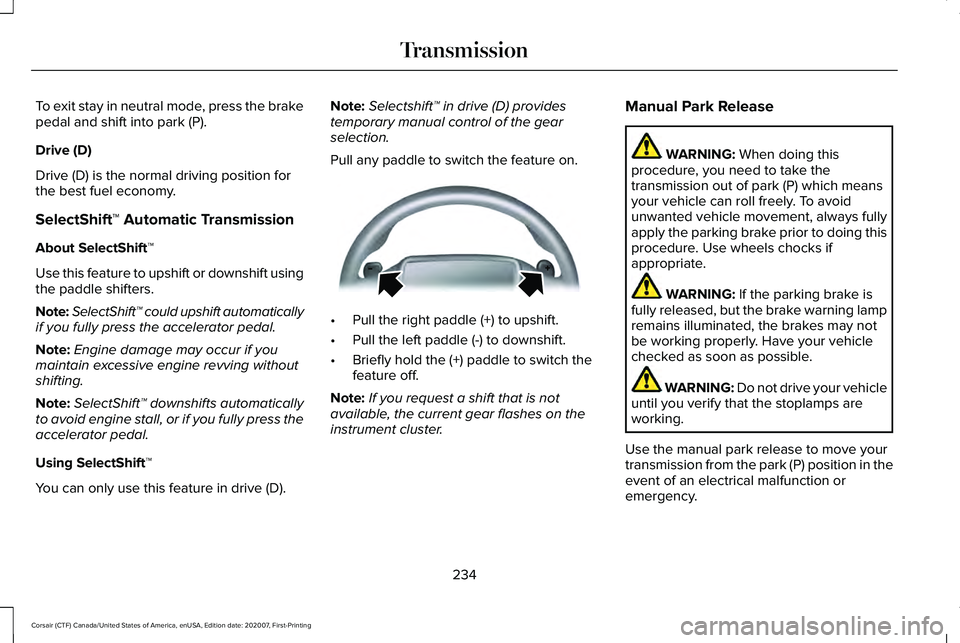
Pull any paddle to switch the feature on. •
Pull the right paddle (+) to upshift.
• Pull the left paddle (-) to downshift.
• Briefly hold the (+) paddle to switch the
feature off.
Note: If you request a shift that is not
available, the current gear flashes on the
instrument cluster. Manual Park Release WARNING: When doing this
procedure, you need to take the
transmission out of park (P) which means
your vehicle can roll freely. To avoid
unwanted vehicle movement, always fully
apply the parking brake prior to doing this
procedure. Use wheels chocks if
appropriate. WARNING:
If the parking brake is
fully released, but the brake warning lamp
remains illuminated, the brakes may not
be working properly. Have your vehicle
checked as soon as possible. WARNING: Do not drive your vehicle
until you verify that the stoplamps are
working.
Use the manual park release to move your
transmission from the park (P) position in the
event of an electrical malfunction or
emergency.
234
Corsair (CTF) Canada/United States of America, enUSA, Edition date: 202007, First-Printing TransmissionE144821
Page 243 of 638
USING ALL-WHEEL DRIVE
Note:
When a system malfunction is present,
a warning message appears in the
information display. See Information
Messages (page 137). This means the system
is not functioning correctly and only
front-wheel drive is available. Have your
vehicle checked by an authorized dealer.
Note: When the system overheats and
switches to front-wheel drive, a warning
message appears in the information display.
This may occur if you operate your vehicle
in extreme high load conditions or with
excessive wheel spin (for example, deep
sand). To resume all-wheel drive function,
stop your vehicle in a safe location and turn
off the ignition. When the system cools,
normal all-wheel drive function will return.
Note: When using the spare tire, a warning
message may appear in the information
display. This message turns off after
reinstalling the repaired or replaced road
tire and you switch on the ignition. Note:
Re-install the repaired tire or replace
the tire as soon as possible. Different tire
sizes between the front and rear axles can
cause system damage, or turn off the
all-wheel drive.
This system anticipates wheel spin and
transfers power to the rear wheels before
the spin occurs. Even when wheel spin is not
occurring, the system is continuously
adjusting power distribution to the wheels,
in an attempt to improve straight line and
cornering, both on and off road.
The system automatically turns on every time
you switch on the ignition.
The all-wheel drive system does not require
maintenance.
Your all-wheel drive vehicle is not intended
for off-road use. The AWD feature gives your
vehicle some limited off-road capabilities in
which driving surfaces are relatively level,
obstruction-free and otherwise similar to
normal on-road driving conditions. Operating
your vehicle in other than those conditions
could subject your vehicle to excessive
stress which might result in damage that is
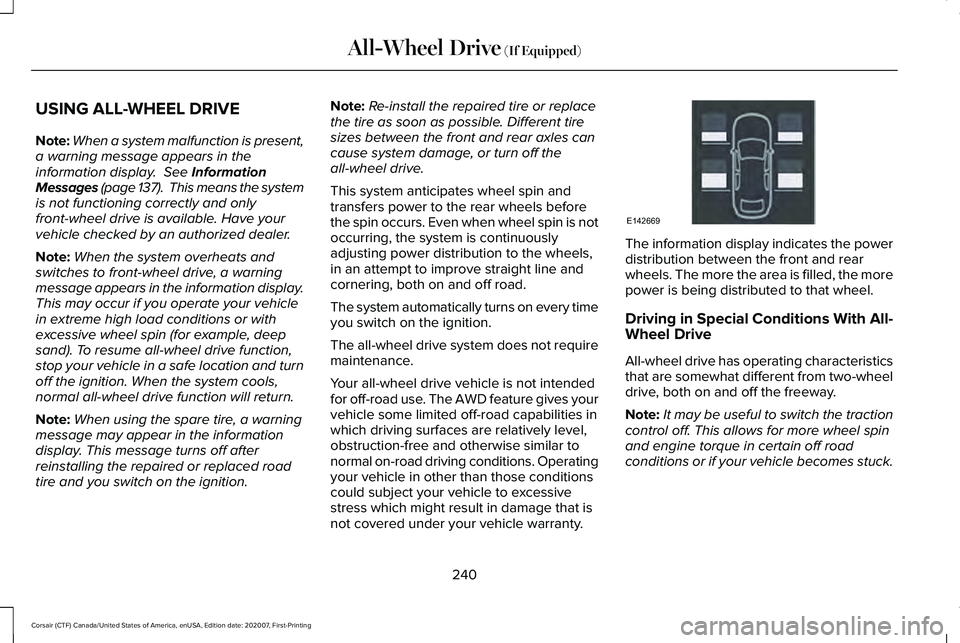
not covered under your vehicle warranty. The information display indicates the power
distribution between the front and rear
wheels. The more the area is filled, the more
power is being distributed to that wheel.
Driving in Special Conditions With All-
Wheel Drive
All-wheel drive has operating characteristics
that are somewhat different from two-wheel
drive, both on and off the freeway.
Note:
It may be useful to switch the traction
control off. This allows for more wheel spin
and engine torque in certain off road
conditions or if your vehicle becomes stuck.
240
Corsair (CTF) Canada/United States of America, enUSA, Edition date: 202007, First-Printing All-Wheel Drive
(If Equipped)E142669
Page 248 of 638
GENERAL INFORMATION
Note:
Occasional brake noise is normal. If
a metal-to-metal, continuous grinding or
continuous squeal sound is present, the
brake linings may be worn-out and an
authorized dealer should check them. If the
vehicle has continuous vibration or shudder
in the steering wheel while braking, an
authorized dealer should check your vehicle.
Note: Brake dust may accumulate on the
wheels, even under normal driving
conditions. Some dust is inevitable as the
brakes wear and does not contribute to
brake noise. Wet brakes result in reduced
braking efficiency. Gently press the brake
pedal a few times when driving from a car
wash or standing water to dry the brakes.
See Cleaning the Wheels (page 392). Brake Over Accelerator
In the event the accelerator pedal becomes
stuck or entrapped, apply steady and firm
pressure to the brake pedal to slow the
vehicle and reduce engine power. If you
experience this condition, apply the brakes
and bring your vehicle to a safe stop. Switch
the engine off, move the transmission to park
(P) and apply the parking brake. Inspect the
accelerator pedal and the area around it for
any items or debris that may be obstructing
its movement. If none are found and the
condition persists, have your vehicle towed
to the nearest authorized dealer.
Emergency Brake Assist
Emergency brake assist detects when you
brake heavily by measuring the rate at which
you press the brake pedal. It provides
maximum braking efficiency as long as you
press the pedal. Emergency brake assist
can reduce stopping distances in critical
situations. Anti-lock Brake System
This system helps you maintain steering
control during emergency stops by keeping
the brakes from locking. If the light does not momentarily
illuminate, continues to flash or
remains on when you switch the
ignition on or apply the parking brake, the
anti-lock braking system could be disabled.
Have the system checked by an authorized
dealer. If the anti-lock brake system is
disabled, normal braking is still effective.
See
Warning Lamps and Indicators (page
126).
Note: Indicators vary depending on region. If the light does not momentarily
illuminate, continues to flash or
remains on when you switch the
ignition on or apply the parking
brake, have the system checked
by an authorized dealer. If the
brake warning lamp illuminates with the
parking brake released, have the system
checked immediately.
245
Corsair (CTF) Canada/United States of America, enUSA, Edition date: 202007, First-Printing Brakes E270480
Page 250 of 638
Pull the switch upward and hold it.
The red warning lamp illuminates, a tone
sounds and the stoplamps turn on. The electric parking brake continues to slow
your vehicle down unless you release the
switch.
Manually Releasing the Electric Parking
Brake
Switch the ignition on.
Press and hold the brake pedal.
Push the switch downward.
The red warning lamp turns off. If it remains illuminated or flashes, the system
has malfunctioned. Have your vehicle
checked as soon as possible.
Pulling Away on a Hill When Towing a
Trailer
Press and hold the brake pedal.
Pull the switch upward and hold it.
Shift into gear.
Press the accelerator pedal until engine has
developed sufficient torque to prevent your
vehicle from rolling down the hill. Release the switch and pull away
in a normal manner.
Automatically Releasing the Electric
Parking Brake
Close the driver door. Shift into gear.
Press the accelerator pedal and pull away in
a normal manner. The red warning lamp turns off.
If it remains illuminated or flashes, the electric
parking brake has not released. Manually
release the parking brake.
Releasing the Electric Parking Brake if
the Vehicle Battery is Running Out of
Charge
Note:
The electric parking brake does not
apply or release if the battery is low or has
no charge.
Connect a booster battery to the vehicle
battery to release the electric parking brake
if the vehicle battery is running out of charge.
See Jump Starting the Vehicle (page 338).
247
Corsair (CTF) Canada/United States of America, enUSA, Edition date: 202007, First-Printing BrakesE267156 E270480 E267156 E270480 E267156 E267156 E270480
Page 283 of 638
Hilly Condition Usage
You should select a lower gear when the
system is active in situations such as
prolonged downhill driving on steep grades,
for example in mountainous areas. The
system needs additional engine braking in
these situations to reduce the load on the
vehicle
’s regular brake system to prevent it
from overheating.
Note: An audible alarm sounds and the
system shuts down if it applies brakes for an
extended period of time. This allows the
brakes to cool. The system functions
normally again after the brakes cool.
ADAPTIVE CRUISE CONTROL
LIMITATIONS - VEHICLES WITH:
ADAPTIVE CRUISE CONTROL
WITH LANE CENTERING
Adaptive cruise control limitations apply to
lane centering unless stated otherwise or
contradicted by a lane centering limitation.
See Adaptive Cruise Control Limitations
(page 280). The system may not correctly operate in any
of the following conditions:
•
Your vehicle is not centered in the lane.
• The lane is too narrow or wide.
• The system does not detect at least one
lane marking or when lanes merge or
split.
• You switch the direction indicator on.
• Limited steering torque input is applied.
• Areas under construction or new
infrastructure.
• When modifications to the steering
system have been made.
• When using a spare tire.
Note: The driving assistance torque is limited
and may not be sufficient for all driving
situations such as driving through tight
curves or driving through curves at high
speeds.
Note: In exceptional conditions, the system
may deviate from the center line. ADAPTIVE CRUISE CONTROL
LIMITATIONS - VEHICLES WITH:
ADAPTIVE CRUISE CONTROL
WITH STOP AND GO
Sensor Limitations
WARNING:
On rare occasions,
detection issues can occur due to the road
infrastructures, for example bridges,
tunnels and safety barriers. In these cases,
the system may brake late or
unexpectedly. At all times, you are
responsible for controlling your vehicle,
supervising the system and intervening, if
required. WARNING:
If the system
malfunctions, have your vehicle checked
as soon as possible. WARNING: Large contrasts in outside
lighting can limit sensor performance.
280
Corsair (CTF) Canada/United States of America, enUSA, Edition date: 202007, First-Printing Adaptive Cruise Control
(If Equipped)
Page 329 of 638
RV & Trailer Towing Guide Online
http://www.fleet.ford.com/towing-guides/
Website
TRAILER SWAY CONTROL WARNING: Turning off trailer sway
control increases the risk of loss of vehicle
control, serious injury or death. Ford does
not recommend disabling this feature
except in situations where speed reduction
may be detrimental (such as hill climbing),
the driver has significant trailer towing
experience, and can control trailer sway
and maintain safe operation.
Note: This feature does not prevent trailer
sway, but reduces it when it begins.
Note: This feature cannot stop all trailers
from swaying.
Note: In some cases, if your vehicle speed
is too high, the system may turn on multiple
times, gradually reducing your vehicle speed. The system applies the brakes to the
individual wheels and reduces engine torque
to aid vehicle stability. If the trailer begins
to sway, the stability control warning lamp
flashes and a message appears in the
information display. See Information
Messages (page 137). Slow your vehicle
down, pull safely to the side of the road and
check for correct load distribution. See Load
Carrying
(page 318).
You can switch this feature off in the
information display. When you switch the
ignition on, the system automatically turns
on. RECOMMENDED TOWING
WEIGHTS WARNING:
Towing trailers
beyond the maximum recommended
gross trailer weight exceeds the limit
of your vehicle and could result in
engine damage, transmission damage,
structural damage, loss of vehicle
control, vehicle rollover and personal
injury.
Note: Do not exceed the trailer weight
for your vehicle configuration listed in
the chart that follows.
Note: Be sure to take into consideration
trailer frontal area. Do not exceed 30 ft²
(2.79 m²) if your vehicle has a towing
package.
326
Corsair (CTF) Canada/United States of America, enUSA, Edition date: 202007, First-Printing Towing
Page 332 of 638
Trailer Lamps
WARNING: Never connect any trailer
lamp wiring to the vehicle's tail lamp wiring;
this may damage the electrical system
resulting in fire. Contact your authorized
dealer as soon as possible for assistance
in proper trailer tow wiring installation.
Additional electrical equipment may be
required.
Trailer lamps are required on most towed
vehicles. Make sure all running lights, brake
lights, turn signals and hazard lights are
working.
Before Towing a Trailer
Practice turning, stopping and backing up to
get the feel of your vehicle-trailer
combination before starting on a trip. When
turning, make wider turns so the trailer
wheels clear curbs and other obstacles. When Towing a Trailer
•
Do not drive faster than 70 mph
(113 km/h) during the first 500 mi
(800 km).
• Do not make full-throttle starts.
• Check your hitch, electrical connections
and trailer wheel lug nuts thoroughly after
you have traveled
50 mi (80 km).
• When stopped in congested or heavy
traffic during hot weather, place the
transmission in park (P) to aid engine and
transmission cooling and to help A/C
performance.
• Turn off the speed control with heavy
loads or in hilly terrain. The speed control
may turn off automatically when you are
towing on long, steep grades.
• Shift to a lower gear when driving down
a long or steep hill. Do not apply the
brakes continuously, as they may
overheat and become less effective. •
If your transmission is equipped with a
Grade Assist or Tow/Haul feature, use
this feature when towing. This provides
engine braking and helps eliminate
excessive transmission shifting for
optimum fuel economy and transmission
cooling.
• Allow more distance for stopping with a
trailer attached. Anticipate stops and
brake gradually.
• Avoid parking on a grade. However, if
you must park on a grade:
1. Turn the steering wheel to point your vehicle tires away from traffic flow.
2. Set your vehicle parking brake.
3. Place the transmission in park (P).
4. Place wheel chocks in front and back of the trailer wheels. Chocks are not
included with your vehicle.
Launching or Retrieving a Boat or
Personal Watercraft (PWC)
Note: Disconnect the wiring to the trailer
before
backing the trailer into the water.
329
Corsair (CTF) Canada/United States of America, enUSA, Edition date: 202007, First-Printing Towing
Page 336 of 638
ECONOMICAL DRIVING
Fuel economy is affected by several things
such as how you drive, the conditions you
drive under and how you maintain your
vehicle.
There are some things to keep in mind that
may improve your fuel economy:
•
Accelerate and slow down in a smooth,
moderate fashion.
• Drive at steady speeds.
• Anticipate stops; slowing down may
eliminate the need to stop.
• Combine errands and minimize
stop-and-go driving (When running
errands, go to the furthest destination
first and then work your way back home).
• Close the windows for high-speed
driving.
• Drive at reasonable speeds.
• Keep the tires properly inflated and use
only the recommended size.
• Use the recommended engine oil.
• Perform all regularly scheduled
maintenance. There are also some things you may want to
avoid doing because they reduce your fuel
economy:
•
Avoid sudden or hard accelerations.
• Avoid revving the engine before turning
off the car.
• Avoid long idle periods.
• Do not warm up your vehicle on cold
mornings.
• Reduce the use of air conditioning and
heat.
• Avoid using speed control in hilly terrain.
• Do not rest your foot on the brake pedal
while driving.
• Avoid carrying unnecessary weight.
• Avoid adding particular accessories to
your vehicle (e.g. bug deflectors,
rollbars/light bars, running boards, ski
racks).
• Avoid driving with the wheels out of
alignment. BREAKING-IN
You need to break in new tires for
approximately 300 mi (480 km). During this
time, your vehicle may exhibit some unusual
driving characteristics.
DRIVING THROUGH WATER WARNING:
Do not drive through
flowing or deep water as you may lose
control of your vehicle.
Note: Driving through standing water can
cause vehicle damage.
Note: Engine damage can occur if water
enters the air filter.
Before driving through standing water, check
the depth. Never drive through water that is
higher than the bottom of the front rocker
area of your vehicle.
333
Corsair (CTF) Canada/United States of America, enUSA, Edition date: 202007, First-Printing Driving Hints