install LINCOLN CORSAIR 2021 Owner's Manual
[x] Cancel search | Manufacturer: LINCOLN, Model Year: 2021, Model line: CORSAIR, Model: LINCOLN CORSAIR 2021Pages: 638, PDF Size: 5.7 MB
Page 74 of 638
I uninstalled my Lincoln Way app and
reinstalled it. Why am I not able to get a
new Phone as a Key?
Remove the Phone as a Key that was
previously associated with your phone
or reset Phone as a Key from your
vehicle, and then request a new Phone
as a Key. See Programming Your
Phone (page 68).
Why can I not remotely start the vehicle
with my Phone as a Key? Using the Lincoln Way app, verify your
Phone as a Key setup is complete and
enabled via Bluetooth connection on at
least one phone. If Bluetooth has
connected but Phone as a Key setup is
not complete, complete the setup of
your Phone as a Key, as prompted from
the Lincoln Way app.
See Programming
Your Phone (page 68).
71
Corsair (CTF) Canada/United States of America, enUSA, Edition date: 202007, First-Printing Phone as a Key
Page 77 of 638
2. Using your touchscreen, press Menu.
3. Press
Settings.
4. Press
Vehicle.
5. Press
MyKey.
6. Press
Clearing All MyKeys.
7. Press
Yes to clear all MyKeys from your
vehicle. CHECKING MYKEY SYSTEM
STATUS
You can find information about the distance
traveled using a MyKey, and the number of
admin keys and MyKeys created for your
vehicle.
1. Switch the ignition on.
2. Press
Settings on the touchscreen.
3. Press
Vehicle Settings.
4. Press
MyKey. 5. Press
MyKey Information.
6. Switch the ignition off.
USING MYKEY WITH REMOTE
START SYSTEMS
MyKey is not compatible with unapproved,
aftermarket remote start systems. If you
choose to install a remote start system, see
an authorized dealer for an approved remote
start system.
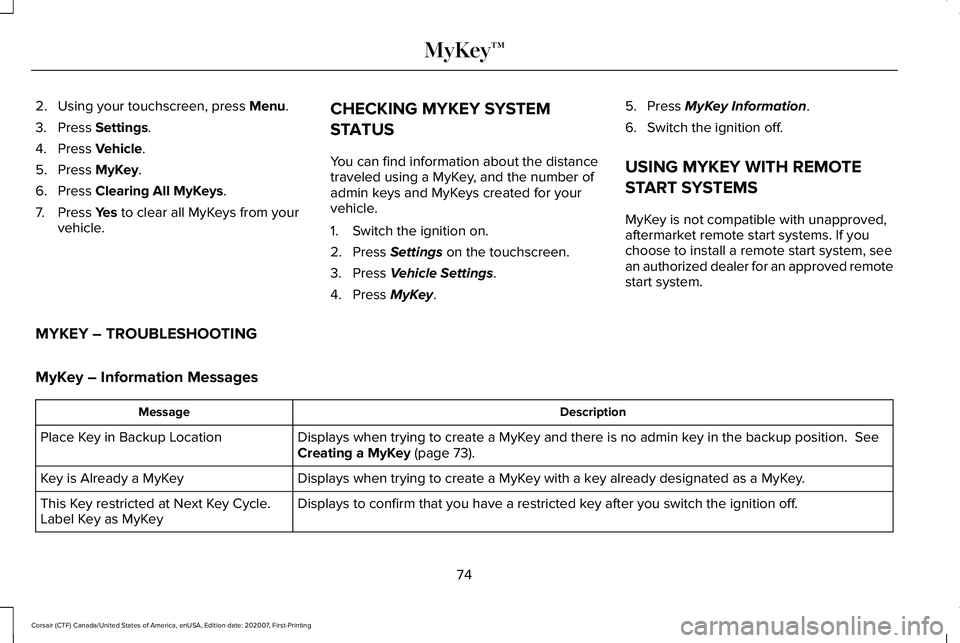
MYKEY – TROUBLESHOOTING
MyKey – Information Messages Description
Message
Displays when trying to create a MyKey and there is no admin key in the backup position.
See
Creating a MyKey (page 73).
Place Key in Backup Location
Displays when trying to create a MyKey with a key already designated as a MyKey.
Key is Already a MyKey
Displays to confirm that you have a restricted key after you switch the ignition off.
This Key restricted at Next Key Cycle.
Label Key as MyKey
74
Corsair (CTF) Canada/United States of America, enUSA, Edition date: 202007, First-Printing MyKey™
Page 102 of 638
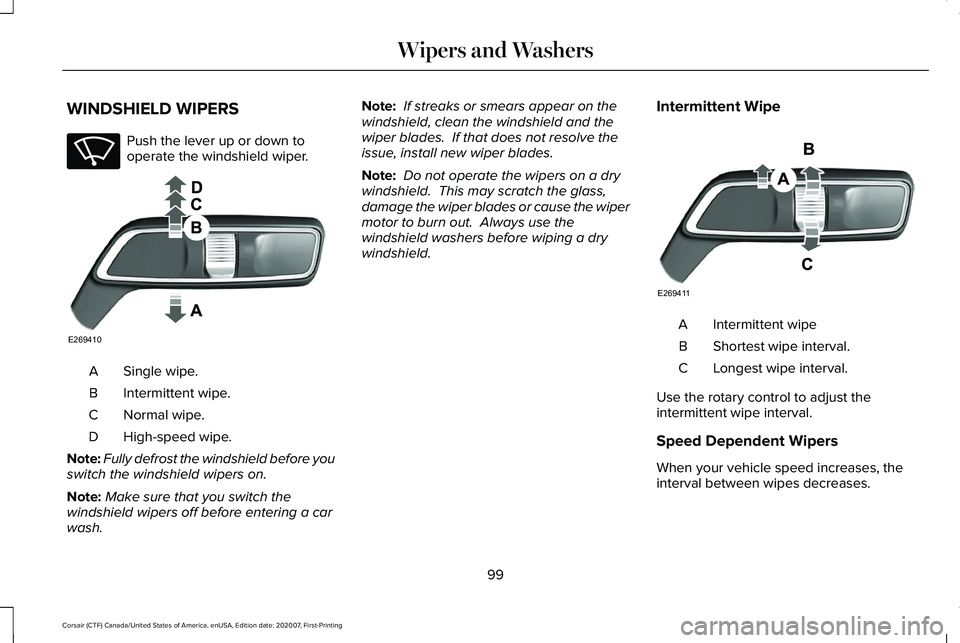
WINDSHIELD WIPERS
Push the lever up or down to
operate the windshield wiper.
Single wipe.
A
Intermittent wipe.
B
Normal wipe.
C
High-speed wipe.
D
Note: Fully defrost the windshield before you
switch the windshield wipers on.
Note: Make sure that you switch the
windshield wipers off before entering a car
wash. Note:
If streaks or smears appear on the
windshield, clean the windshield and the
wiper blades. If that does not resolve the
issue, install new wiper blades.
Note: Do not operate the wipers on a dry
windshield. This may scratch the glass,
damage the wiper blades or cause the wiper
motor to burn out. Always use the
windshield washers before wiping a dry
windshield. Intermittent Wipe Intermittent wipe
A
Shortest wipe interval.
B
Longest wipe interval.
C
Use the rotary control to adjust the
intermittent wipe interval.
Speed Dependent Wipers
When your vehicle speed increases, the
interval between wipes decreases.
99
Corsair (CTF) Canada/United States of America, enUSA, Edition date: 202007, First-Printing Wipers and WashersE270969 E269410 E269411
Page 103 of 638
AUTOWIPERS (IF EQUIPPED)
Wet or winter driving conditions with ice,
snow or salty road mist can cause
inconsistent and unexpected wiping or
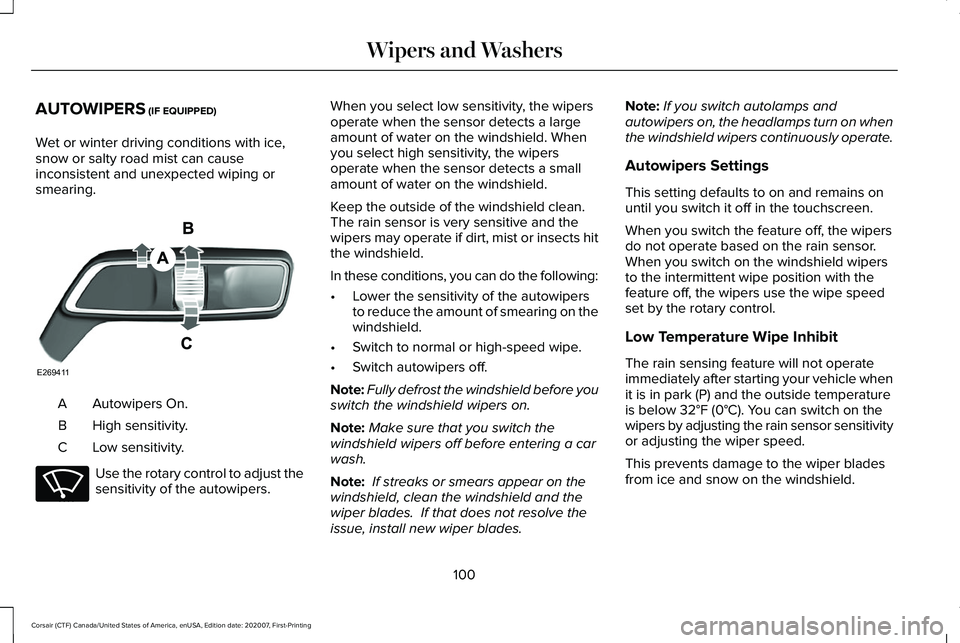
smearing. Autowipers On.
A
High sensitivity.
B
Low sensitivity.
C Use the rotary control to adjust the
sensitivity of the autowipers. When you select low sensitivity, the wipers
operate when the sensor detects a large
amount of water on the windshield. When
you select high sensitivity, the wipers
operate when the sensor detects a small
amount of water on the windshield.
Keep the outside of the windshield clean.
The rain sensor is very sensitive and the
wipers may operate if dirt, mist or insects hit
the windshield.
In these conditions, you can do the following:
•
Lower the sensitivity of the autowipers
to reduce the amount of smearing on the
windshield.
• Switch to normal or high-speed wipe.
• Switch autowipers off.
Note: Fully defrost the windshield before you
switch the windshield wipers on.
Note: Make sure that you switch the
windshield wipers off before entering a car
wash.
Note: If streaks or smears appear on the
windshield, clean the windshield and the
wiper blades. If that does not resolve the
issue, install new wiper blades. Note:
If you switch autolamps and
autowipers on, the headlamps turn on when
the windshield wipers continuously operate.
Autowipers Settings
This setting defaults to on and remains on
until you switch it off in the touchscreen.
When you switch the feature off, the wipers
do not operate based on the rain sensor.
When you switch on the windshield wipers
to the intermittent wipe position with the
feature off, the wipers use the wipe speed
set by the rotary control.
Low Temperature Wipe Inhibit
The rain sensing feature will not operate
immediately after starting your vehicle when
it is in park (P) and the outside temperature
is below
32°F (0°C). You can switch on the
wipers by adjusting the rain sensor sensitivity
or adjusting the wiper speed.
This prevents damage to the wiper blades
from ice and snow on the windshield.
100
Corsair (CTF) Canada/United States of America, enUSA, Edition date: 202007, First-Printing Wipers and WashersE269411 E270969
Page 144 of 638

AWD
Action
Message
The all-wheel drive system temporarily turns off to protect itself from \
overheating.
AWD Temporarily Disabled
The all-wheel drive system is locking up the torque transfer clutch to h\
elp reduce clutchtemperature.
AWD Temporarily Locked
The all-wheel drive system temporarily turns off to protect itself from \
overheating or if you areusing the temporary spare tire.
AWD OFF
The all-wheel drive system will resume normal function and clear this me\
ssage after driving ashort distance with the road tire re-installed or after the system cools\
.
AWD Restored
The all-wheel drive system is not operating properly. If the warning stays on or continues tocome on, have the system checked as soon as possible.
AWD Fault Service Required
Displayed when the transfer case fluid requires service.
Change AWD Power Transfer Unit Lube
Displayed when the transfer case fluid has been changed and reset to new\
.
AWD Power Transfer Unit Lube Set to New
141
Corsair (CTF) Canada/United States of America, enUSA, Edition date: 202007, First-Printing Information Displays
Page 172 of 638
WHAT IS THE CABIN AIR FILTER
The cabin air filter improves the quality of air
in your vehicle by trapping dust, pollen and
other particles.
LOCATING THE CABIN AIR FILTER
You can locate the cabin air filter behind the
glove box.
REPLACING THE CABIN AIR FILTER
Replace the filter at regular intervals. See
Scheduled Maintenance (page 550).
Note: Make sure you have a cabin air filter
installed at all times. This prevents foreign
objects from entering the system. Running
the system without a filter in place could
result in degradation or damage to the
system.
Note: Using an aftermarket cabin air filter
could reduce cabin air filtration and climate
control performance.
169
Corsair (CTF) Canada/United States of America, enUSA, Edition date: 202007, First-Printing Interior Air Quality
Page 174 of 638
HEAD RESTRAINTS
WARNING: Fully adjust the head
restraint before you sit in or operate your
vehicle. This will help minimize the risk of
neck injury in the event of a crash. Do not
adjust the head restraint when your vehicle
is moving. WARNING:
The head restraint is a
safety device. Whenever possible it should
be installed and properly adjusted when
the seat is occupied. Failure to adjust the
head restraint properly could reduce its
effectiveness during certain impacts. WARNING: Adjust the head restraints
for all passengers before you drive your
vehicle. This will help minimize the risk of
neck injury in the event of a crash. Do not
adjust the head restraints when your
vehicle is moving. Note:
Adjust the seat backrest to an upright
driving position before adjusting the head
restraint. Adjust the head restraint so that
the top of it is level with the top of your head
and as far forward as possible. Make sure
that you remain comfortable. If you are
extremely tall, adjust the head restraint to
its highest position.
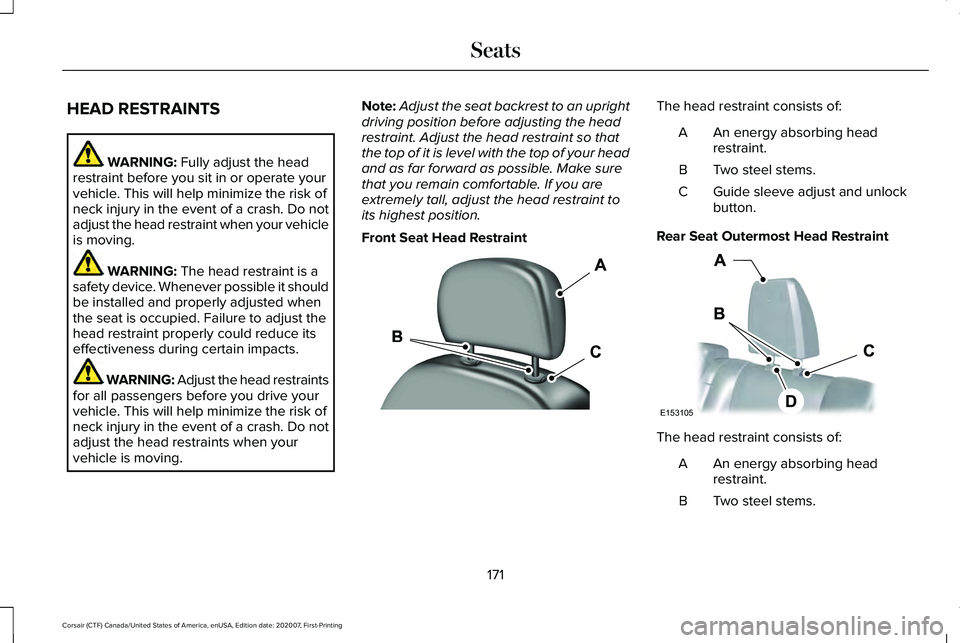
Front Seat Head Restraint The head restraint consists of:
An energy absorbing head
restraint.
A
Two steel stems.
B
Guide sleeve adjust and unlock
button.
C
Rear Seat Outermost Head Restraint The head restraint consists of:
An energy absorbing head
restraint.
A
Two steel stems.
B
171
Corsair (CTF) Canada/United States of America, enUSA, Edition date: 202007, First-Printing SeatsE308781 E153105
Page 176 of 638
Removing the Rear Seat Center Head
Restraint
1.
Pull the head restraint up until it reaches
its highest position.
2. Press and hold button C.
3. Pull the head restraint up.
Installing the Head Restraint
Align the steel stems into the guide sleeves
and push the head restraint down until it
locks. POWER SEATS WARNING: Do not adjust the driver
seat or seat backrest when your vehicle is
moving. This may result in sudden seat
movement, causing the loss of control of
your vehicle. WARNING:
Do not place cargo or
any objects behind the seat backrest
before returning it to the original position.
Pull on the seat backrest to make sure that
it has fully latched after returning the seat
backrest to its original position. An
unlatched seat may become dangerous if
you stop suddenly or have a crash.
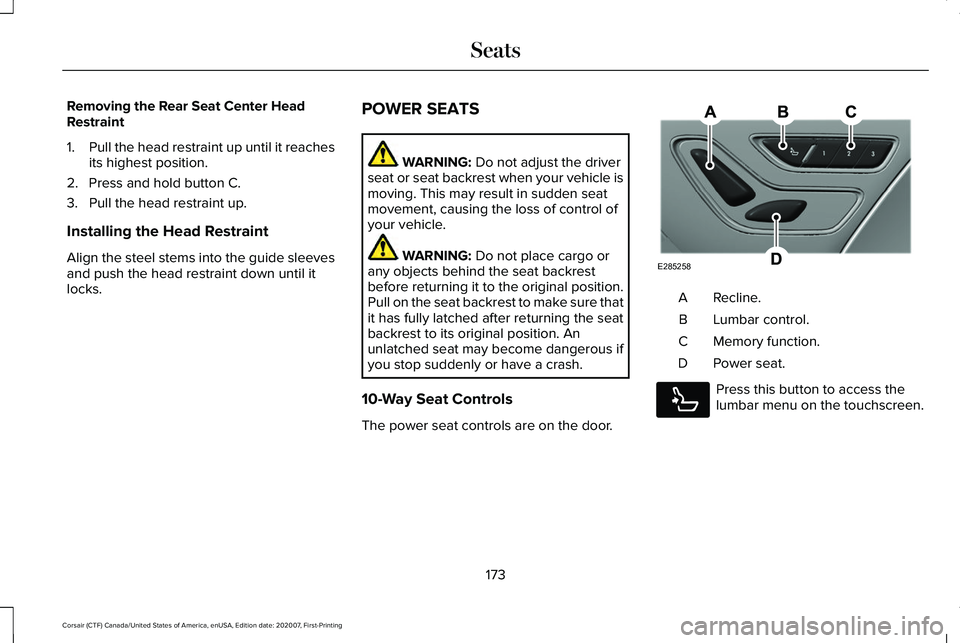
10-Way Seat Controls
The power seat controls are on the door. Recline.
A
Lumbar control.
B
Memory function.
C
Power seat.
D Press this button to access the
lumbar menu on the touchscreen.
173
Corsair (CTF) Canada/United States of America, enUSA, Edition date: 202007, First-Printing SeatsE285258 E285278
Page 197 of 638
FCC ID: L2C0074TR
Canada: 3432A-0074TR
This equipment has been tested and found
to comply with part 18 of the FCC Rules.
•
This equipment generates, uses, and can
radiate radio frequency energy and may
cause harmful interference to radio
communications. There is no guarantee
that interference will not occur in a
particular installation. If this equipment
does cause harmful interference to radio
or television reception, please consult
the dealer.
• This product is not end-user serviceable.
This device contains licence-exempt
transmitter(s)/receiver(s) that comply with
Innovation, Science and Economic
Development Canada's licence-exempt
RSS(s). Operation is subject to the following
two conditions:
• This device may not cause interference.
• This device must accept any interference,
including interference that may cause
undesired operation of the device.
194
Corsair (CTF) Canada/United States of America, enUSA, Edition date: 202007, First-Printing Auxiliary Power Points
Page 206 of 638
WARNING: Do not use your heater
with ungrounded electrical systems or
two-pronged adapters. There is a risk of
electrical shock. WARNING:
Do not fully close the
hood, or allow it to drop under its own
weight when using the engine block
heater. This could damage the power cable
and may cause an electrical short resulting
in fire, injury and property damage.
Note: The heater is most effective when
outdoor temperatures are below
0°F (-18°C).
The heater acts as a starting aid by warming
the engine coolant. This allows the climate
control system to respond quickly. The
equipment includes a heater element,
installed in the engine block and a wire
harness. You can connect the system to a
grounded 120-volt AC electrical source. We recommend that you do the following for
a safe and correct operation:
•
Use a 16-gauge outdoor extension cord
that is product certified by Underwriter’ s
Laboratory (UL) or Canadian Standards
Association (CSA). This extension cord
must be suitable for use outdoors, in cold
temperatures, and be clearly marked
Suitable for Use with Outdoor
Appliances. Do not use an indoor
extension cord outdoors. This could
result in an electric shock or become a
fire hazard.
• Use as short an extension cord as
possible.
• Do not use multiple extension cords.
• Make sure that when in operation, the
extension cord plug and heater cord plug
connections are free and clear of water.
This could cause an electric shock or fire.
• If the block heater cord is under the
hood, Do Not remove the wiring from its
original location. Do Not close the hood
on the extension wiring.
• Make sure your vehicle is parked in a
clean area, clear of combustibles. •
Make sure the heater, heater cord and
extension cord are firmly connected.
• Check for heat anywhere in the electrical
hookup once the system has been
operating for approximately 30 minutes.
• Make sure the system is unplugged and
properly stowed before starting and
driving your vehicle. Make sure the
protective cover seals the prongs of the
block heater cord plug when not in use.
• Make sure the heater system is checked
for proper operation before winter.
Using the Engine Block Heater
Make sure the receptacle terminals are clean
and dry prior to use. Clean them with a dry
cloth if necessary.
The heater uses 0.4 to 1.0 kilowatt-hours of
energy per hour of use. The system does not
have a thermostat. It achieves maximum
temperature after approximately three hours
of operation. Using the heater longer than
three hours does not improve system
performance and unnecessarily uses
electricity.
203
Corsair (CTF) Canada/United States of America, enUSA, Edition date: 202007, First-Printing Starting and Stopping the Engine