remote start LINCOLN CORSAIR 2021 Owner's Manual
[x] Cancel search | Manufacturer: LINCOLN, Model Year: 2021, Model line: CORSAIR, Model: LINCOLN CORSAIR 2021Pages: 638, PDF Size: 5.7 MB
Page 200 of 638
•
Without applying the brake pedal, press
and release the button once when the
ignition is in the on mode, or when the
engine is running but the vehicle is not
moving.
On: All electrical circuits are operational and
the warning lamps and indicators illuminate.
• Without applying the brake pedal, press
and release the button once.
Note: You may have to press the push
button ignition switch twice to switch the
ignition on.
Start:
Starts the engine.
• Press the brake pedal, and then press
the button for any length of time. An
indicator light on the button illuminates
when then ignition is on and when the
engine starts. STARTING A GASOLINE ENGINE
When you start the engine, the idle speed
increases, this helps to warm up the engine.
If the engine idle speed does not slow down,
have your vehicle checked as soon as
possible.
Note:
If your vehicle has remote start, you
can start your vehicle with the remote, and
then drive away by pressing the brake pedal
and pushing a button on the transmission.
This allows you to drive away without
pressing the engine start button.
Before starting the engine, check the
following:
• Make sure all occupants have fastened
their seatbelts.
• Make sure the headlamps and electrical
accessories are off.
• Make sure the parking brake is on.
• Make sure the transmission is in park (P).
Note: Do not touch the accelerator pedal.
1. Fully press the brake pedal.
2. Press the push button ignition switch. The system does not function if:
•
The key frequencies are jammed.
• The key battery has no charge.
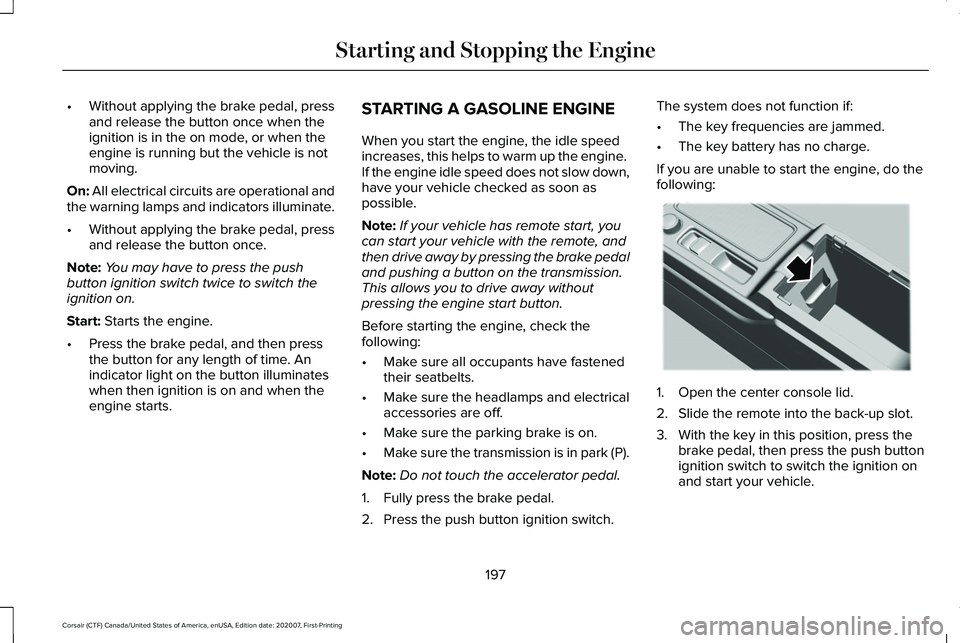
If you are unable to start the engine, do the
following: 1. Open the center console lid.
2. Slide the remote into the back-up slot.
3. With the key in this position, press the
brake pedal, then press the push button
ignition switch to switch the ignition on
and start your vehicle.
197
Corsair (CTF) Canada/United States of America, enUSA, Edition date: 202007, First-Printing Starting and Stopping the EngineE306288
Page 203 of 638
Important Ventilating Information
If you stop your vehicle and the leave the
engine idling for long periods, we
recommend that you do one of the following:
•
Open the windows at least 1 in (2.5 cm).
• Set your climate control to outside air.
STARTING A HYBRID ELECTRIC
VEHICLE SYSTEM
When the engine starts for the first time on
your drive, the idle speed increases, this
helps to warm up the engine. If the engine
idle speed does not slow down, have your
vehicle checked as soon as possible.
Before starting your vehicle, check the
following:
• Make sure all occupants fasten their
seatbelt.
• Make sure the headlamps and electrical
accessories are off.
• Make sure the parking brake is on.
• Make sure the transmission is in park (P). Note:
Do not touch the accelerator pedal.
1. Fully press the brake pedal.
2. Press the push button ignition switch.
Note: The green ready indicator illuminates
letting you know that your vehicle is ready
for driving. Since your vehicle is equipped
with a silent key start, the engine may not
start when your vehicle starts.
The system does not function if:
• The key frequencies are jammed.
• The key battery has no charge.
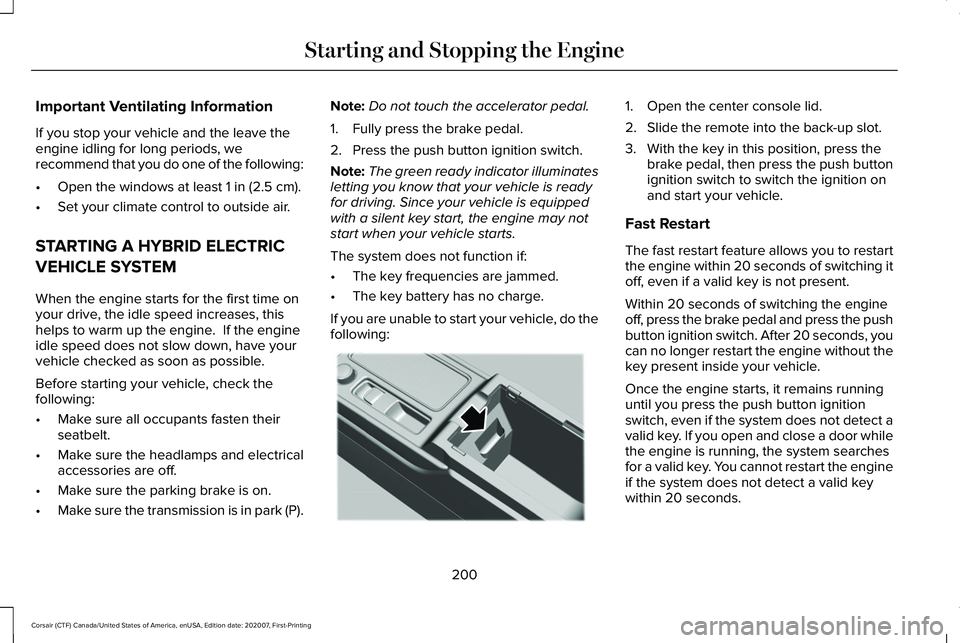
If you are unable to start your vehicle, do the
following: 1. Open the center console lid.
2. Slide the remote into the back-up slot.
3. With the key in this position, press the
brake pedal, then press the push button
ignition switch to switch the ignition on
and start your vehicle.
Fast Restart
The fast restart feature allows you to restart
the engine within 20 seconds of switching it
off, even if a valid key is not present.
Within 20 seconds of switching the engine
off, press the brake pedal and press the push
button ignition switch. After 20 seconds, you
can no longer restart the engine without the
key present inside your vehicle.
Once the engine starts, it remains running
until you press the push button ignition
switch, even if the system does not detect a
valid key. If you open and close a door while
the engine is running, the system searches
for a valid key. You cannot restart the engine
if the system does not detect a valid key
within 20 seconds.
200
Corsair (CTF) Canada/United States of America, enUSA, Edition date: 202007, First-Printing Starting and Stopping the EngineE306288
Page 419 of 638
WARNING: When inflating the
tire for mounting pressures up to
20 psi (1.38 bar)
greater than the
maximum pressure on the tire sidewall,
the following precautions must be
taken to protect the person mounting
the tire:
• Make sure that you have the correct
tire and wheel size.
• Lubricate the tire bead and wheel
bead seat area again.
• Stand at a minimum of 12.0 ft (3.66 m)
away from the wheel and tire
assembly.
• Use both eye and ear protection. WARNING:
Always inflate steel
carcass tires with a remote air fill with
the person inflating standing at a
minimum of
12 ft (3.66 m) away from
the wheel and tire assembly. Important:
Remember to replace the
wheel valve stems when the road tires
are replaced on your vehicle.
It is recommended that the two front
tires or two rear tires generally be
replaced as a pair.
The tire pressure sensors mounted in
the wheels (originally installed on your
vehicle) are not designed to be used in
aftermarket wheels.
The use of wheels or tires not
recommended by us, may affect the
operation of your tire pressure
monitoring system.
If the tire pressure monitoring system
indicator is flashing, your system is
malfunctioning. Your replacement tire
might be incompatible with your tire
pressure monitoring system, or some
component of the system may be
damaged. Safety Practices WARNING:
If your vehicle is
stuck in snow, mud or sand, do not
rapidly spin the tires; spinning the tires
can tear the tire and cause an
explosion. A tire can explode in as little
as three to five seconds. WARNING:
Do not spin the
wheels at over 34 mph (55 km/h). The
tires may fail and injure a passenger
or bystander.
Driving habits have a great deal to do
with your tire mileage and safety.
*Observe posted speed limits
*Avoid fast starts, stops and turns
*Avoid potholes and objects on the road
*Do not run over curbs or hit the tire
against a curb when parking
416
Corsair (CTF) Canada/United States of America, enUSA, Edition date: 202007, First-Printing Wheels and Tires
Page 465 of 638
CONNECTING THE VEHICLE TO A
MOBILE NETWORK
What Is the Modem
The modem allows you to connect your
vehicle to the Internet to use when you are
on the road.
If you enable the modem using the Lincoln
Way app, you can access the following
services:
•
Locating and remotely starting, locking
and unlocking your vehicle. See the
information in the Lincoln Way app.
• Automatic system updates. Note:
We may need to update operating
system software on your vehicle to keep
connected services updated without prior
notice to you.
Enabling the Modem Using The Lincoln
Way
1. Open the Lincoln Way app on your device and log in.
2. Select your vehicle.
3. Select the option for vehicle details.
4. Select the option to activate your vehicle.
5. Switch the ignition on. 6. Make sure that the name on the screen
matches the name shown in your Lincoln
Way account.
7. Confirm the association of your vehicle with your Lincoln Way account.
Enabling the Modem Using the
Touchscreen Select the settings option on the
feature bar.
1. Select Lincoln Connect .
2. Select
Connectivity Settings.
3. Switch connectivity features on.
462
Corsair (CTF) Canada/United States of America, enUSA, Edition date: 202007, First-Printing Network ConnectivityE280315
Page 546 of 638
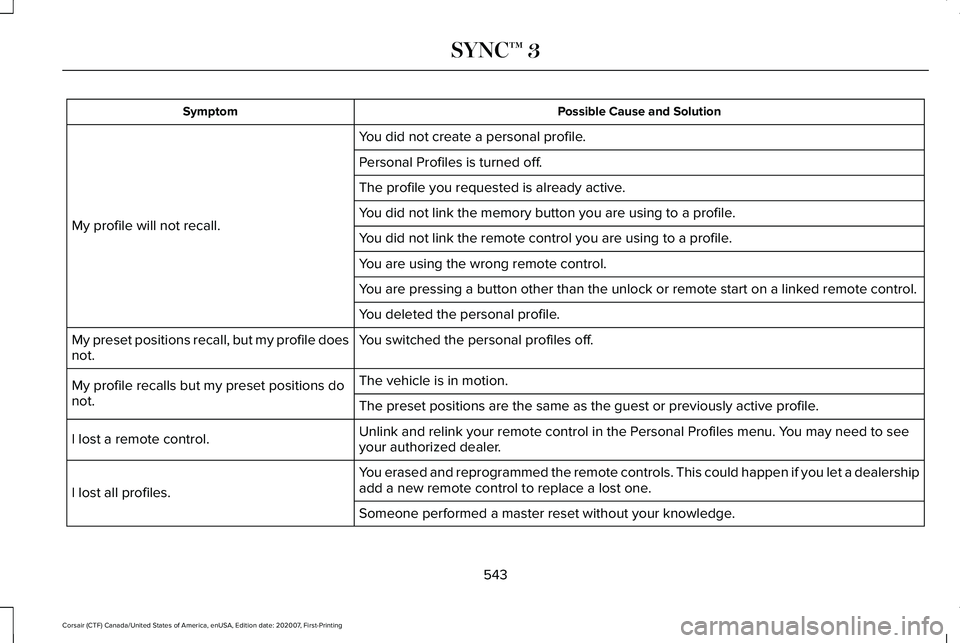
Possible Cause and Solution
Symptom
You did not create a personal profile.
My profile will not recall. Personal Profiles is turned off.
The profile you requested is already active.
You did not link the memory button you are using to a profile.
You did not link the remote control you are using to a profile.
You are using the wrong remote control.
You are pressing a button other than the unlock or remote start on a link\
ed remote control.
You deleted the personal profile.
You switched the personal profiles off.
My preset positions recall, but my profile does
not.
The vehicle is in motion.
My profile recalls but my preset positions do
not. The preset positions are the same as the guest or previously active prof\
ile.
Unlink and relink your remote control in the Personal Profiles menu. You may need to see
your authorized dealer.
I lost a remote control.
You erased and reprogrammed the remote controls. This could happen if you\
let a dealership
add a new remote control to replace a lost one.
I lost all profiles.
Someone performed a master reset without your knowledge.
543
Corsair (CTF) Canada/United States of America, enUSA, Edition date: 202007, First-Printing SYNC™ 3
Page 625 of 638
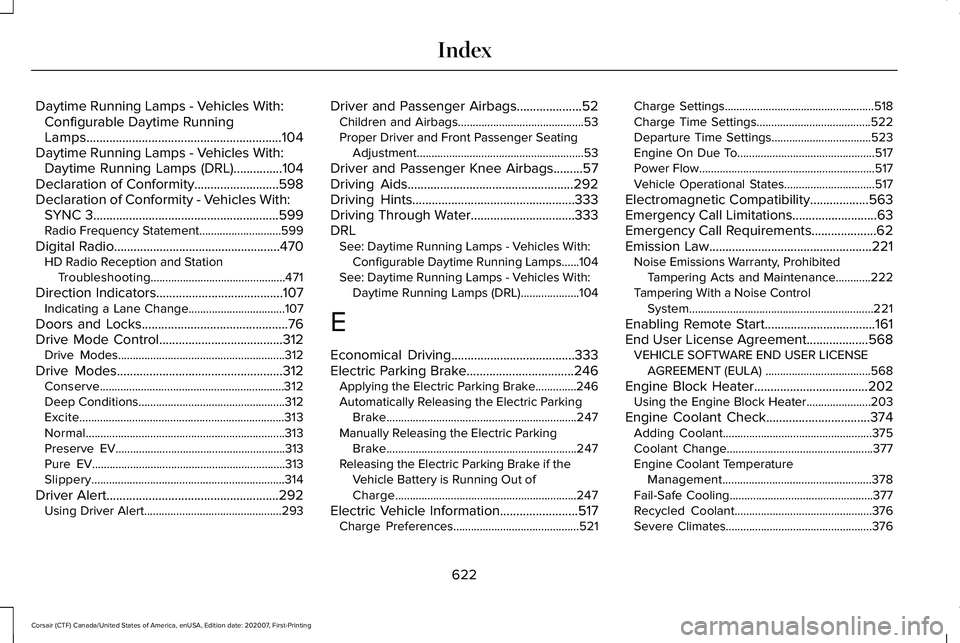
Daytime Running Lamps - Vehicles With:
Configurable Daytime Running
Lamps............................................................104
Daytime Running Lamps - Vehicles With: Daytime Running Lamps (DRL)...............104
Declaration of Conformity..........................598
Declaration of Conformity - Vehicles With: SYNC 3.........................................................599
Radio Frequency Statement............................599
Digital Radio
...................................................470
HD Radio Reception and Station
Troubleshooting..............................................471
Direction Indicators
.......................................107
Indicating a Lane Change.................................107
Doors and Locks.............................................76
Drive Mode Control......................................312 Drive Modes.........................................................312
Drive Modes
...................................................312
Conserve...............................................................312
Deep Conditions..................................................312
Excite......................................................................313
Normal
....................................................................313
Preserve EV..........................................................313
Pure EV..................................................................313
Slippery..................................................................314
Driver Alert
.....................................................292
Using Driver Alert...............................................293 Driver and Passenger Airbags....................52
Children and Airbags...........................................53
Proper Driver and Front Passenger Seating
Adjustment.........................................................53
Driver and Passenger Knee Airbags.........57
Driving Aids...................................................292
Driving Hints
..................................................333
Driving Through Water................................333
DRL See: Daytime Running Lamps - Vehicles With:
Configurable Daytime Running Lamps......104
See: Daytime Running Lamps - Vehicles With: Daytime Running Lamps (DRL)....................
104
E
Economical Driving
......................................333
Electric Parking Brake.................................246 Applying the Electric Parking Brake..............246
Automatically Releasing the Electric Parking
Brake.................................................................247
Manually Releasing the Electric Parking Brake.................................................................247
Releasing the Electric Parking Brake if the Vehicle Battery is Running Out of
Charge..............................................................247
Electric Vehicle Information........................517 Charge Preferences...........................................521 Charge Settings...................................................518
Charge Time Settings.......................................522
Departure Time Settings..................................
523
Engine On Due To...............................................517
Power Flow............................................................517
Vehicle Operational States...............................517
Electromagnetic Compatibility
..................563
Emergency Call Limitations..........................63
Emergency Call Requirements....................62
Emission Law
..................................................221
Noise Emissions Warranty, Prohibited
Tampering Acts and Maintenance............222
Tampering With a Noise Control System...............................................................221
Enabling Remote Start
..................................161
End User License Agreement...................568 VEHICLE SOFTWARE END USER LICENSE
AGREEMENT (EULA) ....................................568
Engine Block Heater
...................................202
Using the Engine Block Heater......................203
Engine Coolant Check................................374 Adding Coolant...................................................375
Coolant Change..................................................377
Engine Coolant Temperature
Management...................................................378
Fail-Safe Cooling.................................................377
Recycled Coolant...............................................376
Severe Climates..................................................376
622
Corsair (CTF) Canada/United States of America, enUSA, Edition date: 202007, First-Printing Index
Page 626 of 638
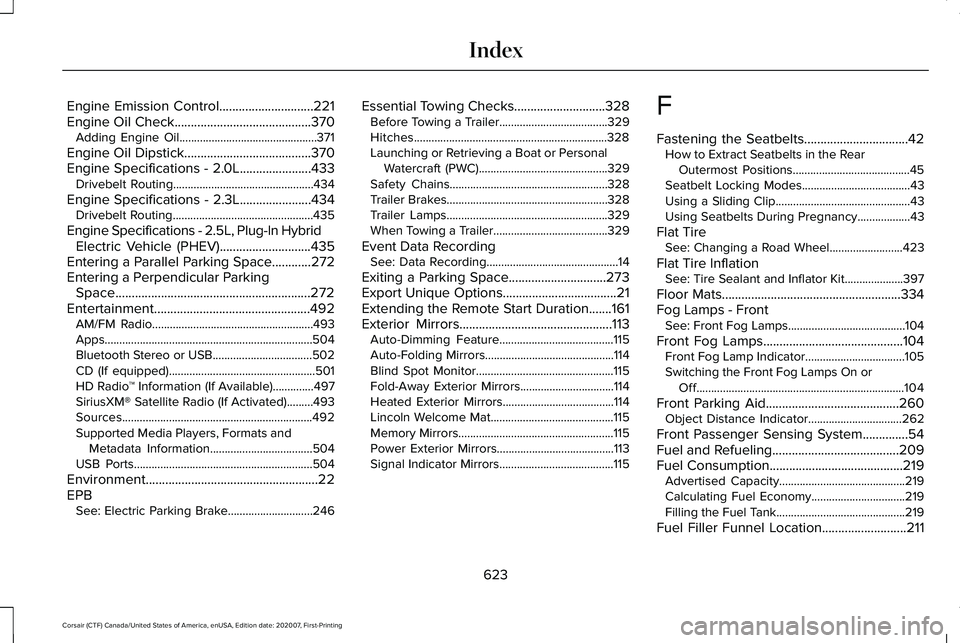
Engine Emission Control.............................221
Engine Oil Check..........................................370
Adding Engine Oil...............................................371
Engine Oil Dipstick.......................................370
Engine Specifications - 2.0L......................433
Drivebelt Routing................................................434
Engine Specifications - 2.3L
......................434
Drivebelt Routing................................................435
Engine Specifications - 2.5L, Plug-In Hybrid Electric Vehicle (PHEV)............................435
Entering a Parallel Parking Space
............272
Entering a Perpendicular Parking Space............................................................272
Entertainment................................................492 AM/FM Radio.......................................................493
Apps.......................................................................504
Bluetooth Stereo or USB..................................
502
CD (If equipped)..................................................501
HD Radio ™ Information (If Available)..............497
SiriusXM® Satellite Radio (If Activated).........
493
Sources.................................................................492
Supported Media Players, Formats and Metadata Information...................................504
USB Ports.............................................................504
Environment.....................................................22
EPB See: Electric Parking Brake.............................246 Essential Towing Checks
............................328
Before Towing a Trailer.....................................329
Hitches..................................................................328
Launching or Retrieving a Boat or Personal
Watercraft (PWC)............................................329
Safety Chains......................................................328
Trailer Brakes.......................................................328
Trailer Lamps.......................................................329
When Towing a Trailer.......................................329
Event Data Recording See: Data Recording.............................................14
Exiting a Parking Space
..............................273
Export Unique Options...................................21
Extending the Remote Start Duration
.......161
Exterior Mirrors...............................................113 Auto-Dimming Feature.......................................115
Auto-Folding Mirrors............................................114
Blind Spot Monitor...............................................115
Fold-Away Exterior Mirrors................................114
Heated Exterior Mirrors......................................114
Lincoln Welcome Mat..........................................115
Memory Mirrors.....................................................115
Power Exterior Mirrors........................................113
Signal Indicator Mirrors.......................................115 F
Fastening the Seatbelts
................................42
How to Extract Seatbelts in the Rear
Outermost Positions........................................45
Seatbelt Locking Modes.....................................43
Using a Sliding Clip..............................................43
Using Seatbelts During Pregnancy..................43
Flat Tire See: Changing a Road Wheel.........................
423
Flat Tire Inflation See: Tire Sealant and Inflator Kit....................397
Floor Mats
.......................................................334
Fog Lamps - Front See: Front Fog Lamps........................................104
Front Fog Lamps...........................................104 Front Fog Lamp Indicator..................................105
Switching the Front Fog Lamps On or
Off.......................................................................104
Front Parking Aid
.........................................260
Object Distance Indicator................................262
Front Passenger Sensing System..............54
Fuel and Refueling.......................................209
Fuel Consumption.........................................219 Advertised Capacity...........................................219
Calculating Fuel Economy................................219
Filling the Fuel Tank............................................219
Fuel Filler Funnel Location..........................211
623
Corsair (CTF) Canada/United States of America, enUSA, Edition date: 202007, First-Printing Index
Page 628 of 638
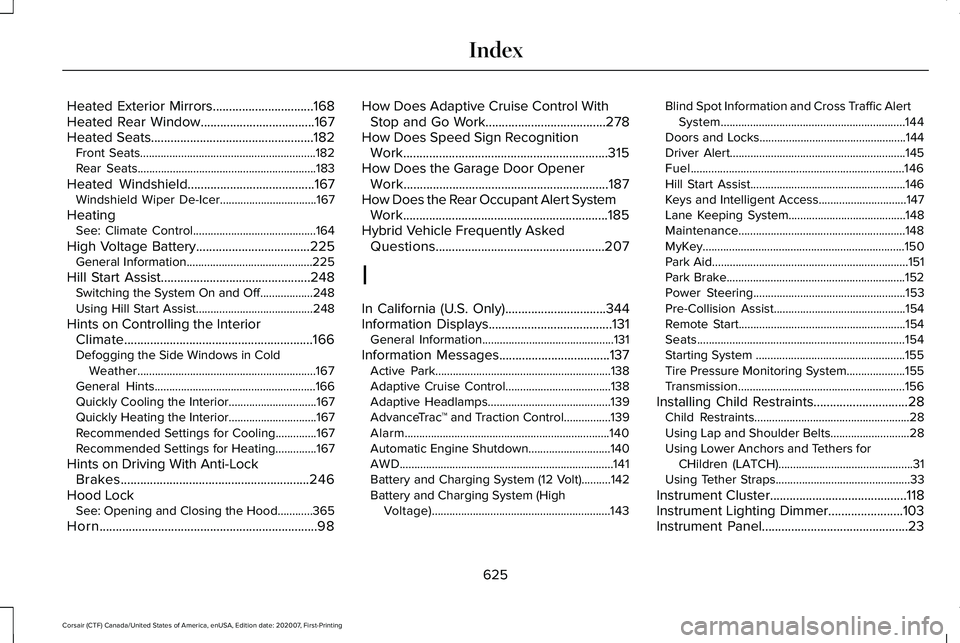
Heated Exterior Mirrors...............................168
Heated Rear Window...................................167
Heated Seats..................................................182
Front Seats............................................................182
Rear Seats.............................................................183
Heated Windshield
.......................................167
Windshield Wiper De-Icer.................................167
Heating See: Climate Control..........................................164
High Voltage Battery...................................225 General Information...........................................225
Hill Start Assist..............................................248 Switching the System On and Off..................248
Using Hill Start Assist........................................
248
Hints on Controlling the Interior Climate..........................................................166
Defogging the Side Windows in Cold Weather.............................................................167
General Hints.......................................................166
Quickly Cooling the Interior..............................
167
Quickly Heating the Interior..............................167
Recommended Settings for Cooling..............167
Recommended Settings for Heating..............167
Hints on Driving With Anti-Lock Brakes..........................................................246
Hood Lock See: Opening and Closing the Hood............365
Horn...................................................................98 How Does Adaptive Cruise Control With
Stop and Go Work.....................................278
How Does Speed Sign Recognition Work...............................................................315
How Does the Garage Door Opener Work
...............................................................187
How Does the Rear Occupant Alert System Work...............................................................185
Hybrid Vehicle Frequently Asked Questions....................................................207
I
In California (U.S. Only)...............................344
Information Displays
......................................131
General Information.............................................131
Information Messages
..................................137
Active Park............................................................138
Adaptive Cruise Control....................................138
Adaptive Headlamps..........................................139
AdvanceTrac ™ and Traction Control................139
Alarm......................................................................140
Automatic Engine Shutdown............................140
AWD........................................................................\
.141
Battery and Charging System (12 Volt)..........142
Battery and Charging System (High Voltage).............................................................143 Blind Spot Information and Cross Traffic Alert
System...............................................................144
Doors and Locks..................................................144
Driver Alert............................................................145
Fuel........................................................................\
.146
Hill Start Assist.....................................................146
Keys and Intelligent Access..............................147
Lane Keeping System........................................148
Maintenance.........................................................148
MyKey.....................................................................150
Park Aid...................................................................151
Park Brake.............................................................152
Power Steering....................................................153
Pre-Collision Assist.............................................154
Remote Start.........................................................154
Seats.......................................................................154
Starting System ...................................................155
Tire Pressure Monitoring System....................155
Transmission.........................................................156
Installing Child Restraints.............................28 Child Restraints.....................................................28
Using Lap and Shoulder Belts...........................28
Using Lower Anchors and Tethers for
CHildren (LATCH)..............................................31
Using Tether Straps..............................................33
Instrument Cluster
..........................................118
Instrument Lighting Dimmer.......................103
Instrument Panel
.............................................23
625
Corsair (CTF) Canada/United States of America, enUSA, Edition date: 202007, First-Printing Index
Page 629 of 638
Interior Air Quality.........................................169
Interior Lamps................................................108
Front Interior Lamp.............................................108
Rear Interior Lamps............................................108
Interior Mirror
..................................................115
Auto-Dimming Mirror...........................................115
Introduction........................................................11
J
Jump Starting the Vehicle
..........................338
Connecting the Jumper Cables .....................339
Preparing Your Vehicle.....................................339
Removing the Jumper Cables.........................340
Starting the Engine............................................340
K
Keyless Entry
.....................................................81
Keyless Entry Settings..........................................81
Keyless Entry – Troubleshooting......................84
Locking and Unlocking the Doors Using
Keyless Entry.....................................................83
Master Access Code.............................................81
Keyless Entry Limitations...............................81
Keyless Entry Settings....................................81 Clearing All Personal Access Codes...............82
Creating Personal Access Codes.....................
82 Reprogramming the Unlocking Function.......82
Switching Keyless Entry On and Off.................81
Keyless Entry – Troubleshooting................84 Keyless Entry – Frequently Asked
Questions...........................................................84
Keyless Starting
.............................................196
Ignition Modes.....................................................196
Keys and Remote Controls...........................64
L
Lane Keeping System
.................................293
Switching the System On and Off..................294
Liftgate...............................................................85 Closing the Liftgate..............................................88
Liftgate – Troubleshooting..................................91
Opening the Liftgate............................................85
Liftgate Obstacle Detection
.........................90
Closing the Liftgate..............................................90
Opening the Liftgate............................................90
Liftgate Precautions.......................................85
Liftgate – Troubleshooting............................91 Liftgate – Frequently Asked Questions..........92
Liftgate – Information Messages.......................91
Lighting Control
.............................................102
Flashing High Beam Headlamps.....................103
Lighting Control Selections..............................102 Switching High Beam Headlamps On and
Off.......................................................................102
Lighting............................................................102 General Information............................................102
Lincoln Automotive Financial Services......18
Lincoln Protect
..............................................547
Lincoln Protect (CANADA ONLY)...................548
Lincoln Protect Extended Service Plans (U.S. Only)..................................................................547
Load Carriers See: Roof Racks and Load Carriers................318
Load Carrying
.................................................318
Load Limit.......................................................320
Special Loading Instructions for Owners of
Pick-up Trucks and Utility-type
Vehicles............................................................324
Vehicle Loading - with and without a Trailer................................................................320
Locating the Cabin Air Filter.......................169
Locating the Keyless Entry Keypad.............81
Locating the Rear View Camera..............265
Locking and Unlocking..................................76 Activating Intelligent Access..............................77
Autolock..................................................................79
Autounlock..............................................................79
Battery Saver.........................................................80
Illuminated Entry....................................................79
Illuminated Exit......................................................79
626
Corsair (CTF) Canada/United States of America, enUSA, Edition date: 202007, First-Printing Index
Page 632 of 638

Rear Occupant Alert System
Limitations....................................................185
Rear Occupant Alert System Precautions..................................................185
Rear Occupant Alert System......................185
Rear Parking Aid...........................................258 Object Distance Indicator................................
260
Rear Seats
.......................................................180
Folding the Power Seat Backrest...................182
Folding the Seat Backrest..................................181
Moving the Seats Backward and
Forward.............................................................180
Recline Adjustment..............................................181
Unfolding the Seat Backrest.............................181
Rear Under Floor Storage...........................318 Cargo Management System.............................318
Rear View Camera Guide Lines
...............265
Rear View Camera Object Distance Indicators.....................................................266
Rear View Camera Precautions...............265
Rear View Camera.......................................265 Rear View Camera Settings............................266
Rear View Camera Settings
......................266
Switching Rear View Camera Delay On and
Off......................................................................267
Zooming the Rear View Camera In and Out.....................................................................266 Rear Window Wiper and Washers.............101
Rear Window Washer..........................................101
Rear Window Wiper.............................................101
Recommended Towing Weights..............326
Refueling - Gasoline.....................................216 Refueling System Overview.............................
216
Refueling System Warning................................218
Refueling Your Vehicle.......................................217
Refueling - Plug-In Hybrid Electric Vehicle (PHEV)............................................................213
Fuel Filler Door Manual Override Lever........215
System Warnings.................................................215
Remote Control
...............................................64
Car Finder...............................................................67
Memory Feature....................................................67
Passive Key.............................................................64
Replacing the Battery..........................................65
Sounding the Panic Alarm..................................67
Remotely Starting the Engine.....................161
Remotely Stopping the Engine..................162
Remote Start Limitations..............................161
Remote Start Remote Control Indicators......................................................162
Remote Control Feedback................................162
Remote Start
....................................................161
Remote Start Settings........................................162
Remote Start Settings..................................162 Setting the Remote Start Duration..................163 Switching Climate Control Auto Mode On and
Off.......................................................................162
Switching Climate Control Last Settings On and Off...............................................................162
Switching the Heated Seat Settings On and Off.......................................................................163
Switching the Heated Steering Wheel Settings On and Off........................................................163
Removing a Headlamp...............................385
Repairing Minor Paint Damage.................392
Replacement Parts Recommendation........19 Collision Repairs....................................................19
Scheduled Maintenance and Mechanical
Repairs.................................................................19
Warranty on Replacement Parts........................19
Replacing a Lost Key or Remote Control............................................................67
Replacing the Cabin Air Filter
....................169
Reporting Safety Defects (Canada Only)..............................................................350
Reporting Safety Defects (U.S. Only)......350
Reprogramming the Garage Door Opener..........................................................190
Resetting the Stopping Position - Vehicles With: Power Adjustable Steering
Column...........................................................98
629
Corsair (CTF) Canada/United States of America, enUSA, Edition date: 202007, First-Printing Index