warning LINCOLN CORSAIR 2021 Repair Manual
[x] Cancel search | Manufacturer: LINCOLN, Model Year: 2021, Model line: CORSAIR, Model: LINCOLN CORSAIR 2021Pages: 638, PDF Size: 5.7 MB
Page 134 of 638
GENERAL INFORMATION
WARNING: Driving while distracted
can result in loss of vehicle control, crash
and injury. We strongly recommend that
you use extreme caution when using any
device that may take your focus off the
road. Your primary responsibility is the safe
operation of your vehicle. We recommend
against the use of any hand-held device
while driving and encourage the use of
voice-operated systems when possible.
Make sure you are aware of all applicable
local laws that may affect the use of
electronic devices while driving.
You can control various systems on your
vehicle using the quick action menu (QAM)
on the right-hand side of the steering wheel.
The information display provides the
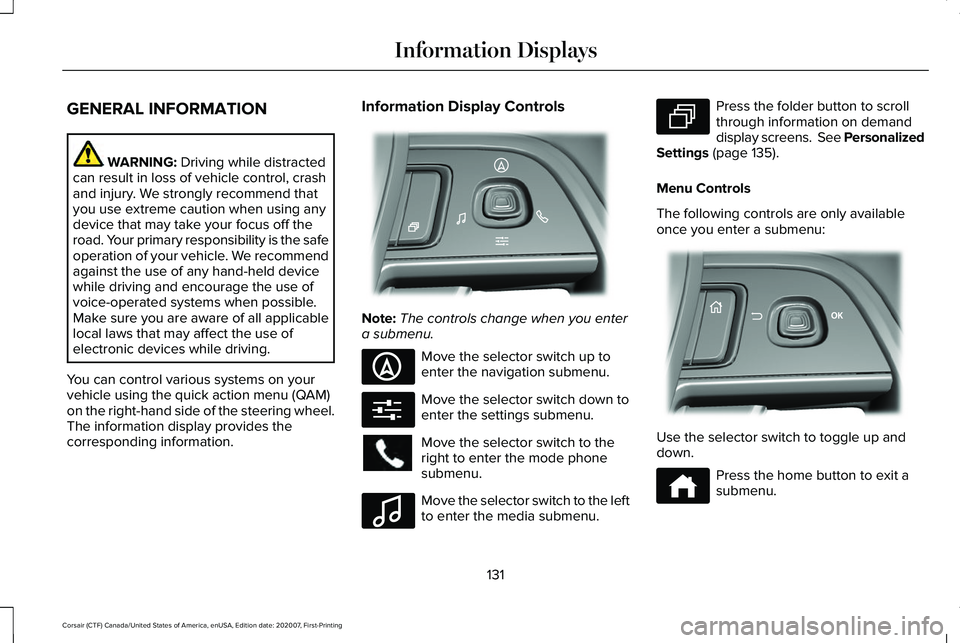
corresponding information. Information Display Controls
Note:
The controls change when you enter
a submenu. Move the selector switch up to
enter the navigation submenu.
Move the selector switch down to
enter the settings submenu.
Move the selector switch to the
right to enter the mode phone
submenu.
Move the selector switch to the left
to enter the media submenu. Press the folder button to scroll
through information on demand
display screens. See Personalized
Settings (page 135).
Menu Controls
The following controls are only available
once you enter a submenu: Use the selector switch to toggle up and
down.
Press the home button to exit a
submenu.
131
Corsair (CTF) Canada/United States of America, enUSA, Edition date: 202007, First-Printing Information DisplaysE281220 E281481 E280315 E100027 E281483 E299701 E272621
Page 144 of 638

AWD
Action
Message
The all-wheel drive system temporarily turns off to protect itself from \
overheating.
AWD Temporarily Disabled
The all-wheel drive system is locking up the torque transfer clutch to h\
elp reduce clutchtemperature.
AWD Temporarily Locked
The all-wheel drive system temporarily turns off to protect itself from \
overheating or if you areusing the temporary spare tire.
AWD OFF
The all-wheel drive system will resume normal function and clear this me\
ssage after driving ashort distance with the road tire re-installed or after the system cools\
.
AWD Restored
The all-wheel drive system is not operating properly. If the warning stays on or continues tocome on, have the system checked as soon as possible.
AWD Fault Service Required
Displayed when the transfer case fluid requires service.
Change AWD Power Transfer Unit Lube
Displayed when the transfer case fluid has been changed and reset to new\
.
AWD Power Transfer Unit Lube Set to New
141
Corsair (CTF) Canada/United States of America, enUSA, Edition date: 202007, First-Printing Information Displays
Page 145 of 638

Action
Message
The charging system needs servicing. If the warning stays on or continue\
s to come on, contactan authorized dealer as soon as possible.
Check Char")
Battery and Charging System (12 Volt)
Action
Message
The charging system needs servicing. If the warning stays on or continue\
s to come on, contactan authorized dealer as soon as possible.
Check Charging System
The charging system needs servicing. If the warning stays on or continue\
s to come on, have thesystem checked as soon as possible.
Charging System Service Soon
The charging system needs servicing. Have the system checked as soon as possible.
Charging System Service Now
The battery management system determines that the 12V battery is at a lo\
w state of charge.
Start the engine to charge the battery or charge the battery using an aft\
ermarket battery charger.
This message clears once you restart your vehicle and the battery state \
of charge has recovered.
Battery State of Charge Low
The battery management system determines that the battery is at a low st\
ate of charge. Turn
the ignition off as soon as possible to protect the battery. This message will clear once the vehicle
has been started and the battery state of charge has recovered. Turning off unnecessary electrical loads will allow faster battery state-of-charge recovery.
Turn Power Off To Save Battery
Displayed when the battery management system detects an extended low-vol\
tage condition.Various vehicle features will be disabled to help preserve the battery. Turn off as many of the electrical loads as soon as possible to improve system voltage. If the system voltage has recovered, the disabled features will operate again as normal.
Low Battery Features Temporarily Turned
Off
142
Corsair (CTF) Canada/United States of America, enUSA, Edition date: 202007, First-Printing Information Displays
Page 148 of 638
Action
Message
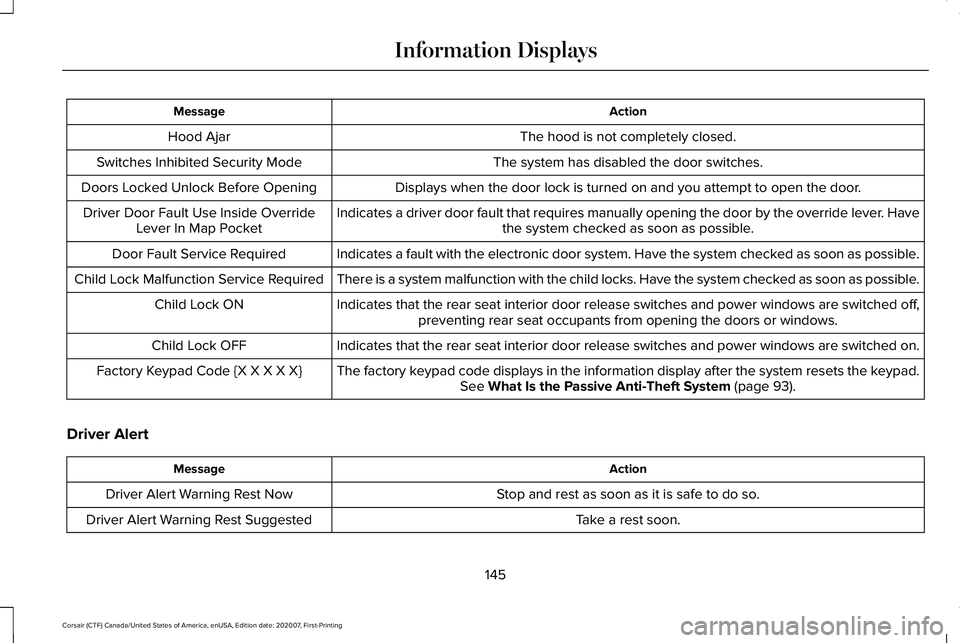
The hood is not completely closed.
Hood Ajar
The system has disabled the door switches.
Switches Inhibited Security Mode
Displays when the door lock is turned on and you attempt to open the doo\
r.
Doors Locked Unlock Before Opening
Indicates a driver door fault that requires manually opening the door by\
the override lever. Havethe system checked as soon as possible.
Driver Door Fault Use Inside Override
Lever In Map Pocket
Indicates a fault with the electronic door system. Have the system check\
ed as soon as possible.
Door Fault Service Required
There is a system malfunction with the child locks. Have the system chec\
ked as soon as possible.
Child Lock Malfunction Service Required
Indicates that the rear seat interior door release switches and power wi\
ndows are switched off,preventing rear seat occupants from opening the doors or windows.
Child Lock ON
Indicates that the rear seat interior door release switches and power wi\
ndows are switched on.
Child Lock OFF
The factory keypad code displays in the information display after the system resets t\
he keypad.See What Is the Passive Anti-Theft System (page 93).
Factory Keypad Code {X X X X X}
Driver Alert Action
Message
Stop and rest as soon as it is safe to do so.
Driver Alert Warning Rest Now
Take a rest soon.
Driver Alert Warning Rest Suggested
145
Corsair (CTF) Canada/United States of America, enUSA, Edition date: 202007, First-Printing Information Displays
Page 151 of 638
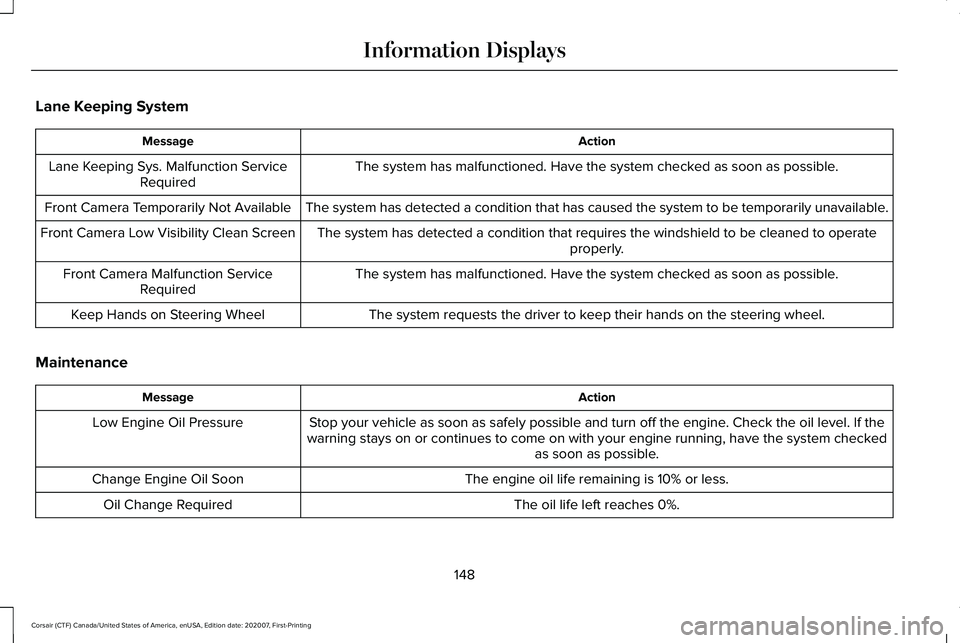
Lane Keeping System
Action
Message
The system has malfunctioned. Have the system checked as soon as possible.
Lane Keeping Sys. Malfunction Service
Required
The system has detected a condition that has caused the system to be tem\
porarily unavailable.
Front Camera Temporarily Not Available
The system has detected a condition that requires the windshield to be c\
leaned to operateproperly.
Front Camera Low Visibility Clean Screen
The system has malfunctioned. Have the system checked as soon as possible.
Front Camera Malfunction Service
Required
The system requests the driver to keep their hands on the steering wheel.
Keep Hands on Steering Wheel
Maintenance Action
Message
Stop your vehicle as soon as safely possible and turn off the engine. Check the oil level. If the
warning stays on or continues to come on with your engine running, have \
the system checked as soon as possible.
Low Engine Oil Pressure
The engine oil life remaining is 10% or less.
Change Engine Oil Soon
The oil life left reaches 0%.
Oil Change Required
148
Corsair (CTF) Canada/United States of America, enUSA, Edition date: 202007, First-Printing Information Displays
Page 155 of 638
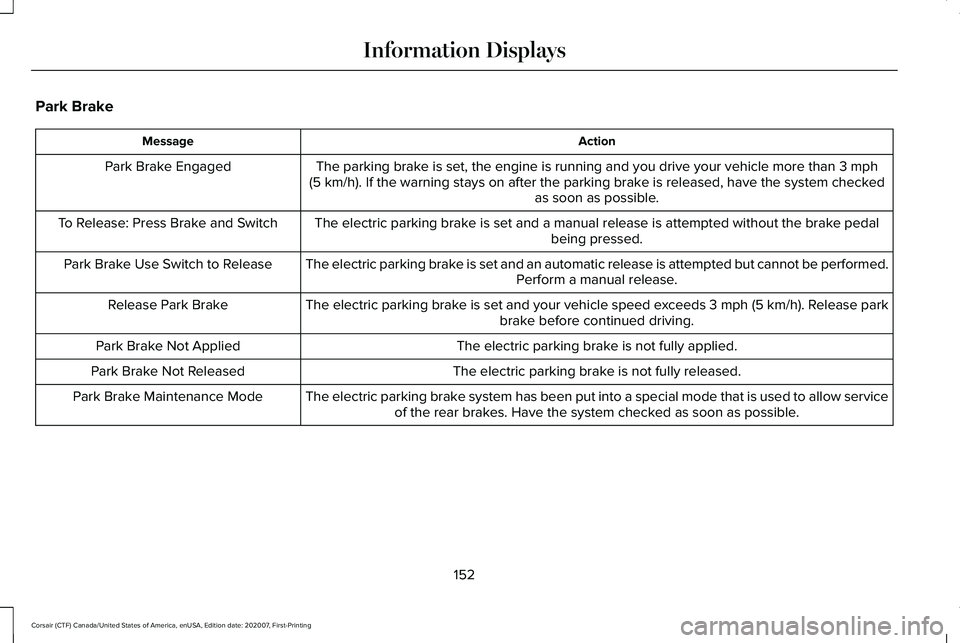
Park Brake
Action
Message
The parking brake is set, the engine is running and you drive your vehicle more than 3 mph
(5 km/h). If the warning stays on after the parking brake is released, have the system checked as soon as possible.
Park Brake Engaged
The electric parking brake is set and a manual release is attempted without the brake pedal being pressed.
To Release: Press Brake and Switch
The electric parking brake is set and an automatic release is attempted but cannot be performed.Perform a manual release.
Park Brake Use Switch to Release
The electric parking brake is set and your vehicle speed exceeds 3 mph (5 km/h)
. Release park
brake before continued driving.
Release Park Brake
The electric parking brake is not fully applied.
Park Brake Not Applied
The electric parking brake is not fully released.
Park Brake Not Released
The electric parking brake system has been put into a special mode that is used to allow serviceof the rear brakes. Have the system checked as soon as possible.
Park Brake Maintenance Mode
152
Corsair (CTF) Canada/United States of America, enUSA, Edition date: 202007, First-Printing Information Displays
Page 157 of 638
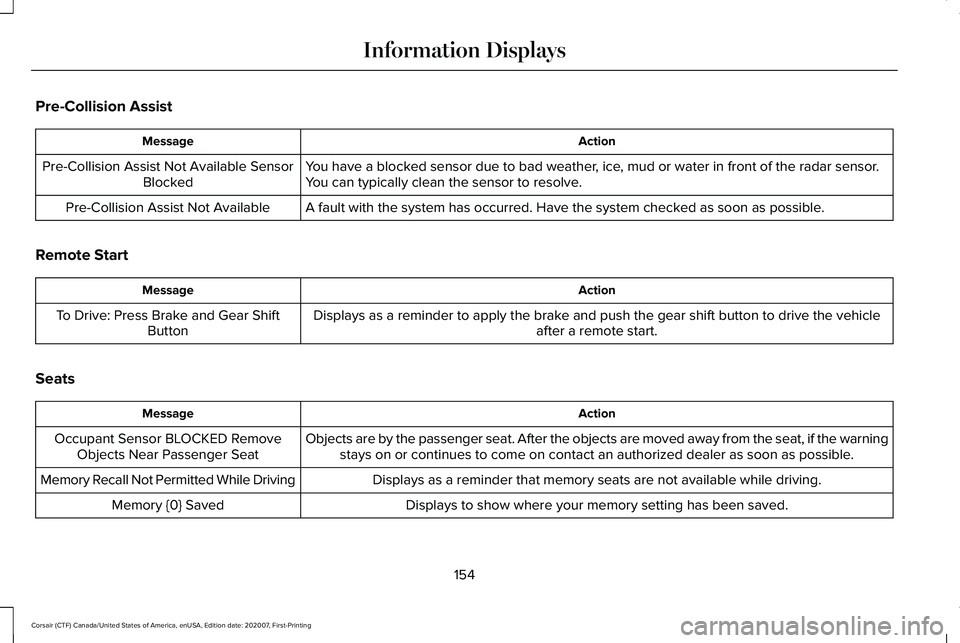
Pre-Collision Assist
Action
Message
You have a blocked sensor due to bad weather, ice, mud or water in front of the radar sensor.
You can typically clean the sensor to resolve.
Pre-Collision Assist Not Available Sensor
Blocked
A fault with the system has occurred. Have the system checked as soon as possible.
Pre-Collision Assist Not Available
Remote Start Action
Message
Displays as a reminder to apply the brake and push the gear shift button to drive the vehicle after a remote start.
To Drive: Press Brake and Gear Shift
Button
Seats Action
Message
Objects are by the passenger seat. After the objects are moved away from\
the seat, if the warningstays on or continues to come on contact an authorized dealer as soon as\
possible.
Occupant Sensor BLOCKED Remove
Objects Near Passenger Seat
Displays as a reminder that memory seats are not available while driving\
.
Memory Recall Not Permitted While Driving
Displays to show where your memory setting has been saved.
Memory {0} Saved
154
Corsair (CTF) Canada/United States of America, enUSA, Edition date: 202007, First-Printing Information Displays
Page 158 of 638
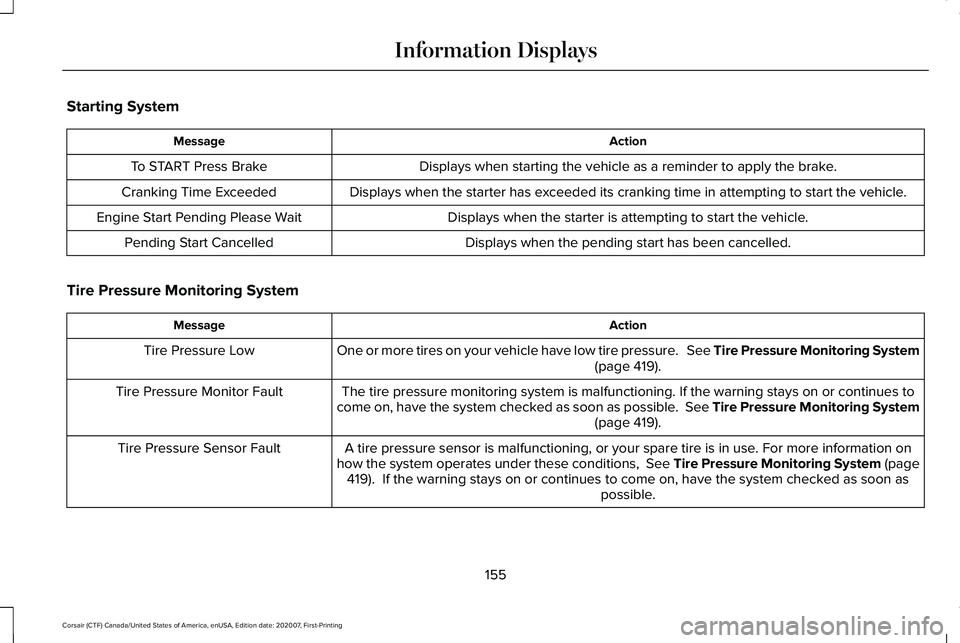
Starting System
Action
Message
Displays when starting the vehicle as a reminder to apply the brake.
To START Press Brake
Displays when the starter has exceeded its cranking time in attempting to start the vehicle.
Cranking Time Exceeded
Displays when the starter is attempting to start the vehicle.
Engine Start Pending Please Wait
Displays when the pending start has been cancelled.
Pending Start Cancelled
Tire Pressure Monitoring System Action
Message
One or more tires on your vehicle have low tire pressure. See Tire Pressure Monitoring System (page 419).
Tire Pressure Low
The tire pressure monitoring system is malfunctioning. If the warning st\
ays on or continues to
come on, have the system checked as soon as possible. See Tire Pressure Monitoring System (page
419).
Tire Pressure Monitor Fault
A tire pressure sensor is malfunctioning, or your spare tire is in use. For more information on
how the system operates under these conditions, See Tire Pressure Monitoring System (page 419
). If the warning stays on or continues to come on, have the system checked as soon as possible.
Tire Pressure Sensor Fault
155
Corsair (CTF) Canada/United States of America, enUSA, Edition date: 202007, First-Printing Information Displays
Page 163 of 638
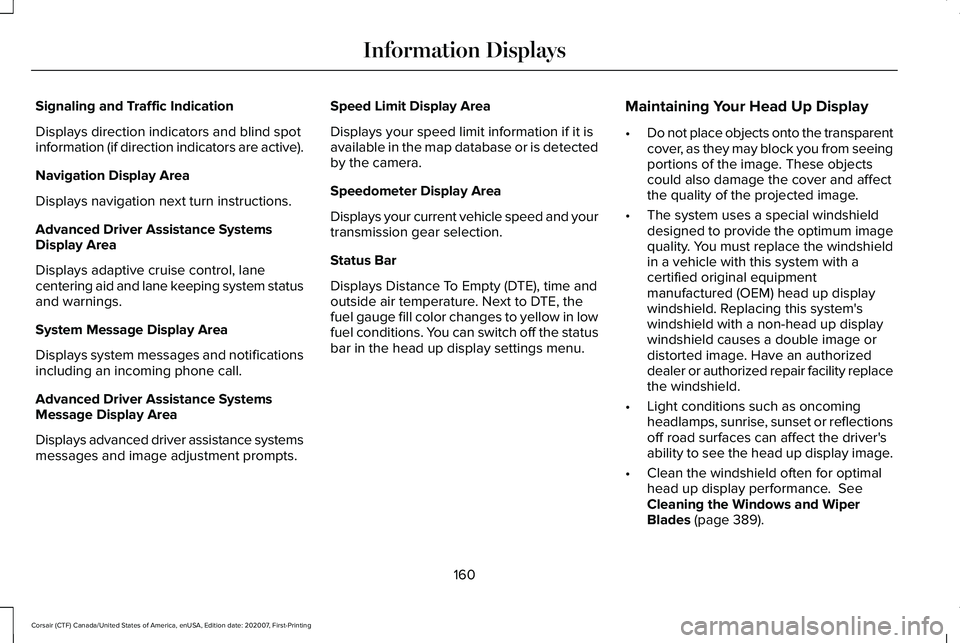
Signaling and Traffic Indication
Displays direction indicators and blind spot
information (if direction indicators are active).
Navigation Display Area
Displays navigation next turn instructions.
Advanced Driver Assistance Systems
Display Area
Displays adaptive cruise control, lane
centering aid and lane keeping system status
and warnings.
System Message Display Area
Displays system messages and notifications
including an incoming phone call.
Advanced Driver Assistance Systems
Message Display Area
Displays advanced driver assistance systems
messages and image adjustment prompts.
Speed Limit Display Area
Displays your speed limit information if it is
available in the map database or is detected
by the camera.
Speedometer Display Area
Displays your current vehicle speed and your
transmission gear selection.
Status Bar
Displays Distance To Empty (DTE), time and
outside air temperature. Next to DTE, the
fuel gauge fill color changes to yellow in low
fuel conditions. You can switch off the status
bar in the head up display settings menu.
Maintaining Your Head Up Display
•
Do not place objects onto the transparent
cover, as they may block you from seeing
portions of the image. These objects
could also damage the cover and affect
the quality of the projected image.
• The system uses a special windshield
designed to provide the optimum image
quality. You must replace the windshield
in a vehicle with this system with a
certified original equipment
manufactured (OEM) head up display
windshield. Replacing this system's
windshield with a non-head up display
windshield causes a double image or
distorted image. Have an authorized
dealer or authorized repair facility replace
the windshield.
• Light conditions such as oncoming
headlamps, sunrise, sunset or reflections
off road surfaces can affect the driver's
ability to see the head up display image.
• Clean the windshield often for optimal
head up display performance. See
Cleaning the Windows and Wiper
Blades
(page 389).
160
Corsair (CTF) Canada/United States of America, enUSA, Edition date: 202007, First-Printing Information Displays
Page 164 of 638
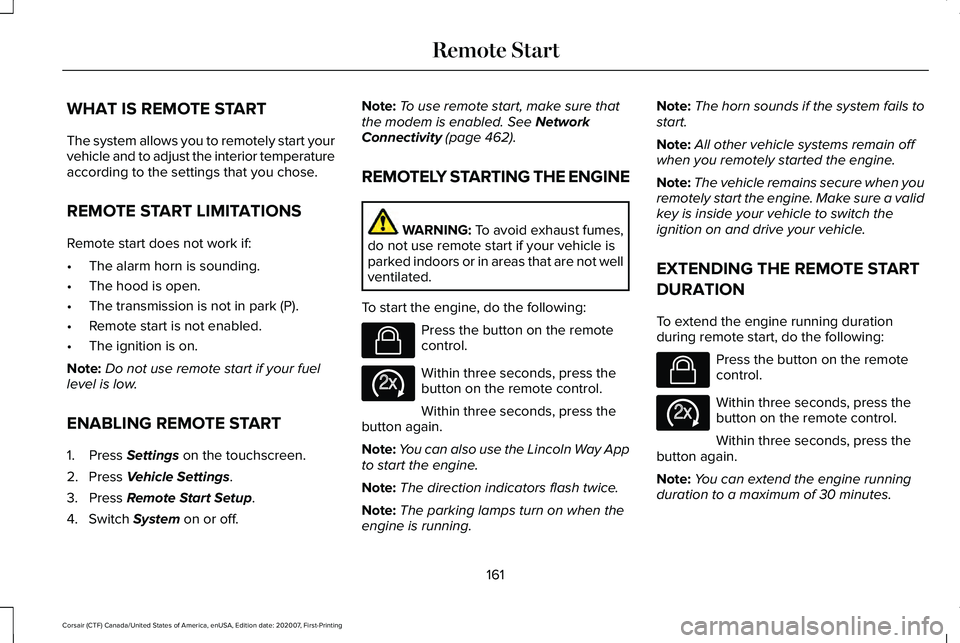
WHAT IS REMOTE START
The system allows you to remotely start your
vehicle and to adjust the interior temperature
according to the settings that you chose.
REMOTE START LIMITATIONS
Remote start does not work if:
•
The alarm horn is sounding.
• The hood is open.
• The transmission is not in park (P).
• Remote start is not enabled.
• The ignition is on.
Note: Do not use remote start if your fuel
level is low.
ENABLING REMOTE START
1. Press Settings on the touchscreen.
2. Press
Vehicle Settings.
3. Press
Remote Start Setup.
4. Switch
System on or off. Note:
To use remote start, make sure that
the modem is enabled.
See Network
Connectivity (page 462).
REMOTELY STARTING THE ENGINE WARNING:
To avoid exhaust fumes,
do not use remote start if your vehicle is
parked indoors or in areas that are not well
ventilated.
To start the engine, do the following: Press the button on the remote
control.
Within three seconds, press the
button on the remote control.
Within three seconds, press the
button again.
Note: You can also use the Lincoln Way App
to start the engine.
Note: The direction indicators flash twice.
Note: The parking lamps turn on when the
engine is running. Note:
The horn sounds if the system fails to
start.
Note: All other vehicle systems remain off
when you remotely started the engine.
Note: The vehicle remains secure when you
remotely start the engine. Make sure a valid
key is inside your vehicle to switch the
ignition on and drive your vehicle.
EXTENDING THE REMOTE START
DURATION
To extend the engine running duration
during remote start, do the following: Press the button on the remote
control.
Within three seconds, press the
button on the remote control.
Within three seconds, press the
button again.
Note: You can extend the engine running
duration to a maximum of 30 minutes.
161
Corsair (CTF) Canada/United States of America, enUSA, Edition date: 202007, First-Printing Remote StartE138623 E138625 E138623 E138625