ignition LINCOLN CORSAIR 2021 Manual PDF
[x] Cancel search | Manufacturer: LINCOLN, Model Year: 2021, Model line: CORSAIR, Model: LINCOLN CORSAIR 2021Pages: 638, PDF Size: 5.7 MB
Page 261 of 638
PRINCIPLE OF OPERATION
WARNING: To help avoid personal
injury, always use caution when in reverse
(R) and when using the sensing system. WARNING:
The system may not
detect objects with surfaces that absorb
reflection. Always drive with due care and
attention. Failure to take care may result
in a crash. WARNING:
Traffic control systems,
inclement weather, air brakes, external
motors and fans may affect the correct
operation of the sensing system. This may
cause reduced performance or false alerts. WARNING:
The system may not
detect small or moving objects, particularly
those close to the ground.
Note: If your vehicle has MyKey™, the sensing
system cannot be switched off when a
MyKey™ is present.
See What Is MyKey
(page 72). Note:
Keep the sensors on the bumper or
fascia free from snow, ice and large
accumulations of dirt. If the sensors are
covered, the system’ s accuracy can be
affected. Do not clean the sensors with sharp
objects.
Note: If your vehicle sustains damage to the
bumper or fascia, leaving it misaligned or
bent, the sensing zone may be altered
causing inaccurate measurement of
obstacles or false alerts.
Note: Certain add-on devices installed
around the bumper or fascia may create
false alerts. For example, large trailer
hitches, bike or surfboard racks, license plate
brackets, bumper covers or any other device
that may block the normal detection zone
of the system. Remove the add-on device to
prevent false alerts.
Note: When you connect a trailer to your
vehicle, the rear parking aid may detect the
trailer and therefore provide an alert. Disable
the rear parking aid when you connect a
trailer to prevent the alert. The sensing system warns the driver of
obstacles within a certain range of your
vehicle. The system turns on automatically
whenever you switch the ignition on.
You can switch the system off through the
touchscreen, information display or from the
pop-up message that appears once you shift
the transmission into reverse (R). If your
vehicle has a parking aid button, you can
switch the system off by pressing the button.
If a fault is present in the system, a warning
message appears in the information display.
See
Information Messages (page 137).
REAR PARKING AID WARNING:
The system may not
detect objects with surfaces that absorb
reflection. Always drive with due care and
attention. Failure to take care may result
in a crash. WARNING:
The system may not
detect small or moving objects, particularly
those close to the ground.
258
Corsair (CTF) Canada/United States of America, enUSA, Edition date: 202007, First-Printing Parking Aids
Page 266 of 638
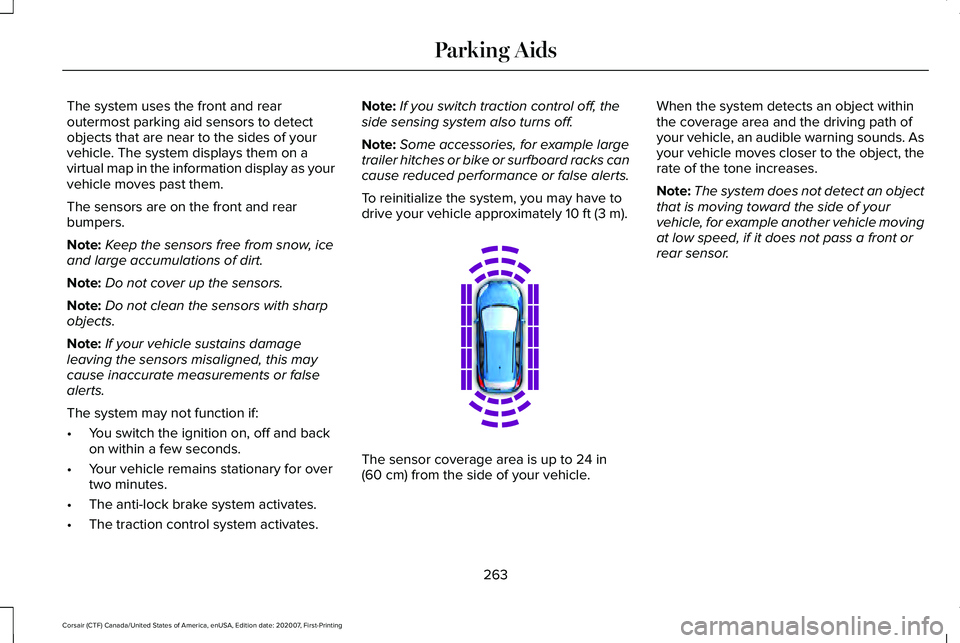
The system uses the front and rear
outermost parking aid sensors to detect
objects that are near to the sides of your
vehicle. The system displays them on a
virtual map in the information display as your
vehicle moves past them.
The sensors are on the front and rear
bumpers.
Note:
Keep the sensors free from snow, ice
and large accumulations of dirt.
Note: Do not cover up the sensors.
Note: Do not clean the sensors with sharp
objects.
Note: If your vehicle sustains damage
leaving the sensors misaligned, this may
cause inaccurate measurements or false
alerts.
The system may not function if:
• You switch the ignition on, off and back
on within a few seconds.
• Your vehicle remains stationary for over
two minutes.
• The anti-lock brake system activates.
• The traction control system activates. Note:
If you switch traction control off, the
side sensing system also turns off.
Note: Some accessories, for example large
trailer hitches or bike or surfboard racks can
cause reduced performance or false alerts.
To reinitialize the system, you may have to
drive your vehicle approximately 10 ft (3 m). The sensor coverage area is up to
24 in
(60 cm) from the side of your vehicle. When the system detects an object within
the coverage area and the driving path of
your vehicle, an audible warning sounds. As
your vehicle moves closer to the object, the
rate of the tone increases.
Note:
The system does not detect an object
that is moving toward the side of your
vehicle, for example another vehicle moving
at low speed, if it does not pass a front or
rear sensor.
263
Corsair (CTF) Canada/United States of America, enUSA, Edition date: 202007, First-Printing Parking AidsE190458
Page 279 of 638
WHAT IS CRUISE CONTROL
Cruise control lets you maintain a set speed
without keeping your foot on the accelerator
pedal.
Requirements
Use cruise control when the vehicle speed
is greater than 20 mph (30 km/h).
SWITCHING CRUISE CONTROL ON
AND OFF WARNING:
Do not use cruise control
on winding roads, in heavy traffic or when
the road surface is slippery. This could
result in loss of vehicle control, serious
injury or death.
The cruise controls are on the steering
wheel. Switching Cruise Control On Press the button to put the system
in standby mode.
Switching Cruise Control Off Press the button when in standby
mode or switch the ignition off.
Note: When you switch cruise control off the
set speed clears.
SETTING THE CRUISE CONTROL
SPEED WARNING:
When you are going
downhill, your vehicle speed could
increase above the set speed. The system
does not apply the brakes.
Drive to the speed you prefer. Press either button to set the
current speed.
Take your foot off the accelerator pedal.
Note: The indicator changes color in the
information display.
Changing the Set Speed Press and release the button to
increase the set speed in small
increments.
Press and hold the button to accelerate.
Release the button when you reach your
preferred speed. Press and release the button to
decrease the set speed in small
increments.
Press and hold the button to decelerate.
Release the button when you reach your
preferred speed.
276
Corsair (CTF) Canada/United States of America, enUSA, Edition date: 202007, First-Printing Cruise ControlE71340 E71340
Page 285 of 638
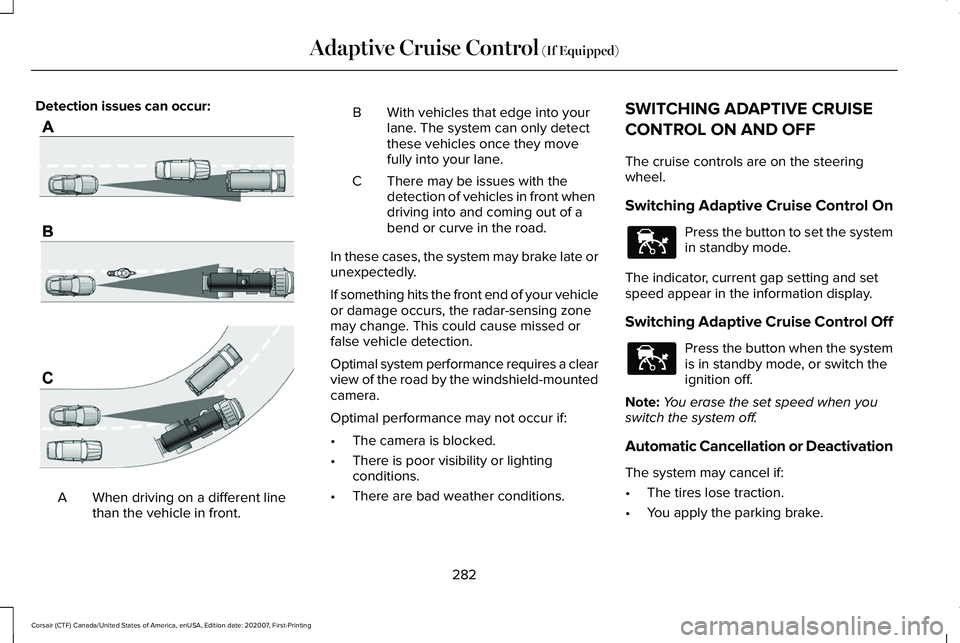
Detection issues can occur:
When driving on a different line
than the vehicle in front.
A B With vehicles that edge into your
lane. The system can only detect
these vehicles once they move
fully into your lane.
There may be issues with the
detection of vehicles in front when
driving into and coming out of a
bend or curve in the road.
C
In these cases, the system may brake late or
unexpectedly.
If something hits the front end of your vehicle
or damage occurs, the radar-sensing zone
may change. This could cause missed or
false vehicle detection.
Optimal system performance requires a clear
view of the road by the windshield-mounted
camera.
Optimal performance may not occur if:
• The camera is blocked.
• There is poor visibility or lighting
conditions.
• There are bad weather conditions. SWITCHING ADAPTIVE CRUISE
CONTROL ON AND OFF
The cruise controls are on the steering
wheel.
Switching Adaptive Cruise Control On
Press the button to set the system
in standby mode.
The indicator, current gap setting and set
speed appear in the information display.
Switching Adaptive Cruise Control Off Press the button when the system
is in standby mode, or switch the
ignition off.
Note: You erase the set speed when you
switch the system off.
Automatic Cancellation or Deactivation
The system may cancel if:
• The tires lose traction.
• You apply the parking brake.
282
Corsair (CTF) Canada/United States of America, enUSA, Edition date: 202007, First-Printing Adaptive Cruise Control (If Equipped)E71621 E144529 E144529
Page 296 of 638
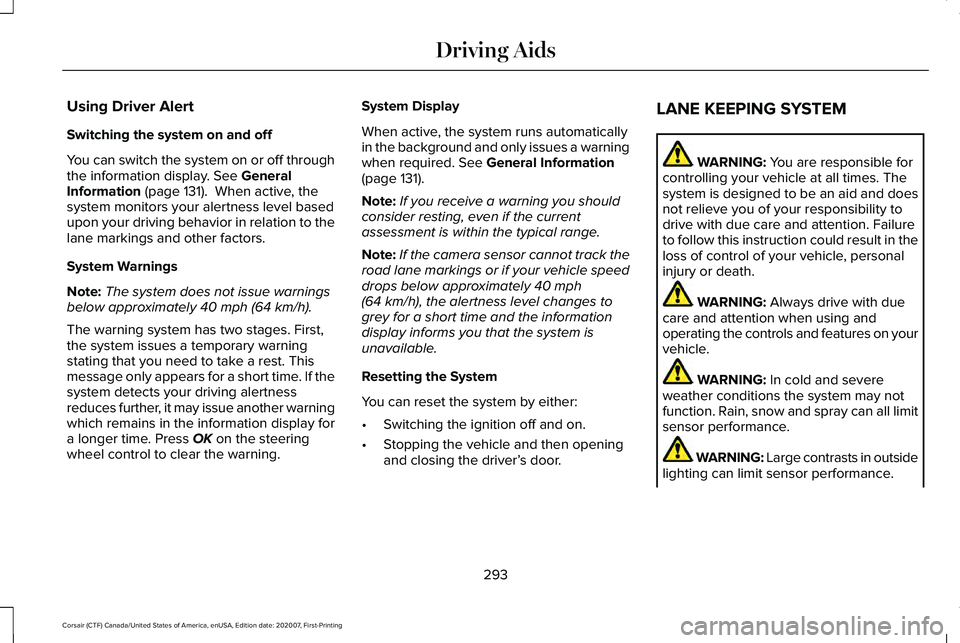
Using Driver Alert
Switching the system on and off
You can switch the system on or off through
the information display. See General
Information (page 131). When active, the
system monitors your alertness level based
upon your driving behavior in relation to the
lane markings and other factors.
System Warnings
Note: The system does not issue warnings
below approximately
40 mph (64 km/h).
The warning system has two stages. First,
the system issues a temporary warning
stating that you need to take a rest. This
message only appears for a short time. If the
system detects your driving alertness
reduces further, it may issue another warning
which remains in the information display for
a longer time. Press
OK on the steering
wheel control to clear the warning. System Display
When active, the system runs automatically
in the background and only issues a warning
when required.
See General Information
(page 131).
Note: If you receive a warning you should
consider resting, even if the current
assessment is within the typical range.
Note: If the camera sensor cannot track the
road lane markings or if your vehicle speed
drops below approximately
40 mph
(64 km/h), the alertness level changes to
grey for a short time and the information
display informs you that the system is
unavailable.
Resetting the System
You can reset the system by either:
• Switching the ignition off and on.
• Stopping the vehicle and then opening
and closing the driver’ s door.LANE KEEPING SYSTEM WARNING:
You are responsible for
controlling your vehicle at all times. The
system is designed to be an aid and does
not relieve you of your responsibility to
drive with due care and attention. Failure
to follow this instruction could result in the
loss of control of your vehicle, personal
injury or death. WARNING:
Always drive with due
care and attention when using and
operating the controls and features on your
vehicle. WARNING:
In cold and severe
weather conditions the system may not
function. Rain, snow and spray can all limit
sensor performance. WARNING: Large contrasts in outside
lighting can limit sensor performance.
293
Corsair (CTF) Canada/United States of America, enUSA, Edition date: 202007, First-Printing Driving Aids
Page 307 of 638
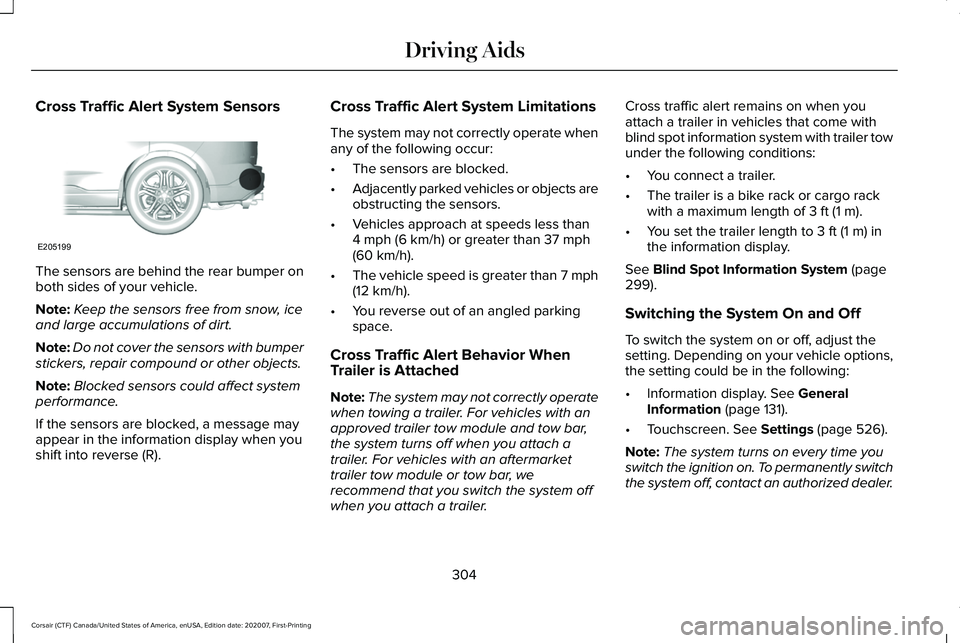
Cross Traffic Alert System Sensors
The sensors are behind the rear bumper on
both sides of your vehicle.
Note:
Keep the sensors free from snow, ice
and large accumulations of dirt.
Note: Do not cover the sensors with bumper
stickers, repair compound or other objects.
Note: Blocked sensors could affect system
performance.
If the sensors are blocked, a message may
appear in the information display when you
shift into reverse (R). Cross Traffic Alert System Limitations
The system may not correctly operate when
any of the following occur:
•
The sensors are blocked.
• Adjacently parked vehicles or objects are
obstructing the sensors.
• Vehicles approach at speeds less than
4 mph (6 km/h) or greater than 37 mph
(60 km/h).
• The vehicle speed is greater than 7 mph
(12 km/h)
.
• You reverse out of an angled parking
space.
Cross Traffic Alert Behavior When
Trailer is Attached
Note: The system may not correctly operate
when towing a trailer. For vehicles with an
approved trailer tow module and tow bar,
the system turns off when you attach a
trailer. For vehicles with an aftermarket
trailer tow module or tow bar, we
recommend that you switch the system off
when you attach a trailer. Cross traffic alert remains on when you
attach a trailer in vehicles that come with
blind spot information system with trailer tow
under the following conditions:
•
You connect a trailer.
• The trailer is a bike rack or cargo rack
with a maximum length of
3 ft (1 m).
• You set the trailer length to
3 ft (1 m) in
the information display.
See
Blind Spot Information System (page
299).
Switching the System On and Off
To switch the system on or off, adjust the
setting. Depending on your vehicle options,
the setting could be in the following:
• Information display.
See General
Information (page 131).
• Touchscreen.
See Settings (page 526).
Note: The system turns on every time you
switch the ignition on. To permanently switch
the system off, contact an authorized dealer.
304
Corsair (CTF) Canada/United States of America, enUSA, Edition date: 202007, First-Printing Driving AidsE205199
Page 309 of 638
STEERING
Electric Power Steering
WARNING: The electric power
steering system has diagnostic checks that
continuously monitor the system. If a fault
is detected, a message displays in the
information display. Stop your vehicle as
soon as it is safe to do so. Switch the
ignition off. After at least 10 seconds,
switch the ignition on and watch the
information display for a steering system
warning message. If a steering system
warning message returns, have the system
checked as soon as possible. WARNING:
If the system detects an
error, you may not feel a difference in the
steering, however a serious condition may
exist. Have your vehicle checked as soon
as possible. Failure to do so may result in
loss of steering control.
Your vehicle is equipped with an electric
power-assisted steering system. There is no
fluid reservoir to check or fill. If your vehicle loses electrical power while
you are driving (or if the ignition is turned
off ), you can steer the vehicle manually, but
it takes more effort. You must adapt your
speed and driving behavior to reduced
steering assist. Extreme continuous steering
may increase the effort it takes for you to
steer. This occurs to prevent internal
overheating and permanent damage to your
steering system. If this should occur, you will
neither lose the ability to steer the vehicle
manually nor will it cause permanent
damage. Typical steering and driving
maneuvers will allow the system to cool
down and steering assist will return to
normal.
Steering Tips
If the steering wanders or pulls, check for:
•
An improperly inflated tire.
• Uneven tire wear.
• Loose or worn suspension components.
• Loose or worn steering components.
• Improper vehicle alignment. A high crown in the road or high crosswinds
may also make the steering seem to wander
or pull.
PRE-COLLISION ASSIST
WARNING:
You are responsible for
controlling your vehicle at all times. The
system is designed to be an aid and does
not relieve you of your responsibility to
drive with due care and attention. Failure
to follow this instruction could result in the
loss of control of your vehicle, personal
injury or death. WARNING:
The system does not
detect vehicles that are driving in a
different direction, pedestrians at night,
cyclists or animals. Apply the brakes when
necessary. Failure to follow this instruction
could result in the loss of control of your
vehicle, personal injury or death.
306
Corsair (CTF) Canada/United States of America, enUSA, Edition date: 202007, First-Printing Driving Aids
Page 312 of 638
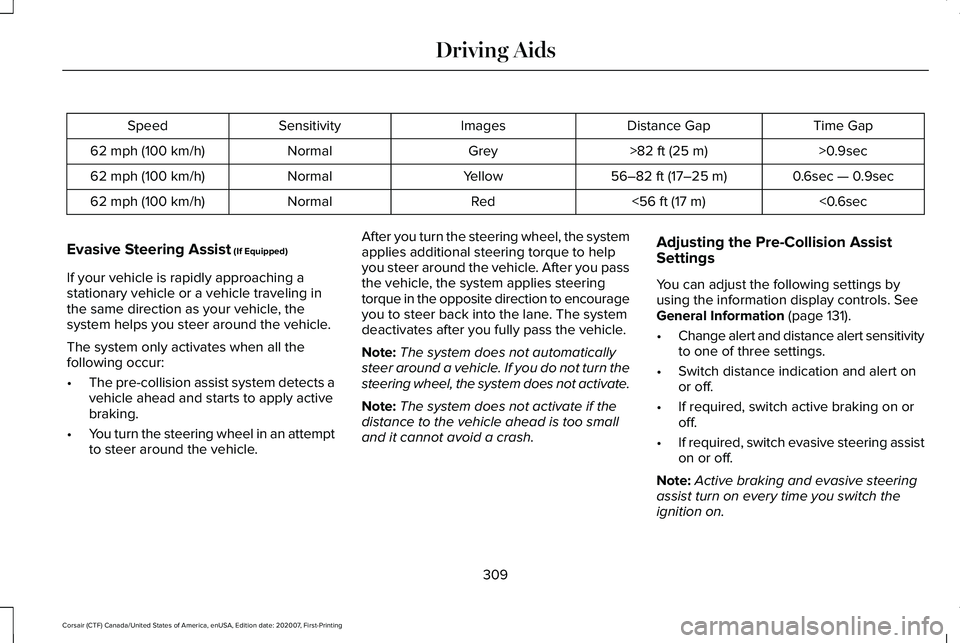
Time Gap
Distance Gap
Images
Sensitivity
Speed
>0.9sec
>82 ft (25 m)
Grey
Normal
62 mph (100 km/h)
0.6sec — 0.9sec
56–82 ft (17–25 m)
Yellow
Normal
62 mph (100 km/h)
<0.6sec
<
56 ft (17 m)
Red
Normal
62 mph (100 km/h)
Evasive Steering Assist
(If Equipped)
If your vehicle is rapidly approaching a
stationary vehicle or a vehicle traveling in
the same direction as your vehicle, the
system helps you steer around the vehicle.
The system only activates when all the
following occur:
• The pre-collision assist system detects a
vehicle ahead and starts to apply active
braking.
• You turn the steering wheel in an attempt
to steer around the vehicle. After you turn the steering wheel, the system
applies additional steering torque to help
you steer around the vehicle. After you pass
the vehicle, the system applies steering
torque in the opposite direction to encourage
you to steer back into the lane. The system
deactivates after you fully pass the vehicle.
Note:
The system does not automatically
steer around a vehicle. If you do not turn the
steering wheel, the system does not activate.
Note: The system does not activate if the
distance to the vehicle ahead is too small
and it cannot avoid a crash. Adjusting the Pre-Collision Assist
Settings
You can adjust the following settings by
using the information display controls.
See
General Information (page 131).
• Change alert and distance alert sensitivity
to one of three settings.
• Switch distance indication and alert on
or off.
• If required, switch active braking on or
off.
• If required, switch evasive steering assist
on or off.
Note: Active braking and evasive steering
assist turn on every time you switch the
ignition on.
309
Corsair (CTF) Canada/United States of America, enUSA, Edition date: 202007, First-Printing Driving Aids
Page 315 of 638
WHAT IS DRIVE MODE CONTROL
The system delivers a driving experience
through a suite of sophisticated electronic
vehicle systems. These systems optimize
steering, handling and powertrain response.
This provides a single location to control
multiple systems performance settings.
Changing the drive mode automatically
changes the functionality of the following
systems:
•
Electronically power-assisted steering
system adjusts steering effort and feel
based on the mode you select. See
Steering (page 306).
• Electronic stability control and traction
control maintains your vehicle control in
adverse conditions or high performance
driving. See Stability Control (page 256).
• Electronic throttle control enhances the
powertrain response to your driving
inputs.
• Transmission controls optimize with shift
schedules tuned to each mode.
• AWD settings become optimized and
tuned to each mode. The system automatically tailors your vehicle
configuration for each mode you select.
Note:
Not all settings, or modes, may be
available.
Note: The system has diagnostic checks that
continuously monitor the system for proper
operation. If a mode is unavailable due to a
system fault, the mode defaults to Normal.
SELECTING A DRIVE MODE
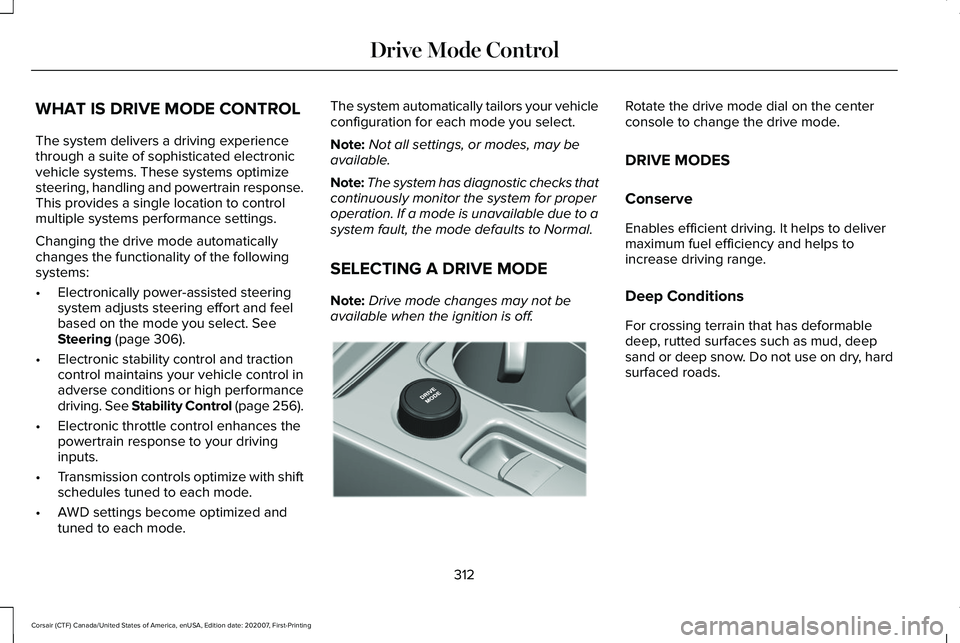
Note: Drive mode changes may not be
available when the ignition is off. Rotate the drive mode dial on the center
console to change the drive mode.
DRIVE MODES
Conserve
Enables efficient driving. It helps to deliver
maximum fuel efficiency and helps to
increase driving range.
Deep Conditions
For crossing terrain that has deformable
deep, rutted surfaces such as mud, deep
sand or deep snow. Do not use on dry, hard
surfaced roads.
312
Corsair (CTF) Canada/United States of America, enUSA, Edition date: 202007, First-Printing Drive Mode ControlE307643
Page 316 of 638
Excite
For sporty on-road driving. This mode
increases throttle response, provides a
sportier exhaust sound and steering feel,
along with quicker shifting. The suspension
could stiffen, with an emphasis on handling
and control. The transmission also holds
gears longer, helping your vehicle accelerate
faster when shifting gears.
Note:
Sportier exhaust sound may not be
available depending on vehicle
configuration.
Normal
For everyday driving. This mode is a perfect
balance of excitement, comfort and
convenience. This is the default mode after
each ignition cycle. Preserve EV - Plug-In Hybrid Electric
Vehicle (PHEV)
Your vehicle runs the engine as needed to
save electric driving range for later use in
another drive mode. For example, you first
drive at high speeds on open roads where
engine operation is appropriate. Later, you
drive at low speeds in an urban area where
electric only is most efficient. See Plug-In
Hybrid Vehicle Operation (page 206).
Pure EV - Plug-In Hybrid Electric
Vehicle (PHEV)
This mode provides an electric only driving
experience. Your vehicle could accelerate
more slowly, and the top speed could
reduce. For more power, you can temporarily
enable your engine at any time by using one
of the following methods: •
Press and hold the folder button on the
steering wheel when viewing the pure
EV information screen. Your vehicle
enables the engine as needed, and
returns to pure EV after several seconds,
or when the vehicle no longer needs the
engine.
• Press the accelerator pedal fully. A
pop-up message appears. Press OK on
the steering wheel to activate as needed.
Your vehicle could enable the engine if
system conditions require it. An engine
enabled message displays if this occurs. See
Information Messages
(page 137).
Your engine could enable if the climate
control is in a defrost mode and the outside
temperature is cold. If the vehicle does not
need defrost, select a different climate
control mode to permit pure EV.
Your vehicle changes from pure EV mode to
normal mode when the vehicle electric range
is zero.
Note: When in pure EV mode, your vehicle
stays in this mode if there is all electric
driving range available and the system does
not fault.
313
Corsair (CTF) Canada/United States of America, enUSA, Edition date: 202007, First-Printing Drive Mode Control