steering LINCOLN CORSAIR 2021 Manual Online
[x] Cancel search | Manufacturer: LINCOLN, Model Year: 2021, Model line: CORSAIR, Model: LINCOLN CORSAIR 2021Pages: 638, PDF Size: 5.7 MB
Page 509 of 638
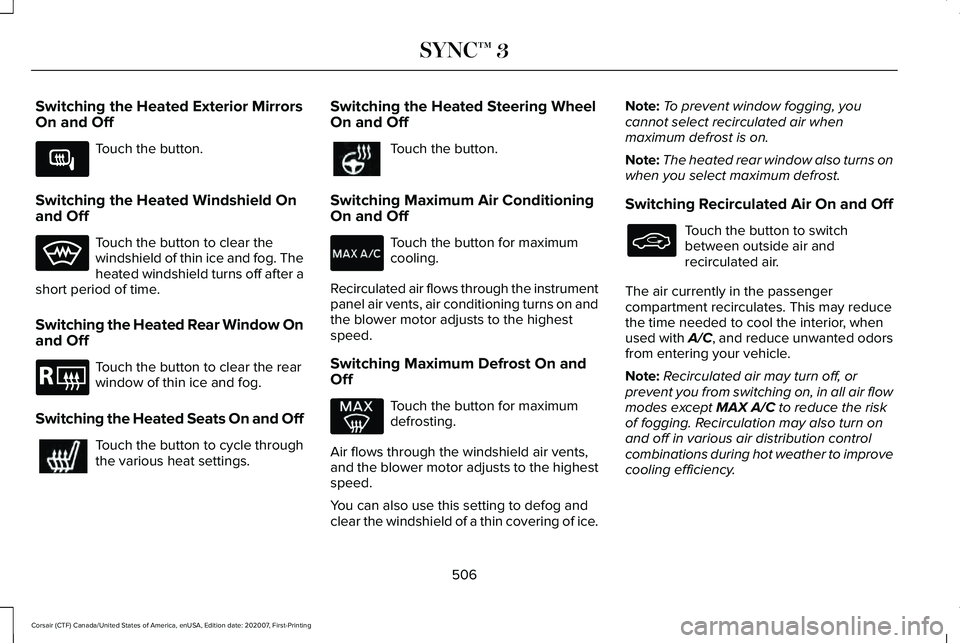
Switching the Heated Exterior Mirrors
On and Off
Touch the button.
Switching the Heated Windshield On
and Off Touch the button to clear the
windshield of thin ice and fog. The
heated windshield turns off after a
short period of time.
Switching the Heated Rear Window On
and Off Touch the button to clear the rear
window of thin ice and fog.
Switching the Heated Seats On and Off Touch the button to cycle through
the various heat settings. Switching the Heated Steering Wheel
On and Off Touch the button.
Switching Maximum Air Conditioning
On and Off Touch the button for maximum
cooling.
Recirculated air flows through the instrument
panel air vents, air conditioning turns on and
the blower motor adjusts to the highest
speed.
Switching Maximum Defrost On and
Off Touch the button for maximum
defrosting.
Air flows through the windshield air vents,
and the blower motor adjusts to the highest
speed.
You can also use this setting to defog and
clear the windshield of a thin covering of ice. Note:
To prevent window fogging, you
cannot select recirculated air when
maximum defrost is on.
Note: The heated rear window also turns on
when you select maximum defrost.
Switching Recirculated Air On and Off Touch the button to switch
between outside air and
recirculated air.
The air currently in the passenger
compartment recirculates. This may reduce
the time needed to cool the interior, when
used with A/C, and reduce unwanted odors
from entering your vehicle.
Note: Recirculated air may turn off, or
prevent you from switching on, in all air flow
modes except MAX A/C to reduce the risk
of fogging. Recirculation may also turn on
and off in various air distribution control
combinations during hot weather to improve
cooling efficiency.
506
Corsair (CTF) Canada/United States of America, enUSA, Edition date: 202007, First-Printing SYNC™ 3E266189 E184884
Page 526 of 638
7. On the Select preferred WEEKDAY or
WEEKEND Charge Times screen, use the
circular 24 hour clock to select your
charging time windows. You can select
up to two time windows by pressing and
dragging across the hour buttons. When
you have selected your preferred times
then press Next to return to the Preferred
Charge Times screen. Repeat for
WEEKEND or WEEKDAY as desired.
Once you are done setting preferred
charge times, press Save.
Note: Selecting all or none of the 24 hours
results in any time of day given equal priority
for charging.
8. Your saved location now shows on the Charge Times screen. Select Done to
return to the main charge settings screen.
Whenever your vehicle is at a saved
charging location, the charge settings
screen displays the location name, and
the charging times are based on your
Charge Time settings for that location
plus the next Departure Time. Note:
Reaching your max charge level by
your next Departure Time is always the
priority. When Charge Times are set,
charging outside your preferred charging
time windows could be necessary in order
to finish by your next Departure Time.
Departure Time Settings
1. Select Charge Preferences on the Charge Settings screen.
2. Select Departure Time Setup on the Edit
Charge Preferences screen.
3. Two time settings show for each day of the week on the Departure Times
schedule screen. Select any one.
4. On the Departure Time settings screen, set your desired departure time, cabin
temperature and days of the week to
repeat. Press Save.
5. Your settings are now shown on the Departure Times schedule screen. Press
Back two times to return to the main
charge settings screen. The next
departure time and cabin temperature
setting display. Note:
Cabin conditioning can perform
differently depending on if you plug in with
the included convenience cord or a higher
power charging station. The power available
for conditioning is limited to the charging
station power available.
Note: Your vehicle may not always reach
the set cabin temperature due to charging
and ambient temperature conditions. This is
normal operation
APPS
The system allows you interact with select
mobile apps while keeping your eyes on the
road. Voice commands, your steering wheel
buttons, or a quick tap on your touchscreen
give you advanced control of compatible
mobile apps. You can also stream your
favorite music or podcasts, share your time
of arrival with friends, and keep connected
safely.
523
Corsair (CTF) Canada/United States of America, enUSA, Edition date: 202007, First-Printing SYNC™ 3
Page 532 of 638
Possible Cause and Resolution
Symptom
–Device limitation. Bluetooth does not support voice commands.
•Connect your device to a USB port.
• If you have an iOS device, press and hold the voice control button on the steering
wheel to use Siri to play specific tracks.
– You are using the wrong voice commands.
•See Using Voice Recognition (page 480).
• For a complete list of voice commands, refer to our website.
– You are not saying the name exactly as it appears on your device.
•Say the name of the track or artist exactly as it appears on your device\
. Spell out any
abbreviations in the name.
The song or artist name may have some special characters that are not be\
ing recognized
by the system.
– The name contains special characters, for example *, - or +.
•Rename the files on your device or use the touchscreen to select and play\
the track.
The system does not understand the name of
a track or artist.
–You are not saying the name exactly as it appears on your device.
•Say the first and last name of the contact exactly as it appears on your\
device. Spell
out any abbreviations in the name.
– The name contains special characters, for example *, - or +.
•Rename the contact on your device or use the touchscreen to select and ca\
ll the
contact.
The system does not understand the name of
a contact in the phonebook on my device and
calls the wrong contact.
529
Corsair (CTF) Canada/United States of America, enUSA, Edition date: 202007, First-Printing SYNC™ 3
Page 534 of 638

Possible Cause and Resolution
Symptom
–Incorrect device settings.
•Make sure that your device does not have an auto-install program or active \
security
settings.
• Check that your device is not set only to charge.
– Device lock screen enabled.
•Unlock your device before connecting it.
The system does not recognize my device. –Device limitation.
•Do not leave your device in your vehicle during very hot or very cold we\
ather condi-
tions.
– Cable connection issue.
•Correctly connect the cable to your device and the vehicle USB port.
– Incompatible cable.
•Use the cable recommended by the manufacturer of your device.
The system does not understand the name of
a track or artist. –
Device limitation. Bluetooth does not support voice commands.
•Connect your device to a USB port.
• If you have an iOS device, press and hold the voice control button on the steering
wheel to use Siri to play specific tracks.
531
Corsair (CTF) Canada/United States of America, enUSA, Edition date: 202007, First-Printing SYNC™ 3
Page 557 of 638
Multi-Point Inspection
Hazard warning system operation
Accessory drive belt(s)
Horn operation
Battery performance
Radiator, cooler, heater and air conditioning hoses
Engine air filter
Suspension components for leaks or damage
Exhaust system
Steering and linkage
Exterior lamps operation
Tires (including spare) for wear and proper pressure2
Fluid levels 1
; fill if necessary
Windshield for cracks, chips or pits
For oil and fluid leaks
Washer spray and wiper operation
Half-shaft dust boots
1 Brake, coolant recovery reservoir, automatic transmission and window washer
2 If your vehicle is equipped with a temporary mobility kit, check the tir\
e sealant expiration Use By date on the canister. Replace as needed.
Be sure to ask your dealership service
advisor or technician about the multi-point
vehicle inspection. It is a comprehensive way
to perform a thorough inspection of your
vehicle. Your checklist gives you immediate
feedback on the overall condition of your
vehicle.
554
Corsair (CTF) Canada/United States of America, enUSA, Edition date: 202007, First-Printing Scheduled Maintenance
Page 560 of 638
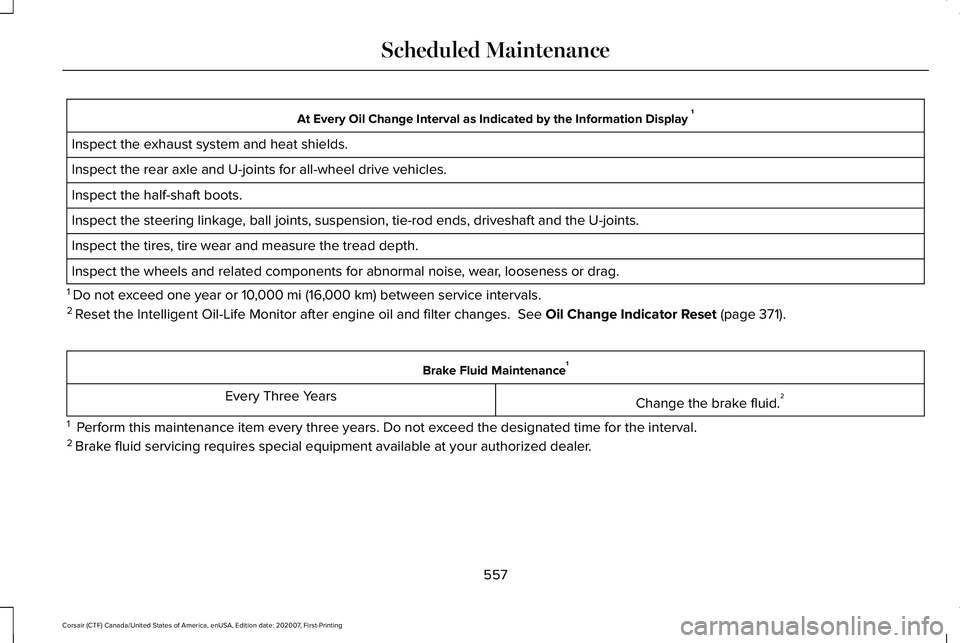
At Every Oil Change Interval as Indicated by the Information Display
1
Inspect the exhaust system and heat shields.
Inspect the rear axle and U-joints for all-wheel drive vehicles.
Inspect the half-shaft boots.
Inspect the steering linkage, ball joints, suspension, tie-rod ends, driveshaft and the U-joints.
Inspect the tires, tire wear and measure the tread depth.
Inspect the wheels and related components for abnormal noise, wear, looseness or drag.
1 Do not exceed one year or 10,000 mi (16,000 km) between service intervals.
2 Reset the Intelligent Oil-Life Monitor after engine oil and filter change\
s.
See Oil Change Indicator Reset (page 371). Brake Fluid Maintenance
1
Change the brake fluid. 2
Every Three Years
1 Perform this maintenance item every three years. Do not exceed the designated time for the interval.
2 Brake fluid servicing requires special equipment available at your authorize\
d dealer.
557
Corsair (CTF) Canada/United States of America, enUSA, Edition date: 202007, First-Printing Scheduled Maintenance
Page 620 of 638
3
360 Degree Camera...................................268
360 Degree Camera Cameras.......................269
360 Degree Camera Settings..........................271
360 Degree Camera Cameras
.................269
Locating the Front View Camera...................269
Locating the Rear View Camera....................269
Locating the Side View Camera.....................269
360 Degree Camera Guide Lines............270 Keep Out Zone....................................................270
360 Degree Camera Limitations..............268
360 Degree Camera Precautions............268
360 Degree Camera Settings....................271 Switching the 360 Degree Camera On and
Off.......................................................................271
Switching the 360 Degree Camera View....................................................................271
9
911 Assist
...........................................................62
A
A/C See: Climate Control..........................................164
About This Manual
...........................................11 ABS
See: Brakes..........................................................245
ABS driving hints See: Hints on Driving With Anti-Lock
Brakes...............................................................246
Accessories...................................................545
Accessories See: Replacement Parts Recommendation.....19
Active Park Assist
.........................................272
Active Park Assist – Troubleshooting...........274
Active Park Assist – Troubleshooting.........................................274
Active Park Assist – Frequently Asked Questions.........................................................274
Active Park Assist – Information Messages.........................................................274
Adaptive Cruise Control
.............................278
Adaptive Cruise Control –
Troubleshooting.............................................289
Adaptive Cruise Control Indicators - Vehicles With: Adaptive Cruise Control
With Lane Centering.................................285
Adaptive Cruise Control Indicators - Vehicles With: Adaptive Cruise Control
With Stop and Go
......................................286 Adaptive Cruise Control Indicators -
Vehicles With: Intelligent Adaptive Cruise
Control..........................................................286
System Warnings................................................286
Adaptive Cruise Control Limitations - Vehicles With: Adaptive Cruise Control
With Lane Centering.................................280
Adaptive Cruise Control Limitations - Vehicles With: Adaptive Cruise Control
With Stop and Go......................................280
Sensor Limitations.............................................280
Adaptive Cruise Control Precautions - Vehicles With: Adaptive Cruise Control
With Lane Centering
.................................278
Adaptive Cruise Control Precautions - Vehicles With: Adaptive Cruise Control
With Stop and Go
......................................279
Hilly Condition Usage.......................................280
When Following a Vehicle................................
279
Adaptive Cruise Control – Troubleshooting.........................................289
Adaptive Cruise Control – Information Messages.........................................................289
Adaptive Headlamps...................................105 About Adaptive Headlamps.............................105
Camera Detects Lane Markings......................
106
Camera Detects Traffic Signs...........................107
Steering Around a Curve..................................106
617
Corsair (CTF) Canada/United States of America, enUSA, Edition date: 202007, First-Printing Index
Page 621 of 638
Switching Adaptive Headlamps On or
Off.......................................................................107
Adjusting the Headlamps ...........................382
Horizontal Aim Adjustment..............................383
Vertical Aim Adjustment...................................382
Adjusting the Set Speed Tolerance - Vehicles With: Intelligent Adaptive Cruise
Control
..........................................................288
Adjusting the Steering Wheel - Vehicles With: Manual Adjustable Steering
Column
............................................................97
Adjusting the Steering Wheel - Vehicles With: Power Adjustable Steering
Column
............................................................97
AFS See: Adaptive Headlamps................................105
Airbag Disposal
...............................................60
Air Conditioning See: Climate Control..........................................164
Air Filter See: Changing the Engine Air Filter - 2.0L/
2.3L....................................................................372
See: Changing the Engine Air Filter - 2.5L, Plug-In Hybrid Electric Vehicle (PHEV)......373
All-Wheel Drive.............................................240
Ambient Lighting
...........................................108
Adjusting the Brightness...................................109
Changing the Color............................................109 Switching Ambient Lighting Off.......................109
Switching Ambient Lighting On.......................109
Anti-Theft Alarm System...............................93 Arming the Anti-Theft Alarm System...............94
Disarming the Anti-Theft Alarm System..........94
How Does the Anti-Theft Alarm System
Work.....................................................................93
What Are the Inclination Sensors.....................93
What Are the Interior Sensors...........................93
What Is the Anti-Theft Alarm System...............93
What Is the Battery Backup Alarm...................94
What Is the Perimeter Alarm..............................93
Anti-Theft Alarm System Settings..............94 Setting the Alarm Security Level......................94
Switching Ask on Exit On and Off....................94
What are the Alarm Security Levels.................94
What Is Ask on Exit...............................................94
Appendices....................................................563
Apps.................................................................523 SiriusXM Traffic and Travel Link.....................525
Using Apps on an Android Device................524
Using Apps on an iOS Device........................524
Using Mobile Navigation on an Android
Device...............................................................524
At a Glance.......................................................23
Audible Warnings and Indicators..............130 Headlamps On Warning Chime.......................130
Keyless Warning Alert........................................130 Parking Brake On Warning Chime..................
130
Audio System
................................................468
General Information...........................................468
Audio Unit
......................................................469
Adjusting the Volume........................................469
Changing Radio Stations..................................469
Selecting the Audio Modes.............................469
Switching the Audio Unit On and Off............
470
Switching the Display On and Off..................470
Using Seek, Fast Forward and Reverse.......470
Auto Hold
.......................................................249
Auto Hold Indicator............................................249
Switching Auto Hold On and Off....................249
Using Auto Hold.................................................249
Autolamps.......................................................103 Windshield Wiper Activated Headlamps......103
Automatic Climate Control..........................164 Accessing the Air Distribution Controls........164
Accessing the Climate Control Menu............164
Setting the Blower Motor Speed.....................164
Setting the Temperature....................................164
Switching Auto Mode On and Off...................164
Switching Maximum Air Conditioning On and
Off.......................................................................165
Switching Maximum Defrost On and Off......166
Switching Recirculated Air On and Off..........166
Switching the Air Conditioning On and Off.......................................................................165
618
Corsair (CTF) Canada/United States of America, enUSA, Edition date: 202007, First-Printing Index
Page 624 of 638
Switching Maximum Air Conditioning On and
Off......................................................................506
Switching Maximum Defrost On and Off......................................................................506
Switching Rear Auto Mode On and Off........507
Switching Recirculated Air On and Off.........506
Switching the Air Conditioning On and Off......................................................................505
Switching the Climate Controlled Seats On and Off..............................................................505
Switching the Climate Control On and Off......................................................................505
Switching the Heated Exterior Mirrors On and Off......................................................................506
Switching the Heated Rear Window On and Off......................................................................506
Switching the Heated Seats On and Off......................................................................506
Switching the Heated Steering Wheel On and Off......................................................................506
Switching the Heated Windshield On and Off......................................................................506
Switching the Rear Climate Controlled Seats On and Off.......................................................507
Switching the Rear Heated Seats On and Off......................................................................507
Switching the Rear Ventilated Seats On and Off......................................................................507 Switching the Ventilated Seats On and
Off......................................................................507
Climate Control..............................................164
Closing the Liftgate........................................88
Closing the Hands-Free Liftgate.......................89
Closing the Liftgate From Inside Your
Vehicle................................................................88
Closing the Liftgate From Outside Your Vehicle................................................................88
Closing the Liftgate Using the Remote Control................................................................89
Connecting the Vehicle to a Mobile Network.......................................................462
Enabling the Modem Using The Lincoln Way....................................................................462
Enabling the Modem Using the Touchscreen....................................................462
What Is the Modem............................................462
Coolant Check See: Engine Coolant Check.............................
374
Crash Sensors and Airbag Indicator..........59
Creating a MyKey
............................................73
Creating a Vehicle Wi-Fi Hotspot.............466 Connecting a Device to the Wi-Fi
Hotspot.............................................................466
Finding the Wi-Fi Hotspot Name and Password.........................................................466 Cross Traffic Alert..........................................301
Cross Traffic Alert Behavior When Trailer is
Attached...........................................................304
Cross Traffic Alert Indicator.............................305
Cross Traffic Alert Information Messages.........................................................305
Cross Traffic Alert System Limitations..........304
Cross Traffic Alert System Sensors...............304
Switching the System On and Off..................304
Using Cross Traffic Alert....................................301
Cruise Control
...............................................276
Cruise Control Indicators............................277
Customer Assistance
...................................343
D
Data Recording
.................................................14
Comfort, Convenience and Entertainment
Data.......................................................................16
Event Data...............................................................15
Service Data............................................................14
Services That Third Parties Provide..................16
Services That We Provide...................................
16
Vehicles With a Modem........................................17
Vehicles With an Emergency Call System.......18
Vehicles With SYNC..............................................17
621
Corsair (CTF) Canada/United States of America, enUSA, Edition date: 202007, First-Printing Index
Page 628 of 638
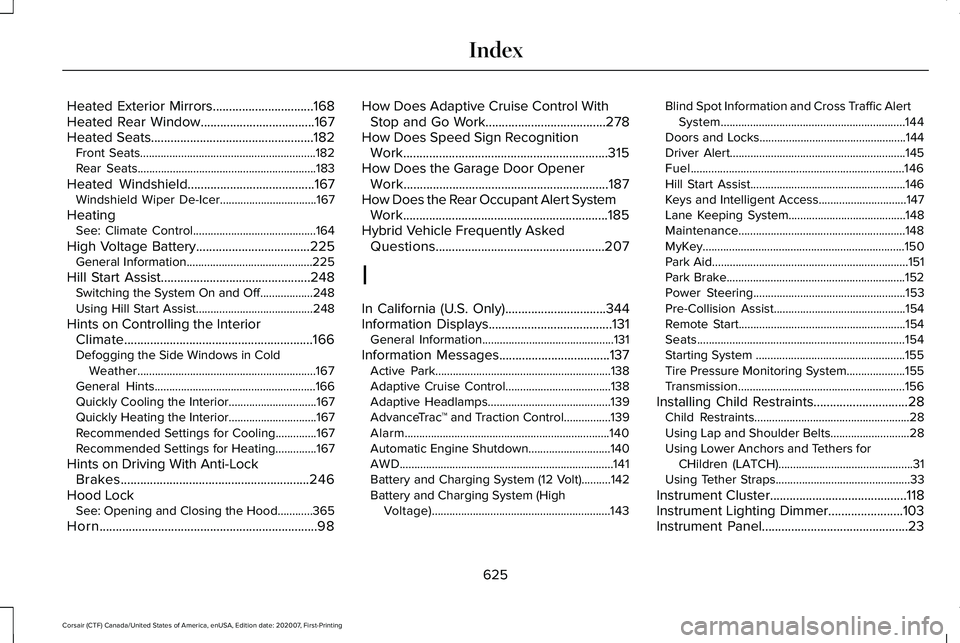
Heated Exterior Mirrors...............................168
Heated Rear Window...................................167
Heated Seats..................................................182
Front Seats............................................................182
Rear Seats.............................................................183
Heated Windshield
.......................................167
Windshield Wiper De-Icer.................................167
Heating See: Climate Control..........................................164
High Voltage Battery...................................225 General Information...........................................225
Hill Start Assist..............................................248 Switching the System On and Off..................248
Using Hill Start Assist........................................
248
Hints on Controlling the Interior Climate..........................................................166
Defogging the Side Windows in Cold Weather.............................................................167
General Hints.......................................................166
Quickly Cooling the Interior..............................
167
Quickly Heating the Interior..............................167
Recommended Settings for Cooling..............167
Recommended Settings for Heating..............167
Hints on Driving With Anti-Lock Brakes..........................................................246
Hood Lock See: Opening and Closing the Hood............365
Horn...................................................................98 How Does Adaptive Cruise Control With
Stop and Go Work.....................................278
How Does Speed Sign Recognition Work...............................................................315
How Does the Garage Door Opener Work
...............................................................187
How Does the Rear Occupant Alert System Work...............................................................185
Hybrid Vehicle Frequently Asked Questions....................................................207
I
In California (U.S. Only)...............................344
Information Displays
......................................131
General Information.............................................131
Information Messages
..................................137
Active Park............................................................138
Adaptive Cruise Control....................................138
Adaptive Headlamps..........................................139
AdvanceTrac ™ and Traction Control................139
Alarm......................................................................140
Automatic Engine Shutdown............................140
AWD........................................................................\
.141
Battery and Charging System (12 Volt)..........142
Battery and Charging System (High Voltage).............................................................143 Blind Spot Information and Cross Traffic Alert
System...............................................................144
Doors and Locks..................................................144
Driver Alert............................................................145
Fuel........................................................................\
.146
Hill Start Assist.....................................................146
Keys and Intelligent Access..............................147
Lane Keeping System........................................148
Maintenance.........................................................148
MyKey.....................................................................150
Park Aid...................................................................151
Park Brake.............................................................152
Power Steering....................................................153
Pre-Collision Assist.............................................154
Remote Start.........................................................154
Seats.......................................................................154
Starting System ...................................................155
Tire Pressure Monitoring System....................155
Transmission.........................................................156
Installing Child Restraints.............................28 Child Restraints.....................................................28
Using Lap and Shoulder Belts...........................28
Using Lower Anchors and Tethers for
CHildren (LATCH)..............................................31
Using Tether Straps..............................................33
Instrument Cluster
..........................................118
Instrument Lighting Dimmer.......................103
Instrument Panel
.............................................23
625
Corsair (CTF) Canada/United States of America, enUSA, Edition date: 202007, First-Printing Index