engine LINCOLN CORSAIR 2021 Owners Manual
[x] Cancel search | Manufacturer: LINCOLN, Model Year: 2021, Model line: CORSAIR, Model: LINCOLN CORSAIR 2021Pages: 638, PDF Size: 5.7 MB
Page 2 of 638

The information contained in this publication was correct at the time of\
going to print. In the interest of continuous development, we reserve \
the right to change specifications,
design or equipment at any time without notice or obligation. No part o\
f this publication may be reproduced, transmitted, stored in a retrieval\
system or translated into any language
in any form by any means without our written permission. Errors and omi\
ssions excepted.
© Ford Motor Company 2020
All rights reserved.
Part Number: 202007 20200721200216
California Proposition 65
WARNING: Operating, servicing and maintaining a passenger vehicle or off-highway \
motor
vehicle can expose you to chemicals including engine exhaust, carbon mon\
oxide, phthalates,
and lead, which are known to the State of California to cause cancer and birth defects or other
reproductive harm. To minimize exposure, avoid breathing exhaust, do not idle the engine except
as necessary, service your vehicle in a well-ventilated area and wear gloves or wash\
your hands
frequently when servicing your vehicle. For more information go to
www.P65Warnings.ca.gov/passenger-vehicle. WARNING:
Battery posts, terminals and related accessories contain lead and lead
compounds, chemicals known to the State of California to cause cancer and reproductive harm.
Wash your hands after handling
.
Page 6 of 638
Daytime Running Lamps - Vehicles With:
Daytime Running Lamps (DRL) .............104
Front Fog Lamps ..........................................
104
Adaptive Headlamps ..................................
105
Direction Indicators ......................................
107
Welcome Lighting ........................................
107
Interior Lamps ...............................................
108
Ambient Lighting ..........................................
108
Automatic High Beam Control
What Is Automatic High Beam Control ........................................................................\
110
Switching Automatic High Beam Control On and Off ..................................................
110
Automatic High Beam Control Indicators ........................................................................\
.
111
Overriding Automatic High Beam Control ........................................................................\
.
111
Windows and Mirrors
Power Windows .............................................
112
Global Opening and Closing ......................
113
Exterior Mirrors ..............................................
113
Interior Mirror .................................................
115Sun Visors
.......................................................
115
Moonroof .........................................................
116
Instrument Cluster
Gauges - Plug-In Hybrid Electric Vehicle (PHEV), Vehicles With: 12.3 Inch
Instrument Cluster Display Screen .......
118
Gauges - Vehicles With: 6.5 Inch Instrument Cluster Display Screen ......
122
Gauges - Vehicles With: 12.3 Inch Instrument Cluster Display Screen ......
124
Warning Lamps and Indicators .................
126
Audible Warnings and Indicators .............
130
Information Displays
General Information ......................................
131
Personalized Settings .................................
135
Information Messages .................................
137
Head Up Display ..........................................
157
Remote Start
What Is Remote Start ....................................
161
Remote Start Limitations .............................
161
Enabling Remote Start .................................
161Remotely Starting the Engine
....................
161
Extending the Remote Start Duration ........................................................................\
161
Remotely Stopping the Engine .................
162
Remote Start Remote Control Indicators .......................................................................
162
Remote Start Settings .................................
162
Climate Control
Automatic Climate Control ........................
164
Hints on Controlling the Interior Climate .......................................................................
166
Heated Windshield ......................................
167
Heated Rear Window ..................................
167
Heated Exterior Mirrors ..............................
168
Interior Air Quality
What Is the Cabin Air Filter ........................
169
Locating the Cabin Air Filter .....................
169
Replacing the Cabin Air Filter ...................
169
Seats
Sitting in the Correct Position ...................
170
Head Restraints .............................................
171
3
Corsair (CTF) Canada/United States of America, enUSA, Edition date: 202007, First-Printing Table of Contents
Page 7 of 638
Power Seats
...................................................173
Memory Function ..........................................
177
Rear Seats ......................................................
180
Heated Seats ................................................
182
Ventilated Seats ...........................................
183
Rear Occupant Alert System
What is the Rear Occupant Alert System .......................................................................
185
How Does the Rear Occupant Alert System Work ............................................................
185
Rear Occupant Alert System Precautions .......................................................................
185
Rear Occupant Alert System Limitations .......................................................................
185
Switching Rear Occupant Alert System On and Off ........................................................
186
Rear Occupant Alert System Indicators .......................................................................
186
Rear Occupant Alert System Audible Warnings ....................................................
186
Garage Door Opener
What Is the Garage Door Opener ............
187How Does the Garage Door Opener Work
.......................................................................
187
Garage Door Opener Precautions ...........
187
Garage Door Opener Limitations ............
188
Programming the Garage Door Opener to Your Hand-Held Transmitter .................
188
Programming the Garage Door Opener to Your Garage Door Opener Motor ........
189
Programming the Garage Door Opener to Your Gate Opener Motor .......................
189
Clearing the Garage Door Opener .........
190
Reprogramming the Garage Door Opener .......................................................................
190
Garage Door Opener Radio Frequencies .......................................................................
190
Auxiliary Power Points
Auxiliary Power Points ................................
192
Wireless Accessory Charger .....................
192
Storage Compartments
Overhead Console ......................................
195Starting and Stopping the Engine
General Information
....................................
196
Keyless Starting ............................................
196
Starting a Gasoline Engine ........................
197
Starting a Hybrid Electric Vehicle System ......................................................................
200
Engine Block Heater ..................................
202
Unique Driving Characteristics
Auto-Start-Stop ............................................
204
Plug-In Hybrid Vehicle Operation ...........
206
Hybrid Vehicle Frequently Asked Questions ..................................................
207
Fuel and Refueling
Safety Precautions ......................................
209
Fuel Quality - Gasoline ...............................
210
Fuel Quality - Plug-In Hybrid Electric Vehicle (PHEV) ...........................................
211
Fuel Filler Funnel Location .........................
211
Running Out of Fuel ....................................
212
Refueling - Plug-In Hybrid Electric Vehicle (PHEV) .........................................................
213
4
Corsair (CTF) Canada/United States of America, enUSA, Edition date: 202007, First-Printing Table of Contents
Page 8 of 638
Refueling - Gasoline
....................................216
Fuel Consumption .......................................
219
Engine Emission Control
Emission Law .................................................
221
Catalytic Converter .....................................
222
High Voltage Battery
General Information ...................................
225
Charging the High Voltage Battery ........
225
Transmission
Automatic Transmission - Excluding: Plug-In Hybrid Electric Vehicle (PHEV)
......................................................................
232
Automatic Transmission - Plug-In Hybrid Electric Vehicle (PHEV) ..........................
237
All-Wheel Drive
Using All-Wheel Drive ................................
240
Brakes
General Information ...................................
245Hints on Driving With Anti-Lock Brakes
......................................................................
246
Electric Parking Brake ................................
246
Hill Start Assist .............................................
248
Auto Hold ......................................................
249
Reverse Braking Assist
What Is Reverse Braking Assist ................
251
Reverse Braking Assist Precautions .......
251
Switching Reverse Braking Assist On and Off ...............................................................
252
Overriding Reverse Braking Assist ........
252
Reverse Braking Assist Indicators ..........
252
Reverse Braking Assist – Troubleshooting ......................................................................
253
Traction Control
Principle of Operation ................................
255
Using Traction Control ...............................
255
Stability Control
Principle of Operation ................................
256
Using Stability Control ...............................
257Parking Aids
Principle of Operation
................................
258
Rear Parking Aid ..........................................
258
Front Parking Aid ........................................
260
Side Sensing System .................................
262
Rear View Camera
What Is the Rear View Camera ...............
265
Rear View Camera Precautions ..............
265
Locating the Rear View Camera .............
265
Rear View Camera Guide Lines ..............
265
Rear View Camera Object Distance Indicators ..................................................
266
Rear View Camera Settings .....................
266
360 Degree Camera
What Is the 360 Degree Camera ............
268
360 Degree Camera Precautions ..........
268
360 Degree Camera Limitations ............
268
360 Degree Camera Cameras ................
269
360 Degree Camera Guide Lines ..........
270
360 Degree Camera Settings ...................
271
5
Corsair (CTF) Canada/United States of America, enUSA, Edition date: 202007, First-Printing Table of Contents
Page 11 of 638
Under Hood Overview - 2.0L/2.3L
..........367
Under Hood Overview - 2.5L, Plug-In Hybrid Electric Vehicle (PHEV) ............
369
Engine Oil Dipstick ......................................
370
Engine Oil Check .........................................
370
Oil Change Indicator Reset ........................
371
Changing the Engine Air Filter - 2.0L/2.3L ......................................................................
372
Changing the Engine Air Filter - 2.5L, Plug-In Hybrid Electric Vehicle (PHEV)
......................................................................
373
Engine Coolant Check ...............................
374
Automatic Transmission Fluid Check ......
379
Brake Fluid Check .......................................
379
Power Steering Fluid Check ....................
380
Changing the 12V Battery .........................
380
Adjusting the Headlamps .........................
382
Washer Fluid Check ...................................
384
Fuel Filter .......................................................
384
Checking the Wiper Blades ......................
384
Changing the Wiper Blades .....................
384
Removing a Headlamp ..............................
385
Changing a Bulb ..........................................
385Vehicle Care
General Information
....................................
386
Cleaning Products ......................................
386
Cleaning the Exterior ..................................
387
Waxing ...........................................................
388
Cleaning the Engine ...................................
389
Cleaning the Windows and Wiper Blades ......................................................................
389
Cleaning the Interior ..................................
390
Cleaning the Instrument Panel and Instrument Cluster Lens ........................
390
Cleaning Leather Seats ..............................
391
Repairing Minor Paint Damage ................
392
Cleaning the Wheels ..................................
392
Vehicle Storage ...........................................
392
Body Styling Kits ..........................................
394
Wheels and Tires
General Information ...................................
395
Tire Sealant and Inflator Kit ......................
397
Tire Care ........................................................
404
Using Snow Chains ......................................
418
Tire Pressure Monitoring System .............
419 Changing a Road Wheel
...........................
423
Technical Specifications .............................
431
Capacities and Specifications
Engine Specifications - 2.0L .....................
433
Engine Specifications - 2.3L .....................
434
Engine Specifications - 2.5L, Plug-In Hybrid Electric Vehicle (PHEV) ..........................
435
Motorcraft Parts - 2.0L ...............................
436
Motorcraft Parts - 2.3L ................................
437
Motorcraft Parts - 2.5L, Plug-In Hybrid Electric Vehicle (PHEV) ..........................
438
Capacities and Specifications - 2.0L ......
439
Capacities and Specifications - 2.3L ......
446
Capacities and Specifications - 2.5L, Plug-In Hybrid Electric Vehicle (PHEV)
......................................................................
454
Bulb Specification Chart ............................
460
Vehicle Identification
Vehicle Identification Number ..................
461
8
Corsair (CTF) Canada/United States of America, enUSA, Edition date: 202007, First-Printing Table of Contents
Page 15 of 638
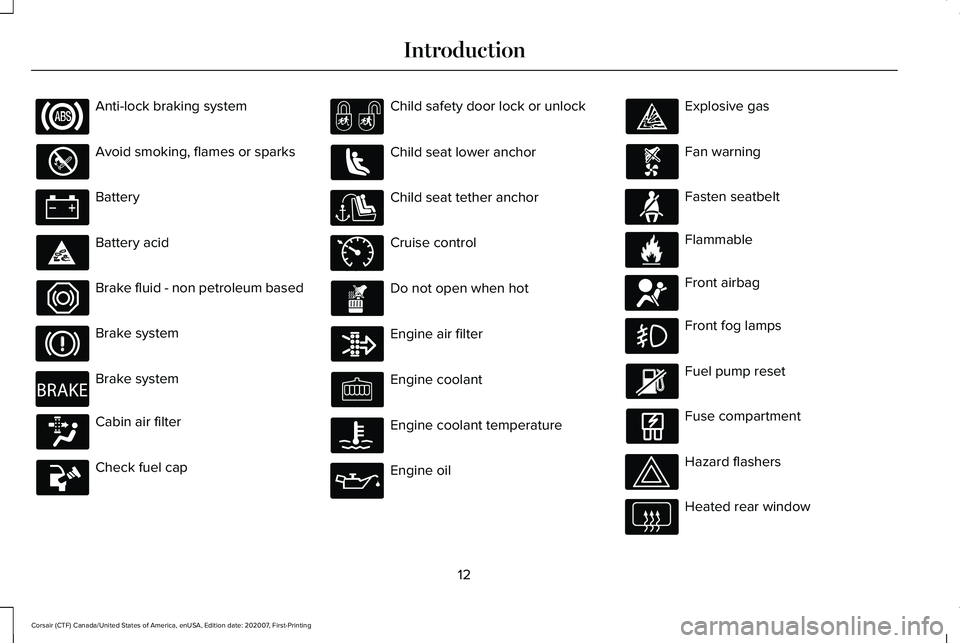
Anti-lock braking system
Avoid smoking, flames or sparks
Battery
Battery acid
Brake fluid - non petroleum based
Brake system
Brake system
Cabin air filter
Check fuel cap Child safety door lock or unlock
Child seat lower anchor
Child seat tether anchor
Cruise control
Do not open when hot
Engine air filter
Engine coolant
Engine coolant temperature
Engine oil Explosive gas
Fan warning
Fasten seatbelt
Flammable
Front airbag
Front fog lamps
Fuel pump reset
Fuse compartment
Hazard flashers
Heated rear window
12
Corsair (CTF) Canada/United States of America, enUSA, Edition date: 202007, First-Printing Introduction E270480 E71340 E71880 E231160 E67017
Page 16 of 638
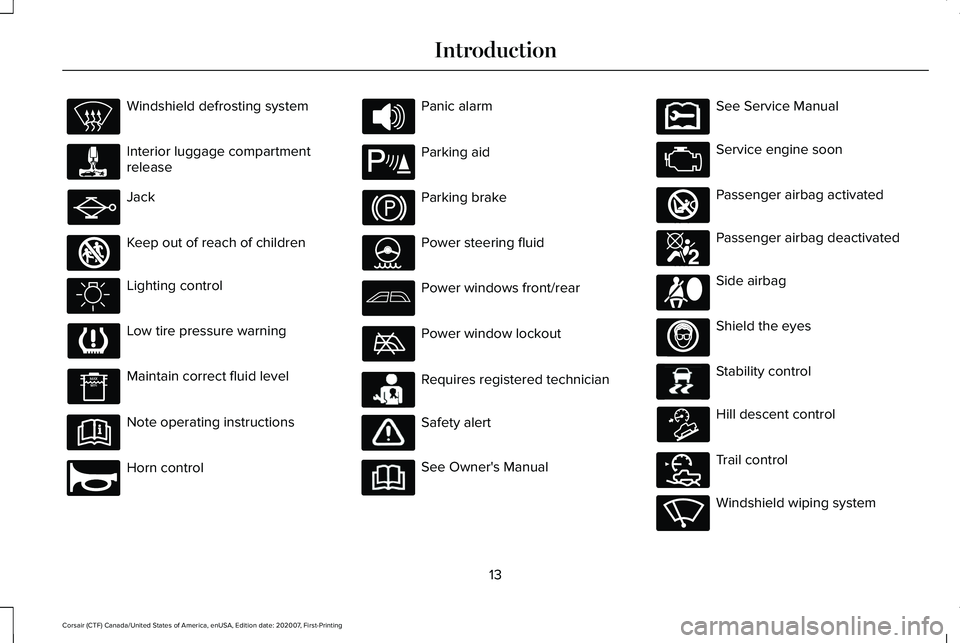
Windshield defrosting system
Interior luggage compartment
release
Jack
Keep out of reach of children
Lighting control
Low tire pressure warning
Maintain correct fluid level
Note operating instructions
Horn control Panic alarm
Parking aid
Parking brake
Power steering fluid
Power windows front/rear
Power window lockout
Requires registered technician
Safety alert
See Owner's Manual See Service Manual
Service engine soon
Passenger airbag activated
Passenger airbag deactivated
Side airbag
Shield the eyes
Stability control
Hill descent control
Trail control
Windshield wiping system
13
Corsair (CTF) Canada/United States of America, enUSA, Edition date: 202007, First-Printing Introduction E161353 E270945 E139213 E231159 E231158 E270849 E270850 E167012 E138639 E163957 E272858 E270969
Page 17 of 638
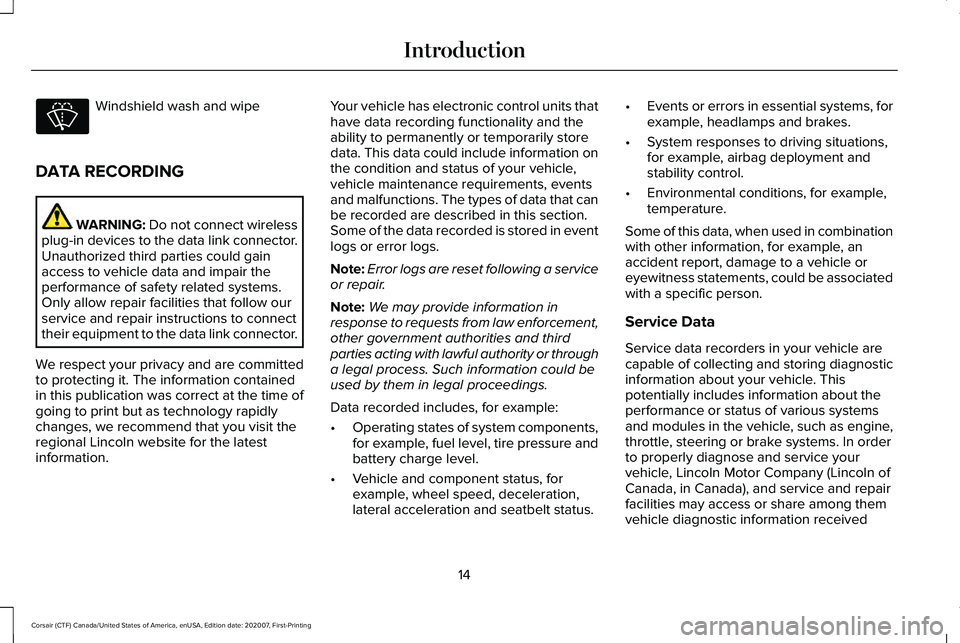
Windshield wash and wipe
DATA RECORDING WARNING: Do not connect wireless
plug-in devices to the data link connector.
Unauthorized third parties could gain
access to vehicle data and impair the
performance of safety related systems.
Only allow repair facilities that follow our
service and repair instructions to connect
their equipment to the data link connector.
We respect your privacy and are committed
to protecting it. The information contained
in this publication was correct at the time of
going to print but as technology rapidly
changes, we recommend that you visit the
regional Lincoln website for the latest
information. Your vehicle has electronic control units that
have data recording functionality and the
ability to permanently or temporarily store
data. This data could include information on
the condition and status of your vehicle,
vehicle maintenance requirements, events
and malfunctions. The types of data that can
be recorded are described in this section.
Some of the data recorded is stored in event
logs or error logs.
Note:
Error logs are reset following a service
or repair.
Note: We may provide information in
response to requests from law enforcement,
other government authorities and third
parties acting with lawful authority or through
a legal process. Such information could be
used by them in legal proceedings.
Data recorded includes, for example:
• Operating states of system components,
for example, fuel level, tire pressure and
battery charge level.
• Vehicle and component status, for
example, wheel speed, deceleration,
lateral acceleration and seatbelt status. •
Events or errors in essential systems, for
example, headlamps and brakes.
• System responses to driving situations,
for example, airbag deployment and
stability control.
• Environmental conditions, for example,
temperature.
Some of this data, when used in combination
with other information, for example, an
accident report, damage to a vehicle or
eyewitness statements, could be associated
with a specific person.
Service Data
Service data recorders in your vehicle are
capable of collecting and storing diagnostic
information about your vehicle. This
potentially includes information about the
performance or status of various systems
and modules in the vehicle, such as engine,
throttle, steering or brake systems. In order
to properly diagnose and service your
vehicle, Lincoln Motor Company (Lincoln of
Canada, in Canada), and service and repair
facilities may access or share among them
vehicle diagnostic information received
14
Corsair (CTF) Canada/United States of America, enUSA, Edition date: 202007, First-Printing Introduction
Page 51 of 638
Make sure that:
•
You set the parking brake.
• The transmission is in park (P).
• The ignition is off.
• You close all vehicle doors.
• You unbuckle the driver and front
passenger seatbelts.
1. Switch the ignition on. Do not start the engine.
2. Wait until the seatbelt warning lamp turns
off (about one minute). After Step 2, wait
an additional five seconds before
proceeding with Step 3. Once you start
Step 3, you must complete the procedure
within 60 seconds.
3. For the seating position you are switching
off, buckle then unbuckle the seatbelt
three times at a moderate speed, ending
in the unbuckled state. After Step 3, the
seatbelt warning lamp turns on.
4. When the seatbelt warning lamp is on, buckle then unbuckle the seatbelt. After
Step 4, the seatbelt warning lamp flashes
for confirmation. •
This switches the feature off if it is
currently on.
• This switches the feature on if it is
currently off.
CHILD RESTRAINT AND SEATBELT
MAINTENANCE
Inspect the vehicle seatbelts and child safety
seat systems periodically to make sure they
work properly and are not damaged. Inspect
the vehicle and child restraint seatbelts to
make sure there are no nicks, tears or cuts.
Replace if necessary. All vehicle seatbelt
assemblies, including retractors, buckles,
front seatbelt buckle assemblies, buckle
support assemblies (slide bar-if equipped),
shoulder belt height adjusters (if equipped),
shoulder belt guide on seat backrest (if
equipped), child safety seat LATCH and
tether anchors, and attaching hardware,
should be inspected after a crash. Read the
child restraint manufacturer's instructions for
additional inspection and maintenance
information specific to the child restraint. We recommend that all seatbelt assemblies
in use in vehicles involved in a crash be
replaced. However, if the crash was minor
and an authorized dealer finds that the belts
do not show damage and continue to
operate properly, they do not need to be
replaced. Seatbelt assemblies not in use
during a crash should also be inspected and
replaced if either damage or improper
operation is noted.
Properly care for seatbelts. See Vehicle
Care (page 386).
SEATBELT EXTENSIONS WARNING:
Persons who fit into the
vehicle's seatbelt should not use an
extension. Unnecessary use could result
in serious personal injury in the event of a
crash.
48
Corsair (CTF) Canada/United States of America, enUSA, Edition date: 202007, First-Printing Seatbelts
Page 75 of 638
WHAT IS MYKEY
MyK
ey
MyKey allows you to program keys with
restricted driving modes to promote good
driving habits.
MYKEY SETTINGS
Non-Configurable MyKey Settings
Seatbelt Reminder or Belt-Minder™
MyKey mutes the audio system until the
drivers, and in some instances, passengers,
fasten their seatbelts.
Note:
If your vehicle includes an AM/FM
radio or a very basic audio system, then the
radio may not mute.
Satellite Radio (If Equipped)
Satellite radio adult content restrictions. Early Low Fuel
The low fuel level warning lamp turns on
earlier.
Driving and Parking Aids
Parking aids, blind spot information system
and cross traffic alert turn on when you start
the engine and cannot be switched off with
a MyKey.
Pre-collision assist and lane keeping alert
turn on when you start the engine, but can
be switched off with a MyKey.
A new destination in the navigation system
can only be set using voice commands when
using a MyKey, and with your vehicle moving.
Note:
MyKey drivers may be able to turn the
lane departure warning feature off, but this
feature turns back on automatically with
every new key cycle.
Configurable MyKey Settings
You can configure the following settings after
creating a MyKey.
See Creating a MyKey
(page 73). Speed Limit WARNING:
Do not set MyKey
maximum speed limit to a limit that will
prevent the driver from maintaining a safe
speed considering posted speed limits and
prevailing road conditions. The driver is
always responsible to drive in accordance
with local laws and prevailing conditions.
Failure to do so could result in accident or
injury.
You can set a speed limit for your vehicle.
Warning messages appear in the information
display and a tone sounds if your vehicle
reaches the set speed. You cannot override
the set speed when using a MyKey.
Speed Reminder
You can set a speed reminder for your
vehicle. Warning messages appear in the
information display and a tone sounds if your
vehicle exceeds the set speed.
72
Corsair (CTF) Canada/United States of America, enUSA, Edition date: 202007, First-Printing MyKey™