key LINCOLN CORSAIR 2021 Owners Manual
[x] Cancel search | Manufacturer: LINCOLN, Model Year: 2021, Model line: CORSAIR, Model: LINCOLN CORSAIR 2021Pages: 638, PDF Size: 5.7 MB
Page 4 of 638
Introduction
About This Manual
..........................................11
Symbols Glossary ............................................
11
Data Recording ...............................................
14
Perchlorate .......................................................
18
Lincoln Automotive Financial Services ........................................................................\
..
18
Replacement Parts Recommendation ........................................................................\
..
19
Special Notices ...............................................
19
Mobile Communications Equipment ........
20
Export Unique Options ..................................
21
Environment
Protecting the Environment ........................
22
At a Glance
Instrument Panel ............................................
23
Child Safety
General Information ......................................
26
Installing Child Restraints ............................
28
Booster Seats .................................................
34Child Restraint Positioning
..........................
37
Child Safety Locks .........................................
39
Seatbelts
Principle of Operation ...................................
41
Fastening the Seatbelts ...............................
42
Seatbelt Height Adjustment .......................
45
Seatbelt Warning Lamp and Indicator Chime ...........................................................
45
Seatbelt Reminder .........................................
46
Child Restraint and Seatbelt Maintenance ........................................................................\
.
48
Seatbelt Extensions ......................................
48
Personal Safety System ™
Personal Safety System ™.............................
50
Supplementary Restraints System
Principle of Operation ...................................
51
Driver and Passenger Airbags ...................
52
Front Passenger Sensing System .............
54
Side Airbags ...................................................
56Driver and Passenger Knee Airbags
........
57
Safety Canopy™ ..............................................
58
Crash Sensors and Airbag Indicator ........
59
Airbag Disposal ..............................................
60
Pedestrian Protection
Pedestrian Alert System ...............................
61
911 Assist
What Is 911 Assist ...........................................
62
Emergency Call Requirements ..................
62
Emergency Call Limitations ........................
63
Keys and Remote Controls
General Information on Radio Frequencies ........................................................................\
.
64
Remote Control ..............................................
64
Replacing a Lost Key or Remote Control ........................................................................\
.
67
Phone as a Key
What Is Phone As a Key ...............................
68
Phone as a Key Limitations .........................
68
1
Corsair (CTF) Canada/United States of America, enUSA, Edition date: 202007, First-Printing Table of Contents
Page 5 of 638
Programming Your Phone
..........................68
Using the Valet Mode ...................................
69
Using the Backup Start Passcode .............
69
Phone as a Key – Troubleshooting ...........
70
MyKey™
What Is MyKey ................................................
72
MyKey Settings ...............................................
72
Creating a MyKey ...........................................
73
Programming a MyKey .................................
73
Clearing All MyKeys ......................................
73
Checking MyKey System Status ................
74
Using MyKey With Remote Start Systems ........................................................................\
.
74
MyKey – Troubleshooting ............................
74
Doors and Locks
Locking and Unlocking .................................
76
Keyless Entry
Locating the Keyless Entry Keypad ...........
81
Keyless Entry Limitations ..............................
81
Master Access Code ......................................
81Keyless Entry Settings
...................................
81
Locking and Unlocking the Doors Using Keyless Entry ..............................................
83
Keyless Entry – Troubleshooting ...............
84
Liftgate
Liftgate Precautions ......................................
85
Opening the Liftgate .....................................
85
Setting the Liftgate Opening Height .........
87
Closing the Liftgate .......................................
88
Stopping the Liftgate Movement ...............
90
Liftgate Obstacle Detection ........................
90
Liftgate – Troubleshooting ...........................
91
Security
Passive Anti-Theft System ...........................
93
Anti-Theft Alarm System ..............................
93
Anti-Theft Alarm System Settings .............
94
Security – Troubleshooting .........................
95
Steering Wheel
Adjusting the Steering Wheel - Vehicles With: Power Adjustable Steering Column
........................................................................\
.
97 Adjusting the Steering Wheel - Vehicles
With: Manual Adjustable Steering
Column .........................................................
97
Resetting the Stopping Position - Vehicles With: Power Adjustable Steering Column
........................................................................\
98
Horn ..................................................................
98
Switching the Heated Steering Wheel On ........................................................................\
98
Wipers and Washers
Windshield Wipers ........................................
99
Autowipers ....................................................
100
Windshield Washers .....................................
101
Rear Window Wiper and Washers ............
101
Lighting
General Information ....................................
102
Lighting Control ............................................
102
Autolamps ......................................................
103
Instrument Lighting Dimmer ......................
103
Headlamp Exit Delay ...................................
104
Daytime Running Lamps - Vehicles With: Configurable Daytime Running Lamps
.......................................................................
104
2
Corsair (CTF) Canada/United States of America, enUSA, Edition date: 202007, First-Printing Table of Contents
Page 7 of 638
Power Seats
...................................................173
Memory Function ..........................................
177
Rear Seats ......................................................
180
Heated Seats ................................................
182
Ventilated Seats ...........................................
183
Rear Occupant Alert System
What is the Rear Occupant Alert System .......................................................................
185
How Does the Rear Occupant Alert System Work ............................................................
185
Rear Occupant Alert System Precautions .......................................................................
185
Rear Occupant Alert System Limitations .......................................................................
185
Switching Rear Occupant Alert System On and Off ........................................................
186
Rear Occupant Alert System Indicators .......................................................................
186
Rear Occupant Alert System Audible Warnings ....................................................
186
Garage Door Opener
What Is the Garage Door Opener ............
187How Does the Garage Door Opener Work
.......................................................................
187
Garage Door Opener Precautions ...........
187
Garage Door Opener Limitations ............
188
Programming the Garage Door Opener to Your Hand-Held Transmitter .................
188
Programming the Garage Door Opener to Your Garage Door Opener Motor ........
189
Programming the Garage Door Opener to Your Gate Opener Motor .......................
189
Clearing the Garage Door Opener .........
190
Reprogramming the Garage Door Opener .......................................................................
190
Garage Door Opener Radio Frequencies .......................................................................
190
Auxiliary Power Points
Auxiliary Power Points ................................
192
Wireless Accessory Charger .....................
192
Storage Compartments
Overhead Console ......................................
195Starting and Stopping the Engine
General Information
....................................
196
Keyless Starting ............................................
196
Starting a Gasoline Engine ........................
197
Starting a Hybrid Electric Vehicle System ......................................................................
200
Engine Block Heater ..................................
202
Unique Driving Characteristics
Auto-Start-Stop ............................................
204
Plug-In Hybrid Vehicle Operation ...........
206
Hybrid Vehicle Frequently Asked Questions ..................................................
207
Fuel and Refueling
Safety Precautions ......................................
209
Fuel Quality - Gasoline ...............................
210
Fuel Quality - Plug-In Hybrid Electric Vehicle (PHEV) ...........................................
211
Fuel Filler Funnel Location .........................
211
Running Out of Fuel ....................................
212
Refueling - Plug-In Hybrid Electric Vehicle (PHEV) .........................................................
213
4
Corsair (CTF) Canada/United States of America, enUSA, Edition date: 202007, First-Printing Table of Contents
Page 27 of 638
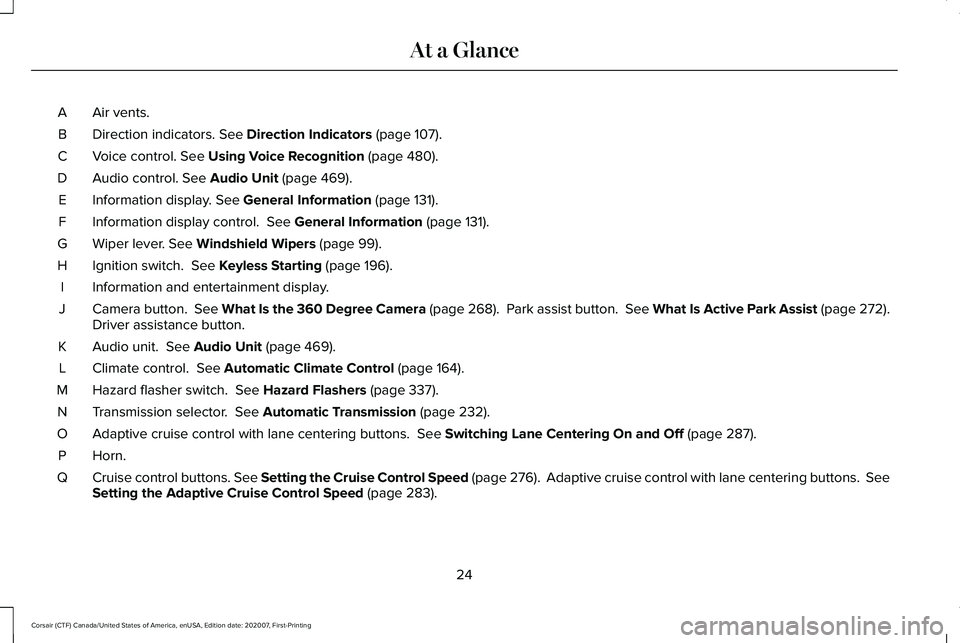
Air vents.
A
Direction indicators. See Direction Indicators (page 107).
B
Voice control.
See Using Voice Recognition (page 480).
C
Audio control.
See Audio Unit (page 469).
D
Information display.
See General Information (page 131).
E
Information display control.
See General Information (page 131).
F
Wiper lever.
See Windshield Wipers (page 99).
G
Ignition switch.
See Keyless Starting (page 196).
H
Information and entertainment display.
I
Camera button.
See What Is the 360 Degree Camera (page 268). Park assist button. See What Is Active Park Assist (page 272).
Driver assistance button.
J
Audio unit.
See Audio Unit (page 469).
K
Climate control.
See Automatic Climate Control (page 164).
L
Hazard flasher switch.
See Hazard Flashers (page 337).
M
Transmission selector.
See Automatic Transmission (page 232).
N
Adaptive cruise control with lane centering buttons.
See Switching Lane Centering On and Off (page 287).
O
Horn.P
Cruise control buttons.
See Setting the Cruise Control Speed (page 276). Adaptive cruise control with lane centering buttons. Se\
e
Setting the Adaptive Cruise Control Speed (page 283).
Q
24
Corsair (CTF) Canada/United States of America, enUSA, Edition date: 202007, First-Printing At a Glance
Page 43 of 638
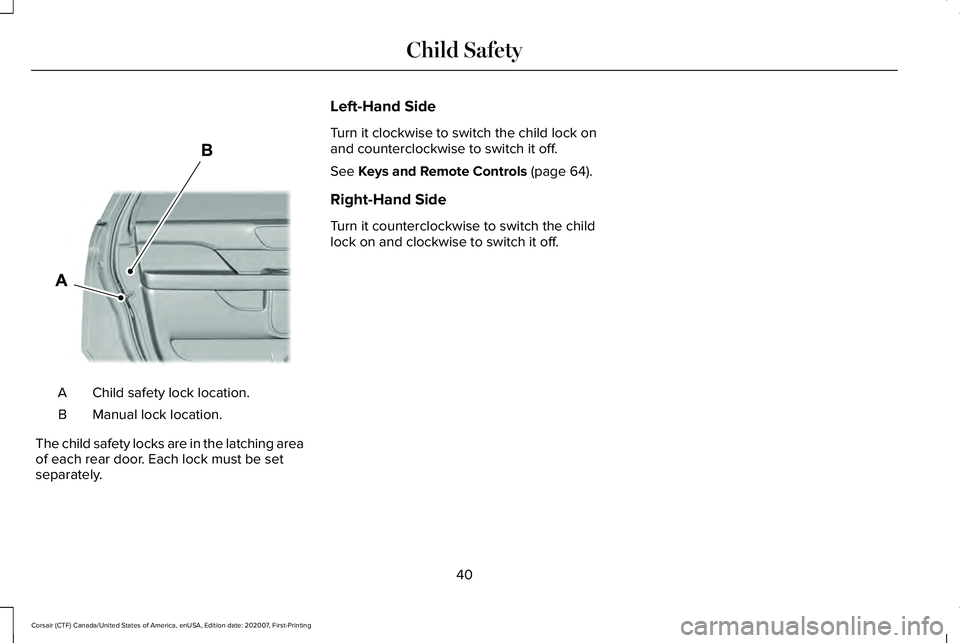
Child safety lock location.
A
Manual lock location.
B
The child safety locks are in the latching area
of each rear door. Each lock must be set
separately. Left-Hand Side
Turn it clockwise to switch the child lock on
and counterclockwise to switch it off.
See Keys and Remote Controls (page 64).
Right-Hand Side
Turn it counterclockwise to switch the child
lock on and clockwise to switch it off.
40
Corsair (CTF) Canada/United States of America, enUSA, Edition date: 202007, First-Printing Child SafetyE327362
Page 67 of 638
GENERAL INFORMATION ON
RADIO FREQUENCIES
This device complies with Part 15 of the FCC
Rules and with Industry Canada
license-exempt RSS standard(s). Operation
is subject to the following two conditions: (1)
This device may not cause harmful
interference, and (2) This device must accept
any interference received, including
interference that may cause undesired
operation.
WARNING: Changes or modifications
not expressively approved by the party
responsible for compliance could void the
user's authority to operate the equipment.
The term "IC:" before the radio certification
number only signifies that Industry Canada
technical specifications were met.
The typical operating range for your
transmitter is approximately 33 ft (10 m).
Vehicles with the remote start feature will
have a greater range. One of the following could cause a decrease
in operating range:
•
Weather conditions.
• Nearby radio towers.
• Structures around the vehicle.
• Other vehicles parked next to your
vehicle.
The radio frequency used by your remote
control can also be used by other radio
transmitters, for example amateur radios,
medical equipment, wireless headphones,
wireless remote controls, cell phones, battery
chargers and alarm systems. If the
frequencies are jammed, you will not be able
to use your remote control. You can lock and
unlock the doors with the key.
Note: Make sure to lock your vehicle before
leaving it unattended.
Note: If you are in range, the remote control
will operate if you press any button
unintentionally.
Note: The remote control contains sensitive
electrical components. Exposure to moisture
or impact may cause permanent damage. Intelligent Access
(If Equipped)
The system uses a radio frequency signal to
communicate with your vehicle and authorize
your vehicle to unlock when one of the
following conditions are met:
• You activate the front exterior door
handle switch.
• You press the luggage compartment
button.
• You press a button on the transmitter.
If excessive radio frequency interference is
present in the area or if the transmitter
battery is low, you may need to mechanically
unlock your door. You can use the
mechanical key blade in your intelligent
access key to open the driver door in this
situation.
See Remote Control (page 64).
REMOTE CONTROL
Passive Key
Note: You may not be able to shift out of
park (P) unless the passive key is inside your
vehicle.
64
Corsair (CTF) Canada/United States of America, enUSA, Edition date: 202007, First-Printing Keys and Remote Controls
Page 68 of 638
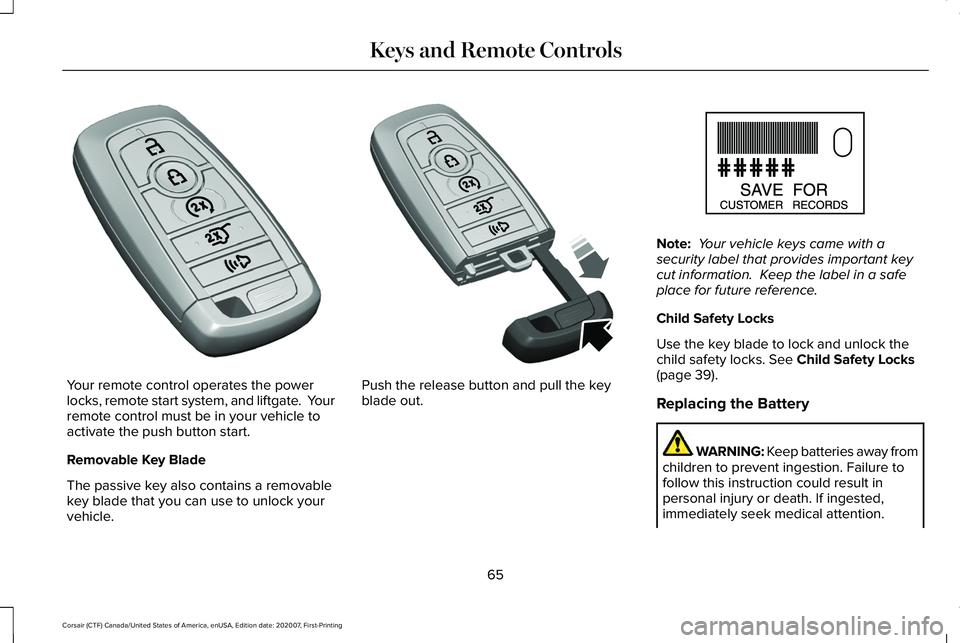
Your remote control operates the power
locks, remote start system, and liftgate. Your
remote control must be in your vehicle to
activate the push button start.
Removable Key Blade
The passive key also contains a removable
key blade that you can use to unlock your
vehicle. Push the release button and pull the key
blade out. Note:
Your vehicle keys came with a
security label that provides important key
cut information. Keep the label in a safe
place for future reference.
Child Safety Locks
Use the key blade to lock and unlock the
child safety locks. See Child Safety Locks
(page 39).
Replacing the Battery WARNING: Keep batteries away from
children to prevent ingestion. Failure to
follow this instruction could result in
personal injury or death. If ingested,
immediately seek medical attention.
65
Corsair (CTF) Canada/United States of America, enUSA, Edition date: 202007, First-Printing Keys and Remote ControlsE305198 E305199 E151795
Page 69 of 638
WARNING: If the battery
compartment does not securely close, stop
using the remote control and replace it as
soon as possible. In the meantime, keep
the remote control away from children.
Failure to follow this instruction could result
in personal injury or death.
Note: Refer to local regulations before you
dispose of the remote control batteries.
Note: Do not wipe off any grease on the
battery terminals or on the back surface of
the circuit board.
Note: Replacing the remote control battery
does not erase the programmed key from
your vehicle. The remote control operates
as normal.
A message appears in the information
display when the remote control battery is
low.
See Information Messages (page 137).
The remote control uses one coin-type
three-volt lithium battery, CR2450, or
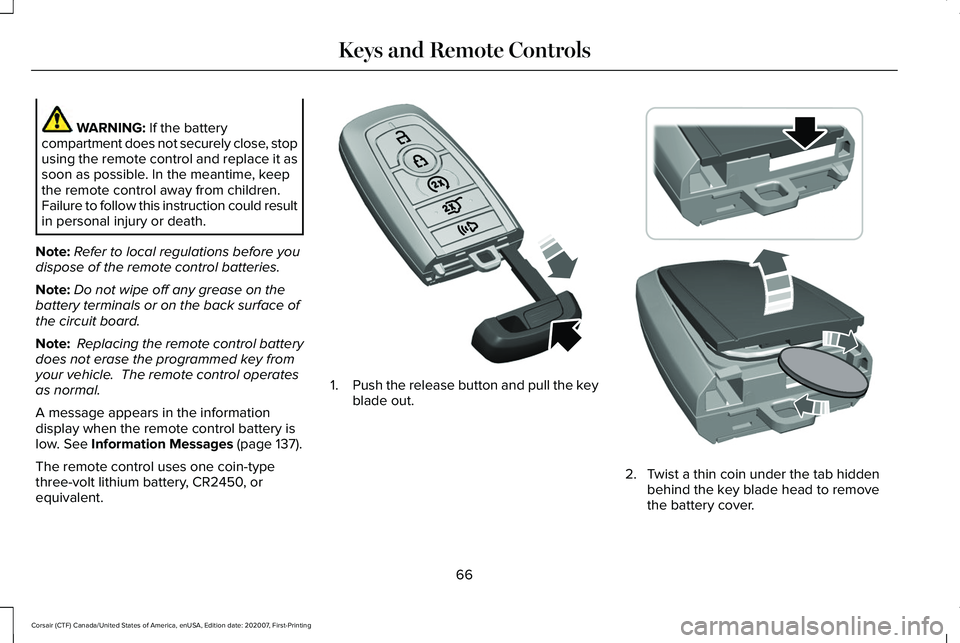
equivalent. 1.
Push the release button and pull the key
blade out. 2. Twist a thin coin under the tab hidden
behind the key blade head to remove
the battery cover.
66
Corsair (CTF) Canada/United States of America, enUSA, Edition date: 202007, First-Printing Keys and Remote ControlsE305199 E303824
Page 70 of 638
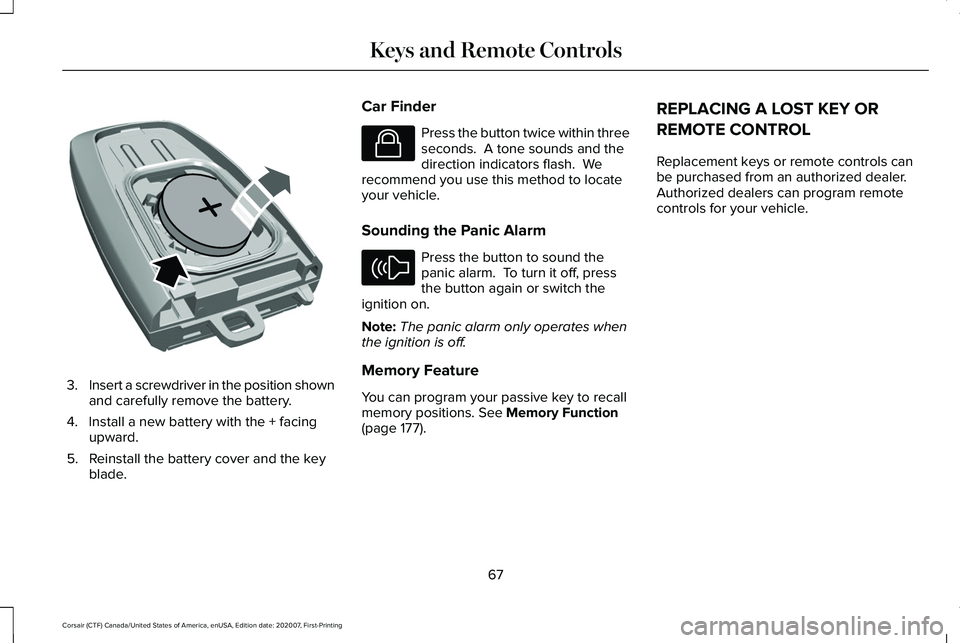
3.
Insert a screwdriver in the position shown
and carefully remove the battery.
4. Install a new battery with the + facing upward.
5. Reinstall the battery cover and the key blade. Car Finder Press the button twice within three
seconds. A tone sounds and the
direction indicators flash. We
recommend you use this method to locate
your vehicle.
Sounding the Panic Alarm Press the button to sound the
panic alarm. To turn it off, press
the button again or switch the
ignition on.
Note: The panic alarm only operates when
the ignition is off.
Memory Feature
You can program your passive key to recall
memory positions. See Memory Function
(page 177). REPLACING A LOST KEY OR
REMOTE CONTROL
Replacement keys or remote controls can
be purchased from an authorized dealer.
Authorized dealers can program remote
controls for your vehicle.
67
Corsair (CTF) Canada/United States of America, enUSA, Edition date: 202007, First-Printing Keys and Remote ControlsE218402 E138623 E138624
Page 71 of 638
WHAT IS PHONE AS A KEY
Phone as a Key allows you to use your phone
in place of a passive key.
You can use your phone for the following
functions:
•
Remote locking and unlocking.
• Passive entry and exit.
• Passive start and drive the vehicle.
• Remote start.
• Memory function recall.
PHONE AS A KEY LIMITATIONS
Limitations can vary based on the make and
model of your phone, phone location and
physical obstructions.
The following items could impact Phone as
a Key performance or prevent functionality
in some cases:
• The typical operating range for Phone as
a Key is 131 ft (40 m). •
Your Bluetooth connection is not
enabled, is disrupted, or out of range.
• Your Phone as a Key is not active or
enabled on at least one phone.
• Your vehicle battery has depleted.
• Your phone battery has depleted.
• Interference from other devices using
radio frequencies or physical
obstructions.
• Your phone is too close to metal objects
or other electronic devices.
Note: Do not leave a duplicate coded key
in the vehicle. Always take your keys and
phone and lock all doors when leaving the
vehicle.
PROGRAMMING YOUR PHONE
To program your smartphone as Phone as a
Key:
1. Visit your device's app store to download
the Lincoln Way app. 2.
Create or sign-in to the Lincoln Way app
and add the vehicle identification number
to your account.
3. Once you add the vehicle identification number, follow the prompts in the Lincoln
Way app to complete the Sync Connect
Authorization process.
4. After the vehicle authorizes, you can setup Phone as a Key following the
prompts in the Lincoln Way app.
5. After Phone as a Key is setup, you can setup the Backup Start Passcode by
following the prompts on your
touchscreen.
Note: Keep your new Backup Start Passcode
with you in case of an emergency.
Resetting Phone as a Key
If the Phone as a Key belongs to your
account, you can delete it from your phone.
If not, reset Phone as a Key using the
following steps:
1. Press Settings on the touchscreen.
2. Press
General.
3. Press
Reset.
68
Corsair (CTF) Canada/United States of America, enUSA, Edition date: 202007, First-Printing Phone as a Key