lock LINCOLN CORSAIR 2021 Owners Manual
[x] Cancel search | Manufacturer: LINCOLN, Model Year: 2021, Model line: CORSAIR, Model: LINCOLN CORSAIR 2021Pages: 638, PDF Size: 5.7 MB
Page 4 of 638
Introduction
About This Manual
..........................................11
Symbols Glossary ............................................
11
Data Recording ...............................................
14
Perchlorate .......................................................
18
Lincoln Automotive Financial Services ........................................................................\
..
18
Replacement Parts Recommendation ........................................................................\
..
19
Special Notices ...............................................
19
Mobile Communications Equipment ........
20
Export Unique Options ..................................
21
Environment
Protecting the Environment ........................
22
At a Glance
Instrument Panel ............................................
23
Child Safety
General Information ......................................
26
Installing Child Restraints ............................
28
Booster Seats .................................................
34Child Restraint Positioning
..........................
37
Child Safety Locks .........................................
39
Seatbelts
Principle of Operation ...................................
41
Fastening the Seatbelts ...............................
42
Seatbelt Height Adjustment .......................
45
Seatbelt Warning Lamp and Indicator Chime ...........................................................
45
Seatbelt Reminder .........................................
46
Child Restraint and Seatbelt Maintenance ........................................................................\
.
48
Seatbelt Extensions ......................................
48
Personal Safety System ™
Personal Safety System ™.............................
50
Supplementary Restraints System
Principle of Operation ...................................
51
Driver and Passenger Airbags ...................
52
Front Passenger Sensing System .............
54
Side Airbags ...................................................
56Driver and Passenger Knee Airbags
........
57
Safety Canopy™ ..............................................
58
Crash Sensors and Airbag Indicator ........
59
Airbag Disposal ..............................................
60
Pedestrian Protection
Pedestrian Alert System ...............................
61
911 Assist
What Is 911 Assist ...........................................
62
Emergency Call Requirements ..................
62
Emergency Call Limitations ........................
63
Keys and Remote Controls
General Information on Radio Frequencies ........................................................................\
.
64
Remote Control ..............................................
64
Replacing a Lost Key or Remote Control ........................................................................\
.
67
Phone as a Key
What Is Phone As a Key ...............................
68
Phone as a Key Limitations .........................
68
1
Corsair (CTF) Canada/United States of America, enUSA, Edition date: 202007, First-Printing Table of Contents
Page 5 of 638
Programming Your Phone
..........................68
Using the Valet Mode ...................................
69
Using the Backup Start Passcode .............
69
Phone as a Key – Troubleshooting ...........
70
MyKey™
What Is MyKey ................................................
72
MyKey Settings ...............................................
72
Creating a MyKey ...........................................
73
Programming a MyKey .................................
73
Clearing All MyKeys ......................................
73
Checking MyKey System Status ................
74
Using MyKey With Remote Start Systems ........................................................................\
.
74
MyKey – Troubleshooting ............................
74
Doors and Locks
Locking and Unlocking .................................
76
Keyless Entry
Locating the Keyless Entry Keypad ...........
81
Keyless Entry Limitations ..............................
81
Master Access Code ......................................
81Keyless Entry Settings
...................................
81
Locking and Unlocking the Doors Using Keyless Entry ..............................................
83
Keyless Entry – Troubleshooting ...............
84
Liftgate
Liftgate Precautions ......................................
85
Opening the Liftgate .....................................
85
Setting the Liftgate Opening Height .........
87
Closing the Liftgate .......................................
88
Stopping the Liftgate Movement ...............
90
Liftgate Obstacle Detection ........................
90
Liftgate – Troubleshooting ...........................
91
Security
Passive Anti-Theft System ...........................
93
Anti-Theft Alarm System ..............................
93
Anti-Theft Alarm System Settings .............
94
Security – Troubleshooting .........................
95
Steering Wheel
Adjusting the Steering Wheel - Vehicles With: Power Adjustable Steering Column
........................................................................\
.
97 Adjusting the Steering Wheel - Vehicles
With: Manual Adjustable Steering
Column .........................................................
97
Resetting the Stopping Position - Vehicles With: Power Adjustable Steering Column
........................................................................\
98
Horn ..................................................................
98
Switching the Heated Steering Wheel On ........................................................................\
98
Wipers and Washers
Windshield Wipers ........................................
99
Autowipers ....................................................
100
Windshield Washers .....................................
101
Rear Window Wiper and Washers ............
101
Lighting
General Information ....................................
102
Lighting Control ............................................
102
Autolamps ......................................................
103
Instrument Lighting Dimmer ......................
103
Headlamp Exit Delay ...................................
104
Daytime Running Lamps - Vehicles With: Configurable Daytime Running Lamps
.......................................................................
104
2
Corsair (CTF) Canada/United States of America, enUSA, Edition date: 202007, First-Printing Table of Contents
Page 7 of 638
Power Seats
...................................................173
Memory Function ..........................................
177
Rear Seats ......................................................
180
Heated Seats ................................................
182
Ventilated Seats ...........................................
183
Rear Occupant Alert System
What is the Rear Occupant Alert System .......................................................................
185
How Does the Rear Occupant Alert System Work ............................................................
185
Rear Occupant Alert System Precautions .......................................................................
185
Rear Occupant Alert System Limitations .......................................................................
185
Switching Rear Occupant Alert System On and Off ........................................................
186
Rear Occupant Alert System Indicators .......................................................................
186
Rear Occupant Alert System Audible Warnings ....................................................
186
Garage Door Opener
What Is the Garage Door Opener ............
187How Does the Garage Door Opener Work
.......................................................................
187
Garage Door Opener Precautions ...........
187
Garage Door Opener Limitations ............
188
Programming the Garage Door Opener to Your Hand-Held Transmitter .................
188
Programming the Garage Door Opener to Your Garage Door Opener Motor ........
189
Programming the Garage Door Opener to Your Gate Opener Motor .......................
189
Clearing the Garage Door Opener .........
190
Reprogramming the Garage Door Opener .......................................................................
190
Garage Door Opener Radio Frequencies .......................................................................
190
Auxiliary Power Points
Auxiliary Power Points ................................
192
Wireless Accessory Charger .....................
192
Storage Compartments
Overhead Console ......................................
195Starting and Stopping the Engine
General Information
....................................
196
Keyless Starting ............................................
196
Starting a Gasoline Engine ........................
197
Starting a Hybrid Electric Vehicle System ......................................................................
200
Engine Block Heater ..................................
202
Unique Driving Characteristics
Auto-Start-Stop ............................................
204
Plug-In Hybrid Vehicle Operation ...........
206
Hybrid Vehicle Frequently Asked Questions ..................................................
207
Fuel and Refueling
Safety Precautions ......................................
209
Fuel Quality - Gasoline ...............................
210
Fuel Quality - Plug-In Hybrid Electric Vehicle (PHEV) ...........................................
211
Fuel Filler Funnel Location .........................
211
Running Out of Fuel ....................................
212
Refueling - Plug-In Hybrid Electric Vehicle (PHEV) .........................................................
213
4
Corsair (CTF) Canada/United States of America, enUSA, Edition date: 202007, First-Printing Table of Contents
Page 8 of 638
Refueling - Gasoline
....................................216
Fuel Consumption .......................................
219
Engine Emission Control
Emission Law .................................................
221
Catalytic Converter .....................................
222
High Voltage Battery
General Information ...................................
225
Charging the High Voltage Battery ........
225
Transmission
Automatic Transmission - Excluding: Plug-In Hybrid Electric Vehicle (PHEV)
......................................................................
232
Automatic Transmission - Plug-In Hybrid Electric Vehicle (PHEV) ..........................
237
All-Wheel Drive
Using All-Wheel Drive ................................
240
Brakes
General Information ...................................
245Hints on Driving With Anti-Lock Brakes
......................................................................
246
Electric Parking Brake ................................
246
Hill Start Assist .............................................
248
Auto Hold ......................................................
249
Reverse Braking Assist
What Is Reverse Braking Assist ................
251
Reverse Braking Assist Precautions .......
251
Switching Reverse Braking Assist On and Off ...............................................................
252
Overriding Reverse Braking Assist ........
252
Reverse Braking Assist Indicators ..........
252
Reverse Braking Assist – Troubleshooting ......................................................................
253
Traction Control
Principle of Operation ................................
255
Using Traction Control ...............................
255
Stability Control
Principle of Operation ................................
256
Using Stability Control ...............................
257Parking Aids
Principle of Operation
................................
258
Rear Parking Aid ..........................................
258
Front Parking Aid ........................................
260
Side Sensing System .................................
262
Rear View Camera
What Is the Rear View Camera ...............
265
Rear View Camera Precautions ..............
265
Locating the Rear View Camera .............
265
Rear View Camera Guide Lines ..............
265
Rear View Camera Object Distance Indicators ..................................................
266
Rear View Camera Settings .....................
266
360 Degree Camera
What Is the 360 Degree Camera ............
268
360 Degree Camera Precautions ..........
268
360 Degree Camera Limitations ............
268
360 Degree Camera Cameras ................
269
360 Degree Camera Guide Lines ..........
270
360 Degree Camera Settings ...................
271
5
Corsair (CTF) Canada/United States of America, enUSA, Edition date: 202007, First-Printing Table of Contents
Page 15 of 638
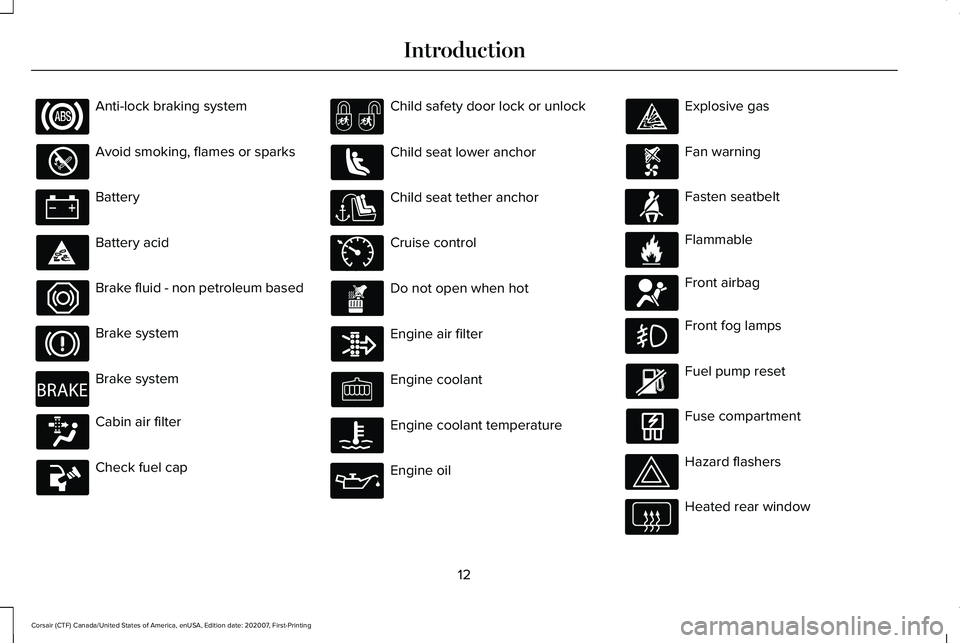
Anti-lock braking system
Avoid smoking, flames or sparks
Battery
Battery acid
Brake fluid - non petroleum based
Brake system
Brake system
Cabin air filter
Check fuel cap Child safety door lock or unlock
Child seat lower anchor
Child seat tether anchor
Cruise control
Do not open when hot
Engine air filter
Engine coolant
Engine coolant temperature
Engine oil Explosive gas
Fan warning
Fasten seatbelt
Flammable
Front airbag
Front fog lamps
Fuel pump reset
Fuse compartment
Hazard flashers
Heated rear window
12
Corsair (CTF) Canada/United States of America, enUSA, Edition date: 202007, First-Printing Introduction E270480 E71340 E71880 E231160 E67017
Page 16 of 638
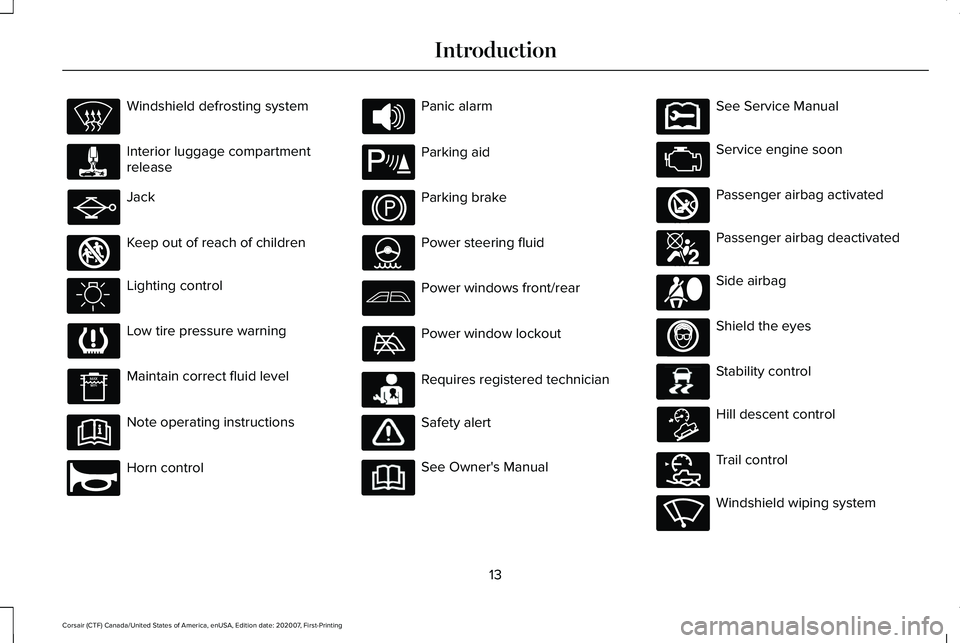
Windshield defrosting system
Interior luggage compartment
release
Jack
Keep out of reach of children
Lighting control
Low tire pressure warning
Maintain correct fluid level
Note operating instructions
Horn control Panic alarm
Parking aid
Parking brake
Power steering fluid
Power windows front/rear
Power window lockout
Requires registered technician
Safety alert
See Owner's Manual See Service Manual
Service engine soon
Passenger airbag activated
Passenger airbag deactivated
Side airbag
Shield the eyes
Stability control
Hill descent control
Trail control
Windshield wiping system
13
Corsair (CTF) Canada/United States of America, enUSA, Edition date: 202007, First-Printing Introduction E161353 E270945 E139213 E231159 E231158 E270849 E270850 E167012 E138639 E163957 E272858 E270969
Page 32 of 638
WARNING: Depending on where you
secure a child restraint, and depending on
the child restraint design, you may block
access to certain seatbelt buckle
assemblies and LATCH lower anchors,
rendering those features potentially
unusable. To avoid risk of injury, make sure
occupants only use seating positions
where they are able to be properly
restrained.
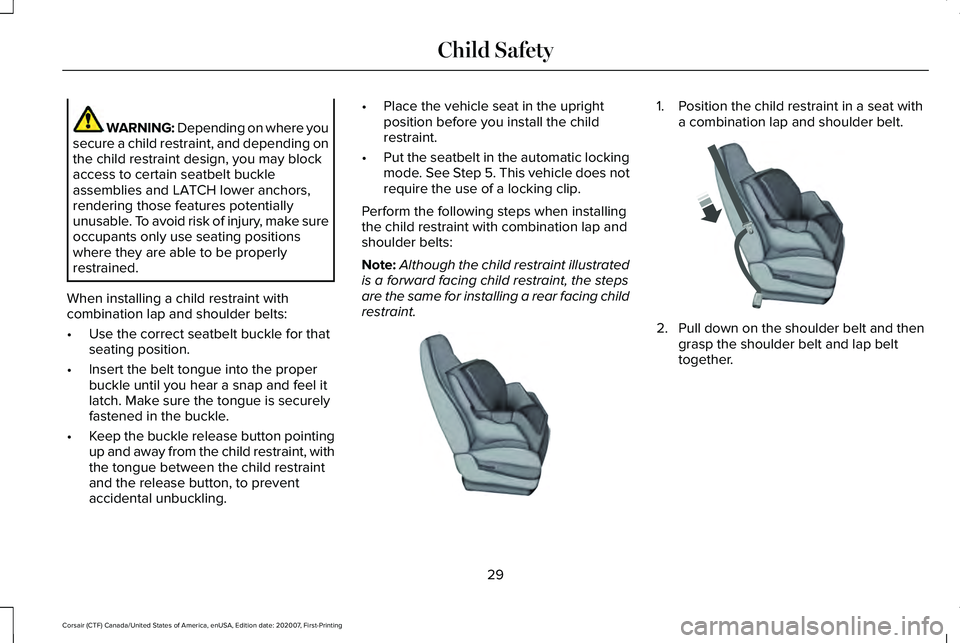
When installing a child restraint with
combination lap and shoulder belts:
• Use the correct seatbelt buckle for that
seating position.
• Insert the belt tongue into the proper
buckle until you hear a snap and feel it
latch. Make sure the tongue is securely
fastened in the buckle.
• Keep the buckle release button pointing
up and away from the child restraint, with
the tongue between the child restraint
and the release button, to prevent
accidental unbuckling. •
Place the vehicle seat in the upright
position before you install the child
restraint.
• Put the seatbelt in the automatic locking
mode. See Step 5. This vehicle does not
require the use of a locking clip.
Perform the following steps when installing
the child restraint with combination lap and
shoulder belts:
Note: Although the child restraint illustrated
is a forward facing child restraint, the steps
are the same for installing a rear facing child
restraint. 1. Position the child restraint in a seat with
a combination lap and shoulder belt. 2.
Pull down on the shoulder belt and then
grasp the shoulder belt and lap belt
together.
29
Corsair (CTF) Canada/United States of America, enUSA, Edition date: 202007, First-Printing Child SafetyE142528 E142529
Page 33 of 638
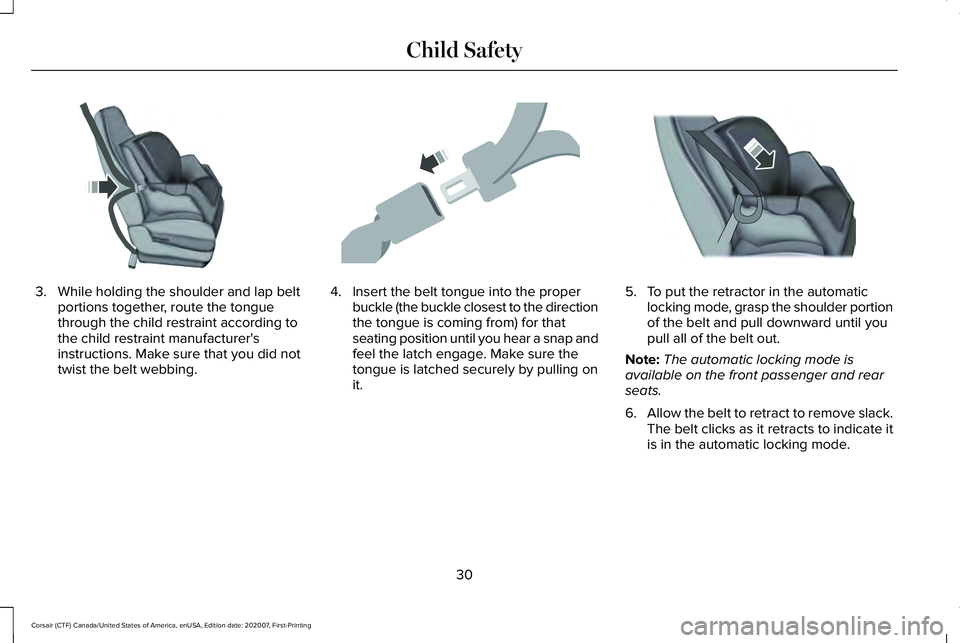
3. While holding the shoulder and lap belt
portions together, route the tongue
through the child restraint according to
the child restraint manufacturer's
instructions. Make sure that you did not
twist the belt webbing. 4. Insert the belt tongue into the proper
buckle (the buckle closest to the direction
the tongue is coming from) for that
seating position until you hear a snap and
feel the latch engage. Make sure the
tongue is latched securely by pulling on
it. 5. To put the retractor in the automatic
locking mode, grasp the shoulder portion
of the belt and pull downward until you
pull all of the belt out.
Note: The automatic locking mode is
available on the front passenger and rear
seats.
6. Allow the belt to retract to remove slack.
The belt clicks as it retracts to indicate it
is in the automatic locking mode.
30
Corsair (CTF) Canada/United States of America, enUSA, Edition date: 202007, First-Printing Child SafetyE142530 E142531 E142875
Page 34 of 638
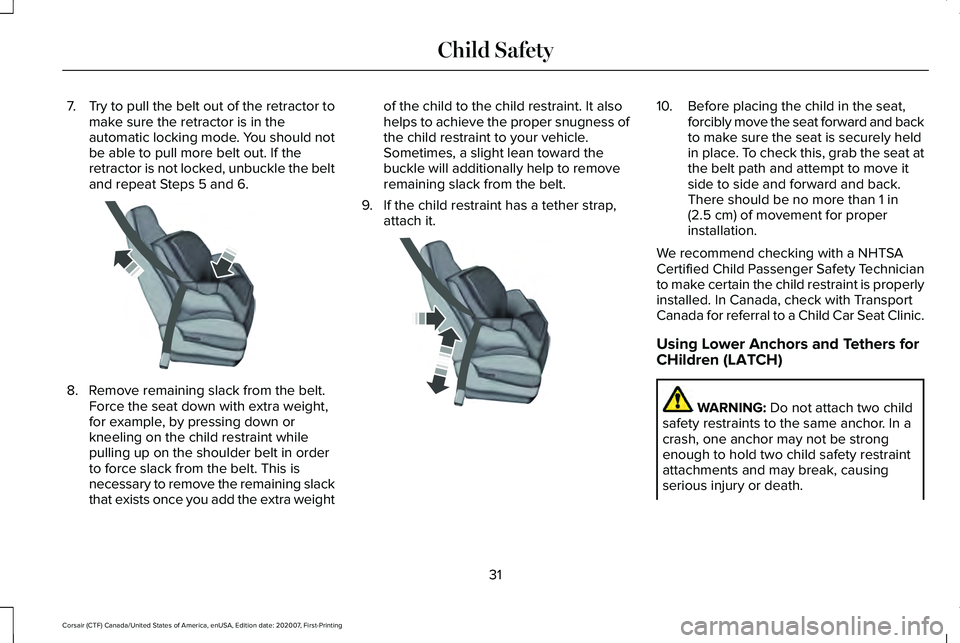
7.
Try to pull the belt out of the retractor to
make sure the retractor is in the
automatic locking mode. You should not
be able to pull more belt out. If the
retractor is not locked, unbuckle the belt
and repeat Steps 5 and 6. 8. Remove remaining slack from the belt.
Force the seat down with extra weight,
for example, by pressing down or
kneeling on the child restraint while
pulling up on the shoulder belt in order
to force slack from the belt. This is
necessary to remove the remaining slack
that exists once you add the extra weight of the child to the child restraint. It also
helps to achieve the proper snugness of
the child restraint to your vehicle.
Sometimes, a slight lean toward the
buckle will additionally help to remove
remaining slack from the belt.
9. If the child restraint has a tether strap, attach it. 10. Before placing the child in the seat,
forcibly move the seat forward and back
to make sure the seat is securely held
in place. To check this, grab the seat at
the belt path and attempt to move it
side to side and forward and back.
There should be no more than 1 in
(2.5 cm) of movement for proper
installation.
We recommend checking with a NHTSA
Certified Child Passenger Safety Technician
to make certain the child restraint is properly
installed. In Canada, check with Transport
Canada for referral to a Child Car Seat Clinic.
Using Lower Anchors and Tethers for
CHildren (LATCH) WARNING:
Do not attach two child
safety restraints to the same anchor. In a
crash, one anchor may not be strong
enough to hold two child safety restraint
attachments and may break, causing
serious injury or death.
31
Corsair (CTF) Canada/United States of America, enUSA, Edition date: 202007, First-Printing Child SafetyE142533 E142534
Page 35 of 638
WARNING: Depending on where you
secure a child restraint, and depending on
the child restraint design, you may block
access to certain seatbelt buckle
assemblies and LATCH lower anchors,
rendering those features potentially
unusable. To avoid risk of injury, make sure
occupants only use seating positions
where they are able to be properly
restrained.
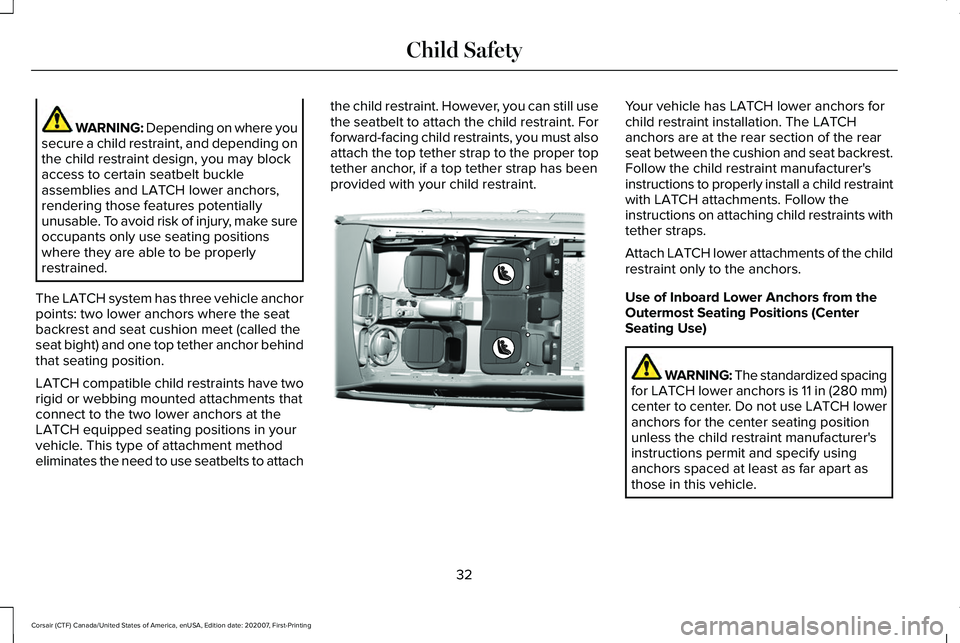
The LATCH system has three vehicle anchor
points: two lower anchors where the seat
backrest and seat cushion meet (called the
seat bight) and one top tether anchor behind
that seating position.
LATCH compatible child restraints have two
rigid or webbing mounted attachments that
connect to the two lower anchors at the
LATCH equipped seating positions in your
vehicle. This type of attachment method
eliminates the need to use seatbelts to attach the child restraint. However, you can still use
the seatbelt to attach the child restraint. For
forward-facing child restraints, you must also
attach the top tether strap to the proper top
tether anchor, if a top tether strap has been
provided with your child restraint. Your vehicle has LATCH lower anchors for
child restraint installation. The LATCH
anchors are at the rear section of the rear
seat between the cushion and seat backrest.
Follow the child restraint manufacturer's
instructions to properly install a child restraint
with LATCH attachments. Follow the
instructions on attaching child restraints with
tether straps.
Attach LATCH lower attachments of the child
restraint only to the anchors.
Use of Inboard Lower Anchors from the
Outermost Seating Positions (Center
Seating Use)
WARNING: The standardized spacing
for LATCH lower anchors is 11 in (280 mm)
center to center. Do not use LATCH lower
anchors for the center seating position
unless the child restraint manufacturer's
instructions permit and specify using
anchors spaced at least as far apart as
those in this vehicle.
32
Corsair (CTF) Canada/United States of America, enUSA, Edition date: 202007, First-Printing Child SafetyE316405