wash LINCOLN CORSAIR 2021 Owners Manual
[x] Cancel search | Manufacturer: LINCOLN, Model Year: 2021, Model line: CORSAIR, Model: LINCOLN CORSAIR 2021Pages: 638, PDF Size: 5.7 MB
Page 2 of 638

The information contained in this publication was correct at the time of\
going to print. In the interest of continuous development, we reserve \
the right to change specifications,
design or equipment at any time without notice or obligation. No part o\
f this publication may be reproduced, transmitted, stored in a retrieval\
system or translated into any language
in any form by any means without our written permission. Errors and omi\
ssions excepted.
© Ford Motor Company 2020
All rights reserved.
Part Number: 202007 20200721200216
California Proposition 65
WARNING: Operating, servicing and maintaining a passenger vehicle or off-highway \
motor
vehicle can expose you to chemicals including engine exhaust, carbon mon\
oxide, phthalates,
and lead, which are known to the State of California to cause cancer and birth defects or other
reproductive harm. To minimize exposure, avoid breathing exhaust, do not idle the engine except
as necessary, service your vehicle in a well-ventilated area and wear gloves or wash\
your hands
frequently when servicing your vehicle. For more information go to
www.P65Warnings.ca.gov/passenger-vehicle. WARNING:
Battery posts, terminals and related accessories contain lead and lead
compounds, chemicals known to the State of California to cause cancer and reproductive harm.
Wash your hands after handling
.
Page 5 of 638
Programming Your Phone
..........................68
Using the Valet Mode ...................................
69
Using the Backup Start Passcode .............
69
Phone as a Key – Troubleshooting ...........
70
MyKey™
What Is MyKey ................................................
72
MyKey Settings ...............................................
72
Creating a MyKey ...........................................
73
Programming a MyKey .................................
73
Clearing All MyKeys ......................................
73
Checking MyKey System Status ................
74
Using MyKey With Remote Start Systems ........................................................................\
.
74
MyKey – Troubleshooting ............................
74
Doors and Locks
Locking and Unlocking .................................
76
Keyless Entry
Locating the Keyless Entry Keypad ...........
81
Keyless Entry Limitations ..............................
81
Master Access Code ......................................
81Keyless Entry Settings
...................................
81
Locking and Unlocking the Doors Using Keyless Entry ..............................................
83
Keyless Entry – Troubleshooting ...............
84
Liftgate
Liftgate Precautions ......................................
85
Opening the Liftgate .....................................
85
Setting the Liftgate Opening Height .........
87
Closing the Liftgate .......................................
88
Stopping the Liftgate Movement ...............
90
Liftgate Obstacle Detection ........................
90
Liftgate – Troubleshooting ...........................
91
Security
Passive Anti-Theft System ...........................
93
Anti-Theft Alarm System ..............................
93
Anti-Theft Alarm System Settings .............
94
Security – Troubleshooting .........................
95
Steering Wheel
Adjusting the Steering Wheel - Vehicles With: Power Adjustable Steering Column
........................................................................\
.
97 Adjusting the Steering Wheel - Vehicles
With: Manual Adjustable Steering
Column .........................................................
97
Resetting the Stopping Position - Vehicles With: Power Adjustable Steering Column
........................................................................\
98
Horn ..................................................................
98
Switching the Heated Steering Wheel On ........................................................................\
98
Wipers and Washers
Windshield Wipers ........................................
99
Autowipers ....................................................
100
Windshield Washers .....................................
101
Rear Window Wiper and Washers ............
101
Lighting
General Information ....................................
102
Lighting Control ............................................
102
Autolamps ......................................................
103
Instrument Lighting Dimmer ......................
103
Headlamp Exit Delay ...................................
104
Daytime Running Lamps - Vehicles With: Configurable Daytime Running Lamps
.......................................................................
104
2
Corsair (CTF) Canada/United States of America, enUSA, Edition date: 202007, First-Printing Table of Contents
Page 11 of 638
Under Hood Overview - 2.0L/2.3L
..........367
Under Hood Overview - 2.5L, Plug-In Hybrid Electric Vehicle (PHEV) ............
369
Engine Oil Dipstick ......................................
370
Engine Oil Check .........................................
370
Oil Change Indicator Reset ........................
371
Changing the Engine Air Filter - 2.0L/2.3L ......................................................................
372
Changing the Engine Air Filter - 2.5L, Plug-In Hybrid Electric Vehicle (PHEV)
......................................................................
373
Engine Coolant Check ...............................
374
Automatic Transmission Fluid Check ......
379
Brake Fluid Check .......................................
379
Power Steering Fluid Check ....................
380
Changing the 12V Battery .........................
380
Adjusting the Headlamps .........................
382
Washer Fluid Check ...................................
384
Fuel Filter .......................................................
384
Checking the Wiper Blades ......................
384
Changing the Wiper Blades .....................
384
Removing a Headlamp ..............................
385
Changing a Bulb ..........................................
385Vehicle Care
General Information
....................................
386
Cleaning Products ......................................
386
Cleaning the Exterior ..................................
387
Waxing ...........................................................
388
Cleaning the Engine ...................................
389
Cleaning the Windows and Wiper Blades ......................................................................
389
Cleaning the Interior ..................................
390
Cleaning the Instrument Panel and Instrument Cluster Lens ........................
390
Cleaning Leather Seats ..............................
391
Repairing Minor Paint Damage ................
392
Cleaning the Wheels ..................................
392
Vehicle Storage ...........................................
392
Body Styling Kits ..........................................
394
Wheels and Tires
General Information ...................................
395
Tire Sealant and Inflator Kit ......................
397
Tire Care ........................................................
404
Using Snow Chains ......................................
418
Tire Pressure Monitoring System .............
419 Changing a Road Wheel
...........................
423
Technical Specifications .............................
431
Capacities and Specifications
Engine Specifications - 2.0L .....................
433
Engine Specifications - 2.3L .....................
434
Engine Specifications - 2.5L, Plug-In Hybrid Electric Vehicle (PHEV) ..........................
435
Motorcraft Parts - 2.0L ...............................
436
Motorcraft Parts - 2.3L ................................
437
Motorcraft Parts - 2.5L, Plug-In Hybrid Electric Vehicle (PHEV) ..........................
438
Capacities and Specifications - 2.0L ......
439
Capacities and Specifications - 2.3L ......
446
Capacities and Specifications - 2.5L, Plug-In Hybrid Electric Vehicle (PHEV)
......................................................................
454
Bulb Specification Chart ............................
460
Vehicle Identification
Vehicle Identification Number ..................
461
8
Corsair (CTF) Canada/United States of America, enUSA, Edition date: 202007, First-Printing Table of Contents
Page 17 of 638
Windshield wash and wipe
DATA RECORDING WARNING: Do not connect wireless
plug-in devices to the data link connector.
Unauthorized third parties could gain
access to vehicle data and impair the
performance of safety related systems.
Only allow repair facilities that follow our
service and repair instructions to connect
their equipment to the data link connector.
We respect your privacy and are committed
to protecting it. The information contained
in this publication was correct at the time of
going to print but as technology rapidly
changes, we recommend that you visit the
regional Lincoln website for the latest
information. Your vehicle has electronic control units that
have data recording functionality and the
ability to permanently or temporarily store
data. This data could include information on
the condition and status of your vehicle,
vehicle maintenance requirements, events
and malfunctions. The types of data that can
be recorded are described in this section.
Some of the data recorded is stored in event
logs or error logs.
Note:
Error logs are reset following a service
or repair.
Note: We may provide information in
response to requests from law enforcement,
other government authorities and third
parties acting with lawful authority or through
a legal process. Such information could be
used by them in legal proceedings.
Data recorded includes, for example:
• Operating states of system components,
for example, fuel level, tire pressure and
battery charge level.
• Vehicle and component status, for
example, wheel speed, deceleration,
lateral acceleration and seatbelt status. •
Events or errors in essential systems, for
example, headlamps and brakes.
• System responses to driving situations,
for example, airbag deployment and
stability control.
• Environmental conditions, for example,
temperature.
Some of this data, when used in combination
with other information, for example, an
accident report, damage to a vehicle or
eyewitness statements, could be associated
with a specific person.
Service Data
Service data recorders in your vehicle are
capable of collecting and storing diagnostic
information about your vehicle. This
potentially includes information about the
performance or status of various systems
and modules in the vehicle, such as engine,
throttle, steering or brake systems. In order
to properly diagnose and service your
vehicle, Lincoln Motor Company (Lincoln of
Canada, in Canada), and service and repair
facilities may access or share among them
vehicle diagnostic information received
14
Corsair (CTF) Canada/United States of America, enUSA, Edition date: 202007, First-Printing Introduction
Page 90 of 638
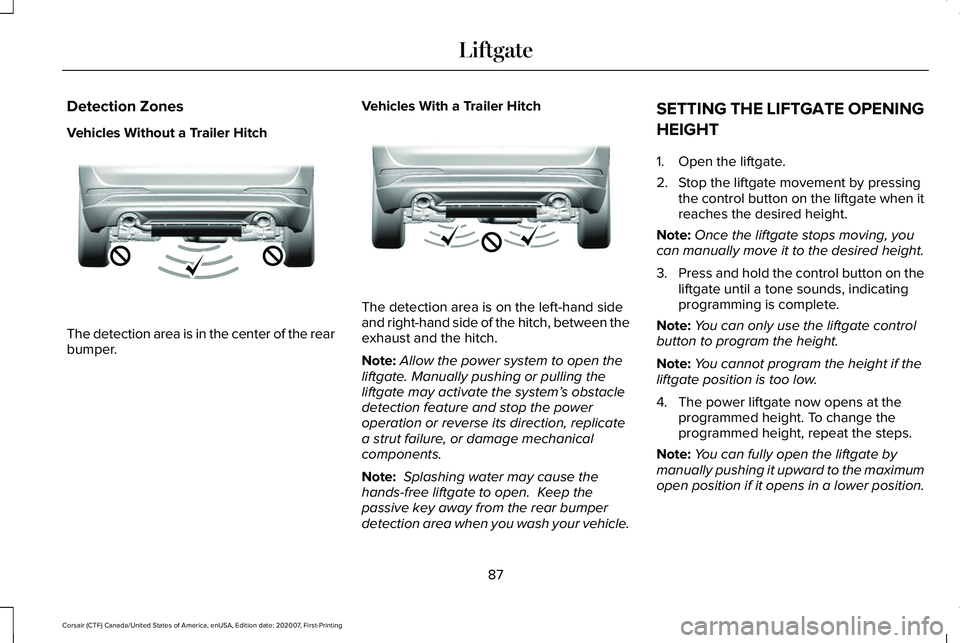
Detection Zones
Vehicles Without a Trailer Hitch
The detection area is in the center of the rear
bumper.
Vehicles With a Trailer Hitch The detection area is on the left-hand side
and right-hand side of the hitch, between the
exhaust and the hitch.
Note:
Allow the power system to open the
liftgate. Manually pushing or pulling the
liftgate may activate the system’ s obstacle
detection feature and stop the power
operation or reverse its direction, replicate
a strut failure, or damage mechanical
components.
Note: Splashing water may cause the
hands-free liftgate to open. Keep the
passive key away from the rear bumper
detection area when you wash your vehicle. SETTING THE LIFTGATE OPENING
HEIGHT
1. Open the liftgate.
2. Stop the liftgate movement by pressing
the control button on the liftgate when it
reaches the desired height.
Note: Once the liftgate stops moving, you
can manually move it to the desired height.
3. Press and hold the control button on the
liftgate until a tone sounds, indicating
programming is complete.
Note: You can only use the liftgate control
button to program the height.
Note: You cannot program the height if the
liftgate position is too low.
4. The power liftgate now opens at the programmed height. To change the
programmed height, repeat the steps.
Note: You can fully open the liftgate by
manually pushing it upward to the maximum
open position if it opens in a lower position.
87
Corsair (CTF) Canada/United States of America, enUSA, Edition date: 202007, First-Printing LiftgateE310717 E310718
Page 93 of 638
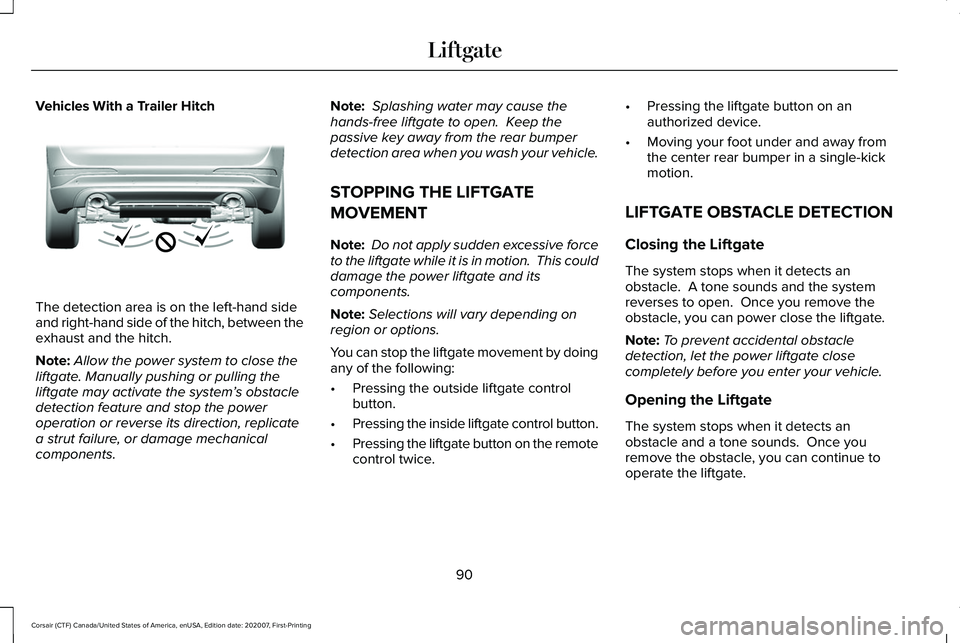
Vehicles With a Trailer Hitch
The detection area is on the left-hand side
and right-hand side of the hitch, between the
exhaust and the hitch.
Note:
Allow the power system to close the
liftgate. Manually pushing or pulling the
liftgate may activate the system’ s obstacle
detection feature and stop the power
operation or reverse its direction, replicate
a strut failure, or damage mechanical
components. Note:
Splashing water may cause the
hands-free liftgate to open. Keep the
passive key away from the rear bumper
detection area when you wash your vehicle.
STOPPING THE LIFTGATE
MOVEMENT
Note: Do not apply sudden excessive force
to the liftgate while it is in motion. This could
damage the power liftgate and its
components.
Note: Selections will vary depending on
region or options.
You can stop the liftgate movement by doing
any of the following:
• Pressing the outside liftgate control
button.
• Pressing the inside liftgate control button.
• Pressing the liftgate button on the remote
control twice. •
Pressing the liftgate button on an
authorized device.
• Moving your foot under and away from
the center rear bumper in a single-kick
motion.
LIFTGATE OBSTACLE DETECTION
Closing the Liftgate
The system stops when it detects an
obstacle. A tone sounds and the system
reverses to open. Once you remove the
obstacle, you can power close the liftgate.
Note: To prevent accidental obstacle
detection, let the power liftgate close
completely before you enter your vehicle.
Opening the Liftgate
The system stops when it detects an
obstacle and a tone sounds. Once you
remove the obstacle, you can continue to
operate the liftgate.
90
Corsair (CTF) Canada/United States of America, enUSA, Edition date: 202007, First-Printing LiftgateE310718
Page 102 of 638
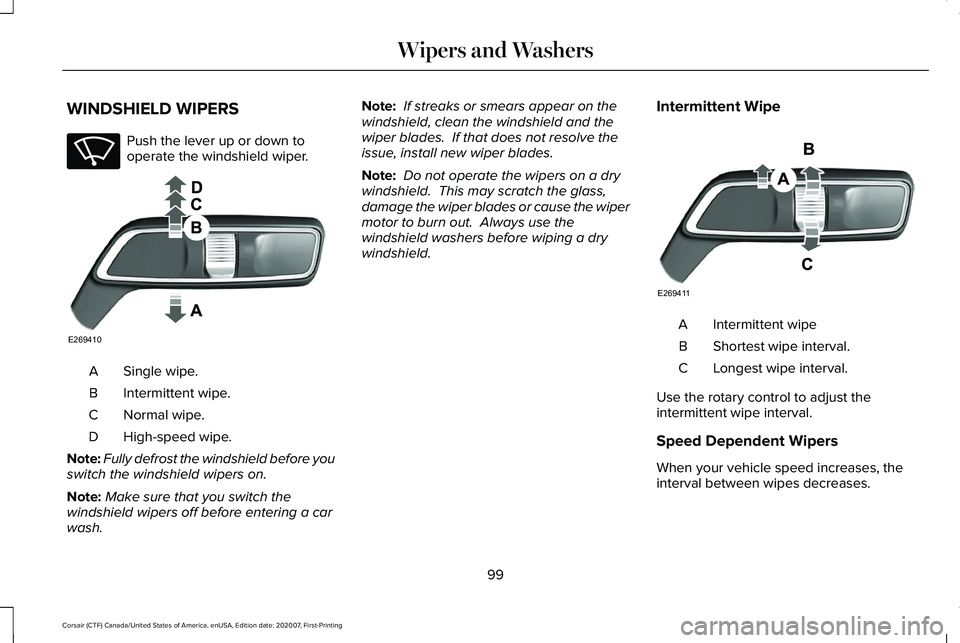
WINDSHIELD WIPERS
Push the lever up or down to
operate the windshield wiper.
Single wipe.
A
Intermittent wipe.
B
Normal wipe.
C
High-speed wipe.
D
Note: Fully defrost the windshield before you
switch the windshield wipers on.
Note: Make sure that you switch the
windshield wipers off before entering a car
wash. Note:
If streaks or smears appear on the
windshield, clean the windshield and the
wiper blades. If that does not resolve the
issue, install new wiper blades.
Note: Do not operate the wipers on a dry
windshield. This may scratch the glass,
damage the wiper blades or cause the wiper
motor to burn out. Always use the
windshield washers before wiping a dry
windshield. Intermittent Wipe Intermittent wipe
A
Shortest wipe interval.
B
Longest wipe interval.
C
Use the rotary control to adjust the
intermittent wipe interval.
Speed Dependent Wipers
When your vehicle speed increases, the
interval between wipes decreases.
99
Corsair (CTF) Canada/United States of America, enUSA, Edition date: 202007, First-Printing Wipers and WashersE270969 E269410 E269411
Page 103 of 638
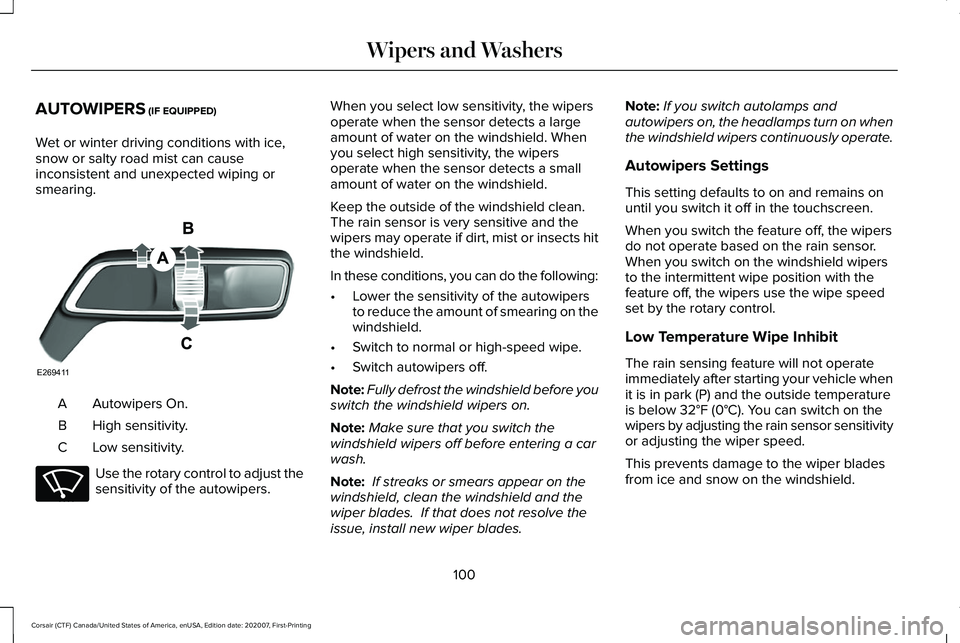
AUTOWIPERS (IF EQUIPPED)
Wet or winter driving conditions with ice,
snow or salty road mist can cause
inconsistent and unexpected wiping or
smearing. Autowipers On.
A
High sensitivity.
B
Low sensitivity.
C Use the rotary control to adjust the
sensitivity of the autowipers. When you select low sensitivity, the wipers
operate when the sensor detects a large
amount of water on the windshield. When
you select high sensitivity, the wipers
operate when the sensor detects a small
amount of water on the windshield.
Keep the outside of the windshield clean.
The rain sensor is very sensitive and the
wipers may operate if dirt, mist or insects hit
the windshield.
In these conditions, you can do the following:
•
Lower the sensitivity of the autowipers
to reduce the amount of smearing on the
windshield.
• Switch to normal or high-speed wipe.
• Switch autowipers off.
Note: Fully defrost the windshield before you
switch the windshield wipers on.
Note: Make sure that you switch the
windshield wipers off before entering a car
wash.
Note: If streaks or smears appear on the
windshield, clean the windshield and the
wiper blades. If that does not resolve the
issue, install new wiper blades. Note:
If you switch autolamps and
autowipers on, the headlamps turn on when
the windshield wipers continuously operate.
Autowipers Settings
This setting defaults to on and remains on
until you switch it off in the touchscreen.
When you switch the feature off, the wipers
do not operate based on the rain sensor.
When you switch on the windshield wipers
to the intermittent wipe position with the
feature off, the wipers use the wipe speed
set by the rotary control.
Low Temperature Wipe Inhibit
The rain sensing feature will not operate
immediately after starting your vehicle when
it is in park (P) and the outside temperature
is below
32°F (0°C). You can switch on the
wipers by adjusting the rain sensor sensitivity
or adjusting the wiper speed.
This prevents damage to the wiper blades
from ice and snow on the windshield.
100
Corsair (CTF) Canada/United States of America, enUSA, Edition date: 202007, First-Printing Wipers and WashersE269411 E270969
Page 104 of 638
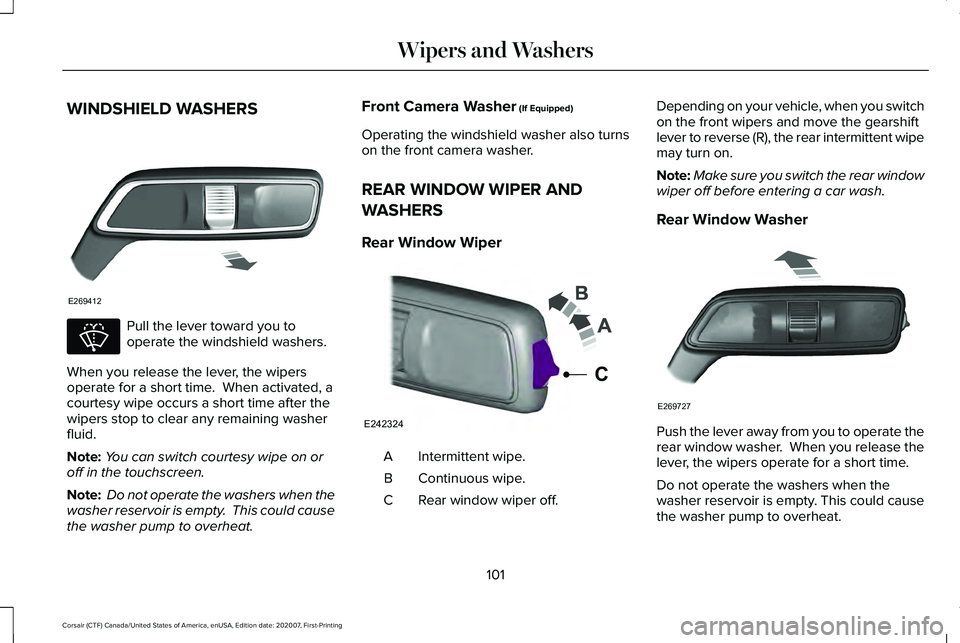
WINDSHIELD WASHERS
Pull the lever toward you to
operate the windshield washers.
When you release the lever, the wipers
operate for a short time. When activated, a
courtesy wipe occurs a short time after the
wipers stop to clear any remaining washer
fluid.
Note: You can switch courtesy wipe on or
off in the touchscreen.
Note: Do not operate the washers when the
washer reservoir is empty. This could cause
the washer pump to overheat. Front Camera Washer (If Equipped)
Operating the windshield washer also turns
on the front camera washer.
REAR WINDOW WIPER AND
WASHERS
Rear Window Wiper Intermittent wipe.
A
Continuous wipe.
B
Rear window wiper off.
C Depending on your vehicle, when you switch
on the front wipers and move the gearshift
lever to reverse (R), the rear intermittent wipe
may turn on.
Note:
Make sure you switch the rear window
wiper off before entering a car wash.
Rear Window Washer Push the lever away from you to operate the
rear window washer. When you release the
lever, the wipers operate for a short time.
Do not operate the washers when the
washer reservoir is empty. This could cause
the washer pump to overheat.
101
Corsair (CTF) Canada/United States of America, enUSA, Edition date: 202007, First-Printing Wipers and WashersE269412 E270967 E242324
C E269727
Page 106 of 638
Push the lever away from you to
switch the high beam on.
Push the lever forward again or pull the lever
toward you to switch the high beams off.
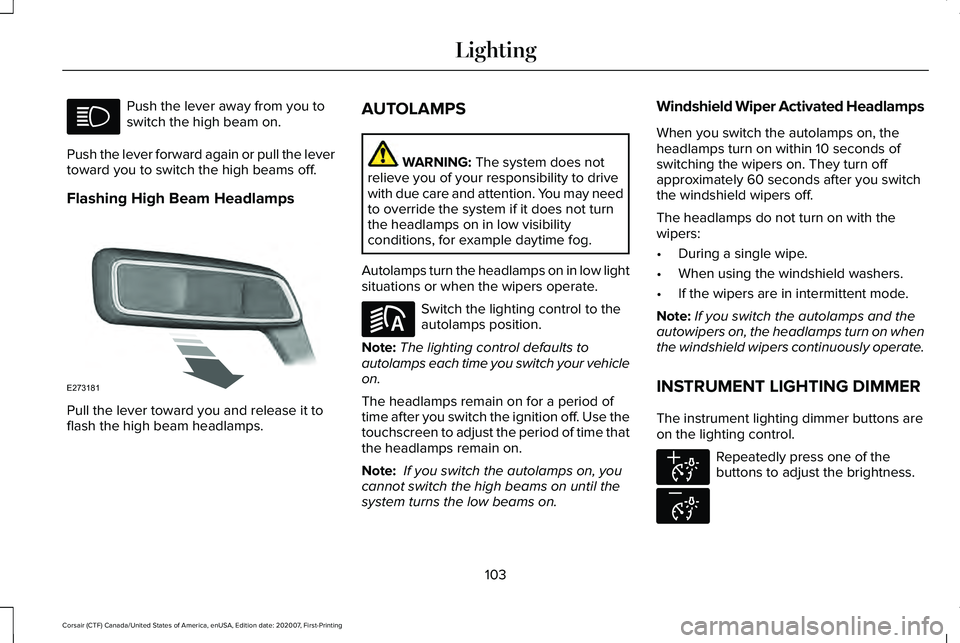
Flashing High Beam Headlamps Pull the lever toward you and release it to
flash the high beam headlamps. AUTOLAMPS WARNING: The system does not
relieve you of your responsibility to drive
with due care and attention. You may need
to override the system if it does not turn
the headlamps on in low visibility
conditions, for example daytime fog.
Autolamps turn the headlamps on in low light
situations or when the wipers operate. Switch the lighting control to the
autolamps position.
Note: The lighting control defaults to
autolamps each time you switch your vehicle
on.
The headlamps remain on for a period of
time after you switch the ignition off. Use the
touchscreen to adjust the period of time that
the headlamps remain on.
Note: If you switch the autolamps on, you
cannot switch the high beams on until the
system turns the low beams on. Windshield Wiper Activated Headlamps
When you switch the autolamps on, the
headlamps turn on within 10 seconds of
switching the wipers on. They turn off
approximately 60 seconds after you switch
the windshield wipers off.
The headlamps do not turn on with the
wipers:
•
During a single wipe.
• When using the windshield washers.
• If the wipers are in intermittent mode.
Note: If you switch the autolamps and the
autowipers on, the headlamps turn on when
the windshield wipers continuously operate.
INSTRUMENT LIGHTING DIMMER
The instrument lighting dimmer buttons are
on the lighting control. Repeatedly press one of the
buttons to adjust the brightness.
103
Corsair (CTF) Canada/United States of America, enUSA, Edition date: 202007, First-Printing Lighting E273181 E281240 E291299 E296433