automatic transmission LINCOLN CORSAIR 2022 User Guide
[x] Cancel search | Manufacturer: LINCOLN, Model Year: 2022, Model line: CORSAIR, Model: LINCOLN CORSAIR 2022Pages: 676, PDF Size: 7.67 MB
Page 260 of 676
How Does Automatic Return to Park (P)
Work
Your vehicle shifts into park (P) when your
vehicle is stationary and any of the following
occur:
•
You switch the vehicle off.
• You open the driver door with your
seatbelt unlatched.
• You unlatch the driver seatbelt when the
driver door is open.
Note: Do not use automatic return to park
(P) when your vehicle is moving, except in
an emergency.
Automatic Return to Park (P) Limitations
Automatic return to park (P) may not work if
the door ajar switch is malfunctioning.
See an authorized dealer if any of the
following occur: •
Door ajar indicator does not illuminate
with the driver door open.
• Door ajar indicator illuminates with the
driver door closed.
• Transmission not in park message
appears with the driver door closed, after
you shift out of park (P).
Reverse (R)
With the selector in reverse (R), your vehicle
moves backward. Always come to a
complete stop before shifting into and out
of reverse (R).
Neutral (N) WARNING: In neutral (N) your vehicle
is free to roll.
In neutral (N), power does not transmit to the
driven wheels, but the transmission does not
lock. You can start the engine with the
transmission in this position. Temporary Neutral Mode
What is Temporary Neutral Mode
This mode keeps your vehicle in neutral (N)
when you switch your vehicle off. Use this
mode at an automatic car wash if you exit
your vehicle, or switch your vehicle off.
Note:
Do not tow your vehicle in this mode.
Note: Automatic return to park (P) delays
when your vehicle is in this mode.
Temporary Neutral Mode Limitations
Your vehicle could shift to park (P) after 30
minutes, or when the vehicle battery charge
level is low. Prolonged use of this mode can
cause the vehicle battery to run out of
charge.
Do not tow your vehicle in this mode. Failure
to follow these instructions could result in
vehicle damage not covered by the vehicle
warranty.
Entering Temporary Neutral Mode
1. Power your vehicle on.
2. Bring your vehicle to a complete stop.
257
2022 Corsair (CTF) Canada/United States of America, enUSA, Edition date: 202106, First-Printing Transmission
Page 264 of 676
Automatic Transmission Adaptive
Learning
This feature may increase durability and
provide consistent shift feel over the life of
your vehicle. A new vehicle or transmission
may have firm shifts, soft shifts or both. This
is normal and does not affect the operation
or durability of the transmission. Over time,
the adaptive learning process fully updates
transmission operation.
If Your Vehicle Gets Stuck in Mud or
Snow
If your vehicle gets stuck in mud or snow,
you can rock it out by shifting between
forward and reverse gears, stopping
between shifts in a steady pattern. Press
lightly on the accelerator in each gear.
Note:
Do not rock your vehicle if the engine
is not at normal operating temperature or
damage to the transmission could occur.
Note: Do not rock your vehicle for more than
a minute or damage to the transmission and
tires could occur, or the engine may
overheat. Note:
If your vehicle has SelectShift™, you
can pull away in second (2) gear.
1. Shift into drive (D).
2. Pull the (+) paddle until 2 shows on the instrument cluster.
AUTOMATIC TRANSMISSION -
PLUG-IN HYBRID ELECTRIC
VEHICLE (PHEV) WARNING: Apply the parking brake,
shift into park (P), switch the ignition off
and remove the key before you leave your
vehicle. Failure to follow this instruction
could result in personal injury or death. WARNING: When your vehicle is
stationary, keep the brake pedal fully
pressed when shifting gears. Failure to
follow this instruction could result in
personal injury, death or property damage. WARNING:
Do not apply the brake
pedal and accelerator pedal
simultaneously. Applying both pedals
simultaneously for more than a few
seconds will limit engine performance,
which may result in difficulty maintaining
speed in traffic and could lead to serious
injury.
Note: You may not be able to shift out of
park (P) unless the intelligent access key is
inside your vehicle.
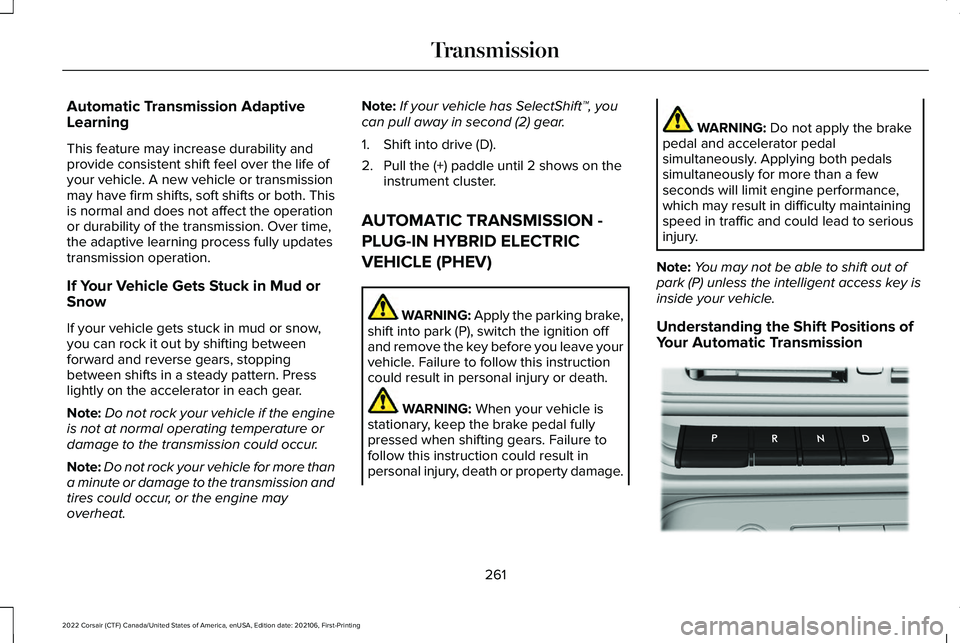
Understanding the Shift Positions of
Your Automatic Transmission 261
2022 Corsair (CTF) Canada/United States of America, enUSA, Edition date: 202106, First-Printing TransmissionE247220
Page 265 of 676
To place your vehicle in gear from park
(P):
1. Fully press and hold the brake pedal
when shifting out of park (P).
2. Press the desired gear on the transmission selector.
3. When you finish driving, come to a complete stop.
4. Press the park (P) button on the transmission selector.
The instrument cluster displays the current
gear.
Park (P)
With the transmission in park (P), your vehicle
locks the transmission and prevents the
wheels from turning. Always come to a
complete stop before putting your vehicle
into and out of park (P). An audible tone
sounds once you select park (P). The electric parking brake may apply when
you shift to park (P) without fully pressing the
brake pedal. The electric parking brake
applies when you shift to park (P) on large
slopes. The electric parking brake releases
with the drive away release operation. See
Electric Parking Brake (page 271).
Automatic Return to Park
What is Automatic Return to Park (P)
Your vehicle shifts into park (P) if you attempt
to exit your vehicle without the transmission
in park (P).
How Does Automatic Return to Park (P)
Work
Your vehicle shifts into park (P) when your
vehicle is stationary and any of the following
occur:
• You switch the vehicle off.
• You open the driver door with your
seatbelt unlatched.
• You unlatch the driver seatbelt when the
driver door is open. Note:
Do not use automatic return to park
(P) when your vehicle is moving, except in
an emergency.
Automatic Return to Park (P) Limitations
Automatic return to park (P) may not work if
the door ajar switch is malfunctioning.
See an authorized dealer if any of the
following occur:
• Door ajar indicator does not illuminate
with the driver door open.
• Door ajar indicator illuminates with the
driver door closed.
• Transmission not in park message
appears with the driver door closed, after
you shift out of park (P).
Reverse (R)
With the selector in reverse (R), your vehicle
moves backward. Always come to a
complete stop before shifting into and out
of reverse (R).
262
2022 Corsair (CTF) Canada/United States of America, enUSA, Edition date: 202106, First-Printing Transmission
Page 266 of 676
Neutral (N)
WARNING: In neutral (N) your vehicle
is free to roll.
In neutral (N), power does not transmit to the
driven wheels, but the transmission does not
lock. You can start the engine with the
transmission in this position.
Temporary Neutral Mode
What is Temporary Neutral Mode
This mode keeps your vehicle in neutral (N)
when you switch your vehicle off. Use this
mode at an automatic car wash if you exit
your vehicle, or switch your vehicle off.
Note: Do not tow your vehicle in this mode.
Note: Automatic return to park (P) delays
when your vehicle is in this mode. Temporary Neutral Mode Limitations
Your vehicle could shift to park (P) after 30
minutes, or when the vehicle battery charge
level is low. Prolonged use of this mode can
cause the vehicle battery to run out of
charge.
Do not tow your vehicle in this mode. Failure
to follow these instructions could result in
vehicle damage not covered by the vehicle
warranty.
Entering Temporary Neutral Mode
1. Power your vehicle on.
2. Bring your vehicle to a complete stop.
3. Press and hold the brake pedal.
4. Press the neutral (N) button.
Note:
A confirmation message appears
when your vehicle enters the mode.
5. Release the brake pedal.
Note: Your vehicle is free to roll.
6. Switch your vehicle off.
Note: Do not tow your vehicle in this mode. Note:
The neutral (N) indicator on the
transmission selector may flash in this mode.
Exiting Temporary Neutral Mode
1. Press the brake pedal.
2. Shift into park (P), or power your vehicle on and shift into drive (D), or reverse (R).
Drive (D)
Drive (D) is the normal driving position for
the best fuel economy.
Transmission Not in Park (P) Audible
Warning
Sounds if you open the driver door before
shifting into park (P).
Park Selection Audible Warning
Sounds when you shift into park (P).
263
2022 Corsair (CTF) Canada/United States of America, enUSA, Edition date: 202106, First-Printing Transmission
Page 274 of 676
If the light does not momentarily
illuminate, continues to flash or
remains on when you switch the
ignition on, have the system
checked by an authorized dealer.
If the brake warning lamp
illuminates with the parking brake released,
have the system checked immediately.
HINTS ON DRIVING WITH ANTI-
LOCK BRAKES
The anti-lock brake system does not
eliminate the risks when:
• You drive too closely to the vehicle in
front of you.
• Your vehicle is hydroplaning.
• You take corners too fast.
• The road surface is poor.
Note: If the system activates, the brake
pedal could pulse and may travel further.
Maintain pressure on the brake pedal. You
may also hear a noise from the system. This
is normal. ELECTRIC PARKING BRAKE WARNING: Always fully apply the
parking brake and make sure you shift into
park (P). Failure to follow this instruction
could result in personal injury or death. WARNING:
If you drive extended
distances with the parking brake applied,
you could cause damage to the brake
system. WARNING:
The electric parking
brake does not operate if the vehicle
battery is running out of charge.
Note: The electric parking brake makes
noises during operation. This is normal.
Your vehicle has an electric parking brake.
You operate it with a switch instead of a
lever. The switch is on the center console or
to the left-hand side of the steering wheel,
on the lower part of the instrument panel. Applying the Electric Parking Brake Pull the switch upward.
The red warning lamp flashes
during operation and illuminates
when you apply the parking brake.
Note:
It remains illuminated for a short
period of time after you switch the ignition
off.
If it continues to flash or does not illuminate,
the system has malfunctioned. Have your
vehicle checked as soon as possible.
Note: You can apply the electric parking
brake when the ignition is off.
Note: The electric parking brake could
automatically apply when you shift into park
(P).
See Transmission (page 256).
271
2022 Corsair (CTF) Canada/United States of America, enUSA, Edition date: 202106, First-Printing BrakesE270480 E267156 E270480
Page 276 of 676
Releasing the Electric Parking Brake if
the Vehicle Battery is Running Out of
Charge
Note:
The electric parking brake does not
apply or release if the battery is low or has
no charge.
Connect a booster battery to the vehicle
battery to release the electric parking brake
if the vehicle battery is running out of charge.
See Jump Starting the Vehicle (page 364).
HILL START ASSIST
(IF EQUIPPED) WARNING:
The system does not
replace the parking brake. When you leave
your vehicle, always apply the parking
brake. WARNING: You must remain in your
vehicle when the system turns on. At all
times, you are responsible for controlling
your vehicle, supervising the system and
intervening, if required. Failure to take care
may result in the loss of control of your
vehicle, serious personal injury or death.
Note: If the engine is revved excessively, or
if a malfunction is detected, the system turns
off.
The system makes it easier to pull away
when your vehicle is on a slope without the
need to use the parking brake.
When the system is active, your vehicle will
remain stationary on the slope for two to
three seconds after you release the brake
pedal. This allows you time to move your
foot from the brake to the accelerator pedal.
The brakes release automatically when the
engine has sufficient torque to prevent your
vehicle from rolling down the grade. This is
an advantage when pulling away on a slope,
for example from a car park ramp, traffic
lights or when reversing uphill into a parking
space. The system will activate automatically on any
slope that will cause significant vehicle
rollback. For vehicles with a manual
transmission, you can switch this feature off
using the information display.
See
Information Displays (page 136). The system
will remain on or off depending on how it
was last set.
Note: There is no warning lamp to indicate
the system is either on or off.
Note: If your vehicle is equipped with Auto
Hold, Hill Start Assist is not available while
Auto Hold is active.
Using Hill Start Assist
1. Bring your vehicle to a complete standstill. Keep the brake pedal pressed
and select a forward gear, for example,
drive (D) or first (1) when facing uphill or
reverse (R) when facing downhill.
2. If the sensors detect that your vehicle is on a slope, the system will activate
automatically.
273
2022 Corsair (CTF) Canada/United States of America, enUSA, Edition date: 202106, First-Printing Brakes
Page 286 of 676
PRINCIPLE OF OPERATION
WARNING: To help avoid personal
injury, always use caution when in reverse
(R) and when using the sensing system. WARNING:
The system may not
detect objects with surfaces that absorb
reflection. Always drive with due care and
attention. Failure to take care may result
in a crash. WARNING:
Traffic control systems,
inclement weather, air brakes, external
motors and fans may affect the correct
operation of the sensing system. This may
cause reduced performance or false alerts. WARNING:
The system may not
detect small or moving objects, particularly
those close to the ground.
Note: If your vehicle has MyKey™, the sensing
system cannot be switched off when a
MyKey™ is present.
See What Is MyKey
(page 73). Note:
Keep the sensors on the bumper or
fascia free from snow, ice and large
accumulations of dirt. If the sensors are
covered, the system’ s accuracy can be
affected. Do not clean the sensors with sharp
objects.
Note: If your vehicle sustains damage to the
bumper or fascia, leaving it misaligned or
bent, the sensing zone may be altered
causing inaccurate measurement of
obstacles or false alerts.
Note: Certain add-on devices installed
around the bumper or fascia may create
false alerts. For example, large trailer
hitches, bike or surfboard racks, license plate
brackets, bumper covers or any other device
that may block the normal detection zone
of the system. Remove the add-on device to
prevent false alerts.
Note: When you connect a trailer to your
vehicle, the rear parking aid may detect the
trailer and therefore provide an alert. Disable
the rear parking aid when you connect a
trailer to prevent the alert. The sensing system warns the driver of
obstacles within a certain range of your
vehicle. The system turns on automatically
whenever you switch the ignition on.
You can switch the system off through the
touchscreen, information display or from the
pop-up message that appears once you shift
the transmission into reverse (R). If your
vehicle has a parking aid button, you can
switch the system off by pressing the button.
If a fault is present in the system, a warning
message appears in the information display.
See
Information Messages (page 142).
REAR PARKING AID WARNING:
The system may not
detect objects with surfaces that absorb
reflection. Always drive with due care and
attention. Failure to take care may result
in a crash. WARNING:
The system may not
detect small or moving objects, particularly
those close to the ground.
283
2022 Corsair (CTF) Canada/United States of America, enUSA, Edition date: 202106, First-Printing Parking Aids
Page 327 of 676
BLIND SPOT INFORMATION
SYSTEM
WARNING: Do not use the blind spot
information system as a replacement for
using the interior and exterior mirrors or
looking over your shoulder before
changing lanes. The blind spot information
system is not a replacement for careful
driving. WARNING:
The system may not
operate properly during severe weather
conditions, for example snow, ice, heavy
rain and spray. Always drive with due care
and attention. Failure to take care may
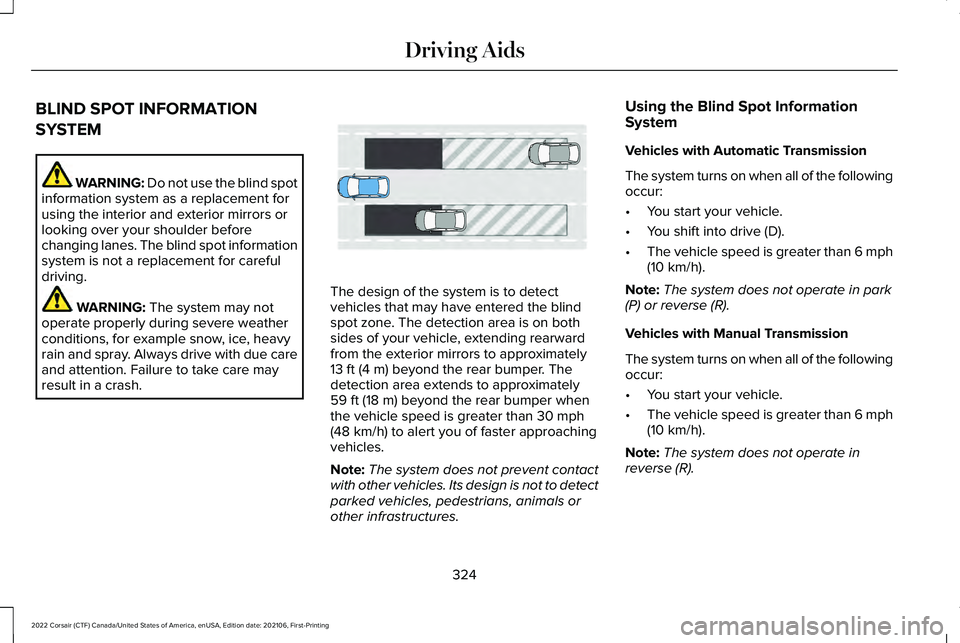
result in a crash. The design of the system is to detect
vehicles that may have entered the blind
spot zone. The detection area is on both
sides of your vehicle, extending rearward
from the exterior mirrors to approximately
13 ft (4 m)
beyond the rear bumper. The
detection area extends to approximately
59 ft (18 m)
beyond the rear bumper when
the vehicle speed is greater than 30 mph
(48 km/h) to alert you of faster approaching
vehicles.
Note: The system does not prevent contact
with other vehicles. Its design is not to detect
parked vehicles, pedestrians, animals or
other infrastructures. Using the Blind Spot Information
System
Vehicles with Automatic Transmission
The system turns on when all of the following
occur:
•
You start your vehicle.
• You shift into drive (D).
• The vehicle speed is greater than
6 mph
(10 km/h).
Note: The system does not operate in park
(P) or reverse (R).
Vehicles with Manual Transmission
The system turns on when all of the following
occur:
• You start your vehicle.
• The vehicle speed is greater than
6 mph
(10 km/h).
Note: The system does not operate in
reverse (R).
324
2022 Corsair (CTF) Canada/United States of America, enUSA, Edition date: 202106, First-Printing Driving AidsE255695
Page 340 of 676
WHAT IS DRIVE MODE CONTROL
The system delivers a driving experience
through a suite of sophisticated electronic
vehicle systems. These systems optimize
steering, handling and powertrain response.
This provides a single location to control
multiple systems performance settings.
Changing the drive mode automatically
changes the functionality of the following
systems:
•
Electronically power-assisted steering
system adjusts steering effort and feel
based on the mode you select. See
Steering (page 330).
• Electronic stability control and traction
control maintains your vehicle control in
adverse conditions or high performance
driving.
See Stability Control (page 281).
• Electronic throttle control enhances the
powertrain response to your driving
inputs.
• Transmission controls optimize with shift
schedules tuned to each mode.
• AWD settings become optimized and
tuned to each mode. The system automatically tailors your vehicle
configuration for each mode you select.
Note:
Not all settings, or modes, may be
available.
Note: The system has diagnostic checks that
continuously monitor the system for proper
operation. If a mode is unavailable due to a
system fault, the mode defaults to Normal.
SELECTING A DRIVE MODE
Note: Drive mode changes may not be
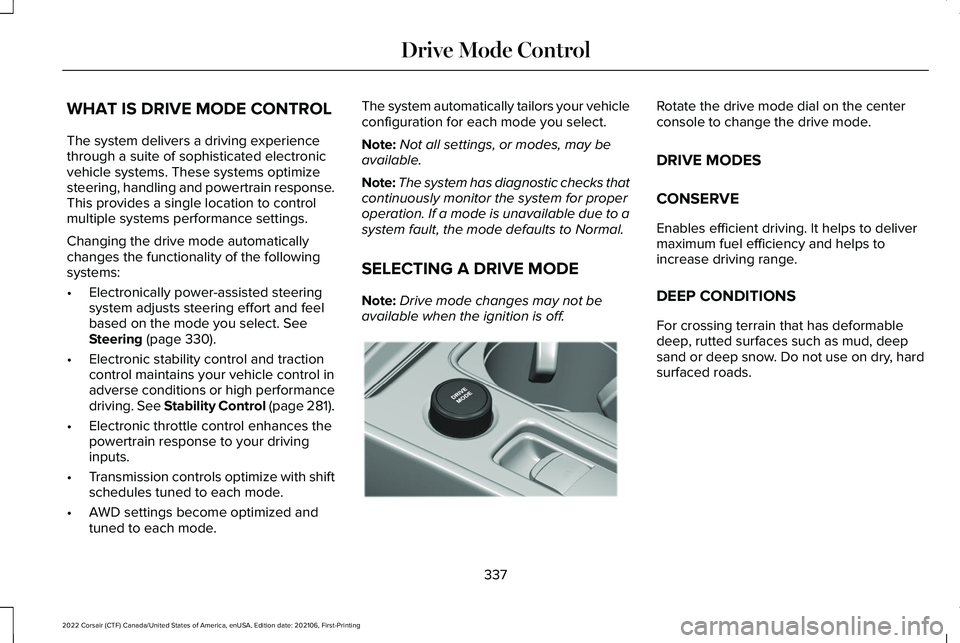
available when the ignition is off. Rotate the drive mode dial on the center
console to change the drive mode.
DRIVE MODES
CONSERVE
Enables efficient driving. It helps to deliver
maximum fuel efficiency and helps to
increase driving range.
DEEP CONDITIONS
For crossing terrain that has deformable
deep, rutted surfaces such as mud, deep
sand or deep snow. Do not use on dry, hard
surfaced roads.
337
2022 Corsair (CTF) Canada/United States of America, enUSA, Edition date: 202106, First-Printing Drive Mode ControlE307643
Page 357 of 676
Trailer Lamps
WARNING: Never connect any trailer
lamp wiring to the vehicle's tail lamp wiring;
this may damage the electrical system
resulting in fire. Contact your authorized
dealer as soon as possible for assistance
in proper trailer tow wiring installation.
Additional electrical equipment may be
required.
Trailer lamps are required on most towed
vehicles. Make sure all running lights, brake
lights, turn signals and hazard lights are
working.
Before Towing a Trailer
Practice turning, stopping and backing up to
get the feel of your vehicle-trailer
combination before starting on a trip. When
turning, make wider turns so the trailer
wheels clear curbs and other obstacles. When Towing a Trailer
•
Do not drive faster than 70 mph
(113 km/h) during the first 500 mi
(800 km).
• Do not make full-throttle starts.
• Check your hitch, electrical connections
and trailer wheel lug nuts thoroughly after
you have traveled
50 mi (80 km).
• When stopped in congested or heavy
traffic during hot weather, place the
transmission in park (P) to aid engine and
transmission cooling and to help A/C
performance.
• Turn off the speed control with heavy
loads or in hilly terrain. The speed control
may turn off automatically when you are
towing on long, steep grades.
• Shift to a lower gear when driving down
a long or steep hill. Do not apply the
brakes continuously, as they may
overheat and become less effective. •
If your transmission is equipped with a
Grade Assist or Tow/Haul feature, use
this feature when towing. This provides
engine braking and helps eliminate
excessive transmission shifting for
optimum fuel economy and transmission
cooling.
• Allow more distance for stopping with a
trailer attached. Anticipate stops and
brake gradually.
• Avoid parking on a grade. However, if
you must park on a grade:
1. Turn the steering wheel to point your vehicle tires away from traffic flow.
2. Set your vehicle parking brake.
3. Place the transmission in park (P).
4. Place wheel chocks in front and back of the trailer wheels. Chocks are not
included with your vehicle.
Launching or Retrieving a Boat or
Personal Watercraft (PWC)
Note: Disconnect the wiring to the trailer
before
backing the trailer into the water.
354
2022 Corsair (CTF) Canada/United States of America, enUSA, Edition date: 202106, First-Printing Towing