battery LINCOLN CORSAIR 2022 Owner's Manual
[x] Cancel search | Manufacturer: LINCOLN, Model Year: 2022, Model line: CORSAIR, Model: LINCOLN CORSAIR 2022Pages: 676, PDF Size: 7.67 MB
Page 126 of 676

Vehicle driving range.
D
Fuel and battery gauges.
E
Engine coolant temperature gauge.
F
Left information group.
G
Dual Gauge View
Note: Displays may appear slightly different
depending on region.
123
2022 Corsair (CTF) Canada/United States of America, enUSA, Edition date: 202106, First-Printing Instrument Cluster
Page 128 of 676

Vehicle driving range.
D
Fuel and battery gauges.
E
Engine coolant temperature gauge.
F
Power gauge.
G
Status Bar
Displays information related to the current
audio source, compass direction and outside
air temperature.
Left and Right Information Group
Information that appears depends on current
gauge view and personalized settings. See
General Information (page 136).
Fuel Gauge
The fuel gauge indicates about how much
fuel is in the fuel tank.
The arrow adjacent to the fuel pump symbol
indicates on which side of your vehicle the
fuel filler door is located.
Note: The fuel gauge may vary slightly when
your vehicle is moving or on a slope. Low Fuel Reminder
A low fuel level reminder displays and
sounds when the distance to empty reaches
75 mi (120 km)
to empty for MyKey, and at
50 mi (80 km), 25 mi (40 km), 10 mi (20 km)
and 0 mi (0 km) for all vehicle keys.
Note: The low fuel reminder can appear at
different fuel gauge positions depending on
fuel economy conditions. This variation is
normal. High Voltage Battery Gauge
The high voltage battery gauge displays the
total amount of charge associated with your
available electric only driving range. A full fill
represents the total amount of energy you
can get from an external charge, plugging
your vehicle in. When the fill reaches empty,
the powertrain system switches to hybrid
operation.
See Plug-In Hybrid Vehicle
Operation (page 215).
125
2022 Corsair (CTF) Canada/United States of America, enUSA, Edition date: 202106, First-Printing Instrument Cluster
Page 129 of 676

Power Gauge
The power gauge displays power to the
wheels when accelerating or maintaining
speed. The high voltage battery power and
engine power contributions are distinguished
by color and added together to indicate total
power to the wheels. When slowing down
by lifting your foot off the accelerator pedal
or pressing the brake, the gauge displays
the power captured by the regenerative
braking system and returned to the high
voltage battery.
Vehicle Driving Range
Vehicle range indicates the estimated
distance your vehicle will travel with the
energy currently onboard. Estimates will vary
based on the energy used while driving. Changes in driving pattern can cause the
values to not only decrease but also increase
or stay constant for periods of time.
The amount of energy being used while
driving is affected by:
•
Mild or aggressive acceleration or
braking.
• Your vehicle speed.
• Use of accessories such as climate
control.
• Ambient temperature and other weather
conditions.
• Driving in a city or on a highway.
• Driving on hilly road conditions.
Note: It is normal for vehicle range estimates
to vary due to changes in average energy
usage. This is why you typically see different
range estimates each time you fill up your
fuel tank or fully charge your battery.
Gasoline Distance to Empty
Indicates the approximate distance your
vehicle can travel on the fuel remaining in
the tank. Electric Range
Indicates the approximate distance your
vehicle can travel on electric power only with
the engine off.
Engine Coolant Temperature Gauge
WARNING: Do not remove the
coolant reservoir cap when the engine is
on or the cooling system is hot. Wait 10
minutes for the cooling system to cool
down. Cover the coolant reservoir cap with
a thick cloth to prevent the possibility of
scalding and slowly remove the cap.
Failure to follow this instruction could result
in personal injury.
Indicates engine coolant temperature. At
normal operating temperature, the level
indicator is in the normal range. If the engine
coolant temperature exceeds the normal
range, stop your vehicle as soon as safely
possible, switch off the engine and let the
engine cool.
126
2022 Corsair (CTF) Canada/United States of America, enUSA, Edition date: 202106, First-Printing Instrument ClusterE320830
Page 135 of 676

Auto Hold Unavailable
Illuminates when the system is on,
but unavailable to hold your
vehicle stationary.
Auto Start-Stop (If Equipped) Illuminates to inform you when the
engine shuts down or in
conjunction with a message.
Battery If it illuminates while driving, it
indicates a system error. Switch off
all unnecessary electrical
equipment and have the system checked
immediately.
Blind Spot Monitor Illuminates when you switch this
feature off or in conjunction with a
message.
See Blind Spot
Information System (page 324). Brake System Warning Lamp WARNING:
Driving your vehicle with
the warning lamp on is dangerous. A
significant decrease in braking
performance may occur. It may take you
longer to stop your vehicle. Have your
vehicle checked as soon as possible.
Driving extended distances with the
parking brake engaged can cause brake
failure and the risk of personal injury.
This lamp is a dual function lamp and
illuminates when:
• You apply the parking brake with the
ignition on.
• Your vehicle has a brake fault or low
brake fluid level, regardless of parking
brake position. If the lamp illuminates when you
are moving, you may have the
parking brake applied. Make sure
the parking brake is off. Have your
vehicle checked as soon as
possible if the lamp continues to
illuminate. Note:
Indicator varies depending on region.
Cruise Control
(If Equipped) Illuminates when you switch this
feature on.
Direction Indicator Illuminates when you switch on the
left-hand or right-hand direction
indicator or the hazard flasher. If
the indicators stay on or flash faster, check
for a burned out bulb. See Changing a Bulb
(page
412).
Distance Alert Flashes when your vehicle is
rapidly approaching another
vehicle or a pedestrian within your
driving path. See Pre-Collision Assist (page
331
).
132
2022 Corsair (CTF) Canada/United States of America, enUSA, Edition date: 202106, First-Printing Instrument ClusterE197934 E151262 E270480 E71340 E281485
Page 145 of 676

When you are accelerating or maintaining
speed you will see a blue or white solid bar
indicating vehicle power. You may also see
a blue rectangular box which shows the
power level at which the engine will turn on.
•
When your power level is within the box
the color of the bar will be blue. This
means you are in electric operation and
the engine is off.
• When your power level is outside of the
box the color of the bar will be white. This
means you are in hybrid operation with
a combination of the electric motor and
the engine providing vehicle power.
When you are decelerating with either your
foot off the accelerator pedal or on the brake
pedal you will see a green or white solid bar
indicating the power being used to slow
down the vehicle. You may also see a green
rectangular box which shows the amount of
power that can be recaptured by the
regenerative braking system and returned
to the high voltage battery. •
When your power level is completely
within the box the color of the bar will be
all green. This means that the
regenerative braking system is being
used to efficiently slow the vehicle down
and return the maximum percentage of
energy to the high voltage battery.
• When your power level is outside of the
green box then the bar will be white. This
means that both the regenerative braking
system and conventional braking system
are being used.
Electric Efficiency
The screen shows your average driving
distance per kWh of electricity used on your
plug-in hybrid vehicle. The value is calculated
only when your available electric range is
being used and the gasoline engine is off.
Distance per full charge is also shown. This
is an estimate of the electric range you would
have if you plugged in and fully charged your
vehicle right now. The higher the electric
efficiency, the higher your distance per full
charge. Your electric efficiency is affected by your
driving style and route, climate control use,
outside temperature and other factors. Best
efficiency is achieved in mild ambient
temperatures with mild to moderate
acceleration and braking, moderate speeds
and low climate control usage.
INFORMATION MESSAGES
142
2022 Corsair (CTF) Canada/United States of America, enUSA, Edition date: 202106, First-Printing Information DisplaysE281220
Page 150 of 676

Details
Message
The charging system needs servicing. If the warning stays on or continue\
s to come on, contactan authorized dealer as soon as possible.
Check Cha")
Battery and Charging System (12 Volt)
Details
Message
The charging system needs servicing. If the warning stays on or continue\
s to come on, contactan authorized dealer as soon as possible.
Check Charging System
The charging system needs servicing. If the warning stays on or continue\
s to come on, havethe system checked as soon as possible.
Charging System Service Soon
The charging system needs servicing. Have the system checked as soon as possible.
Charging System Service Now
The battery management system determines that the 12V battery is at a lo\
w state of charge.Start the engine to charge the battery or charge the battery using an aft\
ermarket battery
charger. This message clears once you restart your vehicle and the battery stat\
e of charge recovers.
Battery State of Charge Low
The battery management system determines that the battery is at a low st\
ate of charge. Turn
the ignition off as soon as possible to protect the battery. This message clears once you start
your vehicle and the battery state of charge recovers. Turning off unnecessary electrical loadsallows faster battery state-of-charge recovery.
Turn Power Off To Save Battery
Displays when the battery management system detects an extended low-volt\
age condition.The system disables various vehicle features to help preserve the batter\
y. Turn off as many of the electrical loads as soon as possible to improve system voltage. When the system voltage recovers, the disabled features operate again as normal.
Low Battery Features Temporarily Turned Off
147
2022 Corsair (CTF) Canada/United States of America, enUSA, Edition date: 202106, First-Printing Information Displays
Page 151 of 676

Battery and Charging System (High Voltage)
Details
Message
Your vehicle needs confirmation it is unplugged before allowing astart. Check to make sure you unplugged your vehicle and then respond to the message prompt before starting your vehicle.
Vehicle Plugged In ? Yes No
Your vehicle detects it is still plugged in after you attempt to start it\
.
Unplug Prior to Starting Vehicle
Your vehicle is ready to drive.
Ready to Drive
Your vehicle is ready to drive. You have XXX% plug-in energy avail-able.
Ready to Drive {percent charged:##0}% Charged
Your vehicle enables the engine due to the climate control defrostsetting. This is normal operation.
Engine Enabled Due to Defrost Setting
For full defrost heat, select a drive mode other than Pure EV. Theengine may run to provide more cabin heat.
Change Drive Mode for Full Defrost
Your vehicle enables the engine for system performance. This isnormal operation.
Engine Enabled for System Performance
You can press OK to enable the engine temporarily for increased
performance when in Pure EV drive mode.
Press OK to Enable Engine
148
2022 Corsair (CTF) Canada/United States of America, enUSA, Edition date: 202106, First-Printing Information Displays
Page 156 of 676

Details
Message
Displays during spare key programming when you have not programmed enough keys.
Not Enough Keys Learned
Displays when the key battery is low. Change the battery as soon as possible.
Key Battery Low Replace Soon
Displays when you switch the vehicle off.
Vehicle Switched Off
Lane Keeping System Details
Message
The system has malfunctioned. Have the system checked as soon as possible.
Lane Keeping Sys. Malfunction Service
Required
The system detects a condition and temporarily disables the front camera\
. Check to makesure the area around the camera is clean and free of objects.
Front Camera Temporarily Not Available
Clean the windshield to improve visibility and allow the front camera to\
properly operate.
Front Camera Low Visibility Clean Screen
The system has malfunctioned. Have the system checked as soon as possible.
Front Camera Malfunction Service Required
The system requests that you keep your hands on the steering wheel.
Keep Hands on Steering Wheel
153
2022 Corsair (CTF) Canada/United States of America, enUSA, Edition date: 202106, First-Printing Information Displays
Page 164 of 676
.
Shift to Park
The transmission is too cold. Wait for it to warm up before you d")
Transmission
Details
Message
You switched the engine off and the gear selector is in any position othe\
r than park (P).
Shift to Park
The transmission is too cold. Wait for it to warm up before you drive.
Transmission Warming Up Please Wait
Displays when you need to press the brake pedal.
Press Brake Pedal
The transmission is overheating and needs to cool. Stop in a safe place as soon as possible.
Transmission Over Temperature Stop Safely
Have the system checked as soon as possible.
Transmission Service Required
The transmission is overheating and needs to cool. Stop in a safe place as soon as possible.
Transmission Too Hot Press Brake
The transmission has limited functionality. Have the system checked as soon as possible.
Transmission Limited Function See Manual
A reminder to shift into park. In addition, this message is typical afte\
r reconnecting or
recharging the battery until you switch the ignition to the on mode. See Changing the 12V
Battery (page 406).
Transmission Not in Park
Displays when there is a system fault and the park brake needs to be depressed beforeexiting the vehicle. Have the system checked as soon as possible.
SHIFT SYS FAULT Confirm Park Brake Apply
Before Exiting the Vehicle
Have the system checked as soon as possible.
SHIFT SYS FAULT Service Required
Displays when there is a system fault while the vehicle is shifting to p\
ark. Have the systemchecked as soon as possible.
SHIFT SYS FAULT Vehicle is Shifting to Park
Displays when there is a system fault while the vehicle is shifting to r\
everse. Have the systemchecked as soon as possible.
SHIFT SYS FAULT Reverse Unavailable
Service Required
161
2022 Corsair (CTF) Canada/United States of America, enUSA, Edition date: 202106, First-Printing Information Displays
Page 172 of 676
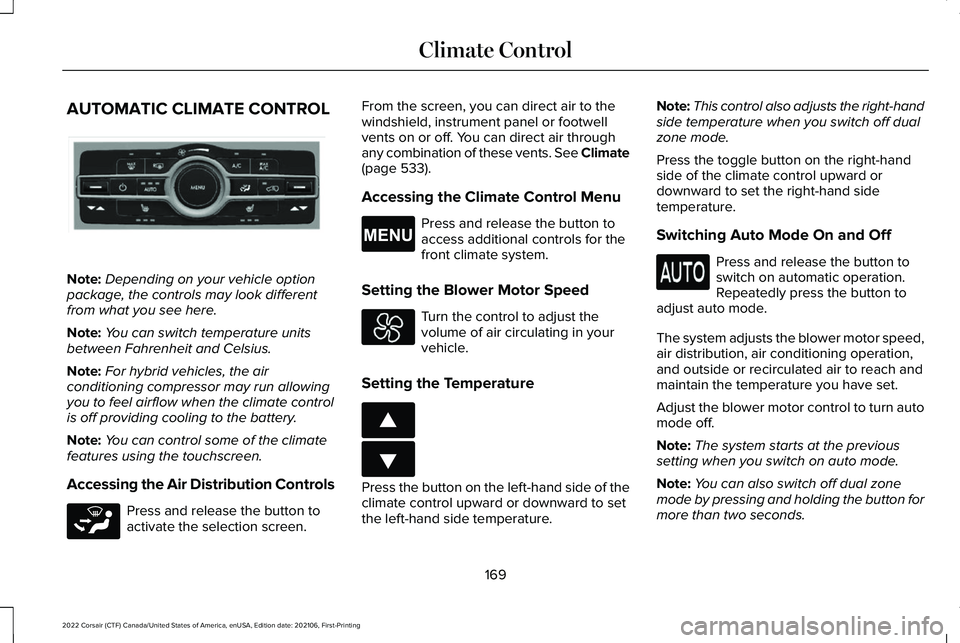
AUTOMATIC CLIMATE CONTROL
Note:
Depending on your vehicle option
package, the controls may look different
from what you see here.
Note: You can switch temperature units
between Fahrenheit and Celsius.
Note: For hybrid vehicles, the air
conditioning compressor may run allowing
you to feel airflow when the climate control
is off providing cooling to the battery.
Note: You can control some of the climate
features using the touchscreen.
Accessing the Air Distribution Controls Press and release the button to
activate the selection screen. From the screen, you can direct air to the
windshield, instrument panel or footwell
vents on or off. You can direct air through
any combination of these vents. See Climate
(page 533).
Accessing the Climate Control Menu Press and release the button to
access additional controls for the
front climate system.
Setting the Blower Motor Speed Turn the control to adjust the
volume of air circulating in your
vehicle.
Setting the Temperature Press the button on the left-hand side of the
climate control upward or downward to set
the left-hand side temperature.Note:
This control also adjusts the right-hand
side temperature when you switch off dual
zone mode.
Press the toggle button on the right-hand
side of the climate control upward or
downward to set the right-hand side
temperature.
Switching Auto Mode On and Off Press and release the button to
switch on automatic operation.
Repeatedly press the button to
adjust auto mode.
The system adjusts the blower motor speed,
air distribution, air conditioning operation,
and outside or recirculated air to reach and
maintain the temperature you have set.
Adjust the blower motor control to turn auto
mode off.
Note: The system starts at the previous
setting when you switch on auto mode.
Note: You can also switch off dual zone
mode by pressing and holding the button for
more than two seconds.
169
2022 Corsair (CTF) Canada/United States of America, enUSA, Edition date: 202106, First-Printing Climate ControlE287616 E265283 E265038 E266187 E266186