traction control LINCOLN CORSAIR 2022 Owner's Manual
[x] Cancel search | Manufacturer: LINCOLN, Model Year: 2022, Model line: CORSAIR, Model: LINCOLN CORSAIR 2022Pages: 676, PDF Size: 7.67 MB
Page 448 of 676
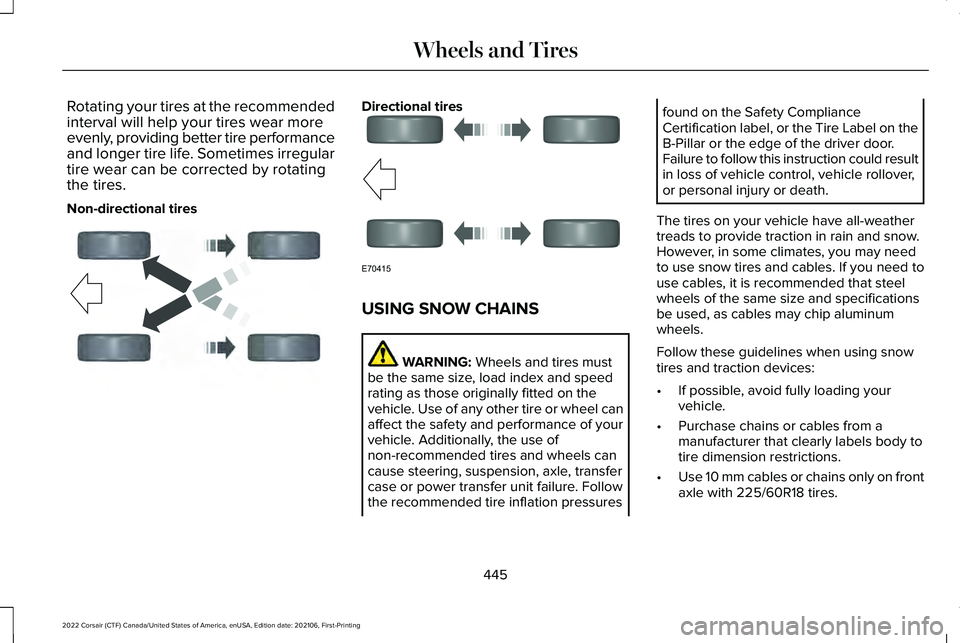
Rotating your tires at the recommended
interval will help your tires wear more
evenly, providing better tire performance
and longer tire life. Sometimes irregular
tire wear can be corrected by rotating
the tires.
Non-directional tires Directional tires
USING SNOW CHAINS
WARNING: Wheels and tires must
be the same size, load index and speed
rating as those originally fitted on the
vehicle. Use of any other tire or wheel can
affect the safety and performance of your
vehicle. Additionally, the use of
non-recommended tires and wheels can
cause steering, suspension, axle, transfer
case or power transfer unit failure. Follow
the recommended tire inflation pressures found on the Safety Compliance
Certification label, or the Tire Label on the
B-Pillar or the edge of the driver door.
Failure to follow this instruction could result
in loss of vehicle control, vehicle rollover,
or personal injury or death.
The tires on your vehicle have all-weather
treads to provide traction in rain and snow.
However, in some climates, you may need
to use snow tires and cables. If you need to
use cables, it is recommended that steel
wheels of the same size and specifications
be used, as cables may chip aluminum
wheels.
Follow these guidelines when using snow
tires and traction devices:
• If possible, avoid fully loading your
vehicle.
• Purchase chains or cables from a
manufacturer that clearly labels body to
tire dimension restrictions.
• Use 10 mm cables or chains only on front
axle with 225/60R18 tires.
445
2022 Corsair (CTF) Canada/United States of America, enUSA, Edition date: 202106, First-Printing Wheels and TiresE142547 E70415
Page 547 of 676
Adjusting the Guidance Prompt Volume
Turn the volume control when a guidance
prompt plays to adjust the volume.
Note:
If you have inadvertently adjusted the
volume to zero, press the turn indicator
button to play the last voice prompt and then
adjust the volume to the desired level.
Muting Guidance Prompts Select the mute option on the
screen to mute guidance prompts.
Note: The system mutes the next and all
future guidance prompts.
Adding Waypoints
You can add a waypoint to a navigation route
as a destination along your route. You can
add up to five waypoints.
1. Select the search option on the map.
2. Set a destination.
3. Select Add Waypoint.
4. Select
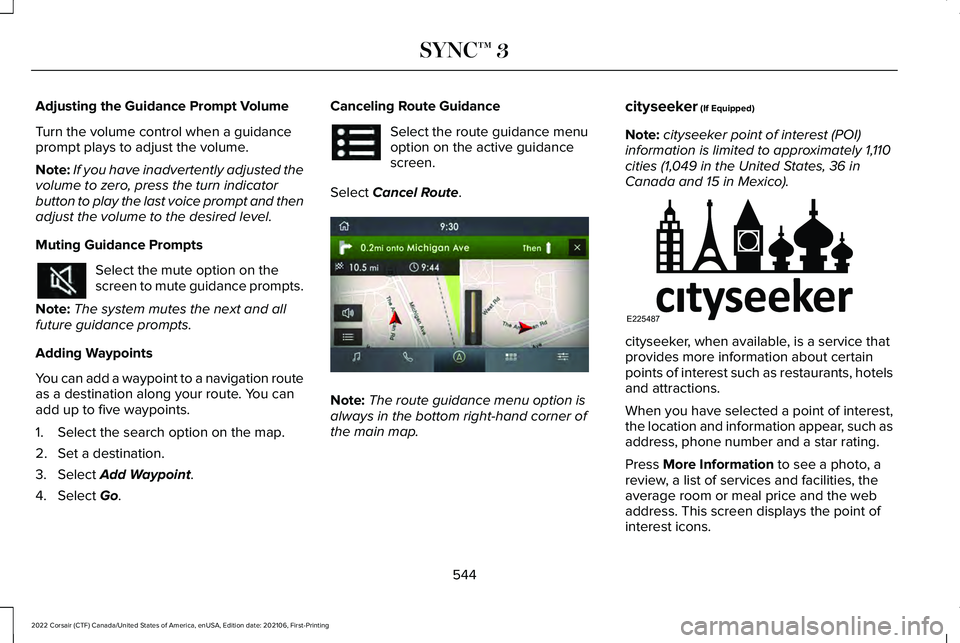
Go. Canceling Route Guidance Select the route guidance menu
option on the active guidance
screen.
Select
Cancel Route. Note:
The route guidance menu option is
always in the bottom right-hand corner of
the main map. cityseeker
(If Equipped)
Note: cityseeker point of interest (POI)
information is limited to approximately 1,110
cities (1,049 in the United States, 36 in
Canada and 15 in Mexico). cityseeker, when available, is a service that
provides more information about certain
points of interest such as restaurants, hotels
and attractions.
When you have selected a point of interest,
the location and information appear, such as
address, phone number and a star rating.
Press
More Information to see a photo, a
review, a list of services and facilities, the
average room or meal price and the web
address. This screen displays the point of
interest icons.
544
2022 Corsair (CTF) Canada/United States of America, enUSA, Edition date: 202106, First-Printing SYNC™ 3 E297860 E225487
Page 639 of 676
•
Volume Setting: Do not raise the volume
excessively. Keep the volume at a level
where you can still hear outside traffic
and emergency signals while driving.
Driving while unable to hear these
sounds could cause an accident.
• Navigation Features: Any navigation
features included in the system are
intended to provide turn by turn
instructions to get you to a desired
destination. Please make certain all
persons using this system carefully read
and follow instructions and safety
information fully.
• Distraction Hazard:
Any navigation
features may require manual (non-verbal)
setup. Attempting to perform such set-up
or insert data while driving can distract
your attention and could cause an
accident or other serious injury. Stop the
vehicle in a safe and legal manner before
attempting these operations. •
Let Your Judgment Prevail:
Any
navigation features are provided only as
an aid. Make your driving decisions
based on your observations of local
conditions and existing traffic regulations.
Any such feature is not a substitute for
your personal judgment. Any route
suggestions made by this system should
never replace any local traffic regulations
or your personal judgment or knowledge
of safe driving practices.
• Route Safety:
Do not follow the route
suggestions if doing so would result in
an unsafe or illegal maneuver, if you
would be placed in an unsafe situation,
or if you would be directed into an area
that you consider unsafe. The driver is
ultimately responsible for the safe
operation of the vehicle and therefore,
must evaluate whether it is safe to follow
the suggested directions. •
Potential Map Inaccuracy:
Maps used
by this system may be inaccurate
because of changes in roads, traffic
controls or driving conditions. Always use
good judgment and common sense when
following the suggested routes.
• Emergency Services:
Do not rely on any
navigation features included in the
system to route you to emergency
services. Ask local authorities or an
emergency services operator for these
locations. Not all emergency services
such as police, fire stations, hospitals and
clinics are likely to be contained in the
map database for such navigation
features.
636
2022 Corsair (CTF) Canada/United States of America, enUSA, Edition date: 202106, First-Printing Appendices
Page 675 of 676
Switching Reverse Braking Assist On and
Off..................................................................277
Switching the Heated Steering Wheel On and Off...........................................................101
Symbols Glossary.............................................11
SYNC™ 3..........................................................507
General Information...........................................507
SYNC™ 3 Troubleshooting
..........................557
T
Technical Specifications See: Capacities and Specifications................461
The Better Business Bureau (BBB) Auto Line Program (U.S. Only)...........................371
Tire Care..........................................................431
Tire Inflation When Punctured See: Tire Sealant and Inflator Kit....................424
Tire Pressure Monitoring System.............446
Tire Repair Kit See: Tire Sealant and Inflator Kit....................424
Tire Sealant and Inflator Kit.......................424
Tires See: Wheels and Tires......................................422
Towing a Trailer.............................................350
Towing the Vehicle on Four Wheels - Gasoline, 8-Speed Automatic
Transmission – 8F35/8F40
.....................355 Towing the Vehicle on Four Wheels -
Plug-In Hybrid Electric Vehicle (PHEV),
Automatic Transmission – HF45...........356
Towing.............................................................350
Traction Control............................................280 Principle of Operation.......................................
280
Trailer Sway Control.....................................351
Transmission ..................................................
256
Transporting the Vehicle.............................367
U
Under Hood Overview - 2.0L/2.3L..........393
Under Hood Overview - Plug-In Hybrid Electric Vehicle (PHEV)............................395
Unique Driving Characteristics
...................211
USB Port.........................................................505
Using All-Wheel Drive.................................265
Using Keyless Entry.......................................82
Using MyKey With Remote Start Systems..........................................................75
Using Snow Chains
......................................445
Using Stability Control................................282
Using the Backup Start Passcode..............70
Using the Keyless Entry Keypad.................86
Using the Valet Mode....................................70
Using Traction Control
................................280
Using Voice Recognition............................509 Utilizing the Mediation/Arbitration Program
(Canada Only)
.............................................372
V
Vehicle Care
...................................................413
General Information............................................413
Vehicle Identification Number
..................490
Locating the Vehicle Identification
Number............................................................490
Vehicle Identification Number Overview..........................................................490
Vehicle Identification...................................490 Vehicle Identification Number........................490
Vehicle Storage
.............................................419
Vehicle Wi-Fi Hotspot.................................495
Ventilated Seats............................................189
Ventilation See: Climate Control..........................................169
W
Warning Lamps and Indicators...................131
Washer Fluid Check.....................................410
Washers See: Cleaning the Exterior................................414
See: Wipers and Washers.................................102
Waxing..............................................................415
672
2022 Corsair (CTF) Canada/United States of America, enUSA, Edition date: 202106, First-Printing Index