tires LINCOLN CORSAIR 2022 Workshop Manual
[x] Cancel search | Manufacturer: LINCOLN, Model Year: 2022, Model line: CORSAIR, Model: LINCOLN CORSAIR 2022Pages: 676, PDF Size: 7.67 MB
Page 458 of 676
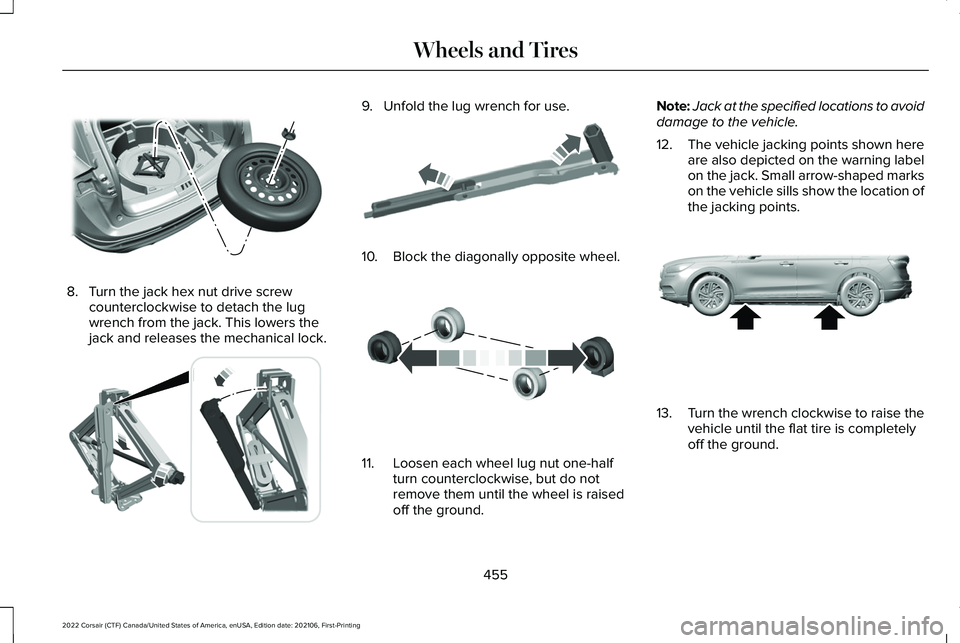
8. Turn the jack hex nut drive screw
counterclockwise to detach the lug
wrench from the jack. This lowers the
jack and releases the mechanical lock. 9. Unfold the lug wrench for use.
10. Block the diagonally opposite wheel.
11. Loosen each wheel lug nut one-half
turn counterclockwise, but do not
remove them until the wheel is raised
off the ground. Note:
Jack at the specified locations to avoid
damage to the vehicle.
12. The vehicle jacking points shown here
are also depicted on the warning label
on the jack. Small arrow-shaped marks
on the vehicle sills show the location of
the jacking points. 13.
Turn the wrench clockwise to raise the
vehicle until the flat tire is completely
off the ground.
455
2022 Corsair (CTF) Canada/United States of America, enUSA, Edition date: 202106, First-Printing Wheels and TiresE309224 E294117 E181744 E142551 E309173
Page 459 of 676
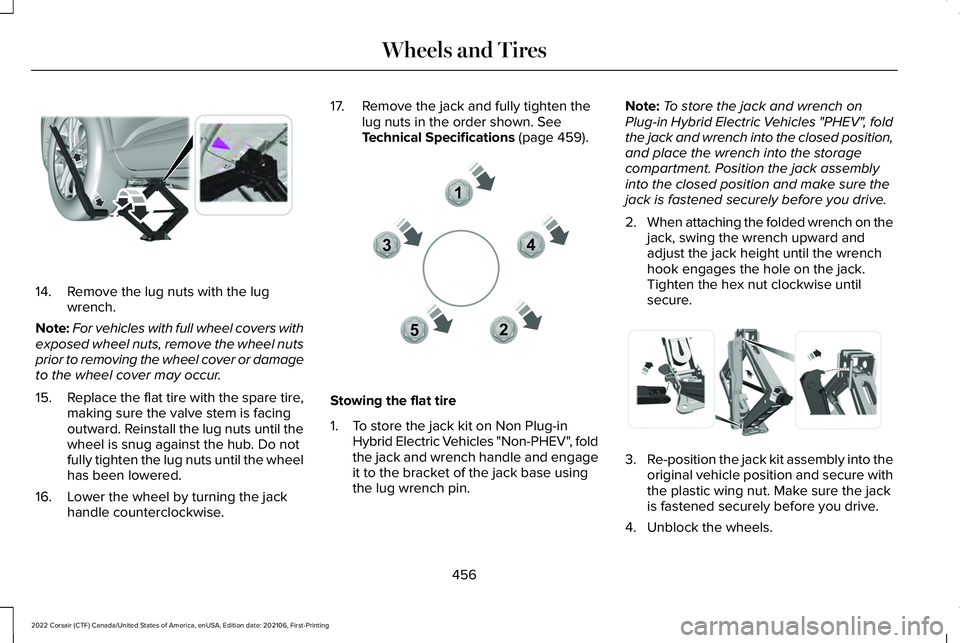
14. Remove the lug nuts with the lug
wrench.
Note: For vehicles with full wheel covers with
exposed wheel nuts, remove the wheel nuts
prior to removing the wheel cover or damage
to the wheel cover may occur.
15. Replace the flat tire with the spare tire,
making sure the valve stem is facing
outward. Reinstall the lug nuts until the
wheel is snug against the hub. Do not
fully tighten the lug nuts until the wheel
has been lowered.
16. Lower the wheel by turning the jack handle counterclockwise. 17. Remove the jack and fully tighten the
lug nuts in the order shown. See
Technical Specifications (page 459). Stowing the flat tire
1. To store the jack kit on Non Plug-in
Hybrid Electric Vehicles "Non-PHEV", fold
the jack and wrench handle and engage
it to the bracket of the jack base using
the lug wrench pin. Note:
To store the jack and wrench on
Plug-in Hybrid Electric Vehicles "PHEV", fold
the jack and wrench into the closed position,
and place the wrench into the storage
compartment. Position the jack assembly
into the closed position and make sure the
jack is fastened securely before you drive.
2. When attaching the folded wrench on the
jack, swing the wrench upward and
adjust the jack height until the wrench
hook engages the hole on the jack.
Tighten the hex nut clockwise until
secure. 3.
Re-position the jack kit assembly into the
original vehicle position and secure with
the plastic wing nut. Make sure the jack
is fastened securely before you drive.
4. Unblock the wheels.
456
2022 Corsair (CTF) Canada/United States of America, enUSA, Edition date: 202106, First-Printing Wheels and TiresE294119 12
3
4
5E306781 E294121
Page 460 of 676
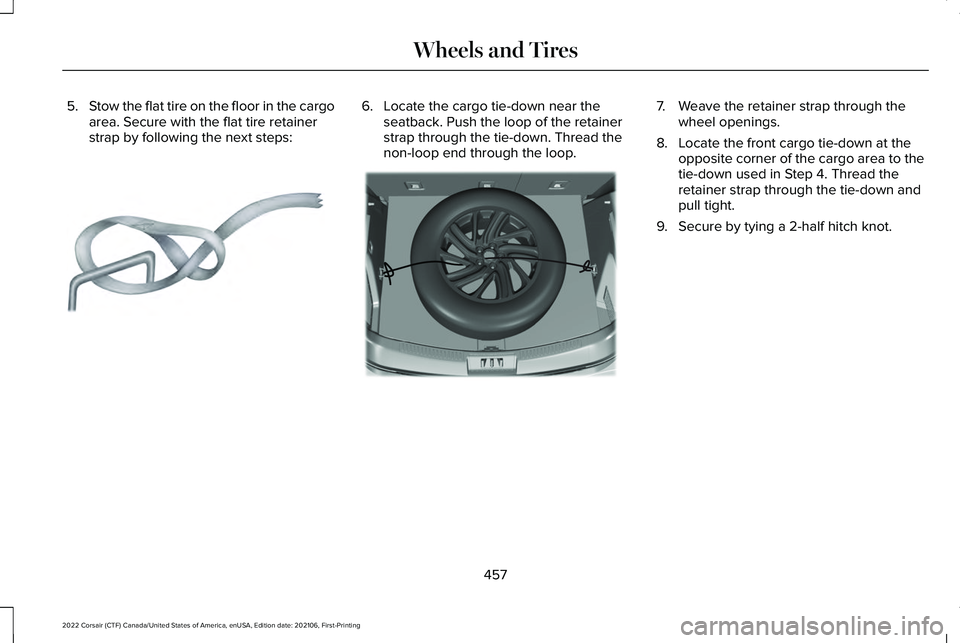
5.
Stow the flat tire on the floor in the cargo
area. Secure with the flat tire retainer
strap by following the next steps: 6. Locate the cargo tie-down near the
seatback. Push the loop of the retainer
strap through the tie-down. Thread the
non-loop end through the loop. 7. Weave the retainer strap through the
wheel openings.
8. Locate the front cargo tie-down at the opposite corner of the cargo area to the
tie-down used in Step 4. Thread the
retainer strap through the tie-down and
pull tight.
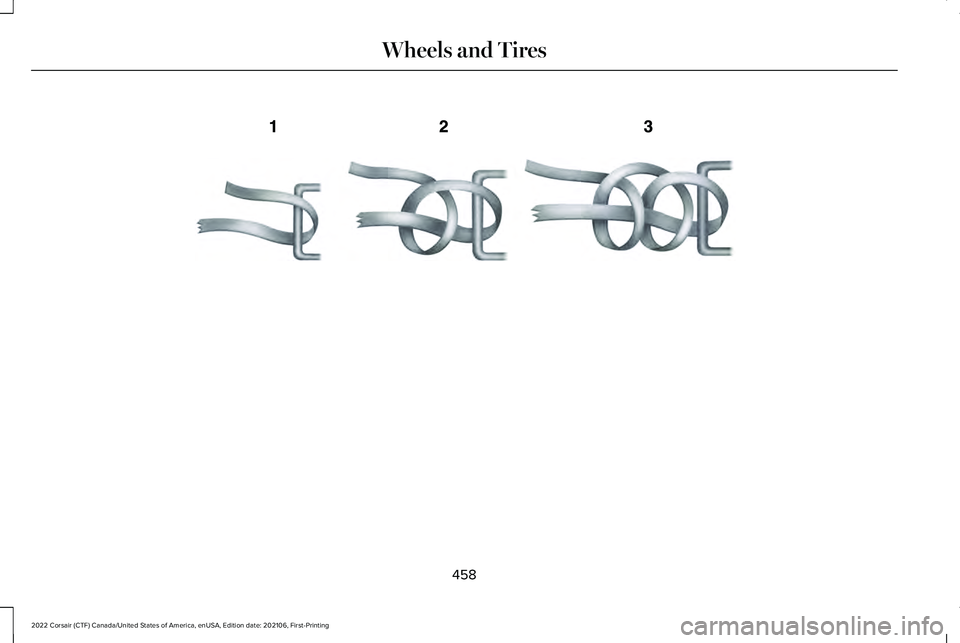
9. Secure by tying a 2-half hitch knot.
457
2022 Corsair (CTF) Canada/United States of America, enUSA, Edition date: 202106, First-Printing Wheels and TiresE142906 E309378
Page 461 of 676
458
2022 Corsair (CTF) Canada/United States of America, enUSA, Edition date: 202106, First-Printing Wheels and TiresE143746
Page 462 of 676

TECHNICAL SPECIFICATIONS
Wheel Lug Nut Torque Specifications
WARNING: When you install a wheel, always remove any corrosion, dirt or foreign m\
aterials present on the mounting surfaces of the
wheel or the surface of the wheel hub, brake drum or brake disc that contacts the wheel. Make sure to secure any fasteners that attach
the rotor to the hub so they do not interfere with the mounting surfaces\
of the wheel. Installing wheels without correct metal-to-metal contact
at the wheel mounting surfaces can cause the wheel nuts to loosen and th\
e wheel to come off while your vehicle is in motion, resulting in
loss of vehicle control, personal injury or death. Ib-ft (Nm)
*
Bolt size
100 lb.ft (135 Nm)
M12 x 1.5
* Torque specifications are for nut and bolt threads free of oil, dirt and \
rust. Use only Ford recommended replacement fasteners.
Retighten the lug nuts to the specified torque within 100 mi (160 km) after any wheel disturbance (such as tire rotation, changing a flat ti\
re,
wheel removal).
459
2022 Corsair (CTF) Canada/United States of America, enUSA, Edition date: 202106, First-Printing Wheels and Tires
Page 463 of 676
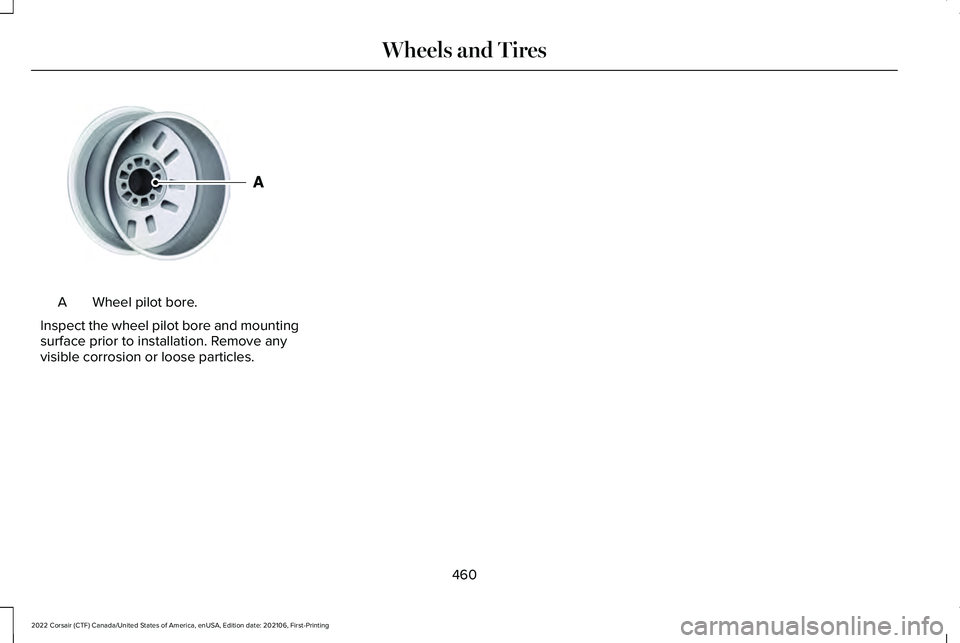
Wheel pilot bore.
A
Inspect the wheel pilot bore and mounting
surface prior to installation. Remove any
visible corrosion or loose particles.
460
2022 Corsair (CTF) Canada/United States of America, enUSA, Edition date: 202106, First-Printing Wheels and TiresE145950
Page 584 of 676
Make sure to change your vehicle
’s oils and
fluids at the specified intervals or in
conjunction with a repair. Flushing is a viable
way to change fluid for many vehicle
sub-systems during scheduled maintenance. It is critical that systems are flushed only with
new fluid that is the same as that required
to fill and operate the system or using a
Ford-approved flushing chemical.
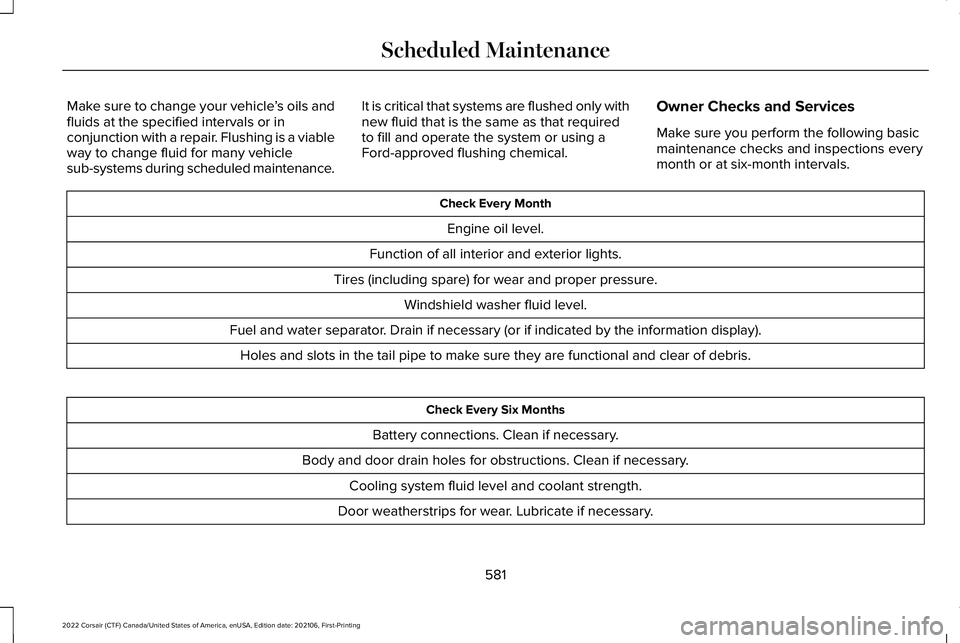
Owner Checks and Services
Make sure you perform the following basic
maintenance checks and inspections every
month or at six-month intervals. Check Every Month
Engine oil level.
Function of all interior and exterior lights.
Tires (including spare) for wear and proper pressure. Windshield washer fluid level.
Fuel and water separator. Drain if necessary (or if indicated by the information display). Holes and slots in the tail pipe to make sure they are functional and clear of debris. Check Every Six Months
Battery connections. Clean if necessary.
Body and door drain holes for obstructions. Clean if necessary. Cooling system fluid level and coolant strength.
Door weatherstrips for wear. Lubricate if necessary.
581
2022 Corsair (CTF) Canada/United States of America, enUSA, Edition date: 202106, First-Printing Scheduled Maintenance
Page 586 of 676
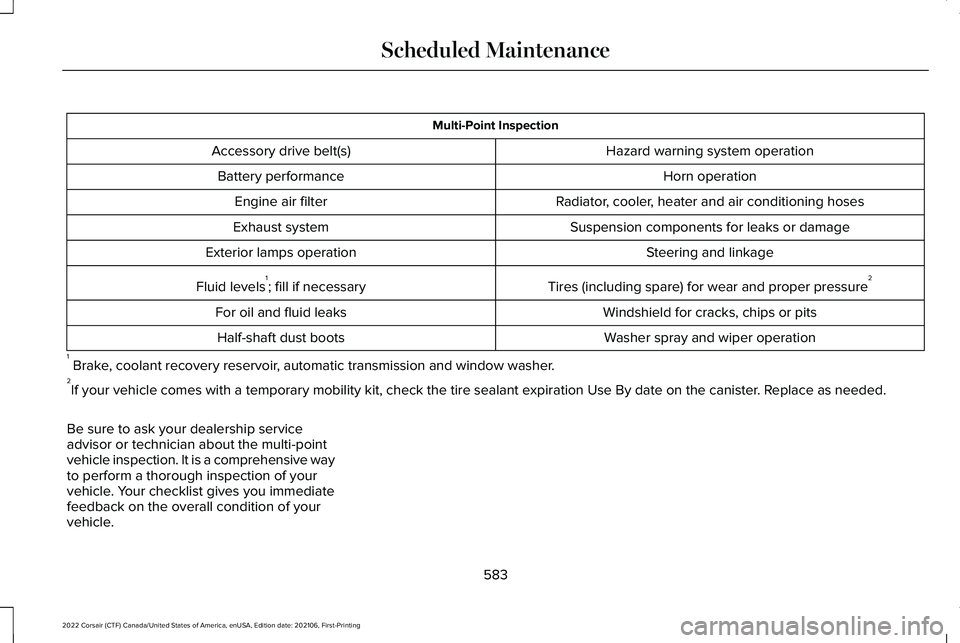
Multi-Point Inspection
Hazard warning system operation
Accessory drive belt(s)
Horn operation
Battery performance
Radiator, cooler, heater and air conditioning hoses
Engine air filter
Suspension components for leaks or damage
Exhaust system
Steering and linkage
Exterior lamps operation
Tires (including spare) for wear and proper pressure2
Fluid levels 1
; fill if necessary
Windshield for cracks, chips or pits
For oil and fluid leaks
Washer spray and wiper operation
Half-shaft dust boots
1 Brake, coolant recovery reservoir, automatic transmission and window washer.
2 If your vehicle comes with a temporary mobility kit, check the tire seal\
ant expiration Use By date on the canister. Replace as needed.
Be sure to ask your dealership service
advisor or technician about the multi-point
vehicle inspection. It is a comprehensive way
to perform a thorough inspection of your
vehicle. Your checklist gives you immediate
feedback on the overall condition of your
vehicle.
583
2022 Corsair (CTF) Canada/United States of America, enUSA, Edition date: 202106, First-Printing Scheduled Maintenance
Page 588 of 676
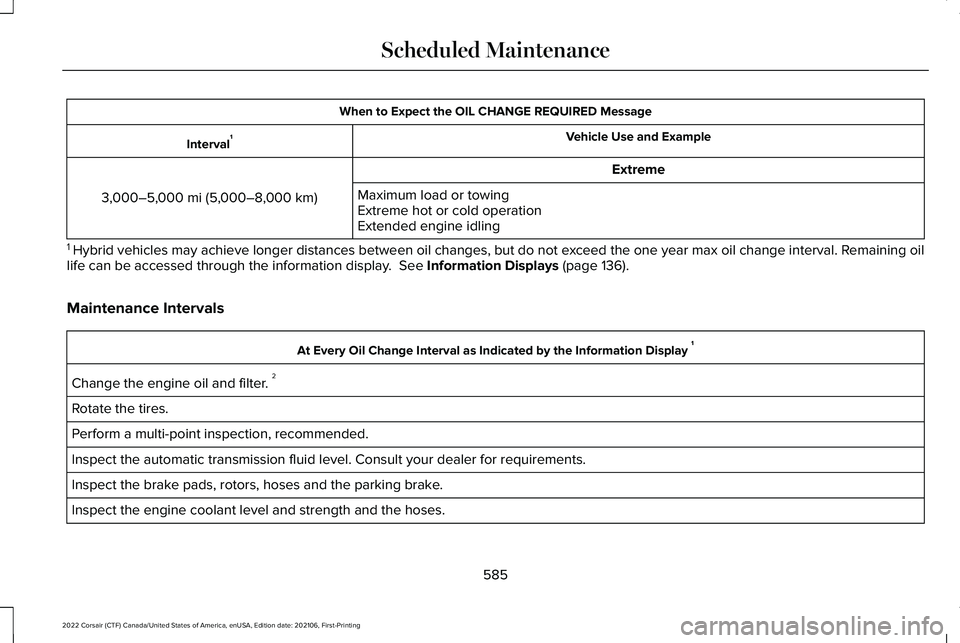
When to Expect the OIL CHANGE REQUIRED Message
Vehicle Use and Example
Interval 1
Extreme
3,000–5,000 mi (5,000–8,000 km) Maximum load or towing
Extreme hot or cold operation
Extended engine idling
1 Hybrid vehicles may achieve longer distances between oil changes, but do\
not exceed the one year max oil change interval. Remaining oil
life can be accessed through the information display. See Information Displays (page 136).
Maintenance Intervals At Every Oil Change Interval as Indicated by the Information Display
1
Change the engine oil and filter. 2
Rotate the tires.
Perform a multi-point inspection, recommended.
Inspect the automatic transmission fluid level. Consult your dealer for \
requirements.
Inspect the brake pads, rotors, hoses and the parking brake.
Inspect the engine coolant level and strength and the hoses.
585
2022 Corsair (CTF) Canada/United States of America, enUSA, Edition date: 202106, First-Printing Scheduled Maintenance
Page 589 of 676
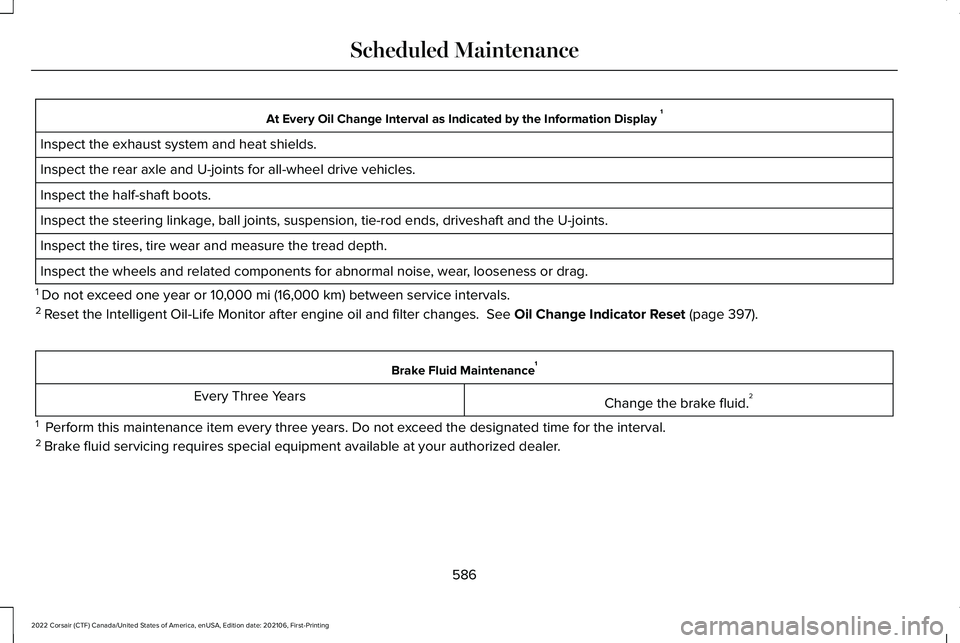
At Every Oil Change Interval as Indicated by the Information Display
1
Inspect the exhaust system and heat shields.
Inspect the rear axle and U-joints for all-wheel drive vehicles.
Inspect the half-shaft boots.
Inspect the steering linkage, ball joints, suspension, tie-rod ends, driveshaft and the U-joints.
Inspect the tires, tire wear and measure the tread depth.
Inspect the wheels and related components for abnormal noise, wear, looseness or drag.
1 Do not exceed one year or 10,000 mi (16,000 km) between service intervals.
2 Reset the Intelligent Oil-Life Monitor after engine oil and filter change\
s.
See Oil Change Indicator Reset (page 397). Brake Fluid Maintenance
1
Change the brake fluid. 2
Every Three Years
1 Perform this maintenance item every three years. Do not exceed the designated time for the interval.
2 Brake fluid servicing requires special equipment available at your authorize\
d dealer.
586
2022 Corsair (CTF) Canada/United States of America, enUSA, Edition date: 202106, First-Printing Scheduled Maintenance